2D to 3D Animation Workflow That Actually Ships in 2026
The most expensive advice in 2D to 3D animation is also the most common. Rebuild everything in polygons, rig it properly, and the original drawings will somehow survive. They usually don't. The silhouette softens, the face loses its snap, and you've paid for full geometry on backgrounds that never needed to turn in space. A conversion that ships starts with a harder question. Which parts of the 2D asset earn full geometry, which parts work better as camera-facing cards or projected textures, and which parts should be redesigned for a camera that can now move. That decision comes before Maya, Blender, Unreal Engine or Unity. It shapes budget, schedule, hiring and whether an audience still recognises the character they already know.
Why Full 3D Conversion Is Rarely the Right Default
Full reconstruction sounds thorough. In practice, it often destroys the exact features that made the 2D version valuable. Heavy line weight, impossible facial exaggeration and cheated perspective don't translate into volume. A mouth drawn wider than the head for one frame is a gag in 2D. Modelled, it's a deformation problem you'll fight for the rest of the production.
The UK never actually replaced 2D
British production gives you a useful precedent here. The sector moved gradually rather than swapping one method for another, from hand-drawn foundations and the 1954 release of Animal Farm by Halas and Batchelor through Channel 4 commissioning in the 1980s and 1990s to wider CGI adoption in the late 1990s and early 2000s, as the history of UK animation production and its mixed 2D, stop-motion and CGI ecosystem shows. Both forms stayed in the ecosystem because both kept solving different problems. That history matters commercially, not just culturally. Written evidence to Parliament from Animation UK reported direct Gross Value Added of £130.6 million in 2019, direct tax revenues of £74.2 million, a wider animation economy of approximately £1.7 billion, more than 16,000 employees and over 800 production companies, according to Animation UK's written evidence on the scale of the UK animation economy. A base that broad doesn't survive on one pipeline. It survives because studios match technique to job.
If an element never rotates, never catches shifting light and never interacts with a moving camera, modelling it in full is rarely fidelity. It's expense disguised as thoroughness.
Decide what the audience must recognise
Start with recognition triggers, not asset lists. For most characters that's silhouette, proportion, a small set of facial landmarks and one or two signature poses. Backgrounds, props and graphic flourishes often carry style rather than narrative weight, so they can stay flat, projected or lightly separated for parallax.
- •Silhouette carries identity: If a black cut-out still reads as your character, you're protecting the right thing.
- •Line weight carries tone: A 3D surface with soft shading can't replicate a hand-drawn outline by accident. You must design for it or let it go.
- •Cheated anatomy carries comedy: Decide early whether squash, stretch and off-model poses are rules or exceptions, because the rig budget depends on the answer.
Hybrid isn't a compromise between ambition and budget. For a stylised explainer, a children's IP extension or a branded short, hybrid is frequently the most faithful route because it keeps flat design where flat design was the point.
The Stage-Gated Production Pipeline
Treat conversion as a staged pipeline, not an automatic transformation. Lock script, storyboard, visual language and target platform first. Then separate 2D artwork into depth-bearing layers, build camera and depth layouts, model or project principal assets, rig, animate, light, render, composite and quality control. The sequence in ScreenSkills' UK animation career map covering development through grading and QC maps closely to that order, which makes it a practical checklist rather than theory.
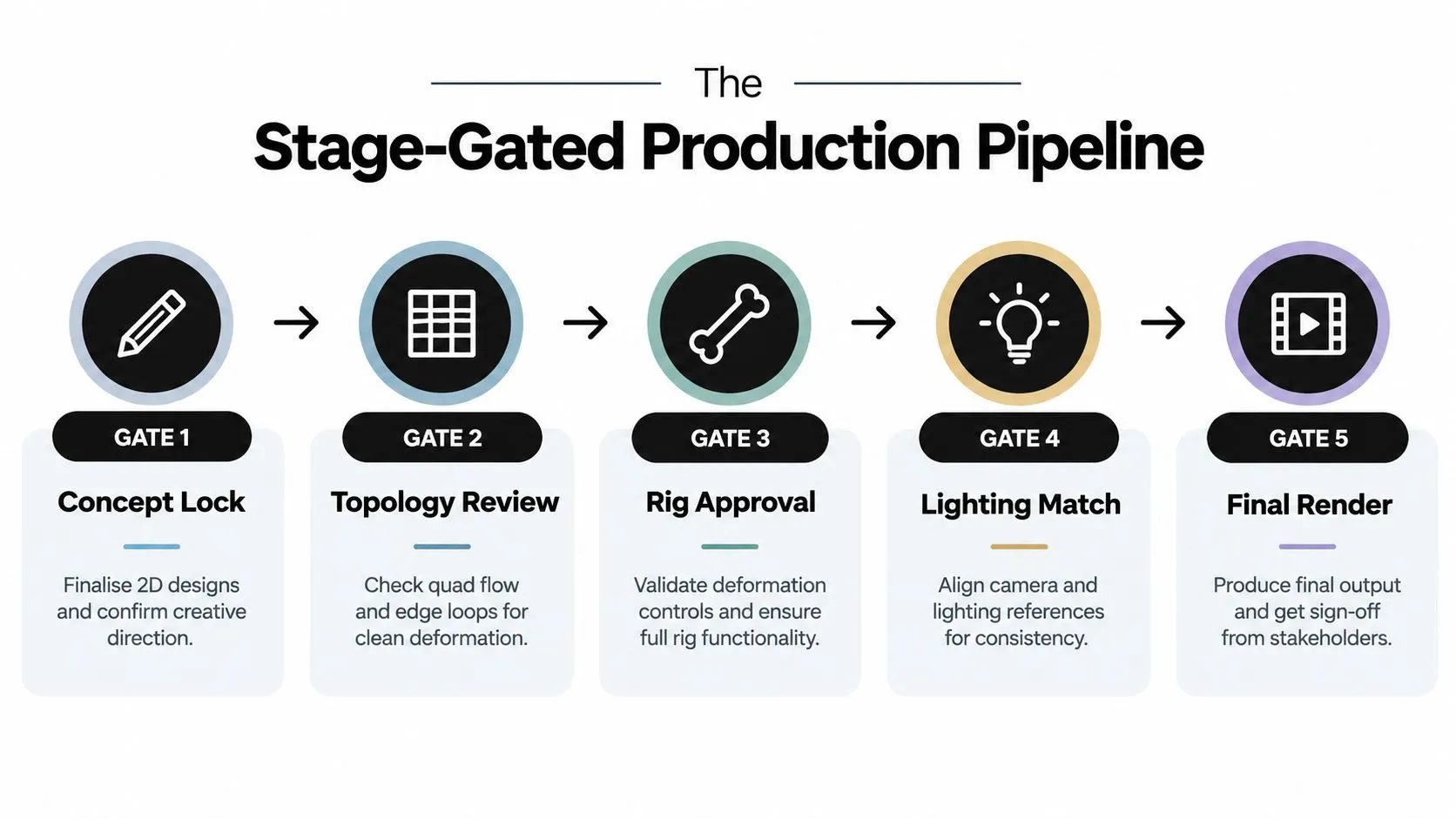
Each gate has to prove something specific before the next spend begins. If it doesn't, you're just passing uncertainty downstream where it's more expensive.
What each gate must prove
Gate 1, concept lock. The approved boards, colour script and delivery platform are frozen. A producer who lets modelling start while the ending is still fluid will pay to rebuild sets nobody uses. Gate 2, animatic and hero shot. Approve a short animatic and one representative hero shot before full asset build. Incorrect perspective, impossible parallax, weak silhouettes and unsuitable layer separation show up here while fixes are still cheap. I've seen hero shots kill a full 3D route in an afternoon, which is exactly what they're for. Gate 3, asset and rig approval. Principal models hold their proportions from the planned camera angles, not just from a tidy front three-quarter view. Rigs survive extreme poses without collapsing brand-defining features. Gate 4, lighting and look development. A lit, composited frame at delivery resolution matches the 2D reference for mood, readability and colour. Teams that need background reading on the render side will find a useful primer on the stages from modeling to post-production, though your own look test matters more than any generic workflow. Gate 5, final render and QC. No missing textures, broken rigs, frame-range errors or colour shifts across broadcast, web or immersive outputs. The fuller stage breakdown in the animation production pipeline guide for end-to-end production planning is worth aligning your schedule against before you commit dates.
Ownership prevents handoff failures
Assign explicit owners for design continuity, technical direction, rigging and compositing. Version scene files, document naming conventions, frame rate and colour management standards, and write them down where freelancers can find them on day one. Studios such as Studio Liddell, which work from 2D sketches through modelling and rigging into finished animation, build that handoff into one pipeline. Whether you build internally or commission externally, unnamed ownership is where conversions rot.
Three Routes From 2D to 3D and When Each One Wins
There's no single conversion path. There are three routes, and choosing wrong costs more than choosing slowly.
Route 1, faithful 3D recreation
You rebuild characters and key environments as full geometry, aiming to preserve proportion and staging from the 2D original. This wins when the camera must orbit, when characters interact physically with sets, or when the same assets must serve a series, trailers and game cut-scenes over a long life. It loses when the original humour depends on facial exaggeration that breaks anatomy. Then you need bespoke blend shapes and correction work, and you should price that accordingly.
Route 2, 2.5D projection and parallax
You separate the 2D artwork into layers, project it onto cards or simple geometry, and move a virtual camera through limited depth. Flat stylised backgrounds, graphic explainers and picture-book worlds usually win here. The look stays intact because the original art stays on screen. The limit is camera freedom. Push the angle too far and cards reveal themselves, edges stretch and the illusion collapses. For teams experimenting with generated motion from stills as a previz aid, these cinematic image-to-video tips can help you test camera moves quickly. Don't confuse a quick test with production assets. Previz answers staging questions, it doesn't deliver final frames.
Route 3, stylistic reinterpretation
You accept that the 3D version is a new expression of the property and redesign for volume, light and real-time or XR use. This wins for games, interactive learning and location-based experiences where viewers control viewpoint. It carries the highest brand risk, so you protect recognition with silhouette tests and audience checks at small sizes and in motion, not just on a turnaround sheet.
| Route | Best for | Fidelity to 2D | Modelling cost | Animation cost | Main risk |
|---|---|---|---|---|---|
| Faithful 3D recreation | Orbiting cameras, long-lived series assets, physical interaction | High if deformation is bespoke, poor if rigged generically | High | High | Cheated 2D poses break in volume |
| 2.5D projection | Stylised backgrounds, explainers, limited camera moves | Very high, original art remains visible | Low | Low to medium | Cards reveal themselves at wide angles |
| Stylistic reinterpretation | Games, XR, interactive and real-time outputs | Variable by design, needs recognition testing | Medium to high | Medium | Audience no longer recognises the property |
Decision rule: Model only what the camera, the light or the interaction actually tests. Everything else is a candidate to stay flat.
Modelling, Topology and Rigging as One Connected Craft
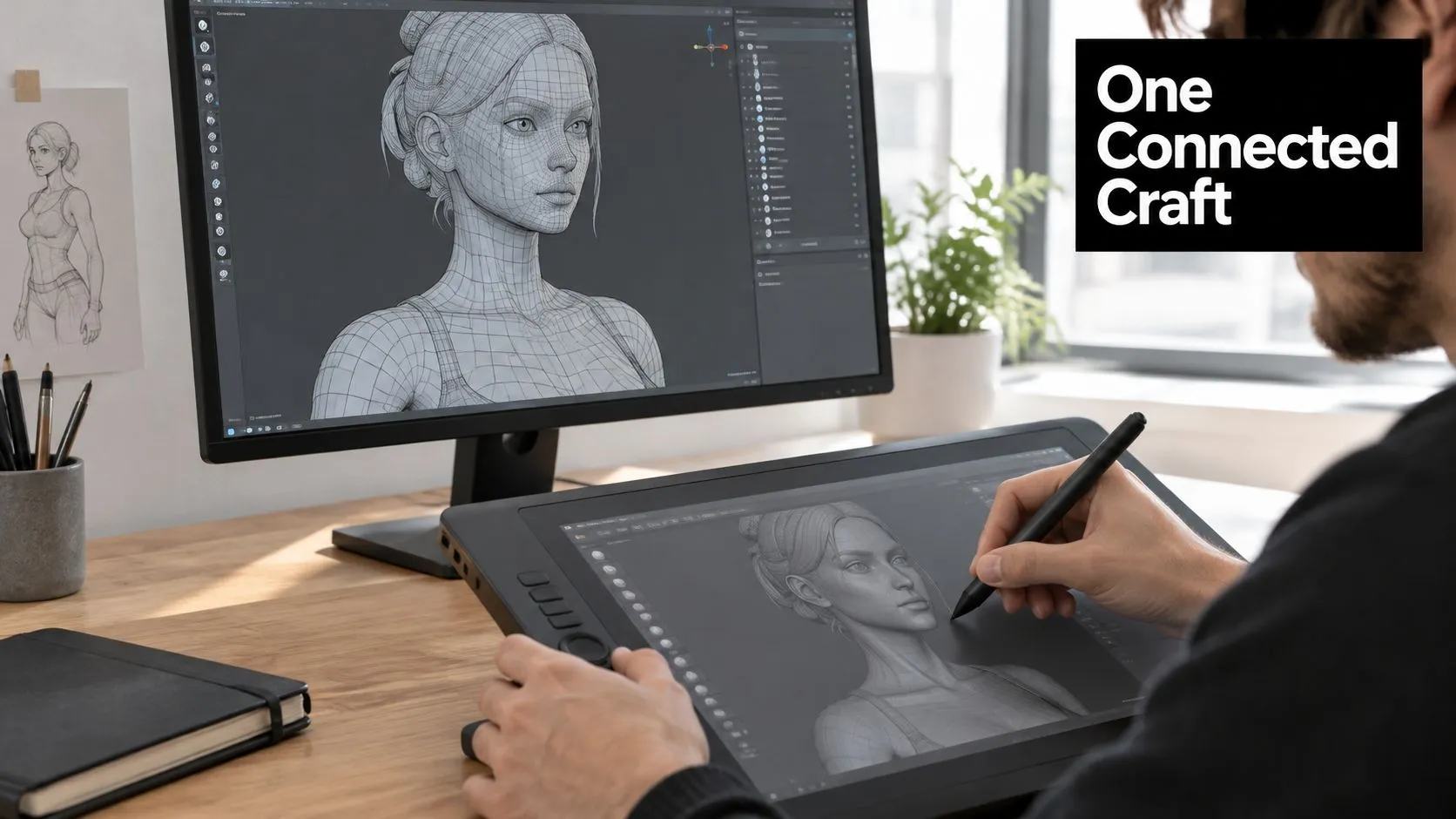
Modellers who ignore the rig create beautiful statues. Riggers who inherit bad topology create slow, fragile puppets. Treat modelling, topology and rigging as one conversation that starts with the 2D turnaround and the list of poses the character must hit.
Topology follows the drawing
Clean quad flow isn't an aesthetic preference. It's what lets a mesh bend, compress and stretch without pinching. Edge loops should follow the facial landmarks the 2D design depends on, around eyes, mouth and brow, because those are the areas animators will push hardest. If the 2D character's appeal lives in a huge grin and raised brows, the loop structure must reserve density there, not in the back of the skull.
- •Front-load the pose list: Give modellers the extreme expressions and hero poses before the build, not after approval.
- •Check silhouettes in pose: A neutral stance can hide proportion errors that a run cycle exposes immediately.
- •Keep cards honest: Hair tufts, graphic patterns and flat props may work better as textured cards than as modelled detail.
Blend shapes, bones or both
Bone-driven faces suit broad, repeatable movement and retargeting. Blend shapes suit specific, brand-defining expressions that bones approximate badly. Most broadcast-quality conversions use both, bones for structure and blend shapes for the expressions the audience will judge. Motion capture can speed body performance, but it rarely captures stylised timing. Keyframe work still carries the appeal on cartoony properties. Validate before animation begins. Run a deformation test at the extremes, widest smile, tightest crouch, fastest head turn, and review it at delivery resolution with the director in the room. Fixing a collapsing cheek at this stage costs hours. Fixing it across forty shots costs the schedule.
A rig isn't approved when it moves. It's approved when the worst pose in the show still looks like your character.
Camera Matching, Lighting and Real-Time Pipelines
A converted asset feels native when camera and light agree with the original boards. It feels pasted in when the 3D camera wanders because it can. Start from reference boards, match focal length and framing to the approved 2D staging, then earn any new move by proving it improves readability.
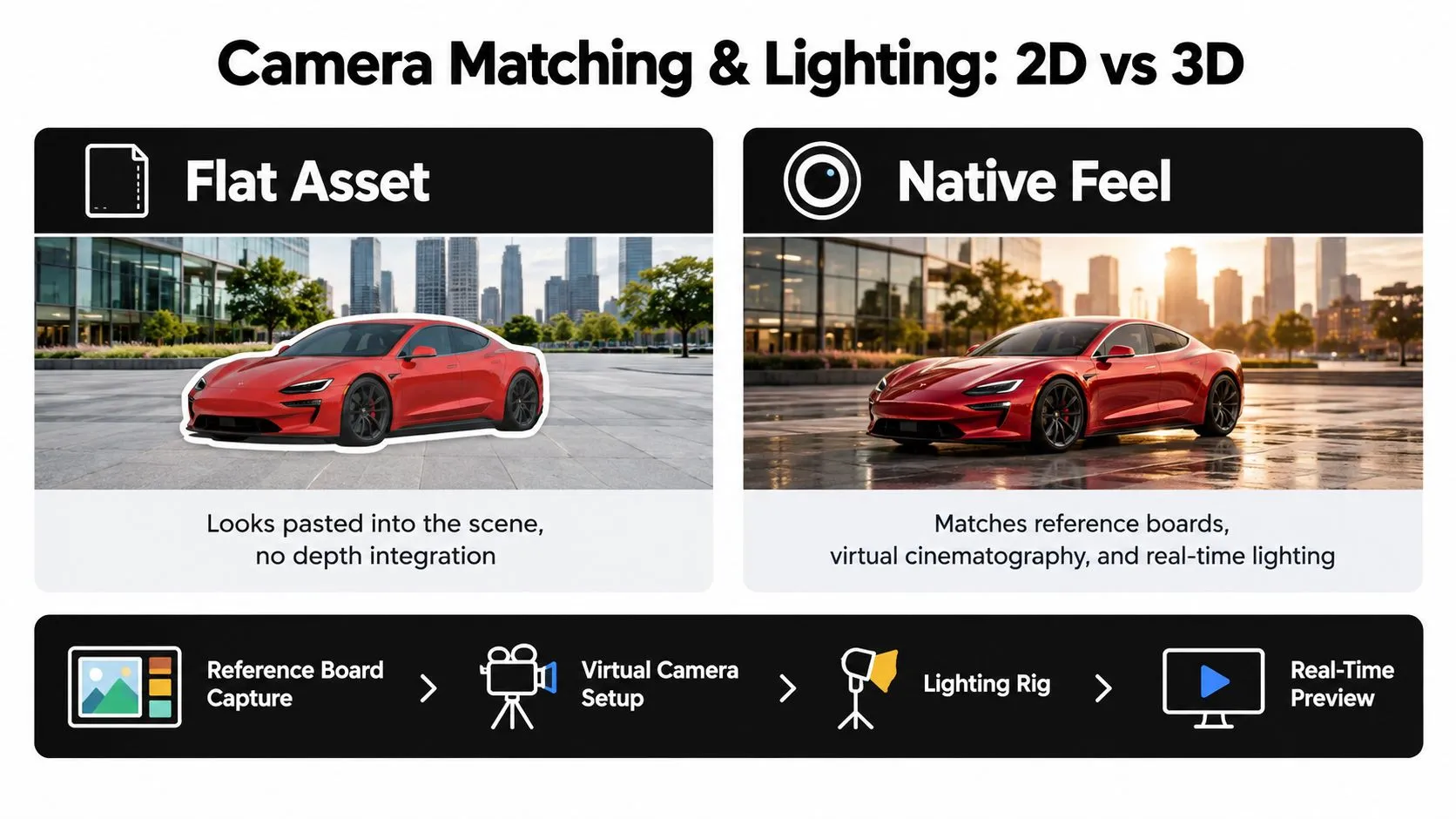
Lighting is where flat design either gains depth or loses itself. A 2D scene lit with flat colour doesn't need physically accurate falloff. It needs a controlled rig that preserves the original value structure, keeps faces readable and adds separation between layers. Test this on the hero shot with final textures. Grey-shaded models hide every problem lighting will later expose.
Choosing your engine and renderer
Maya with Arnold, or Blender with Cycles, suits offline broadcast work where final-frame quality matters more than iteration speed and the schedule can absorb render time. Unreal Engine suits virtual production, XR and projects needing real-time previews with strong lighting tools, provided your team has the technical direction to manage it. Unity suits interactive products, training simulations and deployments across varied hardware, where optimisation and build targets matter as much as image quality. The comparison in the producer guide to Unreal versus Unity for real-time animation digs into render quality, tooling and team skills in more depth. The producer's shortcut is simpler. Pick the pipeline your delivery platform demands, then check you can staff it. A real-time engine doesn't save money if nobody on the team can profile a scene.
Accessibility and readability in interactive outputs
Once viewers control the camera, conversion becomes an information design problem. Key actions can leave frame, text can sit at unreadable angles and interaction can reorder a sequence that education or training content depends on. Plan for subtitles, audio description, readable focal points from changing viewpoints and sensible polygon and texture budgets per device. UK learning resources already expose students to 2D principles and Blender-based 3D work, as the Teach Computing curriculum on media animations for key stage 3 illustrates. Production work has to go further and test recognition time, task completion and device performance with real users.
Compositing, Finishing and UK Delivery Specs
Finishing is where hybrid projects prove themselves. Retained 2D elements, projected cards and full 3D renders meet in the composite, and any mismatch in grain, edge treatment, motion blur or colour shows instantly. Finish one shot completely, through composite and grade, before rendering the rest. The layer logic in this breakdown of animation compositing from layers to final frame is a solid reference for structuring that work. The commercial context justifies the rigour. BFI mapping recorded £97.1 million in expenditure on UK-qualifying animation programmes in 2016, with £58.8 million from domestic production and £38.3 million from inward investment and co-productions, as cited in the UK buyer's guide to corporate animation production and sector scale. Broadcasters spending at that level enforce delivery specs without sentiment.
Specs that become QA gates
- •BBC Scotland UHD: Animation and graphics at 3,840 × 2,160 in 16:9 at 25 or 50 progressive frames per second, with moving effects at 50 frames per second on 2160p/50 programmes to avoid judder, delivered as SMPTE TSP2121-1 IMF packages in Hybrid Log-Gamma HDR and ITU-R BT.2100 colour space, per BBC Scotland's technical delivery standards for UHD file delivery.
- •BBC Studios HD graphics: Files at 1,920 × 1,080 matching programme frame rate, at least 8-bit depth, ITU-R BT.709 colour space and 1:1 pixel aspect ratio, with multilayer elements flattened except text and an alpha channel where transparency is required, per BBC Studios' content delivery requirements for graphics and video layers.
Agree frame rates before production, not at delivery. A conversion animated at one rate and finished at another will judder, and no grade fixes that. Run QC at full delivery resolution on the intended screen type, checking aliasing on retained 2D linework especially, because crisp flat edges beside rendered geometry expose scaling errors first.
Delivery specs aren't paperwork for the last week. They're the checklist your hero shot should pass in the first month.
Playbook, Pitfalls and a Decision Matrix You Can Reuse
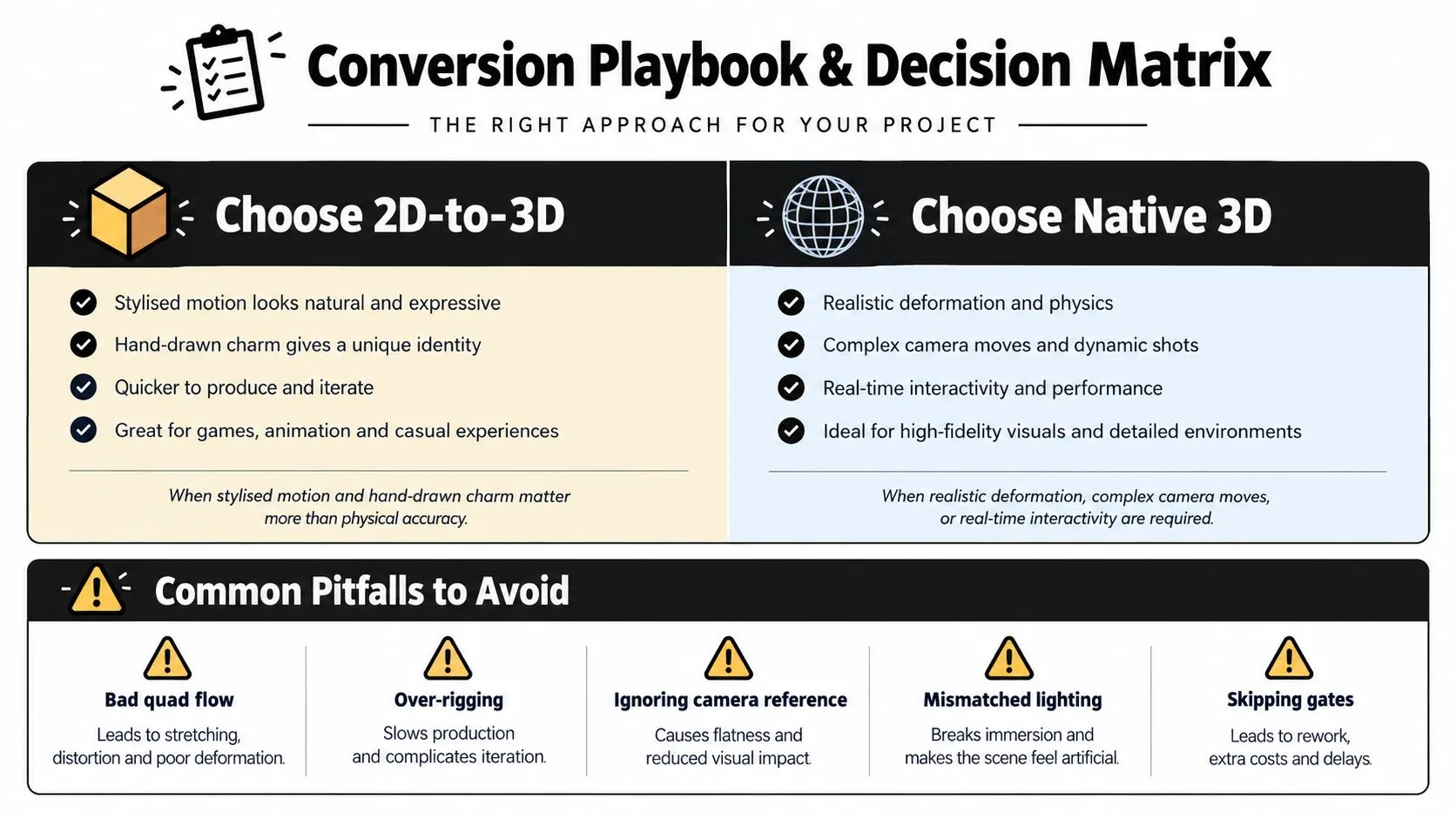
Reduce the whole decision to a brief you can paste into a production document. Name the route per asset group, not per project, because characters, sets and graphics rarely want the same treatment.
Three measurable gates for success
- •Design fidelity: 3D blocking preserves the approved 2D silhouette, proportions and staging from planned angles.
- •Motion readability: Test viewers identify the intended action and focal point at delivery resolution without prompting.
- •Technical acceptance: No missing textures, broken rigs, frame-range errors, aliasing or colour shifts on the target outputs.
Don't promise a universal conversion success rate. UK evidence describes workforce and pipeline conditions, not a validated percentage. It does show that 88% of surveyed screen companies reported existing workforce skill gaps, noted in Animation UK's summary of the BFI skills scoping study for digital content production. Budget for senior technical review and cross-discipline training accordingly. Assuming 2D artists transfer into 3D unsupported is a staffing plan that fails politely, then expensively.
Pitfalls and the cheap fix for each
- •Converting everything to geometry: Audit each asset against camera movement first. Cards and projections handle the rest.
- •Freezing models before cameras: Lock camera and staging on the hero shot, then model in detail. Reversed order guarantees rework.
- •Skipping extreme-pose tests: Validate deformation before animation, while one fix protects every shot.
- •Testing only as a showreel: For education, games and XR, test recognition, task completion, device performance and accessibility with users. Even small-format work has approval logic worth borrowing, as these animated emote approval tips show for readability at tiny sizes.
- •Ignoring skills gaps at mid and senior level: Course provision increasingly blends traditional principles with digital 3D tools, as the South Essex College creative media production animation diploma outlines. That pipeline still needs experienced leads inside your production to turn training into shipped work.
Price rework risk openly at greenlight. A small test shot set, a frozen camera, low-resolution previews before final render and named owners for each discipline will do more for your budget than any render optimisation you discover in month six. --- If you're weighing faithful recreation against a hybrid route for a series, advert, explainer or XR build, talk to a team that works across 2D design, 3D modelling, rigging, real-time pipelines and broadcast delivery under one roof. Visit Studio Liddell to book a production scoping call, share your existing 2D assets and get an honest read on which parts deserve geometry and which should stay exactly as drawn.