What Is Skeletal Animation and How It Powers Modern
The most common advice about skeletal animation is also the least useful: “It's a character mesh with bones inside it.” That definition is technically correct, but it doesn't help a producer decide whether a rig will save time, whether a model is ready for real-time use, or why the same animation can move between characters, scenes and platforms. So, what is skeletal animation in production terms? It's a system that separates a visible skin mesh from an underlying hierarchy of joints and bones. Animators move the skeleton, and the mesh follows according to assigned influences. That structure supports reusable motion, efficient deformation and real-time playback across games, television, commercials, virtual reality and mixed reality. It also gives newer AI-assisted motion systems something stable to target.
Why Skeletal Animation Still Matters in Modern Production
Skeletal animation is not a fallback for older pipelines. It is the production structure that lets one character perform repeatedly without rebuilding every image or pose from scratch. The method became a documented computer-animation technique in 1988, when Nadia Magnenat Thalmann, Richard Laperrière and Daniel Thalmann introduced a way to animate 3D characters through an underlying skeleton rather than redrawing each frame. The background on skeletal animation records that development. Its practical value remains clear: one rig can support many poses, actions and delivery formats. A game character may need to stand, walk, climb and react under player control. A television character must maintain consistent movement across episodes. An XR character needs to respond to interaction while a headset or real-time engine processes the scene. In each case, the rig separates the character's design from its movement system, allowing the same asset to be adapted for different shots, platforms and performance requirements.
Practical rule: If a character needs to perform more than one controlled action, treat the rig as production infrastructure, not as a finishing detail.
This structure also gives AI-assisted motion systems a stable target. Motion data can be mapped to a defined joint hierarchy, reviewed by artists, then reused across characters or outputs with the necessary adjustments. That does not remove production judgement. It gives the team a consistent framework for checking proportions, contacts and deformation. The UK context makes this distinction especially important. The UK animation sector identifies 3D computer-generated animation as one of its four main disciplines, with character work often built around a mesh or digital skeletal structure. It is also described as a world leader in computer-generated animation for games and a major provider of CG visual effects for television, commercials and feature films. Skeletal animation therefore supports broadcast, interactive entertainment and immersive work. Its value lies in repeatable performance, controlled revisions and asset reuse across a modern production pipeline.
Understanding Bones, Joints, and the Skeleton Hierarchy
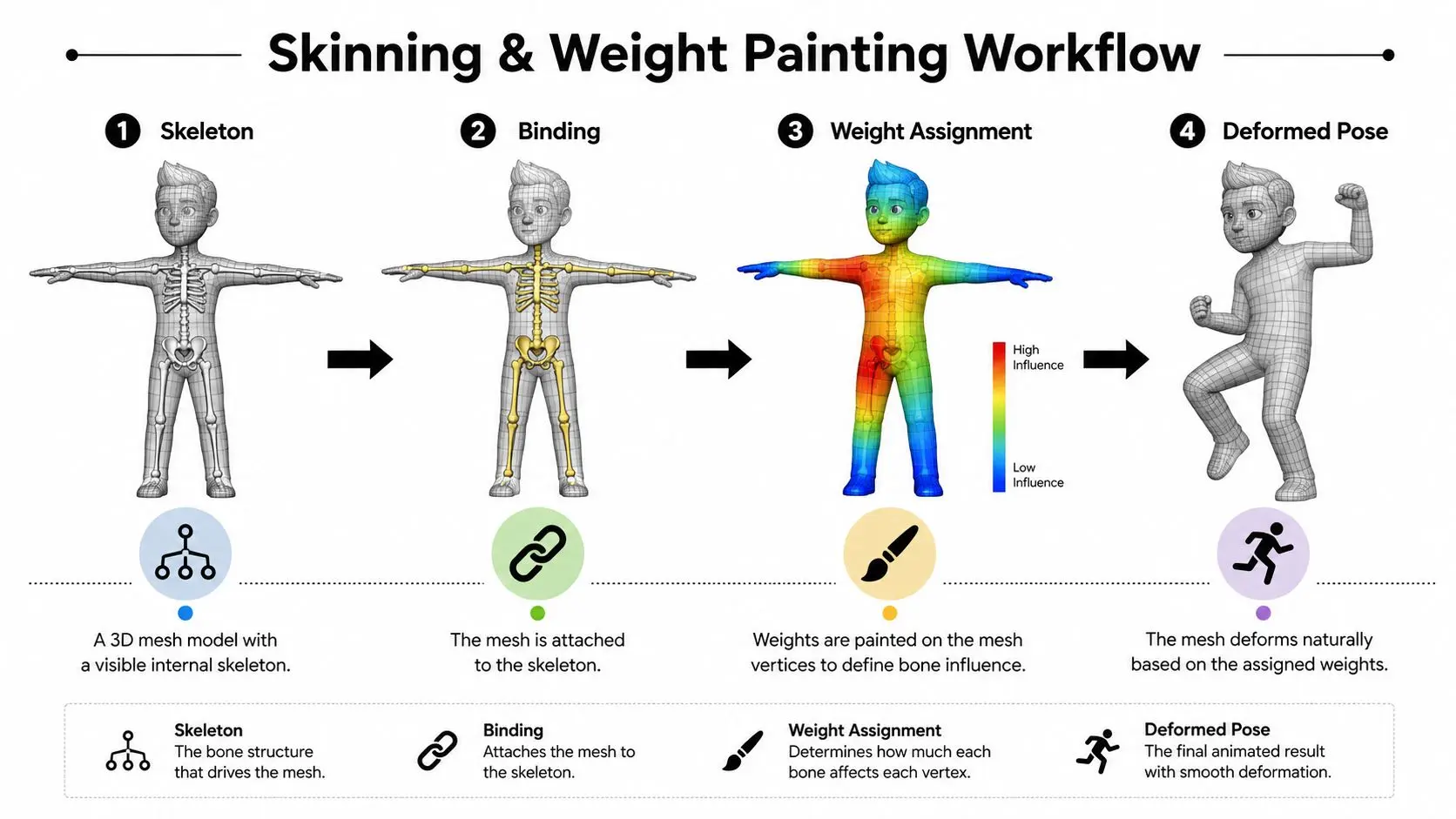
A useful analogy is a hand puppet. The fabric is the visible character, while the rods and joints provide the control system. A digital character works in a similar way, although its skeleton is represented by data rather than physical parts. Start with the joints. A joint marks a point of rotation or translation, such as a shoulder, elbow, wrist, hip or knee. Bones connect those joints and organise them into a hierarchy. The pelvis might sit near the root, the thigh becomes its child, the shin becomes the thigh's child, and the foot follows below it. That parent-child relationship is the first idea to understand. If you rotate the shoulder, the upper arm, forearm and hand inherit the movement. If you move the pelvis, the leg hierarchy can follow. A well-designed hierarchy lets an animator create a large movement by changing a small number of controls. The Bournemouth University National Centre for Computer Animation material describes this as a hierarchy of joints driving a vertex mesh. It also explains bones through transformation matrices defined relative to parent bones. In plain language, each bone stores how it sits and moves in relation to the bone above it, rather than carrying a completely independent description of the whole character.
From skeleton to moving surface
The skeleton doesn't appear on the final character by itself. It drives a surface mesh made from vertices, edges and faces. During setup, the technical artist binds the mesh to the skeleton and defines how strongly each nearby bone affects each vertex. A hand vertex should follow the wrist and hand controls more than the upper arm. A vertex near the elbow needs a carefully balanced relationship between the upper and lower arm. That relationship is what allows the character to bend rather than fold. The hierarchy also supports efficient animation data. Instead of recording a fresh redraw for every visible frame, the system stores transformations for joints and applies them to the mesh. The result is a reusable character system that can be posed, retimed and integrated into different scenes.
How Skinning and Weight Painting Bring Characters to Life
A skeleton only becomes useful when it can deform the character cleanly. Skinning is the process of binding the mesh to the rig, while weight painting assigns influence values that control how much each bone affects nearby vertices. Think of each vertex as receiving instructions from several nearby bones. A vertex near the centre of an upper arm might follow that bone strongly. A vertex around the elbow usually needs a blended influence from the upper arm and forearm. If the weights are poorly assigned, the elbow can collapse, the shoulder can pinch or the character's clothing can stretch in an unintended way. Adobe's guide to rigging in animation describes weight scaling as the method used to control how much each bone influences nearby mesh vertices. This is why weight painting isn't cosmetic clean-up. It's a technical decision that affects silhouette, deformation quality and the animator's ability to create a convincing performance.
Inverse kinematics and constraints
Animators can pose limbs directly through forward kinematics, rotating one joint after another. They can also use inverse kinematics, or IK, where they place an end point such as a hand or foot and let the system calculate the intervening joints. For example, an animator can move a character's foot onto the floor while the IK system calculates an appropriate knee position. The same approach can help an arm reach towards a prop or a tail follow a controlled target. Adobe's rigging guidance identifies IK as a standard part of rigging workflows for limbs such as arms, legs and tails. IK needs guardrails. Joint limits prevent an elbow from bending backwards or a knee from rotating beyond its intended range. Constraints can keep a foot aligned with a surface, hold a hand to a prop or preserve the relationship between controls. Without those limits, the rig may calculate mathematically valid poses that look physically impossible.
Rigging is a problem-solving discipline. The aim isn't to add the largest possible number of controls. It's to give animators useful control while protecting the character from predictable failures.
A production rig therefore combines hierarchy design, skin binding, weight assignment, IK handles and constraints. Technical artists test extreme poses, walk cycles, contact points and interaction cases before the animation team relies on the asset.
Skeletal Animation Versus Frame-by-Frame and Simulation
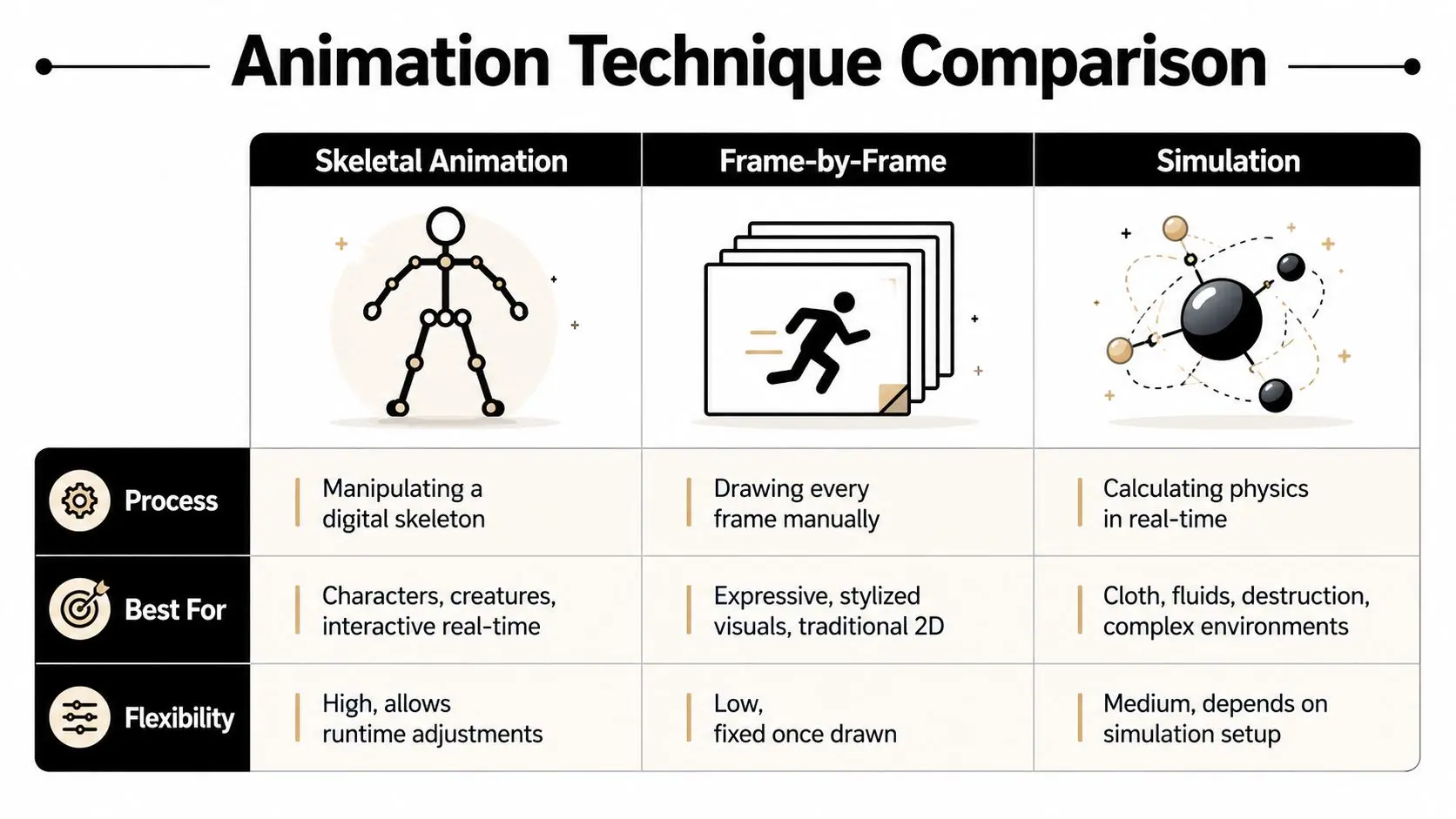
The right animation method depends on the job. Skeletal animation isn't automatically superior to every alternative, and experienced teams often combine techniques within one shot or experience. Frame-by-frame animation gives artists direct control over each image. That makes it powerful for expressive, stylised visuals and traditional 2D work. The trade-off is that the movement is tied closely to the drawings or rendered frames. Reusing the exact performance on a different character, pose or interactive condition can require substantial additional work. Physics simulation calculates behaviour from rules such as gravity, collision, force and material response. It's a strong choice for cloth, fluids, destruction and complex environmental motion. However, simulation can be difficult to art-direct precisely, and changes to a shot may require repeated setup and testing. Skeletal animation occupies a practical middle ground. The animator retains direct control over joints and poses, while the system can reuse motion and adjust it at runtime. The definitive guide to keyframe animation provides useful context for how keyframes fit into controlled animation workflows.
| Requirement | Skeletal animation | Frame-by-frame animation | Physics simulation |
|---|---|---|---|
| Main process | Manipulating a digital skeleton | Drawing or defining each frame manually | Calculating physical behaviour |
| Strong fit | Characters, creatures and interactive real-time movement | Expressive, stylised visuals and traditional 2D | Cloth, fluids, destruction and environmental effects |
| Reuse | High, because motion can be reused and retargeted | Limited, because drawings are closely tied to the original performance | Depends on the simulation setup |
| Runtime control | Strong, suitable for interactive changes | Low once the frames are created | Variable, depending on constraints and inputs |
| Art direction | Direct joint and pose control | Complete image-level control | Indirect control through rules and parameters |
For a producer, the decision usually comes down to repeatability, platform and asset life. A one-off stylised sequence may favour frame-by-frame work. A character used across interactive scenes benefits from a rig. A character with cloth, hair or destruction may need skeletal animation for the primary performance and simulation for secondary motion.
Where UK Studios Use Skeletal Animation in Production
Skeletal animation is less a visual style than a production system. In the UK, studios use it across television, games, commercials, websites and XR, where one character asset may need to serve several outputs. An earlier UK animation industry report described the sector as comparatively small but technically advanced, with animation revenues estimated at around £300 million. More recent figures from Animation in Europe put the sector's contribution at £1.7 billion, with over 13,000 people employed and more than 300 studios focused on children's and family content. A separate UK Screen Alliance estimate refers to about 1,000 highly skilled workers in the animation industry. These sources measure the workforce differently, so the figures are not directly interchangeable. Together, they describe a specialist production economy where reusable technical systems can affect schedules, staffing and delivery.
Television and children's content
For a television series, a rig acts like a production template. Once the skeleton, controls and skin deformation have been approved, animators can concentrate on acting, timing and staging instead of rebuilding movement logic for each shot. The same structure also helps keep proportions and performance rules consistent between episodes and teams. That consistency matters for UK-developed IP distributed internationally. Franchises such as Wallace and Gromit and Peppa Pig have reached audiences in around 180 countries, a milestone noted in the historical overview of skeletal animation. A reusable character system can support episodes, promotional material and digital formats without treating every version as a separate asset.
Games and interactive work
Games require animation to respond to player input. A rig can blend locomotion, gestures and reactions while preserving a character's identity. Movement authored for one compatible skeleton can also be retargeted to another, which helps teams reuse animation across characters, scenes and platforms.
XR and commercial production
XR increases the value of structured runtime data. Headsets and interactive installations need characters and objects to respond to user actions without a pre-rendered sequence for every possible outcome. Bone-based animation gives the engine an organised control system for updating a character, while simulation can handle effects such as cloth or secondary motion. Commercial conditions shape these choices too. Tax relief introduced in 2013 influenced UK production planning, as noted in the sector report cited above. For producers, the practical lesson is clear. A rig affects more than the current shot. It determines how readily an asset can move through a wider production, AI-assisted motion workflow and distribution plan.
How AI and Motion Datasets Are Reshaping Skeletal Systems
AI-generated motion doesn't remove the need for rigs. It increases the need for a consistent structure that can receive, check, edit and retarget the generated movement. Motion tools may produce joint positions, rotations or complete movement sequences. Those outputs still need to map onto a character's skeleton, respect joint limits and deform the destination mesh correctly. Without a compatible rig, a motion dataset remains difficult to use in a real production pipeline.
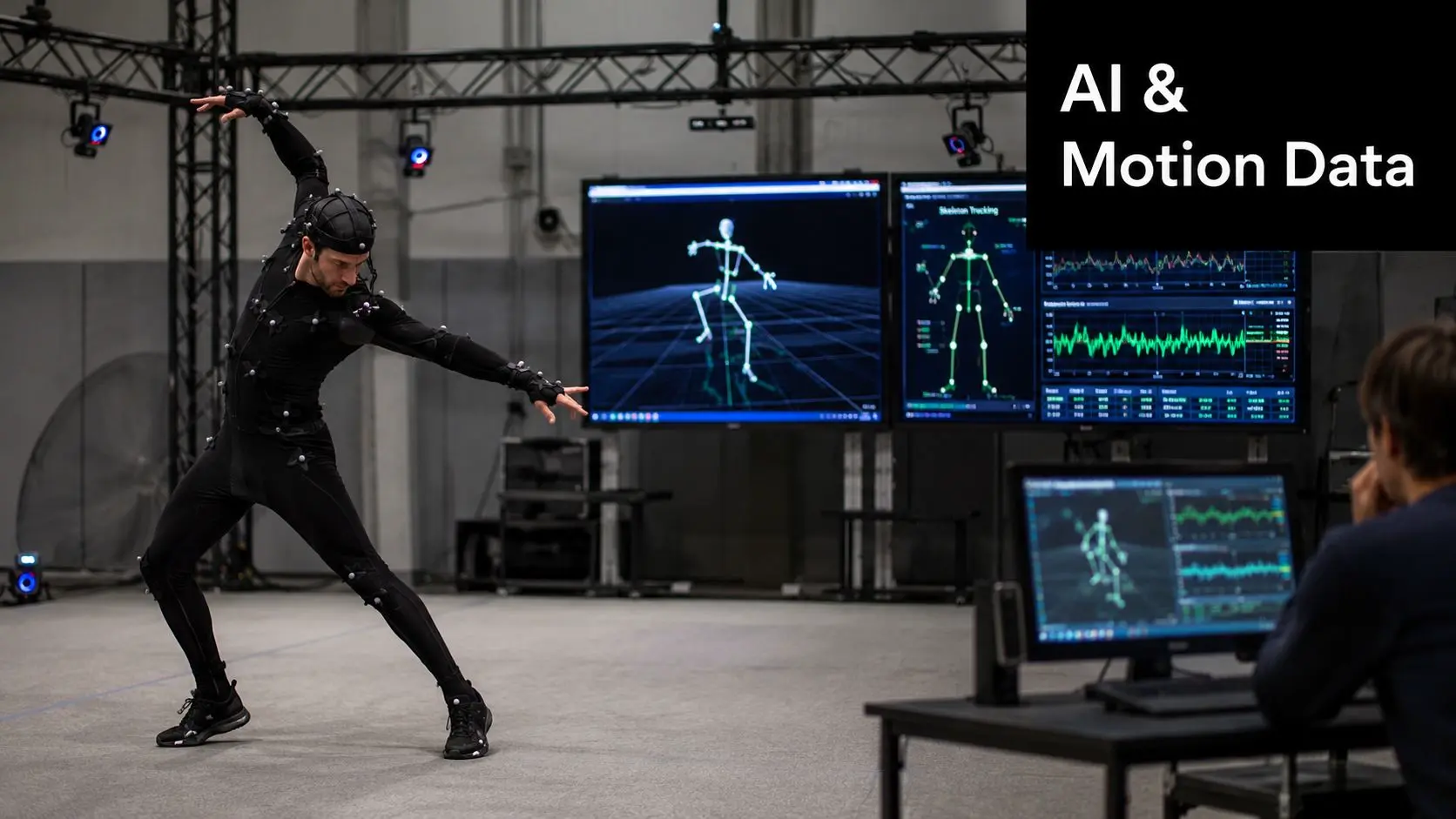
The BONES-SEED dataset illustrates the direction of travel. It contains 142,220 annotated motion sequences, representing about 288 hours of motion at 120 fps, and supports multiple skeletal representations, according to the BONES-SEED dataset page. Those figures describe the dataset itself, not a guaranteed production outcome. Their importance lies in the shared representation. Researchers and developers can label, search, classify and transfer movement when the motion is organised around a skeleton.
Retargeting needs structure
Retargeting maps movement from a source performer or character onto a destination rig. The systems must account for differences in proportions, joint naming, orientation and available controls. A well-built production rig makes this process more predictable, while a poorly structured skeleton can introduce foot sliding, twisted limbs or unstable contacts. That's why AI-assisted production should be evaluated as a pipeline change, not a replacement for technical animation. Artists still need to clean captured or generated movement, adjust timing, preserve contact points and make creative decisions about performance. The same principle appears in other automation projects. For readers interested in how structured systems help teams manage repeatable operations beyond animation, this guide to automated merch programs offers a useful comparison in process design. For a practical view of how AI tools can fit into a wider animation workflow, see AI animation software and production. The central point is that skeletal animation is becoming the interoperability layer between motion capture, generative tools, game engines, broadcast assets and future character formats.
Planning Your Next Project with Skeletal Animation in Mind
Start with the asset's expected life, not the software menu. If the character appears once in a short linear sequence, a fully reusable rig may not be necessary. If the same model will appear across scenes, episodes, interactive learning, games or XR, a carefully planned skeleton can reduce repeated animation work and make later changes more manageable. Ask the production team these questions early:
- Where will the character run? A pre-rendered broadcast shot, a game engine and a headset experience place different demands on runtime control and data.
- How much movement must be reused? Repeated actions, alternate poses and retargeting requirements strengthen the case for a rig.
- What needs simulation? Use the skeleton for primary performance, then consider simulation for cloth, hair, fluids or destruction where those behaviours add value.
- Who owns technical validation? Confirm that the rig supports export, naming conventions, joint limits, IK, animation baking and the target engine.
- What happens after delivery? A reusable rig is an upfront investment, so agree whether the studio will provide documentation, source files and integration support.