AI Animation Software: Transform Your Production
Deadlines tighten first. Then the brief expands. A producer starts with a thirty-second spot, then the client asks for cut-downs, alternate aspect ratios, a localisation pass, cleaner lip-sync, and a version that still feels on-brand after multiple review rounds. At that point, the question isn't whether AI belongs in animation. The question is where it helps, where it creates new problems, and how to fit it into a pipeline without lowering the standard. That's where AI animation software has become useful. Not as a replacement for animators, directors, comp artists, or producers. As a production layer for repetitive, time-heavy, technically fiddly work. Used well, these tools can accelerate previs, assist with rigging, improve lip-sync, generate placeholders, and remove some of the friction that slows approvals. Used badly, they create inconsistent shots, unreliable outputs, and a cleanup bill that lands back on the team anyway. For commercial and narrative work, that difference matters more than the hype.
The New Creative Partner in the Animation Pipeline
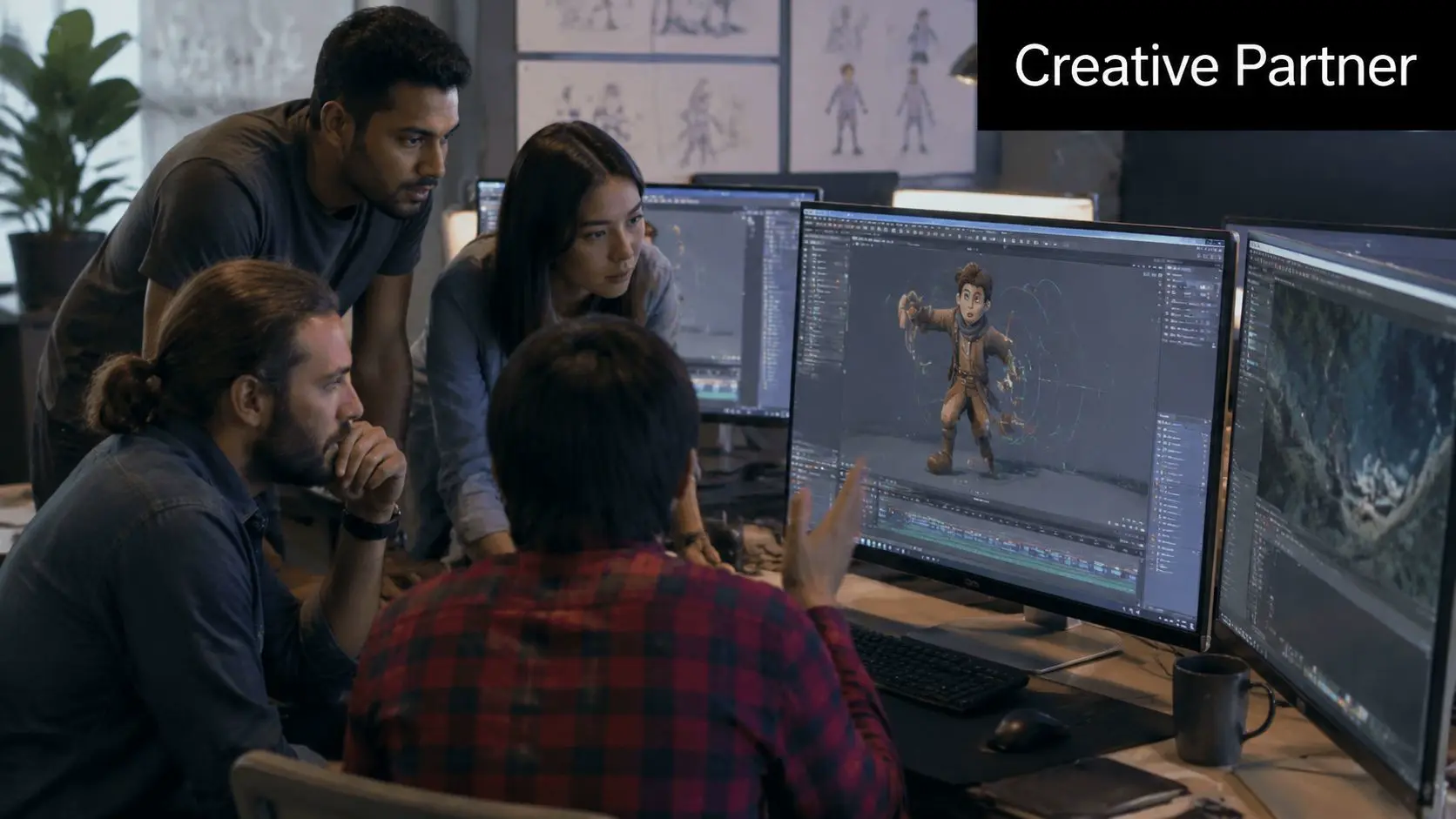
Those who consider AI animation software aren't typically looking to make novelty clips. They're trying to protect delivery dates without compromising the craft. That usually means one of three things: reducing repetitive manual steps, testing visual ideas faster, or handling versioning and post work more cleanly.
What these tools actually are
In practice, AI animation software is a broad label for tools that assist animation production at different stages. Some tools generate rough motion or imagery from prompts. Others slot into established packages and automate specific tasks like lip-sync, masking, interpolation, or layout assistance. The useful distinction isn't whether a tool is “AI-powered”. It's whether it solves a real bottleneck. For professional work, the strongest use cases tend to look like this:
- •Pre-production support: generating rough visual directions, boards, animatics, and placeholder assets quickly enough to improve decision-making early.
- •Animation assistance: automating parts of facial sync, in-betweening, cleanup, or repetitive motion passes so animators spend more time on performance.
- •Post-production efficiency: helping with masks, background fill, versioning, and delivery prep where manual work often piles up late in the schedule.
Why the framing matters
The mistake buyers still make is treating AI as a one-click production model. It isn't. If the job needs narrative control, clear staging, broadcast-safe finishing, and consistent character performance, human judgement remains the backbone.
Practical rule: If a creative decision affects story clarity, character intent, or brand trust, keep a human in charge of it.
That changes how you evaluate software. Don't ask whether it can make animation. Ask whether it can reduce friction inside a production process that already has review loops, technical standards, and client approvals. A useful benchmark comes from audio-driven character work. In the UK market, AI animation software with audio synchronisation can reduce post-production manual rigging time by approximately 40%, because automated lip-sync algorithms align speech phonemes with mesh vertex displacement without frame-by-frame intervention, according to UK analysis of AI animation software and production pipelines. That kind of gain is meaningful because it removes a labour-heavy step without removing creative oversight. The animator still judges the acting. The software handles a chunk of the mechanics.
Understanding Core Capabilities of AI Animation
The term gets thrown around so loosely that buyers often lump everything into “text-to-video”. That misses the parts of AI animation software that are already practical in a working pipeline.
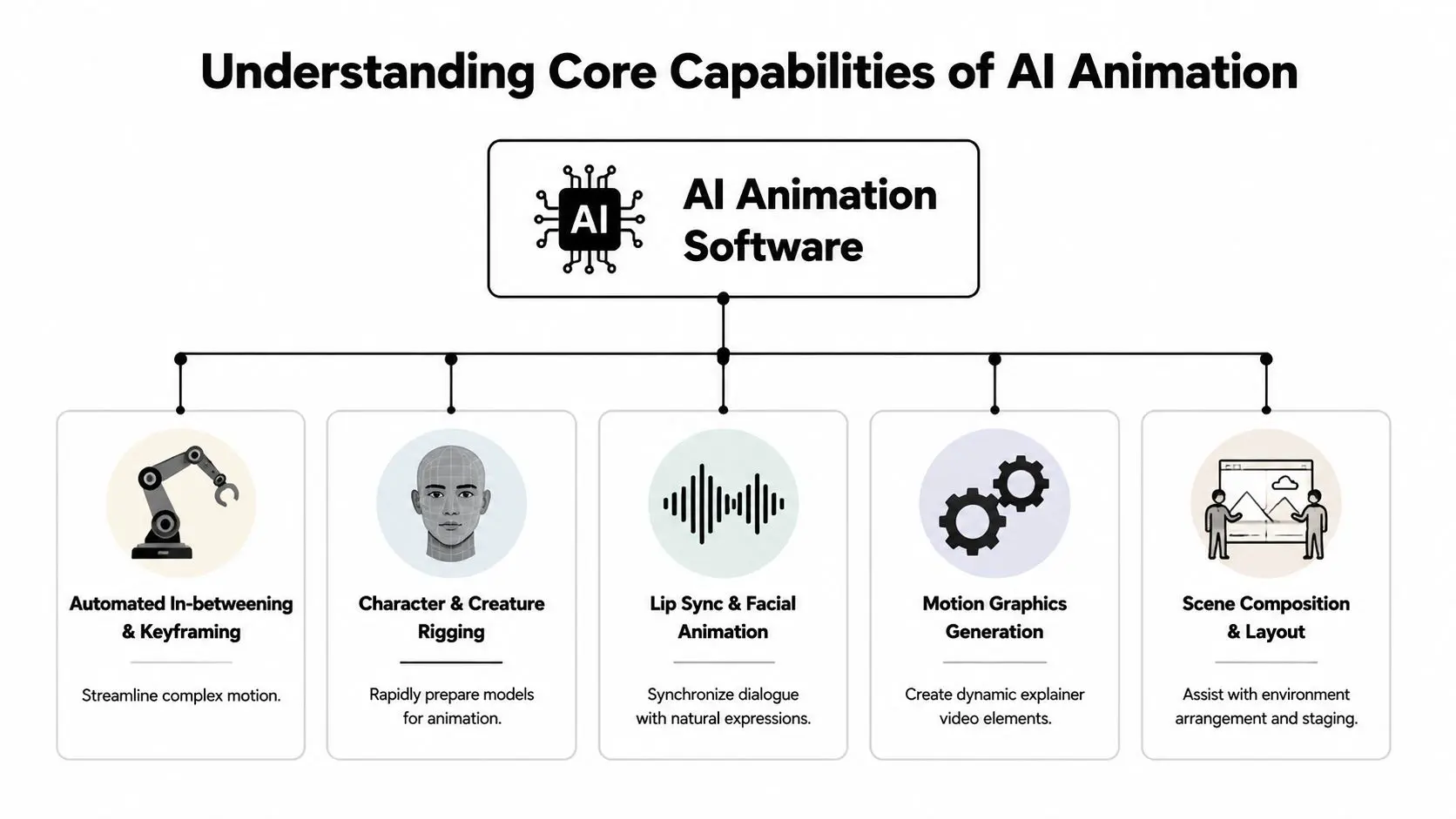
Lip-sync and facial support
This is one of the clearest production wins. Instead of keyframing every mouth shape by hand, audio-aware systems analyse speech and map phonemes to facial movement. Think of it as getting a technically competent first pass before the animator adds intent, timing, asymmetry, and appeal. That matters most when dialogue volume is high. Across episodic content, explainers, and character-led commercial work, small efficiencies stack quickly. Teams exploring AI production services in animation workflows usually start here because the result is easy to test against a known benchmark: does the pass save time without harming performance?
In-betweening and motion interpolation
For 2D workflows, AI can help bridge motion between key poses. The simple analogy is an assistant artist filling the gap between two approved drawings. It doesn't replace a senior animator's eye for timing or weight, but it can reduce the amount of routine transitional work. This is especially useful when the brief supports stylisation rather than highly bespoke character acting. Motion graphics, explainer sequences, and some cut-out pipelines benefit more than nuanced hand-drawn performance.
Rig preparation and repetitive setup
Character and creature work often slows down before animation even begins. Models need preparing, control systems need testing, and any inconsistency in setup becomes a downstream problem. AI-assisted rigging tools can accelerate parts of that preparation by helping detect structure, propose control relationships, or automate repetitive setup logic. That's not the same as solving rigging outright. The hard part is still making a rig behave properly under production stress. But reducing setup friction can be valuable.
The good use of AI in rigging isn't “build me a finished character”. It's “remove the mechanical work so the rigger can focus on deformation and control quality”.
Asset generation and scene composition
Generative systems can help with rough backgrounds, textures, reference art, and placeholder environment elements. They're often strongest when the goal is speed in pre-production, not final-pixel delivery. In a pitch or previs stage, a generated environment plate can be enough to test scale, framing, and mood. AI can also assist with scene composition by proposing layout options or helping populate broad environments. That's helpful in concept development, but it needs restraint. Layout is storytelling. A scene that looks busy isn't necessarily staged well.
Motion graphics support
This area often gets overlooked because it's less flashy than character generation. But AI-assisted motion graphics can be very useful for explainer work, title systems, and branded content where versioning, tempo changes, and repetitive graphic behaviours take time. A sensible way to judge capability is to separate first-pass automation from final craft. If the software gives you a fast first pass, it has value. If it can't survive client scrutiny without major rebuilds, it belongs earlier in the process.
Navigating the Main Categories of AI Tools
The market is crowded because very different products are being sold under the same label. Once you separate the categories, the buying decision gets easier.
Generative platforms
These are the tools commonly seen first. They produce clips, images, motion ideas, or stylised sequences from prompts and references. For pitch visuals, social content, mood development, and rough concept exploration, they can be useful. They're much less reliable when a project needs continuity, repeatability, or exact revision control. A tool that gives you one interesting clip may still be a poor fit for a campaign with multiple deliverables and strict feedback loops. If you're comparing the broader range of creative tooling, FLYP LTD's AI design tool guide is a useful reference point because it helps frame AI tools as design systems rather than magic generators. That mindset is healthier for buyers.
Assistive plug-ins and built-in features
This category tends to deliver more dependable value. These tools live inside software teams already use, or behave like extensions to existing workflows. They assist with masking, interpolation, cleanup, audio sync, or compositing support instead of trying to replace the whole production stack. For many studios, these are easier to adopt because artists stay in familiar environments. The software augments the pipeline rather than forcing a new one. That's usually a better fit for teams already working in established DCC and post tools, especially those reviewing options alongside current 3D software comparisons for production teams.
Pipeline automation systems
In real production, elements become less visible from the outside and more relevant. Some tools focus on render optimisation, batch processing, delivery formatting, review automation, or quality-control steps. They aren't glamorous, but they can remove expensive friction. A strong example sits around rendering and export. UK-focused AI animation tools that support resolutions up to 1080p with variable aspect ratio export can reduce rendering pipeline bottlenecks by 35% compared with fixed-resolution workflows, because adaptive frame buffering allocates GPU memory based on scene complexity rather than static presets, according to Adobe Firefly AI animation generator documentation for the UK market. That kind of capability matters more to producers than flashy demos do. If a tool handles alternate aspect ratios cleanly and reduces render congestion, it helps the schedule. If it just makes one dramatic sample clip, it may not.
| Category | Best for | Main risk |
|---|---|---|
| Generative platforms | Ideation, rough concepts, social clips | Inconsistent outputs and weak revision control |
| Assistive tools | Speeding up known tasks in existing software | Overreliance on first-pass results |
| Pipeline systems | Render, export, QC, operational efficiency | Integration effort and process change |
Integrating AI into a Professional Studio Pipeline
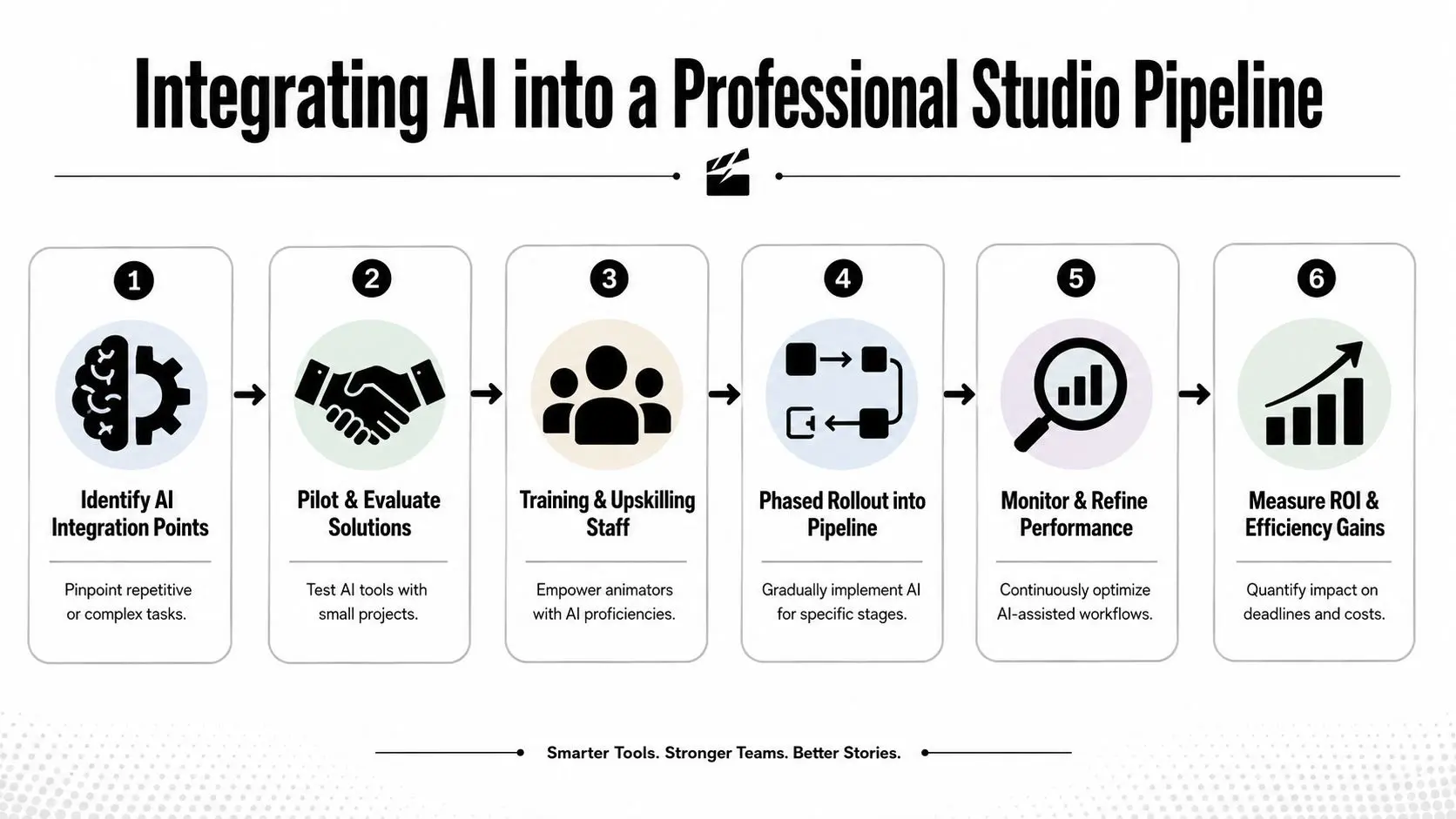
The cleanest adoption strategy is selective, not wholesale. Start with tasks that are repetitive, measurable, and low-risk if the first attempt needs adjustment.
Start at the brief and previs stage
A practical pipeline usually introduces AI before final production. During concept development, teams can use it to generate rough visual routes, mood references, temporary boards, and animatic support. The key word is temporary. Early material exists to test choices, not to bypass art direction. That early speed helps when a brief is still unstable. If the client is uncertain about tone, pacing, or environment, rapid previs reduces the cost of getting alignment.
Use placeholders during production, not final assumptions
Once the job moves into production, AI tends to work best as scaffolding. A team might use generated environment plates as stand-ins, rough design variations for discussion, or automated dialogue sync as a starting point for facial work. That saves time, but only if everyone agrees what is and isn't considered final. A common mistake is letting placeholders drift too far downstream. If a generated asset was only meant to hold composition, don't pretend it's production-ready because it looks polished in a still frame.
Keep human review at the quality gates
Hybrid pipelines succeed or fail depending on human evaluation. AI can move material forward quickly, but someone still needs to evaluate continuity, timing, visual logic, legal comfort, and brand fit. Every major handoff needs a human gate. A straightforward sequence looks like this:
- Identify the bottleneck: lip-sync, rough previs, versioning, masking, render management, or localisation prep.
- Pilot on a contained task: choose work that has clear success criteria but won't endanger the delivery if it underperforms.
- Document failure cases: note where outputs break style, timing, continuity, or technical standards.
- Refine the handoff: define exactly when artists take over and what “approved AI output” means.
- Measure production value: saved labour only matters if review and cleanup don't erase the gain.
Brand consistency is the harder problem
Generic AI tools often look impressive in isolation and weak in a campaign system. A single generated shot can feel plausible. A full set of deliverables often reveals mismatched styling, off-brand colour decisions, inconsistent character details, or localisation errors. That's why the next layer of adoption is less about image generation and more about governance. The projected 2026 trend is the rise of AI agents that automate brand rule checks and localisation, which is especially relevant for UK clients such as Sky Kids or BBC. The current problem is that there's still a gap in UK-specific analysis showing how those agents fit into existing corporate pipelines and broadcasting standards, as discussed in this review of AI tools for motion graphics in the UK.Producer's note: AI can accelerate making versions. It still struggles with understanding why one version is compliant and another quietly isn't.That gap matters in children's content, heritage work, and regulated client environments where “close enough” isn't acceptable.
Post-production is often the safest place to win time
For many teams, the least disruptive place to integrate AI is in post. Automated masking, clean-up support, dialogue sync assistance, version preparation, and basic adaptation work can all reduce pressure late in a schedule. The reason is simple. Post has clearer inputs and outputs. You already know what the cut is, what the brand rules are, and what the final specs need to be. That makes tool performance easier to evaluate against an established animation production pipeline used in studio delivery.Use Cases Versus Critical Limitations in 2026
AI animation software is useful today. It is not universal. The gap between those two statements is where many budget mistakes happen.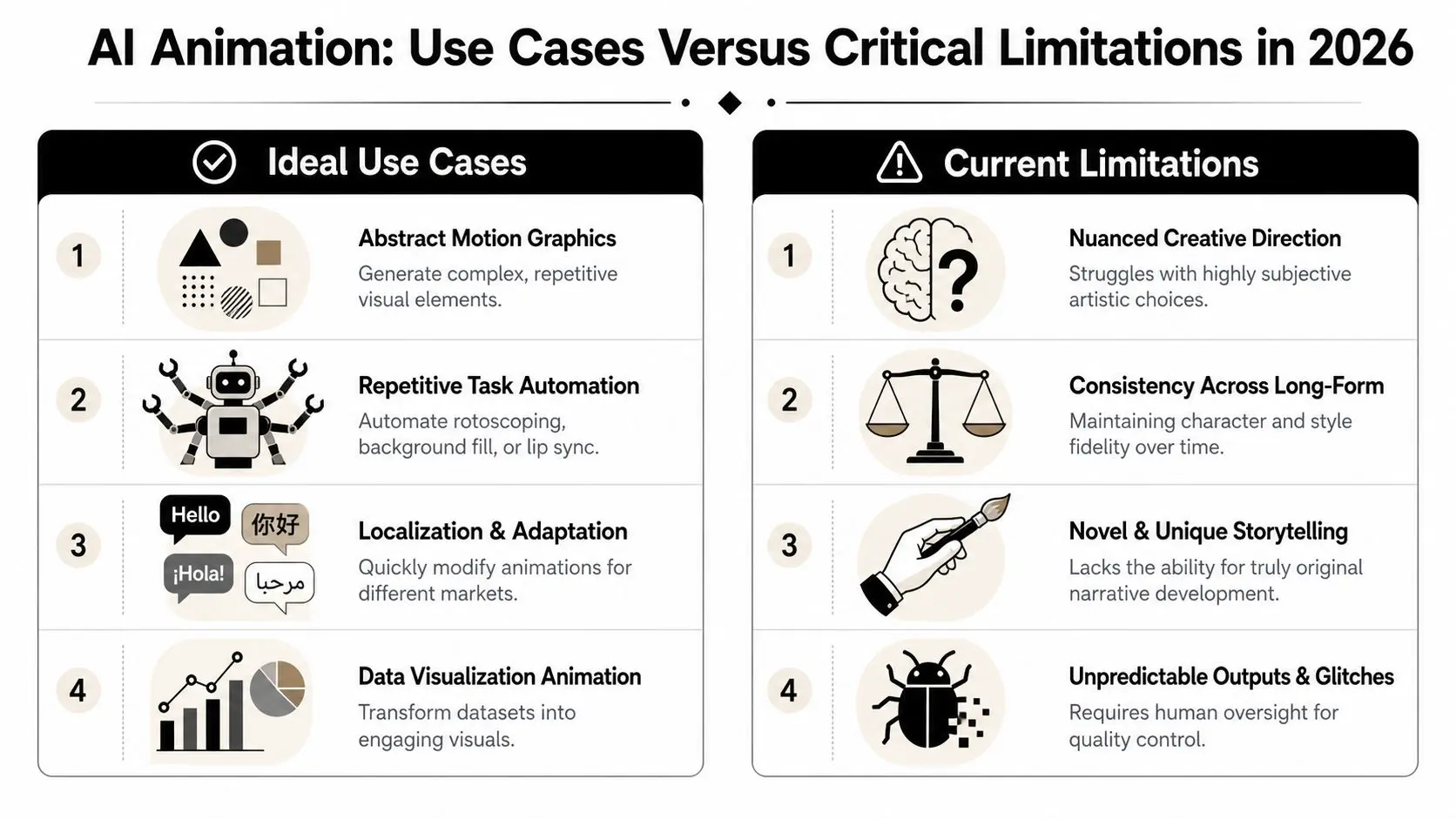
Where it fits well
Some work benefits immediately because the output doesn't rely on fragile continuity or deep performance nuance.- •Abstract motion graphics: looping forms, graphic transitions, visual textures, and stylised background movement are well suited to automation support.
- •Rapid-turnaround social content: short-form assets often prioritise speed and variation over long-form continuity.
- •Localization workflows: adapting copy, aspect ratios, and visual variants can be more systematised than original creative development.
- •Data-led or technical visuals: when the task is clarity and structured transformation, AI-assisted support can be productive.
These use cases share one trait. The work tolerates iteration noise. If one attempt is slightly off, the team can redirect quickly without damaging the whole piece.
Where it still breaks down
Narrative and campaign consistency remain much tougher. The central issue isn't whether AI can make a shot. It's whether it can make the next shot match in the way the story needs. A current limitation stands out clearly. Many free tools are good at generating isolated clips, but they fail to maintain spatial consistency across multiple shots. For narrative work, that's a serious problem because advanced pipelines are needed to reuse a single location for unlimited camera angles without re-prompting, as highlighted in this discussion of persistent world-building limitations in current AI workflows.
If the room changes every time the camera turns, you don't have a scene. You have a sequence of approximations.
That issue affects more than backgrounds. Props shift, costumes mutate, model details drift, and geography stops making sense. A solo creator can sometimes hide that in a short clip. A producer delivering episodic or brand work usually can't.
The decision test
A simple way to assess fit is to ask whether the project depends on the following:
| Requirement | AI-only approach | Hybrid human-led approach |
|---|---|---|
| Shot-to-shot spatial consistency | Weak | Stronger |
| Character performance nuance | Weak | Stronger |
| Branded revision control | Uneven | More reliable |
| Fast concept exploration | Strong | Strong |
| Repeatable delivery standards | Uneven | Stronger |
The more a project depends on continuity, exactness, and repeatability, the more AI needs human supervision and conventional craft around it. That doesn't make the software pointless. It just places it in the right job description.
A Checklist for Adopting AI Animation Tools
Teams often don't need more tools. They need a better filter for deciding what to trial.
Ask budget questions first
Production economics shape whether adoption is worth the disruption. In the UK market, professional 3D animation for character performance or complex product work typically costs between £6,000 and £30,000 per minute, while basic 2D animation starts at £1,750 per minute, according to this UK guide to animation costs. That matters because AI should be evaluated against real cost pressure. If a tool saves setup time on a high-value 3D workflow, it may be worth integrating. If it only creates extra review time on a relatively straightforward 2D job, it may not.
Use a pilot checklist, not a belief system
Before adopting any AI animation software, run through these questions:
- •Pipeline fit: Does it connect cleanly with the software your team already uses, or does it create a parallel process no one wants to maintain?
- •Review burden: Will supervisors spend more time checking outputs than artists would have spent building them properly?
- •IP and data handling: Are you clear on ownership, storage, and what material enters the tool?
- •Skill requirements: Can your current team use it confidently, or will the learning curve slow the next project?
- •Output stability: Can you reproduce results when the client asks for revisions?
- •Success metric: Are you measuring saved time, smoother approvals, fewer manual steps, or something else specific?
Start small and choose the right test
The best pilot project is rarely the hero sequence. It's usually a contained production problem with visible effort and limited downside. Lip-sync support, rough previs, adaptation passes, and post clean-up are better first tests than full scene generation.
Adoption advice: Trial the software on work that matters enough to be realistic, but not so much that one bad output disrupts the delivery.
If the pilot works, expand carefully. If it doesn't, that's still a useful result. You've avoided forcing the wrong tool into the wrong stage of production. AI animation software is now part of the professional conversation for a reason. It can remove real friction. But the teams getting value from it aren't chasing one-click animation. They're building controlled, measurable, artist-led workflows around narrow tasks that benefit from automation. --- If you're weighing where AI fits inside narrative, branded, or XR production, Studio Liddell can help map the right approach. From animation and immersive content to AI-enhanced production planning, the focus is on practical pipeline decisions, not hype. Book a production scoping call if you want to assess where these tools can improve quality, schedule, and delivery without creating new risks.