What Is Performance Capture and How It Works in 2026
A digital character can copy an actor's walk and still feel completely lifeless. So what is performance capture, and why does it sometimes create a convincing screen presence while ordinary motion capture leaves animators rebuilding the emotion afterwards? The answer isn't "actors in suits". Performance capture is a production workflow that connects acting, technical capture, animation, editorial and visual effects. In the UK, that workflow sits within a longer tradition of recording live performance and preserving it for later screen use. Modern performance capture has roots in biomechanics research from the 1970s and 1980s, while British television had already developed systems for storing performances before transmission by the mid-to-late 1950s, as documented in this UK production-history record.
What Performance Capture Actually Means
Performance capture records an actor's body, face, voice and acting choices together, then uses that information to drive a digital character. The key word is together. A body-tracking session, a facial scan and a voice recording may all contribute to a character, but they don't automatically form one coherent performance. On a well-run stage, cameras track movement, facial systems record expressions, microphones capture dialogue and breath, and reference cameras preserve what the actor did. The production team aligns those inputs with shared timecode. Animators, riggers, editors and directors can then work from the same take rather than reconstructing the scene from disconnected pieces.
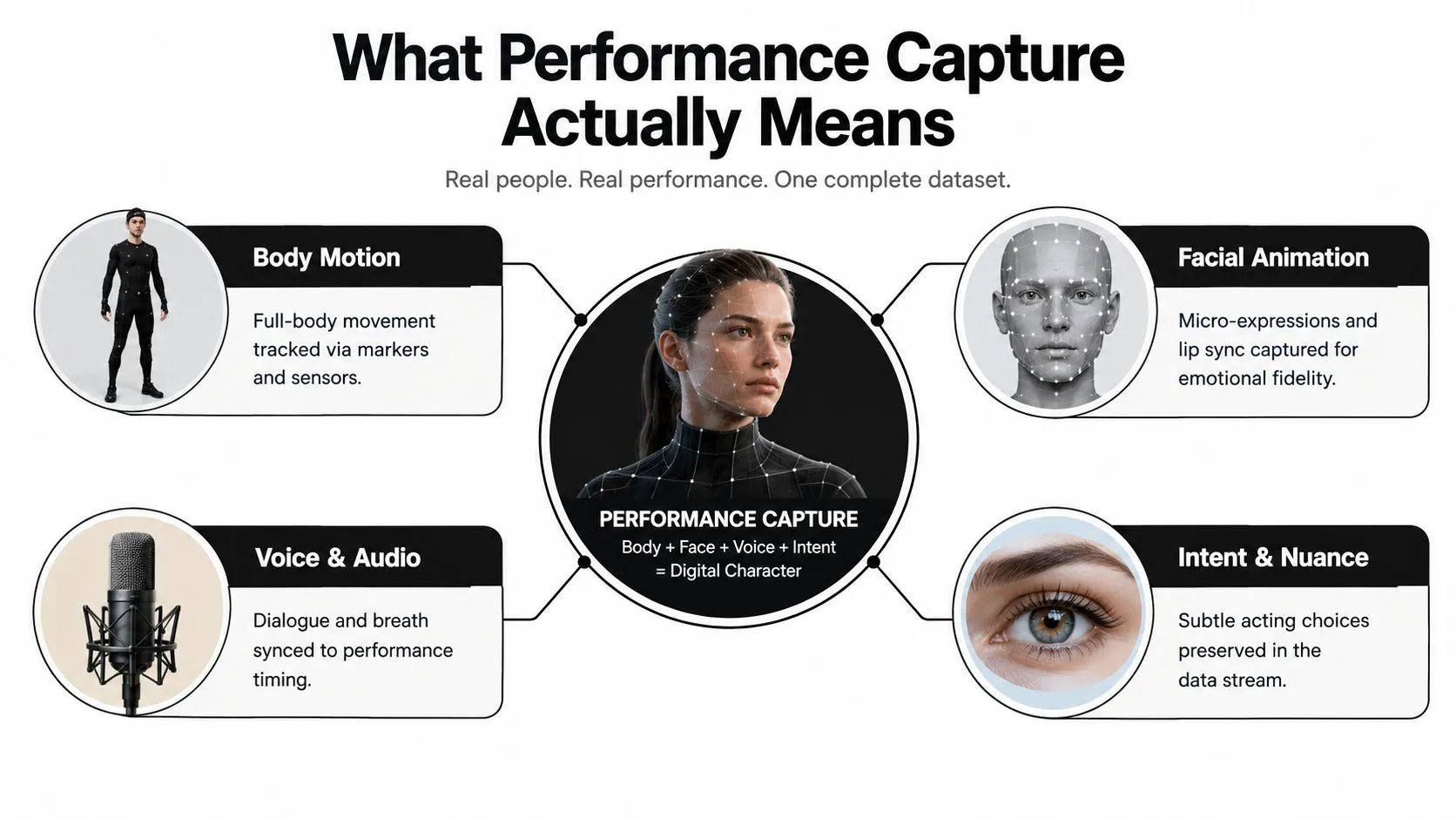
The useful definition is the deliverable
Think of performance capture as a recording package, not a camera trick. A properly organised capture handover may include:
- •Solved takes: Reconstructed movement data assigned to a usable skeleton.
- •Named takes: Clear scene, performer and version information, so editorial can find the right performance.
- •Reference video: A visual record of blocking, eyelines, timing and physical choices.
- •Audio reference: Dialogue and breath aligned with the movement.
- •Camera information: Lens and tracking data that help the team place the digital character correctly.
- •Clean plates: Background material that supports compositing where the performer won't appear in final form.
UK academic work describes the technical basis clearly. Traditional systems use reflective markers and infrared-camera volumes to reconstruct movement in three-dimensional space, as explained in this University of Kent research thesis. The volume is intentionally controlled, which helps the system isolate joints and reduce background noise, but it also limits where actors can move and how productions can stage props. That limitation is part of the creative conversation. The director can't treat a capture stage exactly like a conventional location, because camera visibility, marker placement and calibration affect the result. The producer must plan the room, the data and the review process together.
Practical rule: If the handover doesn't let another department identify the take, understand the performance and reproduce the character setup, the capture session hasn't finished just because the cameras stopped recording.
Performance Capture vs Motion Capture
The simplest distinction is this: motion capture records movement, while performance capture records a more complete acting performance. Motion capture might provide a skeleton, joint rotations and blocking. Performance capture adds facial movement, eyes, fingers, voice and the small decisions that make the actor recognisable. A kitchen analogy helps. Motion capture is the recipe and the prepared ingredients. It gives you the structure of the movement. Performance capture is the plated dish, with timing, texture and presentation intact. If the body data says an actor turns sharply but the facial and vocal data are missing, an animator may still have to decide why the character turned, how hard they looked and what happened in the voice. The labels aren't used consistently. A VFX vendor may call a facial session “mocap”, while a game team may use “performance capture” for a shoot that combines body, face and voice. That's why a production glossary matters. The name on the purchase order should describe the actual inputs and outputs, not just the industry shorthand.
| Dimension | Motion Capture | Performance Capture |
|---|---|---|
| Primary recording | Body movement and joint data | Body, face, voice and acting nuance |
| Typical hardware | Infrared cameras, markers or markerless tracking | Body tracking combined with facial cameras, microphones and reference video |
| Facial detail | May be separate or absent | Captured as part of the performance workflow |
| Voice | Often recorded separately | Recorded in sync where the setup allows |
| Best fit | Locomotion, stunts, loops and blocking | Character scenes where identity and emotion must survive translation |
| Post-production need | Animators may rebuild face, hands or timing | Animators still refine the result, but they start from a fuller performance |
Markerless systems change the preparation burden. Research from the University of Bath's CAMERA group describes capture that can reconstruct the full body, eyes and tongue without markers, calibration, manual intervention or custom hardware, as detailed in its markerless performance-capture publication. That doesn't make every shoot effortless. It changes which problems the team solves, particularly around tracking quality, camera coverage and post-production confidence. For a client, the practical test is more useful than the terminology. If the audience can identify the actor's intention through the digital character, the capture has done its job. For a deeper explanation of the movement-data layer, see this motion capture animation guide.
How the Capture Pipeline Works on Set
Performance capture works best when everyone treats it as a connected chain. A producer doesn't book “a mocap day” and wait for a magical file to appear. The team plans the performance, prepares the actors, calibrates the volume, records the inputs and checks the data before the crew leaves.
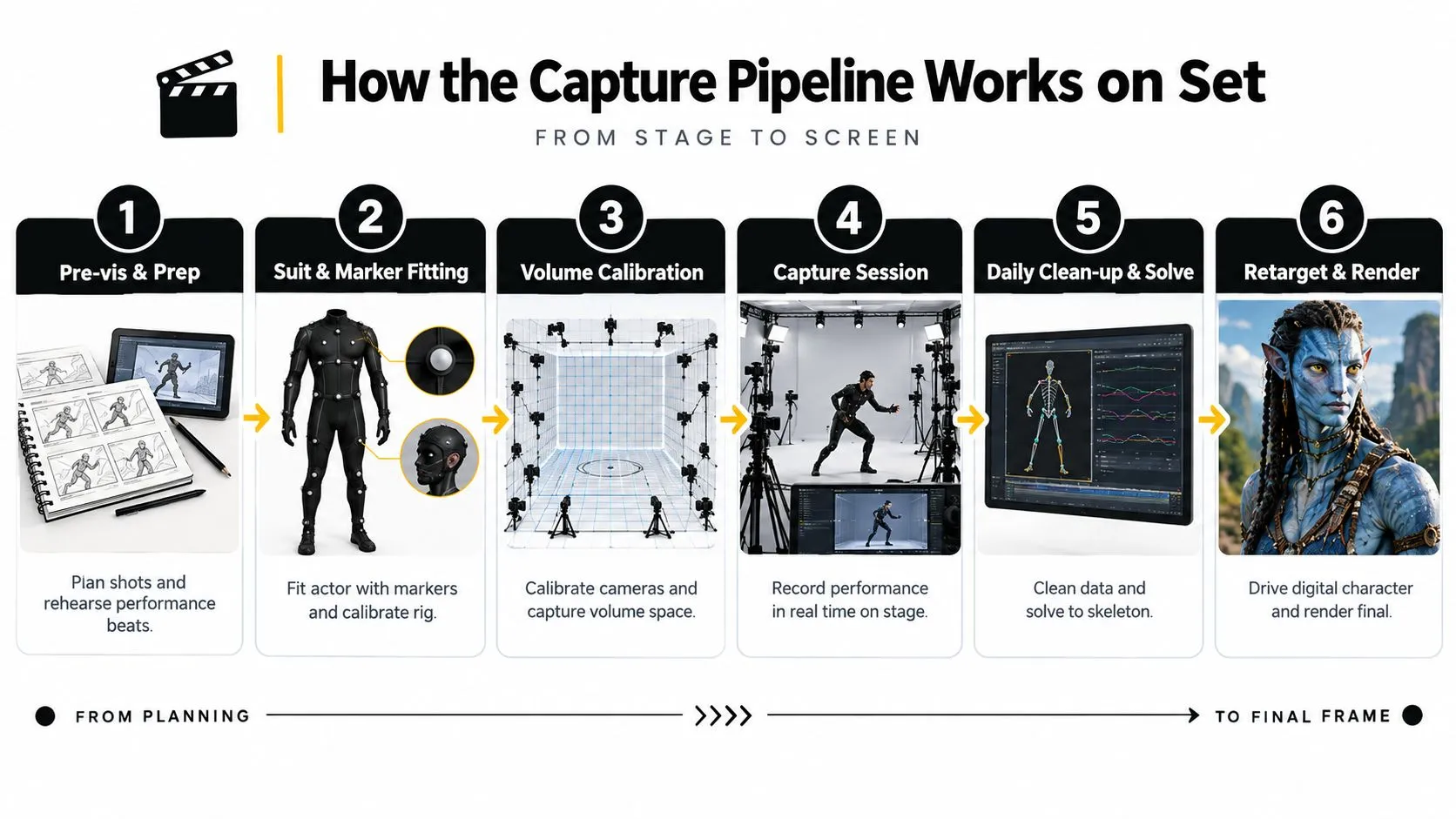
Six connected stages
- Pre-visualisation and preparation
- Suit and marker fitting
- Volume calibration
- Capture session
- Daily clean-up and solve
- Retargeting and review
The rooms and roles behind the result
A full pipeline may involve a capture stage, a solve suite, a retarget room, editorial and a review theatre. The stage records the performance. The solve team turns camera observations into usable motion. Retarget artists adapt that movement to the character's proportions, while the director and animation supervisor review whether the emotional intent survived. The common bottlenecks are practical rather than glamorous: bad lens calibration, marker occlusion, latency between actor and playback, incomplete naming and a slow feedback loop when solving happens off-site. The production also needs camera operators, capture technicians, a facial-capture specialist, an audio team, an animation supervisor and editorial support. Markerless workflows can remove some suit and marker preparation, but they still require careful planning and processing. This markerless motion-capture guide outlines the broader path from capture planning through solving and integration.A producer should budget the solve, retarget and review as part of the shoot, not as invisible post-production contingency.
When Capture Beats Keyframe Animation
Performance capture earns its place when the project needs specific human behaviour at scale, not just movement that looks plausible. A keyframe animator can create a brilliant performance from scratch, often with greater control over stylisation. Capture becomes attractive when the production needs the actor's physicality, timing and accumulated detail across many scenes.Four production questions
Quality: Capture preserves weight shifts, breathing, hesitation, eye movement and the relationship between performers. Those details can be difficult to invent consistently, especially in dialogue-heavy scenes. Animators still refine the data, but they're refining an observed performance rather than guessing every beat. Speed: A prepared session can generate a substantial amount of movement quickly. That advantage shrinks when the team must repeat takes, repair occlusion, solve difficult props or adjust a character whose proportions differ sharply from the actor's. Sustainability: Capture can reduce the need for animators to hand-build repetitive or physically demanding movement. It also spreads the work across performers, technicians, solve artists and animation teams. That isn't automatically easier, because stage days can be intense and data clean-up remains skilled labour. Cost: Capture carries higher upfront requirements, including stage access, crew, actor preparation, suits, facial equipment and technical supervision. Once a production has enough related material to justify that infrastructure, the cost per usable performance can become more attractive than creating every shot by hand. For a small number of highly stylised shots, keyframe animation may remain the cleaner choice.| Factor | Performance Capture | Keyframe Animation | Pure VFX |
|---|---|---|---|
| Acting detail | Starts from a recorded human performance | Built deliberately by an animator | Depends on the live-action reference and VFX design |
| Creative control | Strong during direction, more constrained by captured action | Very high after the brief | High in post, but limited by what was captured on set |
| Physical realism | Naturally preserves timing and weight when solved well | Can be designed, exaggerated or stylised | Can reproduce live-action detail without creating a full digital performance |
| Iteration | Fast for variations that fit the original setup | Flexible shot by shot | Often depends on plates, tracking and compositing complexity |
| Main risk | Occlusion, weak eyelines, costume mismatch or over-cleaning | Long animator hours and inconsistent acting choices | Expensive revisions when the original photography doesn't support the effect |
Use Cases Across Film, TV, Games and XR
The underlying capture principles stay familiar across media, but the production target changes. Film may prioritise emotional fidelity and integration with physical photography. Games need reusable assets and engine-ready data. XR may need live response, audience interaction and reliable streaming rather than a single locked edit.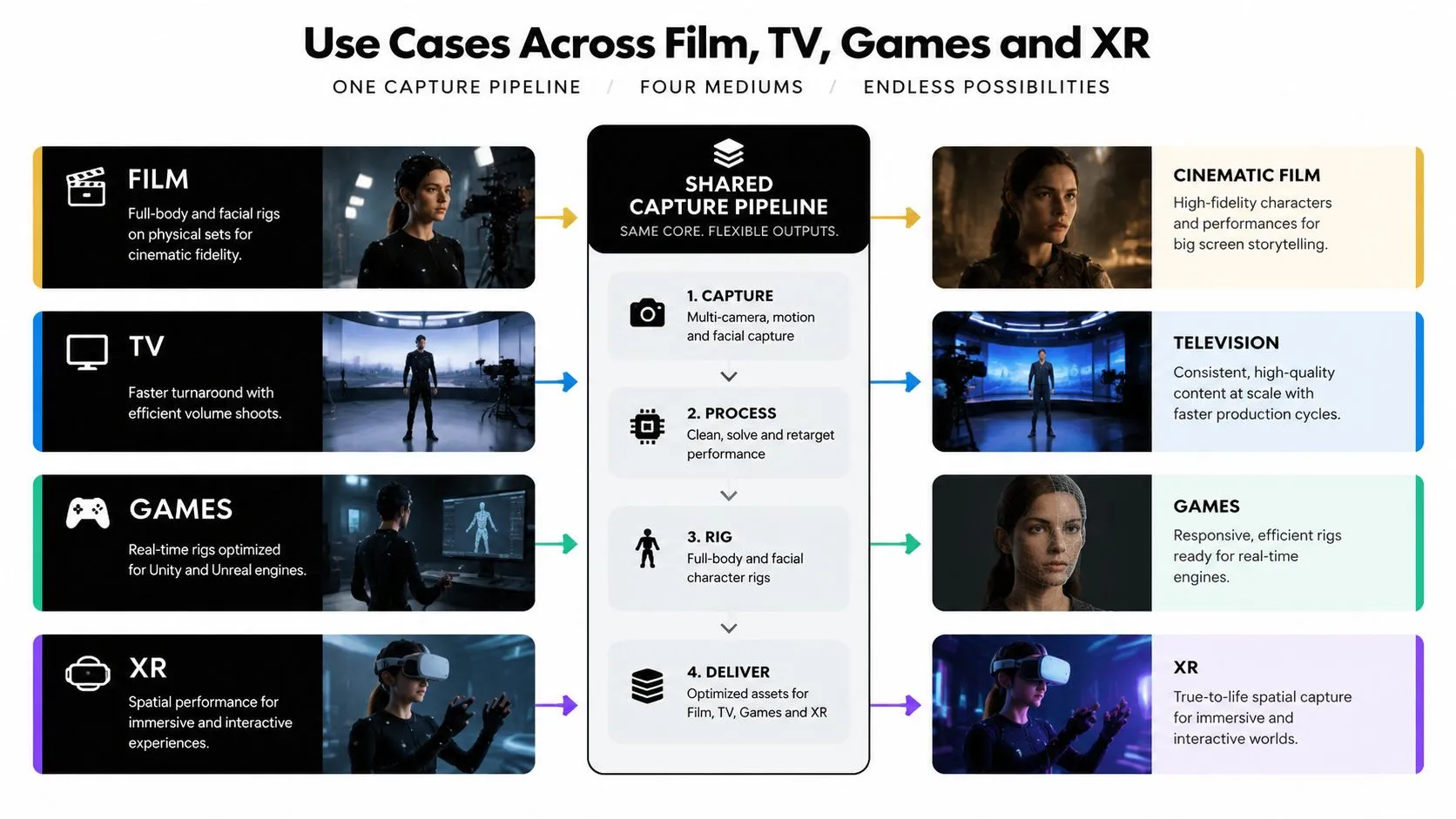
Film
A film production may combine performance capture with practical sets, animatronics, prosthetics or physical eyelines. The performer's body and face can drive a hero creature, digital double or character that must interact convincingly with live-action actors. The capture team pays close attention to camera position, scale, contact and the relationship between the stage performance and the final plate.Television
Television often needs a faster and more repeatable pipeline. Episodic work may favour efficient volume sessions, markerless methods or a tightly controlled facial workflow for dialogue scenes. The team must keep character continuity intact while delivering solved and retargeted material quickly enough for editorial and VFX schedules.Games
Game capture has two distinct needs. Gameplay requires clean loops, reusable actions and data that can be adapted to different contexts. Cinematics may need a more detailed hero performance, with facial capture, fingers, props and carefully directed dialogue. The final data may feed real-time tools such as Unreal Engine, or another engine and animation pipeline, where the team checks how the movement behaves under interactive conditions.XR and immersive production
XR changes the question from “which take is in the final cut?” to “how does the character respond while the audience is present?” Location-based experiences, mixed-reality broadcasts and training simulations may need live tracking, low-latency playback and a reliable connection between performer input and the digital world. The same sensor stack can support all four destinations, but the rig density, iteration count, cleanliness standard and delivery format shift. A film team may accept a heavily polished hero take. A games team may need multiple states and transitions. An XR team may prioritise stable real-time behaviour over a perfect offline solve.The medium determines what “finished” means. A beautiful offline render and a responsive interactive character may begin with the same performance, but they don't share the same acceptance test.This is why performance capture belongs in production planning, not only in the VFX conversation. The UK's CoSTAR programme is receiving £95.8m in AHRC investment, with performance capture named within cheaper and greener screen and performance technologies in this Arts Professional report. The investment reflects a shift towards capture as shared infrastructure for screen, theatre, rehearsal and interactive work.
Studio Liddell Capabilities and Case Examples
A responsible case discussion needs to separate verified project information from assumptions. Studio Liddell's published work includes Aurora, an award-calibre VR short, alongside animation, games and XR production. The project is a useful reference point for discussing how performance-led workflows can support immersive storytelling, but detailed technical specifications such as volume dimensions, marker counts and facial-rig configuration should be confirmed in the production brief rather than guessed. Aurora's relevance lies in the relationship between story, direction, performance and spatial delivery. A VR short has to preserve the viewer's sense of presence, which makes eyelines, timing and body orientation especially important. The capture approach must serve the final experience, whether the team uses a conventional marker volume, facial equipment, markerless tracking or a hybrid workflow.What a production partner should demonstrate
A capable studio should be able to explain the path from stage to deliverable in concrete terms:- •Capture planning: How the team defines the performance objective, scene boundaries, props and output format.
- •On-stage direction: Who gives notes, how rehearsals work and how the director protects the actor's concentration.
- •Data clean-up: Which team solves the body and facial inputs, identifies bad takes and manages versions.
- •Retargeting: How the recorded performance is adapted to the target character's proportions and rig.
- •Preview and review: Whether the director can see a useful character preview during the session or shortly afterwards.
- •Engine integration: How data moves into an interactive or real-time environment when the project needs it.
The same discipline can support a volumetric XR training brief, a markerless facial workflow for a VFX-heavy television episode or finger tracking for a game cinematic. Those are different production problems. The shared requirement is a documented pipeline that protects the actor's intent while giving animators enough control to correct contacts, proportions and technical errors. Studio Liddell can be considered alongside other UK production partners when a brief needs animation, interactive development or XR integration. Its published capability covers 3D and 2D animation, Unity and Unreal XR work, virtual and immersive gaming, multi-episode CGI and IP development, so the relevant question is whether its pipeline matches the intended deliverables. The UK advantage is practical. Producers can assess stage access, crew availability, travel, data security and post-production capacity together, rather than treating capture as an isolated overseas service. London, the Midlands and the North all form part of a broader UK infrastructure that is still developing, with academic, theatrical and screen organisations testing new capture workflows.
Briefing a Studio and Preparing for Capture
A one-line email saying “we need a digital character performance” leaves too many decisions unresolved. Prepare a working brief that gives the studio enough information to plan the stage, the cast, the rig and the handover.
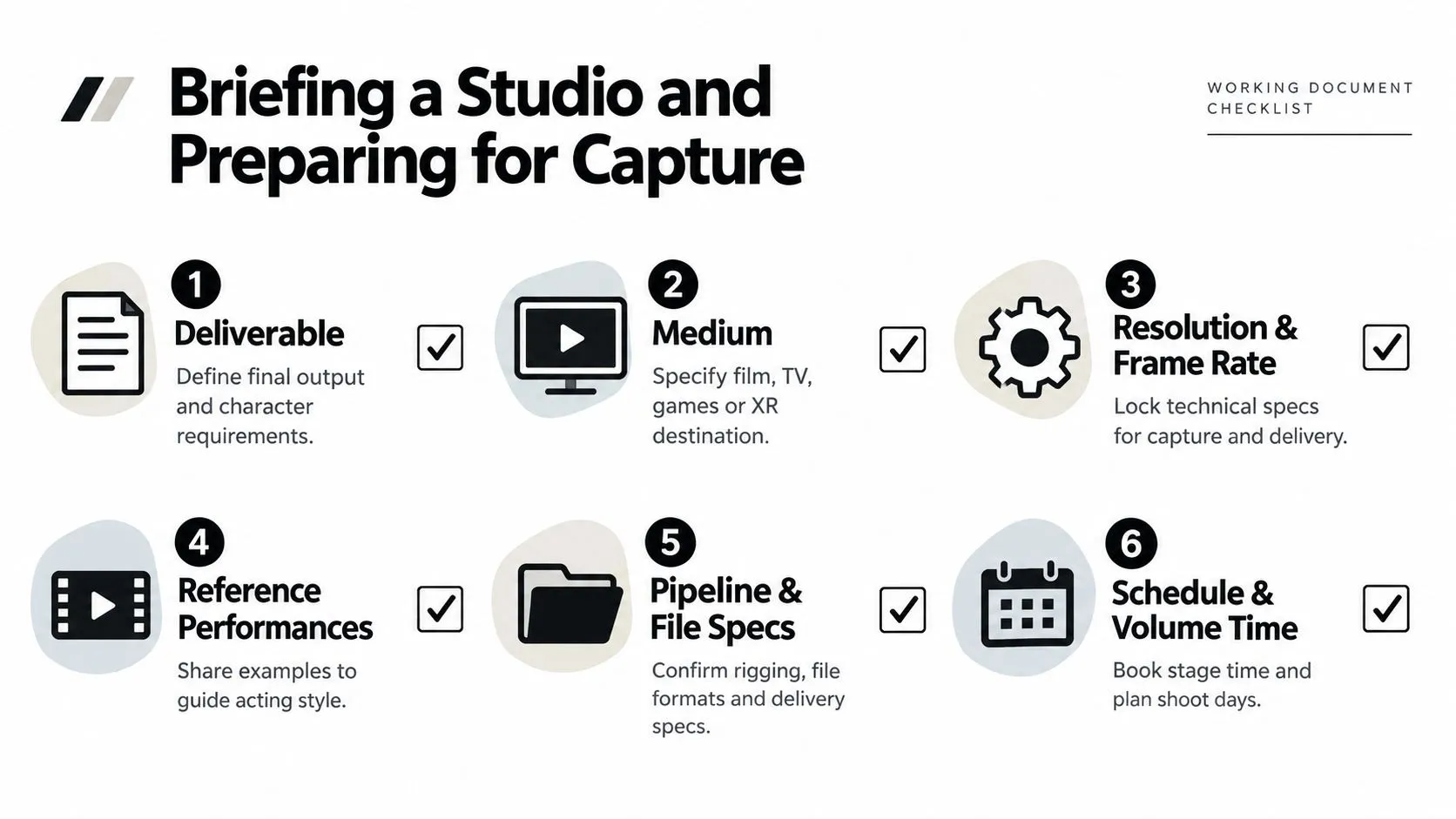
Start with the creative requirement
Name the deliverable first. Is it a finished film scene, a game cinematic, a reusable animation set, a live XR character or a rehearsal asset? Then specify the destination medium, resolution and frame rate, and share reference performances that communicate the acting style. The actor also needs a proper briefing. Discuss wardrobe, props, footwear, body restrictions, scene timing and whether the character's proportions differ from the performer's. Consent must cover facial capture and the intended use of the data. The production should also state how long raw data is retained, who can access it and how deletion or archiving is handled.
Lock the technical decisions early
Before booking the stage, agree:
- •Rig complexity: Decide whether the character needs a simple body rig, detailed facial controls or a full facial and eye setup.
- •Marker strategy: Confirm whether the shoot uses markers, markerless tracking or a combination.
- •Finger scope: Establish whether gloves are required for every scene or only for close interaction and hero shots.
- •Pipeline destination: Identify whether the data will feed Maya, MotionBuilder, Unity, Unreal or a proprietary system.
- •Review criteria: Define what makes a take usable, including contacts, eyelines, breath, facial timing and dialogue sync.
- •Retake windows: Reserve time for technical failures and creative changes instead of treating retakes as an afterthought.
A clean take isn't just one without a visible error. It should support the target character and the final edit. For a dialogue scene, the team may need full-body passes, a focused facial pass, clear eye-line markers and breath references. The exact number of passes belongs in the schedule because it depends on the scene, rig and delivery requirements.
Briefing principle: Decide what the animator must receive before you decide how long the actor stays on stage.
UK capture access is broadening beyond a single production centre. Stages and specialist teams in London, the Midlands and the North, together with regional investment and research activity, can help producers keep capture closer to principal photography and retain control of sensitive intellectual property. The practical test remains the same: can the chosen partner provide the room, people, data management and post-production support the project needs? --- Studio Liddell works across animation, games, XR and immersive production, with workflows that can connect performance-led capture to character animation, real-time engines and final delivery. Visit Studio Liddell to discuss your character, medium, capture requirements and the production route that best fits the finished experience.