What Is Character Rigging and How It Works
Character rigging adds a controllable digital skeleton of bones, joints and animator controls to a 3D model, then binds that structure to the surface so the mesh can be posed without rebuilding the sculpture underneath it. The skeleton never appears on screen, yet it sets the ceiling on what the animator can deliver. So why does almost every project brief treat the rig as something to make as complicated as the budget allows? Ask five animators what makes a good rig and most will describe more. More controls, more switches, more facial bones, more secondary systems. Ask the producer paying for it and the answer changes, because every control has to be built, tested, exported and maintained for the life of the asset. Getting from a finished model to a finished shot means holding three things in view: what sits inside a rig, how much of that machinery a particular production needs, and where the work hands off to animation. Working through what is character rigging turns out to be less about software than about proportion.
What Character Rigging Actually Means
What lets a digital character move without rebuilding its shape for every pose? Character rigging is the process of making a model controllable for animation. The rig combines a digital skeleton, a hierarchy and animator controls, then binds them to the model's surface so it deforms as the character moves. A University of Cambridge computer animation lecture explains the basic principle: the control skeleton is bound to the character's surface to support movement. A rigger builds that system so an animator can create the movement a project needs. The rig's complexity is a proportionality decision: its controls should suit the character's role, the camera distance, how often the asset will be reused and the platform it must run on. A close-up character reused across many scenes may need finer control than a figure seen briefly in the distance.
The puppet, the sticks and the strings
A finished model is like a costume on a puppet. The rig provides the frame beneath it and the controls that let an animator lift an arm without reshaping the fabric. Once the model is rigged, an animator can pose it to walk, reach or speak. Body controls, facial controls and secondary mechanisms for features such as tails, clothing or props can all be part of the setup. Each adds options, but also adds work to build and test, so detail should serve the performance rather than accumulate for its own sake.
The test that matters: hand the file to an animator. If they can create a new pose quickly, the controls are doing their job. Bones inside a model alone do not make it practical to animate.
Rigging connects modelling with animation and lets one character asset serve multiple shots. Film, television, advertising, games and immersive media use the same basic idea, while the required controls depend on the intended performance and delivery platform.
The Parts of a Working Rig and Where It Sits in the Pipeline
A hand reaching for a door handle shows how a rig works: the shoulder moves the upper arm, which carries the forearm and hand along. The character's mesh is attached to a hierarchy of bones and joints, so changing the skeleton's position deforms the surface. In the Cambridge lecture on skeletal animation, bones store translation and rotation values, while skinning weights determine how strongly each bone influences each vertex.
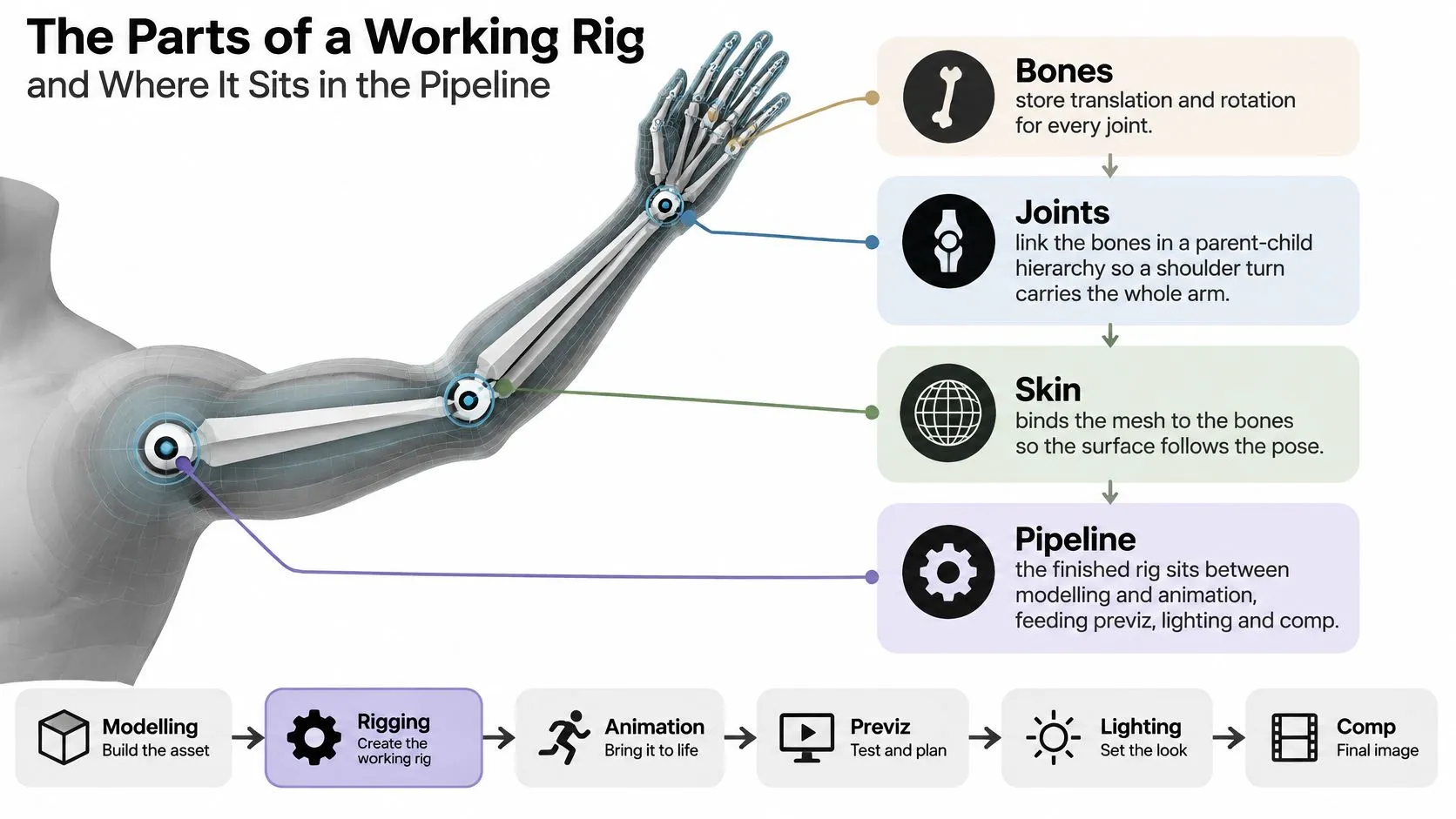
Bones, weights and the joints between them
Bones store movement. Joints connect bones in a parent-child chain, so rotating the shoulder also moves the elbow and hand. Skin weights control how much each bone influences nearby parts of the mesh. The model affects how well the rig can deform it. Without suitable edge loops around an elbow, the surface may pinch as it bends. Poor joint orientation can also make a twist look wrong, even when the weights are carefully balanced. That is why the mesh and rig need to be considered together.
Forward and inverse kinematics without the maths
Forward kinematics passes movement down the chain. Rotate the shoulder, elbow and wrist in turn, and the hand ends up wherever those rotations take it. Inverse kinematics starts with the hand or foot's destination. The animator places the hand on a door handle or keeps a foot on the ground, and the rig calculates the joint angles needed to reach that target. Rigs often offer both approaches, letting the animator choose between direct control and a target-driven pose. Animator-facing controls make those methods practical. Pole vectors guide the direction a knee or elbow bends. Stretch allows a limb to extend beyond its usual range, while constraints can keep a prop in a hand or direct an eye. Facial controls shape expressions that a body skeleton cannot produce.
Specify before modelling is signed off: test poses with extreme bends. A character that looks fine standing still may deform poorly when an arm lifts or a knee folds.
The rig is a function, not a pile of bones
The University of Kent's technical rigging module covers IK, FK, joints, skinning, mechanical and humanoid rigs, facial and animal rigging, and modelling for rigged characters. Together, these areas show that a working rig connects movement controls to a character's changing shape. Researchers also describe rigging as a mapping between animator controls and a character's skeleton. That idea helps explain why two characters can require different controls to produce similar poses: each rig translates the animator's input according to its own structure. For a character that needs to work across formats, test representative actions such as walking, crouching and reaching. Check whether hands and feet reach their intended positions, whether the mesh intersects itself, and whether the character retains its shape through movement. These checks can reveal problems before the asset is used in a new production setting.
Where rigging sits between modelling and animation
Modelling establishes the character's shape. Rigging adds the skeleton, binds the mesh and builds the controls. Animation then uses those controls to create poses over time. Keeping animator controls separate from the deformation skeleton means the underlying rig can be adjusted without necessarily discarding approved animation. The wider handoff from previs through lighting and compositing is outlined in this guide to the animation production pipeline. Repetitive tasks such as naming, export checks and versioning can also be candidates for automation. A plain-English introduction to workflow automation explained on Creators Toolbox covers the general approach.
| Element | What it controls | If it is weak |
|---|---|---|
| Bones and joints | Translation and rotation of each body segment | The limb cannot hold a stable pose |
| Hierarchy | How parent movement carries child joints | The hand does not follow the arm |
| Skin weights | How strongly each bone influences each vertex | Elbows collapse or shoulders bulge |
| Joint orientation and topology | How smoothly the mesh can deform | Creases pinch during movement |
| Forward kinematics | Rotations passed down from the parent | The animator must rotate each joint to position the hand |
| Inverse kinematics | Joint angles used to place a hand or foot on a target | Feet may slide or miss ground contact |
| Animator controls | FK/IK switching, pole vectors and stretch | Posing takes extra effort or produces unwanted bends |
| Constraints and facial controls | Prop placement, aim, mouth and brow shapes | Props drift or speech lacks expression |
A brief can use this table to identify the rig features the character needs before modelling is signed off. Clear requirements give the rigger and animator a shared reference for checking that the controls suit the planned performance.
How Much Rigging a Project Needs
A heavier rig is not a better rig. It's a more expensive one, and the extra cost lands in four places: setup time, debugging, export complexity and runtime on the target device. The Unity glossary entry on rigging in animation makes the same argument from the production side, describing a rig as hierarchy, controls, constraints, skinning and deformation behaviour whose design determines how efficiently animators work, and noting that extra controls can increase production time, debugging, export complexity and runtime cost. So the useful question isn't how detailed the rig should be. It's what this production needs the character to do, and how close the camera gets.
Three rigs a client can actually order
Bespoke cinematic rig. Built for film, trailers and advertising close-ups. It carries facial controls, corrective shapes, cloth or tail systems, FK/IK switching and stretch, because the audience will see the character at a distance where a stiff shoulder reads as a mistake. Reusable production rig. The workhorse for episodic television and returning characters. It needs stable body controls, a dependable FK/IK switch and a compact facial set that survives dozens of shots and several animators, rather than one dazzling hero feature that breaks on export. Real-time optimised rig. Games, VR and AR on device. Fewer joints, simpler facial rigging and engine-friendly controls, because the target hardware charges you for every one of them at frame rate. There's a fourth level worth naming, because it saves the most money: the background rig. Wide shots, crowd scenes and non-interactive extras need a simple skeleton and basic skinning. No faces, no fingers, no custom props. Six criteria decide which level applies: the medium, the shot count, how often the character returns, the closest camera distance, whether the audience interacts with it, and the platform it ships on. When a sector is short of experienced riggers, a rig you can reuse across a series is worth more than a bespoke setup built for one shot.
The cost of a control is not the ten minutes it takes to add. It's the years of exports, checks and fixes that follow it.
| Brief | Typical use | Controls worth paying for | What to leave out |
|---|---|---|---|
| Bespoke cinematic | Film, trailer or ad close-ups | Face, correctives, cloth or tail, FK/IK and stretch | Unused finger detail on distant extras |
| Reusable series | Episodic television and returning characters | Stable body controls, FK/IK switch, a small facial set | One-off hero tricks that break export |
| Real-time | Games, VR and AR on device | Fewer joints, simple face, engine-friendly controls | Heavy correctives and dense secondary sims |
| Background or crowd | Wide shots and non-interactive extras | Simple skeleton and basic skinning | Faces, fingers and custom props |
If the camera never sees the fingers, and nobody in the audience will ever grab the character by the hand, finger controls are a line in the budget that buys nothing.
How Rigs Behave in Performance
Three characters show where all that machinery meets an actual performance.
A speaking close-up
Body IK plants the feet and sets the gesture while the facial rig carries the acting. The underlying captured motion is typically recorded at 60 to 120 Hz, and using every sample directly can make a shot feel heavy and sluggish, according to published research on motion capture and facial animation, which documents reducing the data to sparse keyframes and interpolating the in-betweens, with key reduction driven by motion intensity. Facial work then takes one of four documented routes: keyframe wrapping and morphing, parameterised models, physics-based models, or performance-based methods. The animator judges two things. Does the mouth land on the syllable, and does the body's weight stay over the feet?
A creature at a run
A quadruped fails differently. The spine and tail need secondary motion that trails the body rather than following it exactly, and the limb orientations have to survive a full run without the knees snapping to a reversed bend. Contacts are where the illusion breaks: a paw that hovers a centimetre above the ground reads as weightless no matter how good the fur looks.
A character inside a headset
The same walk has to survive a lighter joint count and a performance budget, so secondary motion is simplified, baked or faked. What the animator protects here is readability at arm's length and a silhouette that holds when the player is moving. In all three cases the judgement is the same: contact with the ground, volume that doesn't collapse, and a face or tail that reads at the distance the camera uses. A hybrid pipeline, captured body plus keyed acting, is normal practice rather than a compromise, and it's how most of the skeletal animation you see on screen gets made.
Specify the Rig and Check AI Work Before Animation
AI has real uses in a character pipeline: pose suggestions, retargeting, motion cleanup, repetitive setup. It doesn't decide anatomy, deformation quality, art direction, or whether a performance reads. The productive split is to label every task as either assisted work or human sign-off, and then defend the line. That framing is now a sector-level concern rather than a curiosity. A UK-wide BFI and CoSTAR Foresight Lab study published in June 2025 examined generative AI's impact across the screen sector, as summarised in this overview of the BFI and CoSTAR AI research, and it treats adoption as a production and workforce question.
Where automation fails quietly
Automated skin weights are a draft, not a finish line. They collapse an elbow on a dense mesh and balloon a shoulder where two bones fight over the same vertices. A generated pose can hit the silhouette and miss the acting note entirely, which nobody catches until the client screening.
Sign-off stays human: anatomy, deformation quality, art direction and performance intent don't come out of a solver.
The checks that catch this are cheap. Pose the rig at its extremes. Measure end-effector error after retargeting. Inspect for mesh penetration. Review facial shapes against the character design rather than against what the tool produced. Hero characters, culturally specific designs and interactive XR assets need authored controls, because the cost of a wrong deformation is highest where the audience looks longest. Agree authorship and training-data terms before any motion library is used, especially when capture comes from performers or when a client's brand character is being fed into a tool. Our animation work is built around storytelling through character animation, and the animators who inherit a rig are the people who pay for a vague specification, so the brief is worth getting right first.
The brief to send before animation starts
- •Medium and platform: film, series, ad, game, VR or AR, and the hardware it ships to.
- •Closest camera distance: a close-up on a speaking face is a different brief from a wide shot.
- •Shot or episode count: how often the character returns, which drives reusability.
- •Real-time or rendered: whether the rig ships in a build or stays in a render farm.
- •Whether the face speaks: dialogue, lip-sync and expression range.
- •Rig level: bespoke cinematic, reusable production or real-time optimised.
- •Extreme test poses: the bends the rig must survive before it's accepted.
- •Control separation: whether animator controls stay independent of the deformation skeleton.
Animating an untested bind wastes performance work, because a weight change after approval forces rework on shots that were already signed off. The one next step that prevents this is a rigging review held with the shot list, the platform, and the model or turnaround in hand, so the control set is agreed before keyframe or capture work begins.
Rigging, Animation and 2D Puppets
How does a rig relate to animation? A rig provides the controls for posing a character; an animator uses them to shape movement, timing and performance. Once a rig is approved, the animation can still change. That separation lets a team adjust a performance without rebuilding the character's controls. 2D characters use a similar idea. A cut-out figure can be assembled from drawn parts on separate layers, joined at pivot points so an arm swings from the shoulder or a mouth opens. The artwork and its movement are handled separately, much like a puppet and the strings that move it. For a closer look at the technique, read this guide to what 2D animation is and how it works. The underlying terms are shared across many 2D and 3D workflows, though the tools and ways the artwork bends differ:
- •Rig: the structure and controls that let a character be posed.
- •Skeleton: the linked bones or joints that define how parts move together.
- •Skin: the surface that follows the skeleton.
- •Weights: values that determine how strongly each bone affects parts of the surface.
- •Controls: the handles an animator uses to pose the character.
The right level of detail depends on the work. A close-up may need expressive facial movement, while a distant figure may need only clear, readable poses. The medium, camera distance, reuse and target platform all affect how much control is useful. More controls can allow finer adjustments, but they can also add complexity without improving what the audience sees. Studio Liddell's animation focuses on storytelling through character animation, with 2D and 3D work for clients in the UK and around the world. If you're planning a project, send your brief, shot list and target platform to start a conversation about the work. Learn more about Studio Liddell's animation.