Web Mobile Development: A Guide for Creative Production
A lot of teams arrive at the same moment from different directions. A brand lead wants a campaign that feels richer than a landing page. A producer needs a companion experience for an animated property. A museum, broadcaster, retailer, or education partner wants something interactive on mobile, but doesn't want to force every user through an app-store download. The creative ambition is clear. The delivery path usually isn't. That's where web mobile development stops being a technical line item and becomes a production decision. The format you choose affects how quickly people can access the experience, how polished it feels on a phone in real conditions, and whether the work supports the wider brand rather than fragmenting it. For creative projects, the wrong platform choice shows up quickly. Heavy visuals stall on load. Interactions that felt elegant in a pitch deck become awkward on smaller screens. Teams spend money reproducing the same feature set across web and app environments when one well-planned product would have done the job better.
Your Digital Vision in a Mobile-First World
A common brief sounds simple on paper. Launch a campaign microsite. Extend a children's IP into interactive mobile content. Turn a filmed explainer into a touch-led product demo. Add AR to an exhibition. Then the practical questions begin. Should it be a responsive site, a PWA, a native app, or something immersive in the browser? How much animation is too much? What still works on a train connection or an older handset?
In the UK, those decisions sit inside a mobile-first reality. 63% of global web traffic comes from mobile devices, and 85% of users expect websites to be mobile-friendly, which is why responsive and mobile-first design has become a baseline requirement for UK businesses rather than an optional upgrade, as noted in these web development statistics. That matters beyond layout. Mobile is often the first touchpoint where someone discovers a campaign, checks a product, watches a trailer, books a ticket, or decides whether your brand feels current. If that first experience is awkward, users won't care whether the concept was strong in the original workshop.
Practical rule: treat mobile as the primary stage, not the cut-down version of a desktop idea.
For creative organisations, that changes the production brief. Motion design has to support clarity, not slow it down. 3D assets need a delivery plan, not just a render spec. Interaction needs to feel immediate under a thumb, not only elegant in static UI frames. Good web mobile development connects those decisions early, before design and engineering drift into separate conversations.
Defining the Digital Canvas
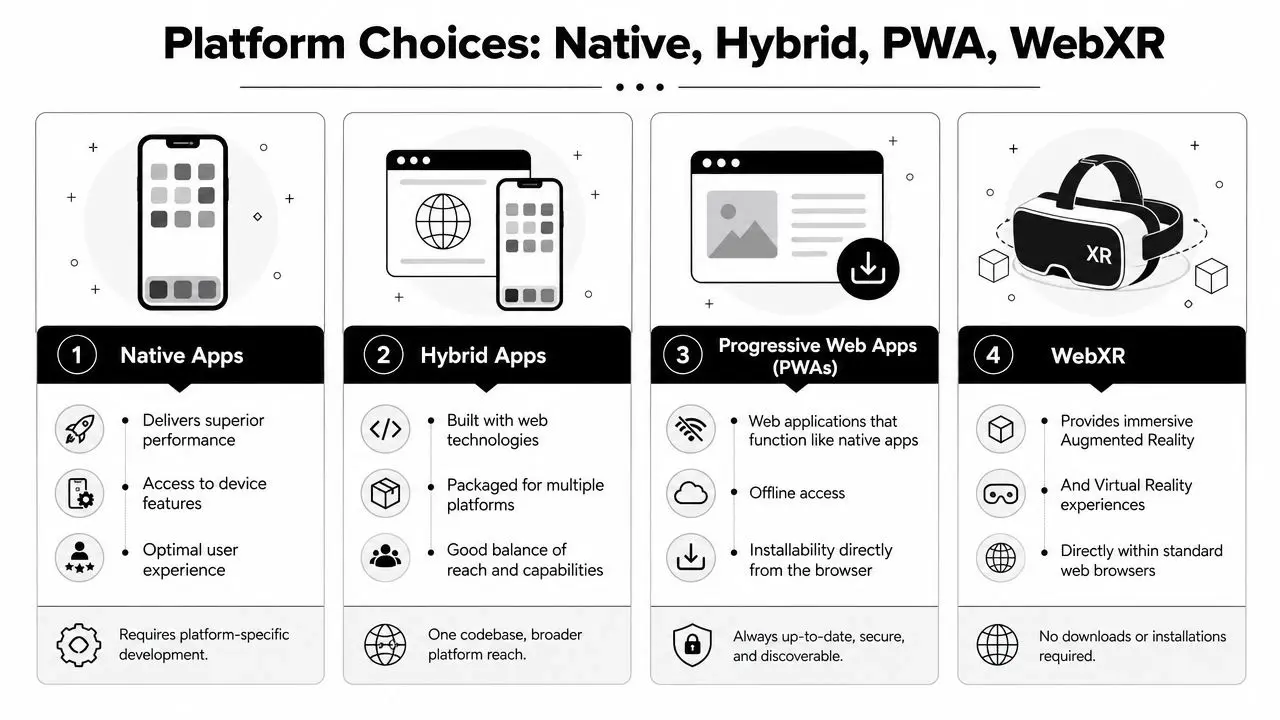
The easiest way to understand the situation is to think in terms of access. A mobile-responsive website is the most open door. Users tap a link and arrive immediately in the browser. The layout adapts to smaller screens, the navigation changes for touch, and content reflows to fit the device. This is often the right starting point for campaigns, editorial experiences, product storytelling, and service sites where friction matters more than deep device integration. A Progressive Web App, or PWA, keeps that browser-first accessibility but adds app-like behaviour. It can feel more persistent, support offline states, and offer installability without requiring a full app-store journey. That makes it useful when you want broader reach than a native app, but need more continuity than a conventional website.
What users actually experience
A user rarely thinks in platform labels. They notice what happens next.
- •Responsive web means fast access from search, social, QR codes, email, and paid media.
- •PWA means the browser experience can feel more durable and more product-like.
- •Native app means a dedicated installation, stronger ties to the device, and usually a higher commitment from the user.
- •Hybrid app sits in between, using web technologies inside an app wrapper to reach multiple platforms with one main build.
- •WebXR opens the door to AR or VR experiences inside supported browsers, which can be powerful for activations, education, and spatial storytelling.
If you're aligning early design thinking with platform choice, this article on design for mobile apps is a useful companion because it focuses on how interface decisions shape user behaviour rather than treating design as visual polish added at the end.
The core trade-off
The trade-off isn't just technical sophistication. It's reach versus depth. A browser-based experience usually wins on discovery and lower friction. Native often wins when device features, performance, or long-term retention matter more. Hybrid can be commercially sensible when a team needs app-store presence without running separate platform-specific builds from day one. WebXR is strongest when the experience itself is the attraction and immersion is central to the concept.
If people need to get in fast, reduce steps. If they need to come back often, invest in product depth.
That single distinction prevents a lot of expensive mistakes. Teams often overbuild because they jump to a platform before they've defined the user journey.
Choosing Your Platform Native vs Hybrid vs PWA vs WebXR
Platform choice should come from the brief, not from fashion. A product launch, education tool, event activation, branded game, and content hub can all live on mobile, but they don't need the same architecture. In UK-facing work, PWA architecture deserves serious attention because Ofcom's UK Adults Media Use and Attitudes report states that 86% of adults used a smartphone in 2024, making browser performance and installability commercially relevant for many consumer-facing products, as summarised in this guide to mobile and web app development.
Platform comparison
| Criterion | Native App (iOS/Android) | Hybrid App | Progressive Web App (PWA) | WebXR Experience |
|---|---|---|---|---|
| Access | Installed from app stores | Installed from app stores | Opened in browser, can often be installed | Accessed through supported browsers |
| Performance ceiling | Highest | Good, depends on framework and implementation | Strong for many content and service use cases | Variable, depends on device and browser support |
| Device feature access | Deepest access | Often good, with some limits | More limited than native | Focused on supported immersive features |
| Update flow | App-store release process | App-store release process | Web deployment, faster iteration | Web deployment, browser dependent |
| Best fit | Feature-rich products, heavy interactivity, deep device use | Multi-platform app presence with shared codebase | Fast-entry mobile products, content, services, commerce, event tools | Browser-based AR/VR storytelling and activation work |
| Common risk | Higher cost and maintenance overhead | Compromise if the UX needs native-level polish everywhere | Overpromising native equivalence in every scenario | Device support and performance fragmentation |
When native is worth it
Native earns its keep when the experience depends on fluid performance, persistent engagement, or close access to device features. If you're building a game-like product, an advanced utility, or something where every interaction has to feel tightly tuned, native is often the cleanest route. It also suits products where app-store presence is part of the business strategy. That's not only about technology. It's about user expectation.
When hybrid is the sensible middle
Hybrid works well when a team needs one product to reach iOS and Android without fully separate codebases, and the experience doesn't demand absolute native optimisation in every interaction. This can be a practical choice for member services, event apps, internal tools, and branded products with moderate complexity. The success or failure of hybrid usually comes down to discipline. If a team treats it like a shortcut for everything, it shows. If they design around the medium, it can be very effective.
Where PWAs shine
PWAs are strong when reach, ease of access, and agile iteration matter. For many brands, they offer the right balance of polish and practicality. Campaigns, content hubs, interactive storytelling, commerce-led experiences, ticketing flows, product selectors, and companion experiences often fit this model well. That doesn't mean PWAs are a universal replacement for native. Discoverability, device capability, push behaviour, and install habits still vary. The point is to evaluate the experience objectively. This PWA versus native comparison is helpful if you want a clearer read on those trade-offs without the usual oversimplification.
Why WebXR needs a different brief
WebXR shouldn't be treated as “an app, but in 3D”. It's best when immersion is the product. That includes virtual exhibitions, spatial storytelling, product visualisation, interactive learning, and event work where the novelty and presence are central to engagement. For planning teams, a practical external resource is this build an app from scratch guide. It's useful because it frames platform choice as part of product definition, not just a build decision.
A platform isn't the idea. It's the delivery system for the idea.
The Production Pipeline from Brief to Launch
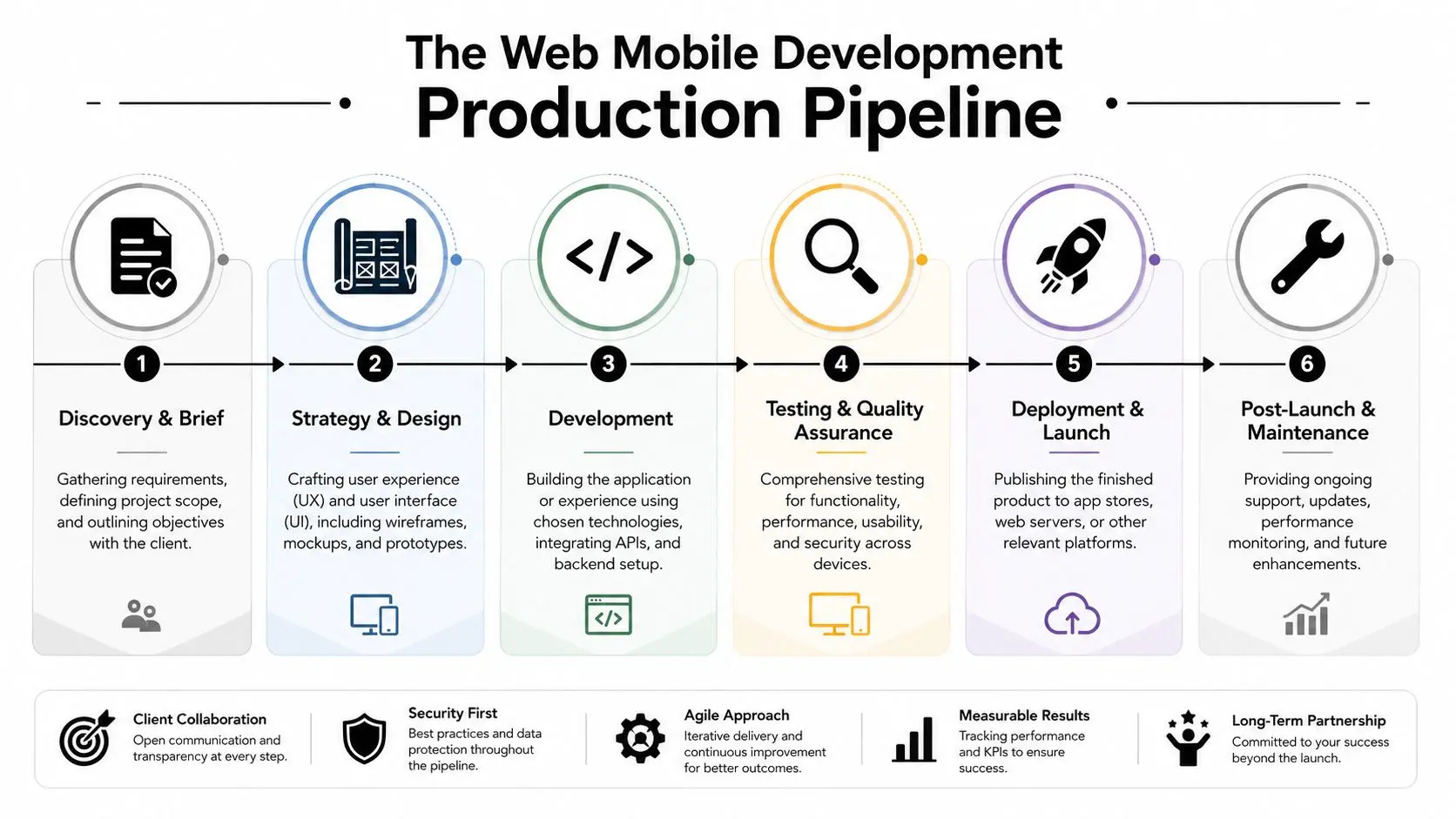
Good mobile products rarely fail because of one bad line of code. They usually wobble earlier, when scope is fuzzy, creative ambition isn't translated into interaction rules, or asset production and engineering run on parallel tracks without a shared performance target.
Discovery and the real brief
The first useful brief goes beyond “we need an app” or “we need a mobile site”. It identifies the audience, the key action, the content model, the visual ambition, and the operational constraints. That's where a team decides whether the experience is transactional, narrative, utility-led, or promotional. A strong discovery phase usually settles questions like these:
- •Primary user action. What should the user do first, and what should they do next?
- •Content and asset reality. Are you shipping static graphics, video, 3D models, animation loops, live data, or all of them?
- •Distribution path. Will users arrive from search, social, QR codes, direct outreach, or app-store discovery?
- •Maintenance expectation. Is this a short campaign burst or an evolving product?
Design, prototyping, and technical architecture
UX and UI should move together with technical planning. There's no value in approving a beautiful motion-heavy interface if the engineering team already knows the interaction model will struggle on everyday devices. Wireframes answer structure. Visual design answers tone. Prototypes answer movement and flow. Architecture answers whether the chosen experience can ship at the level promised.
Teams save time when design prototypes test interaction honestly instead of simulating impossible smoothness.
Development and performance discipline
Once build starts, the biggest production mistake is treating mobile performance as a final QA issue. It isn't. It's a build principle. For UK mobile delivery, the practical bottleneck is often transfer size and JavaScript execution rather than raw network speed, which is why route-level code splitting and aggressive image optimisation matter for reducing first contentful paint on mid-tier devices, as explained in this mobile app tech stack guide. That has direct implications for creative work:
- •Animation delivery needs a plan. Not every motion asset should ship as video.
- •3D scenes need level-of-detail thinking from the start.
- •Framework choice affects JavaScript weight, hydration cost, and interaction delay.
- •Rendering strategy matters. Server-side rendering or edge rendering can improve first impressions when content needs to appear quickly.
QA, launch, and the part clients rarely budget properly
Testing should include different handset classes, orientations, browsers, and weak-connection behaviour. It should also cover the small things that clients feel immediately, including scroll smoothness, tap states, text legibility over motion, and fallback behaviour when media fails to load. Launch isn't the end of production. It's the point where real use begins. Post-launch support usually includes content updates, bug fixing, analytics review, compatibility checks, and refinement of weak journey points that only become obvious under real traffic.
Integrating Advanced Visuals with Animation XR and AI
Creative teams often ask the right question too late. Not “can we put 3D, AR, or AI into this?” but “how should those elements behave on mobile so the experience still feels effortless?” That shift matters. Rich media isn't valuable because it's technically impressive. It's valuable when it helps people understand a product faster, feel more immersed in a story, or interact with a brand in a way that standard web layouts can't deliver.
Animation that serves interaction
High-fidelity animation can enhance a mobile product, but only when it has a clear role. A looping hero scene can establish tone. Micro-animations can improve usability. A lightweight 3D product reveal can replace a long block of explanatory copy. Problems start when motion is treated as decoration and shipped without regard for device load. In practice, the production pipeline has to decide which assets are pre-rendered, which are real-time, and which need static fallbacks. That's where creative production and engineering need one conversation, not two separate sign-off tracks.
XR on the web without breaking the experience
WebXR is appealing because it lowers access friction compared with fully native immersive builds. Users can enter from a browser link, QR code, or campaign touchpoint without committing to an install first. For exhibitions, branded storytelling, product demos, and educational interactives, that can be a strong fit. The harder part is designing for conditions outside the ideal demo environment. A key challenge in UK-facing mobile work is supporting low-connectivity, high-friction users, because Ofcom data points to persistent infrastructure gaps outside major urban areas, which means teams need offline flows, compressed assets, and graceful degradation, as discussed in this piece on mobile engineering challenges. That changes creative decisions:
- •Offer fallback states when immersive features aren't available.
- •Compress aggressively without destroying visual clarity.
- •Stage loading so users see useful content before the richest layer arrives.
- •Keep core actions available even if advanced media fails.
Where AI belongs in the production stack
AI is useful when it accelerates iteration or personalises a layer of the experience. It's less useful when it's dropped in as a gimmick. In web mobile development, AI can support image generation workflows, content variation, assistive interfaces, tagging, and lightweight personalisation, but it still needs art direction, moderation, and technical boundaries. If your team is exploring generated imagery in a production workflow, this Stable Diffusion API guide is a practical reference point because it shows how image-generation tooling fits into implementation decisions rather than treating AI as a vague trend. For browser-based immersive work, this guide to web augmented reality for UK businesses is useful when the question isn't “can we do AR?” but “what version of AR makes sense for the audience, device mix, and production budget?”
Rich media should degrade with dignity. If the premium layer fails, the core story still has to work.
Making the Right Business Decision for Your Project
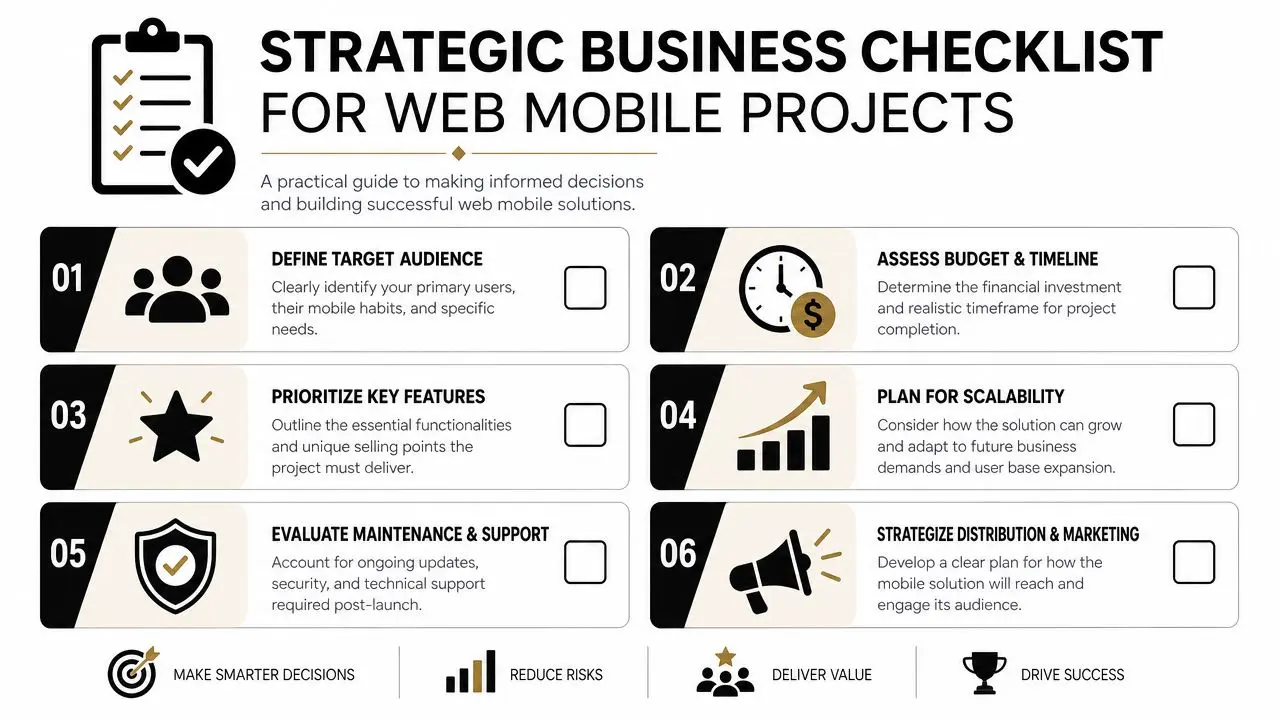
The strongest digital projects start with a business decision, not a technology preference. If the brief begins with “we want an app” before anyone defines the audience, acquisition route, and operational model, you're already carrying avoidable risk.
The UK is a serious mobile market. It accounted for over 26% of European mobile app market revenue in 2023, which reflects a mature ecosystem and strong incentives for organisations to invest in mobile-optimised products, according to these mobile app development statistics. The same source projects global mobile app revenue to rise from $522.7 billion in 2024 to $673.8 billion in 2027. That projection matters because it places UK mobile investment inside a broader expanding market rather than a niche channel.
The questions that matter before build starts
A business-led decision framework is more reliable than a features wishlist.
- •What's the commercial objective? Lead generation, product education, ticket sales, audience retention, training delivery, and campaign engagement point to different platform choices.
- •Who needs to access it first? Existing customers will tolerate more friction than cold audiences arriving from paid media or social.
- •What are you really maintaining? A one-off launch piece and an evolving digital product need different budgets, teams, and governance.
- •How important is speed to market? Fast deployment may favour browser-led routes over app-store dependence.
- •What level of craft is critical? If the visual layer is core to the proposition, allocate for optimisation and content pipeline work, not only front-end build.
What works and what usually doesn't
What works is a focused first release. Pick the critical user journey, support it properly, and leave room for staged enhancement. What usually doesn't work is trying to satisfy every stakeholder in version one. The result is often a bloated product with unclear priorities, too many integrations, and a maintenance burden that outlasts the excitement of launch. A useful discipline is to sort features into three buckets:
| Decision area | Ask this | Why it matters |
|---|---|---|
| Essential | What must work on day one? | Protects the core value of the product |
| Enhancing | What improves the experience if time allows? | Helps sequencing and scope control |
| Aspirational | What belongs in a later phase? | Prevents early overbuild |
Budgeting for the full lifecycle
Clients often think they're budgeting for development. They're really budgeting for production, launch, and ownership. That includes design, prototyping, testing, analytics, updates, and content changes after release. If the project includes heavy motion, 3D assets, or immersive layers, you're also budgeting for optimisation and adaptation across devices. That's why the best commercial conversations don't ask “how much for an app?” They ask “what are we building, who's it for, and what has to be true for it to succeed?”
Partnering for Success with Studio Liddell
The most valuable production partners handle the overlap between concept, craft, and technical delivery. That overlap matters most when a project lives between categories. A campaign that behaves like a product. A children's property that extends from screen content into interaction. An XR experience that still needs the discipline of a polished mobile interface. That's where creative production experience changes the outcome. Teams that already work across animation, games, XR, and app thinking tend to ask sharper questions about asset pipelines, performance ceilings, interaction design, and audience behaviour. They don't just ask what the product should do. They ask how it should feel in the hand. Studio Liddell is one example of that type of partner. Its work spans animation, apps, games, TV advertising, series production, XR experiences, and AI-enhanced production workflows, which is relevant when a brief sits across storytelling and software rather than fitting neatly into one discipline.
Why that matters in practice
A project like BooSnoo for Sky Kids points to transmedia thinking. The challenge in work like that isn't only making assets look on-brand. It's preserving character, tone, and audience fit as an IP extends into digital formats. A project like Dance! Dance! Dance! reflects a different production demand. Mixed reality work has to manage responsiveness, throughput, visual clarity, and technical reliability in live environments. Those are the same habits that improve mobile products. Clear interaction loops, thorough testing, and an honest understanding of what can ship well.
The strongest digital experiences don't separate storytelling from systems. They design both together.
For clients, that usually leads to better scoping and fewer surprises. Creative ambition gets translated into formats, asset plans, and platform choices that can survive contact with real devices and real users.
Frequently Asked Questions
Does AI reduce the need for a proper design and development process
No. AI can speed up parts of ideation, asset generation, coding assistance, tagging, and iteration, but it doesn't replace product thinking. You still need a clear brief, UX logic, visual direction, technical architecture, and QA. In most serious projects, AI works best as a production accelerator inside an already well-run process.
How should we think about maintenance after launch
Treat maintenance as part of ownership, not an optional extra. Browser changes, device updates, analytics findings, content revisions, and bug fixes all continue after release. If the product includes animation, 3D, XR, or external integrations, post-launch support becomes even more important because richer experiences tend to have more dependency points.
What's the first step if we're still unsure whether we need a website, PWA, or app
Start with the audience and the journey. Identify how users will discover the experience, what they need to do in the first session, what level of persistence you expect, and how much device integration really matters. Once those answers are on the table, platform selection becomes much easier.
Can high-end visuals still work on mobile without making the experience feel heavy
Yes, if they're planned properly. The key is to decide early which assets need real-time delivery, which can be simplified, which should be deferred until after initial load, and what fallback the user sees if conditions are poor. Mobile can absolutely support rich visual work. It just doesn't forgive careless asset planning.
When is WebXR a better option than building a full app
WebXR is often the better choice when quick access matters more than deep long-term app usage. It suits campaign-led immersive work, event activations, education demos, and product storytelling where a browser link or QR entry point is part of the strategy. If the experience depends on advanced device integration, repeat usage patterns, or stricter performance control, a dedicated app may still be the better fit.
What should a client prepare before speaking to a development partner
Bring the clearest version of the problem, not a fully solved technical answer. Useful inputs include the business goal, target audience, required content, brand references, examples you like, launch constraints, and any internal approval realities. That gives the production team enough context to shape the right recommendation instead of forcing your brief into the wrong format.
If you're weighing a responsive site, PWA, app, or immersive web experience and want a clearer production path, talk to Studio Liddell. A good first conversation should translate your creative ambition into a realistic platform, scope, and launch plan.