A Guide to Virtual Production Equipment for Creative Studios
When people talk about “virtual production equipment,” they’re not talking about a single gadget. Instead, it’s a whole ecosystem of connected hardware and software, all working together to fuse the physical and digital worlds in real time. The whole point is to move beyond static sets and traditional green screens. With virtual production, you’re creating dynamic, interactive digital environments that let filmmakers and creators see the final shot, visual effects and all, live on set.
The Core Concept Behind Virtual Production
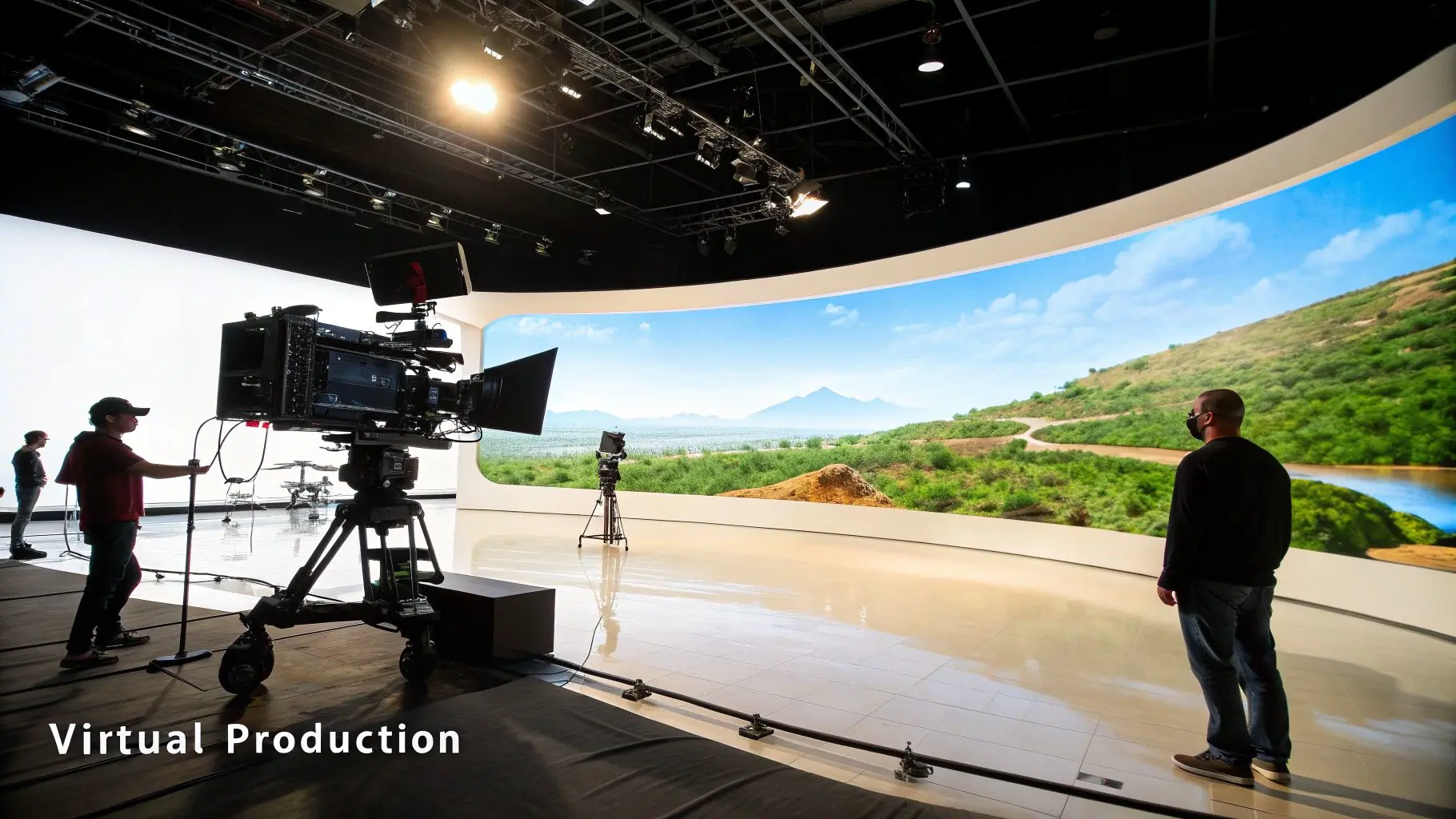
Picture a theatre stage, but instead of a painted backdrop, there’s a massive, high-resolution LED screen displaying a photorealistic world. A camera on set is tracked in 3D space, so every time it pans, tilts, or dollies, the digital background on the screen moves in perfect parallax. This creates a seamless illusion for the camera, making it look like the actors are genuinely _inside_ that virtual location. That’s the magic at the heart of modern virtual production, and it’s a huge leap from older methods. We’re no longer capturing actors against a passive green screen and waiting months to add the VFX in post-production; it's all happening right there, during the live shoot.
Blending the Physical and Digital in Real Time
What makes this whole process click is that it happens instantly. What the camera sees is what the final audience sees, a principle known as "in-camera VFX." This gives the creative team an incredible amount of control on set and comes with some serious advantages:
- •Realistic Lighting and Reflections: The LED panels are a light source, bathing actors and physical props in the same light as the virtual environment. This creates natural, believable reflections and lighting that are incredibly difficult (and expensive) to fake with a green screen.
- •Enhanced Actor Performance: Actors can actually see and react to the world around them. They’re no longer performing in a green void but are truly immersed in the scene, which leads to more grounded and convincing performances.
- •On-the-Fly Creative Decisions: Directors and cinematographers can make changes to the digital world, shift the time of day, move a mountain, or bring in a storm, and see the results immediately.
This fusion of physical and digital tools effectively pulls a huge chunk of the post-production workload into the live-action phase. It speeds up timelines and gives creative teams a level of control that was unthinkable just a few years ago. Our guide to what virtual production is dives even deeper into these benefits.
The UK has quickly become a major hub for this technology. In fact, the UK's virtual production market was valued at USD 1.68 billion and is expected to grow at a healthy 17.6% CAGR. This growth is a direct result of the industry embracing the LED walls, real-time engines, and motion capture systems that power these incredible immersive experiences.
The Essential Hardware for Your Virtual Stage
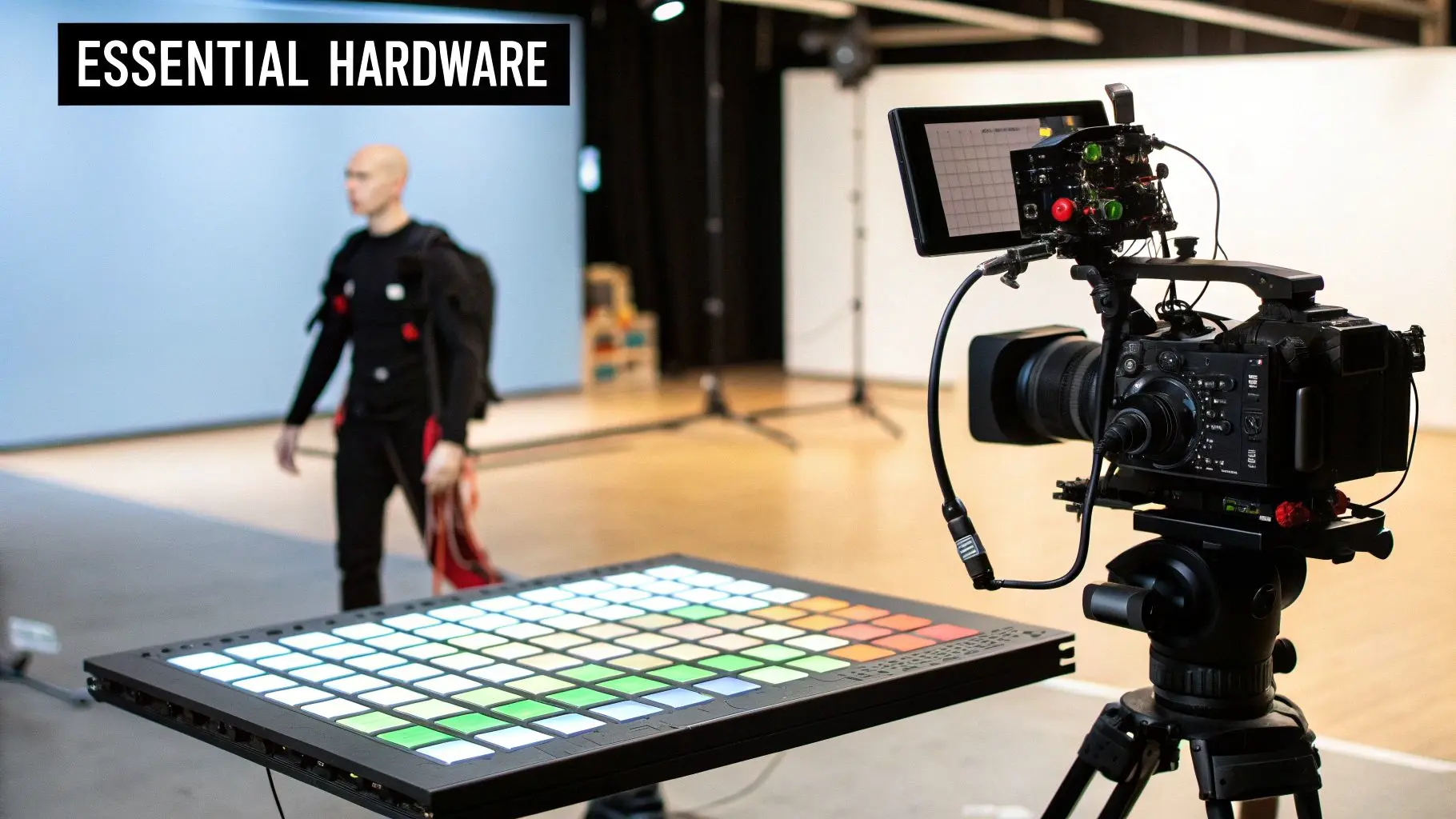
While the software is the creative brain of the operation, it’s the physical hardware that makes up the tangible nervous system of any virtual production. This collection of specialised gear is what makes the magic happen, allowing digital worlds to be captured directly in-camera for a seamless blend of real and virtual. Getting your head around these core components is the first step to building a capable virtual stage or knowing what to look for when you hire one.
The LED Volume
At the very heart of the stage, you'll find the LED volume. But don't just think of it as a massive TV screen. It's so much more than that, it’s a dynamic light source, an interactive set, and a window into another world, all rolled into one. This immersive backdrop is built from high-quality indoor LED wall panels that are pieced together. Individual panels connect to form a huge, curved wall and often a ceiling, wrapping the performance area in your digital environment. When it comes to the technical specs, one thing matters more than anything else: pixel pitch. This is simply the distance between the centre of each tiny LED light. A smaller pixel pitch (say, 1.5mm versus 2.8mm) means a higher resolution. This is crucial because it allows the camera to get much closer to the wall without picking up a moiré pattern, that awful, wavy distortion you see when filming a screen up close. Picking the right pixel pitch is a careful balancing act between your budget and the kind of shots you need to get.
Camera Tracking Systems
For the illusion to hold up, the digital background has to react instantly and perfectly to every move the real camera makes. This is where camera tracking systems come in. They are the essential bridge connecting the physical camera's motion to the virtual camera inside the game engine. There are two main ways this is done:
- •Optical Tracking: This method often uses reflective markers placed on the camera and around the set. Specialised cameras then watch these markers to calculate the camera's precise position and orientation in 3D space.
- •Infrared (IR) Tracking: This system uses IR cameras and markers on the camera rig to do the same job. Solutions like VIVE Mars CamTrack have become popular in professional studios because they're incredibly precise and reliable.
Whichever method you use, the goal is identical: deliver flawless, low-latency tracking data to the real-time engine. Any lag, jitter, or inaccuracy will shatter the illusion in an instant.
Motion Capture and Virtual Cameras
The LED volume creates the world, but other bits of hardware are needed to populate it with life and help you plan your shoot long before the cameras roll. Motion capture (mocap) suits, whether they're optical or inertial, are used to translate an actor's real-life performance onto a digital character in real time. This is non-negotiable for any project that features animated creatures or needs to create a digital double of an actor. Even before stepping on set, creative teams use virtual cameras. These are often just tablets or other handheld devices that let directors "scout" the digital location during pre-production. It allows them to plan shots and block out scenes just as if they were on a physical set, making it a vital part of the previs (previsualisation) workflow. For a closer look at similar immersive hardware, check out this buyer's guide to the modern VR headset for business.
The UK's virtual production scene is on a serious growth trajectory, projected to soar past USD 1.2 million by 2035. This boom is fuelled by the country's world-class gaming and animation sectors. The hardware segment is a huge part of this, with major UK investments in the very tools that make photorealistic virtual sets possible, like volumetric capture stages and synchronised lighting grids.
The Software: Your Virtual World's Engine
If the hardware is the physical stage for virtual production, the software is the director, scriptwriter, and entire special effects department rolled into one. It’s the intelligent core that breathes life into the digital environment, pulling every piece of virtual production equipment together into a single, interactive world. At the heart of this software ecosystem are the real-time game engines. These incredible platforms, born from the video game industry, are now the main driving force behind modern filmmaking and broadcasting. They do the heavy lifting of rendering complex 3D scenes instantly, which means creatives can see the final shot on set, not months later in a post-production suite.
The Two Titans: Unreal Engine and Unity
When you start looking into real-time engines, you'll find the conversation is dominated by two major players. Each has its own army of devoted users and unique strengths, and your choice often boils down to the specific demands of your project and the existing skills within your technical team.
- •Unreal Engine: Developed by Epic Games, Unreal is famous for its jaw-dropping, photorealistic rendering capabilities right out of the box. Its powerful toolset, including Lumen for dynamic lighting and Nanite for handling mind-boggling geometric detail, makes it the go-to for filmmakers chasing that high-end cinematic quality.
- •Unity: Known for its incredible flexibility and vast asset store, Unity is a true workhorse. It has a massive footprint in mobile, AR/VR, and interactive experiences, and its C# scripting environment is a favourite for many developers who find it incredibly intuitive.
For a more detailed look at how these two engines compare for real-time animation and production workflows, producers can find valuable insights here. This isn't just a technical decision; it directly shapes your pipeline, who you hire, and the final look and feel of your project. This image from Unreal Engine's website perfectly illustrates the level of visual fidelity we can now achieve. The digital background isn't just a flat screen; it provides realistic lighting and reflections that interact seamlessly with the physical set and actors.
Unreal Engine vs Unity for Virtual Production
To help you get a clearer picture, here’s a quick comparison of how the two leading real-time engines stack up for virtual production tasks.
| Feature | Unreal Engine | Unity |
|---|---|---|
| Visual Fidelity | Exceptional photorealism out-of-the-box with tools like Lumen and Nanite. The industry standard for film. | Highly capable, but often requires more setup and assets from the store to achieve similar photorealism. |
| Primary Use Cases | High-end filmmaking, broadcast, architectural visualisation, and AAA games. | Indie games, mobile, AR/VR, interactive installations, and increasingly, animation and broadcast. |
| Scripting | Uses C++ and a visual scripting system called Blueprints, which is great for artists. | Primarily uses C#, a language widely known and preferred by a large community of developers. |
| Asset Ecosystem | The Unreal Marketplace offers high-quality assets, though the selection is more curated than Unity's. | The Unity Asset Store is enormous and diverse, offering a vast library of tools, plugins, and 3D models. |
| Learning Curve | Can be steeper for beginners, but Blueprints make many complex tasks accessible without deep coding knowledge. | Often considered more beginner-friendly, especially for those with a background in C# development. |
| Cost & Licensing | Free to use until your product's gross revenue exceeds $1 million USD, then a 5% royalty applies. | Offers various subscription tiers (Personal, Plus, Pro) based on revenue or funding, with no royalty fees. |
Ultimately, both are incredibly powerful. Unreal tends to have the edge for pure cinematic visuals, while Unity's flexibility and developer-friendly environment make it a strong contender for a wider range of interactive projects.
The Broader Software Ecosystem
Of course, it’s not just about the engine. A whole suite of specialised software is needed to keep a production running. Think of asset management tools for tracking thousands of digital files, plugins that pipe motion capture data into digital characters, and render management software that makes the most of your processing power.
This entire software layer is where we're seeing some of the most dramatic efficiency gains. It's the connective tissue that integrates data from camera trackers, mocap suits, and virtual cameras, processing it all in milliseconds to maintain that fragile, all-important illusion of reality on the LED stage.
The UK's adoption of this advanced virtual production equipment is growing at an explosive rate. This is partly fuelled by software that incorporates AI, which can create workflow efficiency gains of up to 30%. The demand for integration services is also booming, with a 21% compound annual growth rate. In fact, Technavio points to the UK as a key growth region, contributing to a global market expected to expand by USD 3.91 billion by 2028. This really drives home just how critical software and AI have become. The road ahead for virtual production is deeply intertwined with artificial intelligence. Exploring innovative AI solutions can unlock even more creative potential. From AI-driven asset creation to intelligent scene optimisation, these tools are quickly becoming indispensable for managing the complexity of modern real-time productions.
Weaving It All Together: Your Virtual Production Workflow
Having all the fancy virtual production kit is one thing, but making it all sing together in perfect harmony? That’s where the real magic happens. A solid workflow is the secret sauce, turning a collection of gear into a seamless, creative powerhouse. It completely flips the script on traditional filmmaking, pulling huge creative decisions out of the lonely post-production suite and right onto the bustling live-action set. Forget the old, rigid assembly line of filmmaking. Virtual production isn’t linear. It’s a dynamic, looping process where pre-production, the shoot itself, and final visuals all blur into one collaborative dance.
The Pre-Production Revolution
Long before a single light is switched on, the virtual production workflow is already humming. This first phase, what we call “previs” (short for previsualisation), is where you build the digital soul of your project. This isn't about rough storyboards anymore; we’re talking about creating a living, breathing, interactive version of the film's entire world. During this crucial stage, your team gets busy with a few key tasks:
- •Virtual Scouting: Imagine your director and cinematographer popping on VR headsets to walk through their digital sets. They can wander through a complete environment, line up camera angles, and plan out entire scenes just like a real location scout, but with the god-like power to shift a mountain or dial in a perfect sunset on a whim.
- •Asset Creation & Optimisation: Your 3D artists are the architects here, building every digital piece of the puzzle, characters, props, sprawling landscapes, that will eventually light up the LED volume. Critically, these assets have to be ridiculously optimised to render in real-time without grinding your multi-million-pound setup to a halt.
- •Technical Planning (Techvis): This is the nitty-gritty stage where you figure out if that crazy, swooping camera shot is actually possible. The team locks down the precise camera moves, lens choices, and tracking data needed to pull off the director’s vision, heading off expensive headaches before they can happen on set.
Nailing this prep work means that by the time you're ready to shoot, most of the big creative and technical hurdles have already been cleared. This diagram shows how the software pieces of the puzzle fit together in a typical real-time pipeline.
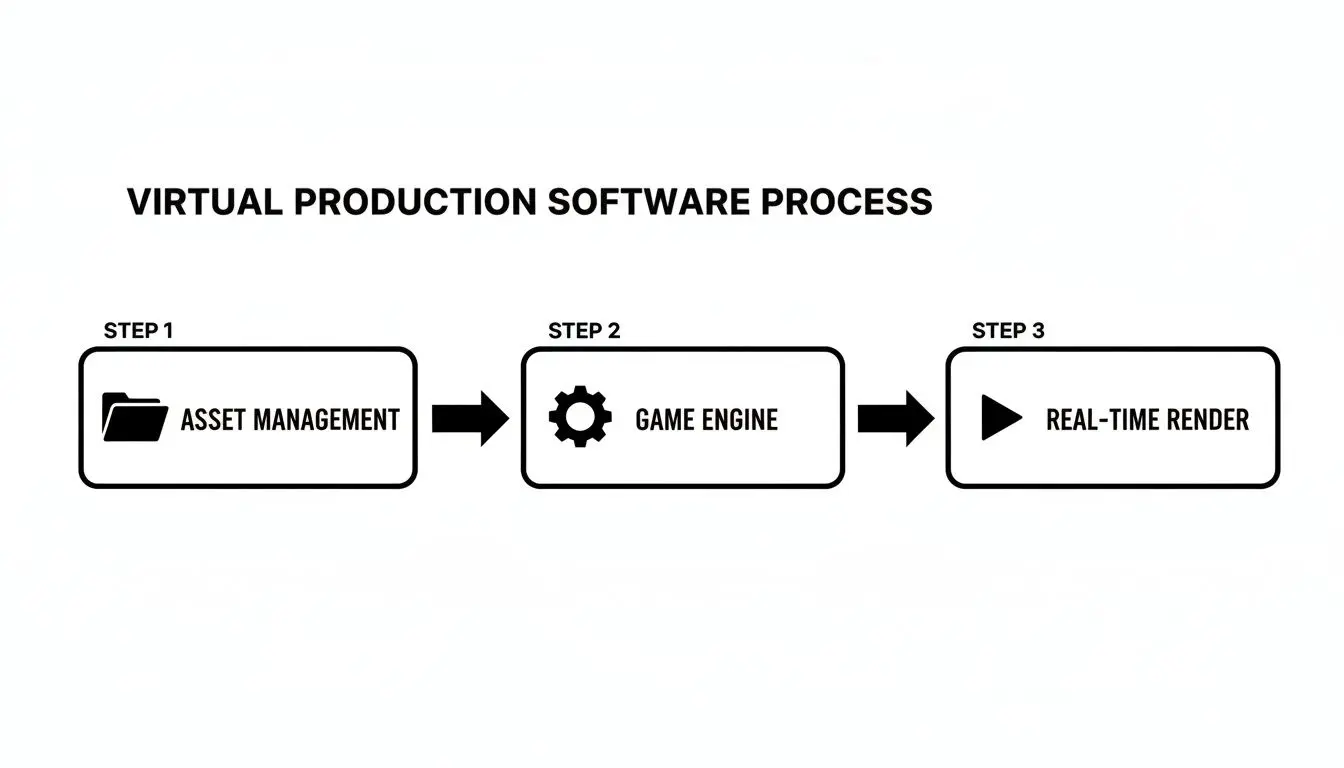
It maps the journey from organising all your digital files to feeding them into the game engine, which then does the heavy lifting to splash that real-time render across the LED volume.
On-Set: A Real-Time Creative Hub
A day on a virtual production stage feels electric. It's nothing like the siloed departments of old-school filmmaking. Here, the director, cinematographer, and VFX supervisor are huddled together, working in a tight, fast-paced feedback loop. The nerve centre of it all is often called the “brain bar,” a bank of computers where technicians pilot the real-time engine. From this station, they can tweak the digital world instantly based on creative feedback from the floor.
This on-the-fly creativity is the whole point of a virtual production workflow. The director is no longer forced to say, "We'll fix it in post." Instead, they can say, "Let's nudge that virtual tree two feet to the left," and see the change appear, perfectly lit and reflected, through the camera lens in seconds.
This constant dialogue is key. The cinematographer might ask for the virtual sun to be lowered to catch a more dramatic flair, while the director guides the actors, who are now fully immersed in and reacting to the stunning world projected around them.
Post-Production Gets a Makeover
Perhaps the biggest shake-up this workflow brings is to post-production. By capturing what we call "final pixel" imagery directly in-camera, the soul-crushing, time-consuming task of green screen compositing is massively reduced. The gorgeous lighting, the subtle reflections, the epic backgrounds, they’re already baked into the shot. Now, this doesn’t mean post-production disappears entirely, but its job changes dramatically. The focus shifts from heavy-duty VFX construction to fine-tuning and polishing. Think of it more like finishing:
- •Final colour grading to perfect the mood and look.
- •Painting out any stray tracking markers or bits of on-set gear.
- •Adding any complex digital elements that were too demanding to render in real time.
By front-loading all that creative and technical energy into previs and the live shoot, this cohesive workflow makes the entire filmmaking process more efficient, more creatively fulfilling, and, crucially, far more predictable.
Rent or Buy? Your Virtual Production Gear Dilemma
So, you’re ready to dive into virtual production. It’s an exciting leap, but it comes with a big question that can shape your studio's future: should you buy all this specialised gear, or is renting project-by-project the smarter move? This isn’t just about the budget; it's a strategic call that depends on your workflow, business goals, and the technical team you have in-house. Choosing the right path means taking a hard look at the total cost of ownership versus the sheer flexibility of hiring. For most studios starting out, renting is the logical first step. It gets you access to state-of-the-art virtual production equipment without needing millions in upfront capital, letting you get your feet wet before taking a multi-million-pound plunge.
The Case for Renting Equipment
Renting is often the most practical option, especially for independent creators, ad agencies, or production houses without a constant flow of VP projects. The biggest win? You dodge the massive initial investment in tech that depreciates incredibly fast. Here’s why it works so well:
- •Lower Upfront Cost: You completely sidestep the huge capital spend needed for an LED volume, tracking systems, and powerful render nodes. That cash can be better spent on what matters most: your cast, crew, and story.
- •Access to the Latest Tech: This industry moves at a breakneck pace. The best gear on the market today could be yesterday's news in 18 months. Renting ensures you’re always using the best tools available, without getting stuck with obsolete hardware.
- •No Maintenance Headaches: Owning an LED wall means dealing with dead pixels, endless calibration, and software updates. When you rent, the stage provider handles all the maintenance and troubleshooting, a massive, often hidden, cost of ownership.
- •Expertise Included: Rental packages from proper VP stages almost always come with a trained crew. You get immediate access to experienced Unreal Engine operators, tracking specialists, and engineers who know the system inside and out, which massively lowers your project’s risk.
When Buying Makes Financial Sense
While renting is the go-to for many, there's a tipping point where ownership becomes a real strategic advantage. This usually happens for larger studios with a packed production schedule, broadcasters, or universities building out dedicated media programmes. Buying your own virtual production equipment is a serious commitment, but it pays off when the conditions are right. Owning your stage means you have unlimited time for R&D, crew training, and creative experimentation, all luxuries you just can't afford when the rental clock is ticking.
For studios with high usage, the long-term cost of owning can eventually dip below the cost of perpetual renting. It shifts a recurring production cost into a fixed asset, giving you far greater financial predictability and control over your entire pipeline.
Before you even think about signing a purchase order, you have to be ready for the full commitment. This goes way beyond the hardware cost. You’ll need to build a dedicated space, hire a highly skilled technical team to run and maintain everything, and set aside a budget for ongoing upgrades. The decision to buy isn't just about getting gear; it's about building an entire in-house capability. It’s a powerful move, but one that needs careful financial planning and a clear vision for how you'll keep it busy.
Assembling Your Virtual Production Dream Team
All the high-tech virtual production gear in the world is useless without the right crew behind the controls. It's the people, not just the pixels, who create the magic. A successful virtual production set is a unique blend of traditional filmmaking craft and real-time digital artistry, demanding new roles and a completely different on-set dynamic. Building this team isn't about finding siloed technicians. It’s about recruiting specialists who are comfortable working at the intersection of film, live events, and video game development. These are the creative partners who translate a director's vision into a digital reality, live on set. For any producer, understanding these key roles is the first step toward a smooth, creative, and efficient shoot.
The New-Era Specialists You Need
This modern way of working brings roles to the call sheet that simply didn't exist a decade ago. Each one is absolutely vital to keeping the complex web of hardware and software humming in perfect sync. Here are the essential players you'll need:
- •Virtual Production Supervisor: Think of them as the big-picture leader, the one who oversees the entire technical and creative pipeline. They’re the crucial link between the director and the tech crew, making sure the technology serves the story, not the other way around.
- •Unreal Engine Operator: Often just called the "UE Operator," this person is the hands-on pilot of the virtual world. You'll find them at the "brain bar," controlling the Unreal Engine, making on-the-fly adjustments to lighting, environments, and effects as the director calls them out.
- •Brain Bar Technician: This role is all about the hardware and networking that powers the whole operation. They manage the render nodes, data flow, and system stability, ensuring the brain bar has all the processing power it needs with zero bottlenecks.
- •Tracking Specialist: This is a job that demands absolute precision. The tracking specialist is responsible for the camera tracking system, handling the calibration, management, and troubleshooting to ensure every physical camera movement is perfectly mirrored by the virtual camera. It's what maintains the seamless illusion.
How New Roles Collaborate with Old
The real measure of success on a virtual production set is how these new specialists mesh with the traditional departments. The UE Operator doesn't replace the Director of Photography (DP); they become their new creative partner. The DP can now ask for the "golden hour" sun to be held for three hours, and the UE Operator makes it happen instantly.
This collaborative spirit is the biggest shift. Instead of a linear, hand-off process, virtual production creates a live feedback loop. The Gaffer works with the UE Operator to blend physical and digital light, while the Production Designer collaborates with 3D artists from the earliest stages of previs.
Ultimately, this structure flattens the traditional hierarchy and fosters a more interactive and agile creative environment. It demands a crew that is not only technically proficient with virtual production equipment but also made up of excellent communicators who are ready to solve problems in real time. For producers, this means hiring for cross-disciplinary skills and a collaborative mindset is just as important as hiring for technical expertise.
Frequently Asked Questions
Jumping into the world of virtual production can feel a bit overwhelming, especially when it comes to the gear. We get a lot of questions from producers, creatives, and studio managers trying to figure it all out. Here are some of the most common ones we hear.
What's the Bare Minimum I Need to Get Started?
To dip your toes in, you can start with a powerful computer, a real-time engine like Unreal Engine or Unity, a camera with a tracking sensor, and a simple green screen. This kind of "green screen VP" setup won't give you the incredible, immersive lighting you get from a full LED volume. But it's a fantastic, low-cost way to get your head around the core principles. It forces you to master real-time compositing and camera tracking before you sink a huge budget into hardware, making it a perfect starting point for smaller studios.
How Is an LED Volume Different from a Green Screen?
The biggest difference is _when_ the magic happens. With a green screen, you shoot your actors against a blank backdrop and then digitally add the world in post-production, long after everyone has gone home. An LED volume, on the other hand, displays the final, photorealistic background _live on set_. This gives you two massive advantages:
- •Actors Can Actually Act: The cast can see and react to the virtual world around them, which leads to far more natural and believable performances. They're in the scene, not just pretending in a green void.
- •Light and Reflections Look Real: The light from the LED screens casts completely authentic lighting and reflections onto your actors and any physical props. Trying to fake that with a green screen is a nightmare in post-production and rarely looks as good.
It all comes down to capturing the in-camera final pixel, which saves an enormous amount of time and guesswork later on.
Do I Really Need a Specialised Team for This Gear?
For anything more than a hobbyist setup, yes. A specialised crew isn't just a good idea; it's essential. You'll need key people like an Unreal or Unity Operator to drive the digital scene, a Tracking Specialist to make sure the real and virtual worlds are perfectly locked together, and a Virtual Production Supervisor to oversee the whole technical pipeline. These aren't your typical film crew roles. They require a unique mix of skills from filmmaking, live events, and video game development. Trying to run a complex shoot without this expertise is a fast track to technical headaches and expensive delays.
Can This Equipment Be Used for More Than Just Film and TV?
Absolutely. We're seeing virtual production tech pop up in all sorts of industries because it's just so versatile. It's now a go-to for creating immersive corporate presentations, dynamic backdrops for live-streamed events, high-end architectural visualisations, and even product design prototyping. Beyond that, it's the core technology for building VR and AR training simulations. Basically, any project that could benefit from visualising a digital world in real-time is a perfect fit for these powerful tools. At Studio Liddell, we bring years of experience in animation, XR, and real-time production to every project. Whether you're planning an ambitious series or developing an immersive experience, our team has the technical and creative expertise to bring your vision to life. Learn more about our services.