Unreal Engine AR Development: The Production Guide
A team can have Unreal Engine installed, a convincing hero asset on screen, and still be nowhere near a shippable AR product. The first device test exposes the gaps: tracking drifts, the camera feed feels disconnected from the render, the frame rate collapses when the lighting is realistic, and nobody has decided who owns platform certification or device testing. That gap matters in the UK. The augmented reality market reached an estimated £3.25 billion in 2024, with forecasts projecting more than £20 billion by 2030, according to Studio Liddell's UK producer guide to augmented reality games. Yet adoption remains uneven. The Centre for Digital Built Britain recorded AR adoption in the UK architecture, engineering and construction sector at only 1.5 out of 5, compared with 2.5 out of 5 for VR in its immersive technology report. That combination creates a genuine production challenge. Unreal Engine AR development isn't mainly about making a virtual object appear in a camera view. It's about building a dependable pipeline around tracking, content, performance, testing, staffing, and delivery constraints. This guide focuses on the decisions that determine whether a commercial UK project survives beyond the prototype.
Setting Up Unreal for Augmented Reality
A successful editor preview proves very little. The first production build can expose missing permissions, unsupported tracking features, signing problems, or assets that overwhelm a target phone. Set up the delivery constraints before the art team commits to a large scene. Start by choosing the device group and interaction model. Mobile AR typically needs camera passthrough, plane detection, light estimation, touch input, and tight memory control. A headset build may require hand tracking, spatial anchors, room boundaries, controller input, and spatial audio. Those choices determine the project template, plugins, input mappings, and test devices from the first commit.
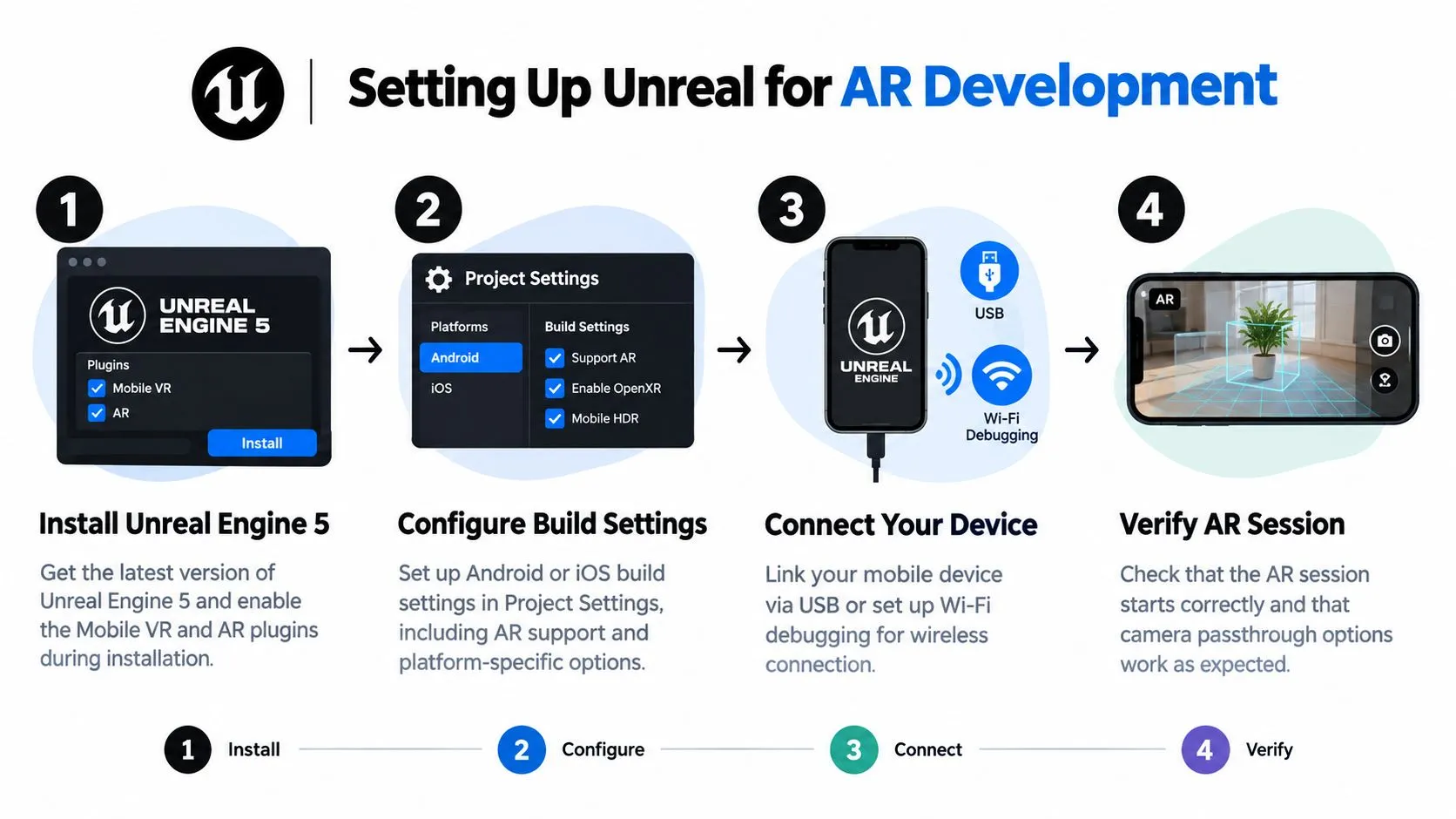
Configure the project before importing content
In Project Settings, enable the ARSession and World_Tracking features before importing any content. Then activate only the plugins required by the agreed device matrix. Set supported orientations, package identifiers, camera permissions, minimum platform versions, and signing ownership with the client. For UK commercial work, record who supplies certificates and who approves store submissions. Those decisions often create more schedule risk than the initial Blueprint work. Create Android and iOS configurations early, even if the first prototype targets one platform. Test camera access and session startup on real hardware rather than relying on the editor. Keep the first scene plain enough to isolate tracking, permissions, and rendering issues. Unreal's AR framework provides a shared layer for sessions, tracked geometry, pins, hit tests, and light estimation. It can keep interaction logic portable while platform services remain behind the framework. Direct ARKit or ARCore work makes more sense when the experience depends on platform-specific tracking behaviour or capabilities the common layer does not expose cleanly. That choice affects hiring too. A general Unreal developer may deliver the shared pipeline, while specialist platform work needs engineers who can diagnose native device behaviour. Use these development notes on Unreal projects as background, then validate the actual build on the devices the client will support. Confirm that the session starts, the camera feed appears, a detected plane accepts content, tracking loss produces a controlled response, and the application recovers after permission changes.
Practical rule: Treat device access, build signing, plugin compatibility, and named ownership as production dependencies, not final-mile administration.
Integrating AR Foundation and Platform SDKs
The integration choice should follow the business requirement. A cross-platform retail activation with similar interactions on Android and iOS benefits from a common AR layer. A specialist experience that depends on face tracking, advanced occlusion, or a particular headset may justify platform-specific work. Unreal teams generally choose between a shared framework approach and direct platform plugins. The shared route keeps session management and interaction logic more portable. Native ARKit and ARCore paths give you closer access to device capabilities, but they also create separate behaviours, debugging paths, and acceptance criteria.
Use the abstraction layer when consistency matters
Set up the common AR session first. Keep the project's gameplay or interaction code concerned with meaningful events, such as “surface found”, “object placed”, or “tracking lost”, rather than embedding iOS and Android checks throughout every Blueprint. A practical structure looks like this:
- Create a platform service layer. Put session start, hit testing, plane visibility, and tracking-state handling in dedicated components.
- Expose capability checks. Let the application know whether a device supports the required feature before presenting the related interaction.
- Keep content independent. The same placement logic should receive a transform and confidence state, not a platform-specific implementation detail.
- Record device behaviour. Log tracking loss, unsupported features, and permission failures during internal testing.
Drop down to native services with a reason
Direct ARKit or ARCore integration is appropriate when the native capability is central to the proposition. Face effects, detailed people occlusion, depth behaviour, or a platform-specific spatial experience may need lower-level access. The price is duplicated testing and a greater risk that the two versions feel functionally different. Android projects need particular attention to Google Play Services for AR, device support, permissions, and the Google ARCore plugin. This Unreal guide to Google Play Services for AR provides relevant implementation context. On iOS, verify camera permissions, signing, deployment settings, and ARKit availability on the devices the client will distribute. Don't let Blueprint convenience hide architectural debt. Use Blueprints for rapid iteration and designer-owned interaction, while C++ is useful for reusable platform services, data handling, and performance-sensitive systems. The dividing line should be ownership and stability, not ideology.Optimising for Mobile Performance
Mobile AR fails at first. The scene looks impressive in the editor, then a real phone heats up, reduces performance, and turns object placement into a sluggish experience. Market coverage often emphasises hardware investment. Grand View Research's UK AR outlook estimates that hardware represented 83.23% of UK AR revenue in 2025, which is a useful reminder that device capability and content efficiency have to be considered together. There isn't one universal mobile benchmark that makes an AR build safe. The right target depends on the device range, scene complexity, camera resolution, and interaction model. The production method is to define a minimum device, a preferred device, and a failure state, then profile all three throughout development.Make the frame budget visible
Start with Unreal's profiling tools, including Unreal Insights, the GPU Visualiser, stat commands, and on-device traces. Measure the application while the camera is active and the heaviest interaction is running. An empty test scene can hide the very problems that appear once shadows, translucent materials, UI, and tracked objects are combined. Prioritise the causes that repeatedly create trouble:- •Texture memory: Compress mobile textures, use sensible resolutions, and avoid loading every product variation into memory at launch.
- •Draw calls: Merge static materials where the visual result allows it, reduce unnecessary transparency, and remove hidden geometry.
- •Materials: Keep shader graphs restrained. Reflections, layered transparency, and expensive custom nodes can cost more than the model itself.
- •Lighting: Prefer baked or simplified lighting where possible. Dynamic lighting should earn its place through a visible improvement.
- •Effects: Disable costly bloom, depth of field, motion blur, and screen-space effects unless testing proves they support the experience.
- •Geometry: Use LODs and culling. A model that looks excellent at arm's length doesn't need the same complexity when it sits across a room.
Virtual shadow maps and high-end post-processing are especially easy to leave enabled because they look good in a desktop preview. On mobile, they can increase GPU load and heat, so test them against the minimum device rather than approving them from a workstation capture.
The useful question isn't whether a feature runs once. It's whether it remains responsive after the camera, tracking, assets, UI, and thermal limits are all active.
Profile the worst realistic moment
Build a stress scene that includes the maximum number of visible assets, the densest interaction, and the most demanding lighting state. Test cold launch, repeated placement, tracking loss, backgrounding, and long enough use for thermal behaviour to appear. Record the device, build configuration, scene, and reproduction steps for every issue. Scalability groups should be deliberate, not a last-minute collection of quality sliders. Define what changes between low, medium, and high settings, then ensure each level preserves the interaction's essential visual cues. A lower tier might reduce shadow quality and material complexity while retaining object silhouettes, placement feedback, and readable labels.
Building a Production-Ready Workflow
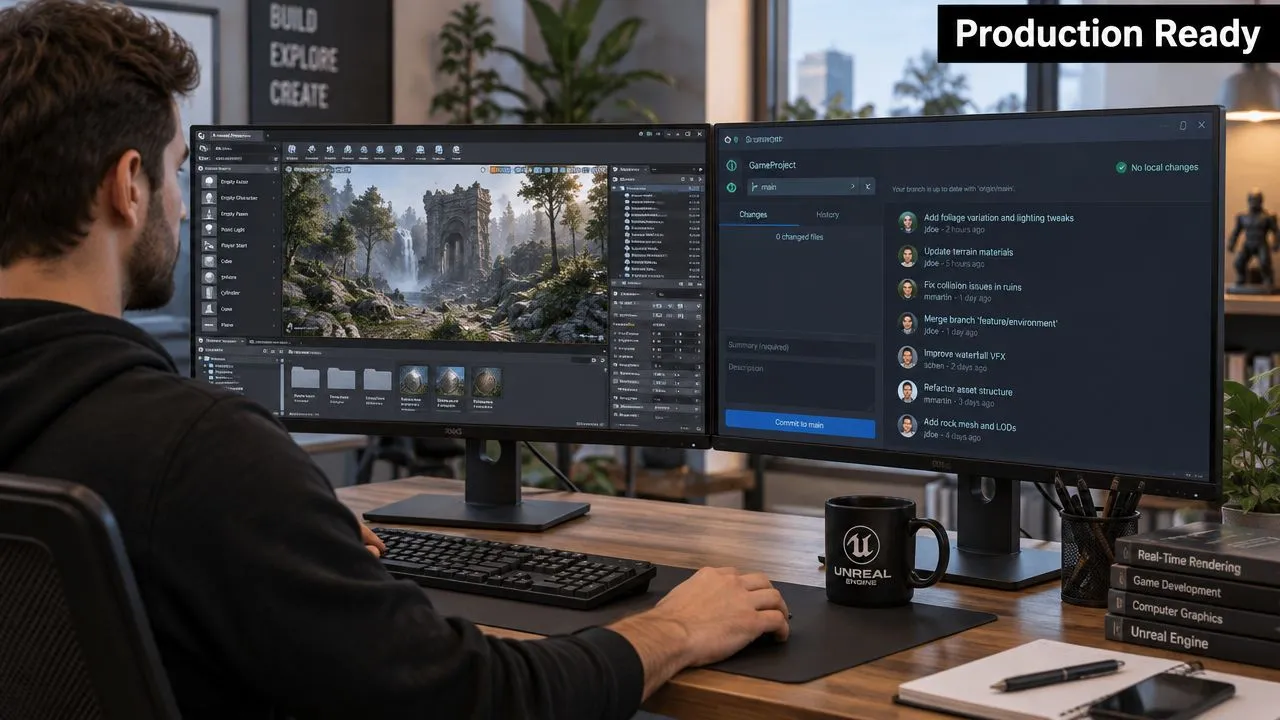
A prototype proves that the idea can exist. A production workflow proves that a team can change it without breaking the build. Unreal AR projects combine source control, large binary assets, platform-specific configuration, 3D review, device testing, and client approvals, so a casual folder structure won't hold for long. The pipeline should make ownership obvious. Artists need predictable asset paths and naming conventions. Designers need stable interaction components. Developers need reproducible builds. Producers need a visible record of what was tested, on which device, and against which acceptance criteria.
Organise assets for change
Use a source-control system suited to the team and the project's binary footprint. Perforce is common for large Unreal teams because it handles sizeable binary assets and file locking in a way that fits art production. Git can work well with disciplined repository management and appropriate large-file tooling, particularly for smaller teams that already have strong Git practices. Keep source assets outside the runtime content structure where possible. Store approved exports, materials, textures, animation, collision, and metadata in predictable locations. Every imported asset should have an owner and a review state. That makes it easier to replace a model without losing the performance decisions attached to it. LOD planning belongs in the asset brief. Ask where the object will be seen, how close the user can approach it, whether it needs animation, and whether the camera will reveal its underside or interior. AR content is exposed to unpredictable backgrounds and lighting, so a model that looks acceptable in a controlled render may need stronger silhouettes and simpler materials in actual world conditions.
Build validation into every handover
A useful handover includes the packaged build, device list, known limitations, interaction notes, asset versions, and a short capture of the intended behaviour. Test builds should carry a visible version identifier. Without that, a client recording a bug may be showing an obsolete package. The UK talent market makes this discipline more important. IT Jobs Watch reports 35 permanent UK jobs citing Unreal Engine in the six months to 23 September 2026, with a median annual salary of £65,000 and a 10th to 90th percentile range of £49,525 to £85,000. The same source reports a £65,000 median outside London, so the staffing challenge isn't confined to the capital. That means a producer should budget for senior technical judgement, not just implementation time. If an internal team needs additional capacity, a resource such as Hire LATAM developers can help structure an external hiring search, but the lead team still needs clear technical ownership, code review, and release accountability. For commercial work, Studio Liddell's production guidance for AR is relevant to the broader question of turning a demonstration into a dependable delivery pipeline. The principle is straightforward: approve the device and asset constraints before the schedule assumes unlimited fidelity.
Deploying Across Mobile and HMDs
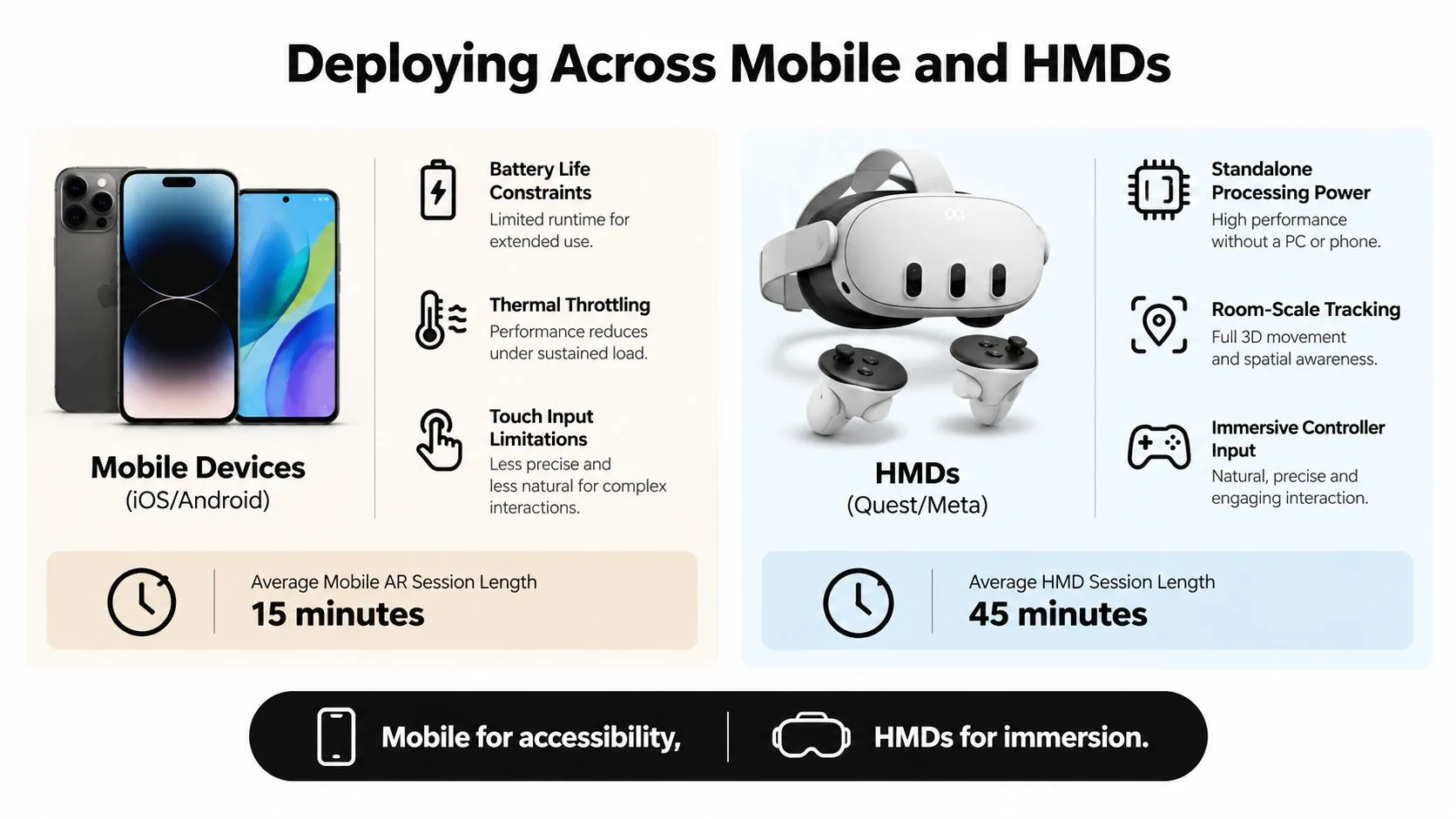
Mobile AR and head-mounted mixed reality can share content, but they shouldn't share every design assumption. A phone gives the project reach and familiar touch input, while a headset gives the user a more immersive view of the room and can support controllers, hands, or spatial interaction. The correct choice depends on where the experience will be used and who must access it.
Choose mobile for access
Mobile deployment works well for retail, packaging, public campaigns, product previews, and experiences where users bring their own device. The camera is familiar, the distribution path is established, and the user doesn't need to wear equipment before reaching the first interaction. The constraints are equally clear. Touch input competes with the need to hold and aim the phone. Battery and thermal limits restrict sustained rendering. Camera quality, depth sensing, operating-system permissions, and device support vary widely. A mobile AR interface should therefore use large, legible controls, short interaction loops, clear tracking feedback, and a graceful response when the surface or lighting isn't suitable. Don't make the mobile version a shrunken headset application. Design for one-handed use, interruptions, changing orientation, and users who won't read a long onboarding sequence.
Choose HMDs for immersion
Standalone HMDs suit controlled installations, training, events, location-based entertainment, and spatial experiences where the environment and session can be managed. Controllers or hand tracking support richer interaction, and spatial audio can direct attention without covering the view with interface elements. The trade-off is operational. Headsets require charging, cleaning, fitting, guardian or boundary setup, staff support, and a space that can accommodate safe movement. If the application runs at an event, throughput and reset time matter as much as visual quality. If it runs in an enterprise, device management, updates, privacy, and user onboarding become part of the deployment plan. A cross-platform strategy is sensible when the core proposition is shared and the client can fund separate interaction and optimisation passes. It isn't sensible when the team is duplicating the mobile build on a headset and hoping the controls translate. Spatial computing needs its own comfort, audio, locomotion, and boundary decisions.
Mobile is usually the distribution decision. HMD deployment is usually the experience and operations decision.
Validating Safety and User Experience
A polished AR demo can still create risk. Users may walk while watching the screen, place virtual content over a real obstruction, or continue after tracking has degraded. Test the software and the person using it, not just the frame rate. Begin with a written risk review. Record whether users stand, walk, turn, reach, or share space with others. Define physical limits, remove movement that does not support the task, and make pausing or exiting possible without a difficult gesture. For headset deployments, configure and test the boundary system in the actual venue. A development-room setup does not account for the furniture, lighting, access routes, or crowd flow of a live installation.
Test the complete journey
Use staged validation:
- Technical checks: Confirm permissions, session startup, tracking recovery, device rotation, audio, interruption handling, and clean exit.
- Interaction checks: Observe users placing objects, recovering from failed detection, interpreting prompts, and completing the primary task without verbal coaching.
- Comfort checks: Look for awkward reach, visual clutter, rapid camera movement, forced refocusing, and time lost searching for controls.
- Environmental checks: Test bright and dim areas, reflective surfaces, patterned floors, crowded backgrounds, noise, and changing network conditions.
- Operational checks: For public use, rehearse charging, cleaning, reset, content updates, support escalation, and incident logging.