Real Time 3d Rendering
Real-time 3D rendering generates interactive 3D imagery at 30 to 90 or more frames per second so viewers see the result instantly, unlike offline rendering, which computes each final frame over minutes or hours. The right choice depends on whether interaction, personalisation, spatial exploration or rapid versioning creates more value than maximum final-image control. The popular advice is to start with an engine and chase frame rate. That's backwards. A real-time project succeeds when its production pipeline, audience experience and commercial objective agree. A beautifully lit scene that drops frames, misses a delivery specification or gives users nothing meaningful to do is expensive decoration. Real-time rendering has moved beyond games. It now supports virtual production, XR training, exhibitions, retail demonstrations, broadcast graphics and interactive brand experiences. The UK games sector provides an important foundation because interactive 3D applications have long needed responsive computer-generated scenes. Yet measuring that ecosystem has always been difficult. The 2016 UK Games Map project from Ukie and Nesta found that only 41% of mapped companies were registered under the correct government industry codes, so official classifications captured less than half of the relevant businesses accurately. This guide takes a producer's view. It covers what real-time 3D rendering does, when offline rendering remains the better choice, how Unity and Unreal differ in practice, why motion-to-photon latency matters, which optimisation techniques protect the frame budget, and how a project moves from brief to delivery. It also looks at Studio Liddell examples across XR, animation and technical storytelling, then turns the technical choices into a commissioning framework.
Why Real-Time 3D Rendering Changed Production Forever
The biggest shift isn't that engines can display attractive images quickly. It's that rendering has become part of the decision-making process. On a traditional animated production, a director may approve a storyboard, wait for an animatic, review lighting tests, and then wait again for final frames. In a real-time environment, the team can change the camera, move a light, adjust scenery and test a player interaction while the scene is running. That doesn't remove creative judgement. It moves more of it earlier, when changes are still affordable. Virtual production makes the change visible on set. The UK virtual-production market is estimated at $194.9 million in 2025, with a projection of $770.7 million by 2030, equivalent to a projected 31.6% compound annual growth rate, according to the UK virtual-production market estimate. The same estimate projects television-series revenue rising from $48.9 million in 2025 to $215.8 million in 2030, a 34.6% projected CAGR. These are market estimates, not official government statistics, but they show why real-time backgrounds, camera tracking and on-set visualisation have become production tools rather than specialist game technology.
The useful question isn't “Which engine is best?” It's “Where does live feedback change the outcome?”
A museum may need visitors to explore a technical system from different angles. A broadcaster may need a digital set that can respond to a presenter. A training provider may need a simulation that records decisions. A brand may need one asset that can become a configurator, event installation and social film. Each use case values responsiveness differently. By the end of a properly scoped project, you should be able to decide whether real-time rendering earns its place, which compromises are acceptable, and which parts of the pipeline should remain offline.
What Real-Time 3D Rendering Actually Means
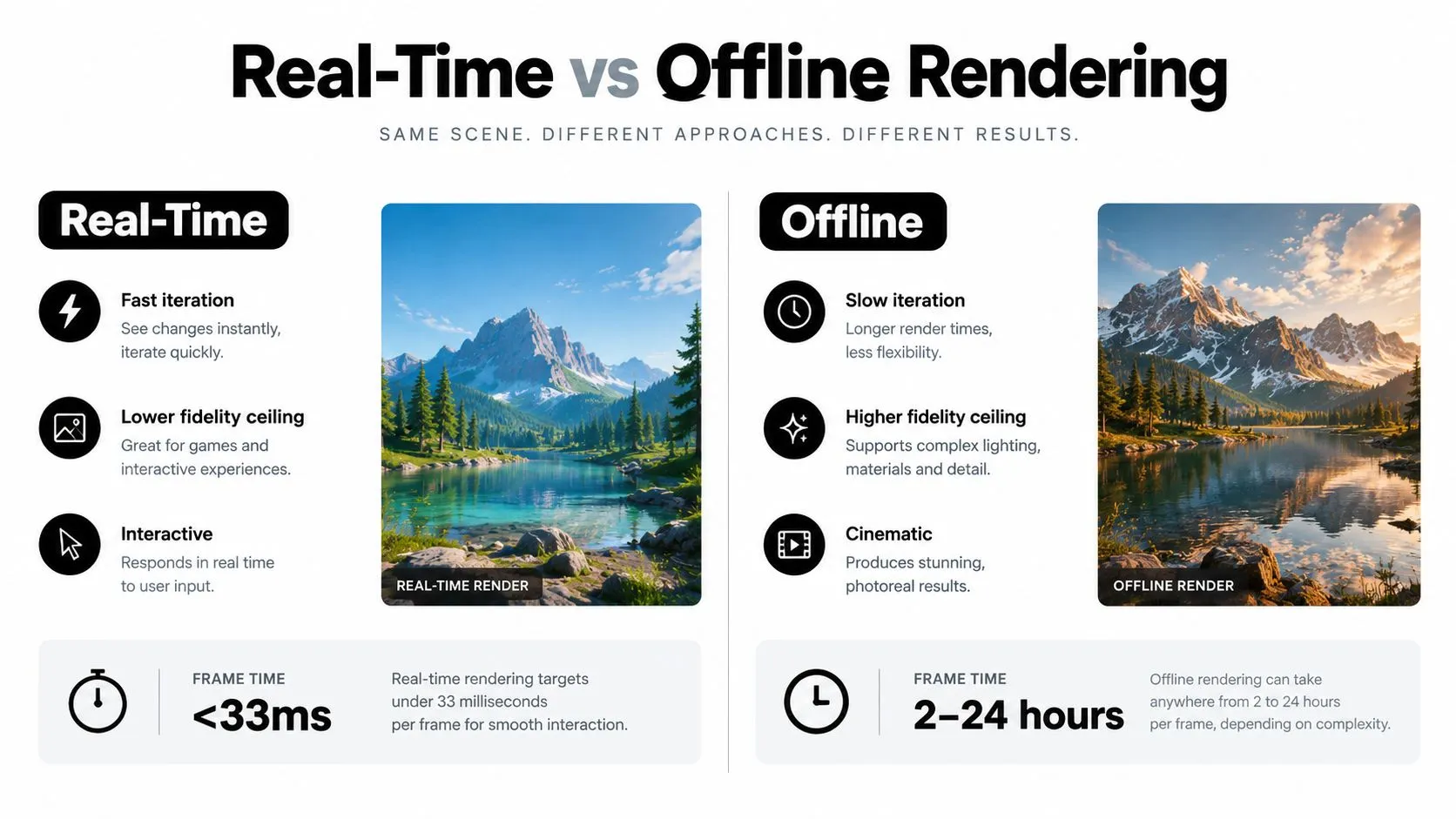
Think of offline rendering as filming a performance and editing the finished recording. The director controls every detail before the audience sees it. Real-time rendering is closer to live theatre. The stage, lights and performers must be ready for the next audience action, and the system has only a short interval to produce each visible moment. At 30 frames per second, the engine has about 33 milliseconds to complete the work for one frame. At 90 frames per second, common in headset experiences, that falls to roughly 11 milliseconds. Within that budget, the application must process input, update the simulation, prepare geometry and materials, calculate lighting, draw the scene, composite the result and present it to the display. The loop usually looks like this:
- Capture input. The system reads a controller, mouse, camera, eye tracker or headset pose.
- Update the world. Characters move, physics resolve, particles change and interactive logic runs.
- Prepare the view. The engine selects visible geometry, applies level of detail and builds draw calls.
- Render and composite. Materials, lights, shadows, reflections, post-processing and interface layers are combined.
- Display the frame. The result is scanned onto the screen before the next update.
What the engine is balancing
Geometry describes the shape of the world, from a character's facial mesh to a building model. More geometry can improve silhouette and detail, but it increases memory, processing and draw requirements. Materials describe how surfaces respond to light. A carefully authored material can create convincing leather, glass or painted metal without modelling every microscopic feature. Poor material choices can make a high-polygon asset look artificial. Lighting establishes mood, readability and spatial cues. Real-time lighting can be dynamic and interactive, but shadows, reflections and global illumination can consume substantial budget. Camera and compositing determine what the viewer sees. Depth of field, colour grading, particles and interface overlays may improve the image, yet each effect competes for time. Offline rendering can spend far longer solving one frame because the audience isn't waiting for an input response. Real-time rendering must decide what matters most in the current view, then deliver a coherent approximation consistently. That's not an inferior version of offline work. It's a different production contract.Real-Time Versus Offline Rendering and When to Use Each
Real-time rendering wins when the audience needs to do something. They may walk through a virtual space, select a product configuration, change a camera angle, rehearse a procedure or interact with a character. The engine's responsiveness becomes part of the product. Offline rendering wins when the audience needs a controlled final image. A cinematic advert, title sequence or high-end film shot may benefit from longer calculations for complex lighting, reflections, particles and compositing. The viewer doesn't need to alter the scene, so the production can spend time on each frame rather than preserving a live response.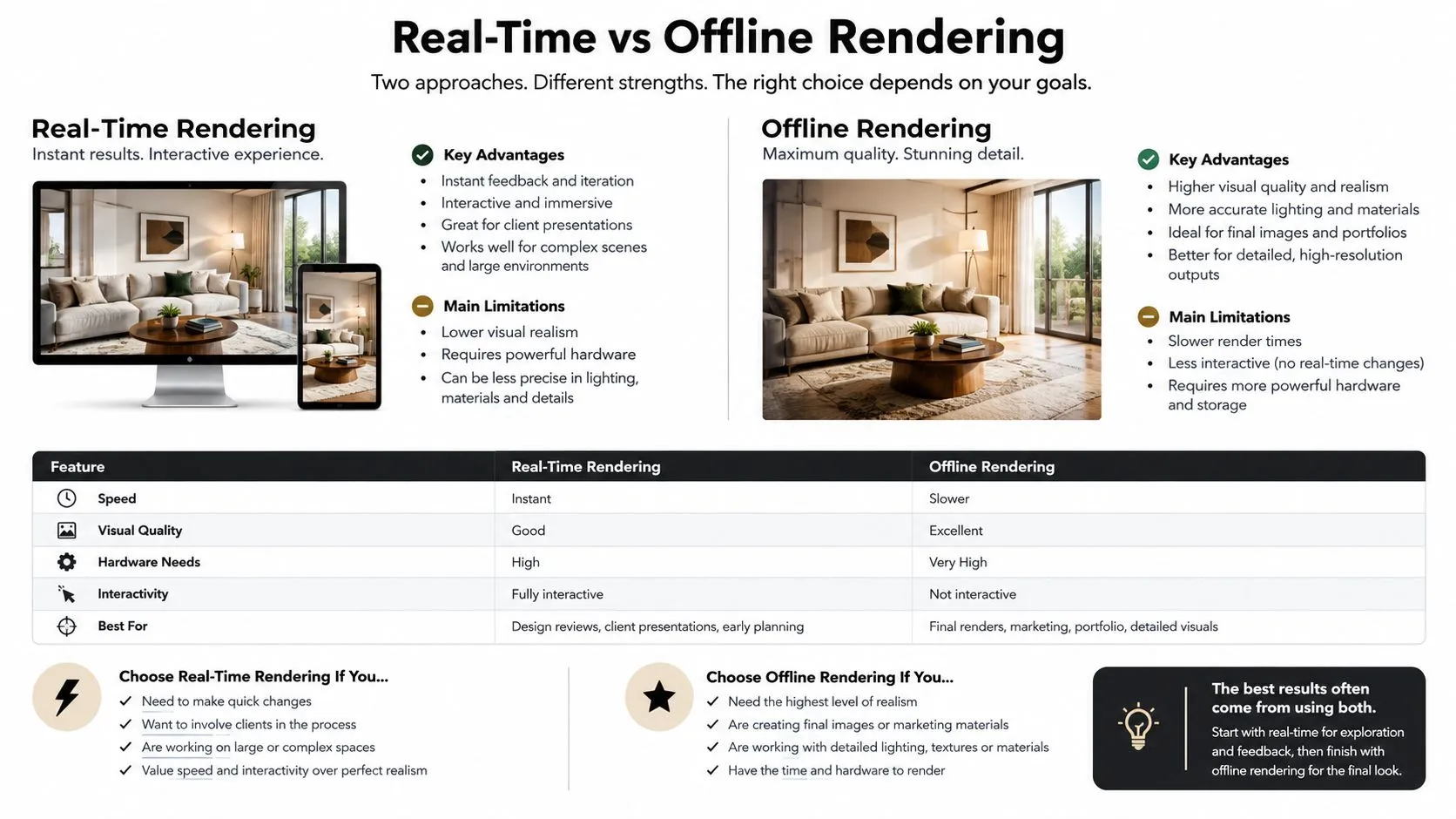
Real-Time vs Offline Rendering at a Glance
| Criterion | Real-Time Rendering | Offline Rendering |
|---|---|---|
| Audience experience | Interactive, responsive and exploratory | Fixed, edited and tightly controlled |
| Iteration | Immediate visual feedback | Slower review because frames must be calculated |
| Fidelity | Strong visual quality within a strict frame budget | Higher ceiling for complex final-frame effects |
| Cost structure | Investment in optimisation, target hardware and testing | Investment in render time, storage and finishing |
| Asset reuse | Well suited to games, XR, configurators and virtual production | Well suited to films, adverts and final broadcast masters |
| Main risk | Frame drops, latency, platform incompatibility and maintenance | Long revisions, render queues and expensive late changes |
| Best commercial fit | Interaction, personalisation, spatial exploration and rapid versioning | Consistent final images where live response adds little value |
Engines, Hardware, and the Reality of Latency
Engine selection should follow the delivery environment and the team's production habits. Unreal Engine often suits projects that prioritise high-end visual quality, virtual production, cinematic lighting and large environments. Unity often suits cross-platform deployment, mobile AR, lightweight applications and teams that need to target a broad range of devices. Those are useful tendencies, not universal rules. A capable team can produce a strong result in either engine. A poorly organised team can waste time in either one. Existing skills, asset standards, source-control discipline, build automation, profiling experience and platform knowledge usually affect the schedule more than a feature comparison. For a wider software comparison before making a shortlist, browse best rendering software, then test the candidates against the actual target device and project constraints. Studio Liddell's discussion of the best rendering engine for performance and cost is also useful when the decision has to account for production overhead rather than visual demonstrations alone.Latency is a system property
In XR, the number shown by a GPU profiler isn't the whole experience. A University of Salford study measured immersive-environment delay at an average of 605 milliseconds in one direction and 414 milliseconds in the other, with graphics rendering contributing approximately two-thirds of total latency and event propagation and simulation contributing the remaining third, as reported in the University of Salford study. The practical lesson is uncomfortable but important. A faster renderer can still leave users with an unpleasant experience if network transport, input capture, simulation ticks, compositor work, display scan-out or synchronisation introduces delay elsewhere. Instrument the complete motion-to-photon path:- •input capture and tracking
- •network transport
- •simulation and event propagation
- •render submission and GPU execution
- •compositor timing
- •display presentation
Measure percentile latency and jitter, not only the average. A stable frame budget appropriate to the display refresh rate is more useful than a headline average that hides occasional long frames. The producer's job is to make the team prove where time goes before approving a hardware upgrade or a visual cut.
Optimisation Techniques That Protect the Frame Rate
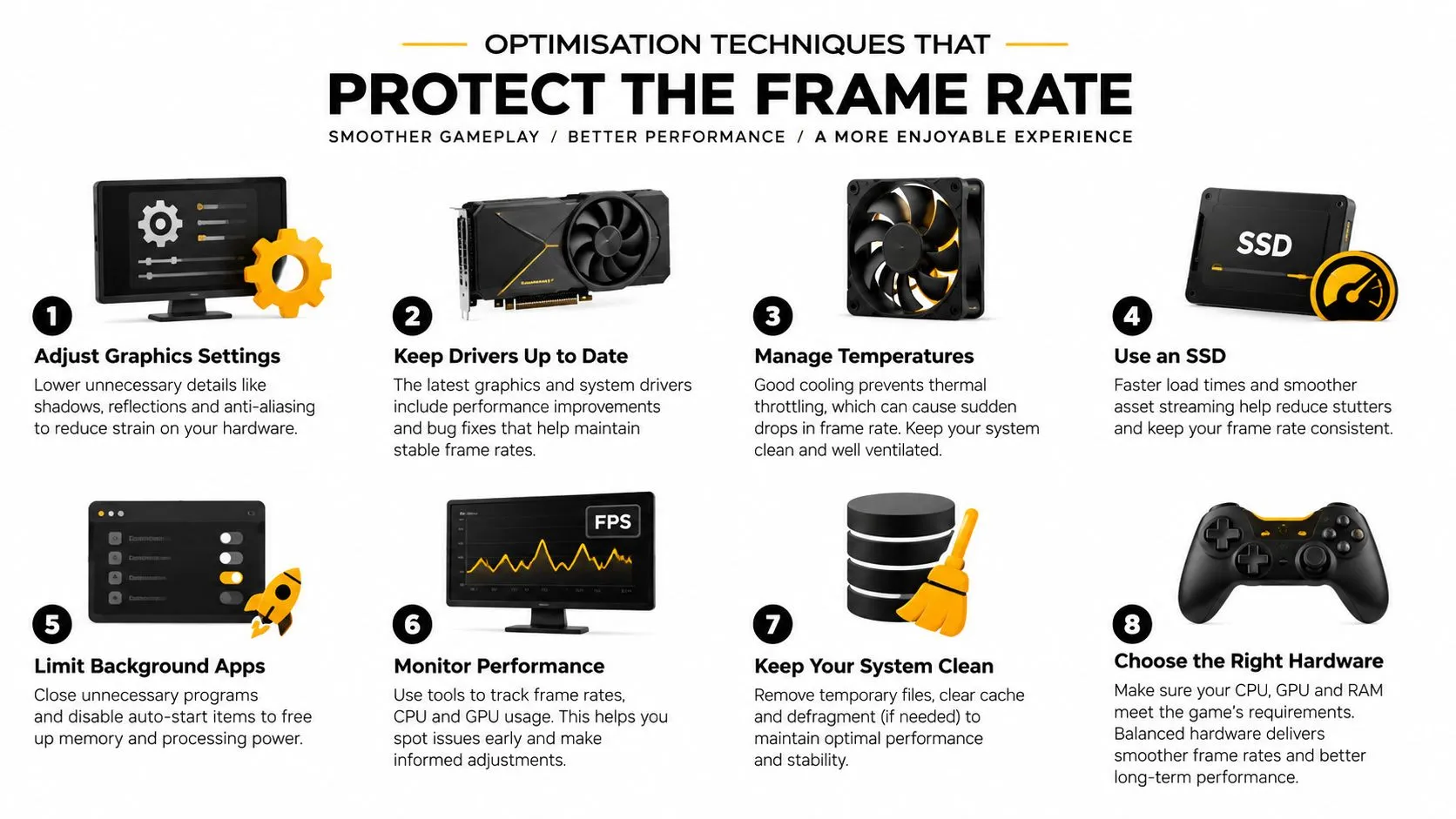
Frame rate protection starts before anyone touches a mesh or a material. Profile a representative scene on the target device, then sort the problem by frame time, not by instinct. If the loss is coming from simulation, submission, bandwidth or presentation, cutting triangles may save asset effort without buying back performance. A useful optimisation pass removes work the viewer will never miss, then spends the recovered budget where it will be seen.
Reduce what the viewer doesn't need
Level of detail systems replace dense meshes with simpler versions as distance increases. They are effective, but poor thresholds can cause popping in silhouettes, shadows and specular response. Occlusion culling prevents the engine from drawing objects blocked by walls or other geometry. It usually pays off most in interiors and structured spaces, and less in open environments where visibility is harder to predict. Dynamic resolution drops internal render resolution during heavy moments to keep interaction responsive. The trade-off is obvious in UI, fine texture detail and thin lines, which can soften just when the scene is busiest. Shader simplification cuts expensive material calculations. That often means reducing layered effects, transparency cost or reflection complexity. Material savings also come from better asset choices. Normal maps preserve surface character while cutting geometry, as explained in what normal mapping is and how it powers real-time 3D. Texture atlasing and draw-call batching reduce state changes and submission overhead. They can improve runtime efficiency, but they also make authoring, versioning and per-asset texture changes less convenient. On a real production, that matters. A technically tidy atlas can become a bottleneck if artists need to keep revising one small element late in the schedule.
Spend quality where the eye is
Some of the best gains come from concentrating quality, rather than lowering it everywhere. Foveated rendering keeps high sampling density where the viewer is looking. Reprojection reuses information from earlier frames instead of shading every pixel again. Brunel University research combined eye-tracked foveated rendering with previous-frame reuse on an Oculus DK2 at 1182 × 1464 pixels per eye. The system achieved real-time frame rates within the headset's VSync limits, and users reported that differences from fully rendered images were barely perceptible. The catch is reliability. Eye-tracking dropouts, fast gaze shifts, unstable edges and head movement can expose the shortcut quickly, especially in XR and virtual production work where viewers are free to look for problems. Use a simple review sequence:
- Establish a high-quality reference render.
- Apply gaze-contingent shading or sample-rate reduction.
- Test head motion, rapid gaze changes and peripheral movement.
- Compare frame-time variance alongside visible artefacts.
- Validate on the intended headset and display conditions.
Practical rule: Approve optimisation only after reviewing a moving scene on target hardware, under the slowest expected interaction.
Production Pipelines From Brief to Broadcast Delivery
A real-time pipeline still begins with a creative brief and a script. The engine doesn't replace planning. It makes poor planning more expensive because unresolved creative decisions become interactive systems, reusable assets and platform-specific builds. Start by breaking the script into a shot list with timings, asset descriptions and practical production information. The Watershed and BFI NETWORK animation-production guide identifies the animatic as a key budget and timing control. It also makes the essential production relationship explicit: a budget needs a schedule, and once the animatic is locked, producers can estimate how long each shot will take.The sign-off gates
Brief and script. Define the audience, platform, interaction model, visual references, accessibility needs and success measure. A headset training module, a broadcast advert and an exhibition installation may all use the same engine, but they need different production contracts. Previsualisation and animatic. Test timing, camera language, player flow and shot complexity before final assets receive detailed lighting and materials. A producer should challenge a sequence that looks expensive without advancing the story. Asset creation and integration. Build models, rigs, materials, animation and audio against the target platform. Establish naming conventions, version control and import rules before the project fills with one-off exceptions. Lighting, rendering and compositing. Decide which elements remain dynamic and which can be baked, cached or finished offline. Keep hero moments visually rich, but don't let a single shot dictate the performance budget for the entire experience. QA and delivery. Broadcast delivery is a production stage, not an administrative afterthought. The BBC requires network television programmes to be delivered as AS-11 DPP files, and suppliers must complete editorial and technical checks for sound, picture quality and faults that could affect viewing, as set out in the BBC technical delivery requirements. Dialogue must be clear and understandable to a first-time viewer. Online and social outputs need their own preparation. The BBC specifies a social editing proxy of 1920 × 1080 H.264 at 12 Mbps, with stereo audio at 320 kbps, while broadcast masters can be AS-11 MXF or ProRes 422 HQ. Graphics may require a 1920 × 1080 ProRes 4444 .mov with an enabled alpha channel, alongside clean versions, an After Effects-compatible project and separate WAV stems at 48 kHz and 24-bit, as described in the BBC online content requirements.XR Use Cases and Studio Liddell Case Examples
Real-time rendering earns its keep when it changes what people can understand, test or experience. Studio Liddell's work gives that principle several different forms, from event gameplay to spatial storytelling and technical communication.
Four different production problems
Dance! Dance! Dance! is a mixed-reality game for events, where the challenge is not only visual quality. The experience needs a clear game loop, readable feedback, reliable tracking and enough throughput for an event environment. Real-time rendering supports the immediate relationship between player action and visual response. The relevant success test is whether participants understand what to do and whether the installation keeps moving, not whether every surface reaches cinematic fidelity. Aurora demonstrates a different use of the medium, a VR short shaped from script through direction, performance capture, spatial sound and optimisation. In this context, the engine is part of the storytelling system. Camera position, presence, sound placement and viewer agency affect how the audience receives a scene. The technical work must protect emotional timing as carefully as it protects frame time. BooSnoo for Sky Kids shows why real-time thinking can matter even when the primary output is children's animation. Extending a beloved IP from series production into digital shorts requires consistency in character performance, visual language and production assets. A reusable pipeline can help the team adapt a world across formats, while broadcast and platform requirements still determine the final checks. GeoEnergy NI applies visual storytelling to complex technical communication. Technical animation isn't successful because it contains more detail. It succeeds when stakeholders can understand a system, process or idea that would otherwise remain abstract. Real-time tools can support iteration with subject-matter experts, allowing the team to test camera angles, diagrams, environments and explanatory sequences before committing to final delivery. A broader introduction to spatial brand experiences can be found in this practical discussion of the future of augmented reality from DigiDevice. For producers, the useful question is still the same: what does the audience need to explore, change or understand? For studios weighing capture, assets, interaction and finishing together, this practical guide to virtual-production workflows provides a useful production perspective. Real-time XR can support training scenarios, exhibition configurators, retail product demonstrations and brand activations. The measurable outcome might be clearer assessment, faster product explanation, more useful audience feedback or a stronger event experience. The technology is only valuable when that outcome is defined before the team starts modelling.Costs, Timelines, and Your Next Steps
Real-time projects are difficult to price from a visual reference alone. A still image tells you about the intended appearance. It doesn't tell you how many users interact at once, which devices need support, whether content changes after launch, how much data the system records, or whether the same asset must serve a film, headset and live installation. The first useful budget conversation is therefore about scope behaviour, not polygons. Ask what the audience does, what the system must remember, how quickly the team needs to respond, and which outputs need formal delivery approval.A practical scoping checklist
- •Objective: Define the commercial, educational or communication result in observable terms.
- •Audience: Identify who uses the experience, where they use it and what accessibility support they need.
- •Interaction: Separate passive viewing from navigation, configuration, collaboration, scoring or assessment.
- •Platform: Name the headset, mobile device, desktop, LED volume, kiosk or event hardware.
- •Performance: Set a frame-rate and latency target appropriate to the display, then reserve budget for simulation, compositing and presentation.
- •Content: List characters, environments, variants, animation, spatial audio, interfaces and localisation.
- •Delivery: Specify broadcast masters, social cut-downs, app builds, installation packages, analytics and source handover.
- •Success: Choose measures such as completion, comprehension, repeat use, configuration choices, training assessment or stakeholder approval.
Funding benchmarks can help producers sense-check a plan, but they aren't universal production prices. The BFI National Lottery Short Form Animation Fund allows eligible projects to request between £30,000 and £120,000 in production funding, and supported projects are expected to be completed and delivered no later than 18 months after the production-finance agreement is executed, according to the BFI fund guidance. The benchmark is useful because it connects a creative proposal to a schedule, budget and finance plan. It doesn't mean an XR installation, series or technical animation should be priced inside the same range.
Plan around the skills you actually have
The UK talent question deserves direct treatment. The games workforce fell from 28,516 in May 2024 to 27,347 in September 2025, while 491 companies cut 3,655 full-time roles and 513 studios added 2,571 positions, according to reporting on the UK games industry workforce. Only 7% of vacant UK games roles were open to new entrants, which creates a difficult future pipeline. That reality changes how organisations should commission work. Keep the decisions that define the product close to the client and creative lead. Standardise assets, naming, materials and review procedures. Outsource specialist work when the requirement is bounded and testable, such as rigging, technical art, shader optimisation, platform certification or a defined environment package. Don't treat general 3D modelling as a substitute for real-time production expertise. Interactive work requires profiling, lighting judgement, simulation design, deployment knowledge, device testing and an understanding of how assets behave under live constraints. A studio that has shipped broadcast animation may need additional engineering support for an event game. A game team may need animation direction and editorial discipline for a broadcast series. Regional planning matters too. 80% of the UK games workforce is based outside London, according to Ukie's response to the workforce demographics survey. A commissioning model that assumes every specialist must work in one London-based team can exclude capable partners and make staffing harder than necessary.
The decision rule
Choose real-time rendering when interaction, personalisation, spatial exploration or rapid versioning creates the value. Choose offline rendering when the audience needs a controlled final image and live response would add technical cost without improving the result. Choose a hybrid when stakeholders need real-time exploration during production but the final public output needs offline finishing. The next step should be a short concept sprint, not a full production commitment. Define one representative scene or interaction, test it on the target hardware, measure the complete pipeline, and use the result to confirm asset scope, staffing, schedule and delivery risk. That small proof should answer practical questions: can the experience sustain the required response, can the team author content efficiently, and does the interaction improve the intended outcome? --- Studio Liddell develops 3D and 2D animation, Unity and Unreal XR experiences, virtual production, games and technical visual storytelling from concept through delivery. Visit Studio Liddell to discuss a real-time pipeline audit, a VR or AR concept sprint, or a production scoping call for your next interactive project.