Best Rendering Engine : Performance & Cost
A studio can spend weeks perfecting a hero shot and still lose the job if the render engine drags review cycles into the next client meeting. That tension is now sharper in the UK, where V-Ray and Corona Renderer still dominate architectural production habits, while real-time review tools have moved from novelty to production infrastructure. The choice is no longer just about image quality, it's about whether the pipeline supports approvals, iteration, and delivery without hidden friction.
| Engine | Core architecture | Workflow strength | Typical fit |
|---|---|---|---|
| V-Ray | CPU and GPU, production ray tracing | Strong balance of speed and realism | Arch-viz, ads, mixed production pipelines |
| Corona Renderer | CPU-focused, photoreal bias | Stable still-image output | Architectural stills and interiors |
| Arnold | CPU-first, offline rendering | Predictable high-end shading | Film and TV final frames |
| Redshift | GPU-biased, production rendering | Fast iteration on complex scenes | Broadcast graphics, motion, animation |
| Octane | GPU-biased, look-dev friendly | Responsive visual development | Style-led commercials and product work |
| Unreal Engine | Real-time engine | Interactive review and walkthroughs | XR, presentations, architectural marketing |
| Unity | Real-time engine | Broad deployment flexibility | XR, apps, interactive experiences |
A practical buyer doesn't ask only, “Which engine looks best?” The better question is which engine fits the studio's scene complexity, hardware, and review culture. If you want a useful adjacent read on production bottlenecks, best FFmpeg API for 2026 is a good reminder that render decisions rarely live in isolation.
Introduction to Rendering Engine Selection
A producer quotes a client on Tuesday, the art director asks for three lighting directions on Wednesday, and by Friday someone wants a walkthrough version for a presentation deck. That's where rendering-engine choice stops being a software preference and becomes a pipeline decision. In the UK market, the centre of gravity still sits with arch-viz, where V-Ray and Corona remain the most widely used tools in architectural production, while real-time tools are increasingly tied to review and immersive workflows (CG Channel on the 2021 CGarchitect survey). The hidden costs show up fast. A renderer that looks perfect in a comparison video can still slow a studio down if it breaks shader compatibility, forces asset rebuilds, or makes farm configuration awkward. That's why the right choice often depends on whether a team needs final-frame fidelity, interactive feedback, or a hybrid path that supports both.
Practical rule: if the engine doesn't fit the handoff between modelling, look-dev, review, and delivery, the image quality won't save the schedule.
For UK studios, the market signal is clear. Real-time rendering is now a practical standard for immersive and interactive production, with Unreal Engine positioned as a leading choice for client presentations, VR, and walkthroughs in G2's 2026 category guidance (G2's 3D rendering category). That matters because the studio buying decision is rarely about a single shot. It's about whether the engine supports film, TV, XR, architecture, or marketing work without making every project a custom rebuild. The rest of this guide focuses on the part most reviews miss, the migration impact. Engine changes ripple through asset naming, material translation, review tools, and even scheduling assumptions. If a studio is also managing animation delivery, a production lens like the one used in Studio Liddell's animation process overview is helpful because it reinforces a simple truth, the engine only works if it fits the full route from brief to delivery.
Overview of Rendering Engine Architectures
At a technical level, the main split is still CPU, GPU, and real-time. CPU renderers such as Arnold and Corona lean on broad compute stability and predictable offline output. GPU-focused engines such as Redshift and Octane shift more work onto graphics hardware, which changes both speed and memory behaviour. Real-time engines such as Unreal Engine and Unity take a different route altogether, prioritising immediate visual feedback and interaction over purely offline output.
Solver design shapes the workflow
That architectural choice affects more than render speed. CPU renderers often tolerate heavier scenes and more conservative production habits, while GPU engines reward teams that keep shaders clean, geometry efficient, and memory use under control. Real-time tools sit on a different axis again, because they let directors, clients, and technologists make decisions inside the scene rather than waiting for a render pass. The comparison becomes more interesting when you look at production intent. Arnold is still a familiar option in film-style pipelines where offline control matters. RenderMan brings similar high-end pedigree. V-Ray straddles multiple camps, which is why it shows up so often in mixed architectural and motion workflows. Redshift pushes hard on GPU throughput, and Octane stays attractive where look development speed matters. Unreal Engine and Unity belong in the real-time bucket, but they're not interchangeable, because one can be tuned for high-end interactive presentation while the other often appeals to broader deployment and app integration needs.
What the UK market is actually standardising on
UK arch-viz doesn't look like a single-engine market. It looks like a short list of mature tools, with survey data showing V-Ray and Corona Renderer still holding the largest presence in architectural production (CG Channel on the 2021 CGarchitect survey). That's a useful signal because architectural visualisation is one of the clearest tests of whether an engine can support photorealism, interoperability, and repeatable output under deadline. Studios comparing architectures should think in terms of workflow fit, not feature bragging rights. The strongest tool for final frames is not always the strongest tool for approvals, and the fastest tool in a viewport is not always the cheapest tool to maintain. For readers wanting a narrower comparison angle, Studio Liddell's Unreal vs Unity guide is a sensible companion piece because it frames engine choice around production context rather than raw spec sheets.
Comparing Technical Differentiators of Top Engines
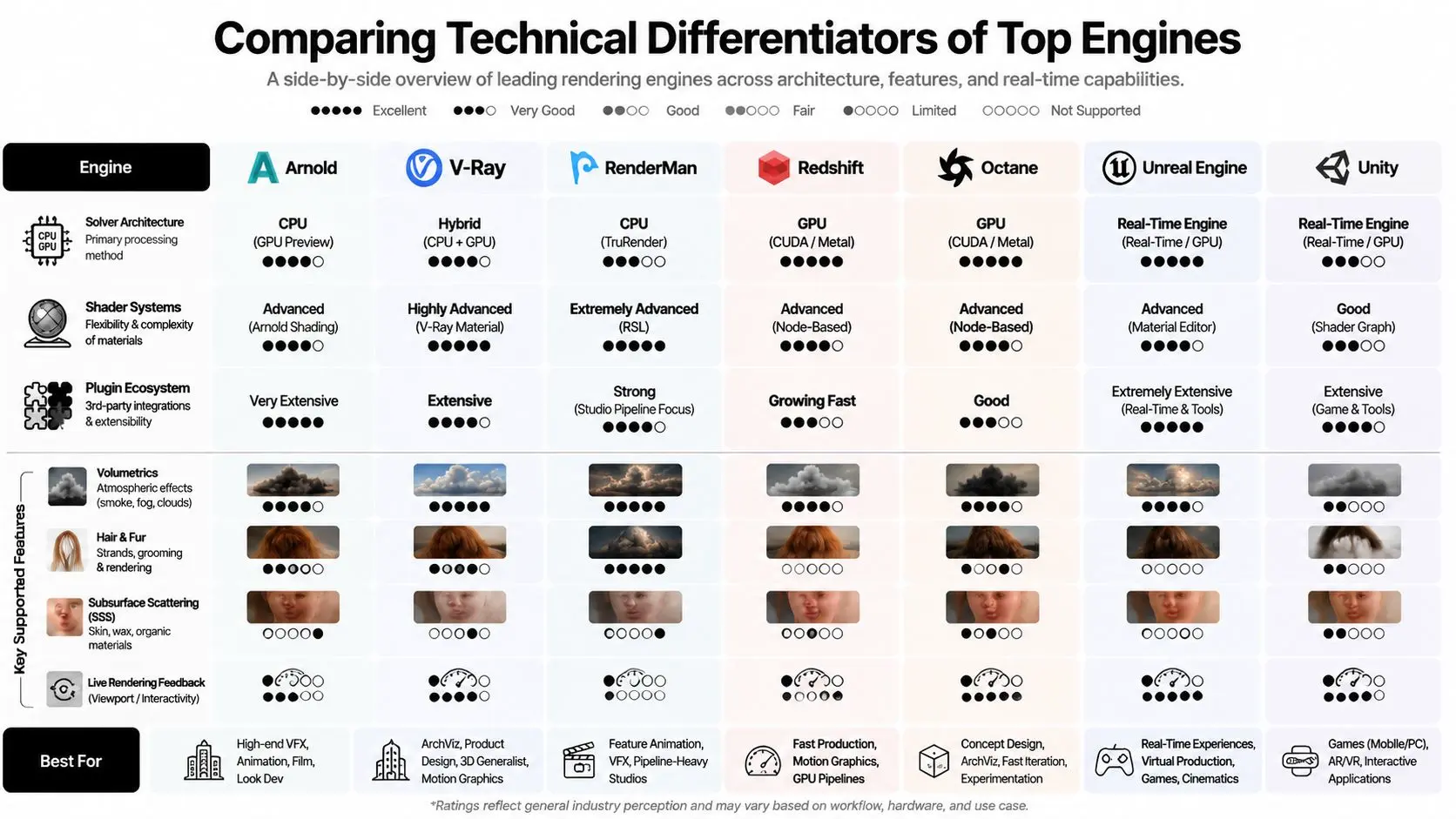
The most reliable way to compare engines is to ask four questions, what solver does it use, how does it handle materials, how broad is the plugin ecosystem, and how strong are the features that matter in production. Those features include volumetrics, hair and fur, subsurface scattering, and live feedback. The engines often separate less by headline quality than by how gracefully they handle edge cases.
Side by side, the differences become operational
Arnold and RenderMan remain strongest in offline fidelity and large-scale production habits. V-Ray is the most adaptable of the established production engines because it sits comfortably in both CPU and GPU-minded pipelines, which is one reason it keeps showing up in arch-viz and mixed commercial work. Redshift tends to win when GPU throughput and responsiveness matter more than absolute solver breadth. Octane is attractive in look development contexts because artists can get to a polished image quickly, even if the studio later needs to manage limitations elsewhere in the pipeline. Unreal Engine and Unity deserve a separate frame. They're not trying to compete with Arnold on the same axis, because their value lies in interactivity, walkthroughs, and stakeholder review. That distinction is why real-time rendering has become a production standard in UK workflows that need presentations, VR, and client-facing iteration (G2's 3D rendering category). If the output is a controlled presentation, real-time often wins. If the output is a locked final image for print or film delivery, offline rendering still has the edge.
The wrong engine often fails quietly, first in shader translation, then in lighting consistency, then in farm time.
For a studio already thinking about rendering software in broader design terms, Armox Labs' comparison of top rendering software options is useful because it reinforces the same point from a different angle, the best choice depends on the kind of decision-making the client expects.
Hidden strengths matter more than feature lists
The overlooked differentiator is how an engine behaves when a production gets messy. Hair-heavy characters, layered atmospheric effects, and skin shading can expose weaknesses that never show up in generic demo scenes. A game-leaning real-time engine may still be ideal for a walkthrough, but if the project needs hero creatures, a more specialised offline renderer can save time by reducing workarounds. Pipeline integration becomes more important than marketing language, because the engine that needs fewer compensations is often the cheaper one to run. The internal question isn't “Which engine has the most features?” It's “Which engine will force the fewest detours between art direction and final delivery?” That's the decision that changes the daily experience of a production team.
Analyzing Performance Benchmark Results
A common mistake is to judge speed by intuition. The cleaner approach is to compare engines on the same scene, on the same hardware, and then ask what the difference means for iteration. In a widely cited benchmark, V-Ray came out fastest in the GPU all-rounder test at 59 seconds using the secondary solver, while LuxCore was slowest at 8 minutes 27 seconds. In the matching CPU test, V-Ray again led at 2 minutes 40 seconds, compared with Cycles at 28 minutes 29 seconds (Blender Guru benchmark).
| Engine | GPU Render Time | CPU Render Time |
|---|---|---|
| V-Ray | 59 seconds | 2 minutes 40 seconds |
| LuxCore | 8 minutes 27 seconds | Not stated in the benchmark summary |
| Cycles | Not stated in the benchmark summary | 28 minutes 29 seconds |
Why those numbers matter in production
The raw delta tells you something practical. When a lighting artist is testing materials, a sub-minute pass changes how often they can course-correct in a day. When a CPU render stretches into tens of minutes, the conversation shifts from creative iteration to queue management. That doesn't make one engine universally “better”, but it does make some engines structurally more suited to teams that need frequent approvals. The benchmark also shows why mixed pipelines still matter. GPU speed can be excellent, but the studio must still account for memory pressure, scene complexity, and compatibility with the rest of the toolchain. CPU pipelines are often slower, but they can be calmer when scenes are heavy or when the team already has dependable render nodes in place.
Operational takeaway: the best renderer is the one that keeps the artist moving while the hardware stays predictable.
For studios choosing between a small number of engines, the benchmark should be read as a production signal, not a universal verdict. A faster engine can still be the wrong choice if it forces a painful migration or if its asset translation layer becomes a maintenance burden. Speed only matters when the full pipeline can effectively use it.
Integration and Pipeline Migration Insights
Engine migration usually costs more than the licence line item suggests. The expensive part is the ripple effect, shader rewrites, material mapping, review cache changes, and the time senior artists spend translating old habits into new settings. That's why a renderer switch should be treated like a pipeline project, not a software install.
Where migration friction appears
The first friction point is asset translation. Studios that rely on dense node graphs, custom textures, or tightly tuned lighting rigs often discover that another renderer needs reauthoring, not just import. The second friction point is tooling. Render management, version control, and review platforms can all be affected when the renderer changes output formats or naming conventions. The third friction point is people. A team trained on one engine will usually move slower at first, even if the destination renderer is technically stronger. That's why real-time adoption is so significant in the UK market, because by 2026 Unreal Engine is already being positioned for interactive client presentations, VR, and walkthroughs in G2's category guidance (G2's 3D rendering category). Studios aren't just buying an engine, they're buying a new communication loop. A useful migration check is simple:
- •Scene transfer: verify whether materials, lights, cameras, and animation survive cleanly.
- •Viewport behaviour: test whether artists can iterate without lag or broken previews.
- •Delivery output: confirm that renders still land in the right compositing and review formats.
- •Team adoption: measure how much retraining the switch requires.
The practical lesson is that hybrid pipelines often outperform a single-engine fantasy. A studio might keep one renderer for final frames and another for approvals, then use real-time tools for client sign-off. For teams working across DCC ecosystems, Studio Liddell's Blender add-on guide is relevant because add-ons often become the glue that decides whether integration feels clean or brittle.
Licensing Models and Total Cost Analysis
The licence model is only the visible cost. The total bill includes hardware, training, migration time, review delays, and how long each render keeps an artist waiting. That's why cost control in rendering is really about total cost of ownership, not just subscription price. Most studios will encounter one of four structures, per-seat licences, per-node farm licences, annual subscriptions, or perpetual arrangements. Each has a different fit. Per-seat models are easier to forecast for small teams. Per-node pricing can be logical when farm usage is heavy. Subscriptions make sense when tools evolve quickly, but they can also create renewal pressure. Perpetual options reduce recurring billing, though they can leave a studio paying elsewhere in support or upgrade friction. The time cost can dwarf the licence cost on short projects. A one-minute high-quality 3D animation can add 6 to 8 weeks for modelling and rendering stages, and some UK studios quote 2 to 3 months for high-end one-minute 3D work (Mooviemakers UK). That means the renderer affects not just software spend, but scheduling, staffing, and cash flow.
What to include in a real budget model
A sane forecast should include:
- •Hardware amortisation: workstation and farm replacement cycles.
- •Render-farm overheads: maintenance, storage, and orchestration.
- •Training time: onboarding artists to new material systems and UI logic.
- •Plugin dependency risk: add-ons can become hidden recurring costs.
- •Revision pressure: slower engines increase the cost of each approval round.
For motion-heavy studios, the choice often comes down to throughput versus control. GPU-biased engines can cut waiting time, but the studio still needs to know whether the hardware budget can support the memory footprint. CPU-heavy renderers can be calmer in large scenes, but the team may pay in longer iteration windows. The best rendering engine is the one that keeps the project profitable once the whole workflow is counted.
Use Case Recommendations for Studios
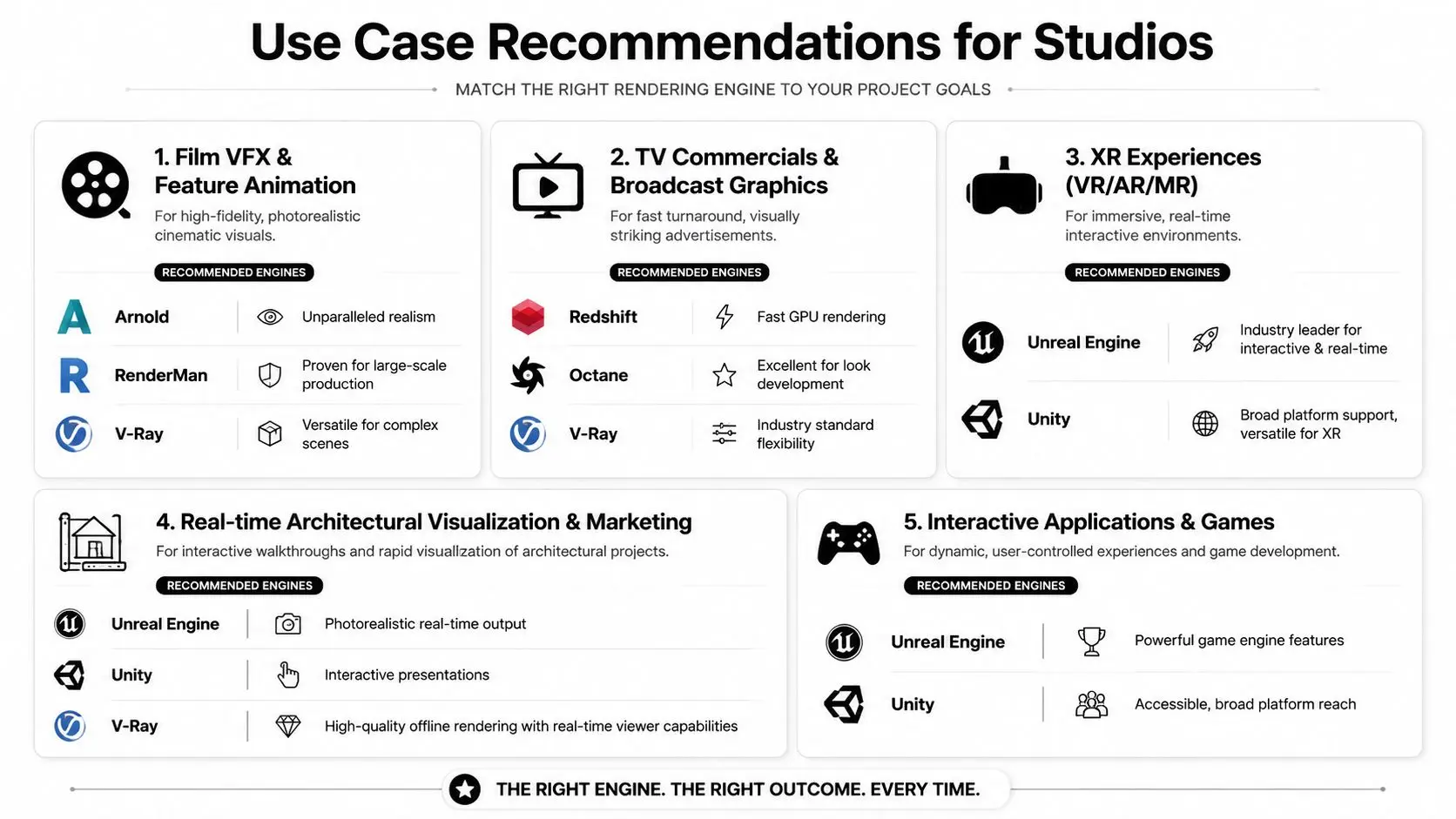
The cleanest way to choose the best rendering engine is to map it to the output, not the brand. Film, broadcast, arch-viz, XR, and interactive apps all reward different compromises. A tool that feels slow in one context can be the right answer in another, because production value depends on what the engine has to solve.
Film and TV still reward offline control
For film VFX and feature animation, Arnold and RenderMan remain strong choices because offline workflows still matter when lighting complexity, shading control, and compositing precision are paramount. V-Ray belongs in this group too, especially when the studio needs a flexible renderer that can handle complex scenes without forcing a separate toolset for every shot. If the final deliverable is a locked frame, not an interactive experience, these engines make the most sense. For TV commercials and broadcast graphics, the equation changes. Redshift is attractive because GPU throughput helps teams hit deadlines, and Octane is useful when look development speed matters. V-Ray remains a safe option when a studio needs flexibility across different client briefs. That tracks with the broader UK guidance that 2D suits explainers and brand content, while 3D is better for product demos and architectural visualisation (Educational Voice UK). In practice, that means motion-heavy agencies can choose a renderer based on whether they need quick stylistic output or more controlled realism.
Real-time wins where the audience has to respond
For XR, VR, AR, and interactive presentations, Unreal Engine is the clearest fit because real-time review has become a production standard in the UK market, especially for client-facing walkthroughs and immersive work (G2's 3D rendering category). Unity stays valuable when deployment breadth and application flexibility matter more than cinematic polish. If a studio is building location-based experiences, training simulations, or exhibition tools, the engine needs to support feedback loops, not just pretty frames. For real-time architectural marketing, Unreal Engine again stands out, with Unity as a practical alternative and V-Ray useful when the studio wants a high-quality offline path alongside interactive review. The market data already tells you where the UK is heading, architectural visualisation remains anchored in V-Ray and Corona habits, but real-time is now part of the standard toolkit (CG Channel arch-viz survey coverage).
Decision rule: choose the engine that reduces the number of times your team has to reinterpret the same asset.
Studio Liddell is one option for teams that need animation, XR, and real-time production workflows handled in one pipeline, but the more important point is the structure of the workflow itself. If your brief is an explainer, 2D can still be the efficient choice. If your brief is a product demo or immersive sales tool, 3D or real-time rendering is usually the better fit. --- A CTA for Studio Liddell