Virtual Production Workflow: A Practical Guide for Studios
A producer can book a volume, approve a digital environment and still lose a shooting day before the first usable take. The usual culprit isn't a dramatic hardware failure. It's an unclear handoff between the people building the world, operating the engine, tracking the camera, lighting the stage and preparing the footage for post. That's the practical reality of a virtual production workflow in the UK. The technology is mature enough to support serious screen work, but the workflow only performs when the production designs its roles, approvals and technical decisions around the team it can hire.
Why the Workflow Is Really a People Problem
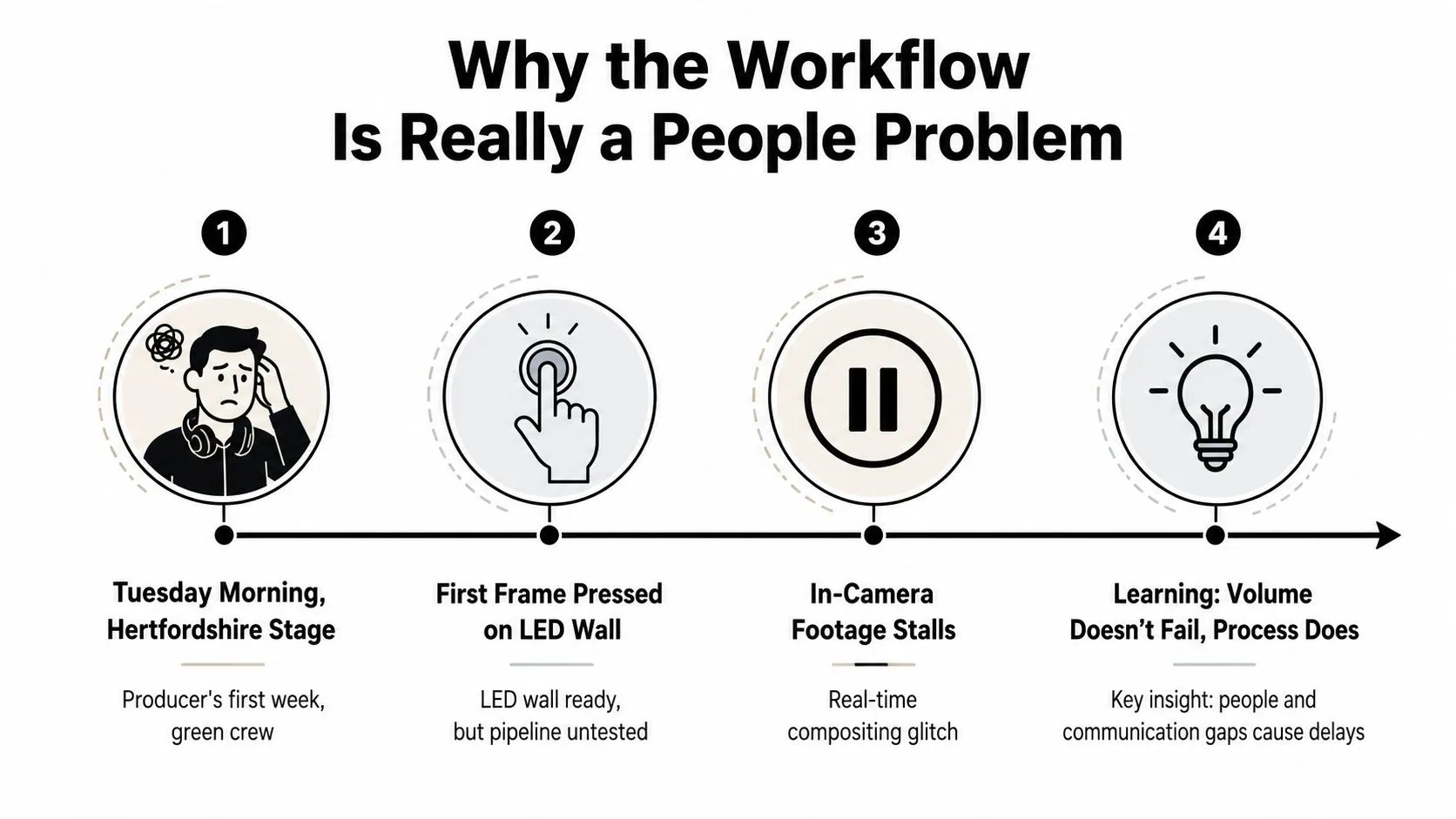
A producer's first morning inside an LED volume can be disorientating. The wall is on, the camera is ready and the environment looks convincing from the viewing monitor. Then the first frame stalls, the perspective slips or the live composite no longer matches the camera move. Everyone looks towards the GPU, but the deeper problem is often that nobody owns the complete pipeline. The UK already had a mapped virtual production ecosystem by early 2023. Research from Loughborough University London and BOP Consulting recorded a national survey of VP assets, while the Department for International Trade cited 12 large feature-film-level stages, 10 in London, alongside 40 stages of all levels nationally in the StoryFutures Virtual Production Skills Report. That infrastructure connects pre-production, production and post-production, but infrastructure doesn't supply the missing decisions. A mid-tier drama may have one Unreal generalist, a technical director, no dedicated LED engineer and a freelance stagehand who's never operated a Brompton processor. That team can still deliver strong work, but only if the production narrows the technical ambition, assigns ownership clearly and brings the right specialists in early.
Practical rule: Every technical decision is also a hiring decision in disguise.
The labour evidence is blunt. The StoryFutures report found that 79% of VP organisations were actively carrying out research and development on live VP projects, while 67% were micro-businesses or SMEs and only 42% had in-house VP-dedicated teams. More than one third of surveyed organisations said their staff had less than six months of VP experience, and two-thirds of VP-productive organisations described VP skills in the employment market as weak or very weak. The UK skills-gap coverage from Royal Holloway makes clear that adoption is running ahead of the available workforce.
The roles that make the workflow hold together
The scarce capability isn't limited to machine operation. UK academic review identifies shortages across creative and communicative coordination, game-engine work, asset construction, coding and plugin design, as discussed in the National Film and Television School's summary of the StoryFutures findings. A useful minimum team has distinct accountability for:
- •Virtual production supervisor: Owns the relationship between creative intent, stage capability and the live decision-making process.
- •Virtual art department lead: Controls environment design, asset approvals, physical-to-digital continuity and the scene's readiness for camera.
- •Unreal or Unity operator: Manages the engine, lighting changes, playback, level changes and performance under stage conditions.
- •On-set tracking and image systems operator: Watches camera tracking, genlock, colour, render output and the display chain.
- •DIT and post supervisor: Protects metadata, recording integrity, colour decisions and the handoff into editorial.
A real-time lighting artist needs to make controlled changes without breaking the scene. A VAD lead needs to understand both production design and engine constraints. An on-set image systems operator needs to spot drift before it becomes a take problem and communicate it without creating confusion on comms. “Good enough” means each person can perform their core task, understands the adjacent departments and knows when to stop improvising.
Capture, prepare and iterate
The UK workflow is best understood as capture, prepare and iterate, rather than as a neat waterfall. Academic mapping describes a non-linear process that integrates development, pre-production, production and post-production, with decisions moving between departments throughout the job. The Brunel academic research on virtual production workflow describes the operational pattern clearly. Capture starts with the actual location or reference material. The team gathers photographic reference, photogrammetry or LiDAR, checks scale and identifies the camera positions that matter. During the first part of prep, the VAD and cinematography teams should already be testing composition, horizon placement and rule-of-thirds choices inside the engine. Prepare turns that material into a stage-ready environment. Artists import assets, build the digital set, tune shaders and calibrate camera tracking against the volume's physical geometry. The team should test the scene with the intended lens, not merely approve a desktop render. Iterate happens during the shoot and continues afterwards. The operator adjusts lighting, background movement and atmosphere while the DOP evaluates the photographed result. Daily re-light passes and rapid post feedback are normal, not evidence that prep failed. A six-episode BBC drama shooting on a 12m x 4m curved volume might manage this with a shared Notion board and a single USD scene. The DOP records camera and lighting requirements, the VAD lead owns asset status and the Unreal supervisor records engine changes against each shot. That shared source of truth prevents a modeller from updating an asset that the operator has already optimised for a different scene version. The seams are predictable. Art approves a doorway without checking the camera frustum. The stage team receives a new environment without a render-budget review. Editorial gets plates without matching camera metadata. Each mistake can cost days because the departments discover it at different points. ScreenSkills' 2024/25 UK high-end television research points to increased adoption alongside continuing pipeline gaps and training demand that exceeds supply. VP reduces cost and risk only when the production secures specialist talent and integrates departments early. The volume itself can't compensate for a missing owner.
Setting Up the Real-Time Engine for Your Team
Choose the engine according to the people available, the delivery target and the type of work, not a feature checklist. Unreal Engine 5 is often the natural fit for LED production because UK stages commonly build around its real-time lighting, Nanite, Lumen and nDisplay workflows. Unity can be a sensible choice for smaller XR, mobile or interactive projects where HDRP and a compact development team matter more than a large-scale stage pipeline. Start by agreeing the render target with the stage. The wall's pixel pitch, commonly 2.6mm or 3.9mm in the supplied production guidance, affects the useful level of detail and the way the team budgets geometry, texture resolution and output. Provision the project repository in Perforce, buy or organise required Megascans access, document the display configuration and lock the plugin set before the first prep week. Engine changes during prep are expensive because they force artists, operators, technical directors and stage staff to relearn the same production logic. Treat an engine switch as a new technical design, not as an import exercise. A production that changes direction halfway through environment development should assume that assets, materials, lighting and tracking tests may need review. The producer's guide to real-time VFX is useful when the production needs to connect engine decisions with previs, stage operation and shot planning.
| Criterion | Unreal Engine 5 | Unity 6 |
|---|---|---|
| LED stage fit | Strong fit for nDisplay-based volume workflows and large real-time environments | Effective where the team already has Unity expertise and a compact interactive pipeline |
| Lighting approach | Lumen supports dynamic real-time lighting workflows | HDRP supports high-quality rendering with a familiar Unity toolset |
| Team availability | Often easier to staff for UK virtual production work | Attractive for teams already delivering XR, mobile or interactive content |
| Pipeline decision | Choose when stage integration and cinematic real-time output dominate | Choose when portability, application development or existing Unity knowledge dominate |
Pin the engine version, plugins, project settings and colour-management configuration. Archive a known-good build before the shoot, then prohibit casual updates on the stage machine. Render drift on day six usually starts with a harmless-looking change made without a recorded rollback path.
Building the Asset Pipeline From Model to Stage
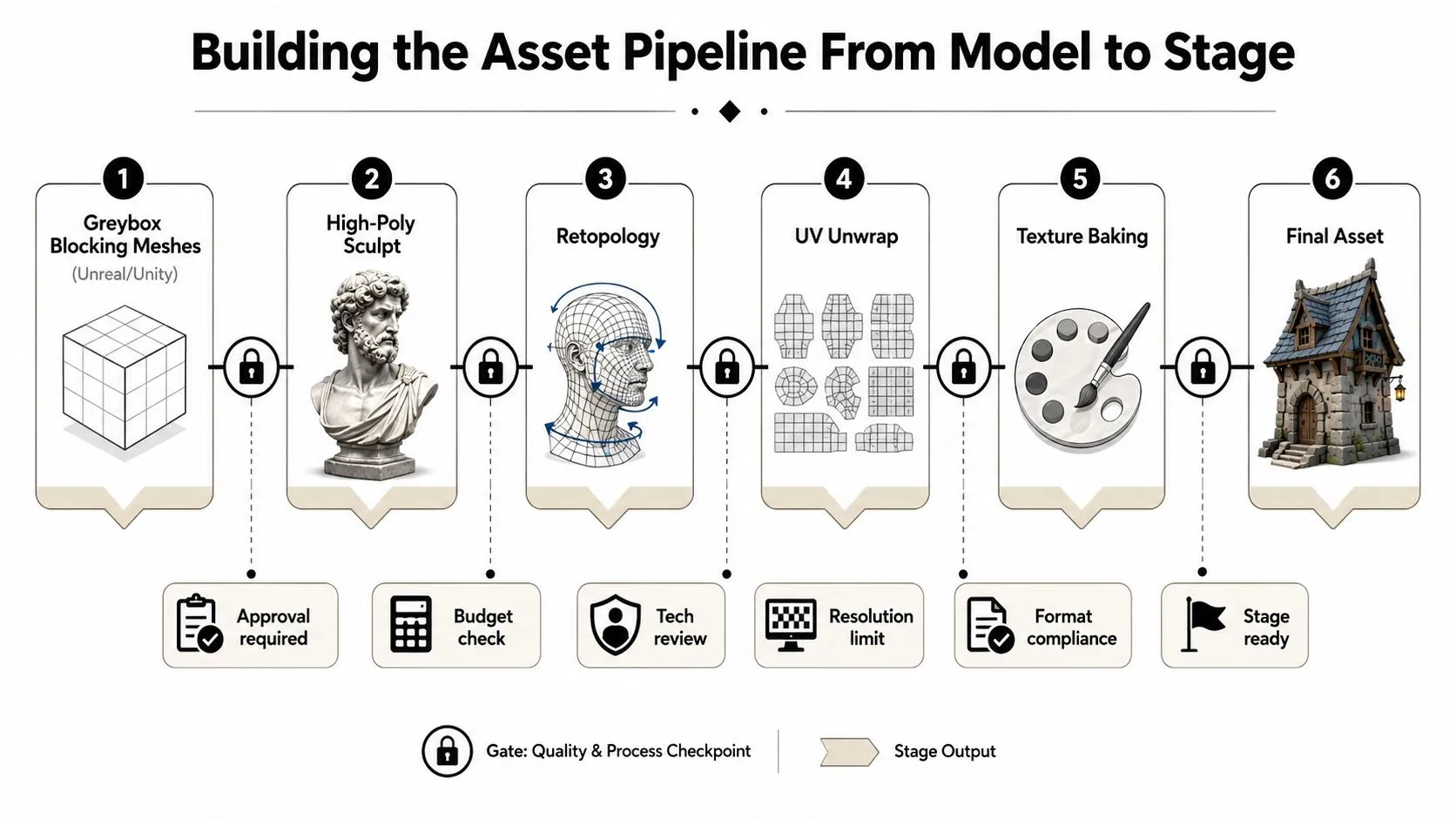
An asset isn't ready because it looks good in a viewport. It's ready when the modeller, look-development artist, rigger, engine operator and LED team have all approved the same version for the intended shot. Begin with a greybox blocking mesh in Unreal or Unity. Use it to confirm scale, camera composition, interaction points and physical set alignment before anyone spends time on a high-detail sculpt. The early block should answer a production question, such as whether a doorway sits correctly behind the actor, rather than merely demonstrate modelling skill.
Lock the gates
The handoffs need names and owners:
- Greybox to modelling: approve proportion, scale and blocking.
- High-poly sculpt to retopology: confirm the detail that must survive the target camera.
- Retopology to UV unwrap: check topology, deformation zones and texture layout.
- UV unwrap to texture: establish material references and texture resolution.
- Look-development to rigging: approve the surface before building deformation controls.
- Rigging to engine: test bones, animation, materials and performance in the target scene.
- Engine to LED: validate frustum behaviour, parallax and display output.
Asset discipline: If the team can't identify the approved master in seconds, the asset pipeline isn't ready for stage work.The final check belongs on the volume, not only on a desktop monitor. Confirm the camera frustum, parallax limits and physical geometry against the actual lens and tracking system. A background that appears convincing in a fixed editor view may reveal incorrect scale, sliding perspective or unusable depth as soon as the camera moves.
Motion Capture, Camera Tracking and LED Volumes
Treat motion capture, camera tracking and LED operation as one calibrated system. If the mocap stage and LED volume don't share the same origin, an actor can walk towards a virtual doorway while the tracked camera sees a different spatial relationship. Choose capture technology based on the performance requirement. Optical systems such as Vicon or OptiTrack suit VFX-heavy work where precise body data matters. Inertial suits can be more practical for fast outdoor capture, body-only reference or situations where optical infrastructure isn't available. Neither option fixes a poorly planned coordinate system. The production camera needs tracking that the engine can trust. Free-D and Stype systems can feed camera position, lens information and orientation into the real-time scene so the frustum follows the physical camera. Lens calibration should include distortion mapping, focus and zoom behaviour where relevant, not just a rough positional solve.The daily calibration routine
Run the same checks every morning and after any meaningful equipment change:- •Wand wave: Confirm that the tracking system sees the calibration tool correctly across the operating space.
- •Lens grid: Check distortion and lens metadata against the camera package.
- •Origin and floor check: Confirm that the engine's virtual floor matches the physical stage.
- •nDisplay alignment: Verify that the display nodes agree on the chosen configuration.
- •Panel colour check: Compare brightness and colour behaviour across the volume.
Keep the sensor-to-pixel latency below 80ms, the threshold identified in the supplied production guidance, or performers may notice the disconnect between movement and response. Monitor the full chain, because a fast camera solve can still produce a slow image if the scene is overloaded or the display path is misconfigured. The markerless motion capture practical guide provides useful context for selecting capture approaches when a production needs performance reference without committing to a full marker setup. Panel behaviour can change after a volume swap. Pixel pitch and brightness may vary between panel batches, so re-measure the display rather than trusting yesterday's calibration file. That small discipline prevents colour and perspective issues from appearing only after editorial has started.
On-Set Operations and Live Compositing
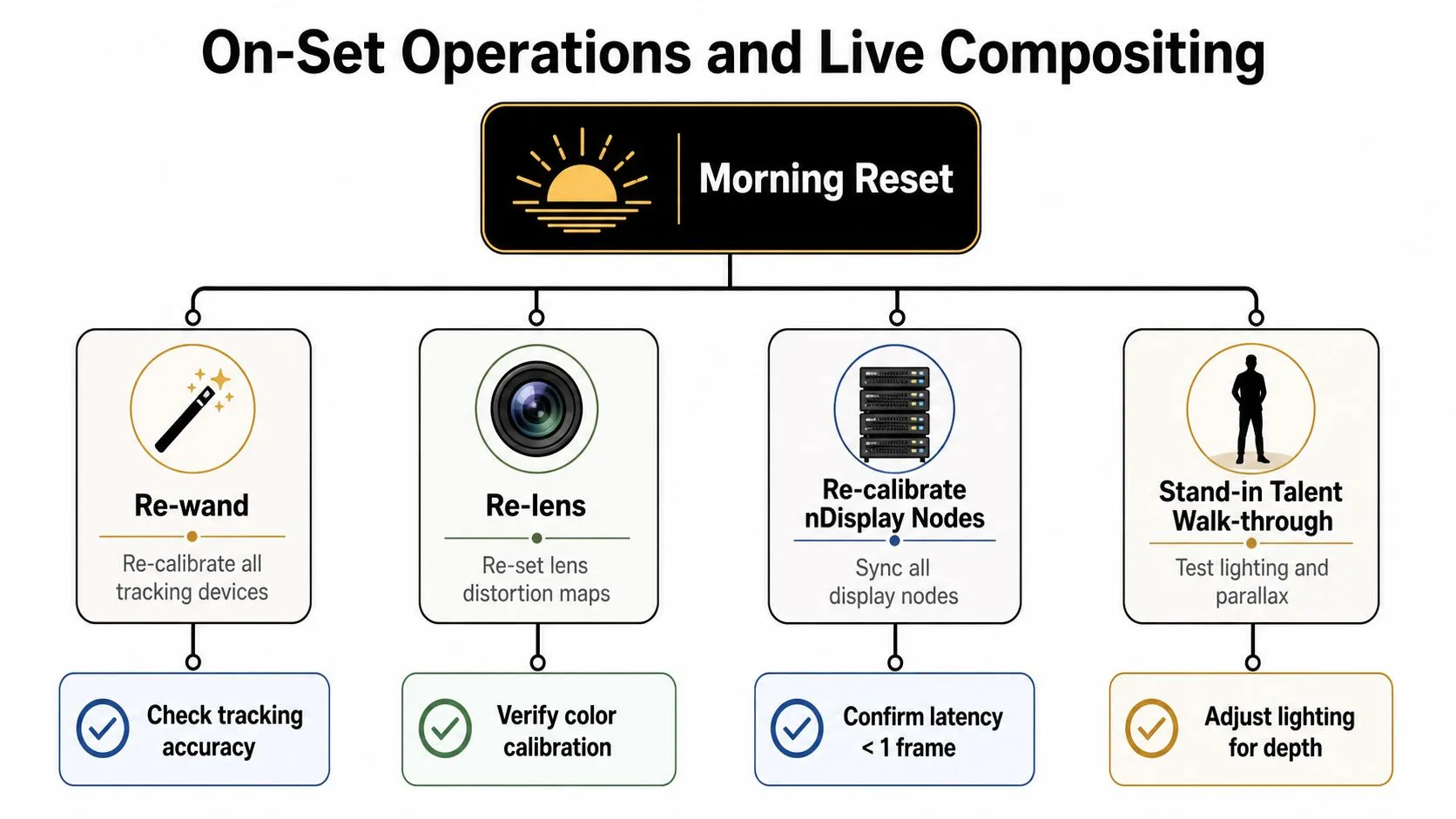
A reliable shoot day starts before the director arrives. The crew resets the system, checks the stage and walks a stand-in through the scene before talent begins the scheduled work. The supervisor calls the shot. The LED operator controls the in-camera VFX exposure and environment changes. The tracking operator flags drift. The DIT checks the recorded plate against the live composite. Those roles should support one another, but they shouldn't all talk to the director during a take.
A morning reset that protects the day
Run the reset in a fixed order:
- Re-wand the tracking system.
- Re-check the lens and distortion map.
- Re-calibrate the nDisplay nodes.
- Confirm colour and exposure on the LED panels.
- Walk a stand-in through lighting, eyelines and parallax.
- Record the approved engine state, timecode and relevant display settings.
 During a take, the supervisor should be the single communication route to the director for technical changes. If the tracking operator, LED operator and Unreal operator all provide separate instructions, the director receives conflicting information and the set loses time. Record every manual grade, lighting adjustment and engine change in a live comp log. Post needs that record to understand why the image differs between takes. The common visual mistake is to judge the wall only through the monitor. Pixel-peeping can distract the team from parallax, eyelines and the actor's relationship with the environment. The performer looking at the wall is the reason to use the volume, so the background must support the performance rather than merely pass a still-frame inspection. For music-led or hybrid content, teams may also benefit from guidance on AI video creation for tracks, particularly when virtual environments need to respond to a track's structure or support multiple cutdowns. It doesn't replace the stage supervisor's judgement, but it can help a creative team explore visual directions before committing to a live setup. Practical equipment and system planning should happen before the booking is confirmed. Studio Liddell's virtual production equipment guidance is one reference point for connecting previs, virtual scouting, asset preparation and technical planning.
 Post-Production Handoff and Delivery Specs
Virtual production shifts decisions earlier, but it doesn't remove post. The handoff must preserve what the camera captured, what the engine rendered and how the live composite was altered on set. Give editorial a complete package rather than a folder of camera files. That normally includes EXR or ProRes 4444 plate sequences, matched camera metadata, separately graded Unreal render passes, editorial proxies and a clean camera-track export. The post supervisor should also receive the live comp log, engine version, scene identifier, slate information and any manual colour decisions.The handoff table
| Deliverable | Format / Spec | Owner |
|---|---|---|
| Camera plates | EXR or ProRes 4444 sequences with matched metadata | DIT |
| Unreal output | Separately graded render passes with scene and version references | Unreal supervisor |
| Editorial media | Proxies linked to original timecode and file names | Editorial producer |
| Camera data | Clean camera track export with lens information | Tracking operator |
| Scene records | Engine build, scene version, comp log and calibration notes | VP supervisor |
| Audio and access files | Agreed broadcaster format, stems, captions and compliance materials | Post supervisor |
- •Check colour consistency between panels, plates and render passes.
- •Inspect volume seams at the intended delivery resolution.
- •Reconcile slates, timecode and metadata.
- •Verify file names against the editorial database.
- •Confirm captions, audio stems and compliance materials.
- •Open delivered files on a separate system before upload.
Troubleshooting and AI Efficiencies That Actually Help
Most volume failures fall into a small group of repeatable problems. The useful response is to assign each symptom to an owner, apply a specific test and record the result before the crew starts changing unrelated settings.
| Failure | First check | Responsible role |
|---|---|---|
| Tracking drift on the LED floor | Floor markers, sensor visibility and origin alignment | Tracking operator |
| Genlock mismatch | Camera, engine and display sync signals | Image systems operator |
| Latency spikes | Scene complexity, draw calls and render-node load | Unreal supervisor |
| Colour drift | Panel uniformity, calibration profile and camera settings | LED operator and DIT |
Tracking drift rarely improves through repeated engine restarts. Recalibrate the sensors, inspect floor references and confirm that the physical and virtual origins still agree. A genlock mismatch needs a signal-path check, not a new material. Latency requires scene optimisation and render-budget discipline, while colour drift calls for a fresh panel calibration and a comparison against the approved camera profile.
Where AI earns its place
AI can close specific capacity gaps when a trained operator still reviews the result. Useful applications include AI-assisted rotomation, automated camera-solve clean-up, neural denoise for dark stage plates, generative matte painting for set extensions, and language models that break down scripts or tag shoot logs. The value is strongest where the task is repetitive and the acceptance criteria are visible. An LLM can identify recurring shot-log terms, but the production team must verify the tags. A neural denoiser can clean a difficult plate, but the DIT still needs to check texture, skin and LED artefacts. Generative set extensions can support ideation or controlled background work, but they shouldn't introduce unapproved architecture, brand elements or rights-sensitive material. Teams evaluating automation should first understand what AI-powered automation means in a production workflow, then map it to a named owner and review stage. AI wastes time when nobody defines the input, output or approval threshold. It also creates risk on regulated or confidential UK work when source material leaves the approved environment, provenance isn't recorded or generated content enters the final picture without editorial review.
Production checklist: Give every recurring failure a test, an owner and a logged resolution. Give every AI tool a review step.
A workable final checklist is short:
- •Before prep: Confirm the engine, stage configuration, source control and specialist roles.
- •Before stage approval: Test assets through the intended lens and frustum.
- •Before every shoot day: Reset tracking, lens data, nDisplay, colour and latency checks.
- •During takes: Keep comms hierarchical and record engine changes.
- •Before post handoff: Reconcile plates, passes, metadata, timecode and delivery requirements.
- •Before automation: Define what the tool can change and who signs it off.
--- Studio Liddell can help plan the people, assets, engine setup, stage equipment and post handoff behind a practical virtual production workflow, with animation, Unreal and Unity XR capability available across creative production. Visit Studio Liddell to discuss your volume brief, technical risks and the team structure needed before you book the stage.