A Producer's Guide to Development Unity for XR and Animation
When we talk about development unity, we're describing the craft of using the Unity engine to build interactive 2D and 3D worlds. This isn't just about video games; it covers everything from mind-bending XR applications and architectural visualisations to real-time animations and serious training simulations. It’s a creative process that blends visual scene-building with the logic of C# scripting to make digital experiences come alive.
What Is Unity and Why Does It Matter?
Think of Unity as a complete digital workshop for building interactive content. While it's famous for powering a huge slice of the world's video games, its real magic lies in being a real-time development platform. What does 'real-time' actually mean? Unlike traditional 3D animation, where you might wait hours for a single frame to render, Unity builds and displays the entire world instantly, right before your eyes. This means creators can make changes on the fly, tweak the lighting, move a mountain, test out a new game mechanic, and see the results immediately. This rapid feedback loop is the secret sauce of modern production, making it faster to experiment, refine ideas, and ultimately achieve a better final product. To give you a clearer picture of what Unity brings to the table, here’s a quick breakdown of its core strengths and how they translate into real-world business applications.
Unity Platform Key Capabilities
| Core Feature | Primary Function | Application for Business |
|---|---|---|
| Real-Time 3D Engine | Renders complex scenes and graphics instantly. | Creates interactive product demos, architectural walkthroughs, and realistic training simulations that users can explore freely. |
| Multi-platform Support | Deploys a single project to over 20 platforms (iOS, Android, PC, Web, XR headsets). | Maximises reach by launching an app or game across multiple devices without rebuilding it from the ground up, saving time and money. |
| C# Scripting | Provides a powerful, object-oriented language for defining logic and interactivity. | Allows for the development of complex custom behaviours, from sophisticated game AI to data-driven enterprise applications. |
| Unity Editor | A visual, user-friendly interface for building scenes and managing assets. | Speeds up the creative workflow, allowing artists and designers to contribute directly to the project without deep coding knowledge. |
| Asset Store | An extensive marketplace for pre-built tools, 3D models, and scripts. | Dramatically accelerates development by providing ready-made components, reducing the need to build everything from scratch. |
This combination of an intuitive editor, a robust scripting language, and a vast ecosystem of tools is what makes Unity such a versatile and powerful choice for creative and commercial projects alike.
The Core Components of Unity
At its heart, Unity development is a partnership between a few key tools that work together seamlessly. Once you understand these parts, you can see how an idea on a whiteboard becomes a polished, interactive experience.
- •The Editor: This is your digital canvas and command centre. It’s a visual workspace where you assemble 3D models, position cameras, design levels, and manage every single asset that makes up your project. It's where the world takes shape.
- •Scripting (C#): If the Editor is the stage, then scripting is the director shouting "Action!". Using the popular C# programming language, developers write the instructions that control how objects behave, how the game rules work, and how the user interacts with the world. You can dive deeper into this with our guide on the Unity development language for games and XR.
- •The Asset Store: Imagine a massive online warehouse filled with pre-made 3D models, tools, animations, and code snippets. That’s the Asset Store. It allows teams to accelerate production by integrating ready-made components instead of having to build absolutely everything from the ground up.
This potent mix of visual editing and powerful scripting makes Unity a true creative workhorse. It’s an engine capable of building everything from immersive VR training simulators for industry to broadcast-quality animated series. In the UK's booming creative sector, Unity's adoption has been a major catalyst for pushing immersive content into the mainstream. The UK digital transformation market, where tools like Unity are essential, is valued at a staggering USD 61.82 billion in 2025 and is projected to more than double by 2030. You can read more about the growth of the UK digital market on mordorintelligence.com.
Navigating Core Workflows for XR and Interactive Apps
Bringing any interactive experience to life in Unity is a journey, a structured and creative process that looks a lot like building a house from a detailed set of plans. But before you lay a single brick, or in our case, write a single line of code, you start with rapid prototyping. This is the sketch-on-a-napkin phase, where we build simple, blocky versions of the environment and test out the core ideas. We’re asking the big questions here: Is this fun? Does moving around feel natural? This low-fidelity approach is a lifesaver, letting us validate the heart of the concept and iron out the kinks before a single polished art asset is even considered. Once we know the blueprint is solid, we shift into full production. This is where the world gets its soul. High-quality 3D models, detailed textures, and immersive audio are brought into the Unity Editor, replacing those initial grey blocks with the rich, visual elements that define the final look and feel. It’s all about building the atmosphere and ensuring every pixel aligns with the creative vision.
From Static Scenes to Interactive Worlds
With all the art in place, what you have is a beautiful but lifeless diorama. The magic happens next with C# scripting. This is where our developers breathe life and logic into the application, writing the code that dictates everything from character movement and physics to the rules of a game or the steps in a complex training simulation. This is where true interactivity is born. Want a deeper dive into how this all comes together? Check out our guide on mastering Unity development for business and XR. A typical project moves through several key stages, each one building on the last:
- •Software Development Kit (SDK) Integration: We start by integrating the necessary SDKs, like the Meta Quest Toolkit for a VR project, to make sure the application can talk to its target hardware without a hitch.
- •User Interface (UI) and User Experience (UX) Design: This is all about crafting menus, buttons, and displays that are intuitive and effortless, which is especially critical in the unique spatial environments of VR and AR.
- •Testing and Quality Assurance (QA): We are relentless with testing. Throughout the entire development cycle, we’re hunting down bugs and polishing the experience to ensure the final product is stable, smooth, and works exactly as it should for the end-user.
This flow chart gives a great visual of how Unity's core pillars, the Editor, Scripting, and the Asset Store, work together in this production pipeline.
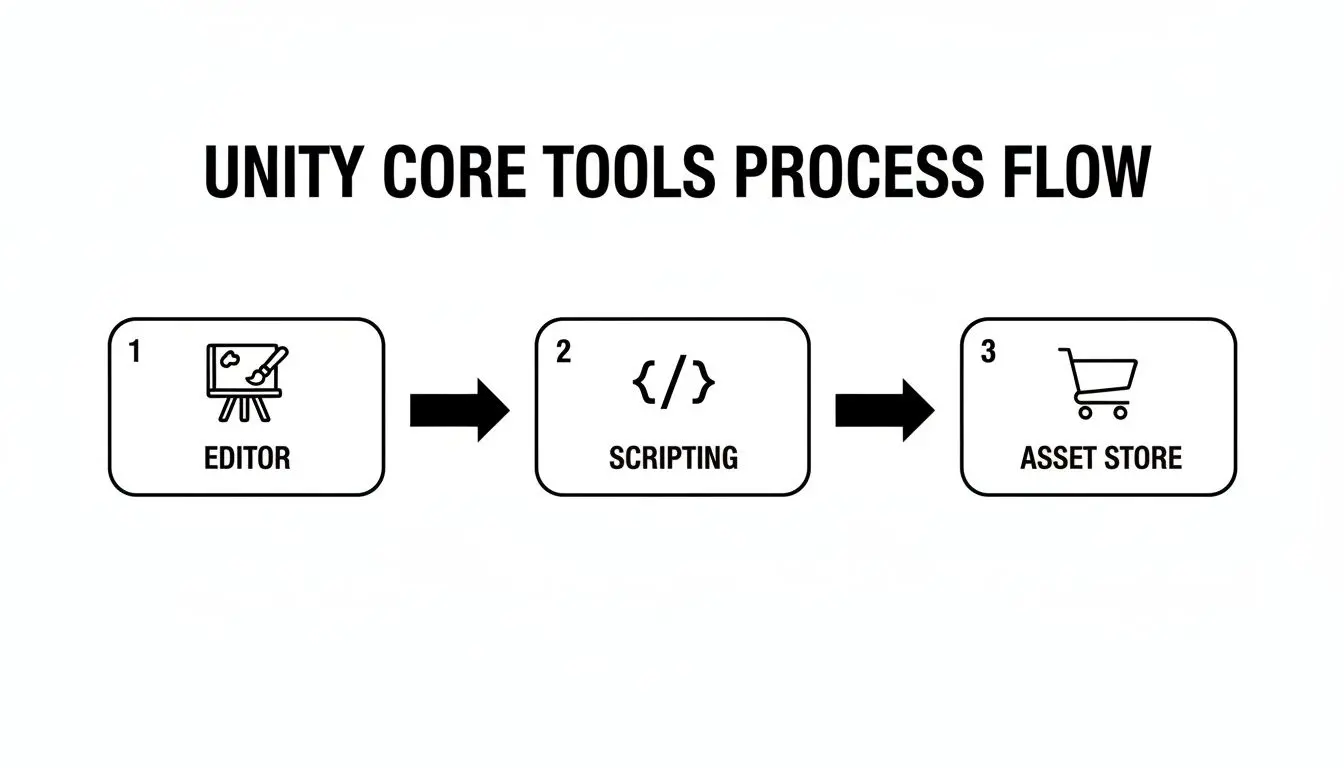
Essentially, the Editor is where you build the world visually, Scripting is what makes it interactive, and the Asset Store offers ready-made resources to speed up both steps.
The Final Polish: Performance Optimisation
The last, and arguably most critical, stage is optimisation. A mind-blowing immersive experience can be ruined in an instant by stuttering frame rates or long loading times. It completely breaks the illusion. Our team goes through the application with a fine-tooth comb, optimising code, compressing textures, and refining 3D models to guarantee it runs smoothly at a high frame rate on its target device. This commitment to rock-solid performance is what separates a professional, polished application from one that’s just plain frustrating.
Producing Real-Time Animation and Cinematics
While most people know Unity as a game engine, it's also a serious powerhouse for cinematic storytelling. It’s completely flipping the script on the traditional animation pipeline, pulling production out of the old "render and wait" cycle. Instead, we now work in a dynamic, real-time environment that feels more like a virtual film set than a piece of software. This is a massive shift, giving directors and artists an incredible amount of creative freedom right at their fingertips. Imagine setting up a complex camera move, tweaking the entire lighting scheme, or re-editing a sequence and seeing the final result instantly. There’s no more agonisingly long wait for an overnight render just to see if a shot actually works. Changes happen on the fly, which means we can experiment and iterate at a speed that was simply impossible before.

The Virtual Film Set
So, how does this virtual film set work? Two key features are at the heart of Unity's cinematic workflow: Timeline and Cinemachine. They work together to create a flexible, non-destructive playground where creativity can just flow.
- •Timeline: Think of this as the master control panel for your entire scene, like a multi-track editor in video software. It’s where you choreograph character animations, trigger events and special effects, sequence all your camera cuts, and manage audio cues in one unified space. It’s the conductor for your digital orchestra.
- •Cinemachine: This is your intelligent, virtual camera crew. It’s a suite of smart cameras that can automatically track subjects, create buttery-smooth dolly shots, and switch between different angles based on the on-screen action, all without a single line of code.
This combination gives our team the precision of traditional animation software but with the immediacy of being on a live-action set. It lets us get our hands dirty and focus on what really matters, the art of storytelling, like framing, pacing, and emotional impact, instead of getting bogged down by technical hurdles and glacial render times.
This real-time, iterative process is more than just an improvement; it's a fundamental shift. It transforms the production pipeline from a rigid, one-way street into a fluid, creative loop. The result? Higher-quality visuals and more dynamic storytelling, delivered much faster.
From TV Series to Technical Visuals
This advanced approach to development unity isn’t just for a single type of project; its versatility is one of its greatest strengths. We can produce a huge range of content, all while hitting broadcast-level quality with remarkable efficiency. We apply this real-time workflow to everything. That could be an episodic TV series where speed and consistency are paramount, or a complex technical visualisation that needs to communicate intricate details with absolute clarity. The shift to real-time engines like Unity is unlocking major economic potential. By 2025, real-time 3D is projected to add over £71 billion to the UK economy alone, demonstrating a fundamental shift in how digital content is created and consumed. This isn't just about changing how we create; it's about shaping the entire future of digital content.
Choosing the Right Engine: Unity vs Unreal
Deciding on a game engine is one of the biggest calls you’ll make on any interactive project. For most teams, it boils down to two heavyweights: Unity and Unreal Engine. The conversation isn't about which one is 'better' in a vacuum, but which is the right tool for your job, your team, and your ambitions. This choice is a strategic business decision, not just a technical one. It ripples through everything, visual style, development speed, hiring, budget, and your final timeline. The first step is to get your head around the core philosophies driving each platform, because that’s where you’ll find the best fit for your production needs.
Comparing Core Philosophies
At a glance, the choice often comes down to visual goals versus developer accessibility. Unity has built its reputation on being incredibly adaptable with a much gentler learning curve. Its real strength is its sheer flexibility; it can be bent and shaped to create just about any visual style you can imagine, from quirky 2D animations to polished, professional 3D apps. Unreal Engine, on the other hand, comes out of the box swinging for the fences graphically. It's engineered to produce photorealistic, visually stunning results with less initial setup. That power comes with a trade-off: a steeper learning curve, especially with its C++ foundation, which is a far more complex beast than Unity's C#. For a producer's take on how this all plays out, have a look at our deeper dive into Unreal vs Unity for real-time animation.
A Decision Matrix for Producers
To cut through the technical jargon, let's look at this from a practical, business-first perspective. This table breaks down the factors that actually hit your bottom line, things like team skills, budget, and project scope.
| Decision Matrix for Producers: Unity vs Unreal | |||
|---|---|---|---|
| Consideration | Unity | Unreal Engine | Best Fit For... |
| Programming Language | C# (Widely used, easier to learn, large talent pool). | C++ (Powerful but more complex, steeper learning curve). | Projects needing rapid development with a broad developer base (Unity) vs projects needing deep system-level control (Unreal). |
| Visual Style | Highly adaptable; excels at stylised, mobile, and clean aesthetics. | Photorealistic powerhouse out-of-the-box; ideal for AAA games and high-fidelity visuals. | Mobile games, XR apps, and diverse artistic styles (Unity) vs cinematic experiences and hyper-realistic simulations (Unreal). |
| Asset Ecosystem | Massive, mature Asset Store with a vast library of tools and pre-made components. | Strong marketplace, particularly for high-end art assets and visual effects. | Projects that benefit from a wide array of affordable, ready-made solutions to speed up development (Unity). |
| Team Skills & Hiring | Larger global pool of C# developers, often making it easier and faster to scale a team. | More specialised talent pool, which can sometimes extend hiring timelines. | Businesses needing to build a team quickly or leverage existing C# skills (Unity). |
So, what’s the final verdict? It’s all about strategy. If you're building a mobile game with a stylised look and a tight deadline, Unity is almost always the smarter path. But if your project is a high-end architectural visualisation where absolute photorealism is non-negotiable, you’ll probably lean towards Unreal. By weighing these factors against your specific goals, you can choose the engine that not only gets you the best creative result but also gives you the smoothest, most cost-effective journey to the finish line.
How AI Is Enhancing Unity Production Pipelines
Let's be clear: artificial intelligence isn't some far-off concept anymore. It's a real, practical co-pilot for creative teams neck-deep in development unity. The idea isn't to replace talented artists and developers. Instead, AI tools are becoming force multipliers, automating the grind and clearing the path for genuine innovation. It’s all about helping studios work smarter, not harder, to produce higher-quality work more efficiently.
This intelligent automation is fundamentally reshaping workflows. Integrating AI tools opens up entirely new ways of making things, and it's happening right now. For instance, teams are now creating AI-powered video content to tackle specific, time-consuming animation tasks right inside their Unity pipelines. Just imagine generating entire libraries of concept art or unique textures in minutes, not days. This kind of rapid ideation lets teams explore more creative dead-ends and brilliant ideas early on, without sinking huge amounts of time into them.
Practical AI Applications in Unity
The real impact of AI is felt right across the production line. It's about offloading the mundane, repetitive jobs so that human creativity can be aimed where it truly counts, on storytelling, polish, and genuinely groundbreaking design. Here are a few real-world examples of how AI is already being put to work:
- •Generative Art and Texturing: AI models can spit out vast quantities of concept art, environmental textures, and character designs from simple text prompts, giving artists a brilliant starting point or a fresh dose of inspiration.
- •Intelligent Rigging and Animation: New tools can now automate chunks of the notoriously complex character rigging process. AI is also great for generating procedural animations, like realistic crowd movements or natural wind effects, saving animators hundreds of hours.
- •Code Assistance and Optimisation: AI assistants built right into development environments can help programmers write cleaner code, spot bugs, and even suggest performance optimisations. The result is more stable and efficient applications.
- •Smart Asset Placement: For huge open-world environments, AI algorithms can intelligently populate scenes with foliage, rocks, and other props, helping to build detailed, believable worlds with a fraction of the manual effort.
AI in the production pipeline isn't about replacing the artist; it's about giving them a powerful assistant. It automates the repetitive, time-consuming tasks, freeing up creative professionals to focus on the high-level decisions that define the final product.
Unity has become a cornerstone of the UK's creative digital production scene, with studios here using its power to build incredible content. The UK's digital economy itself contributed a massive £160 billion in gross value added (GVA) in 2023. As technologies like AI become more deeply embedded in how we work, that economic impact is only going to grow. By embracing these tools, we stay right at the forefront of what’s possible.
What to Look for in a Unity Development Partner
Picking the right engine is one thing, but choosing the right partner for your Unity project is arguably even more important. The success of your entire vision really hinges on their expertise, their process, and their ability to act as a genuine extension of your own team. A great partner doesn't just write code; they help shape your strategy, solve tricky creative problems, and reliably deliver on your goals. When you're vetting potential studios, you have to look past the sales pitch and dig into tangible proof of what they can actually do. The first thing to check is their portfolio. You want to see a diverse range of projects across animation, XR, and interactive apps , it shows they have versatility and deep technical knowledge. This isn't just about looking at pretty pictures; it’s solid evidence that they can handle all sorts of creative and technical curveballs.
Core Criteria for Vetting a Studio
Next, get under the bonnet and scrutinise their process. The best studios operate with a workflow that’s both transparent and collaborative. They should be able to clearly walk you through their production pipeline, from the first discovery calls and prototyping all the way to final deployment and ongoing support. Ask them how they handle feedback, manage timelines, and what they do when things go wrong. A well-defined process is a huge indicator of a professional, organised team that can deliver on time and stick to the budget. Finally, think about the human element. You’re going to be working very closely with these people, so a good cultural fit and clear, honest communication are absolutely essential. You’re looking for a partner who is genuinely invested in seeing your project succeed, not just another vendor ticking off a task list. Here’s a simple checklist to keep in mind:
- •Proven Track Record: Do they have a history of successful, shipped projects that are similar in scope to what you’re planning?
- •Diverse Portfolio: Does their past work show real expertise across different platforms, styles, and industries?
- •Transparent Process: Can they clearly explain their workflow, how they communicate, and their approach to project management?
- •Technical Expertise: Is their team genuinely proficient in the specific Unity features your project is going to need?
- •Collaborative Spirit: Do they feel like a real partner? Someone who will listen, adapt, and work with you to get the best possible result?
Your Questions About Unity Development, Answered
To round things off, let's tackle some of the most common questions we get from clients. Think of this as the quick-fire round, designed to clear up any lingering thoughts and help you move forward with confidence.
What Sort of Things Can You Actually Build in Unity?
Unity is a true creative powerhouse. While it cut its teeth in the games industry, its capabilities now stretch far beyond that. We’re regularly using it to build:
- •Immersive XR Worlds: Fully interactive virtual and augmented reality apps for everything from employee training and product marketing to pure entertainment.
- •Real-Time Animation: High-end cinematic content and even entire TV series, but with a production pipeline that’s dramatically faster than traditional rendering.
- •Mobile Apps and Games: Unity is the engine behind a massive chunk of the world's most popular mobile games and interactive apps.
- •Complex Simulations: Incredibly detailed and realistic training tools for high-stakes sectors like healthcare, engineering, and defence.
- •Architectural Visualisations: Interactive walkthroughs that let clients step inside and explore a building long before a single brick has been laid.
How Long Does a Unity Project Typically Take?
This is the classic "how long is a piece of string?" question. A project's timeline is completely tied to its complexity, scope, and how polished the final result needs to be. A simple interactive app or a short animated piece might come together in just a few weeks. On the other end of the scale, a complex multiplayer VR game or a company-wide training simulation could take anywhere from six months to over a year. The most important thing is defining the scope clearly from day one.
At Studio Liddell, we kick off every project with a deep-dive discovery phase. This lets us give you a realistic timeline and budget, so there are no nasty surprises later on. We map out the entire production journey, ensuring you know exactly what to expect and when.
Do I Need to Supply My Own 3D Models and Assets?
Not at all. A full-service studio like ours is set up to handle the entire creative pipeline. That means we can take a project from the earliest concept sketches and storyboards right through to the final 3D modelling, texturing, and animation. Of course, if you already have brand assets or existing 3D models you want to use, we can absolutely build them into the project. We shape our workflow around what you need, whether you’re starting with a blank page or have assets ready to go. Ready to bring your vision to life with a seasoned Unity development partner? Studio Liddell has been delivering award-winning digital content since 2019. Let's have a chat about your project and explore what's possible.