What Is the Unity Development Language for Games and XR?
When you're talking about building something in Unity, you're talking about using C# (C-Sharp). While the engine did dabble with other languages in its early days, Unity has since gone all-in on C#, making it the one and only official scripting language for everything from games and XR experiences to real-time animations.
C#: The Engine Behind Unity's Creative Power
Think of a programming language as the set of architectural blueprints for building an interactive world. C# gives developers a modern, versatile, and incredibly powerful framework to construct complex systems with real clarity and control. Because it’s an object-oriented language, we can design reusable components, like a character’s movement controls or a slick UI button, that can be easily plugged into different projects. This approach saves a huge amount of time, keeps things consistent, and lets us focus on the creative stuff. This standardisation has been a massive win for professional studios. By focusing squarely on C#, Unity has nurtured a brilliant ecosystem of detailed documentation, passionate community support, and a sprawling Asset Store packed with reliable tools. For our clients, that translates directly into more stable, predictable, and efficient production pipelines. Here’s why that matters:
- •Type Safety: C# is brilliant at catching common errors while we’re building, not after the project has gone live. This means fewer bugs and more robust, reliable applications.
- •Automatic Memory Management: Developers get to spend more time on creative logic and less on the nitty-gritty of memory allocation, which drastically reduces the risk of performance bottlenecks.
- •The Power of .NET: C# gives us full access to the massive .NET library, a treasure trove of pre-built code that speeds up development for complex features like networking or handling data.
This sharp focus has made Unity the undisputed leader in the UK’s creative tech scene. A recent TIGA survey revealed that a staggering 72% of UK games studios rely on Unity, cementing its place as the industry's go-to engine. You can dive into the numbers yourself in the full TIGA survey report.
At the end of the day, C# is what allows our team to turn a creative vision into a high-performance, dependable final product. It strikes the perfect balance between raw power and usability, making it the ideal language for the ambitious animation, simulation, and immersive projects our clients bring to us.
Understanding Unity's Scripting Evolution
To really get why C# is the only official Unity development language today, it helps to rewind the clock a bit. Back in the day, Unity was a bit more of a multilingual playground, giving developers a choice between a few different scripting languages. This flexibility, though, came with a hidden cost. Juggling multiple languages created a fragmented community, split the focus for documentation, and just made it harder for developers to team up or share code without hitting snags. Unity’s decision to streamline its language support wasn’t about limiting creativity; it was a smart, strategic move to make the entire ecosystem stronger.
The Languages Left Behind
Before C# became the clear winner, developers could also use:
- •UnityScript: This was often mistaken for JavaScript because the syntax was so similar, making it a popular on-ramp for web developers dipping their toes into game development. In the end, it just couldn't keep up with the performance and powerful features of C#.
- •Boo: A much cleaner, simpler language inspired by Python. While it had its fans, Boo never really caught on in the same way as UnityScript or C#. Its small user base meant finding help or resources was always a challenge.
This timeline gives you a quick visual of Unity's journey from that multi-language environment to the powerful, C#\-focused platform we have now.
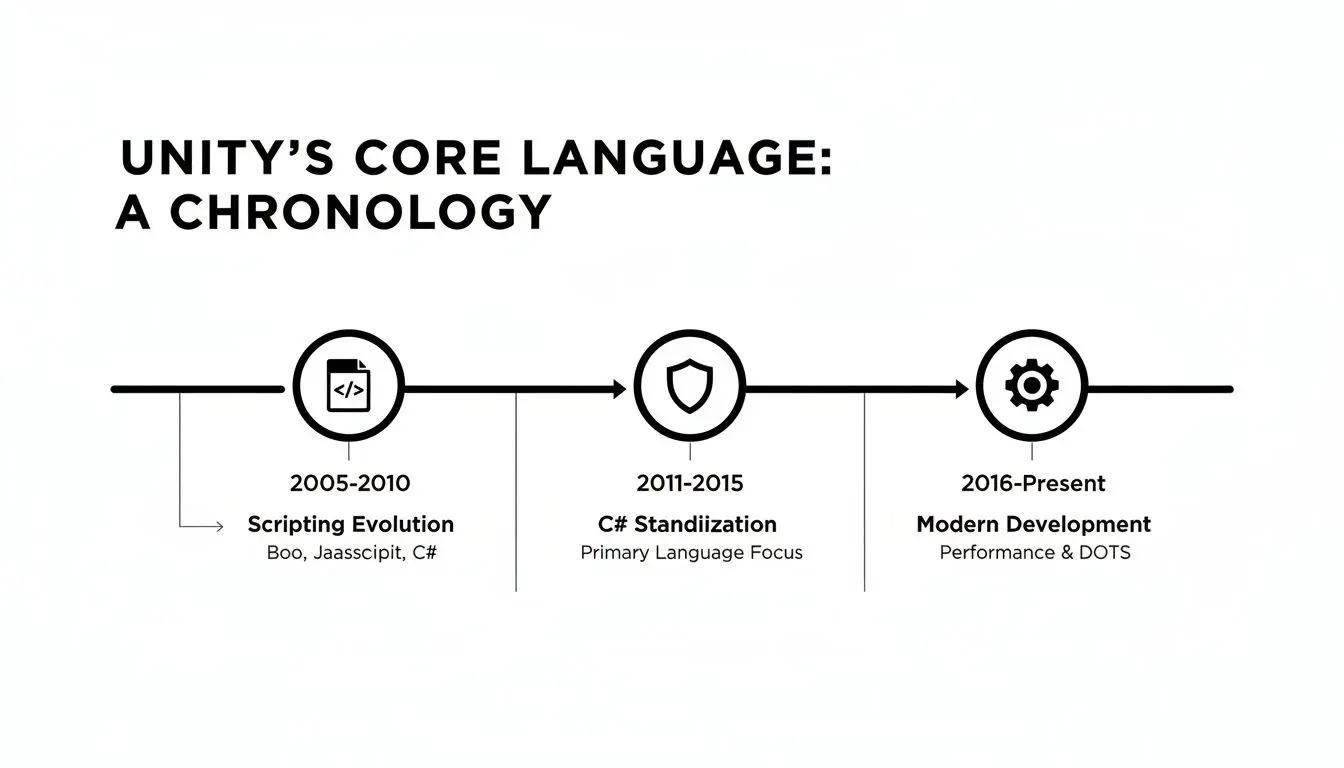
You can see a clear pattern here, a deliberate shift towards building a stable, unified, and professional development environment.
The Strategic Shift to C#
By going all-in on C#, Unity built a far more mature and dependable platform. This one decision created a ripple effect of benefits that professional studios rely on today. For starters, it unified the talent pool, which makes building skilled, cohesive teams much easier. It also supercharged the Unity Asset Store, because creators could build tools and plugins knowing they would work for everyone.
This strategic focus is a key differentiator when evaluating creative technology. The choice between engines often comes down to pipeline maturity and team skills, a topic producers should understand well. For more on this, you can explore our guide on Unreal vs Unity for real-time animation.
Ultimately, this single-language approach means every single resource, from official tutorials to community forums, is focused on making C# development as efficient and powerful as it can be. For a studio like ours, that translates directly into faster, more reliable production cycles and better results for our clients.
Why C# Is the Only Choice for Modern Unity Projects
Deciding to standardise on C# for all Unity development wasn't just a technical footnote for us; it was a strategic move that pays dividends for our clients every single day. The language is perfectly suited to the intense demands of modern animation, XR, and interactive media, letting our team build incredibly complex experiences more efficiently and with greater stability. For producers and stakeholders, this is huge. It means projects get delivered on time and with far fewer of those dreaded last-minute technical dramas.
Strong Type Safety: Your First Line of Defence
One of C#'s standout features is its strong type safety. Think of it as an automatic, rigorous quality check that runs constantly during development, not after the project has gone live. This system is brilliant at catching subtle errors and potential inconsistencies in the code long before they have a chance to grow into project-derailing bugs. The value for a client here is immense. Imagine a critical VR training simulation for surgeons where even a tiny bug could throw off the entire learning outcome. Or consider a high-traffic interactive game at a major live event, where application crashes are simply not an option. Strong type safety is our secret weapon for ensuring the final product is solid and dependable from the moment it’s launched.
Building with a Modular Mindset
C#'s entire design philosophy fits hand-in-glove with Unity’s own component-based architecture. This structure encourages our developers to build self-contained, reusable blocks of code. For example, when creating a complex character, we can code its movement, animations, and interactions as completely separate, independent components. This modular approach has some massive benefits for any production schedule:
- •Faster Development: We can borrow, adapt, and reuse these components across different projects, which drastically cuts down production timelines. A character controller built for one game can be quickly tweaked for another.
- •Painless Maintenance: If a problem pops up with one specific feature, we can zoom in on that single component and fix it without disrupting the rest of the application.
- •Better Collaboration: Our developers can work on different components at the same time. This parallel workflow means we get projects over the finish line much faster.
This method completely changes the game. Instead of tackling development as one enormous, complicated task, it becomes a flexible, highly organised process. It’s like building with high-quality, prefabricated parts instead of mixing concrete from scratch for every wall.
The Power of the .NET Framework
Beyond its own impressive features, C# unlocks the full power of the vast .NET framework. This is a massive, professionally maintained library of pre-built code and tools developed and backed by Microsoft. It provides ready-made, battle-tested solutions for countless complex problems, from managing network connections to handling intricate data structures.
For our studio, the .NET library is an incredible accelerator. Instead of burning valuable time and budget reinventing the wheel for common technical hurdles, we can plug proven, high-performance code straight into a project. This guarantees a higher-quality end product and frees up our creative energy to focus on what really matters: building the unique, standout features that bring our clients' visions to life.
In the end, C# gives us the perfect blend of safety, flexibility, and raw power. It’s the engine that allows us to build ambitious, high-end interactive experiences while keeping our production pipeline efficient and predictable, exactly what modern projects demand. It’s the technical foundation that ensures great creative ideas are always executed flawlessly.
How We Use C# in Real-World Studio Applications
Theory is one thing, but where C# really shows its mettle is in the hustle of a busy, deadline-driven studio. For us, C# isn't just a programming language; it’s the practical toolset we grab to build everything from high-stakes medical simulations to broadcast-ready animations and addictive event games. It acts as the crucial bridge between a creative idea and a polished, working digital product.

Across our entire portfolio, we count on C# to do the heavy lifting. It's what underpins the quality, performance, and interactivity that our clients expect and what ultimately delivers tangible results.
Crafting Immersive XR Experiences
When we’re building for virtual and augmented reality, C# is essentially the central nervous system of the entire project. It handles everything, from the basic nuts and bolts of user interaction, like tracking hand movements or head orientation, to the more complex job of integrating with specific hardware like the Meta Quest or HTC Vive headsets. Our developers put C# scripts to work to:
- •Build intuitive control schemes that feel responsive and completely natural.
- •Manage complex interactions with 3D objects, letting users pick up, turn over, and inspect virtual items with believable precision.
- •Trigger events and animations in response to what the user does, which is key to creating a dynamic and credible virtual world.
- •Optimise performance relentlessly to guarantee a smooth, high-frame-rate experience that keeps motion sickness at bay and maintains total immersion.
These scripts are what turn a static 3D model into a living, breathing, interactive space. You can get a deeper look at our methods in our article covering our Unity VR development process for immersive experiences.
Driving Animation and Interactive Apps
While Unity might be famous for games, its C# scripting is just as vital for our animation and interactive app pipelines. We use it to create custom tools that make life easier for our artists, automating repetitive jobs so they can spend more time on the creative side of things. A C# script might, for instance, automate the process of rendering an animation from multiple camera angles or manage a character's complex rigging setup. For interactive marketing apps and event games, C# is the engine that drives all the logic and user engagement. It’s in control of everything from the user interface (UI) navigation and scoring systems right through to connecting with back-end servers for collecting data or integrating with social media.
C# gives our team the power to deliver bespoke functionality that off-the-shelf solutions just can't offer. This ensures every single project is perfectly aligned with the client’s commercial and creative goals.
This flexibility is particularly important right now. The UK's appetite for interactive digital content is surging, with the game engines market projected to leap from USD 177.0 million to a massive USD 437.3 million by 2030. You can see the full breakdown in the Grand View Research market outlook. For our studio, C# is the key to tapping into that growth, providing the technical backbone needed to bring ambitious ideas to life.
The Professional Toolset for C# and Unity
Writing solid C# scripts is a great start, but it's only half the story. Professional developers lean on a whole suite of specialised tools to build, debug, and fine-tune their code. Honestly, using the right toolset is what separates a rough prototype from a polished, commercial-grade product. It’s non-negotiable for delivering the kind of quality and stability that clients expect. The absolute cornerstone of any professional C# workflow is an Integrated Development Environment, or IDE. Think of an IDE as way more than a simple text editor; it's a powerful command centre for your code that offers intelligent feedback and makes the whole development process dramatically faster.
Choosing the Right IDE
When you're working in Unity, two IDEs really stand out from the crowd: Microsoft Visual Studio and JetBrains Rider. Both plug seamlessly into the Unity Editor, giving you a toolkit of features that are essential for keeping your code clean and efficient. Here's what makes these tools so indispensable:
- •Intelligent Code Completion: Often called IntelliSense, this feature predicts what you’re trying to type, suggesting variable names, functions, and entire code snippets on the fly. It cuts down on typos and helps you write accurate code much, much faster.
- •Real-time Debugging: A powerful debugger lets you pause your game at any point (using what's called a "breakpoint"), check the live values of your variables, and step through your code line-by-line. This is how we hunt down the exact source of a bug.
- •Advanced Refactoring Tools: These tools make it safe and incredibly easy to restructure and tidy up your code without accidentally breaking something else. For big, long-term projects, this is vital for keeping things manageable.
A well-organised workflow, backed by a professional IDE, is absolutely critical for taming project complexity. For a closer look at how our teams handle tricky logic, check out our article on using coroutines in Unity, which offers some practical insights into a core C# feature for managing asynchronous tasks.
Essential Learning Resources
Beyond the software itself, being a professional developer means you never stop learning. You can tell a lot about a studio's commitment to best practices by the resources its team turns to day in and day out. For anyone working with Unity's development language, there are a few non-negotiable sources of truth. The most critical resources we rely on include:
- •Unity's Official Documentation: This is the ultimate bible for every single feature, API, and component in the engine. It's incredibly thorough, always up-to-date, and the first place our developers look for definitive answers.
- •Unity Learn: The official learning platform is packed with a huge range of tutorials, courses, and project-based guides. It covers everything from the absolute fundamentals of C# to advanced performance optimisation.
- •Community Forums: Active communities like the Unity Forums and Stack Overflow are invaluable for collaborative problem-solving. It's where you can find answers to those really niche challenges that someone, somewhere, has already figured out.
By pairing powerful IDEs with a commitment to continuous learning from trusted sources, our studio makes sure every line of code is clean, efficient, and built on a foundation of industry best practices. It's this professional approach that guarantees a more stable and reliable final product for every client we work with.
The Future of Development in Unity
The unity development language isn't gathering dust; it's constantly being refined to keep up with the demands of next-generation interactive content. Looking at the road ahead, it’s clear Unity is doubling down on raw performance, really pushing the boundaries of what C# can do inside its ecosystem.

This forward momentum is really being driven by two things: Unity's full-on embrace of modern C# features and its ambitious Data-Oriented Technology Stack (DOTS). These aren't just minor updates; they're set to unlock a completely new level of performance and scale for real-time applications.
DOTS and High-Performance C#
At its heart, DOTS is a fundamental rethink of how Unity handles data and processing. It moves away from the traditional object-oriented way of doing things and instead organises data for maximum efficiency. This allows today’s multi-core processors to tear through enormous workloads in parallel. Think of it like this: instead of a chaotic warehouse, you’ve organised everything into perfectly labelled, neatly stacked rows. When you need to grab and process thousands of items, this system is exponentially faster than digging through random piles. That’s the kind of performance jump DOTS delivers. This shift opens up some incredible possibilities:
- •Massive Scale: Imagine creating scenes with hundreds of thousands of dynamic objects, every single soldier in a huge battle simulation or every particle in a complex weather effect, all running buttery smooth.
- •Unprecedented Detail: You can render higher-fidelity models and more intricate environments without your frame rate taking a nosedive. This is an absolute game-changer for immersive XR experiences.
- •Complex Simulations: It becomes possible to build incredibly detailed, physics-based simulations for things like professional training or architectural visualisation that were previously unthinkable in real-time.
For our clients, this technological horizon is incredibly exciting. It means we can design and build more detailed virtual worlds, create more responsive interactive experiences, and deliver real-time animations with a level of fidelity that rivals offline rendering.
As developers grow their skills, understanding the nuances of transitioning from visual scripting to writing real code for 3D game design becomes absolutely essential. By staying on top of these advancements, we position ourselves not just as developers, but as strategic partners ready to build what comes next.
Common Questions About the Unity Language
Even with C#’s solid reputation as the language for Unity development, people new to the engine and even some decision-makers still have questions about what scripting in Unity actually looks like day-to-day. Getting straight answers is the first step to really understanding what it takes to build a professional project. Here are a few of the most common questions we hear from clients and partners, along with our answers.
Can I Use Python or JavaScript with Unity?
In short, no, not for the core logic of your game or application. This is a really common point of confusion, especially for developers coming from other backgrounds. In Unity's earlier days, it supported a JavaScript-like language called UnityScript and a Python-inspired language called Boo. However, to streamline the engine and focus the community, both were officially retired years ago. Today, C# is the one and only official language for scripting gameplay, user interfaces, character controls, and all the other interactive elements of a Unity project. While a highly advanced team might rig up a Python integration for a specific offline tool or data pipeline, it can’t be used for the in-app logic that makes everything tick.
How Much C# Do I Need to Know to Use Unity?
You can get your feet wet with the basics, but building something truly professional requires deep expertise. Thanks to Unity's fantastic visual editor and the enormous Asset Store, it's entirely possible for beginners to piece together simple projects with minimal custom code. It’s a great way to start. But when it comes to delivering the custom features, optimised performance, and unique interactive feel that a commercial project demands, there’s no substitute for a strong command of C#. That’s where the real power lies. Our studio’s developers live and breathe C#, which gives us the confidence to build absolutely anything a client can imagine without hitting technical roadblocks.
Is C# a Difficult Language to Learn for Unity?
C# is widely seen as one of the most accessible and thoughtfully designed modern languages out there. Its syntax is much cleaner and more forgiving than something like C++, and it has incredible backing from Microsoft and a massive global community of developers. If you already know a language like Java or C++, you'll find the transition to C# remarkably smooth. For total beginners, Unity’s own learning resources are excellent, offering a gentle learning curve. This makes C# a brilliant first language for anyone keen to jump into the world of interactive development. Ready to see how expert C# development can bring your project to life? Studio Liddell has been delivering high-quality digital productions since 2019, from broadcast animation to immersive XR experiences. Book a production scoping call