Mixed Reality Development: How Teams Build It
Ask a commissioning group which headset to buy and someone answers within seconds. Ask who resets those devices between visitors on a wet Saturday, who trains the stewards, or what a guest should do when hand tracking fails in a dim gallery, and the room goes quiet. That quiet is where mixed reality projects go wrong. The popular advice starts with hardware and engines. It says pick a headset, pick Unity or Unreal, build a prototype, then work out the venue later. Producers who have shipped this work know the order is reversed. The format decision, the staffing model and the fallback path decide whether a build should exist at all. Rendering is the part that comes after. What follows is written for the people who approve the budget rather than the people who write the shaders: what mixed reality is, when it beats a simpler format, how a build runs from brief to launch, what breaks across devices, who gets excluded by a visual-first interface, and what the money buys.
Mixed Reality Development in Plain Terms
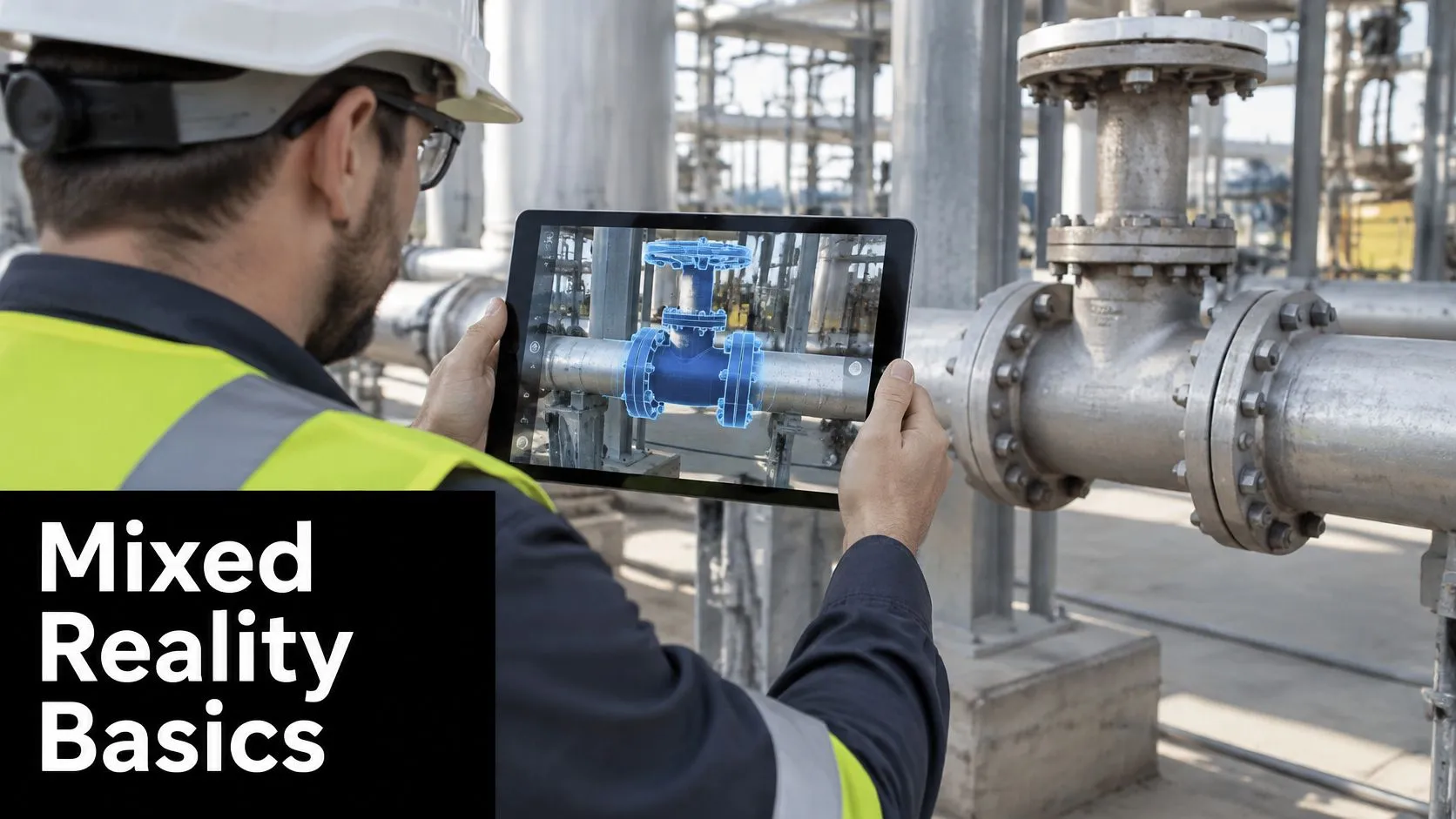
Stand in a training bay with a real pipe run in front of you. Virtual reality shuts the door on that bay and puts you somewhere else entirely. Augmented reality holds up a camera feed and pins labels onto it. Mixed reality leaves the pipe exactly where it is and lets you reach for a virtual valve that sits on that pipe, disappearing behind your hand when your hand passes in front of it. That last detail is the whole discipline in miniature. The digital object has to know where the pipe is, where your hand is, and which of the two is nearer to the camera.
Working definition: mixed reality development is the discipline of building the software, the 3D content and the on-site operation that keep digital objects locked to a physical place and responsive as people move around them.
Six layers make that possible. Spatial mapping builds a mesh of the room. Tracking and input follow the head, hands and controllers. A real-time engine renders the scene fast enough to hold frame rate. Persistent anchors keep objects in the same spot between sessions. An interaction model defines grab, place, confirm and undo. Occlusion and lighting seat the digital layer behind real geometry instead of floating it on top. Get any of those wrong in a training room, a heritage gallery or a brand activation and the digital layer slides off the physical object. The visitor sees a sticker hovering near a machine rather than a valve attached to it, and trust in the whole experience collapses in about two seconds.
The UK has a substantial base for this work. A 2018 UKRI study of the immersive economy estimated just over 1,000 specialist immersive-technology companies, businesses earning more than half their turnover from virtual, augmented or mixed reality, employing approximately 4,500 people and generating about £660 million in sales. Public funding built much of that capability: a Policy Evidence Centre review of immersive technologies records 253 immersive projects receiving around £160 million between 2006 and 2017, with research councils funding from 2006 and Innovate UK from 2011. The decisions that follow run in the order a producer meets them: what each technology layer does, whether mixed reality is the right format, how the build gets made, what breaks on other devices, who is excluded, what it costs, and finally what to include.
Core Technologies Behind a Mixed Reality Build
The comparison most commissioners want is the one between the three formats, so start there. Virtual reality replaces the room. Augmented reality layers graphics onto a camera view without holding a stable model of that room. Mixed reality needs a live map of surfaces, a tracked head and hands, and rendering that respects occlusion, because a virtual object has to be able to pass behind a real table and come back out.
| Layer | What it does | Typical tools | Production risk |
|---|---|---|---|
| Spatial mapping | Builds a mesh or planes of the real room | Device SLAM and scene-understanding APIs | Glass, mirrors and low light break the mesh |
| Tracking and input | Tracks head, hands and controllers in six degrees of freedom | Inside-out cameras, hand tracking, controllers | Drift or lost hands mid-session |
| Real-time engine | Renders 3D at a stable headset frame rate | Unity or Unreal Engine | Standalone headsets throttle when the scene is too heavy |
| Anchors and persistence | Keeps objects in place across sessions | Spatial anchors and cloud anchors | Anchors fail when furniture or lighting changes |
| Interaction model | Defines grab, place, confirm and undo | Direct touch, ray, gaze and pinch | A mode built for one headset fails on another |
| Occlusion and lighting | Seats digital objects behind real geometry | Depth occlusion and environment probes | Flat overlays look like stickers, not mixed reality |
The failures that show up in the room
Read the table as a chain of dependencies rather than a shopping list. Weak spatial mapping shows up as an object that shudders against a real wall. Weak tracking shows up as a hand that vanishes whenever it drops below the headset's camera view. Weak occlusion shows up as a label floating on top of the desk it should be sitting behind, which is the single fastest way to make a polished build look cheap. Spatial mapping is computer vision work at heart, and when a project needs to recognise bespoke objects rather than accept an off-the-shelf SDK, teams can find computer vision developers in LATAM to extend the engineering bench without rebuilding the whole studio.
Engines, abstractions and the profiling you cannot skip
Unity and Unreal Engine are the two platforms most commercial teams build on, and both are fine choices. What matters is what sits on top of them. Shared abstraction layers for hands, controllers, anchors and spatial meshes keep platform-specific code in one place, so a change of headset becomes a configuration task rather than a rewrite. Without those abstractions, every device becomes its own mini-project. Per-device profiling stays mandatory whatever the abstraction does. Frame time, thermal behaviour and tracking stability change with the scene, the headset and the room, and no shared layer predicts them. Our own guide to AR and VR development in 2026 goes deeper into toolchain choices, but the principle holds: build once, profile everywhere. Passthrough headsets, inside-out tracking and spatial anchors are the current baseline. External beacons and marker rigs belong to an earlier generation of installations, and specifying them now adds cost and fragility for no gain.
When Mixed Reality Is the Right Format
The format question is a service design question, not a device selection question. It has a right answer before anyone opens an engine, and that answer is sometimes no.
| Situation | Stronger format | Why |
|---|---|---|
| Hands-on task on real equipment | Mixed reality | The digital step must align to the physical object |
| Object that cannot leave its site | Mixed reality or spatial AR | The story stays with the artefact |
| Public event with a queue and staff | Facilitated location-based loop | Throughput, safety and reset time dominate |
| Remote stakeholders who need the idea | 2D animation or explainer | Reach matters more than presence |
| Unsupported first-time audience | Mobile or physical interactive | Headset confidence and staffing are the constraint |
| Scored training with an audit trail | XR simulation with a rubric | You need logged actions, not only a film |
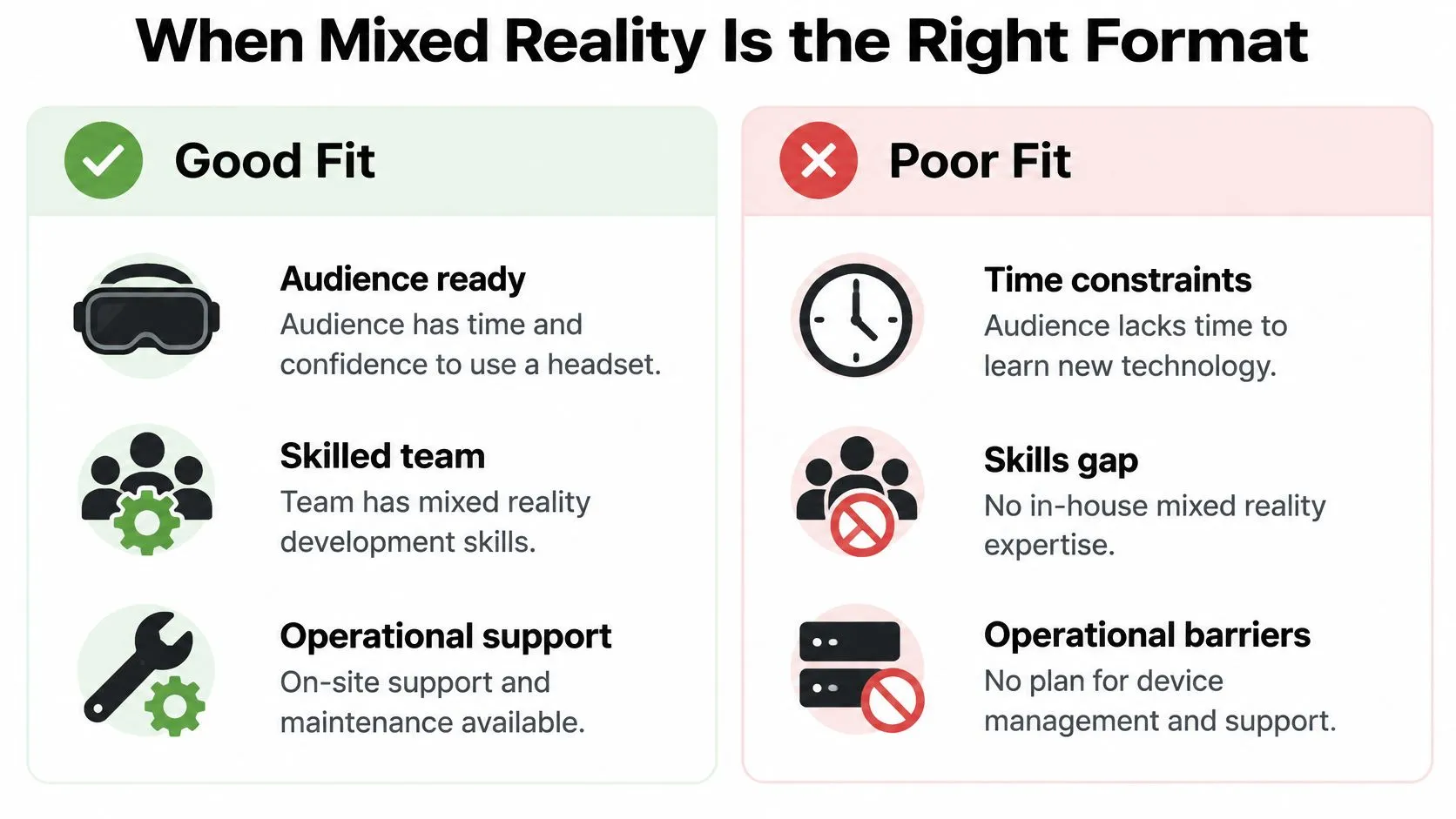
Read the rows left to right. Mixed reality earns its cost when a person must act on a real object in situ, whether that's a procedure on equipment too heavy to move or a museum piece that never leaves its gallery. A facilitated location-based loop is the right call when the goal is guest throughput at an event with a queue. A 2D film, explainer or mobile page wins whenever the audience is remote, first-time, or unsupported by staff on the floor.
What to measure when it fits
Measure the thing the format was chosen for. For a training task that means task completion and assistance requests. For a recurring experience it means repeat use. For an exhibition stand it means dwell time and the number of visitors who finish the interaction, not the number of headsets in use. Headset count is an activity metric dressed up as an outcome.
Practical rule: choose the format that reaches the audience you have, not the audience you'd like. Then write down the metric that proves it worked before anyone signs a purchase order.
The constraint nobody budgets for
Audience readiness and skills, not technical feasibility, are what usually decide the outcome. A Policy Evidence Centre briefing on widening VR appeal notes that access and confidence are uneven even where internet access is high, with many people lacking the skills, time and confidence to use a headset. The same briefing cites an OECD 2025 policy primer reporting that 79% of UK immersive-technology companies struggle to obtain sufficient XR talent, naming talent availability as their top growth barrier. Clients feel that shortage too, in their own teams and in the suppliers they brief. Patterns that reliably earn the extra cost of headsets, facilitators, cleaning and content upkeep are narrow and well understood: training and assessment, product demonstration at exhibitions and retail, heritage interpretation, and high-throughput event games. If a brief has no facilitator plan, no hygiene routine and no fallback for people who won't wear a headset, don't build it. A well-made animation will reach further. Anyone planning a public-facing rollout will find useful groundwork in these accessible VR setups for UK conferences, which cover the operational side most briefs skip.
A Production Workflow from Brief to Deployment
One pipeline covers most builds, and it can be scheduled. Each step carries a specific risk when it's skipped.
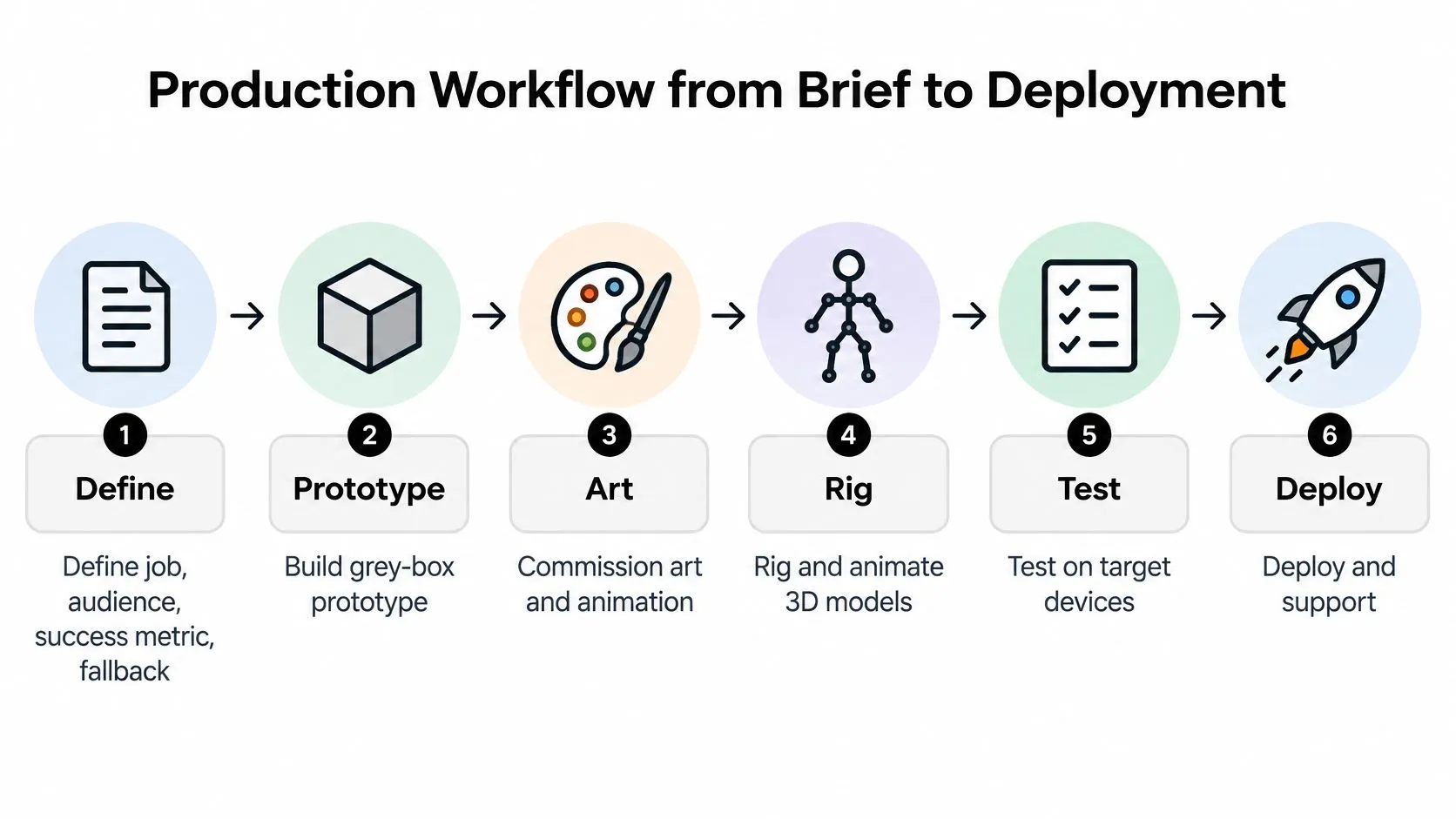
- Define the job before commissioning art. Write the job to be done, the audience segment, the success metric and the non-headset fallback. Skip this and the pilot becomes unjudgeable, because nobody agreed what success looks like.
- Prototype in grey box on the target devices. Block out the space, the interactions and the timing on the hardware from the device matrix, not on a desktop viewport. Prototyping only on a premium headset hides failures until it's expensive to fix them.
- Author the spatial layout, interaction and audio in Unity or Unreal behind shared abstractions for hands, controllers, anchors and meshes. Building straight to one device's SDK feels faster for a week and costs a fortnight later.
- Cut content until the frame rate holds in the physical room. Strip geometry, lights and effects until the experience is stable on the weakest supported device, then lock the build. Rework at this stage is normal; discovering it at launch is not.
- Run a facilitated pilot with first-time users, including the staff who will run the venue. Record completion, drop-off and assistance requests. A pilot that only tests happy-path visitors tells you nothing about a Saturday afternoon.
- Deploy with a support plan covering cleaning, charge cycles, content updates, facilitator scripts and a route for anyone who cannot or will not wear a headset. Treating launch as the end of content work turns this step into an unfunded liability.
Prototypes do double duty. They expose tracking failures early, and they show a client whether the experience is operationally viable before the full production spend is committed.The sequencing matters more than the tooling. Teams that write the success metric first tend to cut scope confidently, because they know which features the measurement depends on.
Cross-Device Validation Before Full Production
Cross-device validation is engineering work that starts at discovery, not a quality check bolted on before launch. Digital Catapult's written evidence to a UK parliamentary committee describes technical R&D projects, proofs of concept and pilots used to test virtual, augmented and mixed reality content across multiple headsets, precisely because device variation changes tracking, interaction, rendering and deployment behaviour. The practical instrument is a device matrix written during discovery, with five fields per target: headset class, operating system, input modality, spatial-mapping capability and performance tier. Then run representative interaction tests on every row.| Headset class | Typical input | Spatial mapping | What to profile |
|---|---|---|---|
| Premium standalone passthrough | Controllers and hand tracking | On-device mesh | Frame time and thermal throttling |
| Enterprise tethered with passthrough | Controllers on a PC VR rig | Higher-fidelity mesh | GPU load and cable or play-space limits |
| Mobile or phone-class passthrough | Touch and gestures | Planes or geospatial anchors | Battery, bright light and tracking loss outdoors |
| Shared venue fleet | Simplified controllers and a guided loop | Pre-scanned or tightly controlled space | Reset time, hygiene and guests per hour |
Profile the weakest device the client will accept
An experience that feels solid on a premium standalone headset can lose its anchors or its hands on a lower tier. That isn't a defect to negotiate away at the end; it's a scope decision to take at the start. Put the weakest device the client is willing to support at the top of the matrix and design to it. Shared venue fleets deserve their own pass. Reset time between guests, cleaning routine and how many people move through in an hour often determine whether an installation is viable at all, long before anyone discusses polygon budgets. If you're weighing hardware tiers for a fleet, this clear guide to the Meta Quest 3 and 3S for XR developers sets out where the differences matter.When to stop testing and start building
Testing ends when every row in the matrix has been exercised on a representative interaction: a grab, a placement, a menu and a reset. That's usually a short, unglamorous pass, and it's the cheapest hour in the project. Skipping it converts a discovery-week fix into a launch-week crisis with a venue full of booked guests.Accessibility as a Production Requirement
Accessibility gets treated as post-production polish. AbilityNet's 2025 research on digital accessibility attitudes shows how far that habit reaches: only 55% of respondents had accessibility embedded in their development process, 52.49% named competing priorities as the leading barrier, and 45.34% cited insufficient internal skills or experience. Those numbers describe a sector that intends to do this work and doesn't get to it.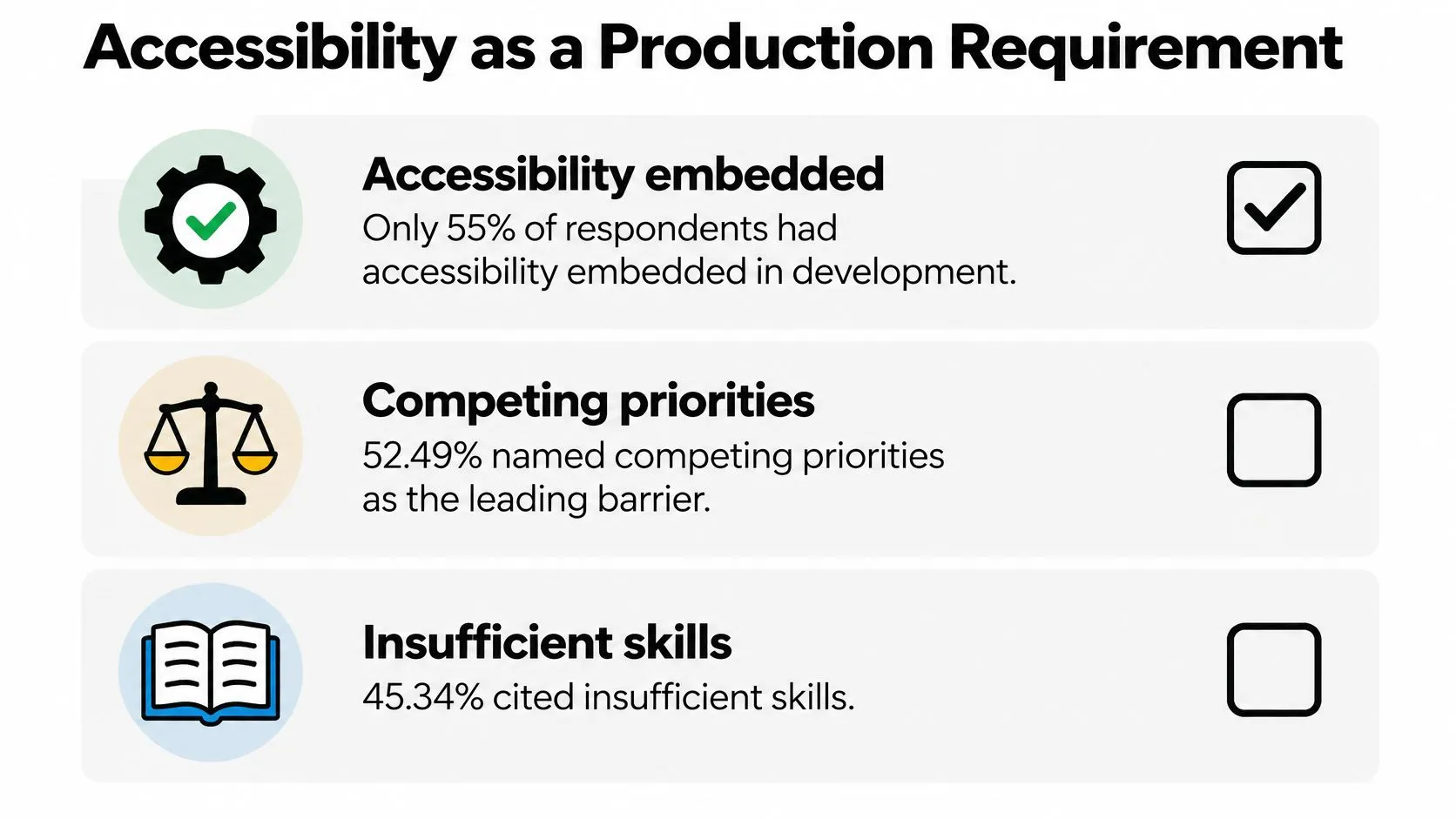 In mixed reality the consequence is harsher than in most software. A visual-first interface can exclude a blind or partially sighted user entirely, and a controller-only grab excludes anyone who can't hold the default input. Retrofitting doesn't fix that, because the interaction model is the thing that needs changing.
Specify these at discovery
- •Audio description and spatial sound that signals where the next object is, so navigation doesn't depend on sight.
- •Configurable text size and contrast, set by the user rather than baked into a style guide.
- •An alternative to the primary controller or pinch, whether that's gaze and dwell, a switch input or voice.
- •Haptic confirmation so a successful grab is felt as well as seen.
- •Seated and standing options, because reach and balance vary.
- •A non-headset route to the same information for anyone who won't or can't wear a device.
Test with people, not with simulation
Test with people who have lived experience rather than simulating impairment with a blindfold and a headset. Simulated impairment tells you what a sighted designer imagines, which is consistently more optimistic than reality. Plan venue safeguarding too, because public installations put strangers in a shared space wearing a device that blocks their vision.
Acceptance question for any pilot: can someone complete the core task without the default input, hear where the next object is, and leave without a member of staff improvising a workaround on the spot?
Museums, classrooms, games and branded activations are where an inaccessible build stops being non-compliant and becomes unusable. That's the difference between a finding in a document and a queue of people handing the headset back.
Budget, Team and Timeline for an MR Build
Cost follows scope, and the lines producers most often forget sit outside the build itself. Map every quote to four areas and the estimate becomes honest.
- Content. 3D assets, interaction design and audio, sized per experience rather than per headset. A second device class usually reuses the content; it doesn't multiply it.
- Fleet. Headsets, charging, cleaning supplies and spares. Spares matter more than teams expect, because a single failed unit in a four-headset loop removes a quarter of the capacity.
- Staffing. Facilitators, a venue lead and on-site support for every hour the experience runs. This is the line most often left out and the one that decides whether the build survives contact with the public.
- Maintenance. Content updates and operating system or firmware changes after launch. A platform update can move an anchor system or change hand tracking behaviour, and that work needs an owner and a budget line.
Brief the Build You Can Actually Run
Commissioners often treat a headset as the brief. Put the device last. If the format verdict did not pick mixed reality, commission the simpler format and stop. That choice saves more than a later cut to scope, because a build nobody can run still costs the full production. If mixed reality did win, the brief names seven things before anyone talks engines: the audience segment, the success metric, the device matrix, the accessibility bar, the facilitator and hygiene plan, the non-headset fallback, and the owner of content after launch. Unity or Unreal only matters once the interaction and the room are defined. A room that needs a facilitator, a spare device and a route for someone who cannot wear a headset is a service, not a render.A brief that answers those seven questions can be costed. A brief that leads with the headset model cannot.Studio Liddell builds virtual and augmented reality inside a wider creative production practice, developing IP and content for practically every platform with game-engine projects in Unity or Unreal. Dance! Dance! Dance! is a Quest VR game from the studio. The studio has also delivered an AR and VR project for Merck Pharmaceutical. A brief stuck between a headset demo and something a commissioner will fund needs a conversation about audience and devices, not more prototype time. Contact Studio Liddell through Studio Liddell to discuss the brief, the target audience and the devices the experience has to run on.