AR and VR Development: A 2026 Immersive Tech Guide
AR and VR development should be chosen by the job it needs to do, not by the novelty of the hardware. The UK already had roughly 1,000 immersive-specialist companies generating £660 million in sales by 2018, so this is an industrial production choice, not an experimental indulgence. That distinction matters when a team is under pressure to “do something in AR” or “put the experience in VR”. A headset can arrive quickly. A useful experience takes longer because it has to fit a real environment, a real audience, a real operating model and a measurable outcome. The strongest projects start with those constraints, then select the technology, engine and content pipeline that can survive production.
Why Most AR and VR Decisions Fail Before Production Starts
A brand team books a headset demonstration before it books a clear brief. The prototype looks impressive in a meeting room, but nobody can explain whether the experience should increase product understanding, improve training, support a sales conversation or entertain visitors. By the time those questions surface, the team has already chosen hardware, commissioned assets and promised a launch date. The wrong engine rarely creates the largest cost. Ambiguous success criteria do. If a retail experience needs to help visitors compare products, the team should measure meaningful interactions and assisted decisions. If a safety simulation needs to improve procedural competence, the brief should define the sequence users must complete and the mistakes instructors need to see. A visually polished demo can't rescue an undefined outcome. The UK ecosystem had already reached meaningful commercial scale by 2018. Evidence submitted to Parliament, citing the Immerse UK sector study, described approximately 1,000 specialist companies, around 4,500 employees and £660 million in sales. The same evidence said the activity could represent as much as 9% of the global immersive-technology market. That scale should change the conversation. AR and VR aren't fringe formats, but neither should be selected because they sound novel.
Write the decision into the brief
A useful brief forces three answers before production starts:
- •User situation: Where will the experience be used, by whom, and with what supervision?
- •Job to be done: What should the user understand, practise, choose or feel?
- •Evidence of success: What observable action proves the experience worked?
The choice between AR and VR then becomes easier. If the physical environment carries essential context, AR may be appropriate. If that environment introduces safety, distraction or inconsistency, VR may reduce risk by controlling the scene. The production guidance for augmented reality is useful precisely because it treats tracking, assets and deployment as production decisions rather than decoration.
Practical rule: Don't approve a headset purchase until the team can describe the user task without using the words “immersive”, “innovative” or “engaging”.
AR vs VR Development - Choosing the Right Immersive Experience
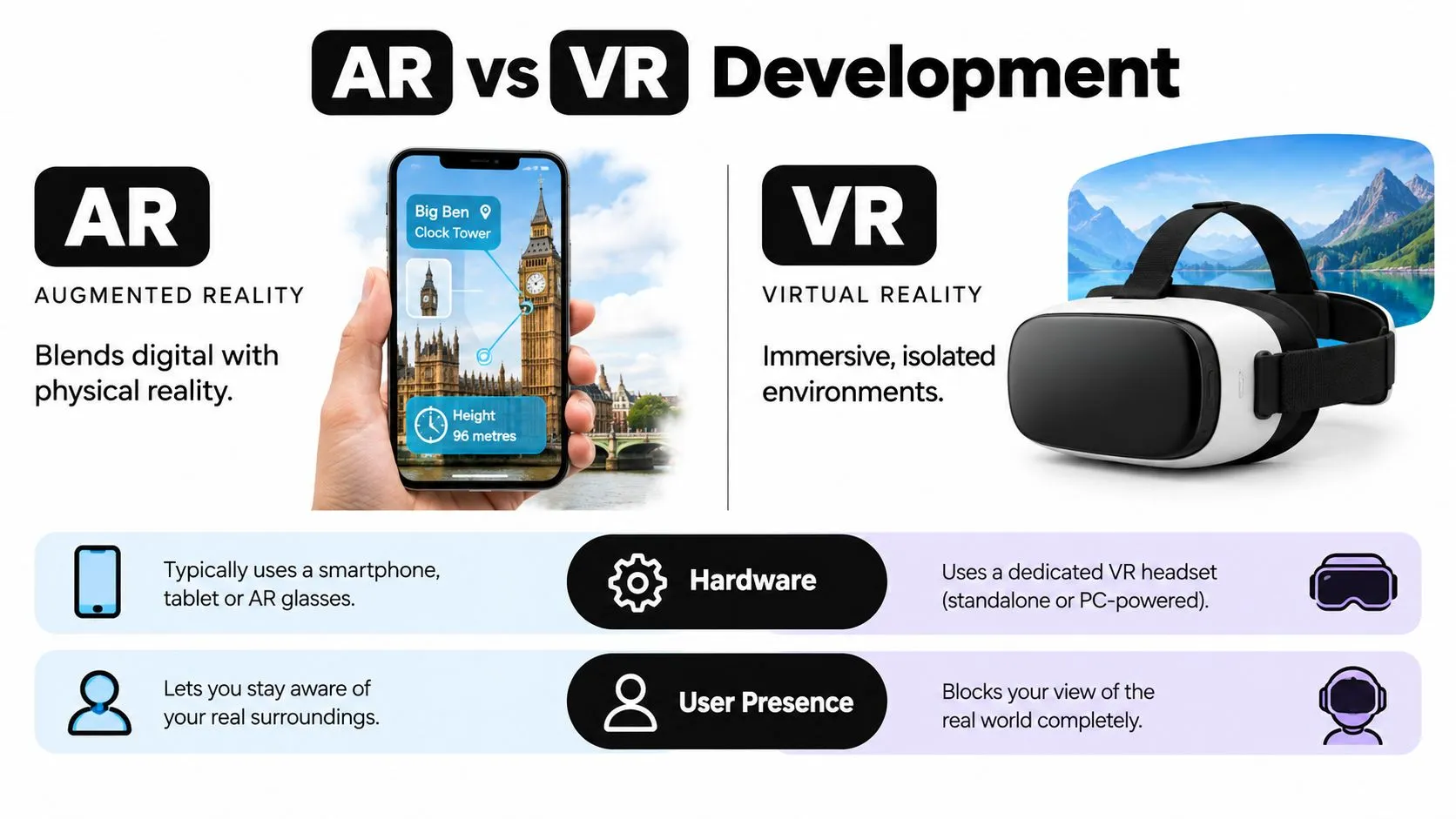
AR overlays digital content onto the user's surroundings. VR replaces the user's visual environment with a controlled virtual one. That difference affects everything from interaction design to safeguarding, but it doesn't automatically make AR the easier option. AR can work well when the physical world is part of the message. A visitor might point a phone at packaging to reveal a product configuration, or a technician might use spatial instructions beside equipment. The physical setting provides scale and context. It also creates uncertainty: lighting changes, surfaces can be reflective, tracking can drift and other people can interrupt the interaction. VR is stronger when the experience needs repeatability. A training scenario can place every learner in the same environment, introduce controlled hazards and record defined actions. A branded story can direct attention without competing signage or movement around the user. VR also brings headset comfort, hygiene, space management and onboarding into the operational plan. UK adoption evidence illustrates why use-case selection matters. PwC identified 1,550 distinct examples of VR and AR business use in UK organisations, with 66% of organisations using XR using VR. Engineering and manufacturing represented 24.13% of identified use, while retail and consumer businesses represented 10.90%. Consumer engagement was the largest application category at 37.9%, followed by learning and development at 21.7%, according to PwC's analysis of UK XR applications.
| Decision factor | AR | VR |
|---|---|---|
| Environment | Uses the existing physical setting | Replaces the setting with a designed world |
| Strong fit | Product engagement, spatial guidance, exhibitions | Simulation, rehearsal, controlled storytelling |
| Main production risk | Tracking, lighting, device variation and physical interference | Comfort, latency, onboarding and safe movement |
| Content advantage | Connects digital information to real objects | Controls sequence, attention and scenario conditions |
| Operational question | Can the user safely look at a screen while moving? | Can the venue support headset use and supervision? |
AR also spans more than phone overlays. Web AR, tablet experiences and headset passthrough each change the interaction model and the testing burden. Teams evaluating a mobile route can use this React Native AR and VR development tutorial as a technical orientation, then validate the proposed experience against actual devices and environments. The sensible choice is the one that removes the largest source of risk. A warehouse training task may benefit from VR because it removes live hazards. An exhibition product configurator may benefit from AR because the physical product and sales conversation remain central. The business case for AR should therefore be tested against the setting, not against a generic claim that AR is more accessible or cheaper.
The End-to-End Pipeline for AR and VR Development
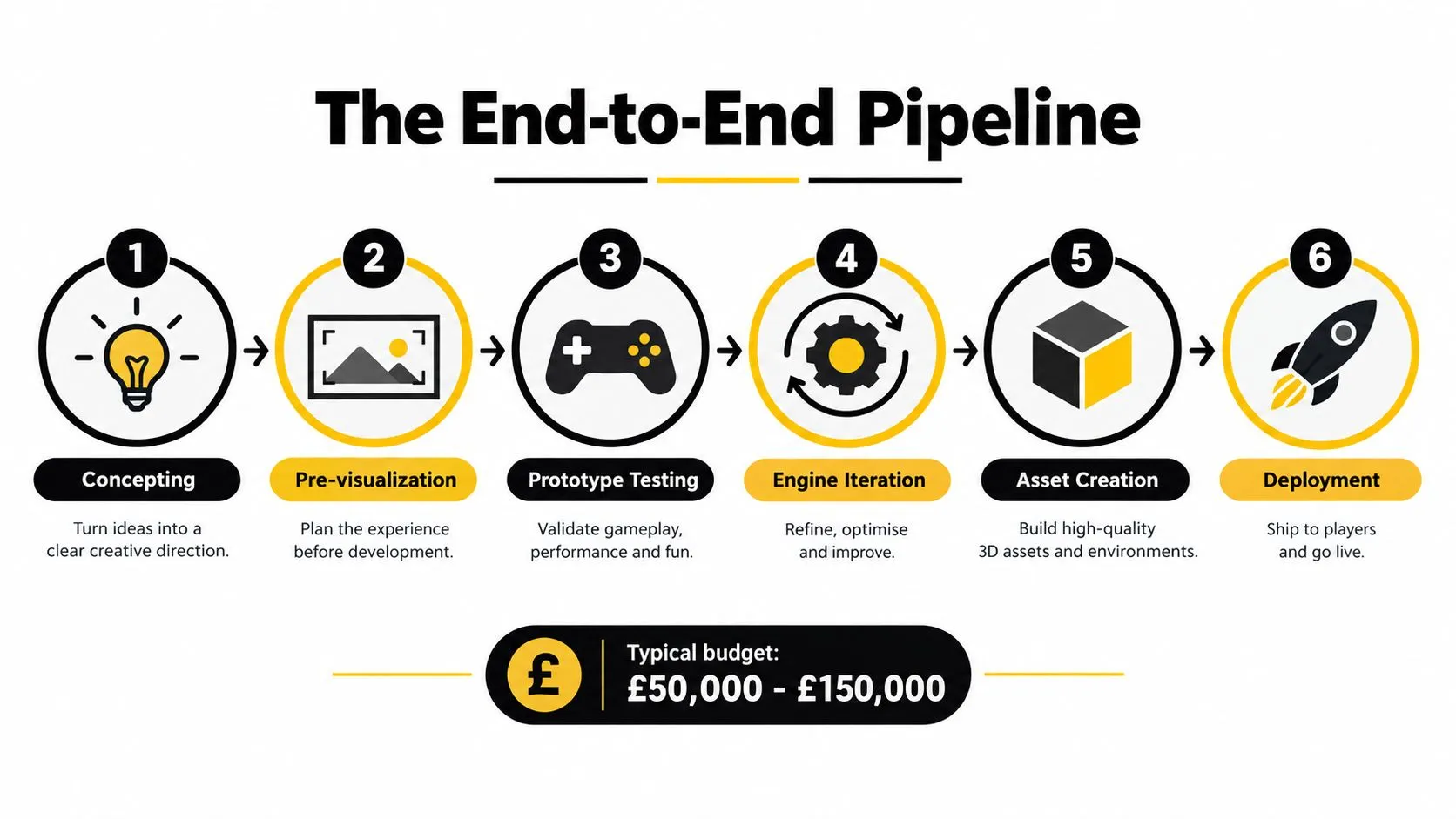
Immersive production works best as a sequence of decision gates, not a straight march from concept to final build. Each gate protects the next investment. A team that models comfort, accessibility and device limits during concepting can avoid rebuilding interaction systems after art production has begun.
Start with the experience, not the asset list
Concepting defines the user task, setting, audience and success measure. Pre-visualisation then tests spatial composition, pacing and interaction with simple geometry. At this stage, the team should decide whether users stand, sit, walk, turn, point, speak or use controllers. Prototype testing should be deliberately unattractive. Grey-box scenes reveal whether users understand the first action, whether instructions compete with the environment and whether the experience works without a facilitator. A beautiful prototype can hide a weak interaction loop, while a rough one exposes it early. The pipeline infographic's £50,000 to £150,000 typical budget note is a planning reference, not a universal quote. The UK short-form animation funding guidance shows how scope, schedule, script, budget and finance planning have to align for substantial creative work. XR adds device, testing and deployment variables, so a producer should treat the brief as a delivery system rather than a creative wish list.
Engineer comfort while the scene is still simple
Motion-to-photon latency deserves a budget from the first technical test. Research associated with the University of Southampton links latency with poorer physical interaction, weaker collaborative-task performance and simulator sickness, with prior recommendations placing effective virtual-environment delay at approximately 17 ms. A separate simulator-driving review gives a practical target of roughly 20 ms for head-mounted-display and CAVE systems, as described in the latency research review. That measurement must cover sensor acquisition, pose prediction, simulation, rendering, compositor transfer, display and wireless transport. Application frame time alone can conceal queueing and display delays. Test demanding scenes with particles, dynamic lighting, skeletal animation and network variation, then use late-stage pose updates, fixed foveated rendering where supported, reduced buffering and simpler locomotion when the target is missed. Asset creation and engine iteration should follow the first comfort tests, not precede them. A modular architecture can separate 3D environments from scenario logic, telemetry, accessibility settings and device inputs. That makes it easier to support a browser preview, a standalone headset and a location-based installation without duplicating the entire project. Deployment is its own production phase. Standalone headsets favour local caching and compressed assets. Web AR depends on browser capability, device permissions and download performance. Location-based VR requires reset procedures, staff tools, physical boundaries and a reliable recovery path. The guide to VR content creation is most useful when read as a reminder that shipping means operating the experience, not merely exporting a build.
Unity or Unreal for AR and VR Development in 2026
Unity and Unreal can both support serious XR production. The decision usually turns on the team already available, the target devices, the visual bar and the amount of reusable tooling required. Unity often suits multi-device education, enterprise and mobile XR deployments. Its component-based workflows can help teams share logic across prototypes, standalone headsets and other constrained platforms. Unreal can be a strong choice for cinematic environments, high-end visualisation and location-based work where lighting, materials and real-time presentation carry much of the experience. Neither engine removes the hard parts. Unity projects still need disciplined profiling, anchor testing and interaction design. Unreal projects still need careful memory budgets, device-specific optimisation and a team comfortable with its production conventions. Plugins can accelerate development, but each dependency adds upgrade, licensing and maintenance decisions.
| Factor | Unity | Unreal Engine |
|---|---|---|
| Rendering | Efficient route for broad device targets when scenes are designed around limits | Strong fit for high-fidelity real-time environments and cinematic presentation |
| XR deployment | Practical for scalable multi-device and educational builds | Practical for premium, spatial and location-based experiences |
| Team skills | Suits teams familiar with C#, prefabs and modular component workflows | Suits teams familiar with Blueprints, C++ and cinematic pipelines |
| Asset workflow | Flexible for reusable interactive content and lightweight builds | Strong for detailed environments, materials and real-time visual development |
| Main trade-off | Visual ambition may require more deliberate optimisation | Fidelity can increase memory, performance and staffing demands |
| Producer concern | Plugin compatibility and device coverage | Scope control and optimisation on constrained hardware |
The best engine is the one the team can profile, debug and ship with confidence. An Unreal prototype that looks excellent but misses comfort targets is not further ahead than a modest Unity build that supports the intended task. Conversely, a visually led location-based experience may lose its value if the chosen pipeline can't deliver the required lighting, spatial audio and performance. Set the engine decision after a short technical spike. Test the hardest scene, the primary interaction, the target headset and one representative lower-performance device. That evidence is more valuable than a feature comparison because it exposes total cost and timeline impact before the project is committed.
Real UK Production Insights and Case-Based Lessons
UK immersive work provides useful lessons because successful projects have to operate beyond a controlled development machine. They face training requirements, public venues, broadcast expectations, stakeholder scrutiny and users who may not have used a headset before. The Nuclear Decommissioning Authority reported a 90% cost reduction after introducing VR training at a nuclear plant compared with the physical simulator, while also improving safety and allowing training designs and validations to be assessed months before real-world deployment, according to its digital vision and strategy. The lesson isn't that every VR project delivers the same saving. It is that VR creates the clearest value when repeated practice, controlled failure and hazardous conditions make physical training expensive or difficult.
Build assessment into the scenario
A training simulation should record actions that matter operationally. Depending on the task, that could include sequence completion, response time, tool selection, hazardous-zone breaches or instructor review. A scenario without an assessment model may entertain users, but it can't reliably support competence decisions. The same principle applies to event-based VR. A location-based game needs a clear loop, quick reset, staff visibility and predictable throughput. Hygiene, physical boundaries and recovery from tracking failure belong in the design specification. Art direction matters, but a beautiful experience that creates queues or requires constant technician intervention won't perform well in a public venue.
Producer's observation: The production team should prototype the reset procedure as seriously as it prototypes the first player interaction.
Broadcast and technical communication impose different constraints. BBC publicity clips use 1920 × 1080 pixels, a 16:9 aspect ratio and 25 frames per second with 50 interlaced fields, known as 1080i/25, with the top field first, according to the BBC programme publicity delivery specification. BBC guidance also requires clips on the delivery date or at least 10 days earlier, whichever comes first. Those details affect animation, compositing and review from the beginning. Technical storytelling benefits from the same discipline as simulation. GeoEnergy NI demonstrates the kind of communication problem where visual hierarchy, iteration and stakeholder comprehension matter more than decorative complexity. A complex system needs a clear visual metaphor, a controlled messaging ladder and review points where subject specialists can challenge what the audience is seeing. For teams working with smaller organisations, UK government research highlights a practical obstacle. Construction SMEs often lack the expertise, training and resources to embed VR, AR safety tools and AI-informed BIM into routine work, with adoption concentrated among major contractors, as described in the sectoral overview of AI skills. That makes short pilots, reusable assets, device-light delivery and staff training more valuable than an ambitious installation nobody can maintain.
Common Misconceptions About AR and VR Development
AR isn't automatically cheaper than VR. A phone-based experience may avoid headset procurement, but it can introduce camera permissions, tracking instability, variable lighting, browser differences and a wider range of user devices. VR controls the visual environment more tightly, yet adds comfort, hygiene, onboarding and physical-space requirements. The cheaper route is the one that reduces operational uncertainty for the intended use. Better hardware also doesn't fix a weak experience. A sharper display can't clarify a confusing task, stabilise a poorly designed AR anchor or make an uncomfortable locomotion system acceptable. Performance begins with scene complexity, interaction choices and end-to-end latency, then continues through testing on the devices people will actually use. Immersion shouldn't be treated as the universal objective. A training user may need legible instructions, seated access, captions and a clear pause function more than a photorealistic environment. An exhibition visitor may need a short, self-explanatory interaction that works while standing in a crowded space.
Treat inclusion as production engineering
UK-facing analysis identifies risks that include eye strain, disorientation, injury, sensitive spatial data, facial-expression or biometric collection, and uncertainty around surveillance and consent, as outlined in the UK executive summary on responsible technology. These aren't policy footnotes. They affect locomotion, session design, permissions, data architecture and venue operations. A responsible production plan should include:
- •Comfort testing: Check seated and standing modes, acceleration, turning, text legibility and session fatigue with representative users.
- •Alternative access: Provide a non-headset route where the learning, marketing or storytelling objective allows it.
- •Data minimisation: Collect only the spatial, interaction or account data required for the stated service.
- •Clear consent: Explain permissions in language users can understand before cameras, microphones or spatial mapping are activated.
- •Operational safeguards: Define supervision, physical boundaries, cleaning, reset and incident procedures before public deployment.
The most reusable content is often not the most immersive content. A well-structured asset can support mobile, browser, tablet and headset versions if the interaction logic is separated from device-specific input. That approach gives organisations room to expand without forcing every audience into the same hardware.
How to Plan and Measure Successful AR and VR Deployment
Start with a decision statement: “We will use AR or VR to help this audience complete this task in this setting.” Add one primary measure, such as task completion, procedural accuracy, meaningful product interaction or stakeholder comprehension, then define the evidence the team can collect without compromising privacy. Next, approve a device and environment matrix. Include the target headset or phone, a representative lower-performance device, network conditions, seating and standing options, accessibility modes and the staff process around the experience. Test latency, tracking, comfort and recovery before polishing the final assets. A pilot should answer operational questions, not merely collect praise. Can a first-time user start without coaching? Can staff reset the experience? Can the organisation update content without rebuilding the application? Can decision-makers connect the output to a business or learning objective? Studio Liddell offers concepting, technical scoping, 2D and 3D asset production, Unity and Unreal development, testing and performance optimisation for AR and VR projects. A feasibility workshop or pipeline audit can turn an initial idea into a choice of platform, prototype scope, measurement plan and delivery route. --- Visit Studio Liddell to discuss an AR or VR concept grounded in operational fit, latency engineering and inclusive design. Bring your audience, environment and desired outcome, and the team can help shape a production plan that is ready to test rather than merely ready to pitch.