Low Poly vs High Poly: Which Wins for Film, Games and XR
The usual advice is simple. More polygons mean a better model, so push the count until the silhouette looks smooth. That advice collapses as soon as the same asset has to hold a steady frame rate on a phone, stay comfortable in a headset, or survive another round of client notes before a broadcast lock. High poly spends many triangles so curves, pores, stitching and cloth folds live in the mesh itself. Low poly spends fewer triangles and asks textures, normal maps and a readable outline to suggest that detail. In a low poly vs high poly decision, neither density wins in general. The right choice is the one the camera distance, the device and the revision calendar can pay for. I would not start modelling until the brief names where the asset is seen. A film close-up and a browser scene on a mid-range handset are different jobs, even when the character design is identical.
Low Poly vs High Poly at a Glance
High poly provides smooth silhouettes and fine surface detail with triangles. Low poly delivers speed, lighter memory use, and quicker changes, then recovers detail with maps and art direction. Weigh the criterion that constrains your job, not a generic quality score.
| Criterion | Low poly | High poly | Better fit |
|---|---|---|---|
| Silhouette and detail | Simplified shapes, relies on textures and normal maps | Fine detail modelled into the geometry | High poly for close-up detail |
| Real-time frame cost | Lower vertex processing and memory use | Higher vertex and memory load | Low poly for mobile, WebXR and VR |
| Rigging and deformation | Fewer edges to deform, simpler weight maps | Smooth bends and detailed deformation | Match density to shot distance and how far the pose travels |
| Asset build and revision time | Faster to model, optimise and revise | Longer sculpting, retopology and baking | Low poly for iterative work |
| Offline render time | Short per frame | Long per frame | Low poly for tight deadlines |
Read the last column as a production rule, not a style preference. Close-up hero work earns dense geometry because the viewer can see a faceted elbow. A background prop, a repeated crowd figure, or anything that must load on a wide range of devices does not. Build time follows the same split. A low-poly mesh is quicker to block, skin and revise when notes keep arriving. A high-poly sculpt plus a clean retopology pass plus bakes is the slower route, and every extra review round multiplies that cost. Offline, the penalty shows up as minutes per frame on the farm rather than as a dropped game frame.
Polygon count is a cost paid in every frame or every render, not a score for quality.
If two options look equally good at the distance the viewer gets, take the cheaper one. Save the dense mesh for the shots where a normal map cannot hold the outline.
Polygon Budgets Each Platform Can Handle
Start with the published ceilings, then test, because a scene total hides the mesh that stalls the frame. Android's game geometry guidance treats fewer vertices as a performance win, and it names 65,535 vertices as a common maximum for an individual mobile mesh if you want broad device compatibility. The same guidance's example scene draws about 210,000 triangles per frame at about 30 FPS. Those two figures do different jobs. The per-mesh cap stops one hero from breaking older GPUs even when the rest of the scene is light. The per-frame figure is what the whole view has to live inside.
| Target | Documented budget | Reference point | What to check |
|---|---|---|---|
| Individual Android mobile mesh | 65,535 vertices as a common maximum | Keeps broad device compatibility | Count vertices per mesh, not only the scene total |
| Android example scene | About 210,000 triangles per frame | Renders at about 30 FPS | Profile on the target handset |
| Meta VR guidance | 1 to 2 million triangles or vertices per frame | Simpler shaders stretch the budget | Check refresh stability on the headset |
| Pre-rendered film and TV | No real-time frame limit | Set by render time and farm capacity | Minutes per frame against booked farm slots |
| Browser WebXR | No single published mesh cap | Set by the browser and the device GPU | Test on representative devices and browsers |
What else spends the frame
Triangle count is a weak proxy on its own. The Android guidance is clear that material count, draw calls, animation, skinning, overdraw, texture sampling and shader complexity can become the actual limit. A model you “optimized” by cutting faces can still miss frame rate if it carries four materials, a heavy skinning stack and a shader that samples several maps per pixel. Practical checks before you lock a budget:
- •Split dense heroes. Break one huge mesh into smaller ones that each sit under the per-mesh vertex cap, and keep a lower LOD for anything outside the interaction radius.
- •Spend density where the camera stops. Reserve extra triangles for the object the user inspects. Distant and repeated assets stay light.
- •Profile the handset you ship to. A nominal polygon cut rarely returns a matching FPS gain, especially once textures and shaders dominate.
Pre-rendered film and television have no live frame ceiling. The constraint is how long each frame takes and how many farm slots you have booked. Browser WebXR is the awkward middle. There is no universal mesh cap, so the only honest budget is the one you measure on the browsers and phones your audience uses. Our notes on real-time 3D rendering are a useful companion when you are setting that scene budget before modelling starts. Low poly earns its place when it cuts vertex work and memory without forcing an expensive pile of unique normal maps and complex shaders to fake what a few extra edges would have done more cheaply.
Where High Poly Earns Its Cost
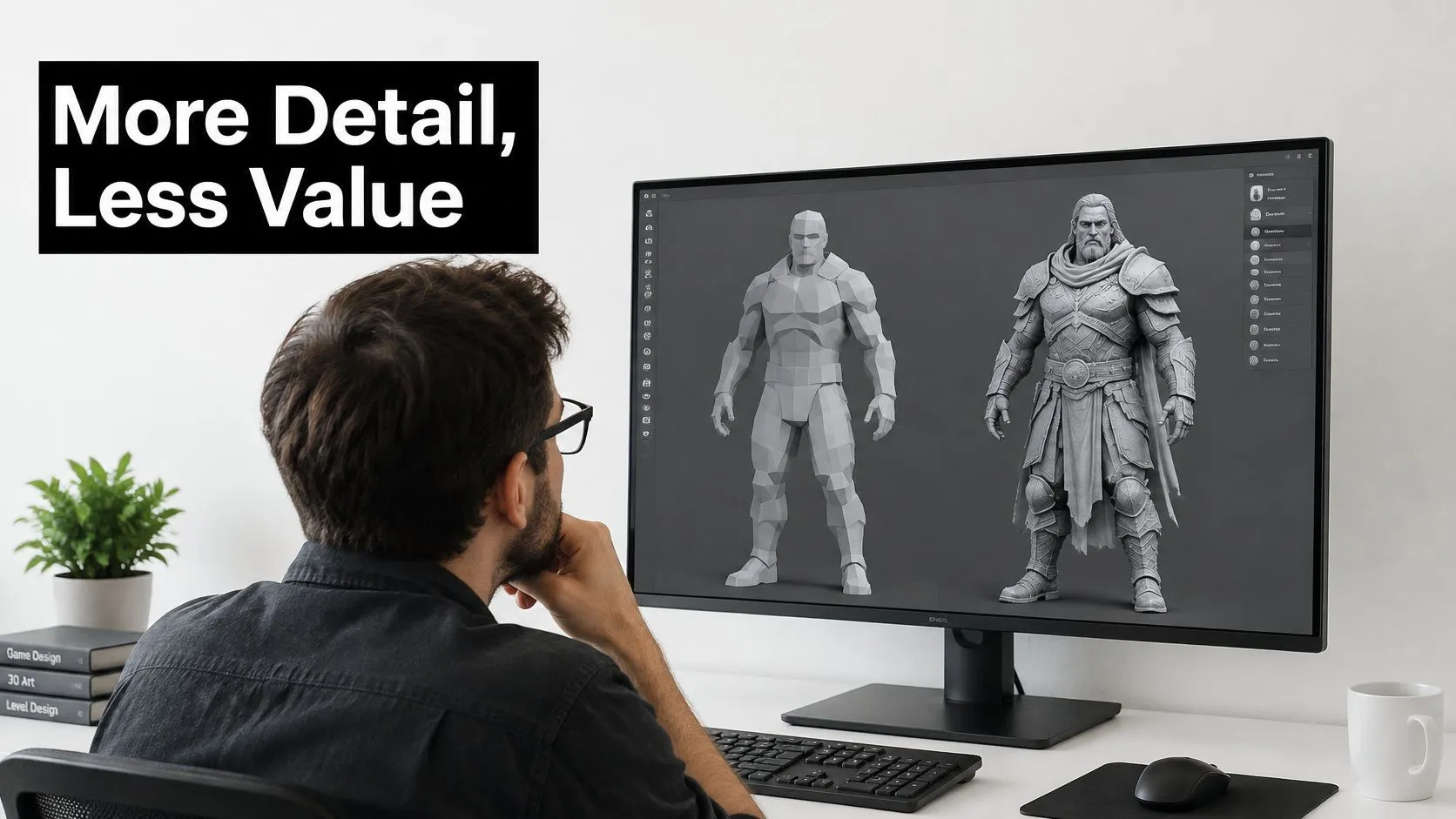
Polygon count is not quality. UK players are already telling producers that. Mintel's 2025 UK gaming analysis reports that improving visuals are not the priority for most gamers, and that incremental graphics improvements are less likely to drive purchases of expensive new hardware. That is diminishing returns, stated by the audience rather than by a technical artist. If buyers will not pay for the next notch of fidelity, a production that spends another fortnight on density is buying something the brief did not need.
What density adds to the invoice
High poly does not only add faces. It adds modelling, rigging, texturing, optimisation, streaming and review time, and each revision round grows all six. A note that says “soften the cheek” on a sculpt means a new bake, a new texture pass and a new check in engine. The same note on a mid-poly mesh with a strong read can be an afternoon. Judge an asset against outcomes, not against a triangle target:
- •Completion rate. Did people finish the experience?
- •Frame-rate stability. Did it hold on the lowest device you promised?
- •Device reach. Who got excluded by the mesh?
- •Production time. How many days to first reviewable asset?
- •Revision cost. What does round three cost?
Two cases, two answers
Say a branded mobile game needs a mascot the player sees at arm's length, mostly in motion. A mid-poly hero with clear lighting and readable animation will beat a dense sculpt on device reach. The extra faces never get a close-up long enough to justify the thermal load or the longer download. Say a film hero shot holds on a face for several seconds, rendered offline, with the camera close enough to read a pore. Density pays. Render time and iteration are the costs, not a dropped frame, and the audience is there to look. Pre-rendered film and television mainly pay for density in render time and iteration. Real-time games, AR and XR pay for it in memory, loading, heat and responsiveness. Those are different bills.
Perceived quality and commercial effectiveness may peak before maximum polygon density.
Clarity, stylisation and access often beat realism. Spend the next polygon only when a measured outcome moves, not because the viewport looks richer on a workstation.
Which Workflow Fits Film, TV, Games and XR
Match the mesh to the delivery specification, then confirm it with the check that matters to that specification.
| Production type | Usually favours | Polygon approach | Validate by |
|---|---|---|---|
| Film and cinematic CGI | High poly | Dense hero models rendered offline | Render time per frame and shot review |
| TV broadcast animation | High poly for close-ups, lower density for crowds | Master to the broadcast specification, such as 1080i/25 with BT.709 colour | Picture and sound quality control before delivery |
| Console and PC games | Mid to high | High-poly heroes with LOD-managed backgrounds | GPU and CPU frame time |
| Mobile games and branded apps | Low | Low poly with baked normal maps | Frame rate on representative handsets |
| VR and XR experiences | Low, with selective high poly | High poly only within the interaction radius | Headset refresh stability and draw calls |
| Explainers and social ads | Stylised low to mid | Art direction and readability over density | Completion rate and revision cost |
Film and television
Cinematic CGI can carry dense hero models because the image is rendered once. You still police per-frame render time and you still review the shot at final resolution. A crowd, a distant set piece, or a prop that never fills the frame does not need the hero budget. UK television is stricter than a social export. The BBC HD delivery specification defines a broadcast master as 1920 × 1080, 16:9, 25 frames per second using 50 interlaced fields (1080i/25), with 4:2:2 colour subsampling, the ITU-R BT.709 colour space, and either 4 or 16 audio channels. Lighting, compositing and colour management have to be planned in BT.709, and the render has to match that frame structure. A pretty workstation viewport in a wide gamut is not a master. Before that file goes out, BBC delivery requirements say Network television programmes must be supplied as AS-11 DPP files, fully checked editorially and technically, with picture and sound consistency verified and defects removed. Dialogue must be clear and understandable to a first-time viewer. That pulls animation, compositing, sound and mastering into separate quality-control stages. A dense facial mesh that fights the grade, or a cloth sim that buzzes under interlacing, fails this check even if the polygon count looked impressive in dailies.
UHD is a different master
For UHD, DPP delivery guidance reported by Broadcast separates broadcast UHD from the looser idea of 4K. The frame is 3840 × 2160, not 4096 × 2160, at 16:9, progressive 2160p/25 or 2160p/50, in an MXF OP1a file using AVC/H.264 in the AS-11 X1 format. Plan that from previs through lighting and compositing. You cannot treat a UHD master as an upscaled HD export and hope the faces, edges and motion hold.
Games, XR and short-form
Console and PC work can keep high-poly heroes if backgrounds drop through LODs, and you judge the scene on GPU and CPU frame time together. Mobile games and branded apps should ship low poly with baked normal maps, proven on the handsets, not on the lead artist's machine. VR and XR keep high poly inside the distance a user can inspect, and they keep everything else light. The pass/fail is headset refresh stability plus draw calls, not a beauty render. Explainers and social ads rarely need either extreme. A stylised low to mid density with clear staging finishes more often and revises faster. The workflow should follow where the model is seen, not which package the team prefers to open.
Rigging, Skinning and Animation Trade-offs
Deformation is where a polygon saving either pays you back or shows up as a broken elbow. A low-poly character has fewer vertices to move, so weight maps stay simpler, edge loops are easier to place, and the rig is cheaper to evaluate on a phone. A high-poly character bends more smoothly at elbows, knees and shoulders, holds smaller facial shapes, and can carry finer cloth or hair. Our animation work focuses on storytelling through character animation, so the mesh only earns faces when those faces change how a performance reads.
Borrowing detail without borrowing the vertex cost
You can keep a low-poly silhouette and still show surface detail. Sculpt the pores, seams and wrinkles on a dense mesh, then bake a normal map, and sometimes a displacement map, onto the lighter runtime mesh. The outline stays the low-poly one. Anything the camera sees on the silhouette, a frayed cuff, a pointed ear, a brow ridge, still needs real edges. A map cannot change the shape against the background. Facial rigs make the same trade in blendshapes. A simple expressive face might carry a small set of mouth, brow and blink shapes on a light mesh, which is enough for a stylised explainer or a distant game NPC. A performance face needs many more shapes, and often corrective shapes at the lips and eyelids, which pushes you toward a denser topology so those shapes do not collapse. Skeletal animation is what drives the body underneath either choice. The skeleton does not care how many vertices you hang on it, but the engine does. Motion capture and keyframe animation react differently to that density. Capture on a heavy mesh shows every jitter in the solve, so cleanup time rises with the vertex count. Keyframe work on a light mesh is faster to block, but a thin elbow or knee will kink unless the edge flow was planned for the pose range. Cloth and hair follow the camera. If the shot never gets closer than a full-body frame, a card-based hair setup will outperform a dense strand groom that the viewer cannot read.
A pose test before you commit
Run this on the actual shot list, not on a T-pose beauty turn:
- Bend each joint to its limit. If the silhouette pinches, you need an extra loop or a corrective shape, not a global subdivision.
- Raise the shoulders and twist the spine. Volume loss here usually means weights, not a lack of polygons.
- Play the facial shapes at full strength. Watch the lips and eyelids for intersections. That is where blendshape count earns itself.
- Check cloth and hair at the camera distance in the storyboard. If the detail vanishes, drop it.
- Compare the result against the shot list. A pose that never appears does not deserve topology.
Building a Hybrid Pipeline with LOD Levels
Keep one detailed source, then publish only the density each distance can justify. We produce work with high-end software inside that kind of pipeline, and we have built IP and content across platforms with Unity or Unreal game-engine projects. The engines differ in tooling. The measurement does not.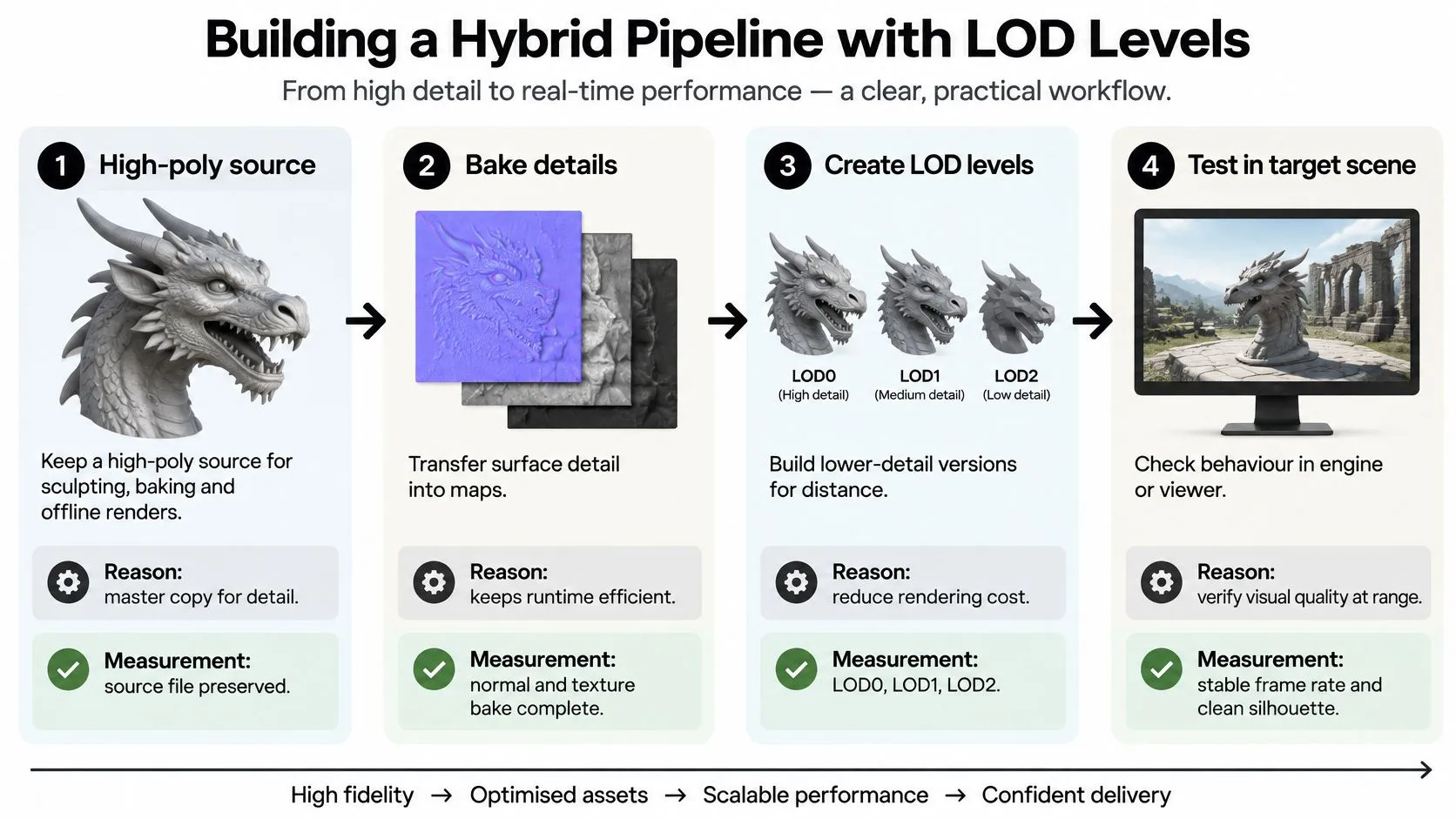
- Keep a high-poly source. This is the master for sculpting, baking and any offline render. Confirm it by keeping that file versioned and untouched by runtime reductions. Every later mesh is derived, so a lost source means rebuilding detail from memory.
- Bake normals and textures onto a low-poly mesh. Surface detail survives at a fraction of the vertex count. Normal mapping is the usual transfer. You are done when the bake is applied in engine and the silhouette still matches the source at the intended camera distance.
- Generate runtime LOD levels. Each step farther from the camera should use the lowest geometry that still reads. Name them in engine, typically LOD0, LOD1 and LOD2, and set the switch distances from the actual camera path, not from a default.
- Reserve high poly for hero objects inside the interaction radius. A lever the user grabs, a face they inspect, a product they configure. If the user cannot get that close, it is not a hero.
- Use low-poly meshes or impostors for distant, repeated and background assets. A tree seen fifty times, a far building, a crowd. Impostors and simple cards are legitimate here.
- Validate every level. Record GPU frame time, CPU frame time, draw calls, memory and headset refresh stability in the target scene. A level that looks fine in an empty test map can fail once lighting and characters are in.
Choosing Low or High Poly for Your Next Project
Answer these before anyone opens a sculpt:- Where will the asset render? Pre-rendered frames, a game engine, a headset, or a browser.
- What is the per-frame or per-mesh budget on the lowest target device?
- How close will the camera or the user get?
- Does this audience reward fidelity or clarity more?
- How many revision rounds are planned, and what does each round cost?
- Who signs off the final delivery format?
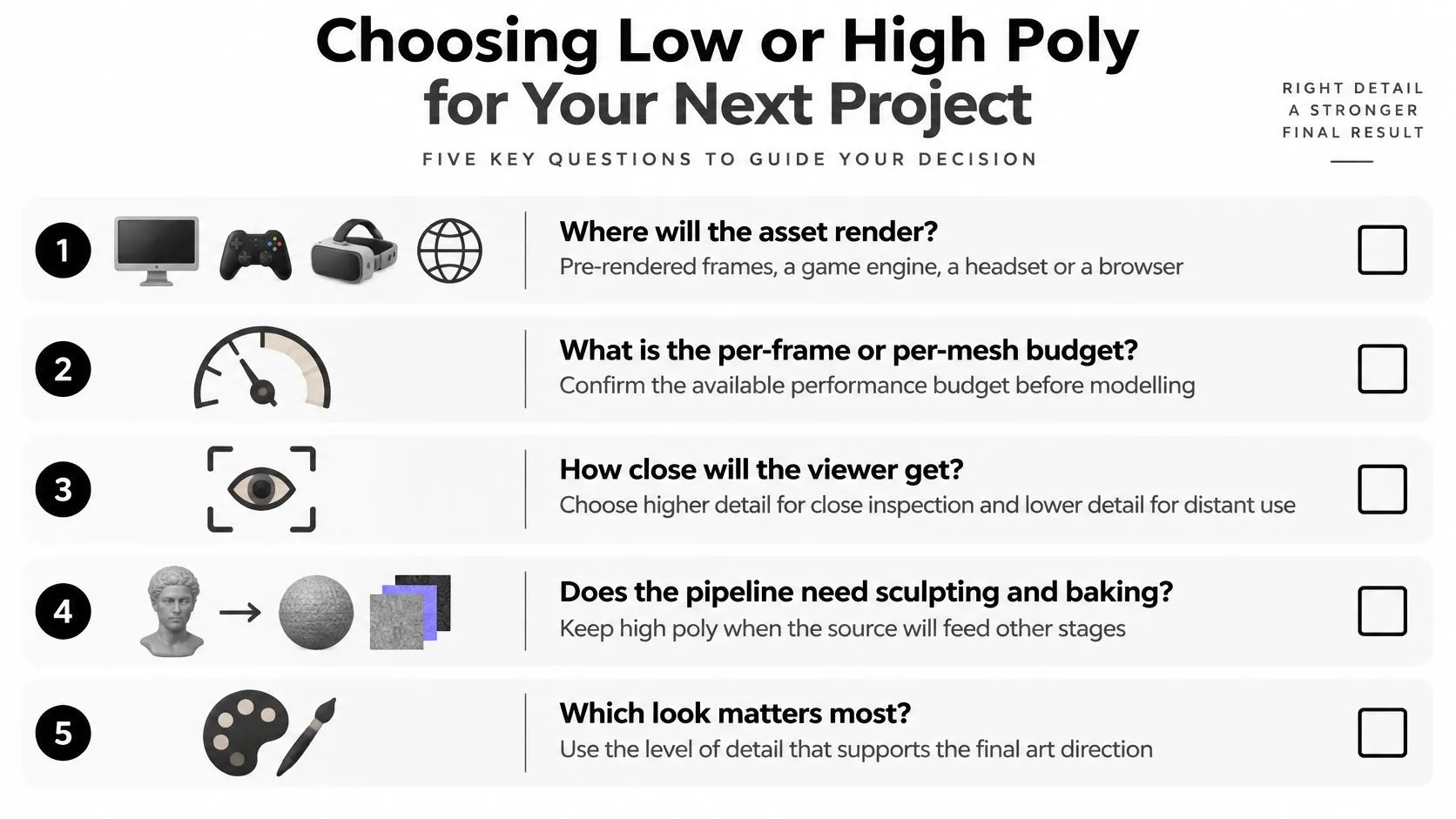 If those answers point at a frame budget, start low and spend polygons only on assets the camera or the user reaches. If they point at offline or close-up film work, start high and keep a lighter version only where a shot never gets close. A budget check before modelling costs far less than a revision round after the mesh, the rig and the maps already exist. We create 2D and 3D animation, and we provide design support and project management when a job needs both the picture and the schedule held together. If you want that pipeline reviewed, send the target platform, the frame budget and the delivery format before modelling begins. --- Studio Liddell builds animation, games and XR with the polygon budget matched to the screen the audience uses, from broadcast picture to headset frame time. If you are weighing a low poly vs high poly pipeline for a film, a game or an immersive piece, bring the platform and the delivery spec. Visit Studio Liddell and book a production scoping call before the first sculpt starts.