Developing Smart Home Apps: The Business Guide
Smart home apps stopped being “companion utilities” a while ago. They now sit at the centre of how connected homes are configured, controlled, monitored, and shared. That shift matters commercially. If the app is the control layer, then the app is also where brand value, customer retention, support cost, accessibility, and product differentiation all show up. In practice, the hardest problem isn't adding one more automation tile or a prettier dashboard. It's building something that still works when a home has two adults, children, a grandparent, a carer, a landlord, or a guest, all with different permissions and different levels of confidence. Most product teams still design smart home apps as if one technically confident owner runs the whole house from one phone. Real homes don't work like that.
The Business of Smart Home Apps in 2026
The UK smart home market is already substantial. CEDIA estimates it at £2.9 billion in the UK, and places the global smart home category in a context that's far larger than hobbyist tech or premium niche installs. Statista's outlook projects worldwide smart home revenue of US$175.1 billion in 2026 with an annual growth rate of 8.82% for 2026 to 2029, which is why serious product teams now treat smart home apps as a platform decision rather than an add-on feature (CEDIA market estimate, Statista smart home outlook).
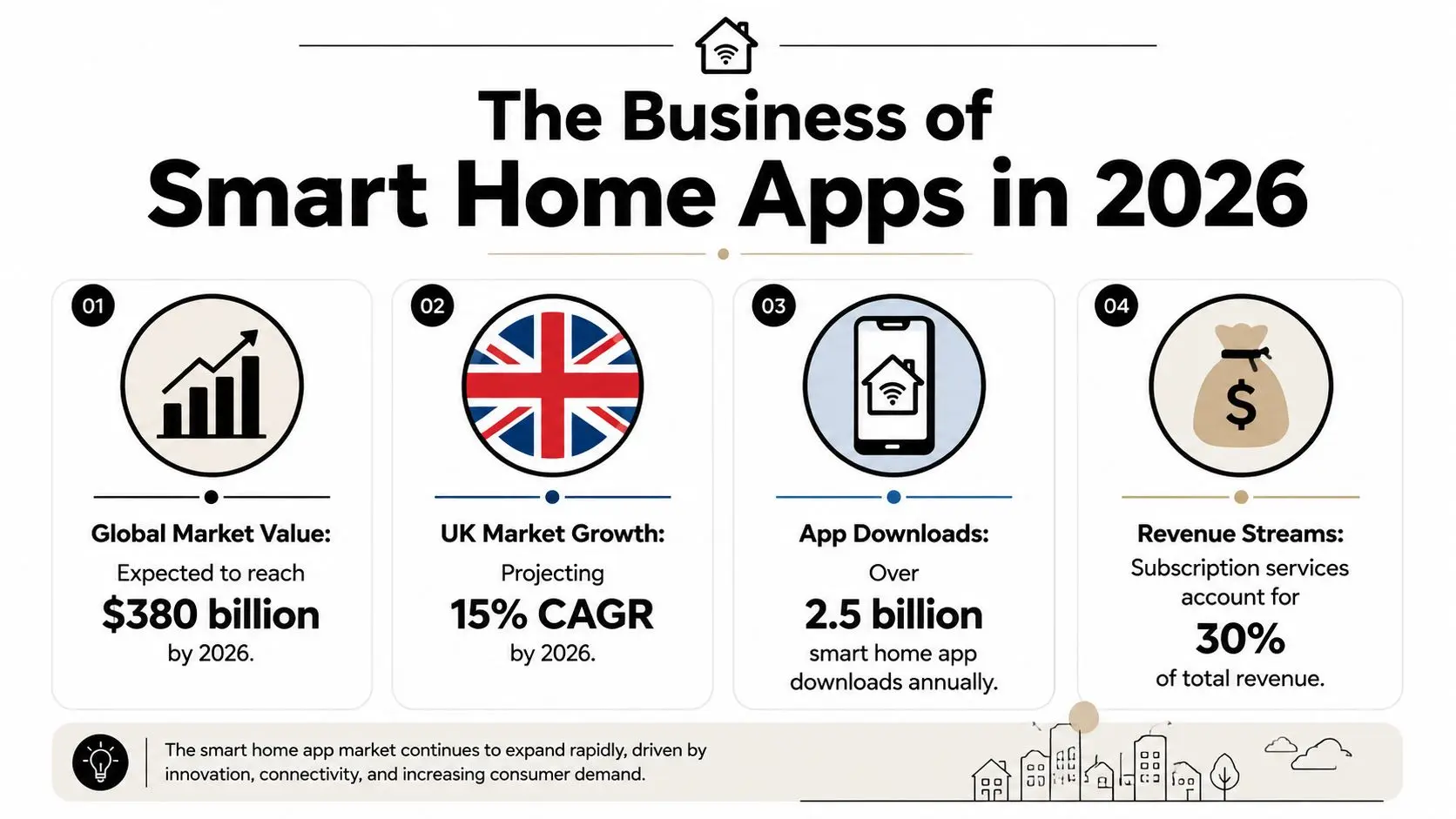
For brands, that changes the brief. You're not just commissioning a mobile interface. You're defining how customers will set rules, receive alerts, assign access, resolve failures, and decide whether the product feels dependable enough to buy again.
Why the app has become the product surface
In connected homes, hardware often gets the headline. The thermostat, lock, camera, speaker, or lighting controller looks like the product. Operationally, the app often carries more weight because it's where the customer experiences the system as a whole. That has three business consequences:
- •Customer perception lives in the interface: If pairing is confusing or permissions are brittle, users blame the brand, not the protocol stack.
- •Support load concentrates in workflows: Failed invites, unclear device states, and unreliable automations create avoidable service tickets.
- •Upsell depends on orchestration: A second or third device becomes easier to justify when the app makes the whole home feel coherent.
Practical rule: In smart home apps, the interface isn't packaging. It's operations.
A lot of teams still scope these products too narrowly. They define screens, not systems. That usually leads to an app that demos well and degrades badly once households start adding rooms, routines, and extra users.
What businesses should take from the market signal
The opportunity isn't just to build another controller app. It's to build software that can carry an ecosystem. That means identity, automation logic, exception handling, onboarding, and trust all need equal weight. Teams that are still framing this as “we need an app because the device needs one” should widen the lens. A better starting point is the same one used in broader mobile product strategy: what role will the app play in acquisition, setup, everyday use, retention, and service? That's also why a broader mobile app producer's guide for UK teams is often a useful precursor before anyone moves into device-specific UX.
Understanding Platforms and Protocols
The technical environment is fragmented, and that's the point. Smart home apps only become valuable when they can coordinate devices that weren't designed as one neat, single-vendor system. In a typical household, you'll see Wi-Fi, Bluetooth, Zigbee, Z-Wave, and Thread in the same environment. The app's job is not just to switch devices on and off. It acts as the control plane, consolidating device state, schedules, and automation rules so users aren't forced to manage each product in isolation. Google's Matter documentation describes Matter as an open standard that lets a device work with any Matter-certified ecosystem using a single protocol, and the Connectivity Standards Alliance frames it as an IP-based protocol for reliable, secure IoT ecosystems (Google Matter overview).
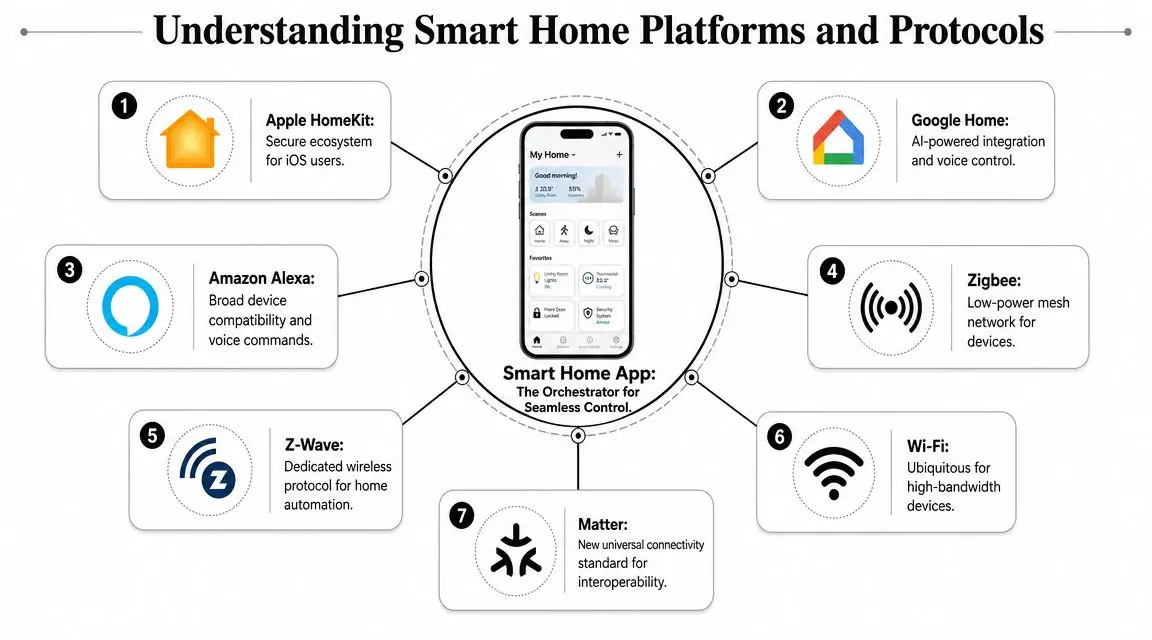
Think of protocols as languages
The cleanest analogy is a multilingual meeting. One person speaks Wi-Fi, another Zigbee, another Z-Wave, and another Thread. If there's no translator, everyone can still talk, but only within their own group. A strong smart home app, often paired with a hub or platform layer, becomes that translator. It doesn't remove technical differences underneath. It hides enough of them that the household experiences one system rather than five partial ones. That distinction matters for product planning because users don't buy “interoperability”. They buy outcomes:
- •One place to check status
- •One routine that can trigger several device types
- •One permission model for shared access
- •One support path when something breaks
Where Matter helps, and where it doesn't
Matter is important because it reduces some of the old ecosystem friction. It gives device makers and app teams a clearer interoperability path, especially across major platforms. But Matter isn't magic. It won't fix poor information architecture, vague device naming, weak automation logic, or confusing handover between household members. It also won't remove the need to decide whether your branded app should be the primary experience or whether your product should lean harder into platform integration. That's where strategy comes back in. If your product has a strong service layer, such as managed access, specialist alerts, or contextual routines, a branded app can carry that value. If the device mainly needs straightforward control, platform compatibility may matter more than bespoke UX. For teams thinking about access and entry workflows, especially where vehicle integration or remote access granting features intersect with the home, it's worth looking at adjacent examples such as Remote entry with Nimbio. Not because the use case is identical, but because it shows how interface decisions sit on top of a more complex permissions and device ecosystem.
The practical planning question
The useful question isn't “which protocol wins?”. It's “what complexity are we asking the app to absorb?”
If the household sees a simple experience, it usually means the product team did the hard integration work upstream.
When teams skip that thinking, the app becomes a thin wrapper over technical mess. Users then inherit the architecture. They end up memorising which room uses which app, which automations live where, and which family member owns the login that works.
Designing Intuitive and Inclusive App Experiences
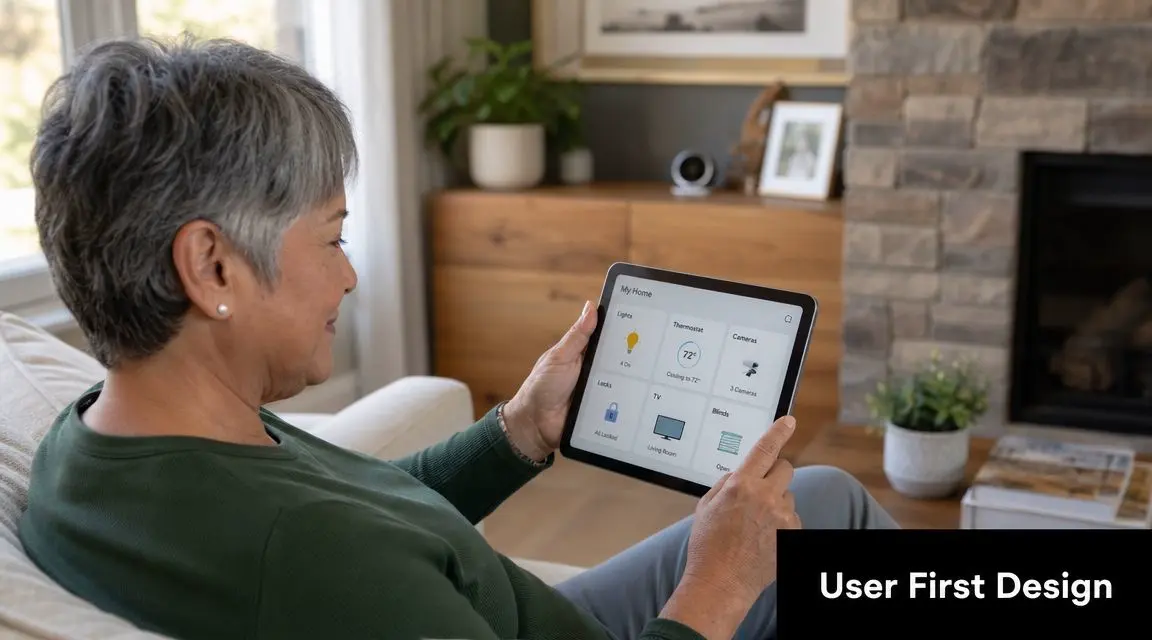
The best smart home apps don't feel clever. They feel legible. That sounds obvious, but many products still confuse interface polish with experience quality. Smooth transitions and neat dashboards help, yet they don't solve the practical issue that most homes are shared environments. NN/g notes that smart home devices are often used by multiple people with different needs, and that apps should support shared access, deeper integrations, and physical fallback controls so people aren't locked out when the app isn't available (NN/g on smart home users).
Remote control is the baseline, not the value
A button that turns the heating on from the sofa isn't a strategy. True value stems from sensor-driven automation that uses occupancy, temperature, location, and device status to drive useful behaviour. RiDC's guidance points to practical examples such as heating control, leak detection, security cameras, and geofencing actions triggered when someone arrives or leaves. Those use cases matter because they connect app logic to outcomes people care about: comfort, safety, earlier fault visibility, and fewer repetitive tasks. In production terms, that changes UX priorities. The key screens often aren't the flashy ones. They're the ones that answer plain questions fast:
- •Is the front door locked?
- •Who changed this routine?
- •Why did the heating turn on?
- •Which sensor triggered that alert?
- •Can another person in the house take control if the primary user is unavailable?
Shared households are the real design test
Most weak smart home apps fail on shared use. Not because they lack features, but because their permission model assumes one owner and everyone else as an afterthought. Consider a common household setup. One person installs the system. Another adult needs regular control. A teenager needs limited access to lighting. An older relative needs simple, dependable control of heating. A carer may need temporary permissions. A guest may need access for a short period. A landlord or facilities contact might need maintenance visibility but not day-to-day control. A single “admin plus everyone else” model breaks quickly.
The strongest UX decision in a smart home app is often invisible. It's the permission structure.
What works in practice
Designing for shared homes usually means being less impressed by feature count and more disciplined about responsibility and fallback. A sensible approach includes:
- •Role-based access: Separate everyday control, setup authority, maintenance permissions, and temporary access.
- •Clear device ownership: Show who added a device, who can edit it, and what happens if that person leaves the household.
- •Audit visibility: Let users see recent automation changes, invites, and major device events.
- •Physical fallback: Preserve manual controls for core functions such as locks, lighting, and heating where possible.
- •Graceful failure states: If the network drops or the app session expires, the home shouldn't become unusable.
Accessibility isn't a side requirement
Accessibility in smart home apps isn't only about screen readers or text size, though those matter. It's also about confidence. Can a less technical user recover from an error? Can someone understand what an automation does before it runs? Can they override it without feeling they might break the system? Many premium-looking apps underperform in this regard. They compress too much meaning into icons, bury key states in menus, and assume everyone understands terms such as scenes, routines, triggers, or presence. A better pattern is to write the product in plain language. “Heating will switch to Away mode when nobody is home” is stronger than abstract automation jargon. Shared homes need explicitness because multiple people inherit the consequences of hidden logic.
A useful benchmark for quality
Ask one question during product reviews: could this app be used safely and confidently by everyone who lives in the home, not just the person who installed it? If the answer is no, the app isn't finished. It's just configured.
The Creative Production Stack
Most discussions about building smart home apps get stuck in a narrow technical argument. Native or cross-platform. Swift or Kotlin. Flutter or React Native. Those decisions matter, but they don't explain why one product feels generic and another feels differentiated. The more useful production view is to map the stack to the experience you want to create. Some smart home apps need clean utility and almost no flourish. Others benefit from richer visual systems that explain setup, represent spatial context, or make automation more understandable.
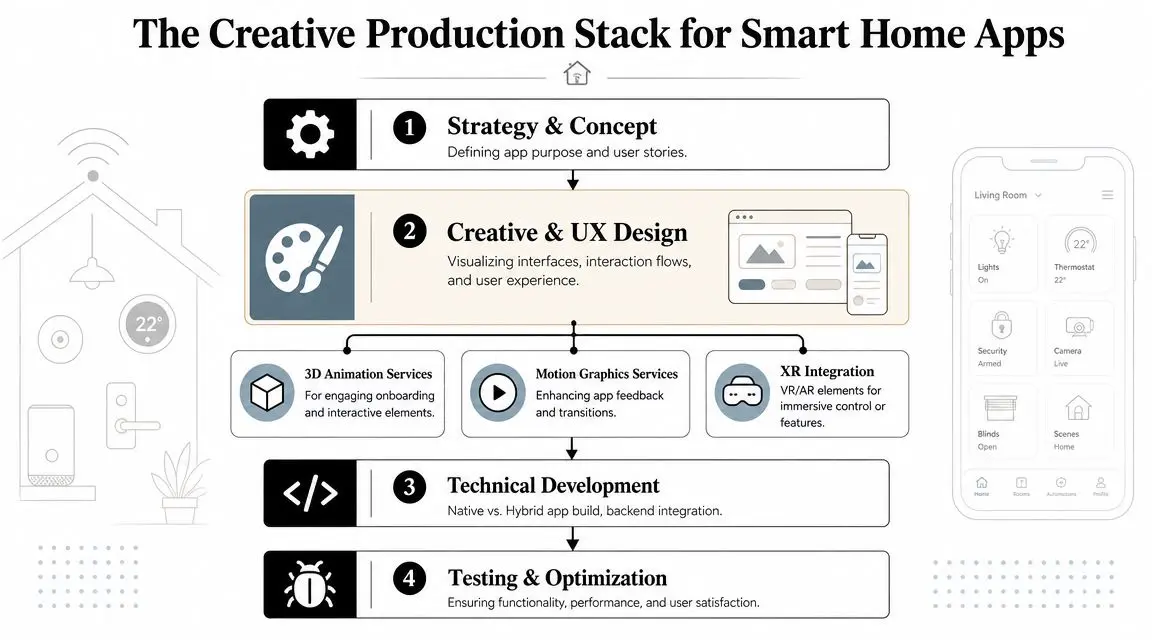
Where creative production adds actual value
In connected products, creative work should reduce friction or increase trust. If it doesn't, it's decoration. Three areas stand out. #### 3D visualisation 3D can help users understand a home as a system rather than a list of devices. A spatial model of rooms, sensors, heating zones, or entry points can make status and fault location easier to read. That's especially useful when the app needs to communicate relationships. Which radiator valve belongs to which room. Which camera covers which entrance. Which sensor triggered an alert. A well-built visual layer can answer those questions faster than a flat menu tree. #### AR-assisted setup and maintenance AR is one of the more underused tools in this category. Used well, it can guide placement, pairing, orientation, and troubleshooting. An installer or customer can hold up a phone and see prompts for where a sensor should sit, how a device should align, or which component needs attention. For support teams, that can reduce ambiguity in setup conversations. For brands, it creates a more premium onboarding flow that feels useful rather than theatrical. #### Motion and state feedback Motion graphics still matter, but the job is functional. Animation can show system state changes, hierarchy, transitions between rooms, or the consequences of a routine. Good motion design in smart home apps tells users what just happened and what will happen next. Poor motion design delays control and makes the product feel less reliable.
A connected home interface should never feel like it's performing for the user. It should clarify the system.
AI belongs in the logic layer, not the marketing headline
AI can improve these products when it helps with recommendation, anomaly detection, scheduling assistance, or natural-language summaries of home activity. It tends to disappoint when it's bolted on as a vague assistant with no clear authority. For example, a useful implementation might surface patterns that support better routines or explain unusual behaviour in plain language. A weak one adds a chat box where users still can't answer simple operational questions.
A practical production model
Creative, technical, and operational decisions need to run together. In practice, a strong production stack usually includes:
- •Service design: Household roles, edge cases, support model, offline assumptions.
- •UX and interaction design: Primary tasks, permissions, automation editing, alert handling.
- •Visual production: Motion systems, 3D assets, iconography, onboarding sequences.
- •App engineering: Front-end build, device integration, account systems, cloud services.
- •Connected QA: Real device testing, shared-user testing, network variability, update handling.
That blend is where smart home apps become brand experiences rather than control panels.
Security Testing and Deployment Pipelines
In smart home products, security isn't a legal checkbox. It's part of usability. If users don't trust account access, invite flows, remote control, or device permissions, they won't use advanced features confidently. They'll either avoid them or create dangerous workarounds, such as shared logins, permanent admin access, or badly governed guest permissions.
What must be protected first
Start with the assets that can cause real harm if handled badly.
- Identity and authentication
- Device control permissions
- Data privacy
- API integrity
A deployment pipeline that matches the risk
Too many connected products are tested like ordinary consumer apps. That's not enough. The pipeline should step from controlled simulation into real household complexity. #### Stage one in lab and emulated environments Use emulators, mocked devices, and synthetic events to test onboarding, state changes, routine logic, and account flows. With these, teams should aggressively test edge cases such as duplicate devices, dropped pairing sessions, revoked access, and conflicting automations. #### Stage two on controlled hardware sets Move onto representative physical devices and hubs. Validate setup, firmware interactions, account invitation flows, and mixed-protocol scenarios. If the product claims shared use, multiple-user testing should start here, not as a late usability pass. #### Stage three in lived-in homes Real environments expose issues labs won't. Weak Wi-Fi in one room. A second resident overriding settings. Someone deleting a routine another person depends on. Push notifications arriving at the wrong time. Device names that make sense to engineers but not to households.Release discipline: A smart home app shouldn't go live until the team has seen it fail in a real home and recover cleanly.#### Stage four after launch Post-release monitoring matters because connected products keep changing. Firmware updates land. Platform rules evolve. Users add more devices than the original scope assumed. Security review has to continue after launch, not end there. A more detailed guide to essential security for apps is useful reading for sponsors who need to assess whether a development partner is talking about actual controls or just broad reassurance.
Budgeting and Planning Your Smart Home App
Budget conversations go wrong when the app is scoped as a screen list. The cost isn't driven only by how many views the interface needs. It's driven by device integration, identity complexity, automation logic, backend services, testing overhead, and the level of visual sophistication you want. Planning gets sharper when you define the product as a service model. Who uses it, what they can control, what happens when it fails, and how success will be measured.Three example project briefs
These aren't price cards. They're planning patterns. #### Brief one single-device control app This is the leanest route. One product category, a small command set, straightforward onboarding, and a tight visual system. Typical characteristics:- •Narrow device scope: For example, one thermostat, one lock family, or one lighting controller.
- •Limited automation: Scheduling and basic notifications, rather than complex multi-device routines.
- •Simple account model: Primary user plus light sharing, not deep household governance.
- •Faster QA path: Fewer interoperability and permissions edge cases.
This can work well when the main commercial goal is to support setup and day-to-day control for a specific product line. It usually stops being simple once product management asks for guest access, service diagnostics, integration with third-party ecosystems, or branded onboarding content beyond utility basics. #### Brief two multi-device security-focused app This profile is more demanding. It combines locks, cameras, sensors, alarms, and event history, so trust and responsiveness become central. Cost drivers usually include:
- •Granular permissions: Different access levels for residents, guests, installers, and support roles.
- •Event visibility: Clear logs, alert logic, and explainable system status.
- •Exception design: Failed connection states, delayed alerts, battery warnings, and manual override paths.
- •Heavier testing: Security and household edge cases grow quickly.
This is often where teams underestimate design complexity. Security apps don't just need stronger infrastructure. They also need language, hierarchy, and notification behaviour that won't confuse users in stressful moments.
Brief three premium energy management app
This is the most ambitious category because it asks the app to deliver measurable value, not just control. The planning question is not whether the dashboard looks advanced. It's whether users can connect the app's logic to bills, comfort, and operational choices. The commercial challenge is captured well in a recent UK-facing discussion of smart home apps: many products claim energy savings, but the harder question is how those features translate into quantifiable ROI and a realistic payback period for users under UK conditions (UK guide on smart home app value and ROI). A premium brief might include:
- •Heating-led automation: Schedules, occupancy logic, room-level control, exception alerts.
- •Richer visualisation: Zone maps, comparative usage views, or 3D representations of the home system.
- •Advanced onboarding: Education around routines, thresholds, and user goals.
- •Broader service layer: Recommendations, summaries, and support content.
A better way to scope budget
Instead of asking “how much does a smart home app cost?”, ask five tighter questions:
| Planning question | Why it changes budget |
|---|---|
| Who needs access? | Shared-user complexity increases identity and permissions work. |
| How many device types are involved? | Each added category increases integration and QA burden. |
| What decisions should the app automate? | Automation logic is usually more expensive than basic control UI. |
| What must work if the app fails? | Fallback design affects both product and support requirements. |
| How will value be measured? | If ROI matters, analytics and reporting need to be designed in from the start. |
For sponsors trying to calibrate app investment more broadly, this UK guide to app development costs is a useful framing tool before the smart home-specific variables are layered in.
Frequently Asked Questions
Should we build a standalone app or integrate with Apple Home or Google Home
Usually, the answer is “some of both”, but the balance matters. If your product's value is mainly straightforward device control, strong integration with major platforms may do more for adoption than a heavily customised standalone app. If your offer depends on specialist workflows, support, branded service logic, or household-specific permissions, a dedicated app becomes more defensible. Here's a practical comparison.
| Factor | Build a Standalone App | Integrate with Platform (e.g., Apple Home) |
|---|---|---|
| Brand control | High control over UX, onboarding, and service flows | Lower control, shaped by platform conventions |
| Feature depth | Better for specialist logic and differentiated workflows | Better for common controls and familiar behaviours |
| Shared household design | Can support custom role models and access patterns | Limited by platform capabilities and patterns |
| Development complexity | Higher, especially for backend and support tooling | Lower for some control scenarios, but still needs integration work |
| Customer trust | Must be earned through product quality | Benefits from existing platform familiarity |
| Support model | You own the end-to-end experience | Shared expectation between your product and the platform |
The wrong move is building a branded app just to mirror what a platform app already does well.
Do we need our own hardware to enter this market
No, not necessarily. Some brands can add value through orchestration, service layers, onboarding experiences, access workflows, or energy and maintenance insight without owning the full hardware stack. Others should only build in this space if they have a clear hardware-service relationship. The key test is whether the app solves a problem users already feel. If the answer is “not really, but it would look impressive”, the concept usually won't hold up.
What makes smart home apps fail after launch
Most failures aren't caused by a missing feature. They come from mismatched assumptions. Common examples include:
- •Single-user thinking: One installer owns everything, but the home has several active users.
- •Weak recovery paths: Users can trigger automation, but they can't easily understand or reverse it.
- •Overcomplicated onboarding: The first setup experience requires too much technical confidence.
- •Poor naming and hierarchy: Device lists become unmanageable as the household grows.
- •Disconnected support planning: Customer service inherits a system it can't diagnose cleanly.
If support staff can't explain why the home behaved a certain way, the product isn't production-ready.
Is accessibility really a commercial issue
Yes, because accessibility in this category is directly tied to adoption, retention, and risk. Homes are shared. Capabilities vary. Devices are used in moments of stress, fatigue, distraction, and urgency. An app that only works well for one technically confident person excludes the wider household and weakens the product's practical value. Accessibility also improves serviceability. Clear labels, predictable flows, larger targets, understandable alerts, and physical fallback assumptions reduce both user frustration and support overhead.
What should a first product brief include
A useful first brief isn't long. It's precise. Include:
- Primary household scenario
- Device map
- Permission model
- Core routines
- Failure assumptions
- Success criteria
Where should a brand start if it's new to smart home apps
Start with the household model, not the interface. Map the users. Define the critical tasks. Decide what must remain operable without the primary phone owner. Only then move into platform choices, integrations, visuals, and roadmap phases. That order prevents a common mistake: designing a polished control app for an imaginary home. The strongest smart home apps come from teams that treat connected living as a service design problem with technical, operational, and creative layers. That combination is where products become useful in everyday life, not just impressive in a product demo.If you're scoping a connected product and need a partner who understands apps, animation, XR, and production pipelines as one joined-up system, Studio Liddell can help shape the brief, define the experience, and turn a smart home concept into a buildable product.