CGI TV Series Production: From Script to Screen
You're sitting across from a commissioner, or staring at a fresh pilot script on your desk, with a handful of polished concept art frames that make your new show look ready for prime time. Every character looks expressive, the lighting feels cinematic, and everyone in the room agrees the world has legs. Then someone asks the two questions that decide whether the series ever reaches audiences: how many months will it take to deliver a full season, and what will each episode cost? That gap between one stunning still frame and twenty or fifty broadcast-ready episodes is where first-time producers lose sleep. A single frame proves what your show can look like. It says nothing about whether you can afford to make it at volume, week after week, without the quality collapsing by episode nine. UK screen production has grown substantially in recent years, and commissioners have more choice than ever. Yet even in a mature production ecosystem, a CGI TV series only stays on schedule when you treat it as a repeatable manufacturing system rather than a visual style you buy at the end. The money and the months are decided long before rendering starts. They are decided by how many assets you build once and reuse, how your shots are mixed between cheap and expensive, and where approval gates sit in the schedule. Get those decisions right on paper, and the season becomes a question of execution. Get them wrong, and no amount of beautiful concept art will save the budget.
What a CGI TV Series Is and How It Differs from a Film
A CGI TV series is built from scratch rather than filmed on a set. Every room, character, costume, prop, and virtual light has to be designed, modelled, rigged, and computed before a single second of action plays on screen. Because broadcasters and streamers order episodes in batches, studios schedule that work as a repeatable production system rather than a one-off shoot. The easiest way to picture the difference between a feature film and episodic television is to compare two kinds of rail travel. A feature film behaves like one long cross-country journey with a single dedicated crew focused on getting one prestige locomotive from start to finish. A CGI TV series operates like a fleet of commuter trains running to one strict timetable, where the same tracks, carriages, stations, and signals must be reused reliably for every single episode. Before diving into schedules and budgets, it helps to separate three terms that often get tangled together in pitch meetings:
- •Computer-generated imagery (CGI) refers to the complete digital visual look on screen, including characters, environments, lighting, textures, and simulated effects.
- •Animation is the performance layer, meaning how characters move, speak, react, and carry emotional timing across frames.
- •A pipeline is the ordered sequence of technical and creative stages every asset and shot passes through from script to final master file.
People also sometimes lump traditional 3D studio production in with newer automated image generators. If you're explaining to stakeholders how hand-crafted 3D worlds differ from algorithmically altered visuals, AI Video Detector's explainer on AI-altered images and avatars offers a clear distinction between synthetic media and frame-by-frame CGI animation.

Schedule and budget aren't decided by how impressive one hero frame looks in a pitch deck. They're decided by how cleanly each stage hands work to the next, how many assets can serve multiple episodes, which shot types eat up render time, and whether story, funding, and sign-off rules are locked before episode one rolls onto the tracks.
The Production Pipeline from Script to Delivery
Every CGI TV series moves through eight linked stages from initial concept to broadcast master. The table below maps what happens at each step, the concrete deliverable passed forward, and the exact friction point where schedules tend to slip.
| Stage | What Happens | Output | Where It Stalls |
|---|---|---|---|
| Development | Writers, designers and producers set the world, characters and episode format | Series bible and pilot script | Unclear format rules that change later |
| Previsualisation | Rough animated blocking checks each scene against the script | Animatic and shot list | Late story changes that force rework |
| Asset build | Models, textures, rigs and shaders are created | Character and environment library | Assets that cannot be reused across episodes |
| Animation | Performance is keyframed or motion captured shot by shot | Animated shots for review | Complex characters and crowds running over time |
| Layout and lighting | Cameras and lights set the look and mood of each shot | Lit shots | Inconsistent lighting between episodes |
| Rendering | Frames are computed on render farms | Rendered image sequences | Slow farms and long queues near delivery |
| Compositing and finishing | Layers are combined and colour graded | Final shots | Late approvals and colour fixes |
| Sound and delivery | Dialogue, music and effects are mixed, then exported to broadcaster specifications | Master files and deliverables | Mismatched formats and missed transmission slots |
The flowchart below shows how those eight stages connect in sequence across a full episodic run.
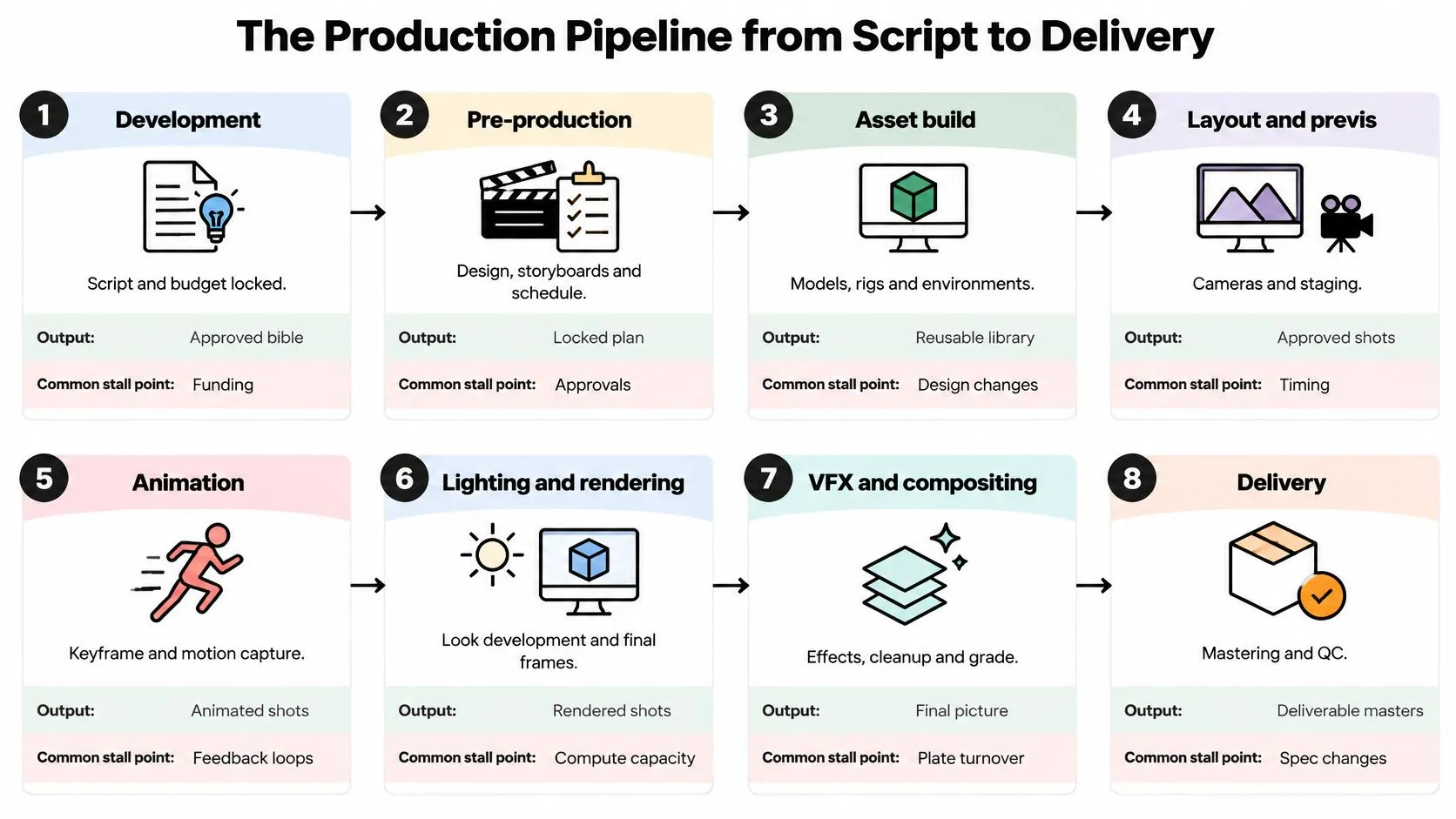
To manage an episodic schedule without drowning in spreadsheets, group those eight stages into three operational phases.
Development and Preparation
Development and previsualisation are the only stages where changing your mind is cheap. During development, the creative team agrees on the episode runtime, visual style, character lineup, and rules of the world. During previsualisation, editors and layout artists turn storyboards and scratch dialogue into a timed animatic (a rough moving blueprint of every scene). Fixing a joke that doesn't land or cutting a sluggish chase scene in an animatic takes hours of editorial time. Making that exact same story change once animators have started blocking shots forces rework across rigs, camera layouts, lighting, and sound. That's why experienced producers treat previsualisation sign-off as a hard boundary rather than a casual check-in.
Core Production and Asset Creation
Once scripts and animatics lock, asset build and animation overlap across multiple episodes at once. Modellers, riggers, and look-development artists construct the characters and environments while animators bring shots to life using either hand-crafted keyframe animation or motion capture cleaned up for broadcast quality. Teams comparing external partners for 3D animation services often focus on showreels, yet a production partner's true test is how smoothly it runs parallel episodes without letting feedback loops pile up on complex characters or crowd shots. In UK broadcast planning, there's also a useful legal boundary between creating animation and finishing it. HMRC's Creative Industries Expenditure Credit Manual guidance on animation and VFX defines animation principally as creating footage from scratch, whereas VFX generally involves manipulating existing live-action footage; inside an animated production, VFX-type work is normally limited to touch-up and finishing activities such as colour correction, lighting, and rendering. Using that same split in your production schedule lets you separate core animation creation from finishing costs and track approvals cleanly across both phases.
Finishing and Delivery
Layout and lighting, rendering, compositing and finishing, and sound and delivery determine whether your transmission date holds. Two failure points break more CGI schedules than any other: late story changes reaching animation and rendering bottlenecks near delivery. When several episodes hit the render farm at once with heavy lighting tweaks or unapproved compositing notes, queues back up overnight and squeeze final audio mixing and broadcaster quality control. An approval gate between each stage stops small snags from snowballing downstream. Nobody moves a shot into lighting until animation is signed off, and nobody sends sequences to final render until lighting continuity matches the rest of the season.
Quick pipeline audit: Pick any stage in your current schedule. Name the exact file or deliverable it produces, name the single person authorised to sign it off, and check both against the eight stages in the table above. If either answer is fuzzy, that stage will stall.
Shaping Story Around What the Animation Can Deliver
Every word a writer puts into a pilot script carries a hidden engineering bill. In live-action television, walking a character down a high street requires a location permit and a camera crew; in a CGI TV series, that same ten-second walk requires modelled shopfronts, pavement textures, street props, rigged passers-by, and lighting rigs. Four writing choices dictate the vast majority of your animation workload:
- •Location count: How many distinct sets each episode visits, and whether those sets return in later episodes.
- •Full-rig character count: How many characters need complete facial and body rigs for speaking roles versus simpler background rigs.
- •Action versus dialogue balance: Whether scenes rely on expressive conversation or high-energy chases, crowds, and physical chaos.
- •Visual realism: Stylised character worlds tolerate bold simplification, whereas photoreal hair, cloth, and weathered surfaces multiply shader and lighting work.
Picture two half-hour family shows side by side. The first keeps eighty per cent of its stories inside one detailed family kitchen and a back garden, so the studio builds two rich environments once and amortises their cost across an entire season. The second jumps from a dense pine forest to a busy metropolis and out into deep space within a single episode, forcing the asset team to design, model, texture, and light three entirely separate environment kits before animators can even touch the shots. Story choices also dictate pacing, episode length, and shot mix. A witty dialogue episode leans heavily on close-ups and two-shots that move swiftly through the pipeline, whereas an action-heavy finale piles up cloth simulations, background crowds, and destruction effects. Knowing how to translate a script into disciplined visual beats starts at the boarding phase, which we unpack step by step in our guide to animation storyboarding for UK productions.
Designing Episodes for Fragmented Viewing Habits
If you're developing a children's CGI series, linear television schedules no longer tell the whole story. Ofcom's 2025 Children and Parents Media Use and Attitudes Report tracks media habits across UK children aged 3 to 17 alongside its longitudinal Children's Media Lives research, underscoring how fragmented modern viewing has become. Young audiences encounter a story world through streaming apps, short clips, games, and interactive extensions rather than waiting for one weekly broadcast slot. That viewing reality should shape writing and format rules from day one. Episode runtimes, visual clarity on small tablet screens, audio accessibility, and repeatable character setups all matter when an audience might meet your characters first in a two-minute clip or companion game. When Studio Liddell developed Camp Furly, a globally focused, multi-episode CGI TV series built through original IP development, designing the world to hold together coherently across episodes and international audiences was central from the earliest creative stage.
A Three-Step Script Review Before First Draft Lock
Writers shouldn't hand over a finished script and wait for producers to break the bad news about budget. Bringing the producer and art director into the room during the first draft prevents painful rewrites later:
- List every location in the script. Flag which spaces already exist in your season asset plan and which ones are brand-new one-off sets. If a scene only needs two lines of dialogue in a new café, ask whether that conversation can happen in an existing hangout instead.
- Count every character needing a full rig. Separate recurring cast from guest characters. A talking guest character who appears for thirty seconds still needs a bespoke model, facial blendshapes, and rig controls unless you can re-dress an existing base mesh.
- Tag costly sequences right in the margin. Mark every crowd scene, water splash, vehicle crash, or sweeping aerial pan on draft one so the producer can either budget for it explicitly or trim its screen time before storyboards begin.
Write the story to the asset budget, not against it. When an episode genuinely needs a showpiece sequence to land an emotional peak, flag it on draft one so the rest of the episode can be trimmed to carry the cost.
Building Assets Once and Reusing Them Across Episodes
The single biggest financial advantage of a CGI TV series is asset amortisation, meaning you pay once to build a character, prop, or location and then deploy it across dozens of episodes. A hero character rig might take weeks of modelling, UV unwrapping, texturing, rigging, and look development, yet once that character passes technical approval, animators can drop them into episode one, episode fourteen, and episode fifty-two with zero rebuild cost. Four asset categories do the heavy lifting across a full season:- •Character models and rigs: Every main cast member needs clean topology that deforms smoothly, intuitive animator controls, and a dependable facial rig capable of clear lip sync and subtle expressions across dozens of scripts.
- •Shaders and material libraries: Consistent digital materials for skin, wood, fabric, and metal ensure a character's jacket looks identical under morning sunlight in episode two and lamplight in episode nineteen.
- •Modular environment kits: Instead of building one rigid street block, environment artists create snap-together buildings, fences, trees, and street furniture that layout teams can rearrange quickly into fresh angles and new neighbourhoods.
- •Simulation caches: Recurring environmental effects like gentle rain, drifting snow, fireplace flames, or rippling puddles can be simulated once, cached as reusable libraries, and layered cleanly into multiple shots without re-running heavy physics every time.

File Rules That Keep Reuse From Breaking
Reusable libraries fall apart fast if every artist saves files under personal nicknames or edits a character rig mid-episode without warning downstream departments. Four technical controls keep a multi-episode library clean:
- Strict naming conventions: Every asset, texture map, shader, and shot file follows one rigid naming pattern covering episode, sequence, shot, department, and version number so automated pipeline scripts never grab the wrong file.
- Centralised version control: Tools such as Perforce, Git LFS, or Universal Scene Description (USD) workflows track every rig fix or geometry tweak. If a character's elbow rig gets improved in week six, the pipeline updates cleanly without corrupting already approved animation.
- Shot-status metadata: Production tracking platforms like Flow Production Tracking (formerly ShotGrid) or Ftrack record exactly which asset version sits inside each shot, alerting leads immediately if an episode is still pointing at an outdated model or shader.
- Formal asset approval gates: No character or set enters the animation library until both the creative director and the rigging technical director test it in a turntable render and a stress-test animation clip.
Managing Distributed UK Teams Across Regional Hubs
Strict asset governance becomes essential when you consider where UK CGI talent is based. The British Film Institute's skills scoping study highlights how animation, post-production, visual effects, games, and emerging technology share interconnected skills across the country. Earlier BFI workforce analysis cited in that study found that approximately 56% of the UK animation workforce was concentrated in London, while a major South West cluster accounted for 26% of visual-effects and animation activity, alongside thriving regional centres such as Manchester. For a CGI TV series producer, that geographic spread is a genuine strength when planned properly. You can allocate character modelling, layout, lighting, rendering, and compositing across regional studios or remote specialists, and recruit nationwide for hard-to-find roles like character technical direction, procedural environments, pipeline engineering, or real-time rendering in Unreal Engine or Unity. Distributed pipelines only save money, though, when you budget for infrastructure on day one. Fast, encrypted file transfer, synchronised review sessions, identical colour-management profiles (such as ACES), and shared render-farm settings must be funded from the start. Define your naming conventions, interchange formats, and render standards before episode one begins, because retrofitting pipeline hygiene mid-season always costs more in broken shots and missed deadlines than setting it up properly at the start.Where the Budget Goes and Which Shots Cost Most
Not every second of CGI costs the same to produce. Two episodes with the exact same runtime and identical total shot counts can land tens of thousands of pounds apart depending on what happens inside the frame. The comparison table below breaks down five common CGI shot categories, what drives their cost, and how heavily they weigh on your episode budget.| Shot Type | Example | Main Cost Driver | Relative Cost |
|---|---|---|---|
| Dialogue shot | Two characters talking in a room | Facial animation and lip sync | Low to medium |
| Cloth or hair shot | A character's cape moving in wind | Simulation iterations | Medium |
| Crowd shot | A market with background characters | Simulation and render time | High |
| Destruction shot | A building collapsing | Simulation, effects and compositing layers | High |
| Full CG environment | An alien landscape built from scratch | Asset build and lighting | High |
Estimating Episode Cost With Four Measurable Variables
Rather than guessing an average cost per minute, build a shot-level complexity taxonomy during previsualisation and score every shot category against four concrete variables:- •Frame count: Total frames in the shot, directly scaling animation labour and render-farm compute.
- •Render samples: Higher anti-aliasing and lighting bounce settings clear visual noise in dark or reflective scenes, multiplying per-frame render duration.
- •Simulation iterations: How many test runs an FX artist needs to dial in believable cloth, hair, water, or rubble physics.
- •Compositing layers: The number of beauty, shadow, reflection, atmosphere, and FX passes artists must balance and colour-grade together.
Multiply the estimated effort per category by the number of shots of that type in your animatic. Consider a simple hypothetical scenario: an episode contains 40 quiet dialogue shots inside a recurring room and six dramatic destruction shots as a bridge collapses. Those six destruction shots can easily eat more FX artist days, simulation cache storage, render-farm queues, and compositing layers than all 40 dialogue shots put together. That worked scenario is illustrative rather than a fixed benchmark; real budget figures must always come from your episode's own shot list and early render tests. Still, the underlying lesson holds on almost every show: budget overruns rarely happen because a series has too many shots overall, they happen because a handful of high-complexity shots were budgeted at the same flat rate as dialogue coverage.
Funding, Tax Reliefs and Making the Numbers Work
Creative ambition sets what you want on screen, yet funding structure decides what you can sustainably deliver week after week. UK public policy has supported episodic animation pipelines for over a decade. According to HM Revenue & Customs creative industries statistics from July 2017, by the 2016, 17 financial year 105 animation productions had claimed the original Animation Tax Relief since its 2013 launch, representing £154 million in cumulative UK expenditure. Today, that incentive framework operates under the Audio-Visual Expenditure Credit (AVEC). Under HMRC's guidance on claiming Audio-Visual Expenditure Credits, animated films, animated television programmes, and children's television programmes qualify for a 39% credit on qualifying expenditure. To claim under the animation route, two concrete thresholds apply:
- Core animation spend: At least 51% of the production's core costs must be spent on animation.
- British certification and broadcast intent: A qualifying television programme must be certified as British by the British Film Institute and intended for public broadcast, which explicitly includes online streaming platforms.
| Route | Credit rate | Key condition |
|---|---|---|
| Animated film or animated TV programme | 39% | At least 51% of core costs spent on animation; certified British by the BFI and intended for public broadcast, including online streaming |
| Children's TV programme | 39% | Qualifying programme certified British and intended for public broadcast; subject to applicable rules and expenditure cap |
| Film or high-end TV with UK VFX on live-action footage | 34% standard; 39% for qualifying UK VFX from 1 April 2025 | Substantial VFX work on live-action footage; eligible costs must be UK VFX work carried out in the UK |
Testing Eligibility and Distribution at the Brief Stage
Say a producer is scoping a 52-episode animated comedy for a streaming platform. Checking whether the production clears the animation spend threshold and satisfies the BFI cultural test happens at the brief stage, before contracts are signed and episodes enter asset build. Discovering halfway through production that hybrid live-action plates pushed animation below the threshold, or that distribution terms fail the public broadcast requirement, can tear a hole in your cash flow.Treat the table above as a starting point for a specialist production accountant's review, never as an automatic net discount on your budget. Qualifying expenditure rules, UK spend definitions, and the expenditure cap all shape the final cash credit.Distribution deals need the exact same early clarity. Confirming your primary broadcaster, streaming partner, and target territories before pre-production locks two vital variables: whether the public broadcast condition (including streaming-first releases) is satisfied for BFI certification, and what technical master specs your finishing team must hit at delivery. Frame rates, HDR colour pipelines, audio stem layouts, and accessibility captions are painless to set up on day one and expensive to convert when masters are already rendered.
Confirm the Plan Before Production Starts
Here's the simplest readiness test for any CGI TV series: before episode one enters production, can you point to every single pipeline stage and name the exact person responsible for signing it off? If two stages share a vague "team review" label or nobody owns final technical QC, your schedule is already carrying hidden risk. The checklist infographic below maps out the named sign-off owners and staffing cover checks to lock in before greenlight.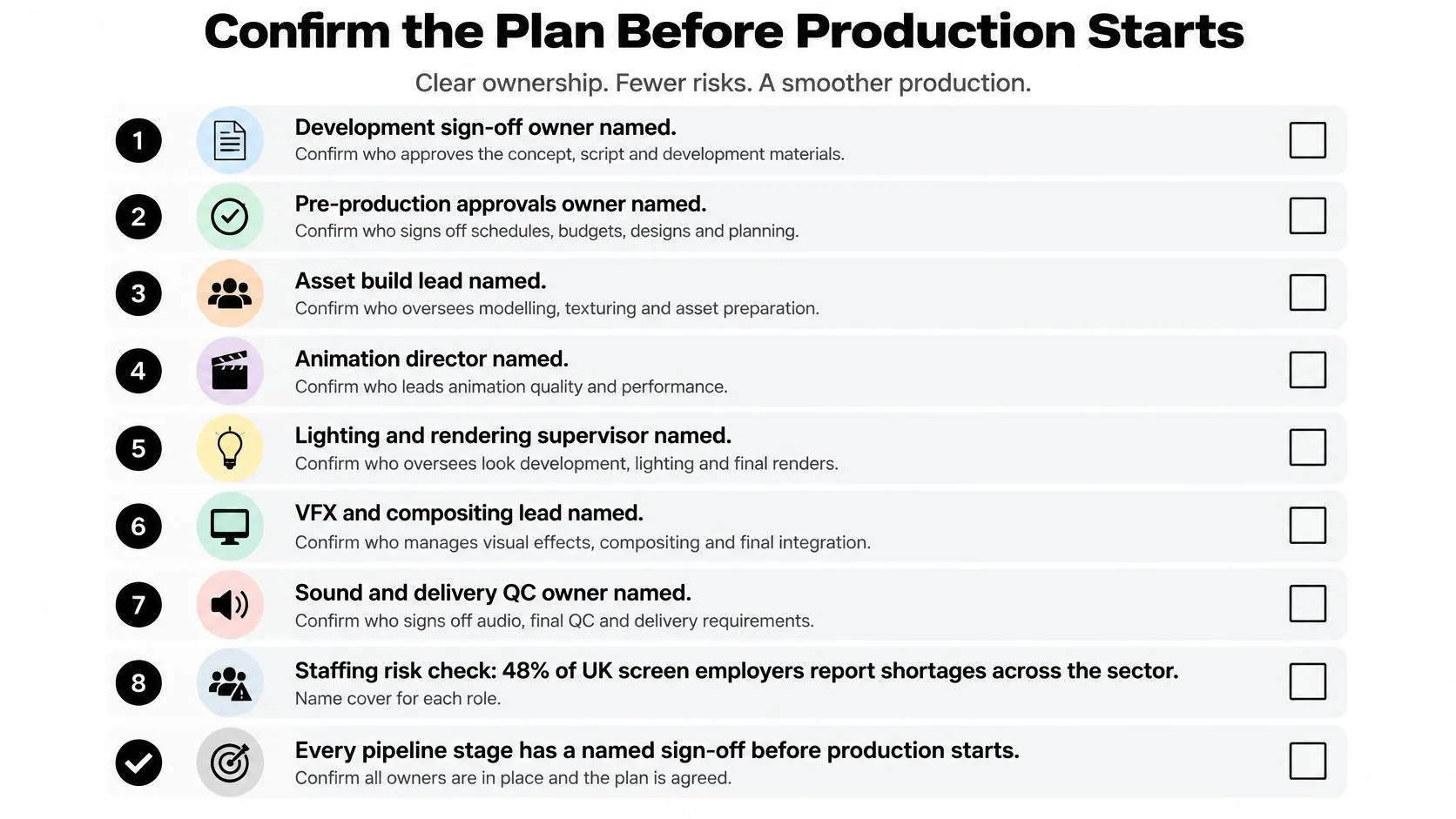 Naming owners isn't just tidy admin; it directly addresses the UK screen sector's tightest operational bottleneck. Skills England's creative industries sector skills needs assessment reports persistent shortages across production coordinators, VFX supervisors, editors, animators, and virtual-production specialists, alongside rising demand for real-time-engine specialists who bridge conventional animation and real-time workflows. Recruitment pressure hits mid-level and senior talent hardest: 48% of UK screen employers report shortages for people with five to ten years' experience, and 38% struggle to recruit experts with more than ten years' experience. That talent crunch changes how you hire. Don't wait until animation falls behind to hunt for a pipeline engineer, senior rigger, or real-time lighting supervisor. Lock senior leads and specialist cover early, then look closely at which repetitive tasks can be standardised or accelerated with automation and AI-assisted tools without weakening visual quality or creative control. Within Studio Liddell's AI Storytelling & Creative Technology practice, we build tools and production pipelines that combine artificial intelligence with animation and digital storytelling so artists spend less time on repetitive technical chores and more time on performance.
Six-Point Pre-Production Go or No-Go Checklist
Before you commit your main production budget, or finalize your pitch package (see our guide on how to pitch an animated TV series that gets noticed), run your brief through these six binary checks and record a clear yes or no beside each one:- Pipeline stages named and signed off: Does every stage from development through sound delivery have one documented output and one named approval owner?
- Asset naming and version rules set: Are file conventions, version-control tools, colour profiles, and asset approval gates written down and tested with every regional or remote partner?
- Shot-complexity mix estimated: Have you categorised your pilot or episode animatic by shot type and run real render tests on your heaviest cloth, crowd, or destruction shots?
- Animation share of core spend confirmed: Has your production accountant checked whether your budgeted animation spend clears HMRC's qualification threshold for AVEC?
- Certification and distribution route confirmed: Are your BFI British certification path, broadcaster or streaming partner, territory plan, and master delivery specs agreed?
- Senior and specialist roles booked: Are your pipeline engineering, supervision, coordination, and senior animation leads contracted with named cover in place before episode one kicks off?