Augmented Reality in Print: A Producer's Guide
A lot of print assets stall at the same point. The packaging looks good. The brochure is well designed. The direct mail pack lands on desks. Then the customer gets exactly one mode of interaction: read it, then put it down. That's the gap augmented reality in print can close when it's handled properly. A printed surface stops being the end product and starts acting as a trigger for something more useful, more demonstrable, and more measurable on a phone or tablet. For marketing teams, that can mean product visualisation or direct paths to purchase. For publishers and educators, it can mean turning static diagrams and layouts into guided, layered experiences that hold attention for longer. Most buyers don't need another pitch about novelty. They need to know what works, what creates friction, what the production process entails, and whether the outcome justifies the added effort. If you're weighing up AR for packaging, editorial, event print, retail collateral, or learning materials, that's the core brief. A practical starting point is understanding where simple printed triggers already fit into wider customer journeys. If you want a grounded example of how physical print can access digital layers without overcomplicating the interaction, Studio Liddell's guide to augmented reality cards is a useful reference point.
Giving Your Printed Materials a Digital Pulse
The strongest AR print ideas usually begin with a familiar production problem. A carton has limited space, but legal copy, setup guidance, and brand story all need room. A brochure needs to sell a product that only makes sense in motion. A magazine ad has one page to do the work of a landing page, product video, and store locator. Augmented reality in print solves that by treating the printed piece as the access layer rather than the full payload.
Where static print runs out of space
Print is still good at a few things digital often isn't. It's tactile. It holds attention differently. It can sit in retail, on desks, in classrooms, and in people's homes. But it also has obvious constraints:
- •Fixed surface area means every message competes for room.
- •No motion makes some products harder to explain.
- •No native feedback loop makes it difficult to tell what happened after someone saw it.
- •Longer refresh cycles make changing content expensive once something is on press.
AR changes the role of the page, pack, or card. Instead of cramming everything into print, you keep the printed design focused and let the phone access the heavier content: a product demo, assembly sequence, narrated walkthrough, 3D reveal, or direct commerce step.
A printed piece doesn't need to do everything on its own. It needs to prompt the next action cleanly.
What that looks like in practice
On packaging, the most useful AR layer is often instructional. Customers scan and immediately see how to assemble, apply, install, or use what they've bought. In editorial, the win is usually context. A feature can launch a clip, model, or extended sequence that deepens the story without overloading the layout. In education, a flat diagram can become something students can inspect from multiple angles. That's where the medium starts to earn its keep. Not because the page “comes alive”, but because the printed item now does a second job. It still carries design, brand, and message in physical form, but it also becomes a gateway to dynamic content that print alone can't hold.
Bridging the Physical and Digital Worlds
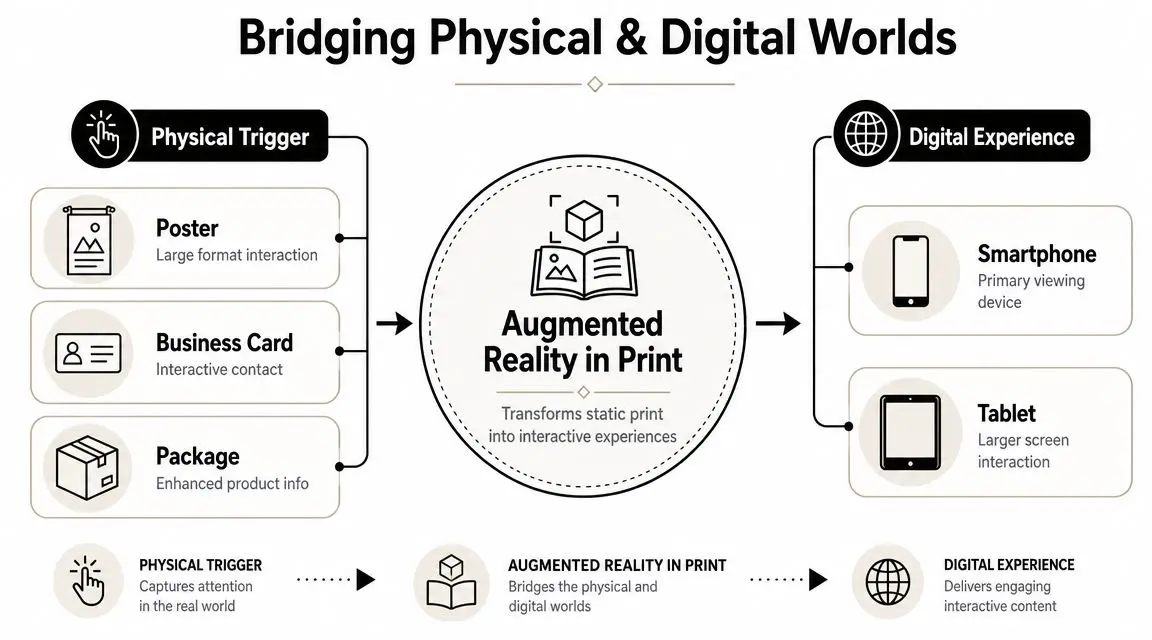
At its simplest, AR in print works like this: a person points a phone camera at a printed object, the system recognises a trigger, and digital content appears in relation to that physical item. That content might be a video, text layer, animation, sound element, or 3D model.
The trigger matters more than most people think
A useful historical shift happened in the 2010s. Print stopped being treated purely as a finished object and started being used as an access point for digital layers. A 2019 study noted that AR applications for magazines, packaging, and flyers were already “growing in number”, with static pages able to trigger videos, product information, and purchase links through augmented reality in print media research1_web_1805.pdf). That basic mechanism is still the foundation today. The camera sees something in the physical world, then software maps digital content onto it. There are two broad models buyers should understand:
| Approach | How it works | Best fit |
|---|---|---|
| Marker-based AR | The system recognises a specific printed image, code, or designed trigger | Packaging, brochures, posters, cards, magazine pages |
| Markerless AR | The system places content onto a detected real-world surface without a fixed printed marker | Product visualisation, room placement, open-space demos |
For print-led campaigns, marker-based workflows are usually the practical choice because they give production teams more control over where and how the experience starts.
Browser access beats friction
The second decision is how the user gets in. If access depends on downloading a dedicated app, many users drop off before the experience even begins. That's why browser-based activation has become the more workable route for most campaigns tied to print. Industry guidance on AR in print describes a workflow where WebAR launches from a smartphone browser after scanning a QR code or NFC tag, reducing the installation barrier and keeping the path from print to interaction short through camera-led WebAR for print. That same principle shows up in other printed environments too. Event teams, for example, care about quick scan behaviour because the handoff from physical ticket or badge to digital action has to be immediate. If you're reviewing connected event flows alongside print activations, this guide on how to choose the right attendance system is a sensible parallel resource.
Practical rule: if someone has to ask “what do I do now?”, the print design hasn't finished its job.
Key Use Cases and Business Benefits
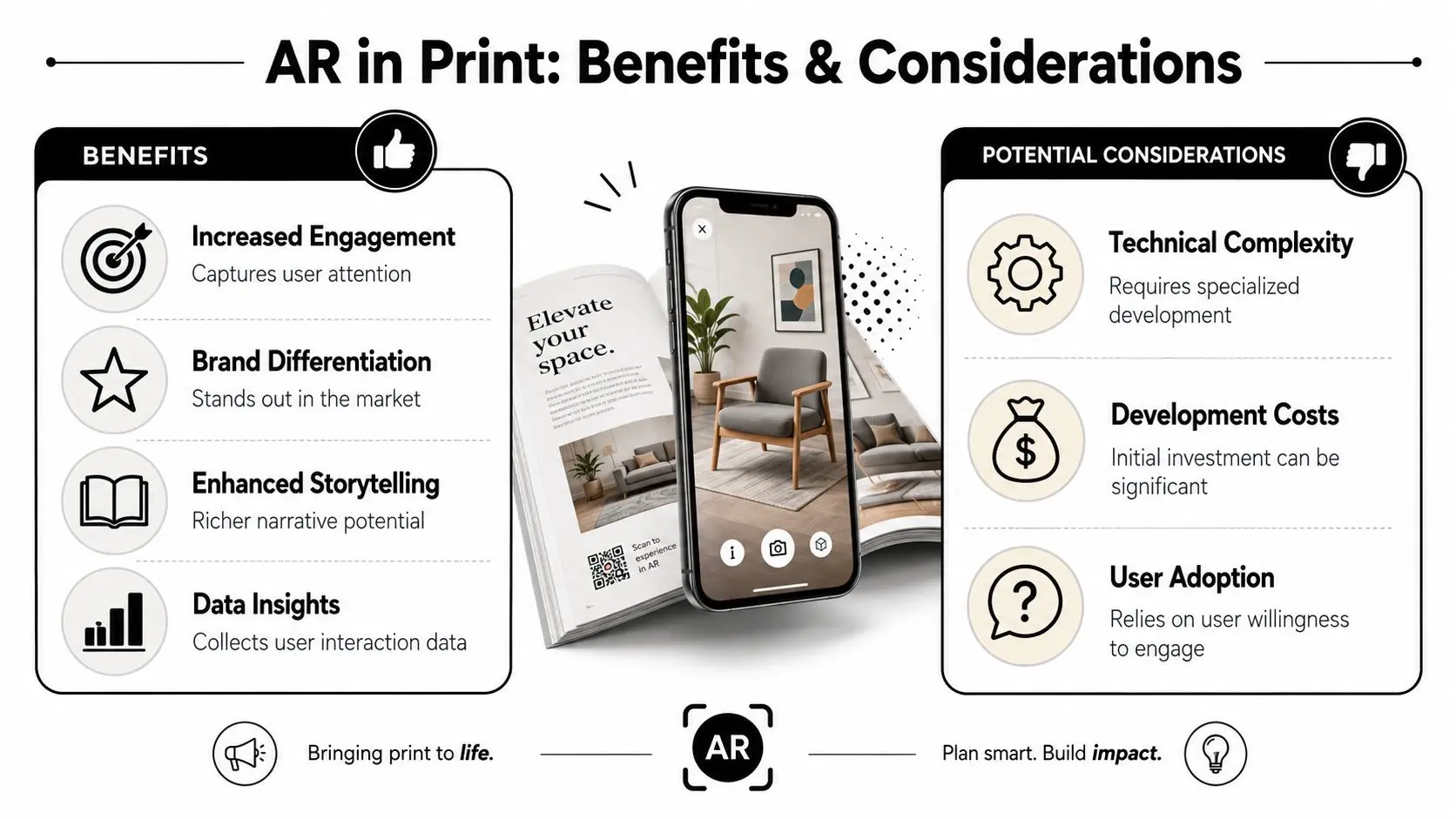
The business case for AR in print gets stronger when you stop treating it as a stunt. It works when it gives the customer something they need, faster than another channel would.
Packaging and retail
Packaging is one of the clearest use cases because the customer already has the object in hand. That creates a natural moment for a scan. A printed pack can trigger:
- •Setup and care guidance for products that need assembly or maintenance
- •Ingredient, sourcing, or product information that won't fit cleanly on pack
- •Retail storytelling such as brand films or launches tied to special editions
- •Post-purchase support without forcing users to search for the right help page
This works because AR layers richer media onto a static surface. drupa's print-technology coverage notes that a simple 2D printed trigger can activate videos, sound, 3D animations, panoramas, and other digital content through print triggers and layered AR content.
Advertising and direct response
In ads, brochures, and direct mail, the key advantage is that the printed piece no longer carries the whole narrative alone. It can open into a product spin, promo sequence, testimonial clip, or commerce link. That changes what print is doing commercially:
- •It can bridge interest to action without relying on later recall.
- •It can extend page space into digital content.
- •It can create trackable interactions from a traditionally hard-to-measure medium.
For UK brands weighing whether interactive print belongs in campaign planning, Studio Liddell's article on augmented reality advertising is a useful companion read.
Education and publishing
Educational print is often where AR makes the most practical sense. Dense concepts can be shown spatially rather than described repeatedly in text. A textbook diagram can become a rotatable model. A worksheet can trigger narration or step-by-step explanation. A museum guide can deliver context in situ.
The strongest educational AR doesn't decorate content. It clarifies it.
What buyers actually gain
The value tends to fall into three buckets:
- Engagement with purpose
- Utility
- Data
The AR Production Workflow Explained
An AR print job usually goes off course long before development starts. The pressure point is alignment: the printed trigger, the digital content, the access method, and the business goal all need to support the same user action.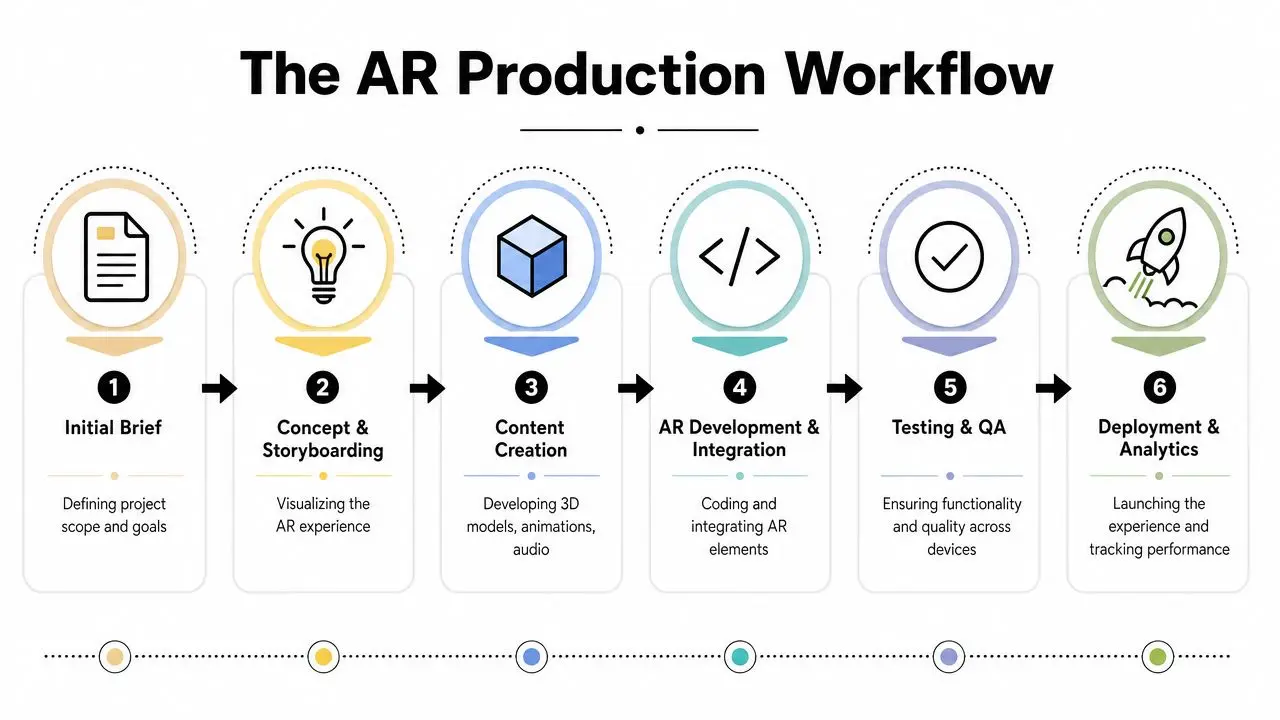 In practice, producers are making two things at once. One is a physical item that must print cleanly, survive production constraints, and still cue interaction. The other is a mobile experience that has to load fast, track reliably, and earn attention quickly. If those tracks are planned separately, costs rise and quality drops.
 Start with the post-scan job
The first question is simple: what should the user do after they scan? That decision shapes everything that follows. A brochure that needs to drive qualified enquiries is built differently from packaging that needs to explain setup, or a museum panel that needs to add context in situ. The strongest briefs define the user context, the intended action, and the success event before anyone commissions animation or 3D. Useful planning usually locks down four points early:- •Where the interaction happens. Shelf edge, direct mail, classroom, exhibition stand, in-store display, or editorial page.
- •What the user gets immediately. Product visualisation, guided explanation, video, step-by-step instruction, or a purchase path.
- •What the business wants to measure. Dwell time, view completion, click-through, lead capture, add-to-basket, or support reduction.
- •What content format fits the device and moment. Lightweight 3D, short-form motion, audio, interactive UI, or a simple web destination.
That sounds basic. It saves expensive rework.
Plan assets for mobile performance early
A common production mistake is approving assets in a desktop review workflow, then trying to force them into a phone-based AR experience at the end. Broadcast-grade renders, dense geometry, and oversized textures rarely survive that handoff without compromise. The better approach is to design for the delivery environment from day one. That means setting asset budgets, agreeing interaction limits, and deciding where realism matters and where speed matters more. In retail or event settings, speed usually wins. A practical pipeline often looks like this:
| Stage | Production question |
|---|---|
| Concept and storyboard | Can a first-time user understand the interaction within seconds? |
| Asset creation | Are models, video, and animation optimised for mobile delivery? |
| Trigger integration | Will the printed surface recognise consistently in real conditions? |
| Interaction design | Are prompts, gestures, and next steps obvious on a handset screen? |
| QA and device testing | Does the experience load, track, and complete reliably across devices? |
Studios that already handle animation, realtime content, and delivery testing tend to move faster here because they can spot problems before they reach press. For a more detailed view of that production handoff, Studio Liddell's guide to AR development from concept to launch breaks down the stages from storyboard through QA.
Access method is a production decision, not a late add-on
Teams often treat the entry point as a minor detail. It is not. The route into the experience changes uptake, design choices, analytics, and support requirements. For print, browser-based access is usually the cleanest route because it reduces steps between scan and content. App-based AR can still be the right call where a brand already has an active app, account system, or persistent feature set that justifies the extra friction. For one-off campaigns, packaging activations, brochures, inserts, and point-of-sale materials, keeping entry lightweight usually produces better completion rates. The rule is straightforward. If the print asset is quick to pick up and use, the AR entry should feel just as direct.
Treat print sign-off as a midpoint
Once artwork goes to press, digital production is still very much live. During this phase, experienced teams protect the project from avoidable failures. Printed proofs need to be checked for recognition quality, not just colour and finish. Device testing needs to cover current iOS and Android handsets in the kind of lighting the audience will have. Hosting, caching, and analytics need to be configured before launch, not after early users hit delays or broken attribution. Producers should also confirm fallback behaviour. If tracking fails, bandwidth is poor, or a browser handles the experience badly, the user still needs a usable path to content. The teams that get good results from AR in print tend to run it like a compact product release. That mindset keeps creative ambition tied to production reality, which is usually where business value shows up.
Crucial Production and Testing Considerations
At this stage, many AR print projects become visibly professional, or visibly fragile.

Friction kills uptake
The biggest operational mistake is assuming the user is highly motivated. Users typically aren't. They'll scan if the reward is obvious and the process feels immediate. They won't tolerate much uncertainty. Wide-format industry coverage makes the point clearly: AR print campaigns tend to fail when they require a slow-loading app or unclear instructions, and with nearly all UK adults owning a smartphone, a browser-first low-step design is the more effective route according to research on friction in AR print experiences. That has direct implications for creative and production decisions.
The trade-offs that matter
A polished AR print experience usually depends on getting several balances right:
- •Visual richness versus load speed
A detailed 3D model may look excellent in review sessions and still perform badly on mobile data. Optimisation is production work, not a final tidy-up.
- •Marker design versus art direction
Designers often want the trigger to disappear into the layout. Tracking systems still need enough distinct visual information to recognise the print reliably.
- •Interactivity versus clarity
More buttons, gestures, and branches don't automatically create a better experience. In many cases, one clean action outperforms a mini interface crammed into a phone screen.
- •Novelty versus utility
If the content doesn't help the user decide, understand, or act, they won't repeat the behaviour.
QA has to happen on real devices
Desktop previews are useful, but they aren't enough. Testing needs to happen with actual printed material, under ordinary lighting, on a spread of current devices and browsers. A sensible QA pass checks for:
- Recognition stability on matte and gloss finishes
- Load behaviour on fast and poor connections
- Legibility of overlays on small screens
- Tap targets that work with one hand
- Recovery if tracking drops or the user rotates the page
Production teams often spend too much time polishing the effect and not enough time rehearsing the first five seconds.That opening moment does most of the commercial work. Can the person understand the prompt, scan the trigger, load the experience, and get immediate value? If not, the rest of the build barely matters.
Measuring Success and Proving ROI
AR in print only earns budget when it can be tied to a business outcome. Nice reactions at a presentation don't count for much once procurement, marketing operations, or a publishing board asks what changed.Track the journey, not just the scan
The useful metrics are the ones that connect physical engagement to a downstream result. A practical measurement stack often includes:| Stage | What to look for |
|---|---|
| Activation | Did people scan the printed trigger? |
| Engagement | How long did they stay and what did they interact with? |
| Progression | Did they click through to product, support, booking, or learning content? |
| Outcome | Did the interaction support a sale, lead, completion, or learning goal? |
Frame ROI around utility
If the AR layer helps someone understand fit, setup, use, or value more quickly, the case becomes easier to defend. A packaging activation might reduce support confusion. A brochure experience might qualify buyers before they speak to sales. An educational overlay might improve completion and comprehension. For marketing teams already comparing channels and trying to maximize your advertising ROI, the right approach is to treat AR print as part of the conversion path, not as an isolated creative extra. The strongest ROI stories usually come from mundane usefulness. Better product understanding. Cleaner click-throughs. Fewer dead-end interactions. More informed leads.How to Commission Your First AR Project
The easiest way to overspend on AR in print is to start with an abstract ambition and no operating brief. “We want something immersive” sounds exciting, but it doesn't help a production team make the right calls.What to bring into the first conversation
A solid commissioning brief should answer five things:- •What printed asset is involved
Packaging, brochure, point-of-sale, book, flyer, direct mail, ticket, or editorial page.
- •What the user should get immediately
A demo, instructions, explainer, model, reward, product view, or route to purchase.
- •What success looks like
More qualified traffic, stronger product understanding, better response, improved learning, or support efficiency.
- •What content already exists
Product renders, CAD, video, motion graphics, copy, artwork, or brand assets.
- •What constraints matter
Press deadline, internal approvals, browser requirements, device support, hosting, data handling, or campaign lifespan.
The shortlist criteria that matter
When evaluating partners, look for a team that can handle both sides of the job: content production and real-time delivery. AR print projects often fail in the handoff between those disciplines. Beautiful assets get built with no regard for mobile performance, or technically workable experiences ship with weak creative. Ask direct questions. Who owns the trigger strategy? Who tests on devices? Who signs off final printed proofs against live tracking? How are analytics configured? What happens if the physical print changes late in production? The right setup is usually modest, focused, and measurable. One clear use case. One fast entry point. One digital layer that earns its place.
If you're planning an AR print activation and need a production partner who understands 3D content, interactive workflows, and delivery constraints, Studio Liddell can help scope the concept, define the user journey, and turn a printed asset into something people can use.