A Guide To AR Development From Concept To Launch
Augmented Reality (AR) development is the process of creating experiences that overlay computer-generated images, audio, and data onto a real-world view. Think of it as a dynamic _digital layer_ on top of your physical surroundings, accessed through your smartphone, which can make a static product or space spring to life with interactive content.
Understanding Augmented Reality Development
At its core, AR development is the art of blending the digital and physical worlds so seamlessly they feel like one. It’s not about replacing reality but enriching it. Imagine pointing your phone at a flat-pack furniture box and seeing the fully assembled chair appear in your living room, perfectly to scale. That's the magic. This all happens through a clever partnership between your device's hardware and sophisticated software. The camera captures your real-world view, while sensors like the accelerometer and gyroscope track its every move and tilt in 3D space. The software then gets to work, analysing this data to understand the environment, finding flat surfaces like floors and walls, estimating the lighting, and mapping the area.
The Core Components of AR
For any AR experience to work, a few key technologies must collaborate seamlessly. These are the building blocks for everything from a simple social media filter to a complex industrial training simulation for engineers.
- •Spatial Tracking: This is how your device understands its position and orientation in 3D space. It’s what allows a digital object to stay “anchored” to a spot in the real world, so you can walk around it as if it were really there.
- •Scene Understanding: The AR software needs to make sense of what the camera sees. This includes detecting planes (finding floors and tables), recognising images (like triggering an animation when you view a specific poster), and even identifying objects.
- •Rendering: This is the final step. It’s where the 2D or 3D digital content, whether it’s an animated character or a product model, is drawn over the live camera feed, creating the final augmented view on your screen.
This technology is quickly shifting from a niche gadget to a mainstream business tool. In fact, the global AR market size is projected to grow from USD 62.77 billion in 2023 to USD 1,114.79 billion by 2030, at a CAGR of 50.7%. This boom is fuelled by better tech and a solid digital infrastructure, making AR more powerful and accessible than ever. To bring these experiences to life, developers rely on a powerful toolkit of software and platforms. Each has its strengths, and the right choice depends entirely on the project's goals, from the target audience to the desired level of interactivity.
Core AR Technologies At A Glance
Here’s a quick breakdown of the essential technologies that power modern AR experiences, providing a handy reference for decision-makers.
| Technology | Primary Function | Key Platforms |
|---|---|---|
| Game Engines | Provide the complete environment for building, rendering, and deploying AR content. | Unity, Unreal Engine |
| Native SDKs | Offer deep integration with device hardware for high-performance, app-based AR. | Apple's ARKit, Google's ARCore |
| Web Platforms | Enable AR experiences to run directly in a mobile web browser, no app download needed. | 8th Wall (Niantic), Zappar |
Choosing the right technology stack is one of the most critical decisions in the development process, as it influences everything from performance and features to how users will ultimately access the experience.
From Concept to Interactive Reality
The entire AR development process is a blend of creative vision and technical execution. It always starts with an idea: how can we use AR to solve a problem or create a truly memorable interaction with a brand? From that spark, 3D artists and animators get to work designing the digital assets, while developers use these powerful toolkits to build the logic that makes it all interactive.
AR development bridges the gap between imagination and interaction. It allows brands to take their digital assets off the screen and place them directly into the customer's world, creating experiences that are not just seen, but felt.
Whether it’s for retail, training, or pure entertainment, the goal is always the same: create an intuitive and engaging experience that adds real value. Getting to grips with these fundamentals is the first step towards unlocking AR’s potential for your business. To see how these concepts are put into practice, you can explore our virtual and augmented reality services.
Your Step-By-Step AR Production Journey
Bringing an augmented reality experience to life is less of a single leap and more of a carefully choreographed dance. It’s a collaborative journey that transforms a spark of an idea into a polished, market-ready product. Each stage builds on the last, ensuring the final experience is technically solid, creatively compelling, and perfectly tuned to your business goals. The whole process unfolds over four key phases. We start with the big picture, the strategy, and finish with a flawless launch, with every step designed to minimise risk and maximise impact.
Phase 1: Concept and Strategy
This is where we lay the foundations and figure out the 'why' behind the project. Before a single line of code is written or a 3D model is sculpted, we work together to set crystal-clear goals. Are you looking to boost dwell time at an exhibition, let customers virtually ‘try on’ products from home, or create a truly memorable brand activation? During this phase, we sketch out the entire user experience (UX) from the first tap to the final interaction. Key activities include:
- •Defining the Target Audience: Who are we building this for? What phones or devices are they likely to use?
- •Mapping the User Journey: How will someone discover, launch, and move through the AR experience?
- •Technical Scoping: We’ll decide on the best home for your AR, a native app, WebAR, or a social media filter, based on your goals and audience.
- •Success Metrics: We’ll define the key performance indicators (KPIs) to track success, like engagement rates, session length, or a jump in sales.
This strategic groundwork gets everyone on the same page and gives us a clear roadmap for the entire project. It's the blueprint that guides every creative and technical decision that follows.
Phase 2: Asset Creation
With a solid strategy locked in, the creative magic begins. This phase is all about building the beautiful visuals and interactive elements that your audience will see and play with. Our team of 3D artists, animators, and designers get to work crafting every digital component. This means creating high-quality, optimised assets that look fantastic without slowing down the user's device. Whether it’s a photorealistic model of your product, a quirky animated character, or a slick user interface, every asset is built to spec. We’re obsessed with creating visuals that are not just stunning, but also lightweight enough to guarantee a smooth and responsive AR experience. This flowchart shows the simple process of how AR technology works on a device.
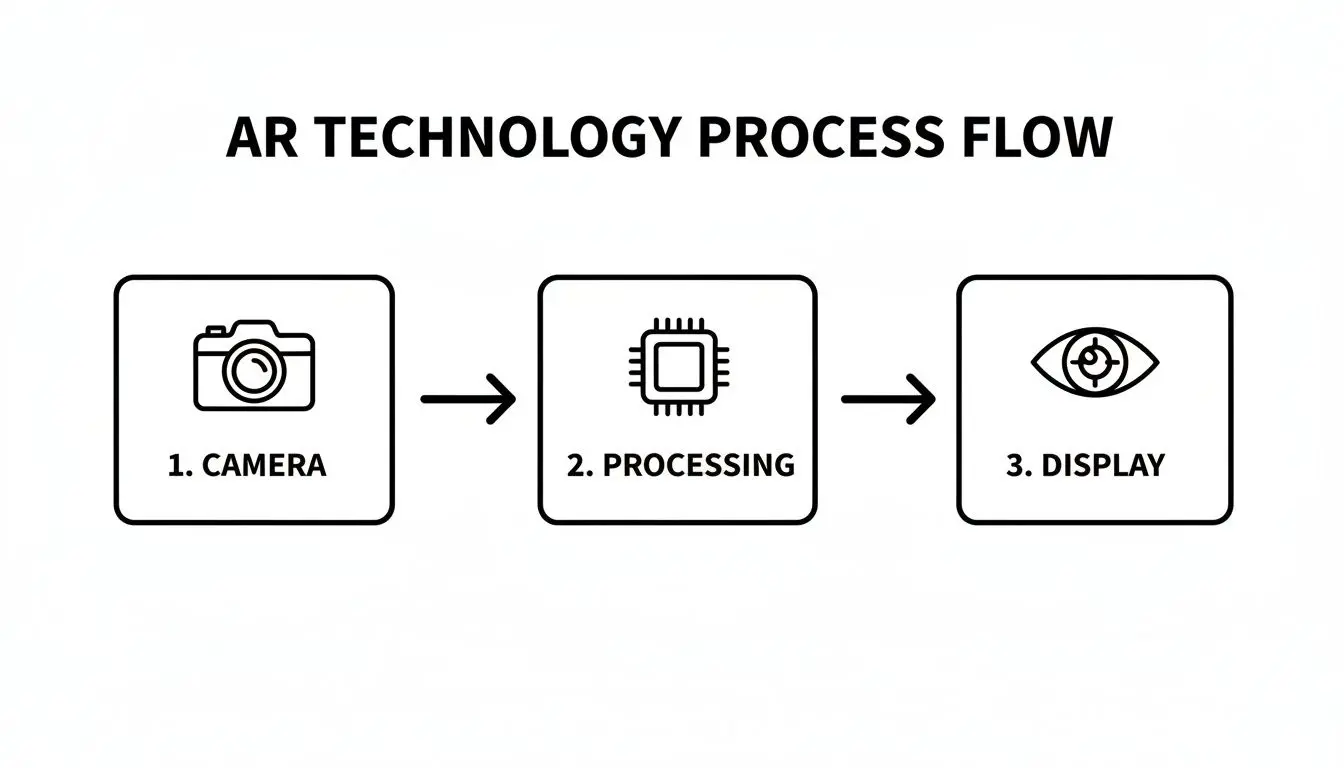
This visual breaks down the core AR loop: capturing reality with the camera, processing that data, and then displaying the augmented view, showing the real-time nature of the technology.
Phase 3: Development and Integration
This is the technical heart of the project. Our developers take the 2D and 3D assets from the previous phase and bring them to life inside a game engine like Unity or Unreal Engine. They write the code that handles all the logic, interactivity, and AR-specific magic like plane detection or image tracking.
This is the stage where the creative vision becomes an interactive reality. It’s a meticulous process of weaving art and code together to build a stable, functional, and delightful user experience.
During development, we build out all the core features, connect the user interface, and implement the tracking technology that anchors digital objects firmly in the real world. This phase is highly iterative, involving constant chats between our artists and developers to make sure the final product looks and feels exactly as we all envisioned.
Phase 4: Testing and Deployment
The final phase is all about refinement and release. No AR experience is ready for the world without being put through its paces. We conduct rigorous quality assurance (QA) testing across a wide range of devices and in different real-world environments to hunt down bugs, optimise performance, and ensure the app is stable and intuitive. Once the experience is polished and gets the green light, we handle the entire deployment process. This might involve:
- Submitting the app to the Apple App Store and Google Play Store, managing all the listing requirements.
- Hosting a WebAR experience and providing a QR code or link for easy access.
- Integrating the AR feature into one of your existing mobile apps.
Choosing The Right AR Technology Stack
Picking the right technology stack is one of the most critical decisions you'll make on your AR development journey. The platform you land on will shape everything, from visual flair and performance to how quickly you can get to market and how much it'll cost. It’s never about finding the single "best" engine, but about choosing the one that's a perfect fit for what you’re trying to achieve. The conversation nearly always comes down to three fantastic options: Unity, Unreal Engine, and WebAR. Each has its own distinct personality and strengths, making them suitable for entirely different kinds of experiences, whether that's a viral marketing campaign or a highly detailed industrial training simulation.
Unity The Versatile Powerhouse
Unity has been a dominant force in the AR world for years, and for very good reason. It hits that sweet spot between powerful features and genuine accessibility, making it the go-to for a massive range of mobile AR applications. Its real magic lies in its flexibility and incredible cross-platform support. With Unity, our developers can build an experience once and then deploy it across both iOS (using ARKit) and Android (using ARCore) without a huge headache. That efficiency is a game-changer for projects that need to reach the widest possible audience. Key strengths of Unity include:- •Vast Asset Store: A huge marketplace packed with pre-made 3D models, tools, and plugins that can seriously cut down development time.
- •Strong Community Support: A massive global community means you’re never far from a tutorial, forum, or a solution to a tricky problem.
- •Mobile Optimisation: Unity is exceptionally well-tuned for mobile devices, ensuring smooth performance even on mid-range smartphones.
This makes Unity the perfect candidate for brand activations, interactive games, and educational apps where reach and rock-solid performance are everything. You can learn more by checking out our guide on mastering Unity development for business and XR experiences.
Unreal Engine For High-Fidelity Visuals
When your project absolutely has to look breathtakingly photorealistic, Unreal Engine is the undisputed champion. It’s the engine behind some of the world's most visually stunning video games, and it brings that same graphical muscle to AR. Its rendering capabilities are simply in a class of their own. This makes it the clear choice for high-end product visualisations, architectural walkthroughs, and cinematic AR storytelling. If you need your digital creation to look indistinguishable from the real thing, Unreal is the tool for the job.
While Unity is the flexible all-rounder, Unreal Engine is the specialist for jaw-dropping visual quality. Choosing between them often comes down to a simple question: is broad accessibility or best-in-class graphics your top priority?
Of course, this visual firepower comes with a few trade-offs. Unreal typically has a steeper learning curve and demands more powerful hardware to run well, which can narrow your audience to those with high-end devices.
WebAR For Instant Accessibility
WebAR flips the script entirely. Instead of making someone download an app from a store, WebAR experiences run directly inside a smartphone's web browser. This simple difference removes a massive barrier for users, who can jump into the content just by scanning a QR code or tapping a link. This frictionless access makes WebAR an incredible choice for:
- •Marketing Campaigns: Perfect for short, snappy brand experiences you want people to use and share in an instant.
- •Retail and E-commerce: Let customers see how that sofa looks in their living room with a single tap from your product page.
- •Event Activations: Offer instant AR fun at a trade show or festival without the faff of an app download.
The trade-off for all this convenience is that WebAR is generally less powerful than native apps built in Unity or Unreal. It might struggle with highly complex 3D models or advanced interactions, but for many projects, that instant accessibility is a winning advantage.
AR Platform Comparison Unity vs Unreal vs WebAR
To make things clearer, here’s a breakdown to help you weigh the options for your project's specific needs and goals.
| Factor | Unity | Unreal Engine | WebAR |
|---|---|---|---|
| Best For | Mobile apps, games, broad audience reach | High-fidelity visuals, product visualisation | Instant access, marketing, retail |
| Visual Quality | Very good, highly versatile | Exceptional, industry-leading photorealism | Good, but limited by browser performance |
| Performance | Excellent on a wide range of devices | Best on high-end devices | Dependent on browser and network connection |
| Development Speed | Fast, thanks to the Asset Store | Can be slower due to complexity | Very fast for simple experiences |
| Accessibility | Requires an app store download | Requires an app store download | No app needed, instant access via browser |
| Team Skills | Widely available C# developers | More specialised C++ developers | Web developers (JavaScript, Three.js) |
Ultimately, the right choice depends on balancing your creative vision with your practical goals. Whether you need photorealism, mass-market reach, or instant access, there’s a platform ready to bring your AR idea to life.
AR Use Cases: Real-World Business Impact
The theory and tech are fascinating, but the real acid test for any AR development is the value it delivers in the real world. Across nearly every industry, businesses are moving beyond experimentation and using augmented reality to solve tangible problems, craft unforgettable customer experiences, and drive measurable growth. From the shop floor to the operating theatre, AR is proving its worth as a powerful and practical business tool. This shift from novelty to necessity is clearest in how companies are engaging with their customers. AR is forging a more engaging, informative, and personal path to purchase, completely changing how people discover and connect with products.

Transforming Retail and Exhibitions
In the highly competitive worlds of retail and events, grabbing and holding attention is everything. This is where AR for exhibitions and retail shines, turning passive browsing into an active, hands-on experience. The impact isn't just a gimmick; studies show AR can ramp up customer engagement by a massive 66%. AR applications are making a tangible difference in a few key ways:
- •Virtual Try-Ons: For fashion and cosmetics, AR lets customers see how products look on them without needing a changing room. This tech bridges the gap between online browsing and in-store shopping, leading to higher conversion rates and a 40% reduction in returns.
- •Interactive Product Demos: At a busy exhibition stand, AR can make your product the star of the show. Imagine visitors pointing their phones at a piece of machinery to see a 3D animation of its inner workings, or placing a true-to-scale virtual model of your product right on their desk.
- •Immersive Brand Storytelling: AR can turn packaging, posters, or even the stand itself into a gateway for digital content. A quick scan could unlock behind-the-scenes videos, customer testimonials, or fun games that build a much deeper connection to your brand.
You can see how concepts like augmented reality shirts are shaking up fashion e-commerce by creating truly interactive experiences. These are powerful sales and marketing tools that boost dwell time, educate consumers, and create brand interactions that people actually remember.
Powering Enterprise Training and Operations
Away from the high street, AR is having a profound impact on how businesses train their staff and handle complex operations. By overlaying digital instructions, schematics, and data onto real-world equipment, AR provides hands-on guidance exactly when and where it’s needed most.
AR in the enterprise is all about empowerment. It gives technicians, engineers, and medical professionals a sort of digital x-ray vision, allowing them to see what needs to be done with absolute clarity and precision, slashing errors and boosting safety.
The applications in this space are as varied as they are vital:
- •Complex Assembly and Maintenance: AR can walk a technician through a tricky multi-step repair, using step-by-step 3D animations overlaid directly onto the machine. This dramatically cuts the need for clunky paper manuals and can improve task accuracy by over 90%.
- •Remote Expert Assistance: A field engineer can share their real-time view with a senior expert back at HQ. That expert can then draw and make notes on the live video feed, guiding the on-site worker through a tough job as if they were standing right beside them.
- •Medical and Surgical Training: In high-stakes environments, medical & training simulations in XR offer a safe, repeatable way for students and professionals to practise complex procedures. AR can overlay anatomical models onto a manikin or even a patient, providing crucial guidance during training exercises.
From grabbing a customer's attention in-store to guaranteeing precision on the factory floor, these real-world examples show that AR development is no longer a futuristic promise. It's happening right now, delivering a strong return on investment for businesses bold enough to make it part of their strategy.
Understanding AR Project Budgets And Timelines
Let's get straight to the point. The two questions at the top of every client's list are always: "How much is this going to cost?" and "How long will it take?" There's no simple price tag for an AR project. The final budget and timeline are shaped entirely by the project's ambition and complexity. A simple, marker-based WebAR experience that just shows off a 3D model is a world away from a complex, multi-level training app with custom animations and deep user analytics. Every new feature, every interaction, and every bespoke 3D model adds to the production time and, naturally, the cost.
Key Factors Shaping Your AR Budget
A few key things will directly influence how much you'll need to invest. Thinking about these early on is the best way to match your creative vision with a realistic budget and stop the dreaded 'scope creep' from taking over.
- •Platform Choice: As we’ve touched on, native apps built in Unity or Unreal Engine are powerhouses, but they usually demand more development time than a lighter WebAR experience. The platform dictates the technical skills needed and how complicated the final rollout will be.
- •Asset Creation: Creating custom 3D models, character animations, and high-quality 2D graphics is a major cost centre. If you can use existing or stock 3D assets, you'll find the project is significantly more budget-friendly than one needing everything built from the ground up by specialist artists.
- •Complexity of Interactivity: A basic "view in your room" feature is pretty straightforward. But start adding configurable product options, animated sequences, physics, or game-like elements, and the development hours start to climb.
- •Backend Integration: Does your AR app need to talk to your other systems? Connecting to an e-commerce platform for live inventory, a user database, or an analytics dashboard all requires extra development, testing, and security considerations.
The budget for an AR project is a direct reflection of its complexity and creative ambition. A clear, well-defined brief is the most powerful tool for managing costs and ensuring the final product aligns perfectly with your strategic and financial goals.
When you're planning, it's also worth thinking about different development models to get the most from your budget. Getting familiar with concepts like maximizing cost savings with nearshore software development can show how different team structures might affect the bottom line.
Typical Timelines For AR Projects
Just like budgets, timelines are tied directly to the project's scope. A core part of any good discovery phase is mapping out a realistic plan. To give you a rough idea, though, here are some general timeframes. A simple project, like a WebAR experience for a marketing campaign using a single 3D model, might take 4-8 weeks from the initial brief to launch. This is perfect for quick, high-impact brand activations. Something more involved, like an interactive product configurator or a slick experience for an exhibition stand, could be in the 3-6 month range. This gives us enough time for creating custom assets, mapping out the user journey, and properly testing across different devices. For a big, enterprise-level application, think a detailed training simulation or a maintenance guide that pulls data from company systems, the timeline can easily stretch to 6-12 months or more. These larger projects require deep collaboration with your subject matter experts and incredibly thorough quality assurance. For a more detailed breakdown of what goes into digital production costs, you can review our guide on how much app development costs in the UK. We believe this transparency is vital for building a great partnership and making sure there are no surprises along the way.
How To Choose The Right AR Development Partner
Picking the right studio for your AR project is probably the single most important decision you'll make. A great partner isn't just a supplier you hire; they're a strategic collaborator who will take your vision from a rough sketch on a napkin to a polished, high-performing reality. Get this choice right, and you're building on solid foundations. The best partners bring a potent mix of technical chops, creative flair, and battle-tested production experience. You need a team that can confidently manage the entire journey, from the initial "what if?" to launch day and beyond.
Technical Expertise and Platform Fluency
First things first: a potential partner needs deep, provable expertise in the core technologies that make AR tick. They should be completely at home in the leading game engines, as this is where the magic of the interactive experience is actually built. You'll want to see a strong track record in:
- •Unity and Unreal Engine: They need to be fluent in both and able to clearly explain why one might be a better fit for your specific project.
- •ARKit and ARCore: For mobile apps, proven experience with Apple's and Google's native AR toolkits is completely non-negotiable. This is what ensures high-performance, stable experiences.
- •WebAR Solutions: A good partner also understands the immense strategic value of browser-based AR for marketing campaigns. Ask about their experience with platforms like 8th Wall or Zappar.
This technical knowledge is the bedrock of a successful project. Without it, you're building on sand.
A Portfolio of Relevant AR Work
Talk is cheap. The most reliable indicator of what a studio can _actually_ do is their portfolio. Ask to see examples of their previous AR projects, especially any that feel similar in scope or ambition to what you have in mind. A solid portfolio is concrete evidence of their quality, creativity, and ability to deliver on their promises. When you're looking through their past work, don't just admire the final product. Dig a little deeper. Ask them about the challenges they ran into and how they solved them. This will tell you a lot about their problem-solving skills and how transparent they are as a partner.
A studio's portfolio is more than just a gallery of past glories; it's a testament to their entire process. It shows you their ability to translate a client's brief into something that is engaging, functional, and beautiful.
Deep Roots in Animation and 3D Production
An augmented reality experience is nothing without compelling content. The digital objects, characters, and environments are what truly capture a user's imagination and make the experience memorable. This is why it's absolutely vital to choose a partner with a strong heritage in 3D animation and CGI production. A studio with this background knows how to create assets that are not only visually stunning but also highly optimised to run smoothly in real-time on a mobile phone. This blend of artistic talent and technical discipline is rare, but it's the secret sauce for creating AR that feels polished and professional. If you want to dive deeper into this, our guide on Choosing an Animation Studio offers some valuable pointers. Ultimately, picking a partner is about finding a team you can trust. Look for a studio that communicates clearly, operates with transparency, and shows a genuine passion for bringing your AR vision to life. That collaborative spirit is the final, crucial ingredient for success.
Common Questions About AR Development
To wrap things up, let's tackle a few of the questions we hear all the time from businesses dipping their toes into AR development. Getting straight answers on these can clear up a lot of the fog and make the whole process feel much more approachable.
How Long Does A Typical AR Project Take?
This is the classic "how long is a piece of string?" question, as the timeline really hinges on complexity. If you're looking for a simple WebAR experience and you’ve already got your 3D models sorted, you could be looking at a turnaround of 4-8 weeks. But if we're talking about a more involved, custom-built app for something like a museum exhibition, packed with interactive elements, you're more likely in the 3-6 month bracket. For the big stuff, like enterprise-level training simulations that need to be woven into your existing company software, projects can easily stretch to 6-12 months or even longer.
What Is The Difference Between AR and VR?
Augmented Reality (AR) is all about adding a digital layer to the world you can already see. You’re typically looking through your phone or a pair of smart glasses, and digital information, like a 3D model of a sofa or directions to the nearest coffee shop, appears in your real-world environment.
The simplest way to think about it is that AR adds to your reality, while VR replaces it. Both are powerful tools, but they serve very different purposes.
Virtual Reality (VR), on the other hand, is a total replacement of your surroundings. You pop on a headset that blocks out the physical world, and suddenly you’re transported somewhere entirely new, a digital space station, a fantasy world, or a training simulation. It’s a full-on immersive experience.
Can AR Be Integrated With Our Existing App?
Absolutely, and it's a great way to go. We can build AR features directly into your current native mobile app using the official toolkits, that’s ARKit for iOS and ARCore for Android. This means your customers get powerful new functionality without having to download a whole separate app. For websites, we use WebAR. This is a brilliant approach for marketing campaigns or e-commerce because it lets people jump straight into an AR experience right from their mobile browser. No app download, no friction, just instant engagement.
Ready to explore how AR can transform your business? The team at Studio Liddell has been crafting immersive digital experiences since 2019. Let's discuss your vision and turn it into a reality. Book a production scoping call with us today.