Augmented Reality Game Development for Business
You're probably in one of two situations right now. Either a campaign needs something more memorable than another short-form video and landing page, or a product team wants a branded interactive experience that people will spend time with. In both cases, augmented reality game development gets discussed quickly, then just as quickly turns vague. That's where most AR projects go wrong. Teams jump from a broad idea like “let's do something immersive” straight into features, devices, and visuals before they've decided what the experience needs to achieve commercially, how it should behave in the physical world, and what level of technical complexity the audience will tolerate on a phone. A good AR game isn't just a digital novelty layered over a camera feed. It's a product with creative, technical, operational, and budget consequences. The producer's job is to connect those consequences early, before they become delays, rework, or a launch that looks clever in a pitch deck and falls apart in the user's hand.
Why Invest in an Augmented Reality Game in 2026
A brand manager trying to cut through crowded feeds has a simple problem. Standard formats are easy to buy, easy to make, and easy to ignore. AR changes the exchange. Instead of asking someone to watch, you ask them to participate in a physical space they already occupy. That matters because attention behaves differently when the experience responds to movement, surfaces, scale, and place. People don't just consume the content. They test it, reposition it, and share it. For businesses, that opens up stronger product storytelling, more memorable launches, and richer behavioural signals than a passive format can usually provide. The timing is favourable in the UK. The UK reality gaming market is experiencing rapid growth in 2026, driven by demand for immersive experiences, wider XR hardware adoption, and advances in AI and cloud computing that support scalable immersive environments, according to this UK reality gaming market overview.
Where AR games work best for business
AR projects tend to perform best when the interaction is tied to a real commercial job:
- •Brand activation: A campaign needs people to stop, explore, and remember.
- •Retail demonstration: A product benefits from being placed, examined, or configured in context.
- •Events and exhibitions: The stand needs a reason for visitors to linger rather than pass through.
- •Education and onboarding: A concept is easier to grasp when users interact with it spatially.
The wrong use case is just as important to identify. If the idea would work better as a simple video, microsite, or conventional mobile game, forcing AR into it usually creates friction rather than value.
Practical rule: Use AR when the physical world improves the mechanic. If the real room, table, wall, or location doesn't add meaning, don't pay the AR tax.
The business case is stronger than the novelty
The strongest AR briefs usually have one of three outcomes in mind: hold attention longer, make a product easier to understand, or give people a reason to return. Those goals are commercial, not decorative. For agencies, AR can also create a more defensible campaign asset. For in-house teams, it can turn a launch or demonstration into something the audience actively interacts with rather than passively receives. That's the difference between an effect and an experience. In augmented reality game development, the latter is what justifies the budget.
From Concept to Blueprint Project Planning and AR Design
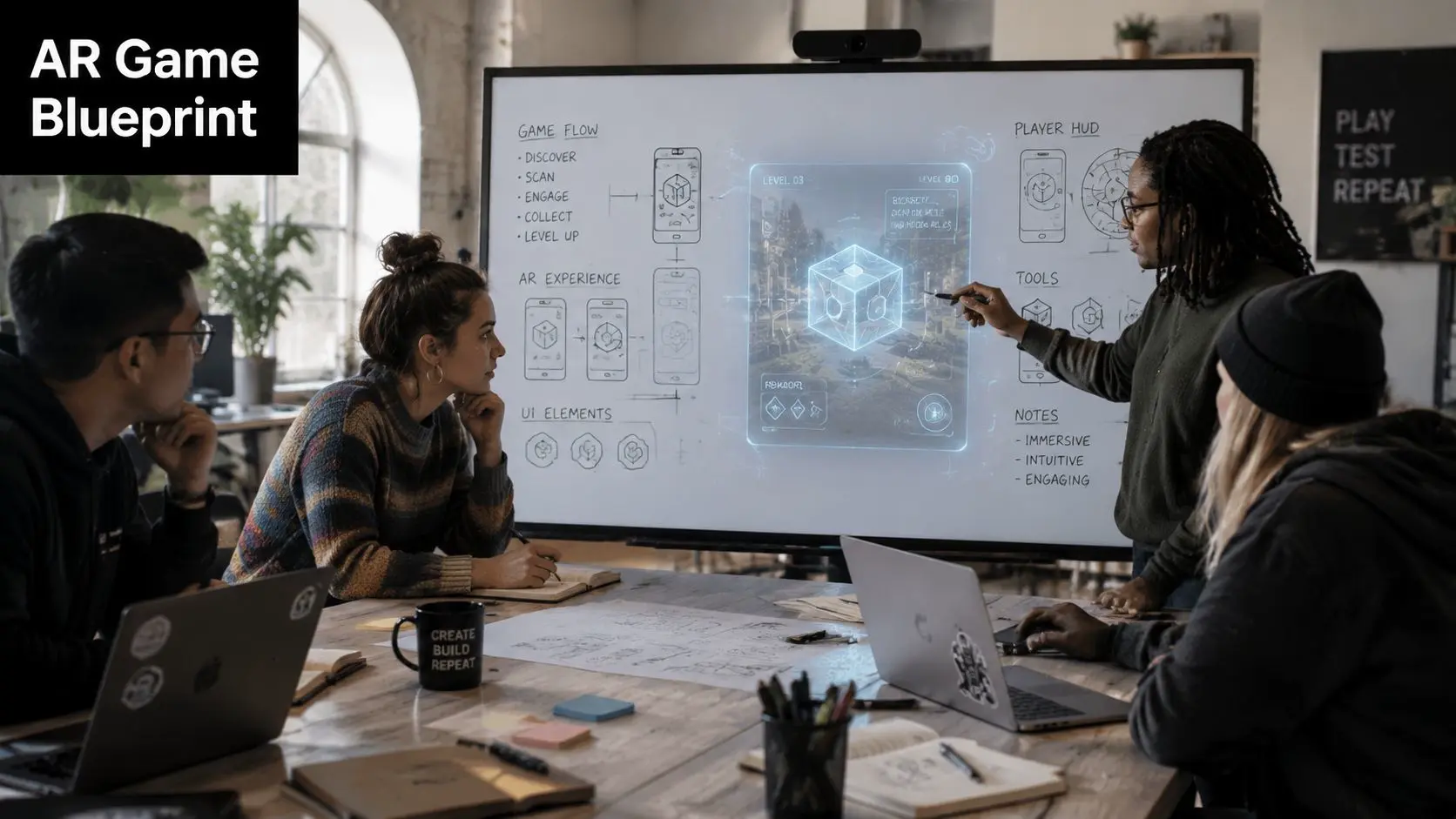
Most expensive mistakes happen before production. They start with a weak brief, a fuzzy success metric, or a mechanic that sounds exciting in a workshop but collapses once a user has to scan a floor, understand calibration, and act on the first screen without guidance.
Start with the business outcome
Before anyone sketches a creature, reward loop, or scavenger mechanic, lock the commercial purpose. A serious AR brief should answer these questions:
- What must the experience do for the business? Awareness, product education, lead capture, event engagement, or something else.
- Who's using it and where? At home, in-store, on a stand, outdoors, in a classroom.
- What does success look like operationally? Repeat plays, qualified conversations, content capture, or product understanding.
- What's the end state of the session? Share, purchase, enquire, access, book, or revisit.
Design for the room, not just the screen
AR UX is physical UX. The player isn't sitting inside a controlled virtual scene. They're in a bright office, a cluttered living room, a crowded exhibition hall, or a badly lit corridor with patchy connectivity and limited patience. That changes design choices immediately:- •Onboarding must be visual: Users need clear prompts for scanning and placement.
- •Interactions must be legible: Tapping, dragging, aiming, or walking should feel obvious without a manual.
- •Play space must be realistic: Don't assume a large empty floor unless the use case guarantees one.
- •Session length must fit context: An event activation and a home download need different pacing.
A lot of AR concepts fail because the team designed for the ideal room rather than the room the audience has.
The best concept art in the project won't save a first-time user who doesn't know where to point the phone.
Blueprint documents that actually help production
A practical pre-production pack usually includes a game loop summary, user flow, device assumptions, environment assumptions, visual direction, and a list of technical risks. It should also flag what is essential and what is optional. That distinction matters. If realistic placement is essential, tracking quality becomes a core requirement. If the experience is mainly playful branded interaction, you may have more flexibility on environmental precision and visual complexity. In strong augmented reality game development, planning isn't a creative brake. It's the stage where ambition gets shaped into something users can understand and teams can ship.
Choosing Your AR Game Development Tech Stack
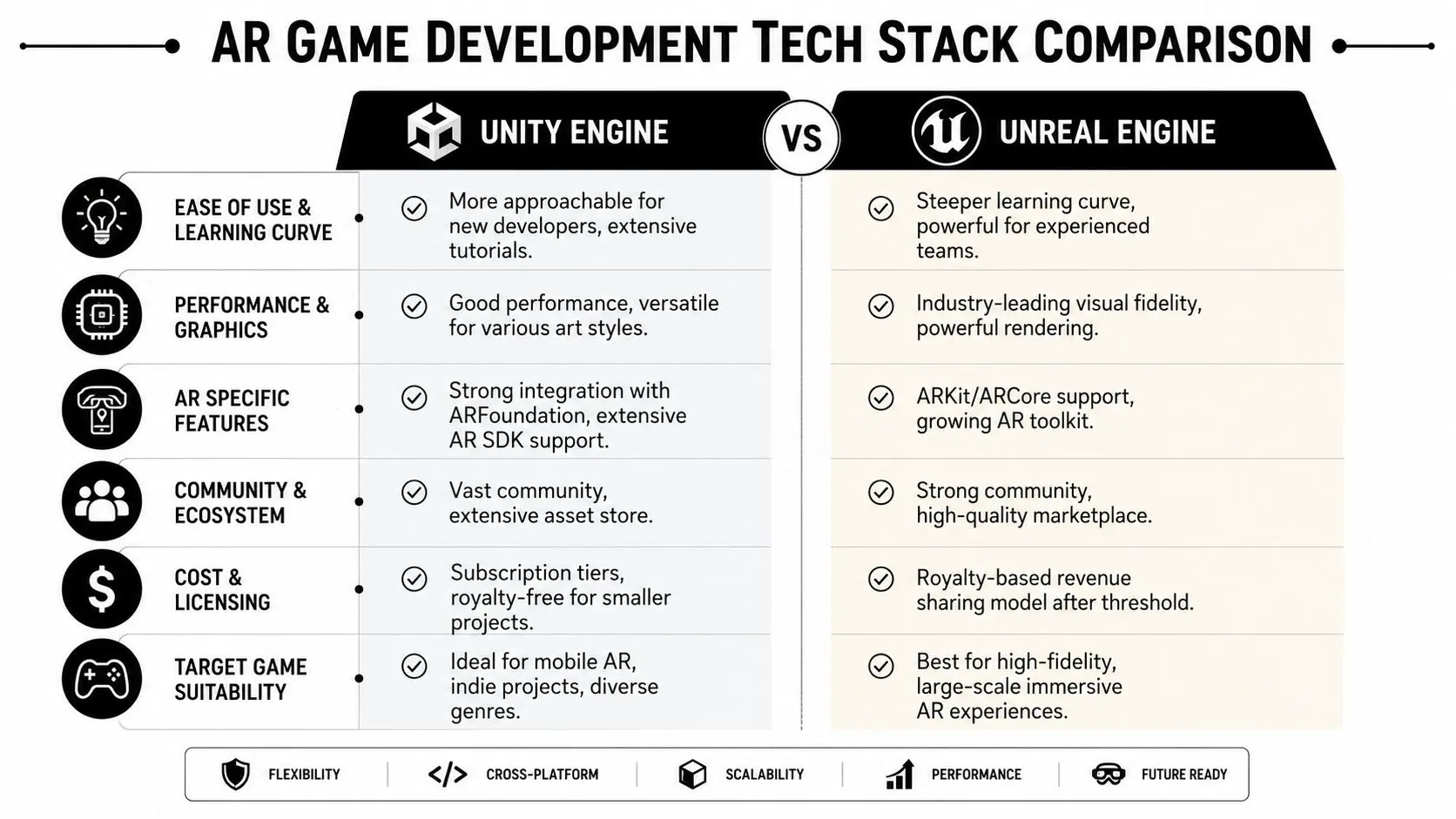
The tech stack discussion often arrives wrapped in engine tribalism. It shouldn't. Most clients don't need a philosophical answer about Unity versus Unreal. They need to know what each choice does to schedule, hiring, asset production, visual quality, and device reach.
Engine choice affects more than visuals
Think of the engine as the production environment where design, code, assets, and device integrations meet. In AR, that decision shapes both the product and the team around it.
| Consideration | Unity | Unreal Engine |
|---|---|---|
| Mobile AR workflows | Often a practical fit for broad mobile deployment | Often selected when visual fidelity is a priority |
| Team availability | Common in AR and app production pipelines | Strong for teams with high-end real-time experience |
| Tooling approach | Frequently used with cross-platform AR workflows | Often favoured for premium real-time rendering |
| Production trade-off | Reach, speed, and flexibility | Visual ambition and rendering power |
If your experience needs to run smoothly across a mixed device base, a simpler content strategy in Unity is often easier to manage. If the brief depends on cinematic rendering and a narrower hardware target, Unreal may be the better call. For producers weighing those trade-offs in more detail, this breakdown of Unreal vs Unity for real-time animation is a useful companion read.
ARKit, ARCore, and cross-platform reality
Apple and Google provide the device-level AR capabilities through ARKit and ARCore. These handle things like motion tracking, plane detection, and environmental understanding. The engine sits above that layer and turns those capabilities into a playable product. For business projects, the key question isn't “Which SDK is best?” It's “How much platform-specific behaviour can the project tolerate?” If your app needs broad reach, teams usually want a workflow that reduces duplicated effort between iOS and Android. If your audience is known and controlled, the stack can be more specialized. A few practical calls matter early:
- •Target audience first: Broad consumer rollout and managed hardware deployment are different jobs.
- •Content ambition second: Rich shaders, heavy VFX, and dense scenes narrow your safe device range.
- •Update strategy third: Live content, promotions, or seasonal refreshes affect architecture and tooling.
What works and what doesn't
What works is matching the stack to the product. What doesn't is picking a stack because it impressed someone in a demo. A lightweight branded mechanic with clean onboarding, reliable tracking, and disciplined optimisation will outperform a visually extravagant build that struggles on common devices. In augmented reality game development, technical prestige is never the same thing as production fit.
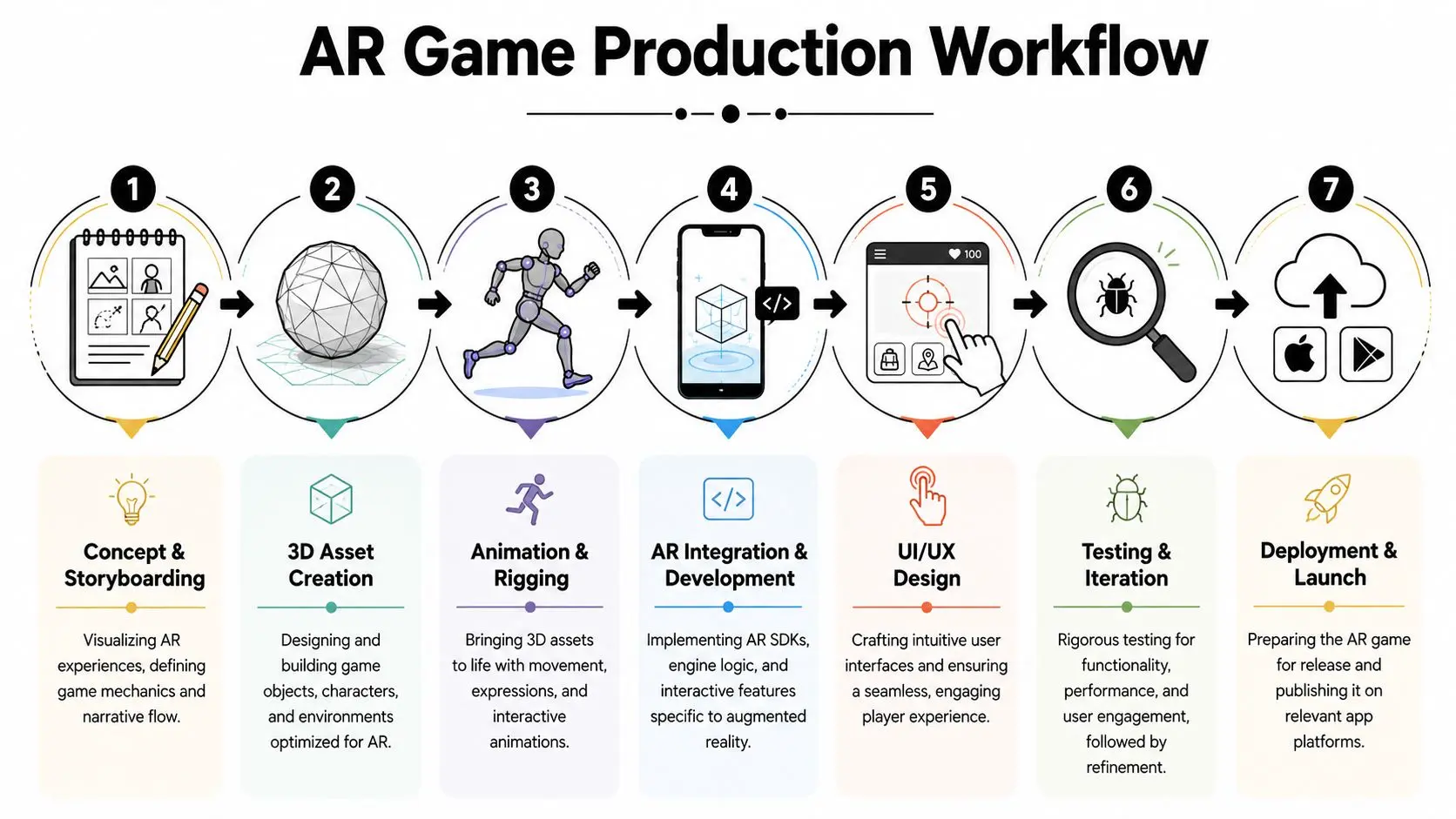
The Production Pipeline From 3D Asset to Interactive App
Once the blueprint is approved, production becomes a coordination exercise between art, design, development, and QA. This is where a lot of clients first see how many moving parts an AR game really has. A model that looks great in a render still has to animate cleanly, import correctly, react to touch, behave in tracked space, and perform on a phone that's also running a camera feed and real-time sensing. The shape of the schedule is fairly well understood. In the UK, a typical AR game project spans 3 to 9 months, with a playable prototype achievable in 4 to 6 weeks to validate core mechanics before full production begins, and the development phase is usually the most technically intensive stage as programmers integrate 3D assets into Unity or Unreal using C# or C++, as outlined in this producer's guide to creating an augmented reality game.
Prototype first, polish later
A producer should push for a playable prototype early. Not because it's pretty, but because it answers the hardest question in the project: is the core interaction fun in practice, clear, and stable in AR? That prototype usually tests a narrow set of truths:
- •Placement: Can users understand where content belongs?
- •Tracking: Does the content stay believable in motion?
- •Interaction: Is the main gesture readable on first use?
- •Pacing: Does the session start quickly enough?
If the prototype fails, that's good news. It's much cheaper to discover a weak loop before full asset production, voice, effects, and backend integration have started stacking up.
Assets have to be built for performance
AR art production is never just about look development. Every asset has technical consequences. Poly density, texture sizes, rig complexity, animation states, materials, and lighting choices all show up later in performance and battery behaviour. That means artists and developers need a shared standard from the start. If the art team builds without mobile constraints in mind, the engine team spends the rest of production cutting things back. If those constraints are agreed early, the pipeline runs more cleanly. A useful reference point for clients reviewing this handoff is the animation production pipeline, because many of the same dependencies apply even when the final output is interactive rather than linear.
Build the first version to prove the interaction. Build the second version to make it beautiful. Teams that reverse that order usually waste time.
Integration is where the real complexity appears
This is the stage where 3D assets become game objects, state machines, UI flows, input systems, effects triggers, and tracked AR content. It's also where seemingly small changes become expensive. A revised interaction may affect animation timing, collision logic, UI prompts, tutorial copy, and event handling all at once. Strong production management keeps milestone definitions tight. “Feature complete” should mean the experience can be played end to end. It shouldn't mean “most things are in, apart from the difficult bits”.
Backend and Multiplayer Considerations for AR Games
Single-user AR can already be demanding. Shared AR raises the stakes fast. The moment more than one player needs to see the same event, object state, or world logic, the project stops being just an app build and becomes a systems project. That isn't a reason to avoid multiplayer. It's a reason to scope it realistically.
What the backend actually does
In practical terms, the backend handles the parts of the experience that can't safely live only on the device. That may include user accounts, progression, inventory, event timing, analytics, rewards, moderation, or session state shared between players. For multiplayer, the hard part is synchronisation. If one user moves an object, claims a reward, triggers an animation, or changes the state of a puzzle, the rest of the session has to reflect that cleanly. The more real-time the experience becomes, the less room there is for sloppy architecture. Businesses often underestimate this because the front-end concept feels simple. “Two people see the same AR character” sounds straightforward in a meeting. In production, it raises questions about authority, persistence, reconnection, latency tolerance, and failure handling.
Questions to settle before promising multiplayer
A useful producer conversation usually starts here:
- •Shared live session or asynchronous play? These are very different technical commitments.
- •Temporary event or persistent world? Persistence changes both cost and operational ownership.
- •Managed environment or public network conditions? An exhibition space differs sharply from consumer mobile use.
- •Essential feature or nice-to-have? If shared play isn't central to the value, keep it out of version one.
The commercial upside is obvious. The global augmented reality gaming market is projected to grow from $14.79 billion in 2025 to $108.19 billion by 2035 at a CAGR of 22.02%, according to this market forecast for AR gaming. But that opportunity doesn't remove engineering reality. It makes disciplined decisions more important. For teams that need a plain-English technical reference before scoping server architecture, this guide to dedicated game servers is helpful because it frames hosting and session reliability in practical terms rather than abstract infrastructure language.
What usually works
A staged approach works best. Prove the loop in single-player or lightweight shared states first. Then add real-time features when the audience case, session design, and support model justify them. The opposite approach is common and costly. Teams commit to live multiplayer because it sounds more impressive in a proposal, then spend the project budget solving infrastructure problems instead of improving the experience players came for.
AR-Specific Testing and Quality Assurance
Traditional game QA won't cover AR well enough. It catches functional defects, broken flows, and obvious crashes, but it doesn't account for the fact that your level is now somebody's kitchen, trade stand, pavement, classroom, or poorly lit office floor. That real-world variability is where many launches become fragile.
The first five minutes decide whether users stay
One of the most damaging AR failures is bad onboarding. If calibration steps are unclear, 78% of users bounce within five minutes, according to this analysis of common AR game development pitfalls. In production terms, that means your tutorial, first scan, and first successful interaction carry more risk than a lot of teams expect. A user who doesn't understand what the app is asking them to do won't stick around long enough to appreciate your art direction or reward system.
Device testing is not optional
AR testing has to cover the actual device mix, not just the devices available on a developer's desk. Performance issues often hide until content, tracking, UI, and effects are all running together on a less forgiving handset. The same source notes that games exceeding 100 draw calls per frame typically experience performance drops on mid-tier smartphones. That's a useful production warning because it ties technical optimisation directly to commercial reach. If you ignore performance discipline, you narrow your usable audience without meaning to. A practical AR QA matrix should include:
- •Different device tiers: Premium phones and more common mid-range models.
- •Different environments: Bright light, dim interiors, reflective surfaces, patterned surfaces.
- •Different user behaviours: Fast movement, partial scans, interrupted sessions, poor placement attempts.
- •Different physical contexts: Small rooms, cluttered spaces, event floors, and open areas.
If the game only works when the room is tidy, well lit, and the user follows instructions perfectly, it doesn't work well enough.
Comfort and stability are part of quality
Performance targets in AR aren't cosmetic. They affect comfort, clarity, and trust. If objects drift, placement feels unstable, or frame pacing stutters during interaction, users read that as broken even when the app hasn't technically crashed. The QA team should treat spatial credibility as a release criterion. Can the object hold position? Do interactions remain accurate after movement? Does the camera feed, UI, and game state remain understandable when the user changes angle or distance? Those questions matter as much as standard bug counts. Good augmented reality game development treats testing as fieldwork, not just verification. The physical environment is part of the platform, so it must be included in the test plan.
Assembling Your Team Timelines and Budgets
Clients often ask for a “ballpark” before they ask what team is required to deliver the work. That order should be reversed. Budget only becomes meaningful once the roles, dependencies, and decision speed are understood. A commercial AR game usually needs a producer, game designer, UX or UI designer, 3D artist, animator if characters or motion-rich objects are involved, AR developer, QA resource, and often backend support if accounts, content management, or multiplayer are in scope. Some people can cover more than one function, but the functions still need covering.
Team structure by phase
| Role | Phase 1 Pre-Production 2-4 Weeks | Phase 2 Production 8-20 Weeks | Phase 3 Post-Production and Launch 2-6 Weeks |
|---|---|---|---|
| Producer | Defines scope, schedule, approvals | Manages sprints, risks, dependencies | Oversees submission, rollout, fixes |
| Game designer | Shapes loop, rules, onboarding | Refines mechanics through testing | Balances based on feedback |
| UX and UI designer | Maps flows, wireframes, prompts | Finalises interface and tutorial screens | Supports release updates |
| 3D artist | Establishes visual style and asset list | Builds and optimises models and environments | Prepares final asset revisions |
| Animator | Plans rigs and motion needs | Produces gameplay and feedback animation | Adjusts polish and transitions |
| AR developer | Assesses tech feasibility | Builds features, integrations, device logic | Handles launch support and patching |
| QA | Defines test approach | Runs device and environment testing | Validates release candidate |
Budgets need honest inputs
Budget moves most when one of these changes:
- •Asset complexity: Stylised props and simple interactions cost less to build than animated characters and layered effects.
- •Platform scope: One controlled target is easier than broad cross-platform support.
- •Backend requirements: Accounts, persistence, live ops, and multiplayer add engineering overhead quickly.
- •Approval structure: Slow feedback loops create hidden cost even when the feature list stays the same.
For teams trying to align schedule assumptions before the first estimate, this overview of the app development timeline is a practical sense-check. A realistic budget conversation should also account for supporting content. If the project includes animated promo assets, event visuals, or explainers around the launch, those can become a meaningful line item in their own right. In the UK, basic 2D animation projects start around £3,000 per minute, while standard 3D animation typically begins at £8,000 to £15,000 per minute, with more complex work exceeding that, according to this UK animation pricing guide. The useful question isn't “How cheaply can we build an AR game?” It's “What's the smallest version that still feels intentional, stable, and worth putting in front of customers?” --- If you're weighing a branded AR activation, a product-led interactive app, or a larger immersive game roadmap, Studio Liddell can help you scope the concept, stress-test the production plan, and turn the brief into a realistic delivery model. Book a production scoping call.