AR in Education: How It Works and Where It Helps Learning
Your department has been offered a trolley of tablets and the head wants to know whether this immersive learning business deserves a line in the development plan. Someone has already forwarded a clip of a volcano erupting on a staffroom table, and one physics topic still refuses to land: the heart. Augmented reality can help with that heart. It can also eat a fortnight of planning, produce a lesson that looks spectacular and teaches nothing anyone can measure, and exclude the two pupils who cannot use a camera-based activity. What separates those outcomes is the objective you set, the delivery model you pick, and whether anyone checks the learning once the devices are back in the cupboard.
What AR in Education Means for Classrooms
A Year 9 pupil holds a tablet over a blank desk. A heart appears on the desk surface, beating, and she walks around the desk to look at the ventricles from an angle no printed diagram has ever given her. The bench, the worksheet and the classmate beside her are all still visible. Only the heart is added. That added layer is what AR means in a classroom: digital content placed over the physical world, viewed through the camera on a phone, tablet or headset. It differs from virtual reality, which replaces the room entirely and asks the pupil to disappear inside a headset, and from a video, which plays on a screen at one remove from the object being studied. Think of a clear tracing sheet laid over a physical object. The object stays exactly where it is while the sheet adds labels, arrows, cutaways and motion on top of it. The map below pulls the pieces together.
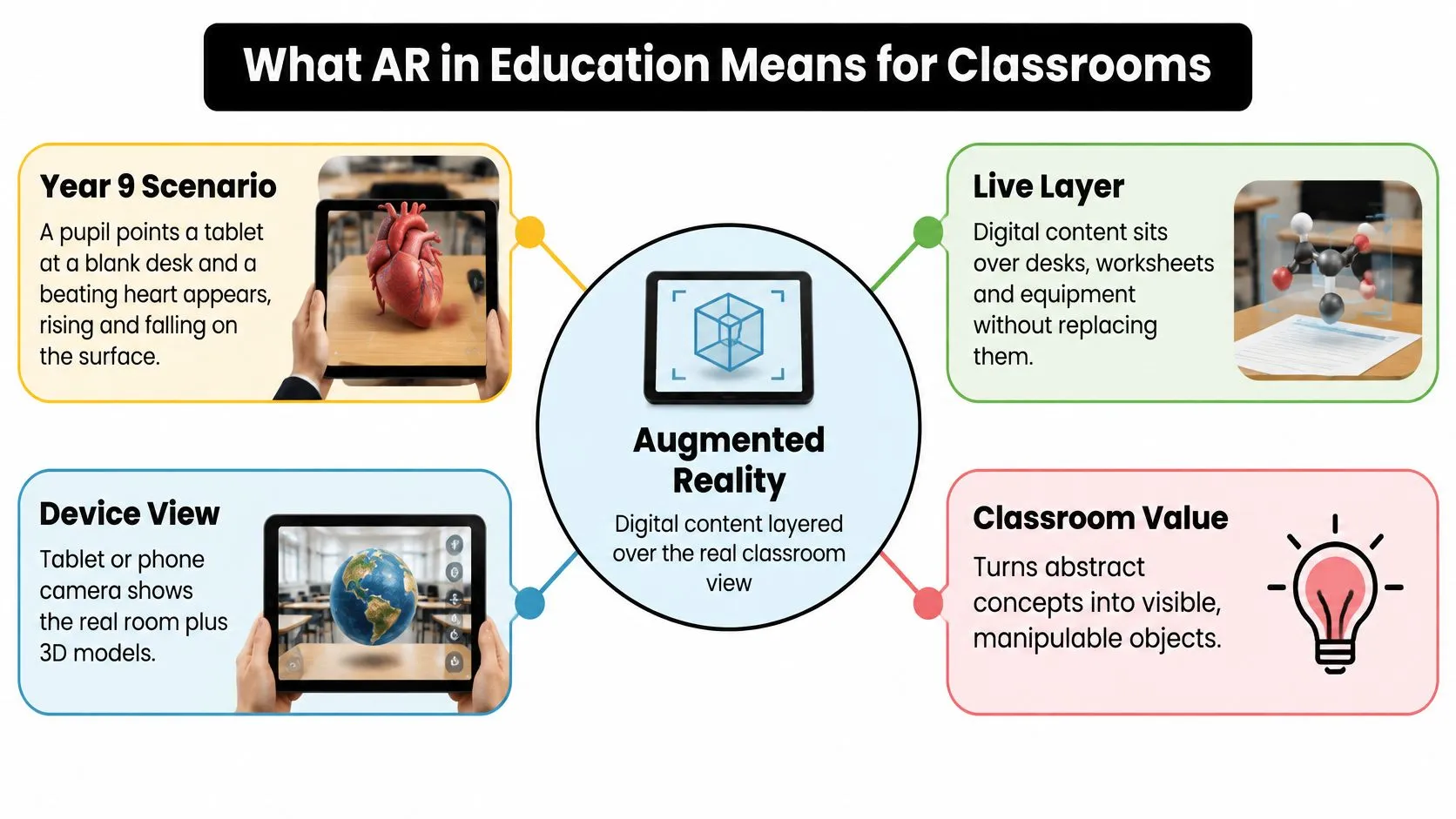
Every activity, from a free phone app to a bespoke build, has the same three parts. Miss one and the lesson stops working.
- •Trigger: a printed marker, an image or a flat surface the device recognises. If the trigger is glossy, dimly lit or creased, nothing appears.
- •Overlay: the 3D model, label, animation or quiz sitting on top of the trigger. This is the part people mean when they say "the AR".
- •Interaction: what the pupil does, such as rotating the model, tapping a label, moving closer or answering a question. Without it, you have a poster that moves.
This isn't a mainstream classroom resource yet. The UK Department for Education's Education Technology Survey 2020, 21 reported that only a minority of schools used artificial intelligence, virtual reality or augmented reality, while laptops, interactive whiteboards and learning-management platforms were already established. The survey captured schools shortly after the pandemic push into digital learning, and it names the constraints that still shape adoption: equipment availability, staff capability, infrastructure, cost and the need to tie the technology to curriculum objectives. If you're mapping that curriculum fit before anyone signs a purchase order, MasteryMind's teaching and education resources are worth reading for how other teachers sequence practical work and assessment. The test for any AR in education proposal is narrow. Does the overlay make something hard to see, or hard to do, easy to inspect? A heart you can walk around passes. A spinning logo above a worksheet does not.
Where AR Already Works in UK Classrooms and Colleges
A biology lesson makes the case better than any brochure. A cell model rotating over a printed worksheet lets pupils see the membrane, nucleus and mitochondria from the side and the back, rather than accepting the single cross-section the textbook chose to print. The page stays flat. The model rewards a second look. A cell for biology and a solid for maths, both sitting on the same printed page:
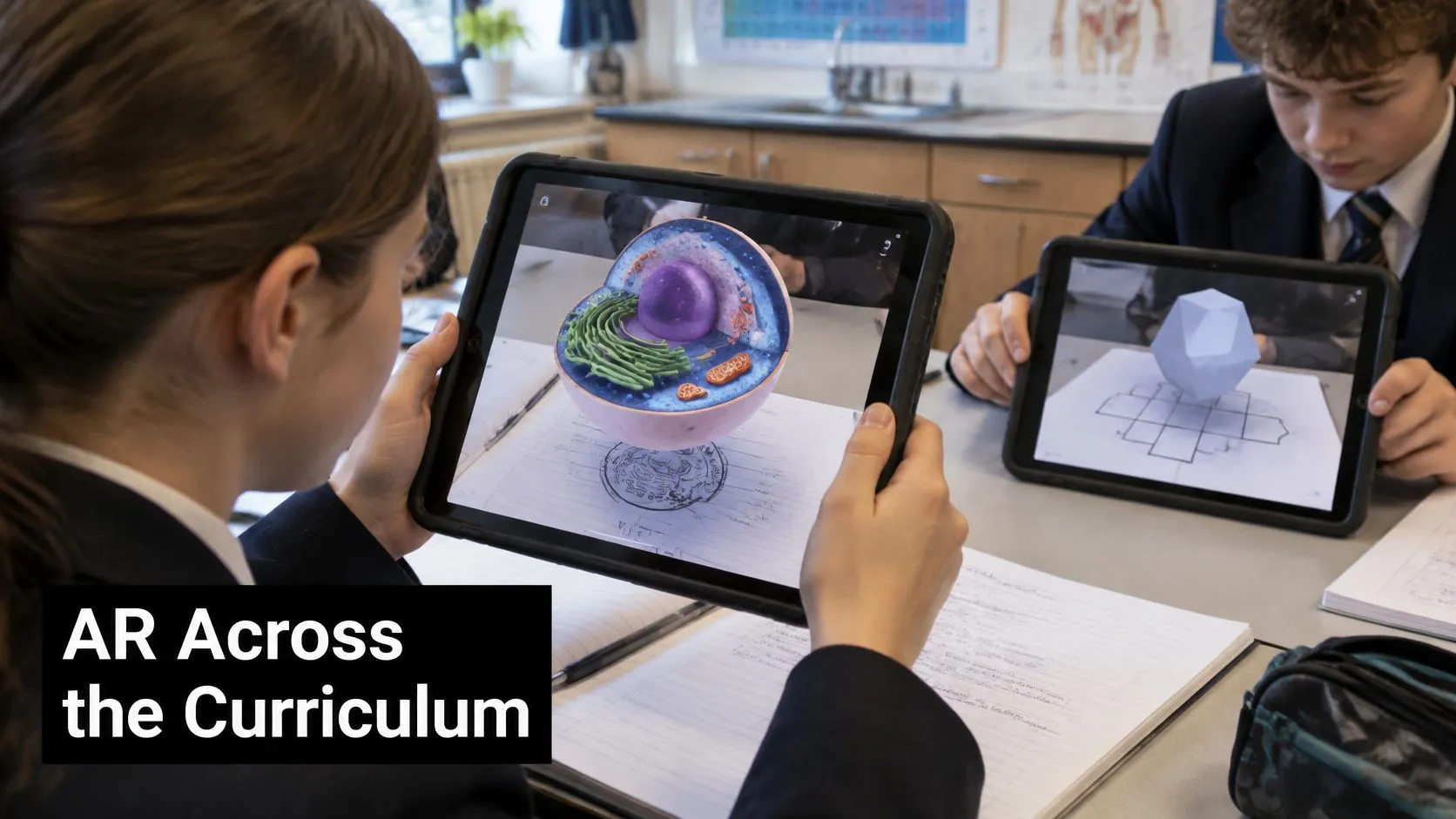
The pattern repeats across the curriculum, and the table below is the fastest way to see whether your own topic fits.
| Subject or setting | Typical AR activity | What learners can inspect |
|---|---|---|
| Science | Rotating cell, molecule or structure model over a worksheet | Bonds, shapes and structures from every side |
| Maths | Solid or net overlay that folds from a flat page | Faces, edges and how a net folds into a solid |
| Geography | Terrain or map layers over a printed map or table | Relief, climate layers and land use |
| History | Reconstructed building or site over a printed plan | How a site looked in an earlier period |
| Design and technology | Product prototype with exploded views | Parts, assembly order and fit |
| Vocational and engineering (further education) | Equipment overlay for setup or maintenance | Correct component layout and sequence |
| Nursing and medicine (higher education) | Anatomy or procedure overlay for practice | Anatomical relationships and procedure steps |
Notice what every row has in common. Each one hands the learner something they could not otherwise hold up, turn around or take apart. That is the engagement half of the argument, and engagement is easy to spot in a classroom: heads come up, hands reach out. The learning half is harder, and it depends on whether the inspection itself is the point of the lesson. Adoption figures tell you where colleges and universities have already made that judgement. A survey of 101 UK universities and colleges found that 82% of respondents were interested in using augmented or virtual reality, including 49% who described themselves as very interested. Reported use ran at 96% of universities and 79% of colleges, but usually in only one or two departments or faculties. Concentration is the finding. Use across five or more departments was rare in both sectors, and buying ready-made content from external providers was rarer still. Most activity was internally built, experimental or stuck at pilot stage. That pattern carries a practical warning for schools: AR survives its first term when it starts in one specialist area with one willing teacher and a clear curriculum reason, not when it launches across a whole faculty on novelty alone. The fit test for a new topic takes a minute. Does the learner need to see the object from more than one angle, or match a physical thing to its labels or its sequence of steps? If yes, AR has a job. If the task is recalling a definition, it doesn't. For a longer look at how schools are sequencing this work across year groups, this guide to immersive learning solutions for UK schools covers the practical decisions.
The Learning Benefits the Evidence Supports
The strongest case for AR appears when the task already has a spatial or procedural problem. Strip out launch-event enthusiasm and what remains is spatial, procedural and object-based learning, documented more often in universities than in schools. A systematic review of mixed-reality experiments in university education found that most included studies reported improved learning outcomes across different subject areas, though results depended on instructional design and on the learning task itself.
Why the overlay does the work
The mechanism is concrete. A pupil can inspect relationships that are otherwise hidden, receive guidance attached to the object in front of them, and practise a procedure while labels sit on the parts being used. A diagram across the room asks the learner to hold that connection in memory; an overlay places the connection where the hands are. Three benefits recur, and each one can be observed during a lesson.
- •Spatial understanding: the learner sees an object from angles a diagram never shows, so structure stops being a flat convention to memorise.
- •Procedural accuracy: labels attached to real components close the gap between knowing the steps and performing them in the right order.
- •Self-paced inspection: a pupil can hold a model still and look for as long as needed, which a demonstration at the front of the room cannot offer thirty people at once.
Design rule: if you can't write "the pupil will be able to X, measured by Y" before anything is commissioned, the AR isn't ready to be built.
What the gain depends on
A model appearing in the room is the start of the activity, not the cause of learning. The reviews tie gains to design: a pre-briefing that says what to look for, guided interaction rather than free exploration, formative questions asked while the object is still on screen, and a post-use assessment after the device has gone back in the case. Remove those and novelty plus cognitive load take over. Pupils remember the animation and forget the structure, so the lesson can look better than it taught. Judge any claim with measures a school can defend: identification accuracy, task completion time, procedural errors and retention measured after a delay of a week or more. Engagement scores belong in a separate column because they show the lesson was enjoyed. The evidence is most convincing where those four measures move.
When AR Helps and When It Only Looks Impressive
Engagement is cheap. Learning is not. That distinction decides most AR budgets, and it's the one the sales material skips. A 2025 study across four Scottish primary schools followed 106 pupils aged 10 to 11 through a two-week AR-supported computing programme. Motivation variables, especially attention, relevance and satisfaction, explained approximately 55% of the variation in reported engagement. The study measured engagement, not long-term attainment and not transfer to tasks without AR, so it can't tell you whether those pupils learned more than a comparison class would have. Read that carefully and the trap becomes visible. A well-received AR lesson proves the AR was well received. It doesn't prove the class understood cell structure better than they would have from a physical model, an annotated diagram and ten minutes of teacher explanation.
Start from the objective, not the device
Use the table as a way to have the argument before anyone spends money. Read down the left column to your objective, then look at the alternative you could run next week for almost nothing.
| Learning objective | AR fit | Lower-cost alternative to test first |
|---|---|---|
| Seeing 3D structure or spatial relationships | Strong | Physical models |
| Following a multi-step procedure | Strong when guided | Teacher demonstration with a printed sequence |
| Practising a skill where real practice is risky | Strong | Supervised practical work |
| Building engagement for a short lesson | Moderate, fades with novelty | Teacher-led discussion or short video |
| Recalling facts or vocabulary | Weak | Flashcards or interactive 2D quiz |
| Reading or writing skills | Weak | Printed text with annotated images |
The subject differences matter more than most suppliers admit. Spatial reasoning, science visualisation and geography gain most, because the thing being taught is three-dimensional or layered. Vocabulary recall and reading comprehension gain almost nothing, and a flashcard set costs a fraction of a build.
The equity question nobody has answered
The Scottish evidence is small and short, which means it cannot establish whether AR benefits pupils with special educational needs, pupils learning English as an additional language, or pupils who arrive with limited access to devices. Those are exactly the groups to track separately in a pilot, because an average gain can hide a subgroup that fell behind while everyone else moved forward.
- What must the learner see or do that they can't see or do now?
- What's the cheapest tool that gets them there?
- How will you know it worked, without the device in their hands?
Choosing a Delivery Model Without Overloading Staff
What kills school AR projects isn't the content. It's period four on a Thursday, thirty pupils, twenty-five minutes and one tablet that won't connect to the network. England's Technology in Schools Survey for 2024, 25 reports that 73% of respondents considered virtual and augmented-reality headsets fit for purpose less often than other technology categories, which is a confidence and suitability barrier rather than a verdict on the content. The same Department for Education report cites a UK-wide teacher survey in which 53% agreed schools should invest in projectors to support immersive learning, while flagging headset complexity, isolation and cost as concerns. The barrier is usually workload, infrastructure and inclusion, not the hardware spec. A model that takes eleven minutes to set up has already lost the lesson.Five models and what each one costs you
| Delivery model | Hardware needed | Setup effort for staff | Main inclusion or reliability risk |
|---|---|---|---|
| Browser or phone AR | Pupils' own or shared phones or tablets | Low to moderate | Device access, data privacy, camera use |
| Shared tablets in rotation | School tablets with an AR app | Moderate | Hygiene, queueing, lost lesson time |
| Headset-based AR | Headsets, charging and secure storage | High | Motion or visual sensitivity, fit, isolation |
| Projector-based AR | Projector and screen | Moderate | Shared view limits individual inspection and seating |
| Printed markers with one display | Printed triggers and one display | Low | Trigger quality, lighting, weak view from back rows |
The checks to run before you commit
- •Devices and charging: count working devices against your largest group, not the average class, and check where they charge overnight.
- •Connection: test the app in the actual room at the time of day you'll teach, with an offline fallback planned for the lesson after the network fails.
- •Safeguarding and data: decide what the camera sees, what the app records, who can view it and which settings go on before pupils arrive.
- •Sensory and access needs: offer an alternative for pupils with visual or motion sensitivity, and for anyone who cannot use a camera-based experience.
- •Minutes: time the whole activity once, setup and pack-away included, then compare it with the teaching time you gained.
Education is devolved, so the England figures above don't transfer automatically to Scotland, Wales or Northern Ireland. Check the equivalent evidence before quoting them in a staff meeting in Cardiff or Belfast.
Cost check: total devices, charging, licences, content and staff hours across the term, then divide by the minutes of real learning delivered. The list price is the smallest part of that number.
If you're still weighing up marker-based, surface-based and location-triggered approaches, this breakdown of AR types and how to choose sets them side by side.
How to Plan a Classroom AR Lesson Step by Step
A workable AR lesson fits on one page. This sequence survives contact with a real class.
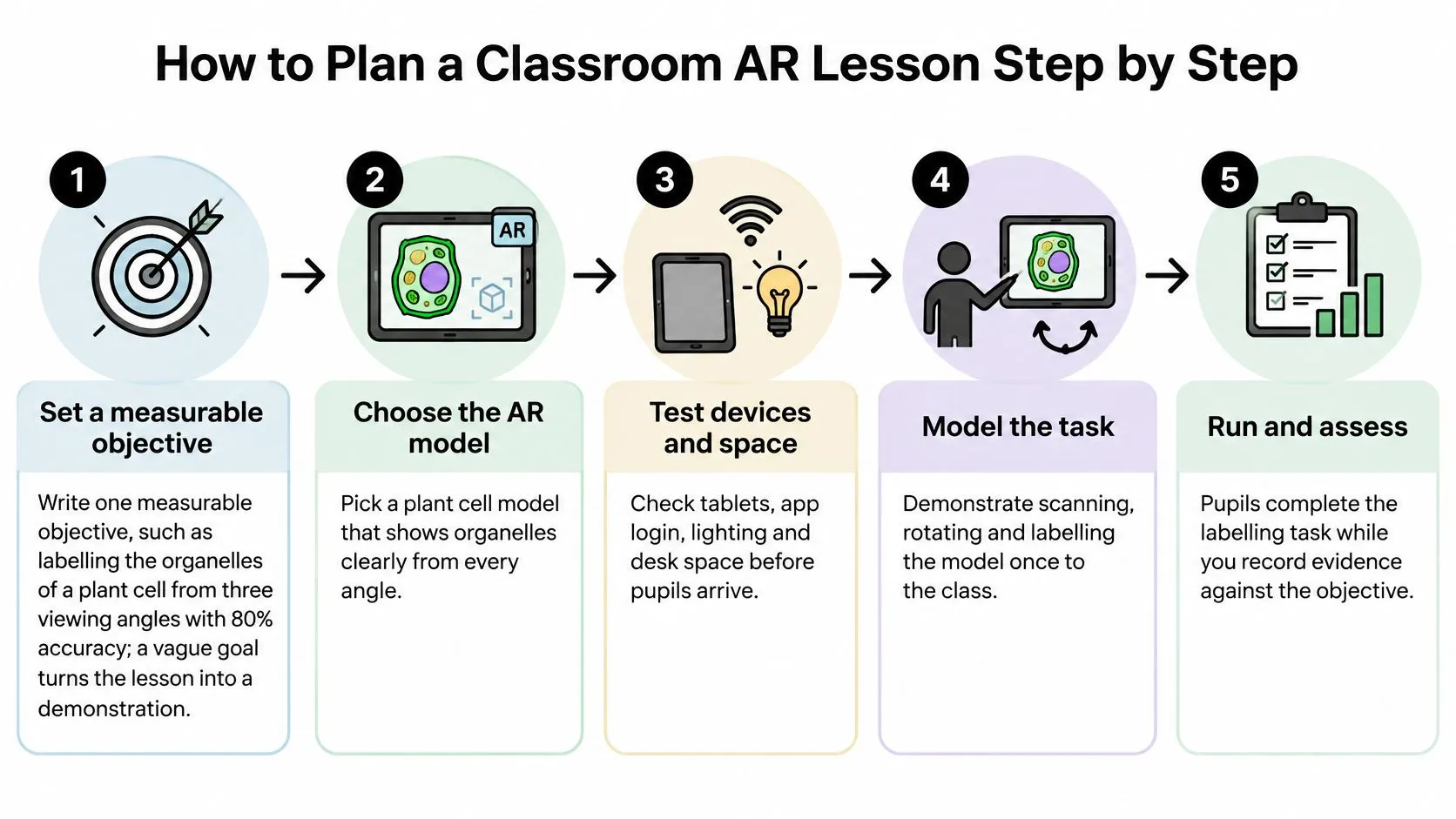
- Write one measurable objective. "Pupils will label the organelles of a plant cell from three viewing angles with 80% accuracy" is testable. "Pupils will explore a plant cell in AR" turns the lesson into a demonstration.
- Choose the delivery model for the room. The common slip is picking headsets before checking how many charge, how many work and where thirty pupils will sit.
- Brief for five minutes. Say what to look for and the question they must answer, because pupils who don't know the target spend the activity exploring rather than learning.
- Run the interaction in pairs while you circulate. Check on one group in three, since unsupervised pairs drift to the most visually striking feature, which is rarely the one you're teaching.
- Pause at two or three overlay changes. Ask a formative question while the object is still in view, so you find out what they understand while they can still see it.
- Assess without the device, in the same week. A check that needs the tablet only proves the tablet works.
- Compare against your usual method. Use a comparison group or last year's cohort and the outcomes named earlier: identification accuracy, completion time, procedural errors, delayed retention.
Run One Pilot Before You Commit to AR
Commit only where two conditions hold at once: the objective needs spatial inspection or a guided procedure, and one teacher can carry the workload for a term without dropping something else. If either fails, wait. Set the scope tightly. One subject, one class or department, one objective, one delivery model from the comparison above, and a comparison group taught the usual way. Run it for a full term, because novelty fades before week six and the second half of the term is where the answer sits. Record three things and nothing else.- •The measured objective: identification accuracy, procedural errors or retention after a delay.
- •Minutes lost to setup per lesson, counted from the moment equipment comes out.
- •Pupils or students who couldn't take part, and why.
Then pick one of three endings. Scale it when the objective beats the comparison group and the workload holds. Adapt it when the learning gain is real but setup is too slow, which usually means a phone-based model or a shorter activity rather than a better headset. Stop it when the measured objective shows no difference and the only evidence is that pupils enjoyed it. Before any purchase, ask the content provider to scope the work against your pilot objective and to show how teachers can edit overlays or scripted activities themselves. Locked content dates within a term. We build interactive and AR work through our AI Storytelling & Creative Technology team, which develops tools and production pipelines combining artificial intelligence with animation and digital storytelling, and we'd rather scope a build against a teacher's measurable objective than against a showreel. --- Studio Liddell designs and produces AR and XR learning experiences for schools, colleges and training teams, delivered on headsets, tablets and screens. If you're weighing up a single lesson, one pilot or a wider rollout, we'll scope it against the outcome you need to measure and the minutes your teachers have. Visit Studio Liddell to start that conversation.