AR App Development Company: How to Choose the Right One
The UK augmented reality market generated $9,061.1 million in revenue in 2025, with software identified as the fastest growing component segment, according to Grand View Research. That scale explains why so many firms now call themselves an AR app development company, and why picking one is harder than the showreels suggest. Renders don't tell you if tracking holds in a dim museum, if a mid-range Android phone overheats, or who fixes the build after an operating system update. I'd judge a partner on three things most buyers leave until last. Device testing, accessibility, and post-launch support aren't finishing touches. Price them in before you sign, or you'll price them in later at a worse moment.
Scope the AR Build Before You Compare Companies
The approach you choose decides the quote before anyone writes a line of code. A browser campaign and a headset training tool aren't versions of the same job. They need different tracking, different testing, and different people.
| Approach | Best for | Build effort | Main limit |
|---|---|---|---|
| WebAR (browser, no install) | Product previews, campaign activations | Low to moderate | Limited tracking and camera quirks across browsers |
| Native marker-based AR | Exhibitions, print, museum guides | Moderate | Install friction and dependence on image targets |
| Native markerless AR (ARKit, ARCore) | Furniture placement, wayfinding, configurators | Moderate to high | Device support and calibration variance |
| Headset-based AR or mixed reality | Industrial guidance, training, field service | High | Hardware cost and platform SDK changes |

Three Questions Before Any Call
Answer these in writing first:
- Who uses it, and on which devices? A visitor's own phone is a different commitment from managed tablets on a stand.
- Must it recognise objects, places, or faces? Recognition drives the tracking stack, the privacy review, and the test load.
- Which numbers define success? Dwell time, scans, configurator saves, or training completion. Pick the measure now, not at launch.
Evaluation Checklist and Accessibility Release Gate
Pitches make every company look equal. Score each candidate against the same criteria and the gaps appear. Rate every criterion 1 to 3, where 1 is a claim with no evidence, 2 is evidence with gaps, and 3 is evidence you can inspect yourself.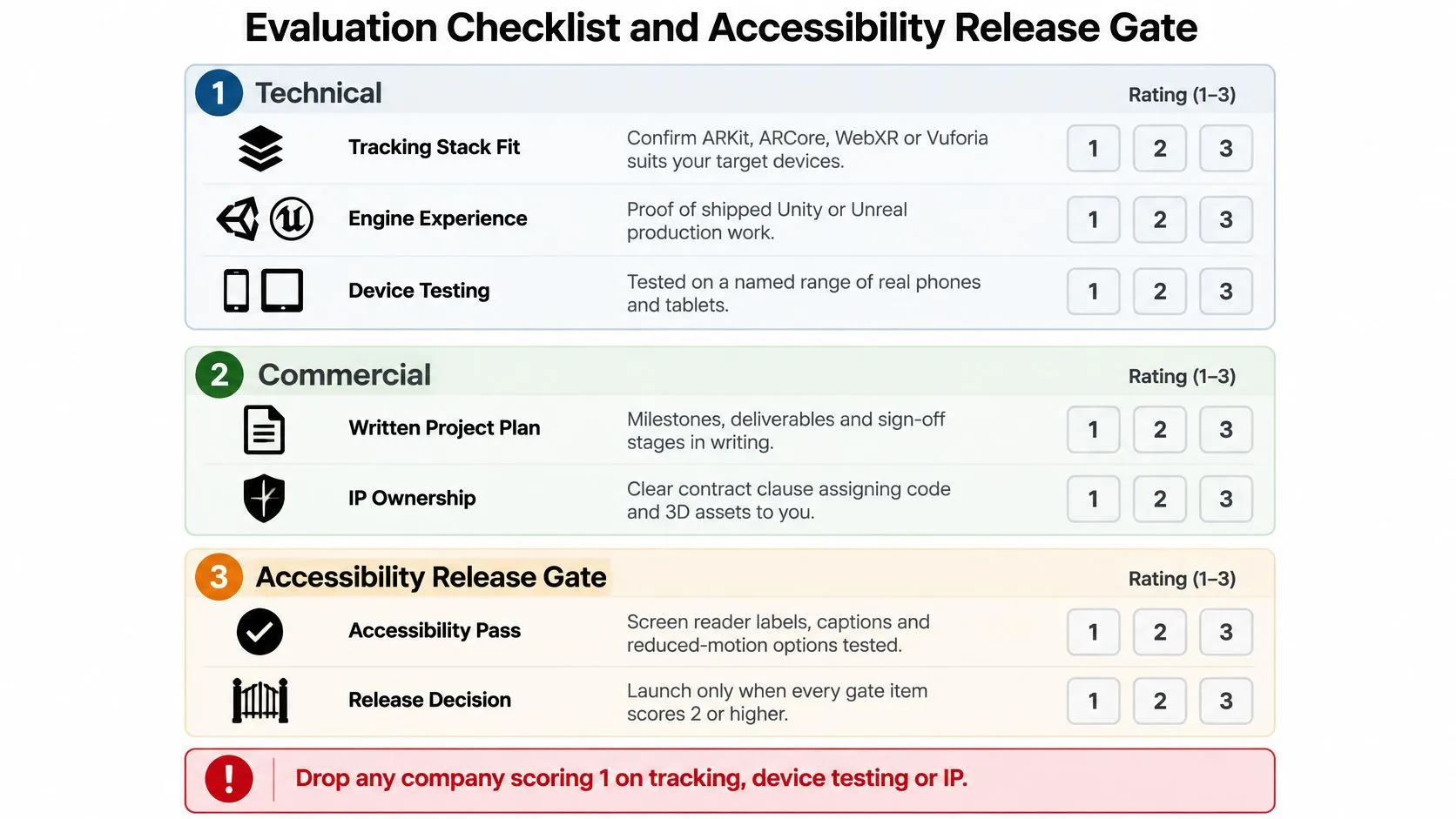
Technical Evidence
Start with the tracking stack. ARKit, ARCore, WebXR, and Vuforia solve different problems, so ask why the recommendation fits your devices and environment. Then check Unity or Unreal production experience, a written device matrix covering at least one mid-range Android and two recent iPhone generations, a performance floor such as 30 fps, and what happens offline when a venue network drops. Waymap's breakdown of vendor selection criteria for venues is a useful model for your own scoring sheet. It was written for a different purchase, but the habit transfers: fix your criteria before demos start distorting your judgement.Creative and Commercial Evidence
For creative fit, look for shipped spatial interface work. Flat app screens with a 3D viewer attached don't qualify. Ask whether their 3D pipeline can clean up and optimise your existing brand models, and who handles motion design separately from interaction design. A beautiful animation that blocks the user's view of a staircase is a failed interface. On the commercial side, I want sector references I can call, a paid discovery phase with fixed scope, and named senior people with stated allocation. I also want written IP assignment, UK GDPR compliant hosting, and a support plan with response times. Then get device testing, accessibility work, and post-launch support itemised in the quote itself. A bid that leaves them out looks cheaper only because the cost lands on you after signature. If you're weighing tools before those conversations, this guide to AR development software tools helps you ask grounded questions about engine and SDK choices. Ask for a live link or store listing you can install yourself. A reel can hide loading time, drift, and awkward onboarding. A live build can't.| Area | What to verify | Evidence to request |
|---|---|---|
| Tracking stack | ARKit, ARCore, WebXR or Vuforia chosen for the use case | Architecture note for a past project |
| Engine skills | Unity or Unreal production experience | Shipped build with named engine version |
| Device testing | Written device matrix and lighting conditions | Test matrix and bug log from a past release |
| Performance | Frame-rate floor and install size limits | Profiler screenshots or store size figures |
| Spatial UX | Interaction design for real rooms and outdoor spaces | Live link to an app with its design rationale |
| Sector fit | Experience in your industry | Two references you can call |
| Team | Named senior lead and their time commitment | Org chart with roles and allocation |
| IP and data | Assignment of code and assets, UK GDPR hosting | Sample contract clauses |
| Support | Post-launch fixes and OS update response | Written SLA with response times |
Disqualifier: Any score of 1 on tracking, device testing, or IP ends the discussion, whatever the creative work looks like.
Accessibility as the Final Gate
Give accessibility the same 1-to-3 scoring and let a weak score end the conversation. UK government accessibility monitoring of public sector websites and mobile apps has repeatedly found that many public sector websites and apps fail accessibility checks when first tested. AR builds carry those ordinary app risks plus camera dependence, motion, and spatial audio. Convert WCAG 2.2 AA and EN 301 549 requirements into acceptance criteria before build starts. Test every core journey with automated checks plus manual keyboard, screen reader, contrast, motion, and low-vision review. Repeat testing after each major interaction change, because fixes get more expensive the later they surface. Ask to see fallbacks running in a build, since a promise in a proposal costs nothing. That means captions and transcripts for spatial audio, a non-camera flow, a text or 2D map mode, adjustable motion and contrast, and voice or switch compatible controls where the task allows. Require zero critical blockers before launch, track issues by severity and user journey, and reserve sprint capacity for remediation in the contract. For education, public sector, and enterprise buyers, this gate decides whether a finished app is actually deployable.Interview Questions That Reveal Real AR Experience
Don't ask if a team can build your idea. Everyone says yes in a pitch. Ask what happened when a previous build met real rooms, real lighting, and real users. Record the answers in a shared sheet so you can compare three companies on identical questions.- Walk me through an AR app that shipped. Which tracking method did it use, and what broke on a real device? A credible answer names a specific handset or tablet, describes drift, occlusion, or a lighting failure, and explains the fix.
- How do you test across devices and lighting, and who does it? You want a device list, named conditions such as bright retail lighting and low light at home, and a named tester. "We test everything" isn't an answer.
- Who owns the 3D models and code at handover, and can I reuse the assets elsewhere? Expect a clear written position covering source files, optimised exports, and reuse in web, film, or print.
- If the budget falls by 30%, what do you cut first? Good teams cut locations, asset count, languages, or secondary features. Weak teams trim testing, accessibility, or senior time.
- What's the camera-free fallback when a user cannot or won't use the camera? This might be a 2D viewer, audio-led mode, printed alternative, or staff-assisted flow. If there's no fallback, accessibility wasn't designed in.
- When an OS update breaks tracking after launch, who fixes it and how fast? Ask for the owner and response time in writing, plus how they monitor ARKit, ARCore, and engine updates.
- Who's my day-to-day lead, and what share of their week is on my project? As an example, a senior lead allocated under 20% of their week is a risk on a build where hardware decisions block everyone else.
Strong answers get more specific under pressure. Weak answers get broader.Look for the same specificity in case studies. A project page such as the Engine Shed AR experience is more useful when it lets you ask about the device, the space, and the visitor task than when it only shows polished visuals. I'd use that kind of example to steer the interview back to constraints. Who held the device, where did they stand, and what happened when tracking failed? Score the answers while the meeting is fresh. Don't let a friendly presenter overwrite a vague answer on IP or support.
Red Flags That Should End the Conversation
The commonest red flag is a quote issued before any discovery questions. That company is pricing a guess, and you'll pay for the guess through change requests. Reply with one line: "Which features are in that price, and which are estimated?"Portfolio and Device Claims
- •Renders without builds: A portfolio of showreel clips and stills, with no store links or live demos. Ask, "Can I install it today?"
- •Compatibility with all phones: No serious team promises that. Reply, "Show me the test matrix for your last release."
- •No offline answer: Exhibition halls, factories, and historic buildings have poor signal. Ask what still works with no connection.
Contract and Team Gaps
- •Single fixed price, thin paperwork: No written scope, acceptance criteria, or change process means every disagreement becomes a negotiation.
- •Sales lead only: If you never meet the people building the app, you're buying a handover you haven't seen. Ask for the named lead and their allocation.
- •Vague IP and hosting: Reluctance to assign IP or state where data sits is a procurement problem now, not a legal detail later.
Product Risks Hidden in Language
- •Accessibility as a final checklist: No mention of captions, reduced motion, or a non-camera fallback tells you exclusion is baked in.
- •Unspecified AI features: If they can't say what runs on device and what runs in the cloud, they can't explain cost, latency, or privacy either.
- •No post-launch numbers: Ask directly about app store fees, SDK licences, OS update work, analytics, and content changes.
Two or more red flags from the same AR app development company means move on, however strong the demo looked. Demos are built for controlled rooms. Your users won't be in one.
Pricing Models and Realistic Project Timelines
Start with the billing model, because it decides who carries scope risk when the first user test exposes a problem. Don't compare totals until you know what each total excludes.
Four Models and Where They Fit
Fixed fee suits a defined prototype with written acceptance criteria, a locked asset list, and a named device matrix. It fails when the brief is really a wish list. Milestone billing suits an MVP where scope will move after user tests. Pay against a working demo at each stage, not a slide deck. I'd tie payments to things you can hold: tracking prototype, first playable or usable flow, content-complete build, store-ready build. Time and materials suits discovery and complex enterprise work with unclear requirements. It needs a cap, weekly reporting, and a backlog you can reprioritise. Without those controls, you're funding exploration with no brake. Monthly retainer suits post-launch support, OS update work, analytics reviews, and content changes. Define response times, included hours, and what counts as a new feature rather than a fix.
| Billing model | Best fit | Risk carried by |
|---|---|---|
| Fixed fee | Defined prototype with clear acceptance criteria | Company |
| Milestone billing | MVP where scope moves after user tests | Shared |
| Time and materials | Discovery and complex enterprise work with unclear requirements | Buyer |
| Monthly retainer | Post-launch support, OS updates and content changes | Shared, ongoing |
This guide doesn't quote UK price or timeline bands, because there's no sourced benchmark here for AR projects. Request written quotes against identical scope and treat any figure without a defined scope as unusable. For context on cost drivers before you brief, this breakdown of augmented reality app costs for UK businesses is a sensible primer. Team shape also changes the number. Some buyers consider distributed engineering alongside a UK lead studio, and resources such as Hire LATAM developers from LatHire can help you understand that staffing route. If you split work across teams, write down who owns device testing and release sign-off. Split ownership is where AR bugs hide.
Costs That Appear After the Quote
Budget separately for these:
- •Wider device testing: Extra handsets, tablets, headsets, and tester time in real venues.
- •3D asset work: New models, cleanup of CAD files, retopology, textures, and optimisation for mobile GPUs.
- •Licences and services: SDK fees, cloud anchors, image recognition, analytics, hosting, and content delivery.
- •Store and platform work: App store fees, review fixes, privacy labels, and yearly OS update maintenance.
- •Content after launch: New products, seasonal scenes, translations, and accessibility updates.
Allow two to four weeks for discovery and at least one round of user testing before launch. Compare quotes only when they cover the same scope, the same asset count, and the same device test matrix.
Confirm the Order Before You Sign
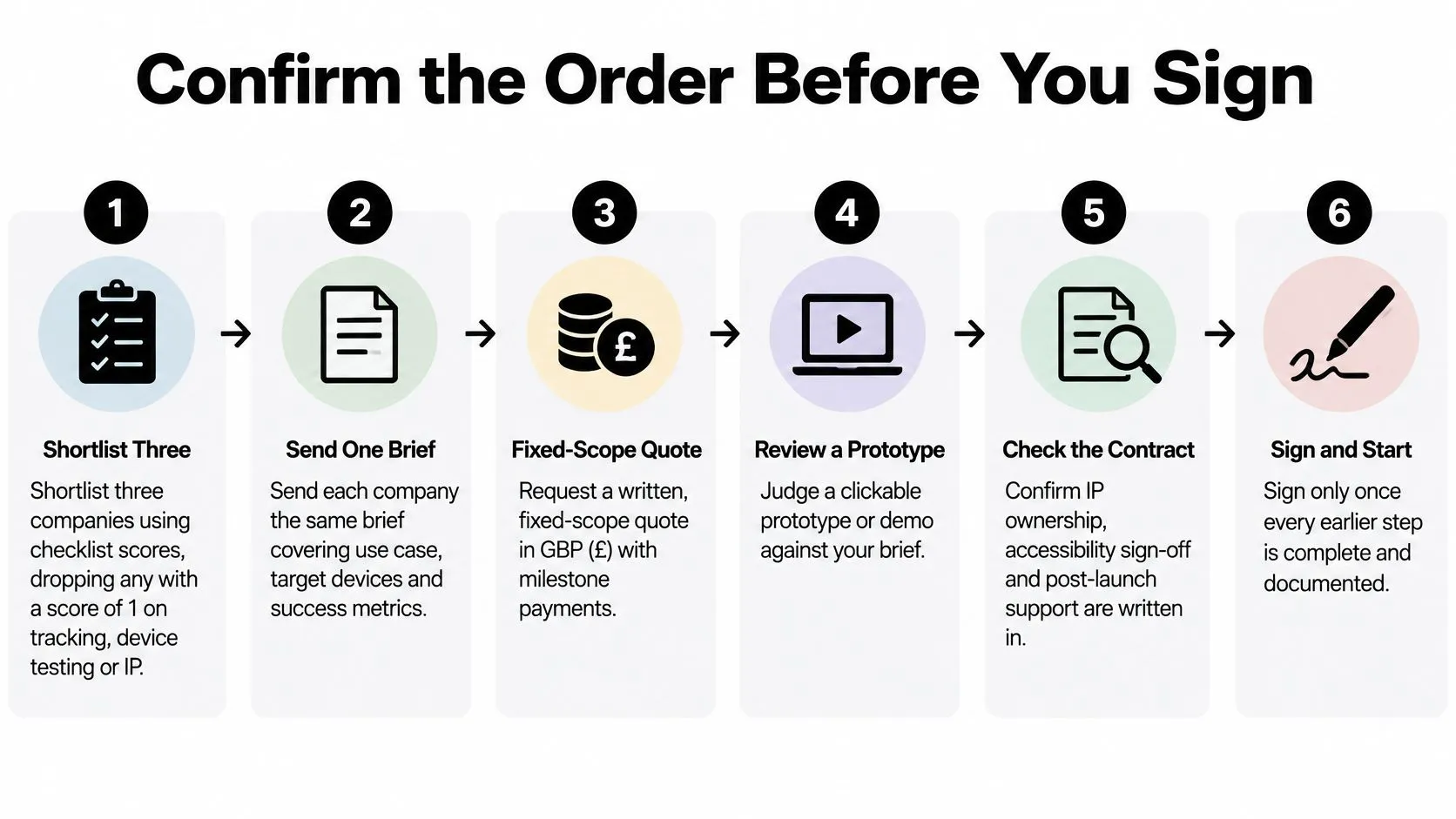
Run these steps in order. Skipping one moves the argument to a point where you're already committed, with less room to walk away.
The Seven-Step Sequence
- Shortlist three companies using your checklist scores. Drop any AR app development company scoring 1 on tracking, device testing, or IP, even if its creative work is the strongest you've seen.
- Send each company the same brief. Cover the use case, target devices, environments, success metrics, content you already own, and accessibility needs. Identical inputs make quotes comparable.
- Pay for a discovery sprint. It should end with a clickable or on-device prototype, a draft device matrix, a tracking recommendation, and a risk list. Unpaid discovery tends to produce a sales document.
- Price the exclusions alongside the quote. Ask each bidder to list what is left out (extra handsets, second languages, post-launch content) and cost each item separately. Assumptions are where AR budgets leak.
- Check the contract properly. Confirm IP assignment for code and 3D assets, data hosting location, acceptance criteria, and source code and project file handover. Ask for a 60 to 90 day defect warranty, and write the accessibility release gate in as a formal acceptance condition.
- Agree the milestone plan. You want a working demo every two weeks on a real device, a named decision maker on your side, and a change process with cost agreed before work starts. Late feedback from your own team breaks AR schedules as reliably as slow development does.
- Sign only when the discovery output matches the quote. If the prototype exposed a harder tracking problem, a narrower device list, or extra asset work, update the scope and price first.
If the contract doesn't say who fixes an OS update break, the answer is you.One cost buyers overlook is internal readiness. Nominate who supplies models, brand files, copy, translations, and venue access for testing, and book that venue time early. AR can't be signed off from screenshots: a warehouse with reflective floors, a gallery under spotlights, and a classroom with thirty children moving at once each expose different faults. Your move this week: send the same brief to your shortlist and book discovery sprints with the two strongest respondents. Hold off on a full build contract until a prototype has survived your devices, your lighting, and your accessibility gate. --- If you want one more company in that comparison, Studio Liddell designs and develops XR experiences in Unity and Unreal. Bring your target devices, your venue or use case, and your success measure to a conversation about your AR brief, and score their answers against the same seven steps.