Animation Software for Professionals: 2026 Picks
The most repeated advice about animation software for professionals is still "buy the package with the longest feature list and push the whole show through it." That advice fails the moment a freelancer has to open someone else's scene, an AI pass has no named approver, or a game engine needs a clean export. In 2026 the strongest choice is the toolchain a mixed freelance crew can hand over with editable sources, governed AI and a clean engine export. A commissioner doesn't buy a brand. They buy a review path, a licence a contributor can open, and files that survive a crew change. Autodesk Maya, Toon Boom Harmony, Adobe After Effects, Cinema 4D, Blender, SideFX Houdini, Unreal Engine and Unity each earn a seat for one job. None of them earns the whole production. Treat the pages below as a production brief. Match the package to the job, split rigging from rendering, pilot the engine handoff, then reject any tool that can't be taught, inspected, versioned or finished by hand.
Animation Software Matched to the Job
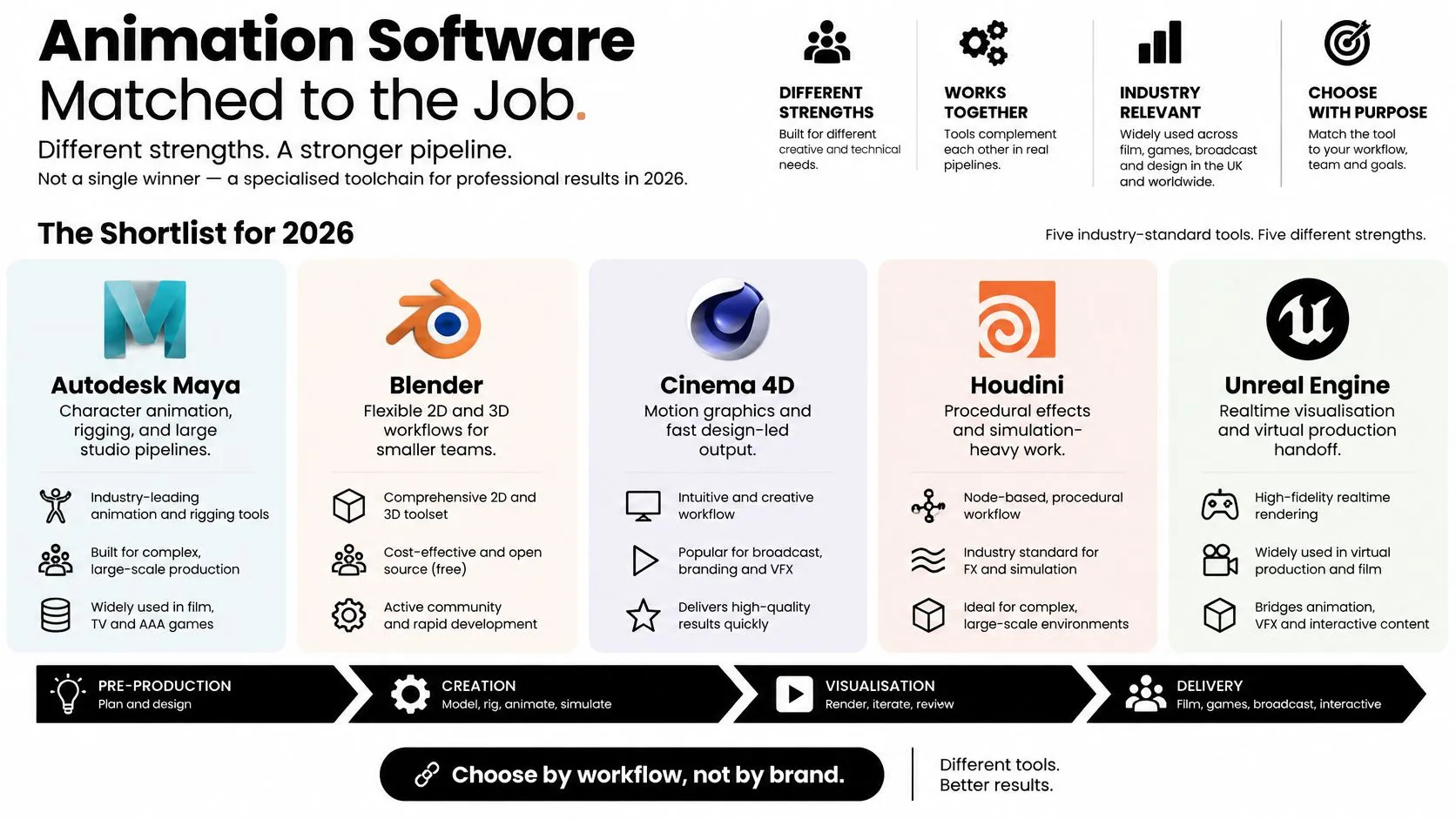
There is no single winner. In 2026, animation software for professionals is a specialised toolchain, not an all-in-one app. Educational Voice's coverage of UK animation providers is clear that a professional pipeline is best designed as specialised seats, then judged on interchange, scripting, preview, render compatibility and a clean move into Unity or Unreal, not on headline feature counts. Keep this shortlist, then read the watch-outs.
- •Autodesk Maya is the default where complex character rigs, simulation and film or TV interchange sit at the centre of the show.
- •Toon Boom Harmony fits a 2D series that needs drawing, cut-out rigs and effects in one environment.
- •Adobe After Effects is the motion-graphics and compositing seat for stings, title sequences and ad finishing, not long character performance.
- •Cinema 4D suits motion-design teams who need fast 3D type and client-friendly iteration.
- •Blender is the open-source 3D option when licence flexibility, scripting and a configurable pipeline outweigh a single vendor seat.
- •SideFX Houdini earns a place on procedural effects that must stay non-destructive.
- •Unreal Engine and Unity are destinations for games, XR and virtual production, not replacements for the DCC.
Keep two seats, then test the handoff
An all-in-one score misleads because it averages jobs that don't share a bottleneck. A fast motion-design package can still be the wrong home for a creature rig. Use the table to keep a primary seat and a second seat, then test interchange rather than feature lists.
| Package | Strongest job | Watch-out | Typical licence shape |
|---|---|---|---|
| Autodesk Maya | Character rigs, layout and film or TV interchange | Heavy seats and specialist rigging knowledge | Commercial subscription |
| Toon Boom Harmony | 2D series drawing, rigs and effects | Weak fit for 3D or real-time scenes | Subscription, with studio and education tiers |
| Adobe After Effects | Motion graphics, titles and compositing | Poor home for long character animation | Subscription as part of a wider Adobe seat |
| Cinema 4D | 3D motion design and fast client iteration | Less natural for complex creature pipelines | Subscription |
| Blender | Configurable 3D, scripting and open files | Support and studio standards are on you | Free and open source |
| SideFX Houdini | Procedural VFX and non-destructive look-dev | Steep supervision load for generalists | Commercial and indie or apprentice tiers |
| Unreal Engine | Real-time scenes, virtual production and games | Not a full 2D or offline character suite | Free to start, with revenue terms to check |
| Unity | Interactive, mobile and XR deployment | Cinematic fidelity needs extra art direction | Subscription tiers by revenue and seats |
Practical rule: Two packages that exchange clean files beat one package that claims to do everything.
The checks that decide the shortlist come next, and they stay separate on purpose. Rigging and render behaviour, engine handoff, AI and freelancer continuity, and licence portability each fail a different way. Don't collapse them into a single "best of 2026" score.
Rigging Rendering and Pipeline Trade-offs
A fair test splits interactive work from final pixels. A render farm and a rigger's viewport stress different hardware, so one speed claim is not a software decision. UK PCMag's desktop testing method is the model, not a leaderboard. It uses Blender Benchmark 3.1.0 with Blender 4.2 to record CPU and GPU rendering on the Monster, Junk Shop and Classroom scenes, scored as samples per minute. The same method uses SPECviewperf 2020 to record professional viewport performance in frames per second, including Autodesk Maya workloads at 1080p. A high Blender score does not prove a fast Maya scene.
Log three numbers on your own machines
Don't import someone else's chart and call the workstation selected. On the machines your crew will use, log:
- Samples per minute on the hero render, CPU and GPU, using a scene that resembles the show, not a demo.
- Viewport frames per second on a rigged shot at the review resolution, with the controls a supervisor will scrub.
- A compositing or editorial pass, so a slow grade, a heavy plate or a title build isn't hiding behind a pretty render time.
Rigging philosophy, without a feature dump
Maya suits custom character rigs, constraints and simulation that supervisors already know how to review. The cost is specialist knowledge. A clever rig that only its author can debug is a schedule risk. Harmony keeps 2D drawings, pegs and deformers in the show file. That is the point of the seat. Splitting drawings into one app and rigs into another creates a second master you will regret by episode three. Blender can match many of those jobs through rigging add-ons and Python. The studio must own the standard. Name the add-ons, version-lock them, and write the shelf down. If the standard lives in one artist's startup file, you don't have a pipeline. Houdini is the better bet when the shot is a system, such as destruction or crowds, rather than a performed character. Don't put a dialogue performance through a node network just because the effects lead prefers it.Interchange is the score
The numbers above tell you which machine is slow. The files tell you whether the software choice will survive a vendor change.- •Alembic or USD caches should open in the next seat without the original shelf scripts.
- •Scale and up-axis must be agreed once, in the DCC, before the first export.
- •Versioned scene files must open for a freelancer who was not in the room when the rig was built.
A cache that only plays back, with no editable source beside it, is a delivery, not a master.
If those three checks fail, stop comparing render times. You are scoring a demo, not a show.
Moving Assets into Unity and Unreal
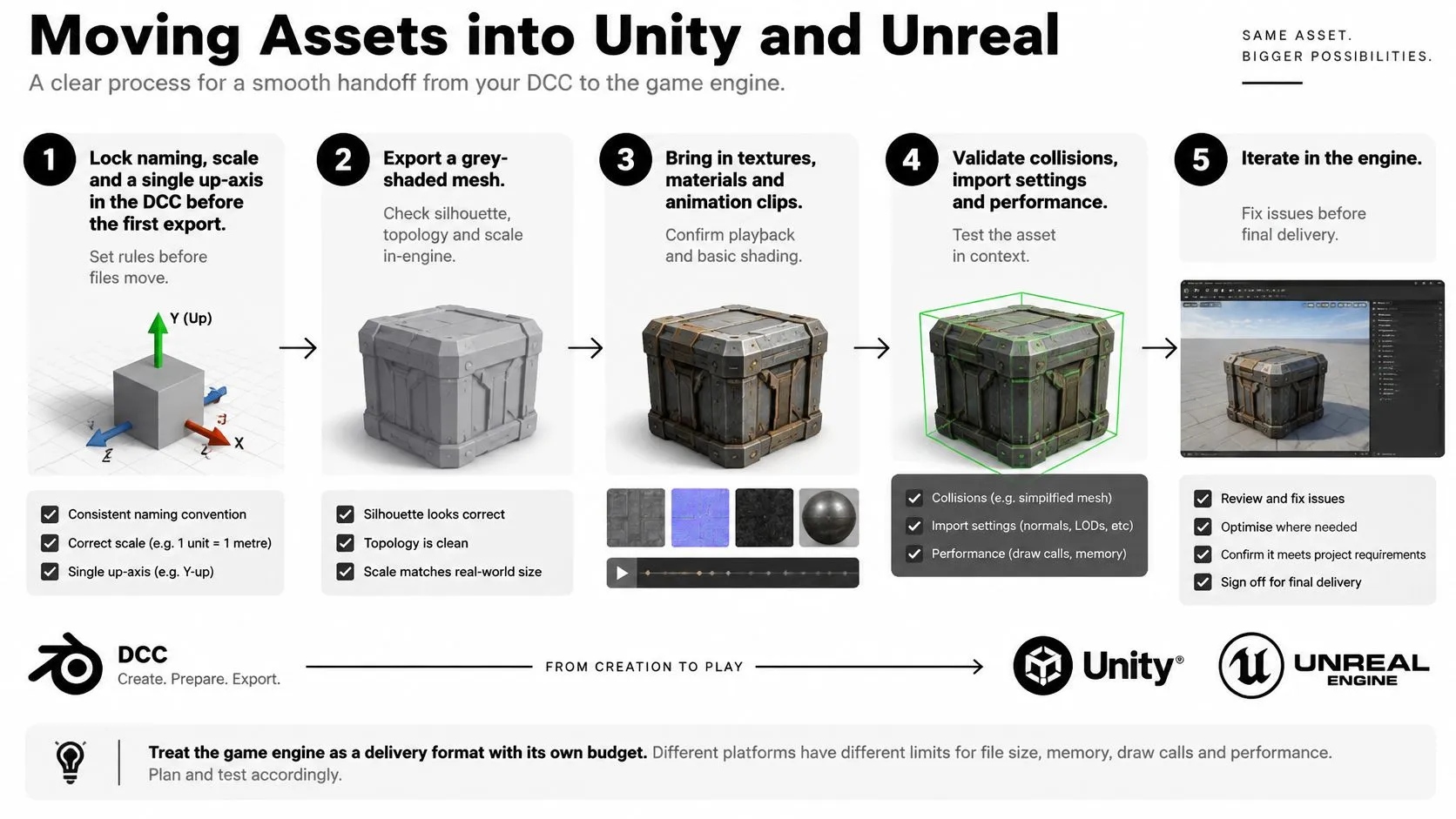
Treat the game engine as a delivery format with its own budget. It is not a free extra at the end of an offline render.
Run one shot as a numbered pilot
Lock the software choice only after one shot survives this order.
- Lock naming, scale and a single up-axis in the DCC before the first export. Late fixes here multiply across every prop.
- Export a grey-shaded mesh, then a rigged test, then a textured hero. If you send materials with the first mesh, you won't know whether the silhouette, the rig or the shader is wrong.
- Prefer FBX or USD for interchange, and keep the editable DCC scene. An engine asset is a poor master. You will need the Maya, Blender or Harmony file when the brief changes.
- Rebuild materials in-engine. An offline shader will not match. Budget look-dev time inside Unreal or Unity, not as a surprise after "export".
- Measure the target device. A linear series can afford heavy subdivision. A Quest-class or mobile XR build cannot. Count draw calls on the device, not on a workstation viewport.
- Put lighting, LODs and collision in the engine pass. Keep character performance review in Maya, Blender or Harmony, where the supervisor already knows the controls.
Unreal or Unity is a destination, not a personality
Unreal is the better destination for cinematic real-time, virtual production and high-fidelity environments where the review happens in-engine. If the client signs off on a viewport that is already the picture, build toward that viewport from the model stage. Unity is the better destination for mobile, interactive installs, training apps and mixed-device XR, where deployment range matters more than a filmic default. A beautiful default scene that won't ship to the kiosk is the wrong success. Producers should price three risks before they cheer the preview. An engine update can break a plugin mid-show. A real-time preview can hide a mismatch with any offline render you still owe. A team skilled only in After Effects will not become an Unreal team by installing it. Our comparison of Unreal and Unity for real-time animation is the producer-level read on render quality, plugins, skills and schedule. Use it after the pilot, not instead of it. If the grey mesh, the rig, the material and a device build don't all land, the stack is not chosen yet.AI Skills and Freelancer Continuity
A longer feature list does not fix a skills bottleneck. UK ScreenSkills research on production skills treats AI literacy, ethical tool use, multiskilling, realtime visualisation, Unreal Engine, virtual production and end-to-end pipeline knowledge as increasingly valuable in animation, VFX and immersive work. The same research reports that 52% of employers see an AI skills gap, and that animation artist, animation supervisor and animation director are among the roles lacking sufficient AI capability. Speed, subscription price and checkbox features miss the buying question. Can a mixed crew learn the review path?
Four pass-fail tests
Apply these to every candidate, including AI tools already sitting inside the DCC and external generators sold as a shortcut.- Teachability. A competent freelancer reaches useful output inside an agreed onboarding window. If only one specialist can drive the feature, you have added a bottleneck, not removed one.
- Inspection. A supervisor can open and review the scene without the author's scripts or shelf tools. If the notes live in a private plugin, the shot is not reviewable.
- Provenance. Every AI-generated frame or motion clip records its source model, settings and approver. "The model did it" is not a sign-off.
- Fallback. The shot can be regenerated or finished by hand when a cloud model changes, is repriced or disappears. If you can't, you don't own the shot.
The only pilot worth running
Pick one governed AI task on a non-hero shot. Record the model, the settings and the approver. Keep the master editable in Maya, Harmony, Blender or After Effects. If the cloud feature vanishes next month, a human should still be able to finish the shot from that master.The most powerful package is the wrong buy if it deepens your dependence on scarce specialists and weakens creative oversight.If a tool fails teachability or fallback, leave it off the show, however impressive the reel.
Licences Collaboration and Production Risk
Price the shape of the licence against the crew you have, not against a list of seat prices. A 2025, 26 Greater Manchester survey of animation, VFX, motion-graphics, games-cinematic and immersive work found that freelancers represented 77% of the animation workforce. 42% felt less secure than previously, 28% were considering leaving, and 42% reported a negative impact from AI compared with 11% reporting a positive impact. AI-enabled software does not automatically make a show cheaper or safer. Licence portability is a schedule issue, because the person who built the scene may not be there for the notes. We already work with freelance animators on client projects. The file has to open on the seat they can legally use, then come back as a commercial scene the studio can archive.Six checks before you sign
- Can a freelancer open the show on an affordable or educational seat, and can that seat save a commercial file back? A view-only login is not a handover.
- Name the licence shape. Compare node-locked seats, floating licences, named-user subscriptions and Blender, which carries no seat fee. A floating seat that only works on the studio VPN fails a remote review day.
- Is offline access available for review days, and are render-node rights included? A subscription that phones home during a delivery week is a production risk.
- Is any plugin the hero rig depends on rented per user? If the deformer disappears when the contractor's login ends, you don't have a rig. You have a rental.
- If a contributor leaves mid-episode, can someone else take over without rebuilding the scene? That means versioned files and consistent naming, not a zip of "latest_FINAL".
- For AI features, is authorship and human approval recorded, and is an editable source kept? A generated clip with no settings log cannot be defended in a client review.
Why this is a sign-off problem
A tool that cannot show its files, versions and renders will struggle on a production that must satisfy a formal budget and client sign-off. Commissioners ask who changed the shot, which file is current, and whether the picture they approved is the picture you will deliver.Continuity test: If the rigger is unavailable on Friday, can another artist open Monday's scene, see the notes, and render the same frame?If the answer is no, the licence is too clever for the crew. Choose the duller seat that travels.
Stacks for Film TV Games Ads and XR
Pick the stack from how the work is reviewed and delivered. A powerful offline render is the wrong success test for a real-time or social job.| Format | Primary seat | Second seat | Decision test |
|---|---|---|---|
| Feature or episodic CGI | Maya | Houdini on effects, then comp | Can a supervisor review the rig without custom scripts? |
| 2D series | Harmony | After Effects for titles | Do drawings and rigs stay in one show file? |
| Brand film, sting or explainer | After Effects | Cinema 4D if the spot is 3D | Can cut-downs ship without rebuilding? |
| Games cinematic | Maya or Blender | Unreal | Does the in-engine shot match the DCC review? |
| XR, LBVR or training | Unity or Unreal | Maya or Blender for assets | Does a device build hold frame rate? |
| Broadcast graphics | After Effects | Cinema 4D for 3D ids | Will motion pass a judder and mastering check? |
Verdicts, kept short
Feature and episodic CGI stays in Maya for character performance. Houdini joins only on procedural shots. Comp finishes the picture. If the supervisor can't review the rig, the stack has already failed. A 2D children's series lives in Harmony so drawings and rigs share one show file. After Effects stays on titles and fixes. Don't promote the comp seat into the animation seat because a designer is faster there. Brand films, stings and explainers start in After Effects, with Cinema 4D when the idea needs 3D type or product moves. Review is led by script and cut-downs. Square, vertical and 15-second versions are planned in the same project, not redrawn after the master is locked. Games cinematics are built for Unreal from the model stage so the review happens in-engine. A DCC playblast the client loved, then an engine shot that doesn't match, is a reshoot. XR, location-based and training work picks Unity or Unreal from the device outward. Maya or Blender supply assets that survive a draw-call budget. Frame rate on the device is the test. Broadcast graphics add a technical check beyond taste. The BBC's technical delivery specification says electronically generated moving graphics and effects, including rollers, digital video effects, wipes, fades and dissolves, must be edited to avoid unacceptable judder, and that progressive capture is the only acceptable method where film motion is required. The comp seat is part of the software decision, not a favour at the end. Before you lock a stack, break the commission into shots a producer can schedule. Contesimal's guide to scene breakdowns is a practical way to list what each shot must survive, from rig review to the final aspect ratio.Judge a real-time or social job on frame rate on device, or on the cut-down in its final aspect ratio. An offline beauty render can still be the wrong picture.
Choose a Stack and Brief the Studio
The strongest professional animation stack is the one a mixed crew can hand over, review and deliver without breaking the pipeline. Choose for the production, not for the length of a software feature list. Set the brief in this order:- Name the format. Choose the primary tool and, if needed, a second seat. Every extra package adds another pipeline to manage.
- Run a pilot shot. Test one rig or design through a render or device build. Have a freelancer open and save the file using a realistic licence. If they cannot return a usable commercial file, the stack fails the handover test.
- Score each stage separately. Check the viewport, final render and handoff on their own terms. If AI is part of the process, decide what needs human review and how its output fits the production.
- Write the brief around the pipeline. Specify delivery format, review cadence, engine target, source-file ownership and the requirements for bringing in new crew. “Maya” or “Unreal” alone does not describe how the work will get made.
- Choose a studio with relevant production experience when the commission needs a delivery team, not an internal software rollout. Software setup does not replace production planning, review or sign-off.