AI Character Rigging: A Practical Production Guide
A one-click auto-rig can look perfect in its own viewport. The trouble starts when the character enters a real episode, a Unity prototype, or an Unreal build. The shoulders collapse under a raised arm, the root rotates on the wrong axis, facial shapes lose their names, and the animator discovers that the impressive demo has created more review work than it removed. That's the practical reality of AI character rigging. AI can accelerate repetitive setup, but production quality still depends on hierarchy design, deformation, facial control, export discipline, and approval processes. The UK is already a serious environment for this work. The government's 2026 copyright and artificial intelligence impact assessment values the UK AI sector at approximately £12 billion GVA in 2024, while the creative industries generated £146 billion GVA in the same year. AI rigging now sits inside an established production economy, not a speculative side experiment.
What AI Character Rigging Actually Solves
A rigger usually sees the failure before the producer does. The mesh has a plausible skeleton, a handful of controls respond correctly, and a test walk cycle plays inside the authoring package. Then the export arrives in the game engine. The pelvis is offset, the twist joints do nothing, the jaw pulls the cheek vertices with it, and the character's hands drift away from the animation. That result doesn't mean AI has no place in rigging. It means the tool solved the visible setup task, not the production problem. The useful target is repetitive preparation, such as proposing joint placement, creating an initial hierarchy, accelerating weight assignment, or identifying areas that need inspection. The senior rigger should then spend the recovered time on deformation, facial performance, stylised anatomy, secondary motion, and the awkward edge cases that generic systems rarely understand.
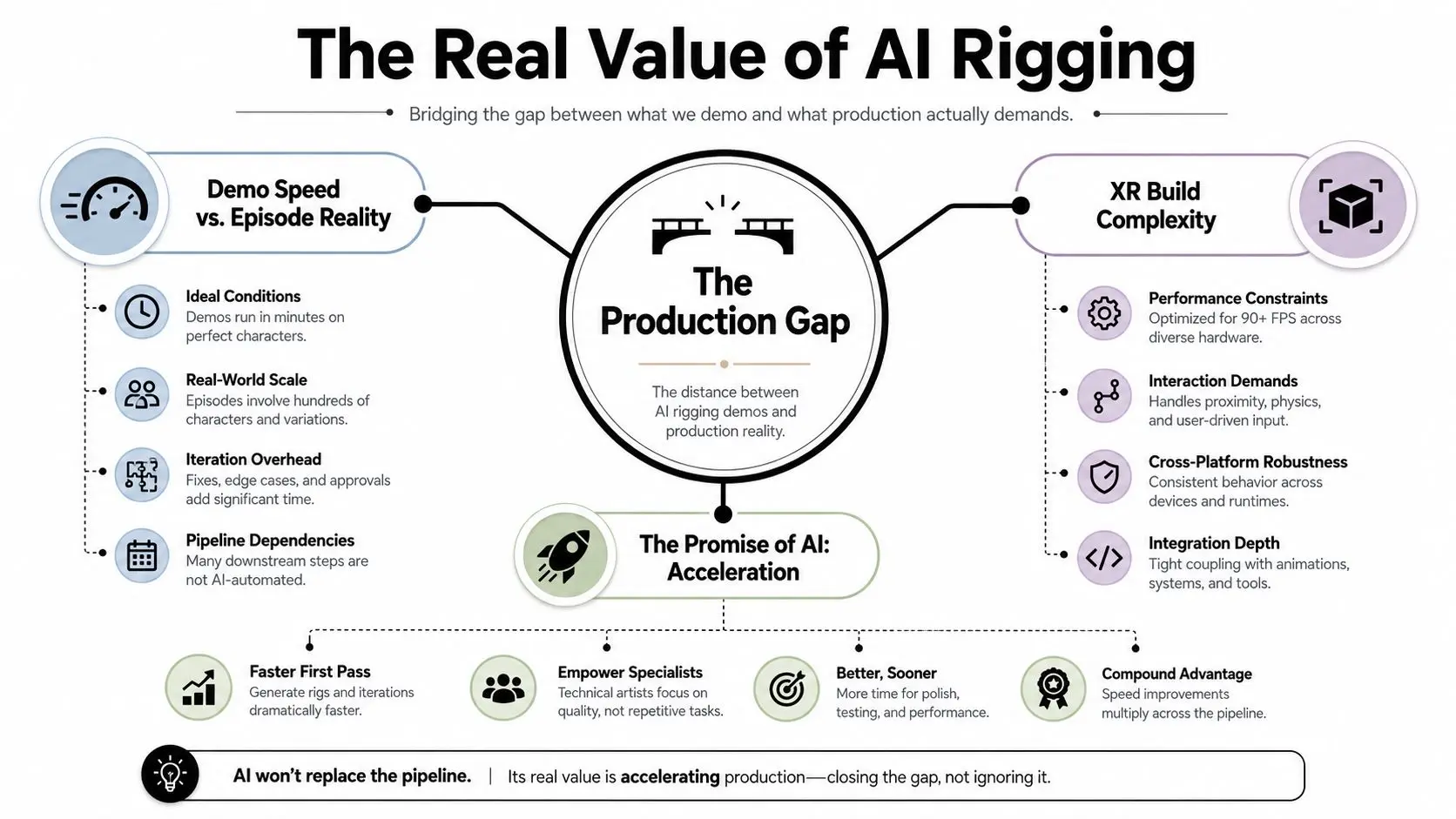
Speed is only useful when the result travels
The UK government's Creative Industries AI Adoption Plan reports that 51% of creative businesses use AI, compared with 33% of UK businesses overall. It also records creative firms using AI for visual content creation at 24%, compared with 12% across all UK businesses. That matters because rigging belongs to the same visual iteration loop as asset preparation, animation tests, previz, and real-time review. The value is therefore not “a finished rig in seconds”. It's a faster route to a reviewable first pass, provided the production team has standards for what happens next. Teams building wider AI-enabled workflows may also benefit from guidance on senior engineering teams and AI processes, particularly where automation must remain auditable and maintainable.
Practical rule: Treat an AI rig as an inspection candidate, never as a delivery asset.
The rest of the pipeline should answer two questions: which operations remove repetitive labour, and which operations merely move the labour into export testing and animation review? Studio Liddell's discussion of AI animation software and production workflows is useful context, but the same principle applies here. AI can shorten the first pass. It can't replace a production definition of “works”.
The Rig Anatomy You Still Need Before AI Helps
A generated skeleton can pass a viewport test and still fail in an episode pipeline. Before sending a character through an auto-rigger, inspect the asset as though another artist must revise it under deadline. Confirm the pose, proportions, scale, topology, orientation, and deformation plan first. These decisions determine whether the rig can be reused, retargeted, and exported to Unity or Unreal without rebuilding its foundations. Start with the joint system. A human or creature rig needs a readable hierarchy, a dependable root, and chains that support the planned movement. Forward kinematics gives the animator direct control along a chain. Inverse kinematics lets a hand, foot, or other end control influence the joints above it. AI can propose joint locations, but it cannot decide whether a creature needs another spine segment, a planted-foot solution, or a mechanical pivot aligned to a designed hinge.
Build the structure before the prediction
Skinning links the mesh to the joints through weights. Each weight map defines how strongly a joint affects a vertex. Poor weighting creates collapsing shoulders, pinched elbows, sliding hips, and rubbery fingers. An automated weight pass can reduce repetitive painting, yet it still requires extreme-pose checks. A neutral stance hides many failures that will appear in shots. The same foundation changes with the character type. Mechanical rigging needs constrained pivots and predictable rotation. Animal rigging needs anatomy-aware chains, often with different foot, spine, and shoulder logic. Facial rigging may combine joints, blend shapes, custom controllers, and driven relationships. Maya Embedded Language scripting can automate repeatable setup and validation, but a script only applies the rules it contains. It will repeat a bad assumption just as efficiently as a good one.
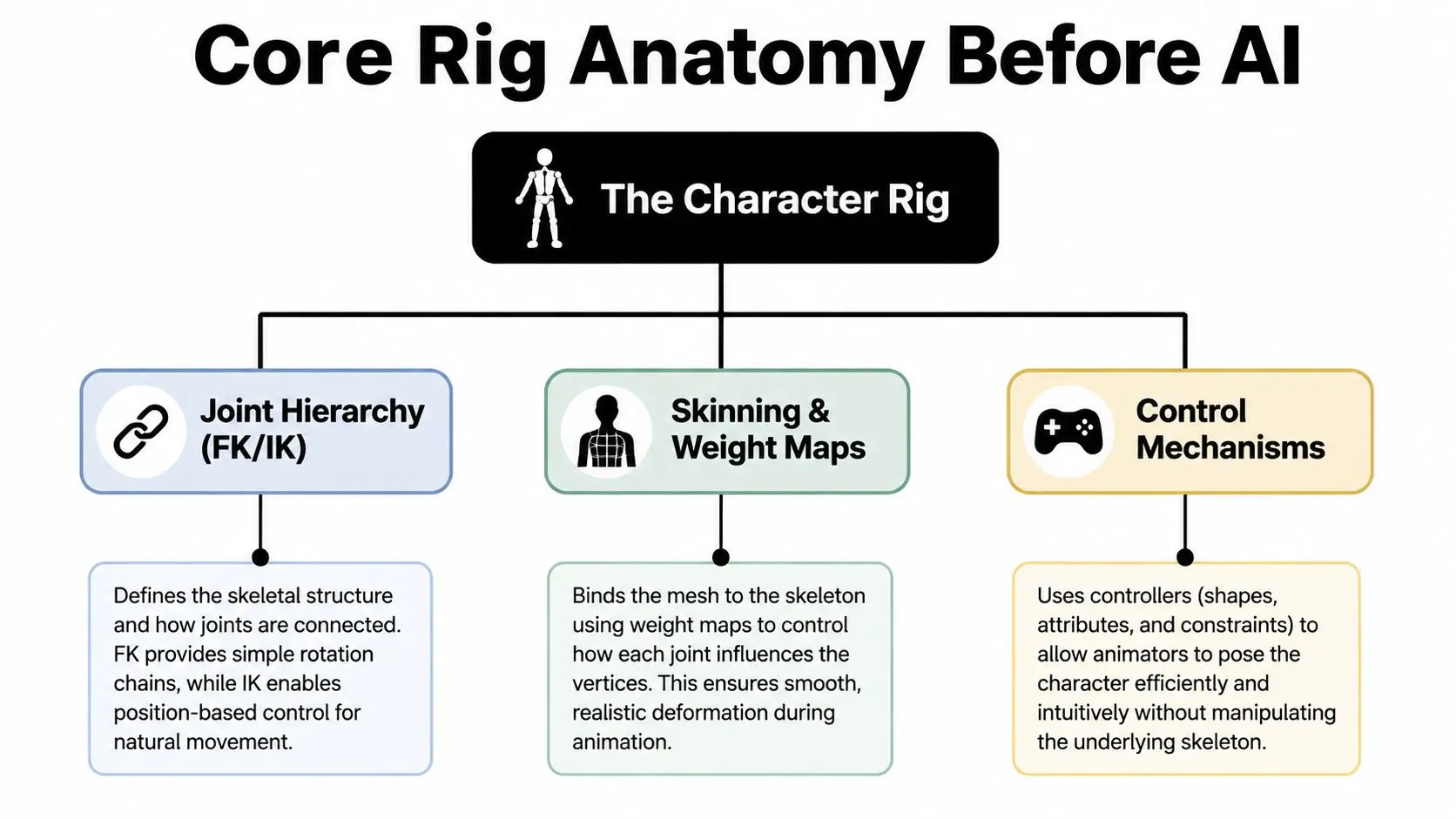
Run this preflight check before AI processing:
- •Naming: Give meshes, joints, controls, blend shapes, and materials stable names that remain unchanged across revisions.
- •Scale: Set a deliberate scene scale and apply transforms before rig generation or export.
- •Topology: Keep edge flow suitable for shoulders, hips, elbows, knees, hands, and facial deformation.
- •Pose: Use a consistent neutral pose that exposes the limbs and matches the target retargeting convention.
- •Separations: Mark clothing, armour, props, hair, and accessories that need separate deformation or simulation.
- •Requirements: Define whether the character needs body IK, facial controls, animal motion, mechanical constraints, or real-time retargeting.
If these answers remain unclear, AI may produce a technically valid skeleton that is artistically wrong and difficult to maintain between episodes. The remedy is a better base asset, not a more elaborate prompt.
The AI-Assisted Rigging Workflow From Ingest to Export
A reliable workflow begins with the mesh, not the auto-rig button. Clean the source, remove hidden geometry that could confuse joint placement, apply transforms, confirm the character's orientation, and save an untouched version. That original file becomes the comparison point when an automated pass changes the hierarchy or weights. The next stage is AI-assisted joint suggestion. For a conventional humanoid, the tool may identify the major body landmarks and propose a useful first skeleton. For a stylised character, a creature, or a figure with oversized clothing, the suggestion is only a hypothesis. Check joint placement at the shoulders, hips, wrists, ankles, jaw, and spine before binding the mesh.
Separate time saved from time displaced
Weight-paint acceleration can remove a large amount of repetitive work on predictable body areas. It's less dependable around overlapping clothing, hard-surface accessories, long hair, tails, fingers, facial features, and deliberately exaggerated proportions. A quick visual pass in a neutral pose isn't enough. Test the areas that will be seen in animation. Secondary motion comes later, because it depends on the primary deformation behaving correctly. Add spring controls, driven attributes, cloth hooks, hair attachments, or other follow-through only after the skeleton and weights survive movement. Facial performance prediction deserves an even stricter review. A generated face setup may be useful for blocking, but close-up dialogue often needs carefully designed blend shapes, corrective shapes, and animator-friendly controls. The UK evidence supports treating this as an active production workflow. The government adoption plan records creative businesses using AI for LLM text generation at 28%, compared with 13% across UK businesses, and machine-learning data processing at 14%, compared with 7% overall. Those figures aren't rigging benchmarks, but they show that creative teams are already combining AI with broader preparation, iteration, and processing tasks rather than treating one tool as a complete pipeline.
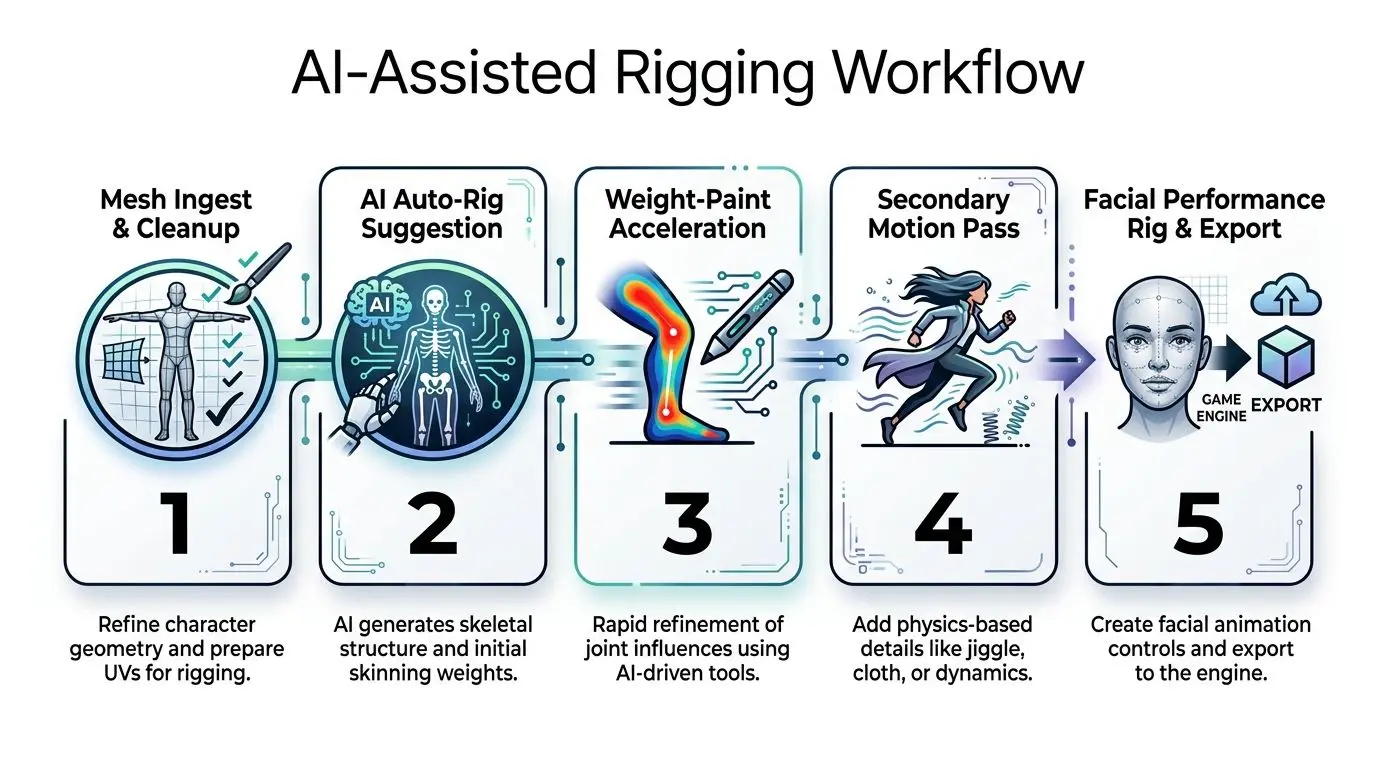
Before export, lock down:
- The approved skeleton, including root, spine, limb, twist, facial, and accessory joints.
- The binding method and weight corrections, with a saved source and revision history.
- The control behaviour, including IK switches, pole vectors, master controls, and animator limits.
- The facial strategy, whether it uses joints, blend shapes, or a combination.
- The export contract, including file format, axis, scale, naming, animation clips, and engine target.
- A test scene, containing representative poses and motion that can be checked again after every revision.
Getting the Rig Into Unity and Unreal Without Breaking It
The engine is a quality gate, not a storage destination. A rig that behaves correctly in the DCC can still fail during FBX export, import, retargeting, animation compression, or runtime evaluation. Test the complete route with the actual character and a small motion set before promising a final delivery date. Unity and Unreal accept different forms of rig intent. Unity's Humanoid workflow can map a conventional biped to an avatar and support retargeting, while Generic rigs preserve a custom hierarchy when humanoid assumptions would be damaging. Unreal works around the Skeletal Mesh, skeleton assets, animation sequences, retargeting tools, and, where appropriate, Control Rig. The right choice depends on whether the character needs a reusable standard skeleton or a custom structure that reflects unusual anatomy.| Concern | Unity | Unreal |
|---|---|---|
| Skeleton classification | Humanoid for standard biped retargeting, Generic for custom hierarchies | Skeletal Mesh and skeleton assets, with retargeting configured through engine tools |
| Root behaviour | Validate avatar mapping, root motion, scale, and orientation | Validate root bone, retarget pose, root motion, and skeletal hierarchy |
| Custom controls | Controls generally remain authoring-side unless rebuilt for runtime | Control Rig can provide runtime or editor-side control logic, but requires deliberate setup |
| Facial data | Check blend shape names, ranges, and import settings | Check morph targets, animation curves, and compression behaviour |
| Main risk | A convenient Humanoid mapping can hide incorrect proportions or missing joints | A valid Skeletal Mesh can still expose bad retarget poses, twist behaviour, or root motion |
Export failures have recognisable signatures
Lost custom attributes usually mean the FBX export was treated as a complete rig transfer rather than an animation and deformation handoff. Put the engine-required data on supported joints, curves, blend shapes, or animation clips, and maintain a separate authoring rig where necessary. Swapped axes and incorrect scale point to inconsistent scene conventions. Set the source and target conventions before export, apply transforms, and test a reference pose. Broken twist bones usually come from missing mappings or an unexpected hierarchy. Confirm whether the engine expects those joints, whether the animation drives them, and whether the weights use them. Facial blend shapes that collapse on import need their names, ranges, topology, and compression settings checked as a group. Don't approve the face because the body retargets cleanly. Engine review must include jaw, blink, lip, cheek, and extreme expression tests. Teams setting up AI adoption more broadly may find the AI talent guide from DataTeams useful for thinking about ownership, skills, and implementation responsibility. In a production pipeline, that responsibility must be explicit. Someone owns the export preset, someone owns the engine test, and someone signs off the result. For a producer-facing comparison of the two engines, use the Unreal versus Unity real-time animation guide. The practical decision isn't which engine looks better in a demo. It's which engine matches the team's target platform, runtime requirements, existing skeletons, and review capacity.Best Practices That Stop Rigs Breaking in Review
A rig can pass a neutral-pose check and still fail the first real shot. Ask it to crouch, reach, turn its head, grip a prop, and hold a close-up expression before animation begins. These tests expose hierarchy offsets, weak weights, control conflicts, and facial deformation problems while the rigger can still correct them.Four habits protect the handoff
1. Enforce consistent naming. Apply one convention to joints, controls, blend shapes, animation clips, and exported assets. Names form the pipeline contract between the DCC, review tools, Unity, and Unreal. A renamed jaw or left-hand joint can turn reliable retargeting into manual repair. 2. Use lockable master controls. Provide clear global, root, and character controls that animators can select, lock, and reset predictably. Check the generated hierarchy for inherited offsets. If the master control carries one, every downstream animation may preserve the error. 3. Keep weight layers non-destructive. Store the initial AI-generated pass separately from manual weight edits and corrective deformation. This preserves a review trail and makes revisions comparable. The team can see whether a new AI pass improved the mesh or moved the failure to another area. 4. Document a standard test sequence. Include a walk, deep bend, raised arm, body twist, planted foot, prop interaction, and relevant facial extremes. Save the test scene, record the expected result, and run it after each structural change. For episodic work, keep the same test asset and export settings so character behaviour remains comparable from episode to episode.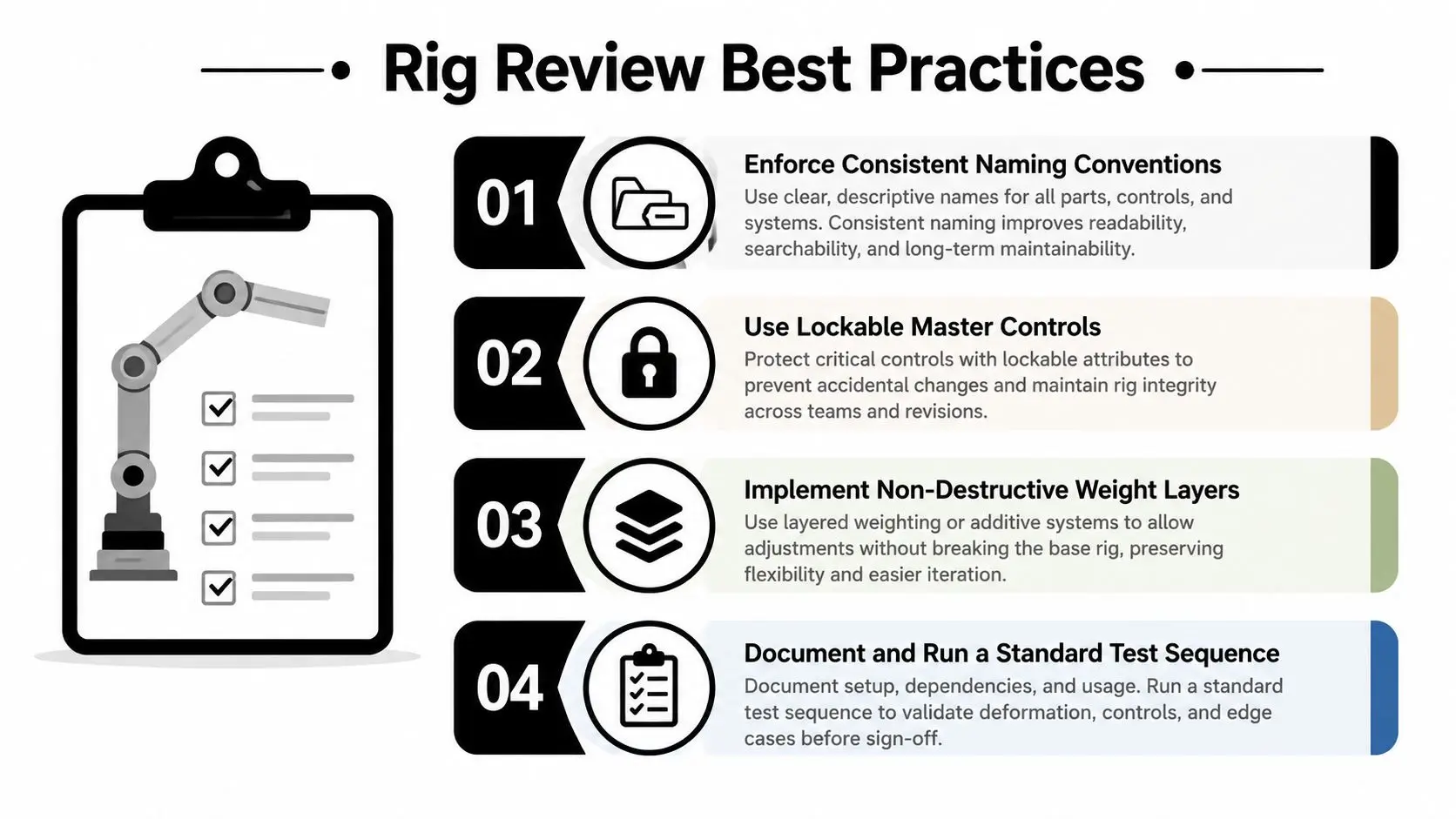
A good review asks the rig to fail while the rigger is still present.Automate repetitive, measurable work such as scene validation, naming checks, transform checks, initial joint placement, ordinary body weights, export packaging, and repeatable test playback. Keep manual ownership of facial rigging, stylised creatures, complex clothing, mechanical constraints, hero deformation, and controls that affect performance quality. These areas carry the character's identity, and a plausible generic result can cost more to correct than a deliberate setup. Assign an owner for the export preset, engine test, and final sign-off.
The Questions UK Productions Must Answer First
The hardest question isn't “How quickly can this character be rigged?” It's “Can the production explain where the rigging inputs came from, who approved them, and whether the result can be reproduced later?” UK screen-sector evidence has already identified wider concerns around rights clearance, workflow disruption, and safe professional use of generative AI. The BFI and CoSTAR screen-sector report describes generative AI being used across the UK screen sector for efficiency and creativity, including AI-assisted animation. That makes governance an operational requirement, not a policy discussion that can wait until delivery. A production using AI-assisted rigging should answer these questions before scaling the workflow across a series:- •Reference rights: Were the images, scans, motion references, and facial examples cleared for the intended use?
- •Performer consent: Does the agreement cover AI-assisted facial processing, performance modification, reuse, and derivative outputs?
- •Version control: Can the team identify the source mesh, tool version, settings, manual corrections, and approved export?
- •Episode consistency: Will the same character produce stable deformation, facial behaviour, and control response across episodes?
- •Human review: Who signs off the rig before animation, and what evidence do they review?
- •Reuse permissions: Can the rig, generated data, and corrected weights be reused in games, XR, marketing, or other extensions?
- •Data handling: Where do uploaded assets go, who can access them, and how long are they retained?
The UK's AI adoption figures show that creative businesses are already using these systems at a meaningful operational level, including visual content creation, text generation, and machine-learning data processing. Adoption without a documented approval path creates hidden production risk. A fast rig that can't be explained, reproduced, or cleared may be unusable when the series expands to new episodes and platforms.
Putting AI Rigging Into a Real Delivery Plan
AI rigging earns its place when production defines it as a pre-production service with clear handoffs, rather than an emergency fix during animation. UK animation financing can involve BBC contributions of 10% to 24%, with the remaining budget assembled through presales, co-production, gap financing, distribution advances, and bank loans. Development and financing commonly take 18 to 24 months, according to this industry financing overview. A full animated programme may take around two years to complete, and some productions reach four to five years before broadcast. A rigging choice made early can therefore affect delivery for years. Set the delivery plan around five controls:
- Approve the rig specification, covering anatomy, controls, facial needs, target engine, and reuse.
- Define AI guardrails for approved inputs, review ownership, version tracking, and manual corrections.
- Test export into Unity or Unreal before building the character library.
- Build repeatable body, facial, deformation, and performance tests.
- Place sign-off points at ingest, rig approval, engine import, animation handoff, and final delivery.