Animated Video Production: The Complete Guide
The first bad animation brief usually arrives as a single line, “we need a short animated video.” Nobody has decided who it's for, where it'll run, what the viewer should do next, or whether the job needs 2D, 3D, or something more immersive. By the time those answers are missing, the project is already expensive in the wrong way, because every later choice gets made on guesswork instead of a clear production brief. A better brief starts with audience, channel, outcome, and constraint. If the video has to work on paid social, a homepage, an internal deck, or a live event screen, the production logic changes fast. That's why the commissioning side matters as much as the creative side, and why a useful starting point is a proper commissioning guide such as Studio Liddell's guide to commissioning animation work in London. The strongest animation jobs don't begin with style references. They begin with a decision about what the video has to do, what it has to fit, and what can't go wrong.
The Commissioning Brief Most Animation Jobs Never Quite Get Right
Most buyers know the feeling. A marketing team wants something “clean and modern”, the sales team wants more product detail, and someone senior wants it to “feel premium” without saying what premium means. At that point, the studio is being asked to solve a communication problem, a channel problem, and a budget problem all at once.
Start with the decision, not the look
An animation brief gets sharper when it names the single most important action. That might be a click, a sign-up, an internal policy change, a trade-show conversation, or a clearer explanation of a technical product. Once that outcome is fixed, the style brief becomes easier because the work can be judged against one practical standard, not half a dozen taste opinions.
Practical rule: if two stakeholders want different things, the one closest to the viewer's actual decision usually wins.
Channel matters just as much. A video built for social needs different pacing, framing, and text density from one designed for broadcast or an exhibition loop. A good buyer doesn't ask a studio to “make it work everywhere” unless the content has already been planned for those uses.
What a studio needs before it can price properly
A studio can't scope a job cleanly without the basics. It needs the audience, the intended platforms, any compliance constraints, the number of versions, and whether the source material already exists. If those inputs are vague, the quote will either be padded for risk or low enough to hide problems until revisions start. For UK buyers, procurement discipline matters. The better the brief, the easier it is to compare studios on the same terms instead of comparing one polished reel against another studio's cheaper guess.
What Counts as Animated Video Production in 2026
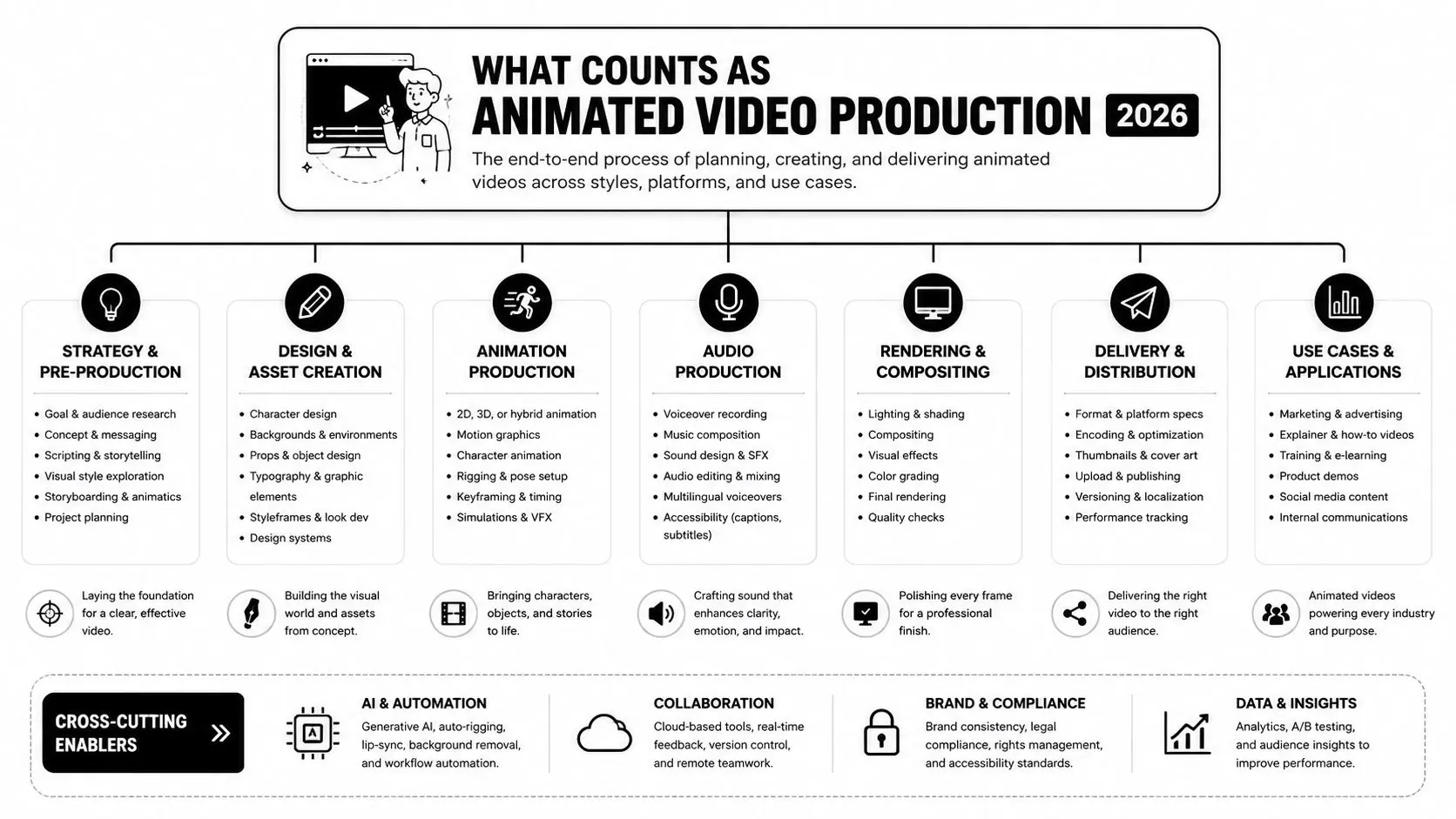
Animated video production in 2026 covers far more than a cartoon or a polished explainer. It includes 2D animation, 3D animation, broader CGI work, motion graphics, and increasingly XR outputs that sit alongside conventional video deliverables. The common mistake is to treat these as labels for style when they're really different production models with different costs, timelines, and revision risks.
The main formats in plain language
2D animation is the flat, illustration-led approach. It suits explainers, social cut-downs, and content where clarity matters more than realism. Think of it as visual storytelling with the fewest technical dependencies, which is why it often moves quickly through approvals. 3D animation builds a modelled world with lighting, texture, and camera movement. It's the right fit when a product needs to be shown from every angle, when a brand wants depth and polish, or when the asset might be reused across campaigns and formats. CGI is the broader umbrella for computer-generated imagery, including both stylised and photoreal work. XR covers VR, AR, and mixed reality. It's not a replacement for video, but it often sits beside animated assets when a brand wants immersion, interaction, or training content that can't be delivered well as a flat film.
Match the format to the brief
For a training module, the strongest format is often the one that reduces friction for the learner. For a product launch, the winner might be the one that shows detail cleanly and can be versioned for multiple channels. For a public-facing campaign, the decision may come down to whether the organisation needs speed, polish, or a more immersive experience. The point isn't to rank formats by prestige. It's to choose the production model that fits the job without creating avoidable complexity.
2D vs 3D Animation and When Each One Wins
The choice is rarely “which looks better”. It's usually which one is easier to brief, approve, adapt, and reuse. In practice, 2D tends to win when the message is simple, the timeline is tight, or the content needs frequent updates. 3D tends to win when the visual object matters, the product needs dimensional realism, or the footage has to support multiple uses after launch. Studio Liddell's cost guide to 2D vs 3D animation is useful here because the buyer question is almost never just about aesthetics. It's about how much control the team needs over angle, motion, lighting, and later re-edits.
A practical comparison
| Factor | 2D Animation | 3D Animation |
|---|---|---|
| Primary strength | Clarity and speed | Depth and realism |
| Best fit | Explainers, social assets, internal comms | Product films, trailers, broadcast work |
| Revision pressure | Usually lower when the design is locked early | Often higher because more assets depend on each change |
| Reuse potential | Strong for modular edits and cut-downs | Strong for alternate angles, renders, and campaign variants |
| Typical buyer priority | Fast understanding | Visual impact and asset longevity |
A strong 2D brief usually comes from a team that already knows the message. A strong 3D brief usually comes from a team that needs to visualise something physical, spatial, or branded in more detail. A hybrid approach often works well too, especially when a team wants 3D assets inside a 2D-led edit to preserve flexibility without committing every frame to a full 3D pipeline.
Where each one actually wins
2D is often the cleaner choice for policy, education, product onboarding, and lower-friction social campaigns. It's easier to keep text legible, it tends to support quicker approvals, and it can be more forgiving when content changes late. 3D is stronger when the frame itself is part of the selling point. If a viewer needs to understand form, finish, scale, or internal structure, 3D usually earns its place. It also gives teams more mileage when the same asset needs to be cropped, re-rendered, or repurposed later.
Budget discipline matters more than style loyalty. The right format is the one that can survive your revision process without collapsing the schedule.
The End-to-End Animated Video Production Pipeline
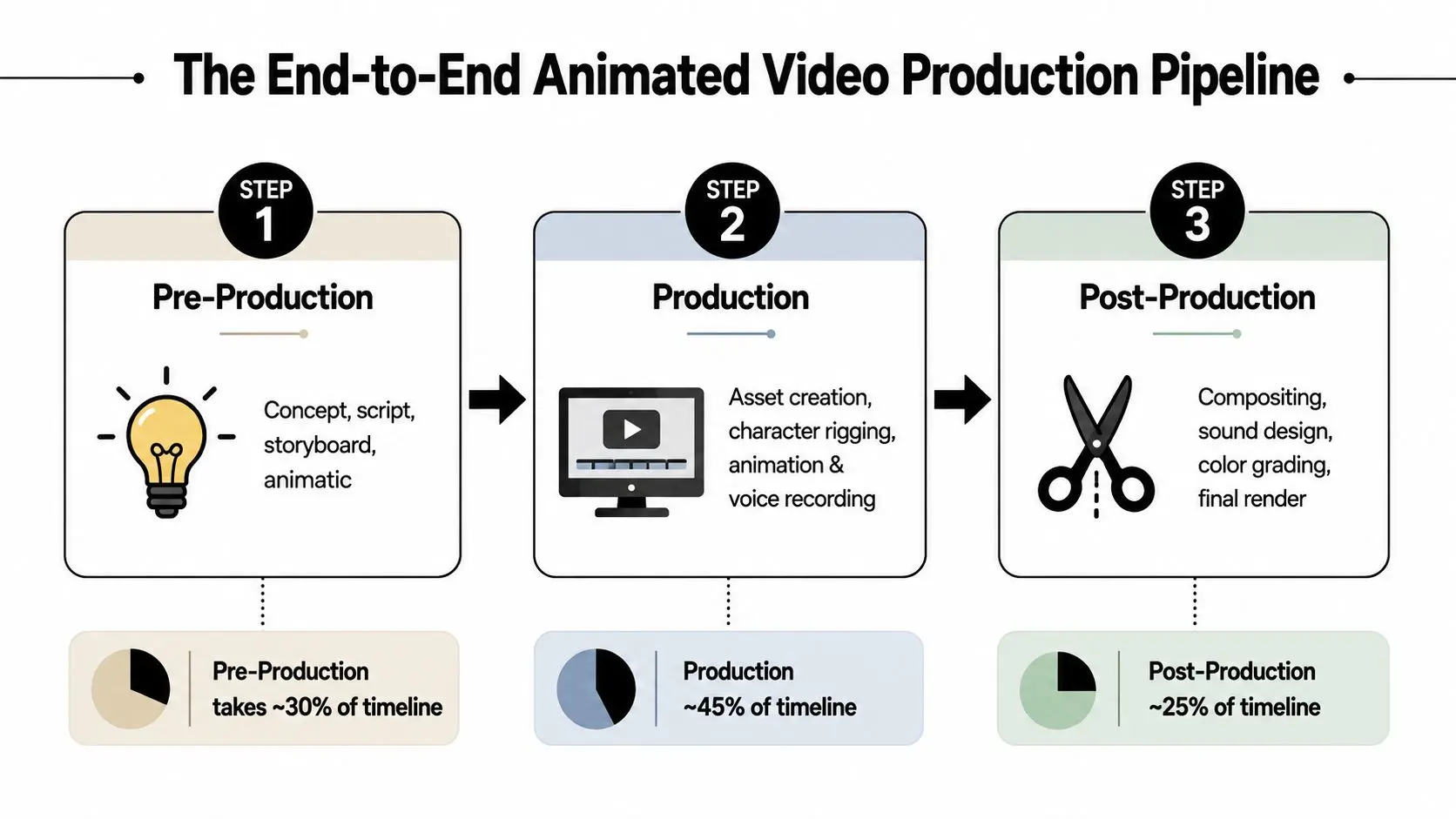
A proper pipeline is more than “design, animate, deliver”. A competent studio should be able to name every stage from script and storyboard through to compositing, sound, and final export. In a standard 2D workflow, the full process includes pre-production items such as script, storyboarding, design, puppet making, prop making, set building, and testing, followed by production, then post-production tasks including voice-overs, music, sound effects, VFX, rig removal, compositing, colour grading, editing, and exporting the final piece. The Falmouth animation brochure names that pipeline clearly, which is exactly what a buyer should expect a studio to understand.
Pre-production is where most risk gets removed
Pre-production is the planning layer. It should include concepting, scripting, storyboard approval, animatic timing, and visual design. If these are rushed, the rest of the project becomes expensive because every animation change ripples through the whole schedule.
Production is the asset-making stage
Production is where assets are built, rigged, animated, lit, and rendered. This stage can also include voice recording, depending on the workflow. The more complex the characters, camera moves, or environments, the more carefully this stage has to be scheduled.
Post-production is not just finishing
Post-production includes compositing, sound design, music, colour grading, and delivery outputs. It also covers rig removal where relevant, accessibility versions, and file preparation for each channel. A buyer who only budgets for “the main film” usually discovers too late that social crops, captions, and alternate deliverables were never properly priced.
Timelines and Budgets for Animated Video Production
Budgeting is where a lot of animation projects drift into trouble. The same brief can stay efficient or become expensive depending on scene complexity, revision rounds, localisation, and how many deliverables the client expects at the end. One cited industry source reports 3D computer animation budgets ranging from $5,000 to over $1.5 million per minute (Cite Journal), which is exactly why flat pricing advice doesn't help much on real jobs.
What moves a project up the cost curve
Several things make a quote rise quickly. Character count, custom environments, precise product detail, extra approval rounds, and versioning for different platforms all add time. If the job also needs localisation, captions, accessibility cuts, or multiple aspect ratios, the budget should reflect that from the start. A short social explainer is usually the least complicated ask because it can stay visually restrained and tightly scripted. A broadcast-quality ad or a multi-asset campaign needs more coordination because the same core content often has to be adapted for several uses. That's why the cheapest quote is rarely the most realistic one.
Planning for quality before distribution
For high-quality delivery, a common technical baseline is a QuickTime .mov master with Apple ProRes 422 HQ, 1920×1080 HD or 3840×2160 UHD, 24 fps, square pixels, progressive scan, and 48 kHz/24-bit PCM audio, because that preserves image quality before final distribution. For broadcast and digital delivery, specs often tighten to H.264, 1920×1080, and a 20 to 25 Mbps target bitrate at 24 fps, with an 80% safe area of 1536×864 to protect text and logos from cropping (Screenvision guidelines; CalArts technical requirements).
Practical rule: keep the master high quality first, then compress for delivery later. Flat animation and gradients show compression damage faster than many teams expect.
Technology Choices from Unity and Unreal to AI Tools
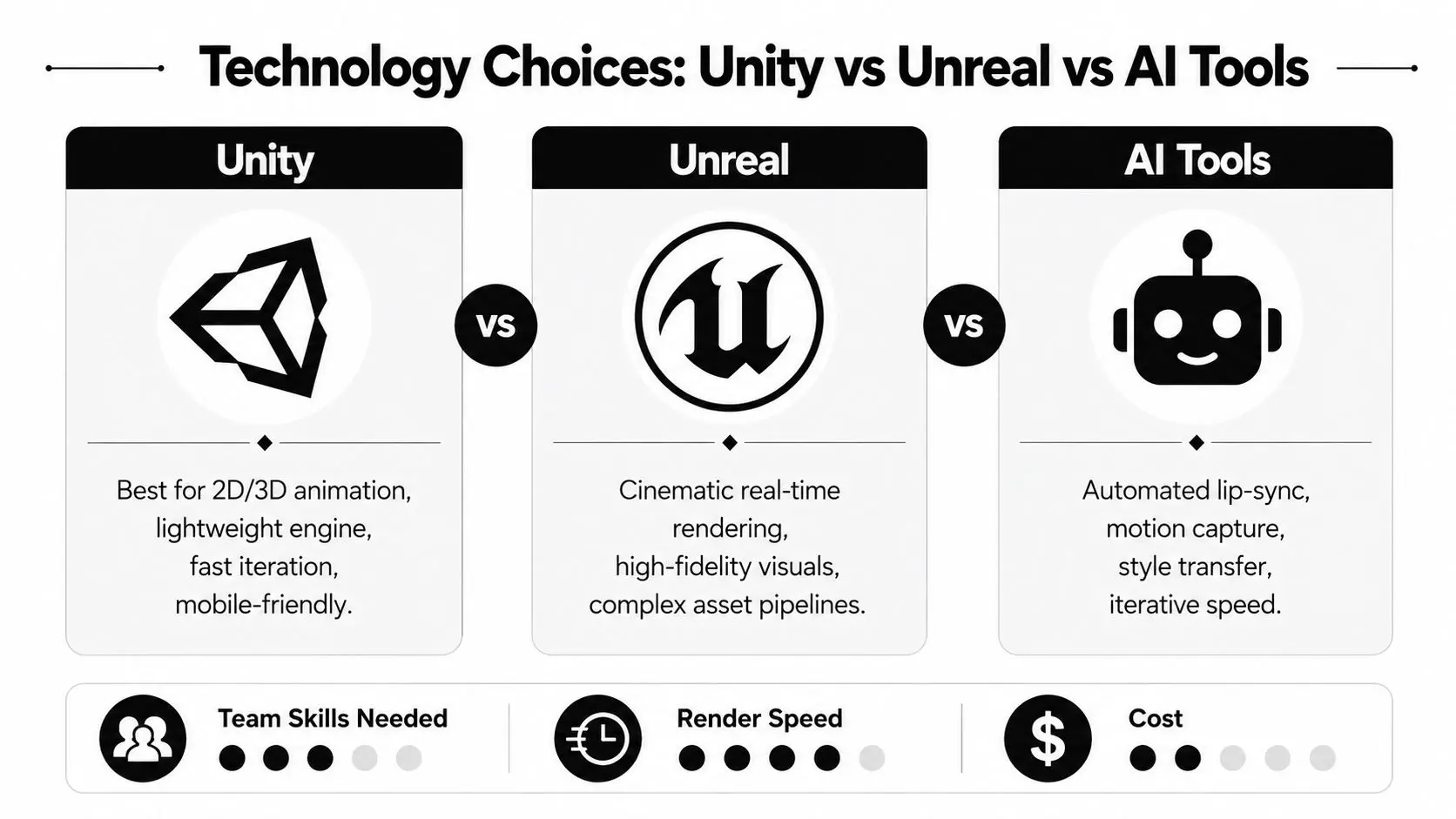
The producer's question isn't which tool is fashionable. It's which stack keeps the project controllable when the client changes the brief halfway through. Unity and Unreal both support real-time animation workflows, but they serve different production habits, different asset pipelines, and different team skills. For a useful overview of the engine choice itself, Studio Liddell's real-time pipeline article is worth reading alongside the broader tooling discussion.
Where the engines differ in production terms
Unity is often associated with lighter-weight iteration and mobile-friendly deployment. Unreal is stronger when the job leans toward cinematic real-time rendering and richer visual fidelity. The right call usually depends on the team's familiarity, the amount of custom asset work involved, and whether the final output needs to feel interactive or look finished.
Where AI tools actually help
AI-assisted production can reduce friction in previs, lip-sync, motion capture cleanup, style transfer, voice, and localisation. That doesn't make AI a replacement for art direction. It makes it useful when the client needs faster iteration and can accept a human-led review layer on every output. For teams comparing tools, BeyondComments' guide to AI tools is a helpful external reference because it frames tools as workflow choices rather than magic shortcuts. That's the right mindset for buyers too, since a faster draft still needs a producer who can judge whether it's usable.
What the buyer should ask
A good studio should be able to explain which parts of the pipeline are manual, which parts are accelerated, and where quality control happens. For explainers and learning content, research on computer-animated videos in education also notes that storyboard-driven planning and clear learning objectives are central to effective work (MDPI review). That's a reminder that the tool never replaces the structure of the message.
How to Choose the Right Animation Studio Without Burning the Budget
Choosing a studio is less about the slickest reel and more about whether the team can deliver under real production constraints. A serious buyer should ask for named pipeline stages, clear rights and IP ownership terms, evidence of broadcast or platform delivery, and a real explanation of how the studio handles revisions. If a studio can't describe QA in plain language, that's a warning sign. For an external reference on checking video authenticity and synthetic content risk, AI Video Detector's newsroom guide to spotting AI video is a useful adjacent read. It's not a substitute for due diligence, but it does reinforce the need to ask how a studio sources and checks assets.
The shortlist checklist
- •Showreel depth: Look for work that matches your channel, not just your taste.
- •Pipeline clarity: Ask who owns script, boards, design, animation, sound, and delivery.
- •Rights terms: Confirm who owns project files, source assets, and final masters.
- •Producer access: Make sure there's a real contact who can answer scope questions quickly.
- •Ethics around spec work: Be cautious if a studio is expected to create unpaid custom concepts before any commitment.
A cheap quote often hides one of three problems, scope gaps, inexperienced staffing, or a process that leaves the client to make the hard decisions too late. None of those saves money once the work is underway. The better comparison is whether two or three studios can explain the same brief in the same language and commit to the same deliverables.
Common Pitfalls and What Buyers Should Measure Next
The most common failure points are predictable. The brief is vague, stakeholders comment too late, revisions were never budgeted properly, accessibility gets left until the end, and the final film is treated as a one-off instead of an asset that can be re-edited. In practice, that means the project cost climbs while the value of each version stays low. Measure what the video does, not just whether people saw it. Completion rate, message recall, click-through, dwell time on owned channels, and cost per reusable asset tell a much better story than raw views alone. If the video can be cut down, localised, captioned, or repurposed for other channels, that's part of the return. The smartest next step is simple. Tighten the brief, define the channel mix, and ask every studio to scope the same deliverables against the same review stages. That's how a buyer turns animation from a visual expense into a reliable communication asset. --- If you need a production partner that can scope the brief, map the pipeline, and build delivery-ready animation across 2D, 3D, and XR, Studio Liddell works across commercial, educational, and technical content. Visit Studio Liddell to discuss your project and book a scoping conversation.