Your Guide to an Immersive Gaming Experience
You're probably dealing with one of two pressures right now. Either someone in your team wants “something immersive” because competitors are doing XR demos and branded game activations, or you already know interactive content could work for your audience but you need to turn that idea into a scoped, buildable project with a sensible commercial case. That's where most immersive projects either sharpen up or fall apart. The weak ones chase spectacle first, then try to retrofit usability, performance, and business logic later. The stronger ones start with a harder question: what should the player feel, do, remember, and complete, and what platform gives you the best chance of delivering that without blowing the budget or the schedule? An immersive gaming experience isn't a gimmick, and it isn't defined by a headset alone. It's a production discipline. It sits at the point where design, real-time technology, art direction, accessibility, and operational planning all have to work together.
What Is an Immersive Gaming Experience
Most buyers first hear “immersive” as a visual promise. Better graphics. Bigger screens. Headsets. Spatial effects. That's part of it, but it's not the actual definition. An immersive gaming experience is any interactive experience that holds attention by making the player feel present inside a system, world, challenge, or narrative. Sometimes that presence comes from full VR. Sometimes it comes from AR layered into a live environment. Sometimes it comes from well-judged sound, reactive feedback, and a game loop that gives the player no reason to mentally drop out.
Immersion is a design outcome, not a device category
A lot of teams make the mistake of treating immersion as a hardware decision. It's better understood as a spectrum. At one end, you have screen-based interactive content that creates deep focus through pacing, rules, feedback, and art direction. At the other, you have room-scale or headset-based experiences that use physical movement, spatial sound, and embodied interaction to create a stronger sense of presence. Both can be immersive. Both can also fail. A useful way to think about it is this:
- •Attention: Does the experience pull the player in quickly?
- •Presence: Does the player feel located inside the action rather than observing it?
- •Responsiveness: Do controls, feedback, and world reactions feel immediate?
- •Coherence: Do story, mechanics, visuals, and sound support the same emotional goal?
If one of those breaks, immersion weakens fast. A beautiful environment with clumsy interaction won't hold up. Neither will an impressive headset demo that makes players think more about the equipment than the experience.
Practical rule: If players spend more time learning the interface than engaging with the core loop, the project isn't immersive yet.
The UK is well positioned to build this kind of work because immersive gaming isn't emerging in a vacuum. It's growing from an established games market with 33.7 million video game consumers in 2022, £5.2 billion in GVA, and 2,437 games businesses, according to UK industry data cited in this UK games market summary. That matters because strong immersive work needs an existing ecosystem of developers, artists, technical directors, producers, and interactive specialists.
What this looks like in practice
If you need a simple framing device, look at game genres that already create strong world ownership and systemic engagement. A resource like this ultimate god game roundup is useful because it shows how immersion can come from agency and control, not just from display technology. Players stay engaged when systems respond convincingly to their choices. For brands and institutions, that same principle applies. The experience works when users feel they're acting inside a live environment, not sitting through a dressed-up presentation. For teams weighing spatial formats, it also helps to understand where virtual and physical layers meet. This short explainer on what mixed reality means in production terms is a useful starting point when your concept sits somewhere between screen content, AR, and fully enclosed VR.
The Business Case for Immersive Experiences
Immersion only matters commercially if it changes behaviour. That's the standard worth using. If the project helps a buyer understand a product faster, helps a trainee practise safely, helps visitors stay longer at an installation, or helps a group participate together instead of passively watching, then immersion is doing a real job. If it only produces a brief novelty hit, it won't survive a proper budget review.
Where immersive projects create business value
In marketing, immersive content gives people something to do rather than something to watch. That's useful when a campaign needs memorability, not just reach. A branded game, interactive product world, or mixed reality installation can turn passive footfall into active participation. In training and education, the value is usually clarity and repetition. Real-time environments let teams simulate procedures, rehearse decisions, and test understanding in a way slide decks are unable to. The strongest training builds aren't flashy. They're legible, consistent, and easy to repeat. For sales, immersion becomes practical when it reduces friction around explanation. Product configurators, guided demonstrations, and spatial walk-throughs can help non-technical stakeholders understand a complex offer without sitting through a long verbal pitch. That's especially useful for physical products, environments, and systems that are hard to show on a flat page.
Why the UK market matters now
The broader commercial context is moving in the right direction. The UK's virtual reality market was valued at about USD 2.15 billion in 2024 and is forecast to reach USD 8.41 billion by 2030, representing a 25.57% CAGR, according to this UK immersive technology market forecast. Even though that covers more than gaming alone, it's still a useful signal. Hardware, tooling, buyer familiarity, and deployment models tend to develop across adjacent sectors together. That changes the internal conversation for clients. A few years ago, immersive work was often treated as innovation theatre. Now it's easier to position it as a delivery format with established platforms, clearer expectations, and a more mature vendor ecosystem.
Immersion stops being experimental when the surrounding market can support repeatable production, deployment, and maintenance.
What doesn't make the business case
Some ideas sound immersive but aren't commercially sound. A few examples come up repeatedly:
- •Headset first thinking: Teams pick VR before they've defined the audience context, session length, or physical environment.
- •Film logic in an interactive format: Stakeholders ask for passive storytelling inside an expensive real-time build.
- •Overbuilt prototypes: Too much money goes into visual polish before gameplay, navigation, or user onboarding are proven.
- •No operational owner: The experience launches, but no one owns updates, staffing, resets, support, or performance review.
The business case gets stronger when the experience solves a job that existing media handles poorly. That's usually where immersive work earns its place.
Choosing Your Immersive Technology Platform
Platform choice shapes everything: budget, design complexity, setup burden, staffing, testing, and the kind of audience behaviour you can realistically expect. Most mistakes happen because teams choose technology according to trend rather than context. This is the first filter I'd apply. Where will the experience happen? In a headset at home, on a phone in a shop, at an exhibition stand, in a museum gallery, or in a managed venue with staff on hand? Once that's clear, the platform decision gets far simpler.
The practical differences between the main options
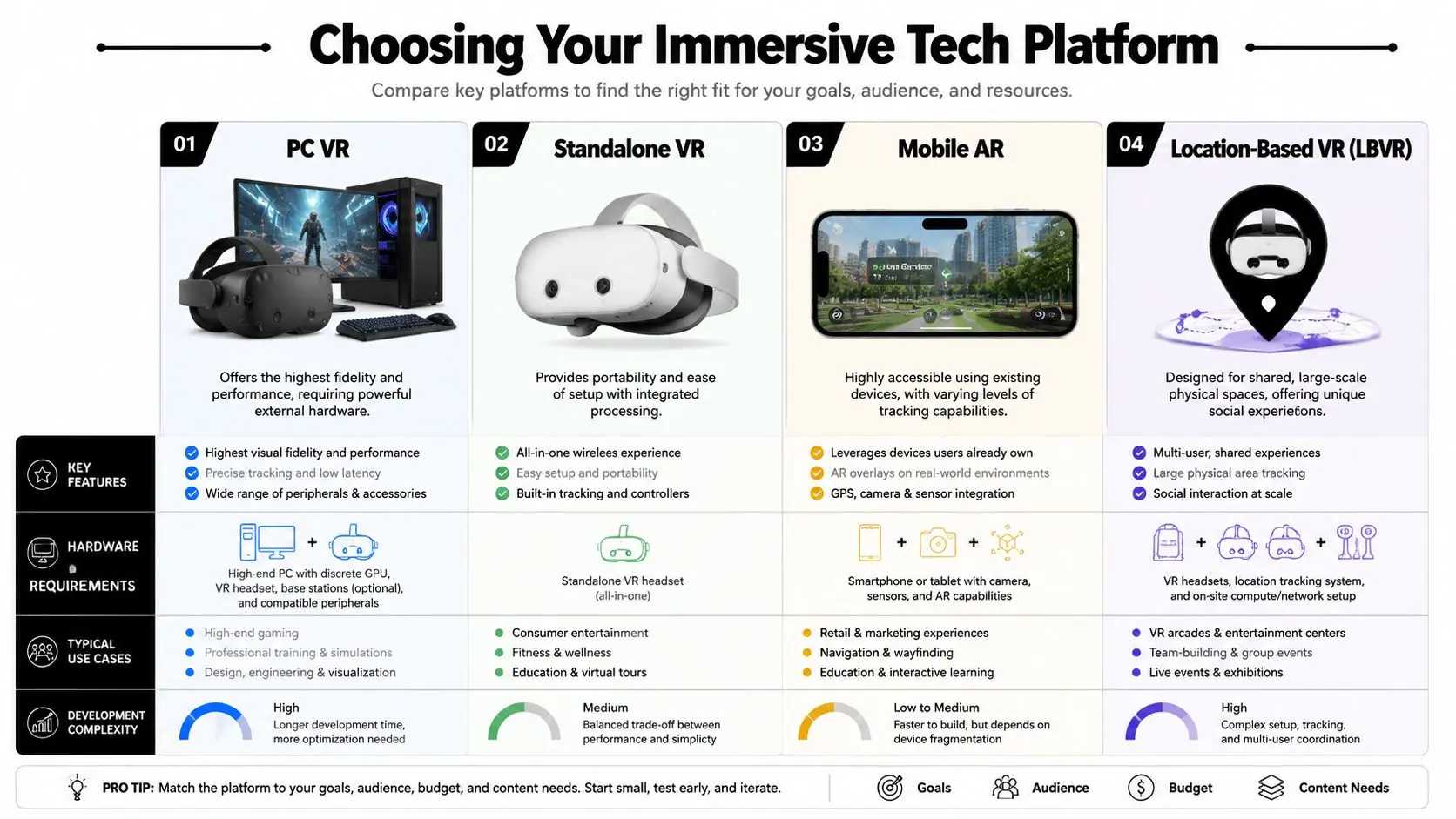
VR gives you the strongest environmental control. You own the player's field of view, their audio space, and most of the interaction rules. That makes VR useful for training, narrative experiences, simulation, and focused gameplay. It also brings more friction. Headsets need managing, onboarding matters more, and comfort standards are essential. AR is usually the easiest entry point because it uses devices people already understand. It works well when the physical environment should remain part of the experience. Retail visualisation, exhibition content, lightweight product interaction, and location-aware overlays all fit here. The trade-off is that you don't control the environment as tightly, so attention competes with everything else around the user. MR sits in the middle. It blends spatial digital content with the physical environment and can be powerful when collaboration, co-presence, or environmental awareness matter. It's often attractive for group interaction and guided experiences, but it demands careful interaction design because users are processing both worlds at once.
VR vs AR vs MR which technology fits your goal
| Technology | User Experience | Required Hardware | Best For |
|---|---|---|---|
| VR | Full environmental immersion with controlled focus | Headset, and in some cases a connected PC or managed venue setup | Simulation, training, narrative experiences, focused gameplay |
| AR | Digital overlays within the real world | Smartphone, tablet, or AR-capable headset | Retail demos, exhibitions, product visualisation, lightweight branded interaction |
| MR | Interactive digital objects anchored within physical space | Mixed reality headset or compatible spatial device | Collaborative experiences, guided installations, spatial storytelling |
Matching platform to project reality
The decision usually comes down to four questions.
- •Audience tolerance for setup: If users are at a busy public event, AR or a low-friction interactive install may outperform headset-based VR.
- •Need for environmental control: If distraction ruins the concept, VR is often the safer choice.
- •Importance of social play: Shared spaces and spectator value matter more in LBVR and certain MR formats.
- •Content lifespan: Short campaign activations can tolerate more bespoke setup than evergreen training tools or repeated sales deployments.
PC VR still has a place when visual fidelity and simulation depth matter. Standalone VR is often a better production choice when deployment simplicity matters more than absolute graphical ceiling. Mobile AR can reach more people with less setup but usually requires tighter scope and cleaner interactions. Location-based VR works when staffing, safety, floorplan, reset time, and throughput have been designed into the concept from day one. If your team is choosing an engine alongside the platform, this breakdown of Unreal vs Unity for real-time animation and interactive production is useful because engine choice affects asset workflow, optimisation strategy, and long-term maintainability.
The Production Pipeline for Immersive Content
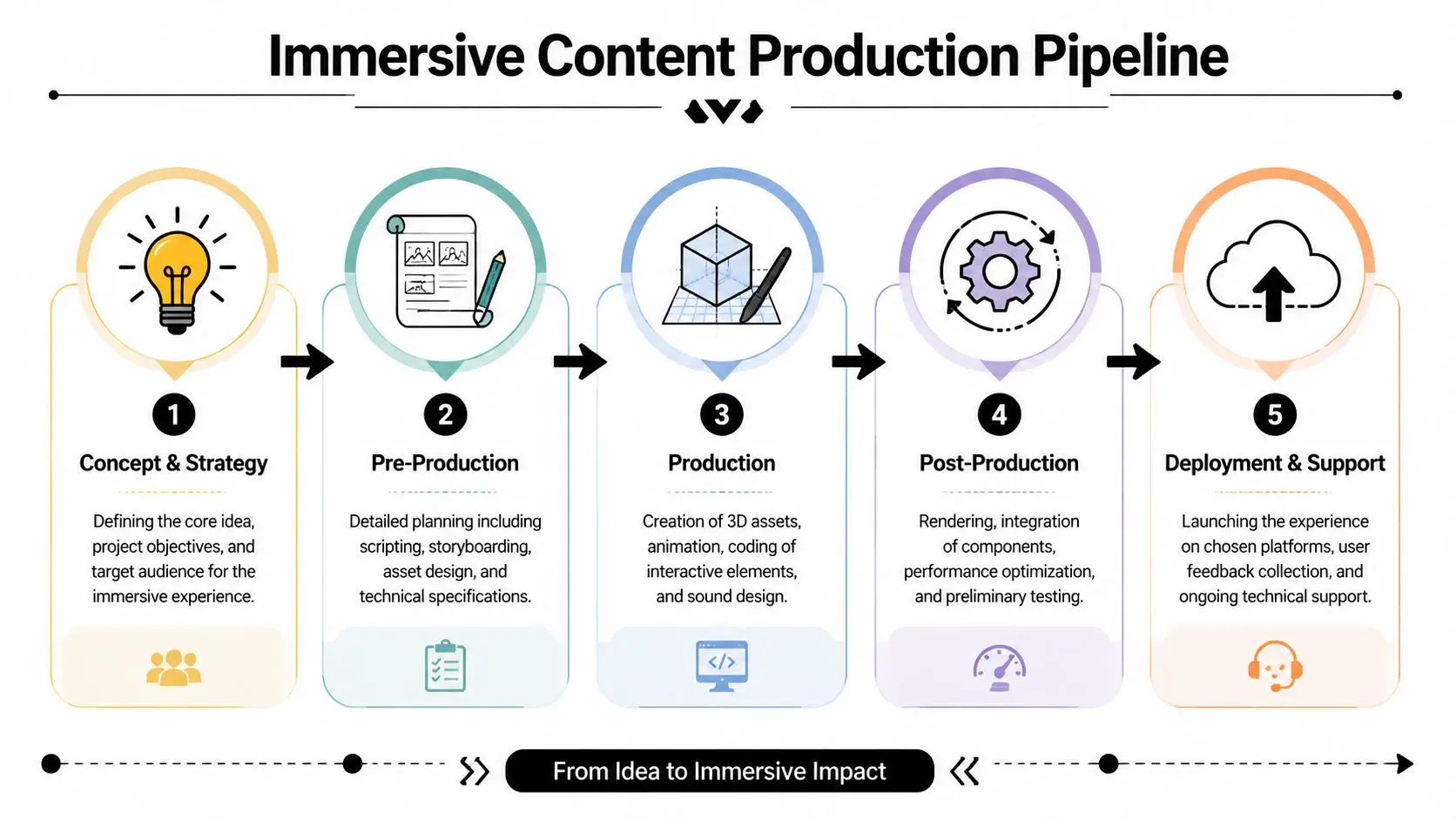
A headset demo can win approval in the pitch room and still fail on site. The usual reason is production, not concept. The interaction takes too long to learn, the build drops frames under actual operating conditions, or staff need five minutes to reset a three-minute experience. Immersion only holds when the production pipeline is built around use in practical settings. Teams get better results when they treat immersive production as an iterative system, not a relay race between departments. Experience design, engineering, art, audio, QA, and deployment planning need to inform each other early. If those decisions stay isolated until late production, the rework is expensive and the compromises are visible to the player.
Start with interaction, not with asset lists
The first production question is simple. What does the player do in the first minute, and how do they know they are doing it correctly? That answer sets scope. It determines onboarding, input design, pacing, feedback, camera logic, and the level of environmental detail the experience can support. Producers who start with asset inventories often burn budget on environments before the core loop has earned that investment. A workable pre-production pass usually covers four things:
- •Experience mapping: entry point, first interaction, tutorial beats, fail states, success condition
- •Technical definition: platform, engine, input method, performance budget, deployment environment
- •Spatial planning: play area, reach zones, collision risk, spectator needs, operator reset flow
- •Content planning: which assets carry the experience and which can stay modular or low-cost
This stage protects budget. It also protects schedule, because the team can test whether the experience is readable before full production begins.
Production quality comes from constraint management
Once the prototype proves the interaction, production shifts from exploration to controlled execution. Artists build environments, props, UI, and effects against clear budgets. Animators define timing and response cues that make interactions feel deliberate. Developers integrate logic, state handling, scoring, device-specific features, and networking where needed. Audio supports direction, feedback, and pacing rather than arriving late as decoration. Constraint management decides whether the build remains stable. In real-time production, every choice has a cost. Dense geometry affects frame time. Large textures affect memory and load performance. Complex lighting affects both readability and iteration speed. Ambitious interaction systems increase QA complexity, especially when multiple hardware targets are involved. Good pipeline planning makes those costs visible early enough to make informed trade-offs. Studio Liddell's VR and AR production work is one example of a studio model built around that kind of coordination, where concept development, real-time build, and deployment planning sit inside one production process. That structure helps when animation, interactive logic, and device optimisation all need approval at the same time.
Comfort has to be built into the schedule
Comfort issues rarely come from a single mistake. They usually come from small production decisions stacking up across the project. Latency, camera behaviour, movement design, controller response, and scene complexity all affect whether a session feels stable. For XR builds, motion-to-photon delay needs close control, as discussed in this XR performance discussion on motion-to-photon delay. Shared and networked experiences are harder to keep comfortable because each additional system introduces more opportunities for delay or inconsistency. That changes production planning. Teams may choose standalone deployment instead of remote rendering. They may reduce shader complexity, cut simultaneous effects, simplify physics, or redesign traversal to avoid unnecessary discomfort. These are not minor technical adjustments. They are production decisions with budget and creative implications, and they need sign-off before the team is deep into content build.
Testing belongs in every milestone
Immersive projects break in predictable ways, so testing should be tied to milestones rather than saved for the end. A useful testing plan checks for four failure types:
- Interaction failure, where users cannot read the affordances or complete the intended action
- Comfort failure, where movement, latency, or camera logic creates strain
- Operational failure, where staff cannot launch, reset, clean, support, or maintain the experience efficiently
- Message failure, where players complete the session but miss the intended narrative, training outcome, or brand point
Best Practices for Immersive and Inclusive Design
The industry still over-rewards visual spectacle. That's one of the main reasons some immersive builds look impressive in a teaser clip and feel awkward in real use. True immersion is multisensory, but it's also legible. Players need to understand where to look, what matters, what they can interact with, and how to stay comfortable while doing it. If that sounds less glamorous than headline visuals, good. That's where usable design lives.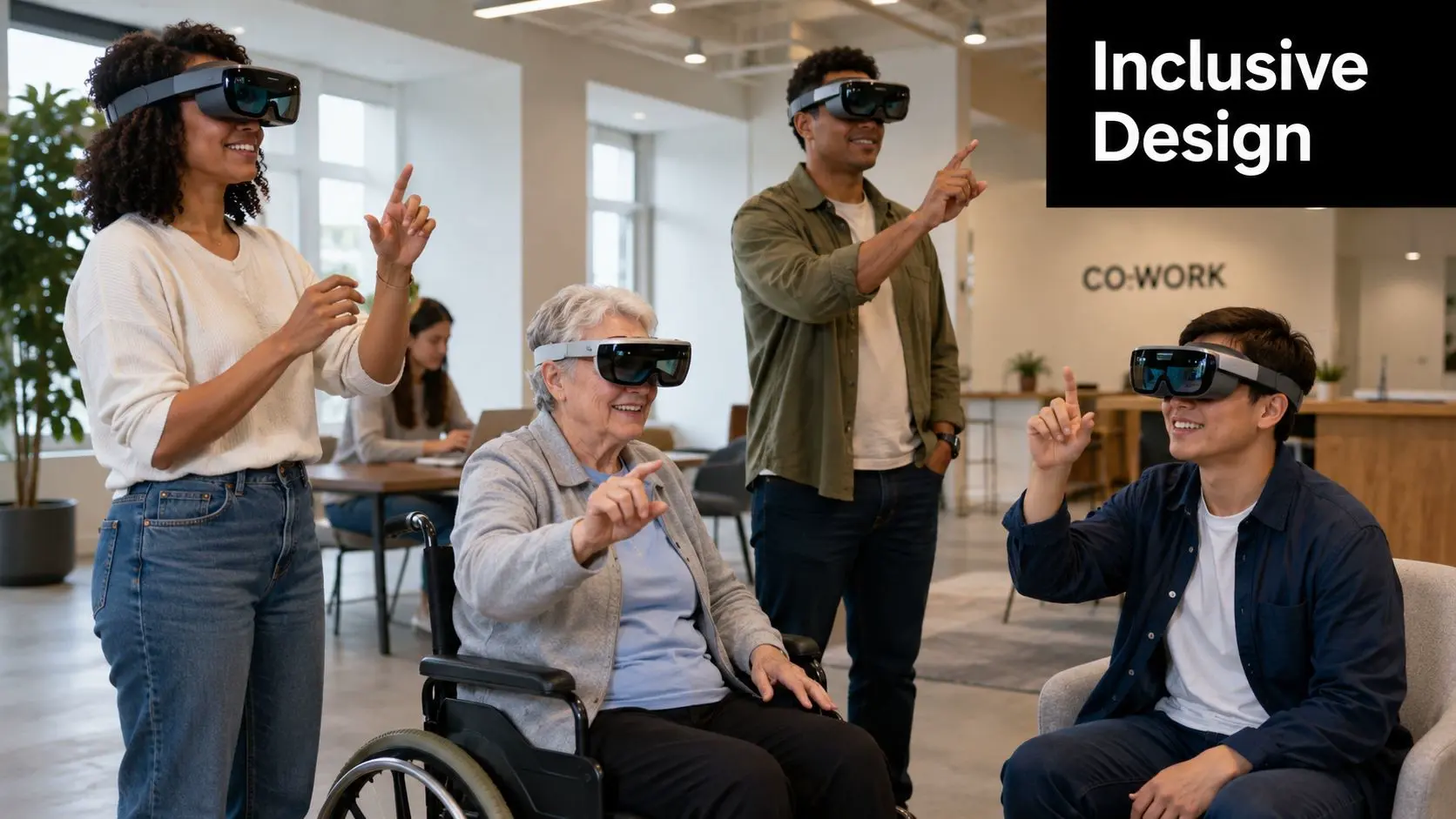
Visual fidelity is only one part of presence
A convincing immersive gaming experience usually depends on a few quieter disciplines working together:- •Spatial audio: Directional sound guides attention, supports navigation, and makes environments feel inhabited.
- •Interaction clarity: Hands, controllers, gaze, and gesture systems need predictable feedback.
- •Haptics and response cues: Physical confirmation helps actions feel intentional.
- •Comfort settings: Snap turn, vignette options, seated modes, and pace control reduce drop-off.
These elements do more for presence than a dramatic render alone. Players forgive stylisation more easily than they forgive confusion.
The moment a user starts asking “what am I supposed to do?” the illusion weakens, no matter how advanced the graphics are.
Accessibility is part of immersion, not an add-on
Accessibility is still under-discussed in immersive production, and that's a serious design gap. Around 2 million people in the UK live with sight loss, and disabled people make up a substantial share of the population, as noted in this discussion of accessibility in immersive design. If an experience depends entirely on visual spectacle, a fixed control scheme, or narrow assumptions about movement and perception, it excludes people by default. Inclusive design improves the product even for users who don't identify as disabled. Better cues, clearer interaction feedback, stronger subtitles, adjustable comfort options, and alternative inputs all reduce friction for everyone. A practical accessibility checklist often includes:
- •Non-visual guidance: Audio cues, haptics, and spatial prompts
- •Flexible controls: Rebinding, seated play, one-handed options where feasible
- •Readable support layers: Subtitle timing, contrast, icon clarity, and paced instructions
- •Sensory moderation: Comfort modes, reduced motion, and manageable stimulus density
The common objection is that these features dilute immersion. In practice, the opposite is usually true. More people can stay in the experience, understand it, and complete it. That's stronger immersion, not weaker.
Design for the real environment
Immersive content doesn't exist in a vacuum. Exhibition halls are noisy. School groups move fast. Venue staff need simple reset flows. Corporate users may be nervous in headsets. Some players are confident with controllers, others aren't. Good design responds to those realities. It doesn't assume ideal conditions. The projects that hold up best are usually the ones that respect cognitive load, physical context, and mixed levels of user confidence from the start.
Measuring Success and Calculating Project ROI
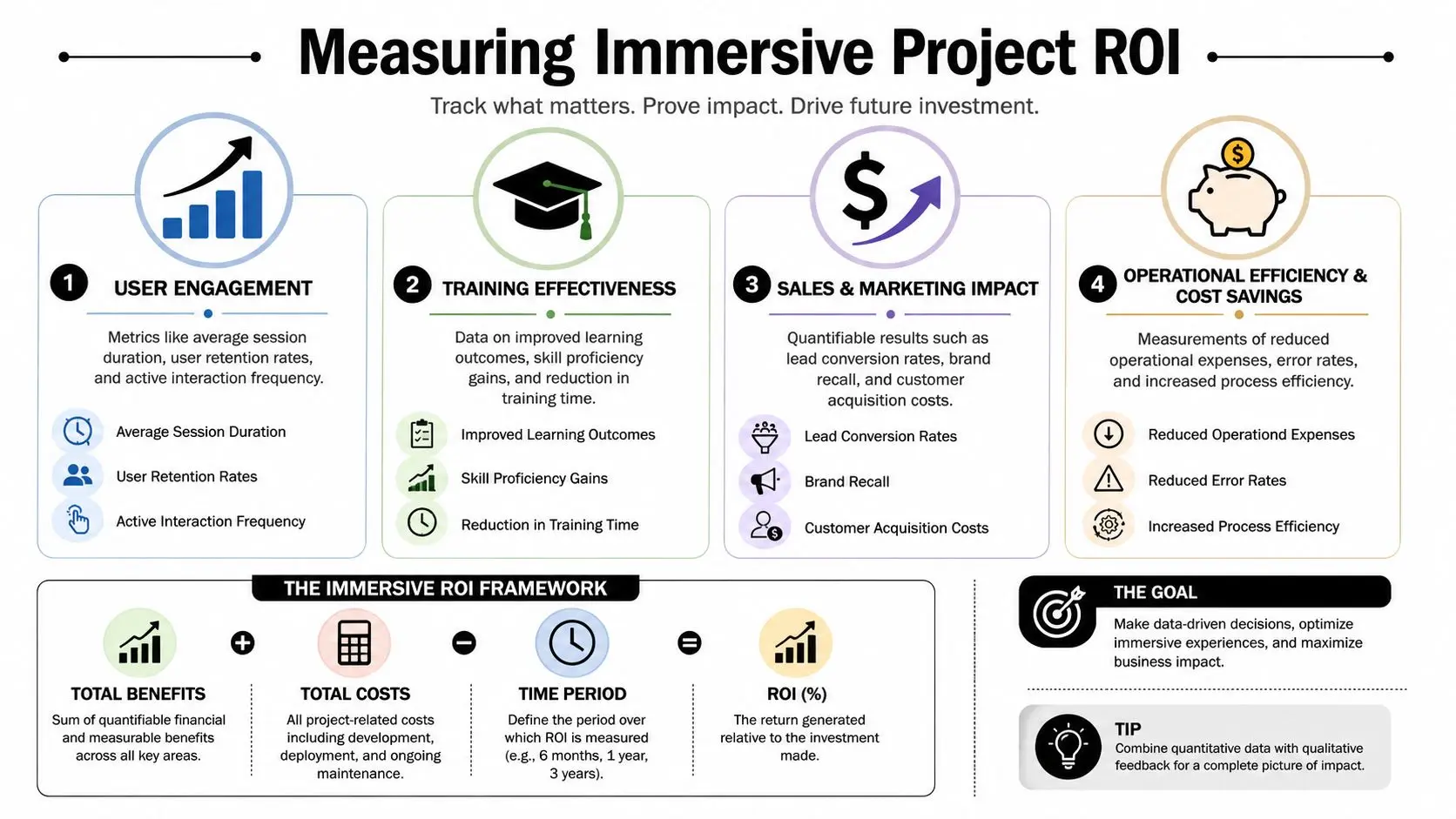
If success is defined as “people liked it”, the project hasn't been measured properly. Immersive work needs a metrics framework before production begins, not after launch. Otherwise teams end up collecting whatever the platform happens to expose rather than the signals the business needs. That's how expensive interactive projects get judged on vague reactions instead of outcomes.
Pick metrics that match the job
Different immersive formats need different definitions of success. For exhibition or retail activations, useful signals often include dwell quality, interaction completion, replay behaviour, staff intervention rate, and whether the experience creates a meaningful next step such as a conversation, scan, or lead capture. For training, I'd look at completion consistency, task accuracy, repeatability, supervisor feedback, and how easily users can move through the scenario without guidance. If the simulation is realistic but hard to operate, the training value drops. For digital products and apps, engagement depth matters more than raw traffic. You want to know whether users understand the loop, return to it, and reach the key moments that justify the build. If your team needs a practical thinking model for turning fuzzy goals into measurable ones, this article on quantifying business results is a useful companion because it pushes you to define what evidence would count.
Physical immersive venues need operational maths
Location-based projects add another layer. The experience itself is only half the equation. Operator economics matter just as much. In the UK, ROI for physical immersive gaming venues depends on factors such as capex, throughput, staffing, and whether the format increases dwell time or repeat visits enough to justify higher operating costs, as discussed in this article on hyper-immersive venue economics. That's the right lens. A venue install that looks remarkable but is slow to reset, hard to staff, or difficult to explain can become commercially awkward very quickly. A practical review should ask:
- •How many people can use it within the operating window
- •How much staff help each session needs
- •How often the system needs reset or support
- •Whether the experience drives an upsell, revisit, or premium ticket logic
Commercial test: If immersion increases complexity faster than it increases usable demand, the format needs redesign.
Build the ROI case before greenlight
ROI becomes easier to defend when the project is tied to a concrete commercial or operational problem. That might be harder-to-explain products, low engagement at a stand, inconsistent training delivery, or a venue need for stronger group participation. For teams looking specifically at the commercial side of spatial content, this guide to AR advantages in ROI, engagement, and efficiency is useful because it frames immersive work around measurable business outcomes rather than novelty. The point isn't to force every outcome into a spreadsheet. It's to know which numbers matter, which observations matter, and what success would have to look like for the project to earn a second phase.
Your First Step into Immersive Production
The phrase “immersive gaming experience” gets used too loosely. In production terms, it means building an experience that earns attention, sustains presence, works comfortably, and supports a real business objective. If any one of those elements is missing, the project usually becomes harder to justify and harder to scale. The practical route in is narrower than many teams expect. Start with the audience context, not the hardware. Define the action you want users to take, not just the atmosphere you want them to feel. Build around one strong interaction loop. Test comfort and clarity early. Treat accessibility as design quality, not compliance. Then measure the result against the specific commercial or operational problem the project was supposed to solve. That approach tends to produce better work because it forces useful constraints. It keeps the team honest about what the format is for. It also reduces a common production failure, which is trying to make immersive content do everything at once. The best projects usually do fewer things, more clearly. If you're early in the process, don't start by requesting a long feature list. Start by answering five questions with your stakeholders:
- Who is the user in the moment of use
- What must they understand or accomplish
- Where will the experience happen
- What would count as success
- What operational reality has to support it after launch
If you're exploring how an immersive gaming experience could work for your brand, venue, training team, or campaign, Studio Liddell can help scope the concept into something buildable. A useful first step is a discovery conversation that clarifies platform choice, production requirements, user flow, and how success would be measured.