What Is Game Engine: A Guide for Modern Studios
You've got a brief for an interactive experience, and the first hard question isn't artistic, it's infrastructural. Before anyone blocks out scenes, rigs characters, or writes logic, someone has to choose the software foundation that will carry the work from prototype to delivery. That foundation is the game engine. A game engine is the reusable software framework that provides the core systems a project needs, such as rendering, physics, animation, audio, scripting, and tooling, so teams don't have to build those parts from scratch Wikipedia's summary of game engine fundamentals. In production terms, that means one engine can help a studio target multiple platforms, keep technical work organised, and spend more time on the experience itself rather than low-level plumbing. For UK teams especially, that matters because engine choice shapes staffing, delivery speed, and how much risk sits inside the pipeline.
A Working Definition for Producers and Creators
A useful way to think about what is game engine is to treat it as the thing that turns raw creative assets into something playable and testable. It's not just a renderer bolted onto a project. It's the production backbone that coordinates the moving parts, from input and scene management to audio, scripting, and editor tools Kindatechnical's overview of layered engine architecture.
What the engine actually does
If you're on a real project, the engine is the space where a model becomes an asset, the asset becomes part of a scene, and the scene becomes something a user can interact with. That is why studios treat engines as foundational infrastructure rather than optional software. A simple viewer shows content. A game engine gives that content rules, timing, interaction, and runtime behaviour.
Practical rule: if a tool can't run a loop, manage scene behaviour, and respond to input in a structured way, it isn't acting like a real engine.
The UK context makes the distinction sharper. The country's games industry generated £7.82 billion in consumer spending in 2023, and that scale helps explain why engine decisions are strategic, not decorative UK industry data cited in the brief. When you're planning games, XR, animation, or training products, the engine sits underneath the whole delivery model. A producer can explain it this way: the engine is the reusable technical layer that lets a team build one interactive product without recreating the same plumbing for every new brief. That's why teams care about it before the first shot, level, or interaction is even designed.
How a Game Engine Is Actually Built
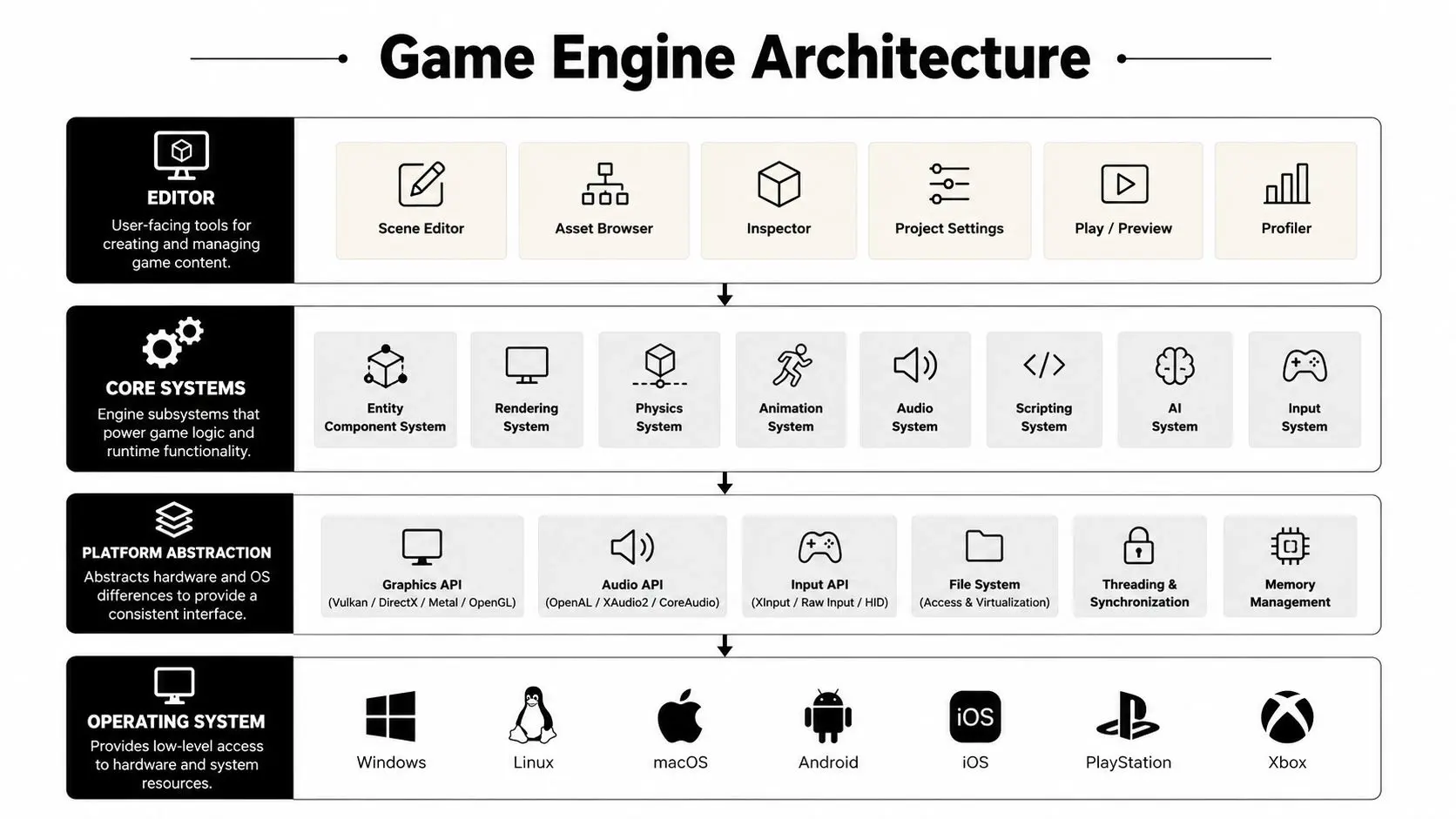
The cleanest mental model is a stack. At the top sits the editor, where artists, designers, and producers work. Under that are the core systems, then platform abstraction, and finally the operating system at the base. That layered structure is what lets a studio work in one environment while the engine handles all the messy differences between platforms and hardware game engine architecture overview.
Why layered architecture matters
A film studio lot serves as a helpful analogy. The editors and creators work in the front office, the core systems are the workshops, and the platform layer is the infrastructure that connects everything to the outside world. Nobody wants to rebuild the lot every time a new production starts, and that's exactly the point of the engine's modular design. Because the engine is layered, teams can isolate changes. If physics needs an upgrade or audio needs a different implementation, those changes can often sit behind interfaces without forcing gameplay code to be rewritten. That reduces integration risk and makes it easier to reuse the same technical backbone across multiple projects game engine architecture overview. The editor also matters more than non-engineers expect. It isn't just a convenience panel. It's the place where workflows become repeatable, which is why engine tooling is so central to production speed. A strong editor lets teams inspect scenes, place assets, tweak behaviours, and test changes without constantly bouncing back into raw code. The historical shift in the UK also makes sense in this context. The launch of the Unreal Engine 3-powered UK DevNet in 2009 reflects the move from isolated, proprietary studio tech toward shared engine platforms with common workflows and local support UK DevNet milestone noted in the brief. That shift matters because modern teams often train, hire, and collaborate around the same engine concepts. For a deeper look at how engine layers connect to graphics workflows, see Studio Liddell's guide to 3D computer graphics.
The Core Systems Every Engine Provides
A real engine is defined by the systems it bundles together, not by one flashy feature. The game loop is the heartbeat, it keeps the project updating frame by frame. The rendering engine turns scene data into visible output, and many engines also provide 2D or 3D graphics support plus physics simulation Gamescrye's explanation of core engine mechanics.
Rendering, physics, and scripting
Rendering is the part producers usually see first. It's the system that handles cameras, lighting, materials, and the final image on screen. In a 3D pitch, that's the difference between a grey blockout and a shot that already feels believable. Physics is the engine's rule-set for motion and collision. It decides whether an object falls, bounces, rests, or collides in a way that looks plausible. In XR, that can affect how a user reaches for a virtual object. In games, it affects whether interactions feel solid or broken. Scripting is the layer that lets designers and developers define behaviour without rebuilding the engine itself. It's where the rules of a level, a character, or an interaction live. That separation matters because it lets content teams change behaviour without touching the deepest engine code.
Animation, audio, and the asset pipeline
Animation drives rigs, characters, and creatures. Audio shapes the spatial feel of a scene, especially in real-time work where sound often needs to follow the user's position. The asset pipeline is the intake system, models, textures, data, and other files come in, get processed, and become usable inside the project.
The best engine teams don't ask whether one subsystem is “good enough”, they ask whether the full package is stable enough for content to move through it without friction.
That's why a game engine is more than an asset viewer or code library Gamescrye's baseline definition. It's the combination of systems, loop, rendering, simulation, input, and tools, that makes real-time production possible.
Unity and Unreal at a Glance
The Unity versus Unreal question usually comes up too late, after a team has already assumed the answer is about visuals alone. It isn't. The choice comes down to the kind of production you're running, the team you have, and how much pipeline complexity you can support.
| Criterion | Unity | Unreal Engine |
|---|---|---|
| Render quality | Strong across many real-time use cases | Known for high-fidelity, cinematic output |
| Scripting | C#-based workflows suit many app and XR teams | C++ and Blueprint workflows suit deeper technical and cinematic builds |
| Tooling | Broad ecosystem and mature asset workflows | Strong real-time and production tooling |
| Team fit | Often a fit for smaller teams and cross-platform work | Often a fit for teams pursuing high-end visual output |
Unity tends to suit projects where platform reach, mobile deployment, and fast iteration matter. Unreal tends to suit projects where visual fidelity, cinematic presentation, and real-time storytelling are the priority. Neither engine wins by default.
How producers should read the choice
Think about the team first. If your artists, technical artists, and developers already know one engine, that knowledge has real value. Switching engines can slow early delivery, even if the target result looks better on paper. Think about the pipeline next. Some projects want a lighter production setup and quick iteration. Others need the kind of tooling that supports more complex lighting, animation, or sequence work. That's where the engine decision starts to intersect with schedule and staffing, not just creative ambition. For a producer-level comparison, Studio Liddell's Unreal versus Unity guide for real-time animation is a useful reference point.
Where Engines Are Used Beyond Games
Once you stop thinking of engines as game-only tools, the picture opens up fast. Real-time engines now sit inside XR experiences, virtual production, animation pipelines, and interactive brand content because the same core systems can be recombined for different outputs.
XR and immersive work
In XR, the engine often runs the whole experience, from user input to spatial interaction. A headset project needs rendering, scripting, asset handling, and performance discipline all at once. That's why engine choice affects comfort and stability, not just visuals.
Virtual production and animation
In film and broadcast-adjacent workflows, engines can support layout, lighting previews, and real-time previz. Teams use the engine as a visual decision-making space before final shots or renders are locked. That makes the engine a planning environment as much as a delivery environment.
Interactive brand apps and exhibitions
For brands, exhibitions, and retail experiences, the engine becomes a configurable interaction layer. Product demos, configurators, and immersive stand pieces all depend on fast scene updates and reliable input handling. Studio Liddell's overview of VR, AR, and MR applications across industries shows how broad that real-time reuse can be. The important point is that the same engine systems are being used differently, not rebuilt from scratch. A studio may use one engine for a location-based installation, another for an animation previz pass, and another for an interactive training prototype, but the production logic stays recognisably the same.
The Commercial Side of Engine Choice
For UK studios and agencies, engine choice is usually a staffing and licensing decision before it's a technical one. That's because the UK games industry includes a large number of very small businesses, 87% of UK game businesses were micro-sized and 96% had 50 or fewer employees in the figures provided in the brief ARM's glossary entry on gaming engines. In that kind of market, the wrong engine choice can make hiring harder, outsourcing messier, and delivery slower.
What small teams feel immediately
A small team feels every tool decision. If an engine doesn't fit the skills already in the room, the project starts paying for that mismatch in onboarding time and specialist hires. If a contractor pool is thin, the studio may end up locked into a narrower set of delivery options. Licensing matters too. Even when the engine itself is technically excellent, its commercial model can shape how comfortable a studio feels taking on work with uncertain scope. A good producer doesn't ask only whether the engine can do the job. They ask whether the team can carry it through to completion without blowing up the budget or the schedule.
Rule of thumb: the best engine is the one your team can actually staff, support, and finish with, not the one that looks most impressive in a trailer.
That also affects outsourcing compatibility. A studio that works with external animators, technical artists, or developers needs a shared engine workflow that won't fracture every time an asset changes hands. For UK firms working across games, XR, and branded content, engine choice can shape who can join the production cleanly and who can't.
How Studio Liddell Puts Engines to Work
In a working studio pipeline, engines aren't separate from production, they're where production happens. Unity and Unreal can sit inside the same broader workflow for animation, XR, and interactive content, with rigs, scenes, and assets moving through the engine as part of delivery rather than as an afterthought.

The practical pattern is simple. Assets are prepared, assembled in-engine, tested in context, and then handed over as a client-ready output. For XR work, that may mean tuning performance for headset delivery. For animation and interactive pieces, it can mean using the engine as the place where layout, timing, and playback are validated. AI-assisted workflows fit inside that same pipeline. They're most useful when they support asset generation, layout decisions, or QA checks, not when they sit outside production as a novelty layer. The engine remains the backbone, and AI becomes one more assistive tool inside it. That's the important operational lesson. Modern real-time teams don't treat the engine as a toy or a technical curiosity. They treat it as the place where creative intent becomes something testable, playable, and deliverable.
Choosing an Engine for Your Next Project
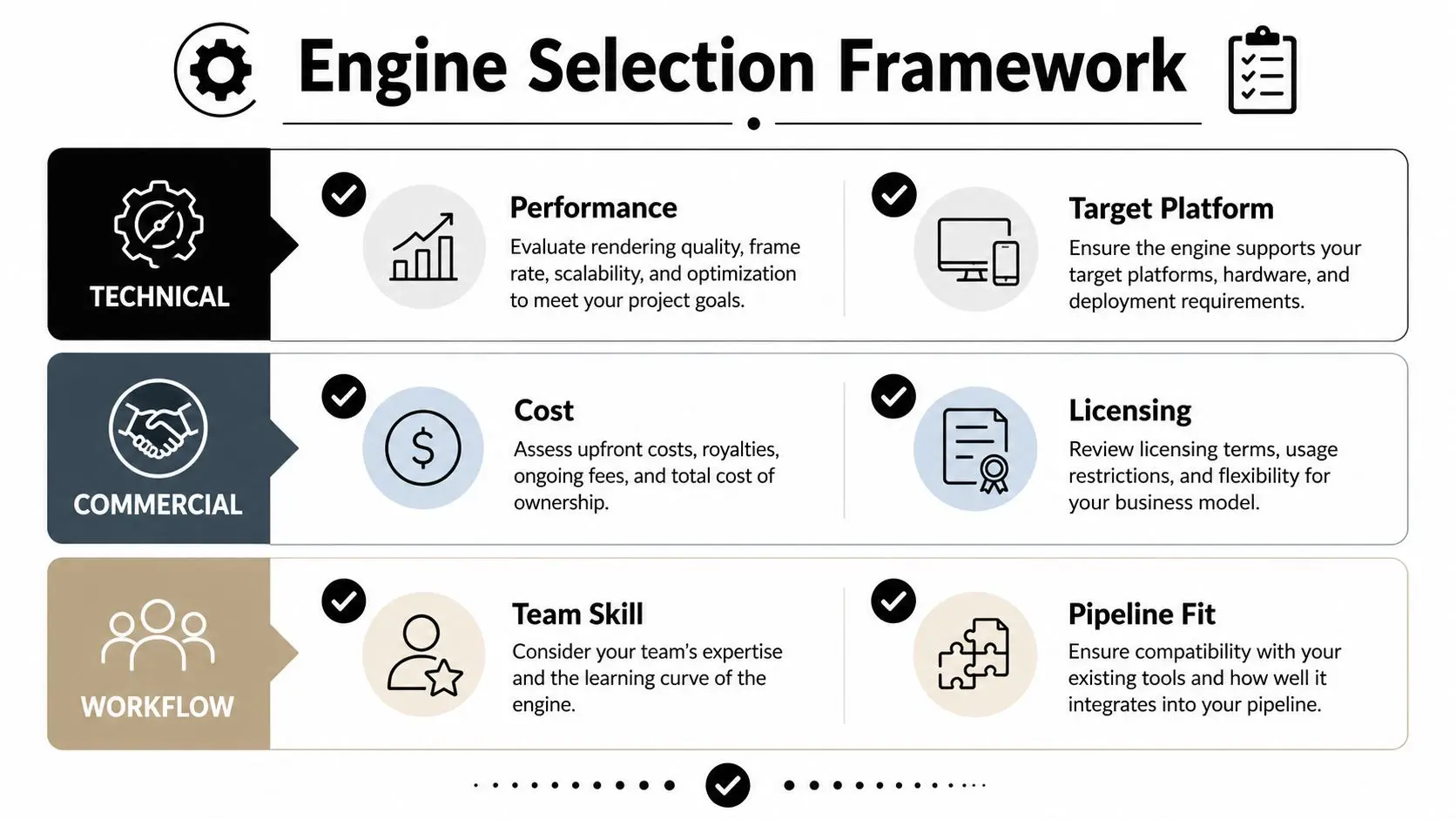
Start with the target platforms, the visual bar, and the team skills you already have. Then weigh the commercial model, the hiring pool, and how easily the engine will fit your asset pipeline and any AI-assisted workflows you plan to use. If you're commissioning interactive content, the right question isn't “which engine is best”. It's “which engine can this team ship with, maintain, and support without creating avoidable risk”.
--- If you're planning an interactive, animation, or XR brief and want a practical read on engine fit, Book a production scoping call with Studio Liddell.