Virtual Production vs Green Screen: Cost, Time and Control
UK virtual production took USD 288.5 million in revenue in 2025, and Grand View Research projects the domestic market reaching USD 1.2642 billion by 2033. A market that grows that fast is telling you the technology works. It isn't telling you which setup to book for the scene in front of you. The two setups stopped competing on image quality a while ago. They compete on where the decisions land: which choices get locked before the first take, and which stay open until the edit. That's a budgeting question, a crewing question and a schedule-risk question, and it's the one worth working through.
Virtual Production vs Green Screen at a Glance
Green screen separates the performer from the place. The actor stands in front of a uniform chroma backdrop and the environment arrives in compositing weeks later. Virtual production inverts that arrangement: computer-generated locations are displayed on LED walls while the camera rolls, so lighting, reflections, parallax and camera movement all respond in real time. A 2022 study cited by the University of York found that 40% of UK and US industry executives were already using virtual-production tools, with a further 50% expecting to adopt them within 18 to 24 months. That adoption curve makes the comparison a live production decision rather than a speculative one. The table below sets out where the two routes clearly diverge.
| Factor | Green screen | Virtual production (LED stage) |
|---|---|---|
| Background | Uniform chroma-keyed green or blue screen | Computer-generated environment shown on LED walls |
| Lighting | Added in post, actors lit for key and fill only | Real-time light from the display falls on actors and props |
| Reflections and parallax | Recreated in compositing | Captured in camera during the take |
| Actor reference | Imagined from markers and previs | Visible on set during every take |
| Camera movement | Flexible, tracked in post | Tracked live and must match the stage geometry |
| Final image settled | After the shoot, in post | Largely on set, during the shoot |
Read down the rows and neither column dominates. Green screen does best when the environment has to stay fluid until the edit, when coverage is high, or when the shot will be rebuilt anyway. LED virtual production does best when the camera, the light and the reflection have to agree in the same frame on the same day. Each row gets unpacked in the sections on workflow, cost, technical requirements and creative control. Treat the table as typical practice rather than fixed law, because plenty of productions run both setups inside one schedule, using a volume for the shots that need interactive light and a keyed stage for everything else.
How Each Workflow Runs from Prep to Final Image
The key production choice is when to settle the image. Green screen leaves more decisions for post-production; an LED wall requires more of the environment to be ready before the shoot. That shifts schedule risk between stages.
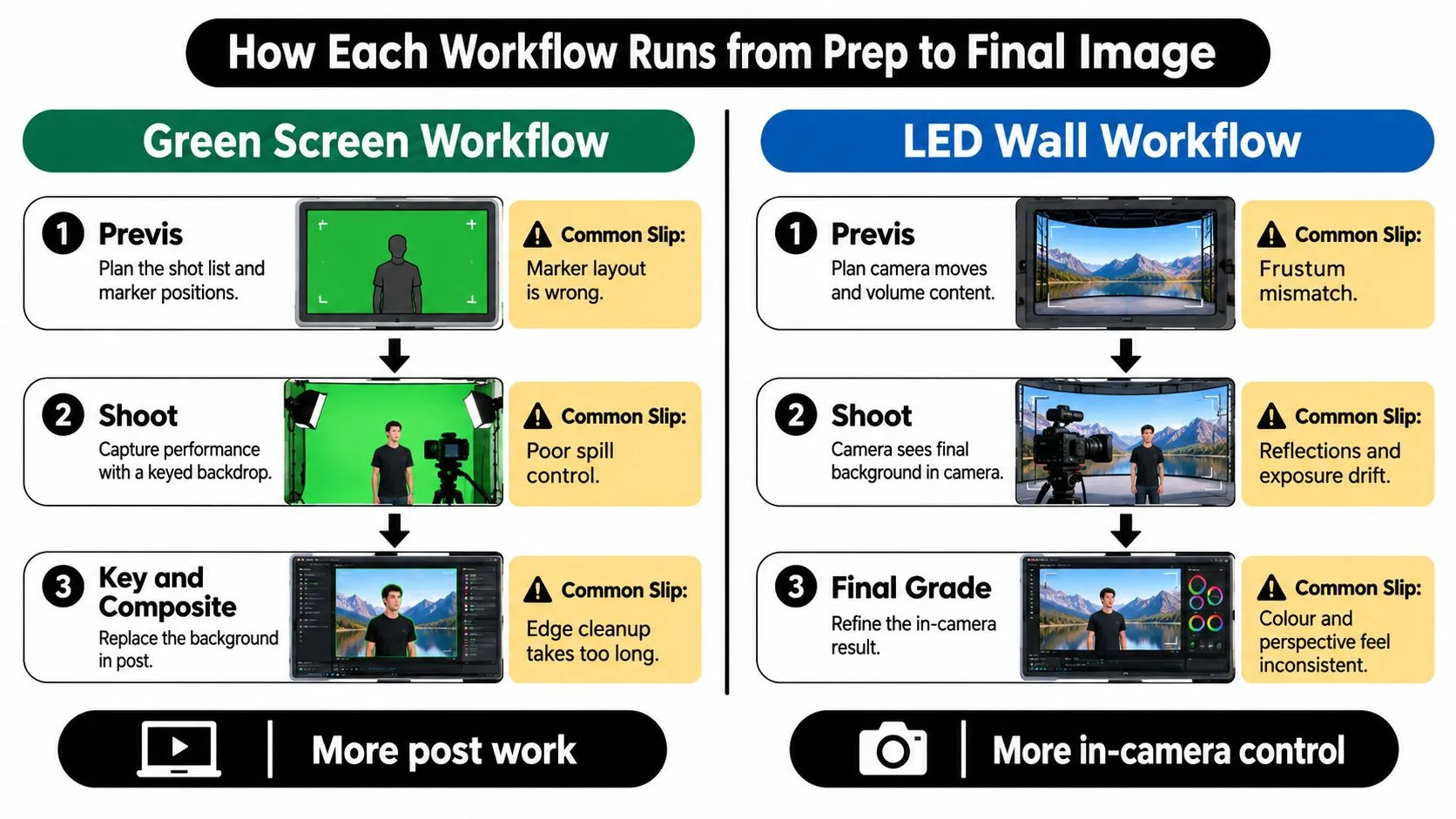
Green screen, stage by stage
- Plan the shot list and marker positions. Place tracking markers where talent will not obscure them. If the camera cannot track enough markers, the solve may need extra work in post.
- Shoot against an evenly lit backdrop. Light the screen separately from the talent and keep the subject far enough forward to limit green spill. Spill in hair or skin can add hours of keying and cleanup.
- Key the footage and solve the camera move in post. The compositor creates a matte, tracks the camera and prepares the plate. Fine hair, glass and semi-transparent wardrobe often need careful edge work.
- Build and add the environment. Add a set, matte painting or CG environment behind the plate, then match its grain and lens characteristics to the footage.
- Match lighting and grade the composite. Add the light, bounce and shadow needed to connect the subject to the background. These choices remain open longer, but they also create more post-production work.
LED wall, stage by stage
- Build or license a real-time environment in Unreal Engine or Unity before the shoot. The visible scene needs to be at the right real-world scale. A street that looks convincing on a monitor may feel too narrow when the tracked camera moves.
- Optimise the scene for the wall's resolution and frame rate. Shaders, foliage, crowds and volumetrics may need reducing to keep the engine synchronised. Assets designed for offline rendering may also need adjustment.
- Set up camera tracking and sync the frustum to the wall. The engine uses the camera's lens position, orientation and field of view to make the background respond to the move. Tracking or calibration errors can affect the image on set.
- Calibrate the wall's colour and brightness against the practical lights. The display casts light onto talent and props, so its appearance needs to work with the fixtures on the floor.
- Shoot with live reflections and parallax. The background responds to the lens during the take, so camera movement and the visible environment are judged together on set.
- Clean up and finish in post. Seams, moiré, exposure drift and elements the wall could not render may still need correction. Some environments may use AI-generated assets, making it useful to pick the right model for ads before committing to a shoot.
Cost, Time and Location Savings Compared
Virtual production shifts expenditure from location work and post-production towards digital preparation and stage time. Whether that lowers the total depends on which decisions are settled before the shoot and whether the assets are ready when the stage is booked.| Cost driver | Green screen | LED virtual production | Where the difference shows |
|---|---|---|---|
| Location travel, permits and accommodation | Often needed for real locations | Reduced when the environment is built on stage | Pre-production and location days |
| Set construction | Physical sets may still be needed for some shots | A digital set can be built once and reused across scenes | Art department and build schedule |
| Stage and equipment | Standard studio hire | LED volume hire or capital, plus specialist crew | Daily stage rate |
| Asset creation | Clean-up and compositing take place in post | Real-time engine environments are prepared before the shoot | Pre-production and post hours |
| Shooting days | Can run long when composites are complex | May fall when the set is ready and tracked | Total shoot days, depending on the scenario |
Budgeting the two routes per scene
Compare the routes scene by scene, with preparation costs and shoot-day assumptions visible.- Baseline the green screen plan. Count shooting days, crew travel, set-build materials, stage hire and post hours for each scene.
- Cost the LED alternative. Include volume hire, asset creation, technical crew, and tracking and calibration time.
- Compare like with like. A volume day that replaces several location days may reduce total spend. One that replaces a studio day may not.
Technical Requirements and Crew for Each Setup
The equipment list is only half the decision. Each setup fixes different choices before the shoot, shifting risk between preparation, crew availability and post-production.Green screen requirements
A green-screen stage needs enough floor space to hang the backdrop and leave clearance for the camera and booms. Light the screen evenly and separately from the talent to limit colour spill. Moving cameras also require tracked markers on the floor or screen, plus a post-production pipeline for keying, tracking and compositing. The crew is smaller on set, with more work falling to compositors and VFX artists after filming. That keeps some creative decisions open, but makes post capacity part of the schedule.LED volume requirements
An LED volume needs room for the wall and for camera movement within it. Camera tracking must match the wall geometry, while a real-time engine such as Unreal Engine or Unity runs assets prepared for the display's resolution and frame rate. The shoot typically adds LED operators, a virtual production supervisor and real-time technical artists to the camera and lighting crew. Those roles bring more decisions into preparation. The environment, tracking and engine build need to be ready before filming; late changes can affect the schedule and require specialist crew. The UK's virtual production expertise is still being built project by project rather than solely through formal training routes, as written evidence to the Culture, Media and Sport Committee describes. Studio Liddell develops game-engine-based projects using Unity and Unreal for a range of platforms. For an LED shoot, the engine project needs an owner, version history and build schedule, so changes can be managed before they reach the stage. This guide to virtual production equipment for creative studios covers the equipment involved. Before committing, get four answers in writing:- •Are the assets built and optimised for the wall? Incomplete work puts the shoot schedule at risk.
- •Has tracking been calibrated and tested with the actual lens? A lens change can require recalibration.
- •Who owns the engine project after delivery? Unclear ownership can complicate reshoots and reuse.
- •How many post hours remain? An LED volume reduces some compositing work, but does not remove the need for finishing.
Post-Production and Creative Control Differences
Take a car commercial where a skyline has to travel across the bodywork as the camera tracks past. On an LED wall that reflection is a physical event, recorded in camera, and it lands on the panel exactly where the lens sees it. On green screen a compositor invents it, and a client notices immediately when it slides off the panel across a moving shot. Now take a dialogue scene shot against a plain backdrop where the environment will be swapped for three different locations in the edit. The keyed stage costs less, and the change is free right up to delivery. Neither setup is better. They suit different scenes.
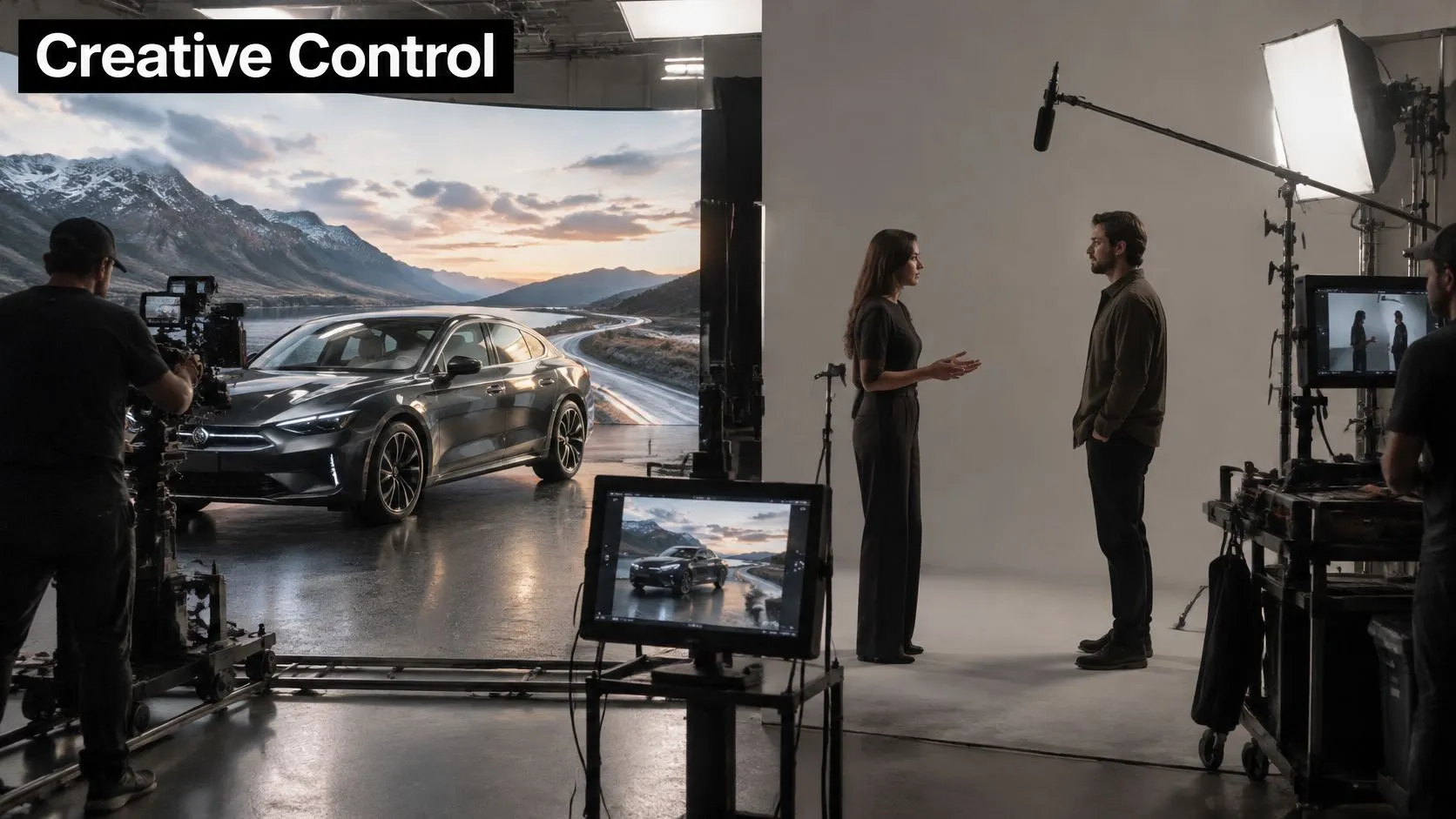
What each setup decides, and when
Green screen hands post a long list of small problems: edge treatment, hair, glass, semi-transparent fabric and shadow anchoring. That work keeps the shot flexible, and it can run heavy on a close-up with movement. On an LED stage the director judges the finished frame on the monitor, the actor reacts to something visible, and the composite is largely decided before lunch. The trade is that a change after the shoot is harder, because the set was committed in pre-production.
Three failures and their fixes
- Moire from the wall. Fine patterns in the display beat against the sensor pixel grid. Fix it through shutter angle and settings, and by choosing wall pixel pitch against the camera's resolution and the distance the talent stands from the screen.
- Colour mismatch between wall and talent. The display's colour temperature drifts from the practical fixtures and the actor reads as pasted in. Fix it by calibrating the wall against the lights and checking wardrobe against the display, not only against a monitor.
- Edge halos on green screen. Spill in hair and shoulders survives a careless key. Fix it with screen distance, negative fill and a deliberate clean-up pass before the shot is signed off.
The decision is locked where an element must be right in camera, and stays open where post can change it cheaply. Everything else is preference.Our producers' guide to real-time VFX covers the pipeline side of that trade in more depth.
Choosing the Right Setup and Your Next Steps
A setup decision is also a commitment decision: it determines which visual elements must be settled before filming and which can stay adjustable in post. Choose LED virtual production when the scene depends on perspective-sensitive reflections, interactive light or a compressed schedule. Green screen is often the better fit for high-volume coverage, limited interactive lighting or environments expected to change substantially in post. The case for virtual production rests on potential production efficiencies, not just replacing a backdrop. A UK production model identified shorter schedules, smaller crews, reduced travel and fewer generators as possible sources of savings. It calculated reductions of up to 97% across the production types it modelled, a scenario-based result rather than a measured benchmark, as described in the White Rose Research repository's virtual production study.| Production type | Lean towards | Deciding factor |
|---|---|---|
| Commercials with brand environments | Virtual production when reflections or product surfaces must read on camera | Reflections and lighting need to be established in camera |
| Episodic TV with recurring locations | Virtual production | Reusable environments can serve multiple episodes |
| Drama with high-volume coverage and heavy post | Green screen | Many setups, with limited need for interactive lighting |
| XR and immersive experiences | Virtual production or a real-time pipeline | Unity or Unreal assets may be reused |
| Training and explainer footage | Green screen | Environments can be finalised in post |
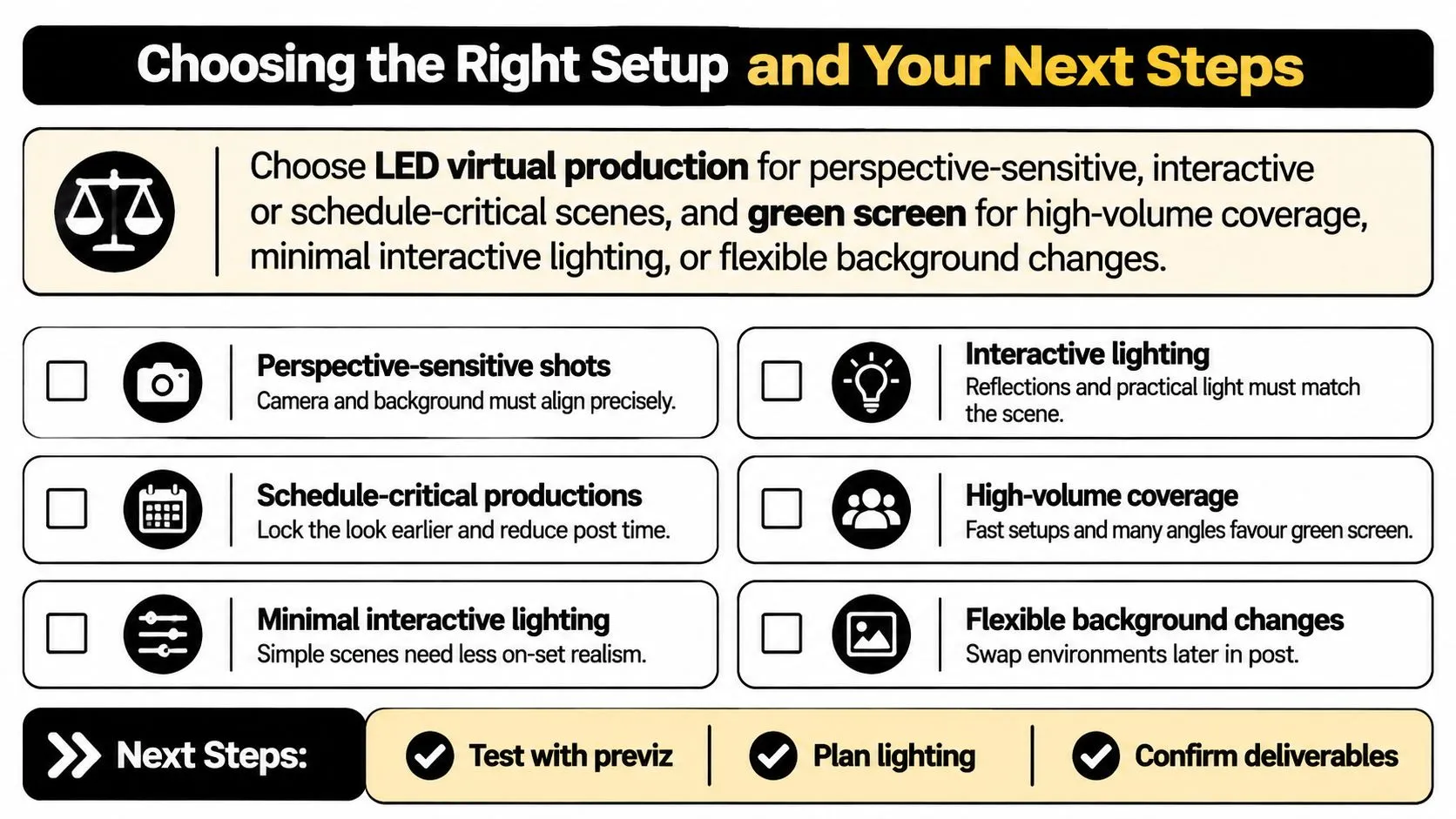
Four questions that settle the call
- Does the scene need perspective-correct reflections or interactive light? If so, these elements need to be planned for the shoot. Post-production can approximate them, but that may require additional compositing work.
- Will the same environment serve several scenes or episodes? Reuse can spread the cost of building a digital environment across more than one scene.
- Is the schedule tight enough that fewer physical shoot days matter? With more time available, the schedule advantage of a volume may carry less weight.
- Can the production staff the stage or hire the required skills? Without a virtual production supervisor, the volume's technical setup can add cost and coordination time.
What to track before you book
Start with the scene list. Mark scenes requiring interactive light or perspective-correct reflections, then compare the options scene by scene. Track shooting days, overtime, render and compositing hours, travel mileage, generator fuel, LED-stage electricity use and the share of digital assets reused across deliverables.Before you book: compare the highest-risk scenes under both setups. That shows whether the virtual production savings are likely to justify committing to the environment and stage before filming.The environmental case also depends on how a production is run. An Ulster University report estimates potential emissions reductions of 20% to 50% or more, depending on deployment, while noting that comparisons need to account for LED-volume electricity, real-time rendering, hardware manufacture and disposal, and cloud services. Its analysis of virtual production and emissions highlights why the result depends on the production. Reusable environments, low-carbon electricity and avoided travel can strengthen the case; moving the same crew to a volume without reducing travel may not. Asset reuse also matters for XR. When a production already has assets in Unity or Unreal, those assets may serve both an LED shoot and a headset experience. Studio Liddell uses VR technology to create digital experiences and increase customer engagement, and its work includes game-engine-based projects using Unity or Unreal. The practical question is whether one asset build can support several deliverables. Studio Liddell's UK-based animation services are available to clients worldwide. Its work spans animation, immersive media and interactive experiences, including XR projects. For a project involving real-time or animation assets, consider how the chosen pipeline will serve different delivery formats and territories, rather than assessing the shoot in isolation. Send Studio Liddell your brief and scene list for advice on an XR, real-time or animation approach suited to the project. The guide to choosing a virtual production company offers further considerations for evaluating production partners.