Choosing Virtual Production Companies
You’ve been told to make something ambitious. A campaign film that looks bigger than the budget. A branded spot that needs multiple locations without the travel bill. A launch piece that has to feel premium, fast, and somehow less risky than a conventional shoot. Then the vendor calls start. LED volume. Unreal. Unity. ICVFX. Camera tracking. Volumetric capture. Suddenly you’re not buying production. You’re buying a technical ecosystem. That is where clients go wrong. Most buyers don’t fail because virtual production is too complex. They fail because they let a supplier define the problem for them. They get sold a stage, not a solution. They hear feature lists instead of production logic. If you want a useful grounding before you speak to vendors, start with this practical guide to what virtual production is for modern creatives. The right virtual production company can give you tighter creative control, fewer location headaches, stronger on-set decision-making, and a cleaner route to final pixels. The wrong one will burn time in prep, confuse departments, and hand you a post-production mess wrapped in expensive jargon. Choose the partner, not the spectacle.
The Virtual Production Promise and Its Pitfalls
A good virtual production setup lets your director, DP, agency team, and client see the image taking shape on set instead of arguing about it weeks later in post. That is the promise. Better visualisation. Faster approvals. Fewer ugly surprises after the shoot. The pitfall is simple. Virtual production is not a magic trick that fixes weak planning. It punishes vague briefs, indecisive stakeholders, and crews that have not worked together in real time. I’ve seen buyers focus on the wall because the wall is easy to understand. Big screens impress people. They photograph well in pitch decks. But the wall is rarely the reason a job succeeds. A key determinant is whether the company can connect creative intent, colour workflow, tracking, content creation, and on-set change control without chaos.
Tip: If a vendor talks at length about hardware before asking about your shot design, approval chain, and post tolerance, you are in a sales conversation, not a production conversation.
The best virtual production companies simplify decisions. They tell you when not to use LED volumes. They separate scenes that belong in-camera from scenes that should stay in previs, greenscreen, or conventional VFX. They help you spend money where it changes the frame. That is what you should buy. Judgment.
Defining Your Project Needs Before You Start
If your brief is fuzzy, every proposal will look “strategic”. Fix that first.
Start with the frame, not the technology
Ask the question buyers often avoid. What must the audience believe when they watch this? If the answer is photoreal scale, your vendor needs strong environment builds, lighting integration, and disciplined colour management. If the answer is stylised spectacle, you may be better served by a lighter real-time pipeline and a sharper art direction process. Write down the essential requirements:
- •Creative outcome: Do you need realism, graphic stylisation, product precision, or a hybrid of live action and animation?
- •Shot priority: Which moments need to feel final on set, and which can tolerate later polish?
- •Performance needs: Are you filming presenters, actors, products, stunts, or all four?
- •Reuse value: Will these digital assets need to reappear in sequels, social cut-downs, event content, or interactive work?
Most over-spend starts when clients try to make every shot a virtual production shot. Don’t do that. Ring-fence the shots where in-camera feedback improves the result.
Define your operational constraints
A virtual production company cannot protect your schedule if you hide your internal bottlenecks. Use a simple internal brief with these prompts:
- Approvals
- •Who signs off environments?
- •Who signs off colour?
- •Who can approve on set without escalating every decision?
- Technical delivery
- •What are your final delivery formats?
- •Do you need broadcast-safe output, social versions, localisation, or stills from the same assets?
- Production reality
- •Are there wardrobe materials, reflective products, or fast camera moves that could complicate LED capture?
- •Does your team expect remote review during prep or on the shoot day?
- Post-production tolerance
- •How much cleanup can your post team realistically absorb?
- •Are you trying to avoid post complexity, or are you comfortable finishing there?
Tie it to business outcomes
Buyers often talk about “innovation” when they mean one of three things:
| Business goal | What it usually means in practice | What to ask vendors |
|---|---|---|
| Faster launch | Fewer location changes and quicker approvals | How do you structure approvals before shoot day? |
| Lower production risk | Better previs and fewer unknowns on set | Where do you test failure points before the stage day? |
| Better asset value | Reusable environments and content variants | What reusable assets will we own at handover? |
If you do this homework, the conversation changes. You stop asking virtual production companies what they offer. You start asking whether their process fits your job.
Key takeaway: A good brief for virtual production is not “we want LED”. It is “we need these shots, this level of realism, this approval model, and this degree of post dependency.”
Evaluating a Company’s Technical Stack and Capabilities
Most vendors can name the tools. Fewer can explain why their stack suits your production. That distinction matters.
A useful benchmark starts long before the wall powers on. According to the Pomfort interview with Peter Canning, successful LED volume implementation starts with early pre-production consultation, early DP involvement for Techvis planning, and tools such as Pomfort’s Livegrade Studio for real-time colour grading on set. UK studios using that approach report significant reductions in post-production VFX costs. That should shape how you evaluate the stack. Don’t ask only what they own. Ask how they prep. If you want a grounding in the kit itself, this overview of virtual production equipment for creative studios is a useful reference.
LED volume quality is about fit, not bragging rights
A wall can be technically impressive and still wrong for your job. What matters is whether the vendor can explain how the LED setup supports your framing, lensing, movement, and subject matter. A product shoot with controlled camera moves is one thing. A live-action sequence with reflective surfaces, wide lenses, and talent moving through interactive light is another. Ask about:
- •Pixel pitch and viewing behaviour: How close can camera and talent get before the image breaks down or introduces unwanted artefacts?
- •Brightness and colour control: Can the wall serve the shot and the lighting plan, not just the background?
- •Stage geometry: Does the volume shape support your blocking, or will it force compromised camera positions?
- •Ceiling and floor strategy: Are they solving reflections and interactive lighting properly, or leaving those problems to post?
A serious vendor answers in relation to your shot list. A weak one answers in generic marketing language.
Real-time engine choice should follow production needs
Unreal and Unity are both capable. The question is not which logo appears in the proposal. The question is which team knows how to build, optimise, and revise content in the chosen engine under production pressure. Engine choice affects:
- •Visual style
- •Asset pipeline
- •Revision speed
- •Interactive complexity
- •How comfortably the vendor can support your specific workflow
If a studio pitches an engine because it is fashionable rather than because their artists and supervisors use it fluently, expect friction. One practical example. A studio such as Studio Liddell works with Unity and Unreal across animation and XR production, which is relevant if your project crosses from filmed content into interactive or immersive outputs. That matters if you plan to reuse environments beyond a single shoot.
Tracking and colour workflows separate professionals from enthusiasts
Tracking and colour workflows separate professionals from enthusiasts. Many buyers stop asking questions at this point because the jargon gets dense. Don’t stop. You need to know whether the company can maintain image integrity while the camera moves, the background updates, and the DP judges exposure and colour in real time. In the same Pomfort interview, Peter Canning describes integrating Livegrade Studio with Brompton Tessera Processors for real-time LUT control and metadata capture, with the DP leading colour decisions on set. That is a production workflow, not a gadget demo. Ask vendors to walk you through:
| Capability area | What good looks like | Warning sign |
|---|---|---|
| Techvis | Camera, lens, movement and scene planning happen before stage day | “We’ll work it out on the day” |
| Colour management | DP and DIT control LUTs and image balance in a defined workflow | Colour decisions drift between departments |
| Metadata capture | Takes are logged cleanly for downstream use | No clear handoff to post |
| Tracking integration | Camera movement aligns reliably with rendered content | They avoid specifics and rely on showreel clips |
Tip: Ask who owns colour on set. If the answer does not clearly include the DP and DIT, the workflow is probably undercooked.
Ask how they handle the ugly bits
Every vendor will show polished frames. Ask about failure modes instead. Probe these areas:
- •Frame rate mismatches
- •Motion blur handling
- •Asset optimisation
- •Remote review of heavy files
- •Last-minute scene changes
- •Backup plans when tracking or render performance slips
Competent virtual production companies have a defined answer for each. They have trained the departments around those answers. Technical capability is not the possession of gear. It is the repeatable ability to get the image you need, at the pace your production requires, without improvising the core workflow under pressure.
Assessing Production Workflows and Team Expertise
A premium stage with a weak team is an expensive way to discover avoidable mistakes. Buyers often underweight this part because hardware is visible and staffing is not. That’s backwards. The people running the workflow determine whether your project feels controlled or chaotic. The labour market tells you why this matters. The ARwall article citing UK Screen Alliance data states that 68% of UK virtual production firms face acute shortages in AI and game engine specialists. It also notes that 22% of graduates are trained in real-time tools, and projects can face 15 to 20% delays on average when the skills gap bites. That is not a side note. It is a buying criterion. A useful companion read is this producer’s guide to real-time VFX, especially if your internal team needs help framing the right technical questions.
Vet named people, not just the company reel
Ask who will be on your job. You want to know the experience of the:
- •Virtual Production Supervisor
- •Unreal or Unity artists
- •DIT
- •Tracking lead
- •Technical producer
- •On-set operator managing scene updates
A polished reel proves the company has participated in good-looking work. It does not prove the assigned team can run your production. Ask for role-specific credits and ask what those people did. “Worked on” is not enough. You need “owned tracking setup”, “managed colour pipeline”, “supervised content optimisation”, or “ran on-set revisions”.
Workflow maturity beats improvisation
A mature virtual production company can describe its process in operational terms. Listen for answers to questions like these:
- •How are 3D assets ingested, tested, and approved before stage time?
- •What happens when the director requests a scene change on set?
- •How do art department, camera, lighting, and post coordinate before the shoot?
- •Who has final call when creative ambition conflicts with real-time performance?
If those answers sound informal, your budget is funding experimentation.
Key takeaway: The best teams remove uncertainty in prep. They do not glorify solving predictable problems on the day.
Training is not a nice-to-have
Virtual production sits across cinematography, VFX, game engines, data handling, and post. Any studio that treats training as optional will eventually make your job the classroom. Ask directly:
| Question | Why it matters |
|---|---|
| How do you train staff on engine updates and on-set workflows? | Tools evolve quickly. Old habits break pipelines. |
| How do you retain key technical staff? | Continuity matters when jobs get complex. |
| How do you onboard freelancers into your workflow? | Freelance-heavy crews need process discipline. |
| What parts of the pipeline are fully in-house? | Outsourcing critical steps can slow approvals and obscure accountability. |
Good vendors answer without defensiveness. They know the talent shortage is real, and they have built around it.
Navigating Pricing Models Contracts and IP
Buyers usually ask “what does a virtual production shoot cost?” too late and too vaguely. The better question is “what exactly are we buying, what can change the spend, and what do we own at the end?”

According to the ARwall stage design article, fully adopting a virtual production pipeline for indie-to-corporate shoots can deliver up to 60% cost savings and 40% timeline compression. It also states that 35% of UK productions encounter failures from suboptimal planning, with 20 to 30% rework caused by issues such as mismatched frame rates or ignoring stuntvis. The lesson is obvious. Savings come from planning discipline, not from hiring a stage and hoping the economics sort themselves out.
Understand the pricing model before you compare quotes
Virtual production companies usually price work in one of three ways.
Day-rate driven: This typically combines stage hire, crew, and technical operation. It can work for tightly scoped shoots with well-resolved prep. It becomes dangerous when the content is still fluid. If the creative is not locked, you can burn expensive days solving problems that should have been fixed earlier.
Fixed project fee: This suits campaigns or productions with defined deliverables, clearer approval routes, and a known asset scope. The risk sits in the assumptions. If the proposal hides vague language around revisions, content complexity, or shoot contingencies, “fixed” may not stay fixed.
Hybrid model: This is often the most sensible structure. Prep, asset creation, and testing are scoped as project phases. Stage days and optional overages sit separately. That model usually gives the cleanest view of where costs belong.
Watch the hidden lines in the budget
The quote is rarely the whole budget. Check for these items:
- •Techvis and pre-production days
- •3D environment or asset creation
- •Optimisation for real-time playback
- •Tracking calibration and testing
- •Data wrangling and handoff
- •Revision rounds for environments and lighting
- •Remote review support
- •Versioning for multiple outputs
If a proposal feels cheap, it may be incomplete.
Tip: Ask the vendor to label every line as either pre-production, production, post handoff, or optional contingency. That exposes gaps fast.
Nail down IP before any asset build starts
Clients often lose long-term value by neglecting this aspect. If the vendor creates digital environments, props, characters, or configurable scenes for your job, your contract should state:
| Contract point | What to clarify |
|---|---|
| Asset ownership | Do you own the final assets, license them, or share rights? |
| Reuse rights | Can you use assets in future campaigns, events, stills, or interactive work? |
| Source files | Which working files are included at handover? |
| Third-party elements | Are any purchased assets or plugins subject to separate restrictions? |
| Confidentiality | How may the vendor reference your project in reels or marketing? |
If you expect reuse, negotiate that up front. Retrofitting rights after the asset exists is harder and usually more expensive.
Define handover in plain language
Do not accept vague promises about “all final files”. Specify what you expect:
- •Final renders or edits
- •Real-time project files where agreed
- •LUTs and colour metadata where relevant
- •Asset packages and naming conventions
- •Documentation for reuse or post continuation
- •Clear notes on any licensed third-party dependencies
A virtual production engagement should leave you with more than a finished film. It should leave you with usable production value.
Your Practical Vetting Checklist and RFP Questions
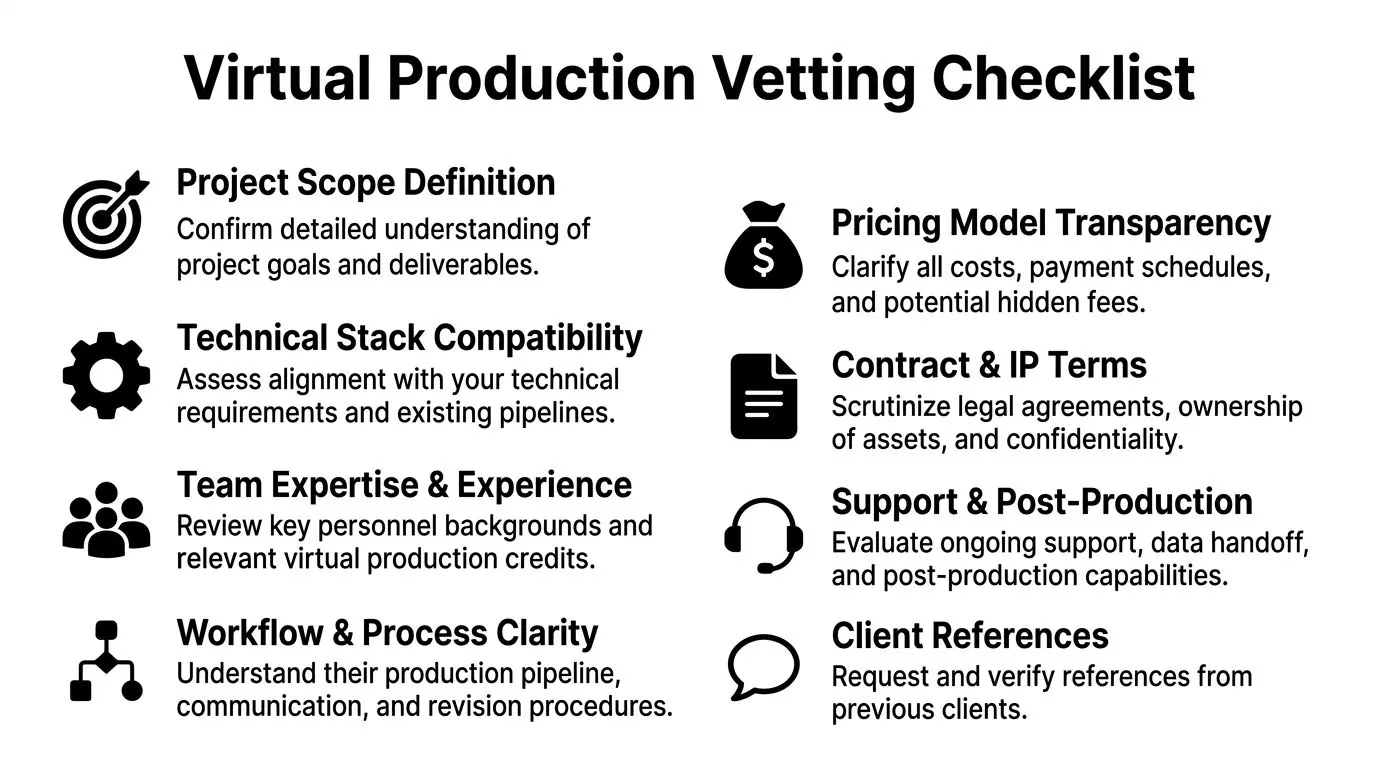
Most buyers need a way to compare vendors without getting seduced by presentation polish. Use a scorecard. Keep it blunt.
The shortlist scorecard
Assess each of the virtual production companies you’re considering against these criteria:
- •Project fit: Do they understand the actual problem, or are they forcing your brief into their favourite setup?
- •Technical suitability: Does their stage, tracking, colour workflow, and engine capability match your production needs?
- •Named team quality: Have you seen the people, not just the logo, who would run the job?
- •Workflow clarity: Can they explain approvals, revisions, testing, and on-set issue handling without hand-waving?
- •Commercial transparency: Are scope, overages, handoff, and contingencies clearly defined?
- •IP position: Will you retain useful rights in the assets you are paying to create?
- •Post-shoot support: Can they support downstream edits, localisation, or asset reuse?
If you want a broader procurement lens while building your process, these actionable vendor management best practices are worth reviewing. They map well to complex creative-tech suppliers where accountability and scope control matter.
Questions that expose the truth fast
Ask these in the first serious meeting. On prep and planning
- •Walk me through your pre-production process from brief to Techvis.
- •Which shots would you advise not doing in virtual production, and why?
- •At what point do you lock environments, camera data, and colour workflow?
On technical execution
- •How do you manage LUTs, metadata, and image review on set?
- •What happens if tracking drifts or scene performance drops during a take?
- •How do you test assets before they reach the stage?
On team capability
- •Who is my day-to-day technical decision-maker?
- •Which roles are in-house and which are freelance?
- •Tell me about a production where the brief changed late. How did your team contain the disruption?
On commercial terms
- •What costs are not included in this proposal?
- •What do we own at the end?
- •What is the process for approving change requests?
Key takeaway: Good vendors answer directly. Weak vendors answer theatrically.
A lean RFP structure
Keep your RFP tight. Include:
- Project summary
- Creative references
- Required deliverables
- Technical constraints
- Approval stakeholders
- Desired handover assets
- Timeline
- Request for itemised pricing
- Request for named team and relevant credits
- Request for risk assumptions and exclusions
That document will do more to improve proposal quality than any amount of vague “innovation partner” language.
Final Thoughts on Finding Your Ideal Production Partner
Choosing between virtual production companies is not a hardware decision. It is a judgment decision. You are looking for three things. Technology that fits the job. A team that can execute under pressure. Commercial terms that protect the value you’re creating. Miss any one of those and the shiny demo stops mattering. The strongest partner will probably be the one who challenges your assumptions early, narrows the use case, and insists on prep discipline. That is not resistance. That is competence. If a company can translate your business objective into a clean production plan, explain its workflow without theatre, and define ownership without games, you are close to the right fit. Virtual production works best when the relationship is strategic, not transactional. Buy the thinking. The tools follow.
Frequently Asked Questions About Virtual Production
Is virtual production only suitable for large film or TV projects
No. It can work for advertising, branded content, product storytelling, corporate films, and hybrid live-action projects. The deciding factor is not project size alone. It is whether real-time visualisation, controlled environments, or reusable digital assets improve the outcome.
When should I engage virtual production companies
Early. Bring them in during concept and pre-production, not after the creative is effectively locked and the schedule is already squeezed. Early involvement improves planning around shot design, colour workflow, environment builds, and technical risk.
Is virtual production always cheaper than a traditional shoot
No. It is cheaper when it replaces expensive location complexity, reduces downstream VFX burden, or creates reusable assets. It is more expensive when clients force unsuitable shots into the pipeline or underinvest in prep.
What is the biggest mistake first-time buyers make
They buy the spectacle. They focus on the wall, not the workflow. The result is usually poor planning, unclear ownership, and too many on-set decisions happening too late.
What should I ask for in a final handover
Be explicit. Agree final edits, approved renders, any agreed real-time project assets, colour information where relevant, and documentation for reuse. If you expect to repurpose environments or scenes later, put that in the contract before production starts.
How is this different from a greenscreen shoot
Greenscreen pushes more integration decisions into post. Virtual production brings more of those decisions forward into prep and the shoot itself. That can improve confidence and speed, but only if the vendor has a disciplined process.
If you're weighing virtual production companies and want a grounded conversation about scope, workflow, and reusable digital assets, Studio Liddell is one option to consider for animation, real-time production, and XR-linked content development. Book a production scoping conversation and start with the shots, the team, and the commercial reality.