Virtual Production Unreal Engine Workflows
You've approved the concept, booked the stage and assembled a production team. Then the first camera move exposes the problem. The background shifts with the lens, the LED refresh conflicts with the shutter, an asset arrives without the right colour pipeline, and nobody can say whether the Unreal Engine operator or the VFX supervisor owns the fix. That's the reality behind virtual production with Unreal Engine. The LED wall is visible, but the difficult work sits underneath it: accurate tracking, predictable rendering, disciplined asset preparation, clear crew responsibilities and a pipeline that survives contact with a real schedule. UK demand is growing, yet workforce readiness and workflow design still determine whether a stage delivers value or becomes an expensive demonstration.
Rethinking the Traditional Film and TV Pipeline
A green-screen shoot often begins with confidence and ends with a long list of unanswered questions. The director knows the scene takes place in a storm-battered harbour, the cinematographer lights the performers against green, and the actors perform while looking at marks and imagining the horizon. Only later does the team discover that the eyeline, lens choice, reflections and light direction don't agree with the finished environment. Virtual production changes the order of those decisions. An LED wall displays the digital environment behind the performers, while Unreal Engine renders the scene in real time and adjusts its perspective as the camera moves. The director can judge the composition through the lens, the cinematographer can see how the environment affects the subject, and performers have a tangible setting rather than a colour field. The benefit isn't that every shot becomes final without further work. The benefit is that the team makes better decisions earlier, with more of the relevant information visible on set.
The final pixel becomes a production tool
Traditional visual effects separate photography from environment creation. That separation remains appropriate for many shots, particularly where digital characters, complex simulations or extensive set extensions are involved. A real-time stage instead brings selected environment work into the shooting day, using in-camera visual effects to capture a more complete image during principal photography. This affects practical filmmaking. A warm digital sunset can cast colour onto skin and costume. A moving background can support an actor's performance. A reflective object can respond to the displayed world instead of requiring a carefully controlled replacement later. The crew still needs to monitor exposure, colour, reflections and continuity, but they can assess those issues while the scene is in front of them.
Practical rule: Use the stage to make creative decisions earlier, not to pretend that post-production has disappeared.
The UK's practical guide to real-time VFX for producers is useful for framing that shift. The core question isn't whether Unreal Engine can display an impressive world. It's whether the production has chosen the right shots, prepared the right assets and assigned the right people to control them.
Where the traditional approach still works
Green screen remains effective when the background needs to change substantially in post, when the camera position is highly constrained, or when the production already has a mature compositing pipeline. It can also be more efficient than building a real-time environment for a brief insert. Virtual production earns its place when lighting interaction, reflections, parallax and on-set creative control matter enough to justify the preparation. The strongest productions don't treat the two methods as rivals. They allocate each shot to the pipeline that handles its creative and technical demands most reliably.
Core Components of a Real-Time Stage
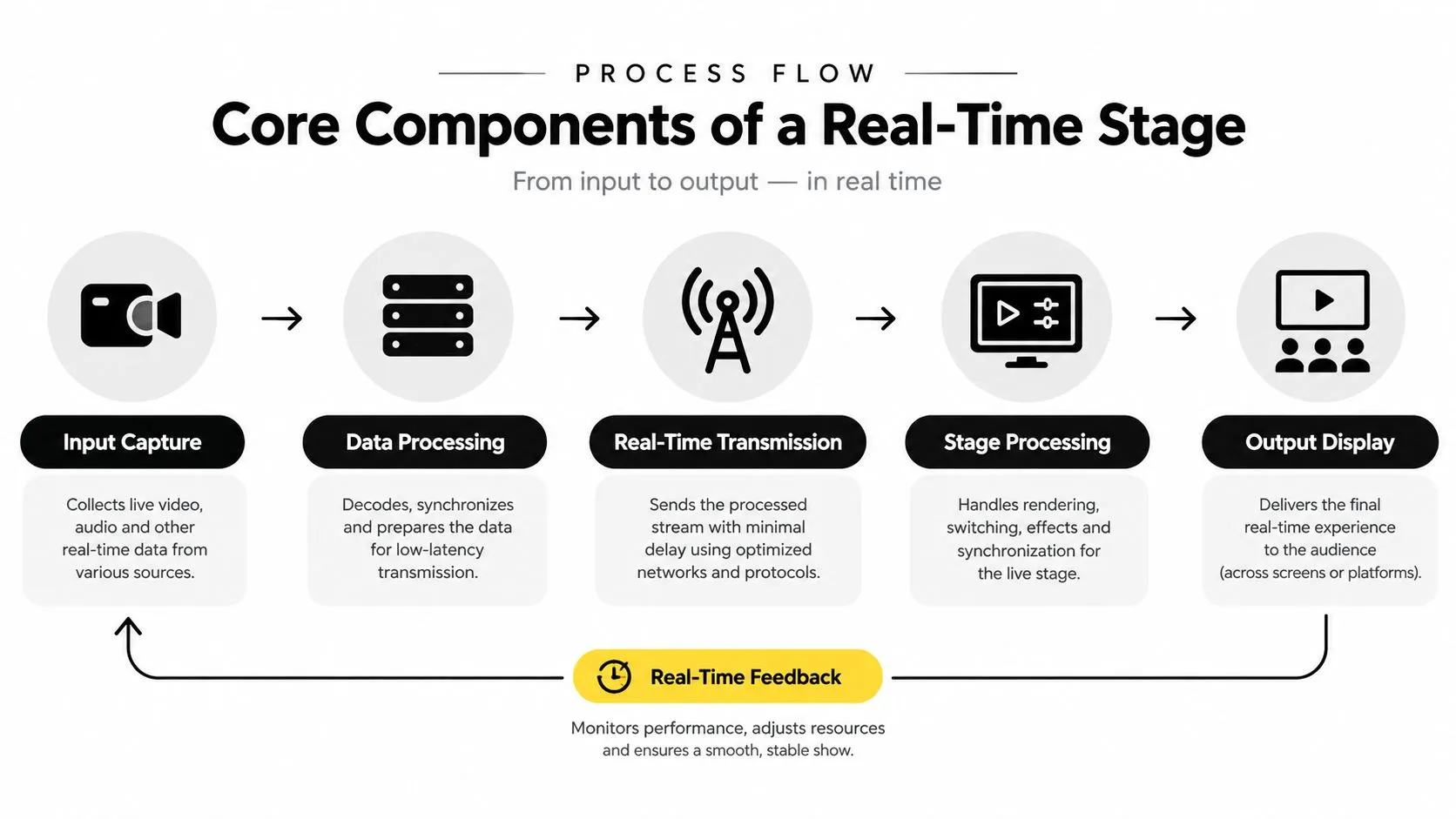
A real-time stage works as a chain. The camera supplies positional data, Unreal Engine uses that data to render the correct view, and the display presents the result at a speed and quality that the camera can capture. Break one link and the illusion weakens.
Start with the camera
Camera tracking measures position, rotation and, depending on the system, lens information. The tracking system sends that data to the engine so the virtual camera matches the physical camera. If the physical camera pans or moves closer to the LED wall, Unreal Engine updates the rendered background to preserve the correct perspective. That perspective shift is parallax. It's what makes a foreground object appear to move differently from a distant mountain as the camera travels. Without reliable tracking, the background behaves like a flat picture and the audience notices the mismatch quickly. Lens calibration matters just as much. Focal length, focus distance, sensor information and lens distortion affect the relationship between the physical camera and the virtual scene. A tracking system can report movement accurately, yet the background can still feel wrong if the lens profile is incomplete or inconsistent.
Let the engine render the view
Unreal Engine holds the digital set, materials, lighting, animation and environmental effects. It receives tracking data, calculates the camera view and sends the output to the display system. The scene must be built with the target camera, resolution and frame rate in mind. A beautiful asset that runs poorly on the chosen render hardware is a production risk, not a finished solution. Teams should also decide which elements need to respond live. A static environment may need only camera perspective updates. A scene with animated weather, interactive lighting or moving vehicles demands more careful performance management and testing.
Treat the display as part of the lighting system
An LED wall is not just a large monitor. Its colour output, pixel pitch, brightness, refresh behaviour and physical curve affect what the camera records. The wall also becomes a practical light source, which can be valuable for interactive illumination but can expose colour inconsistencies across panels. Projection can be a sensible alternative for some environments and camera plans. It may offer a different balance of scale, brightness and surface flexibility, though it introduces its own calibration and image-quality constraints. The virtual production workflow guide for studios makes the operational point clearly: the stage must be designed around the shot, not assembled as a generic technology package. Test the camera, tracking, engine output and display together before the shoot. A reliable result comes from the complete system, not from any individual component.
Market Growth and Industry Adoption
The UK has moved beyond treating virtual production as a niche experiment. A 2022 Department for International Trade-backed estimate identified 40 virtual production stages of all levels nationwide, including 12 feature-film-level stages, with 10 of those in London. The figures appear in the UK virtual production skills report, which also describes the workflow as a combination of real-time game-engine technology, including Unreal Engine, camera tracking, LED screens, motion capture and in-camera visual effects. That infrastructure gives producers more options, but availability doesn't automatically make a project viable. A stage still needs the crew, pipeline and preparation to use it effectively. The UK evidence points to a market that is expanding while its operating model is still being formed.
Adoption has moved into major production
A UK government evidence pack on creative-industry R&D states that the UK screen industries more than doubled in size from 2017 to 2021, with production spend rising from £2.2 billion to £5.6 billion and projected to reach £7.3 billion by 2025. The same evidence pack records Unreal Engine use in virtual production across more than 550 major motion pictures and episodic TV shows. These figures are documented in the UK creative-industry R&D evidence pack. The important point for UK producers is not that every production should adopt an LED volume. It's that Unreal Engine has become a recognised part of professional screen pipelines while the surrounding market has expanded. That creates a credible basis for investment in skills, partnerships and reusable digital assets.
Scale creates a smaller-studio question
Large studios can absorb specialist roles, dedicated technical teams and repeated stage use. Smaller companies need a more selective model. They may use a stage for a defined sequence, combine virtual production with location photography, or develop assets that support several deliverables. A skills report found that half of surveyed virtual-production organisations expected their VP turnover share to double or more within three years, while 42% said only 1 to 10% of current turnover came from VP at the time of the survey. Those findings suggest strong expectations, but they also show that many organisations were still building their commercial base. The opportunity is real, but producers should judge readiness by delivery capability rather than market enthusiasm.
Hardware and Software Integration Requirements
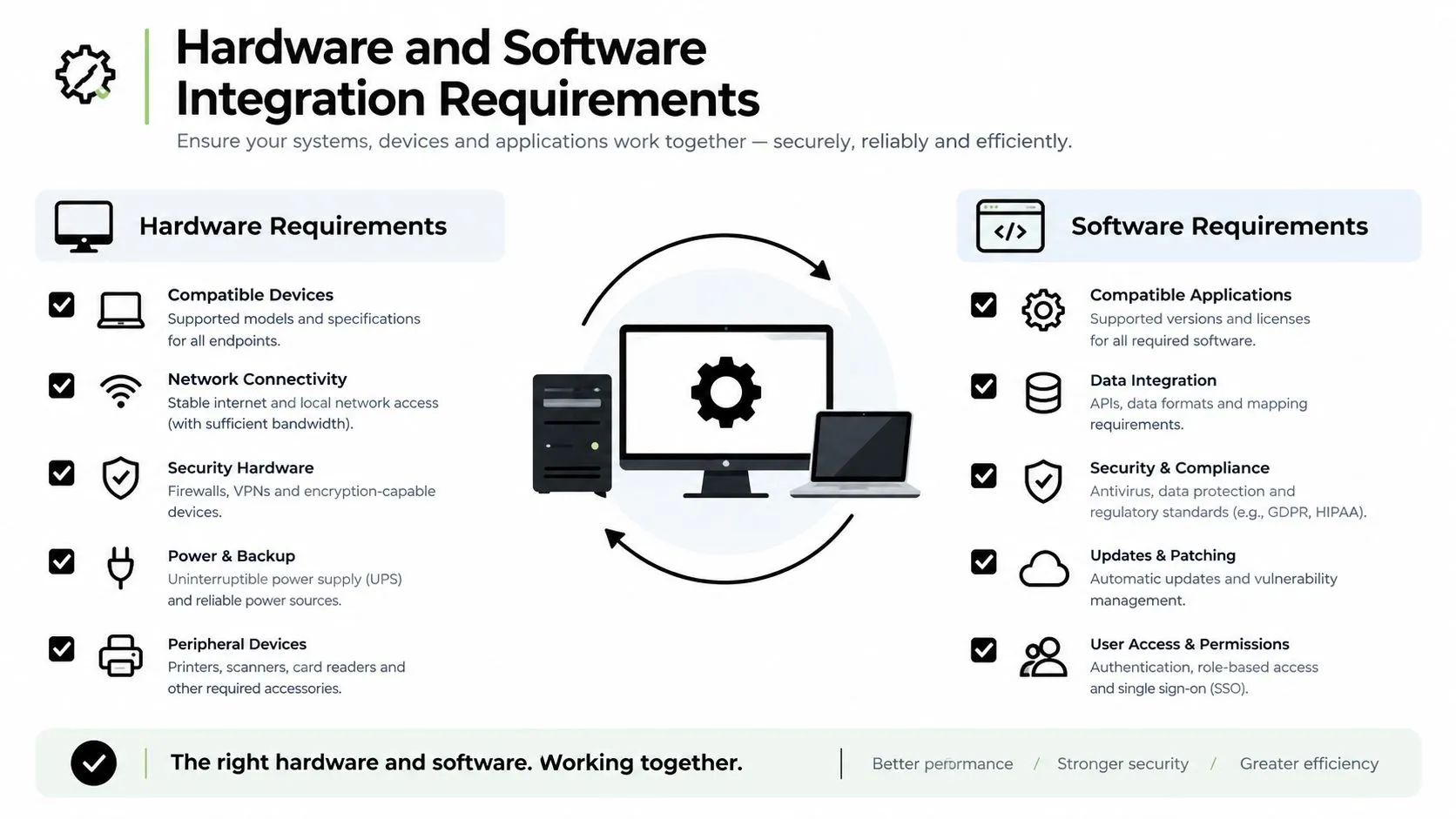
The difference between a convincing stage and a fragile setup usually appears in integration. A basic system can display an Unreal Engine environment. A broadcast-ready system must maintain dependable timing, colour, tracking, rendering and monitoring across a complete camera pipeline.
Compare the system by production consequence
| Component | Basic setup | Broadcast-ready requirement |
|---|---|---|
| Rendering | A workstation renders a controlled scene for a limited camera plan. | Render capacity is planned around the scene, camera output and required frame rate, with monitoring for performance headroom. |
| Tracking | Position data supports simple movement. | Calibrated tracking, lens data and repeatable alignment support demanding camera work. |
| Display | An LED or projection surface presents the environment. | The display is calibrated for colour, brightness, refresh behaviour and camera capture. |
| Networking | Devices exchange data on a small local network. | The pipeline has tested routing, synchronisation and clear recovery procedures. |
| Monitoring | The operator watches the engine output. | The team monitors camera image, tracking quality, render performance, colour and display artefacts. |
Render capacity needs a plan
Unreal Engine performance depends on scene complexity, materials, lighting, virtual geometry, effects and output requirements. Render nodes can distribute work, but adding hardware doesn't repair an unoptimised scene or an unstable data path. Technical artists should profile the environment with the intended camera and movement rather than relying on a still-frame test. Use level-of-detail strategies, sensible texture sizes, controlled effects and clear asset naming. Keep a versioned project so the stage team can identify which change introduced a performance problem. A live stage rewards discipline because every frame arrives on a deadline.
Synchronisation protects the image
The camera shutter and the LED wall's refresh behaviour must work together. Poor timing can produce scanlines, flicker or other artefacts that may not appear on a production monitor but become obvious in the recorded image. Genlock, timecode, camera settings and display configuration need to be tested as one system. The same applies to colour. The wall should be assessed through the camera, not only by eye. Exposure, white balance, wall brightness and practical lighting all influence the result, while reflective surfaces can reveal small inconsistencies. The equipment guide for creative studios is a useful reference point for assessing the stack. The correct question isn't whether a supplier can list powerful hardware. Ask whether the team can calibrate, operate and support the complete workflow under shooting conditions.
Overcoming Workforce and Pipeline Bottlenecks
Buying an LED wall doesn't create a virtual production capability. It creates a physical resource that still needs Unreal Engine operators, tracking technicians, technical artists, VFX supervision, production design and a crew that understands how their decisions affect one another. UK research on small production studios identifies workflow barriers rather than purely creative barriers. Micro and small companies need customized pipelines, clearer role definitions and training. The national skills research also highlights gaps in on-the-job learning, cross-department communication and shared terminology. These findings are set out in the UK research on virtual production for micro and small companies.
The operator is part of the creative department
An Unreal Engine operator isn't just a person pressing buttons during a take. The operator manages scene states, camera views, playback, lighting changes and live adjustments while maintaining communication with the director and cinematographer. If the role is added late, the production may discover that nobody owns the transition between creative intent and technical execution. The same problem appears in asset preparation. A modeller may build an environment that looks excellent in a still image but performs poorly in real time. A lighting artist may create a mood that doesn't survive the LED's brightness range. A production designer may specify surfaces that create distracting reflections. The pipeline must connect those decisions before the stage day.
The real bottleneck is not access to technology. It's the shortage of people who can connect creative decisions to a dependable technical pipeline.
Build communication into the schedule
Small teams benefit from a shared vocabulary and explicit handoffs. Define who approves assets, who signs off tracking, who controls the engine, who calls a technical reset and who owns the recorded output. Run a technical rehearsal with the actual camera, lens, display configuration and representative scene. Recent UK coverage of dedicated virtual-production courses and bootcamps shows that institutions are still developing routes into the discipline. That's a positive sign, but it also confirms that workforce readiness remains an active industry problem. Producers should budget time for training and rehearsal instead of treating them as optional extras.
Calculating ROI and Production Timelines
Virtual production moves cost rather than just removing it. More money and decision-making often arrive earlier, in environment design, asset optimisation, tracking tests, technical rehearsals and stage preparation. The return comes when those investments prevent location moves, reduce uncertainty on set and limit the amount of background reconstruction required later. A useful evaluation starts with the shot list. Mark scenes that need controlled lighting, repeatable environments, difficult locations, reflections, weather or rapid creative changes. Then compare the cost of building and operating the actual real-time setup with the cost of travel, location control, practical construction, post-production compositing and likely revisions.
Follow the work, not the marketing claim
The strongest business case usually appears across several departments:
- •Production design: A digital environment can be adjusted without rebuilding a physical location, provided the asset has been prepared for the intended camera.
- •Cinematography: The DP can judge the relationship between background, lens and subject during photography rather than waiting for a composite.
- •Post-production: In-camera results can reduce background replacement and compositing dependency, although clean-up, integration and additional VFX may still be required.
- •Scheduling: A controlled stage can reduce location uncertainty, but asset development and rehearsal must be included in the plan.
- •Commercial delivery: Reusable environments may support multiple versions, though reuse only pays off when the assets are organised, documented and technically maintainable.
The UK animation financing model illustrates why timing discipline matters in adjacent production businesses. Broadcaster funding can typically represent 10 to 25% of the total budget before a production company seeks the remaining project funding, and the process is described as typically taking at least 18 to 24 months in this UK animation financing reference. Those figures shouldn't be transferred directly to virtual production budgets, but they show why producers need a complete financing and delivery plan before committing to technical scope.
Traditional versus virtual production timelines
| Production Phase | Traditional Pipeline | Virtual Production Pipeline |
|---|---|---|
| Development | Script, design and location planning establish the visual approach. | Script, design and technical feasibility are developed together. |
| Pre-production | Green-screen plans, practical locations or set builds are tested. | Digital environments, tracking, lens data and stage configuration are tested. |
| Photography | The team captures foreground action and records references for later integration. | The team captures foreground action against a tracked, rendered environment, with in-camera interaction where appropriate. |
| Post-production | Compositing and background creation carry more of the environment work. | Post-production refines captured material and completes shots that still need additional VFX. |
| Delivery | Editorial and VFX dependencies can continue late into finishing. | Earlier decisions can reduce uncertainty, provided the stage and asset pipeline performed as planned. |
The decision should be based on total production risk, not the headline day rate of a stage. A cheaper shoot can become expensive if the team lacks the skills to use it.
Studio Liddell and End-to-End Delivery
Virtual production succeeds when creative development, digital asset creation, technical testing and final delivery operate as one production conversation. A stage booking alone doesn't solve the handoffs between storyboard, previs, environment design, Unreal Engine implementation, photography, editorial and finishing. Studio Liddell describes a full-service digital production practice spanning 3D CGI film and TV, 2D and 3D animation, XR design and development, multi-episode CGI, virtual and immersive gaming, AI-enhanced production, and IP design and development. Its published work and company information also identify Unity and Unreal XR expertise, which is relevant when a project needs to move between screen content, interactive experiences and real-time environments.
Build the pipeline around the deliverable
A practical partner should help answer four questions before production begins:
- What must be captured in camera? Separate the shots that benefit from live environments from those better handled through conventional VFX.
- Which assets need production-grade optimisation? Prioritise the environments, props and effects that the camera will actually see.
- Who owns each live decision? Assign responsibilities for tracking, engine operation, lighting, colour, playback and technical sign-off.
- How will the project finish? Define editorial turnover, colour management, VFX integration, versioning and delivery specifications at the outset.