Video Content Production: UK Business Guide
You've probably landed here in a familiar position. The business knows it needs more video. Marketing wants campaign assets. Sales wants a sharper explainer. HR wants training content people will finish. Product wants something that makes a complex offer easy to understand. Then the choices pile up fast: live-action or animation, 2D or 3D, social cut-downs or one hero film, in-house edit or external studio, standard delivery or broadcast-grade mastering. That's where most projects either become efficient or expensive. Good video content production isn't only about craft. It's about decision-making. The businesses that commission strong work usually behave like producers before they spend like advertisers. They define the job the content must do, the audience it must work for, the platforms it must fit, and the approval process it must survive. Everything else follows from that.
Why Every Business Needs a Video Strategy in 2026
A lot of teams still treat video like a campaign extra. In practice, it's now closer to core business infrastructure. If your buyers compare suppliers online, if your staff learn through digital systems, if your brand launches products across multiple platforms, video is already shaping how people understand you. That's especially true in the UK market. Video ads accounted for 29% of the UK's £35.5 billion internet advertising market in 2024, growing 20% year on year to £10.9 billion, according to IAB UK and PwC reporting referenced here. That matters because it tells you where demand sits. Video isn't a side format. It's one of the main commercial engines behind digital creative production.
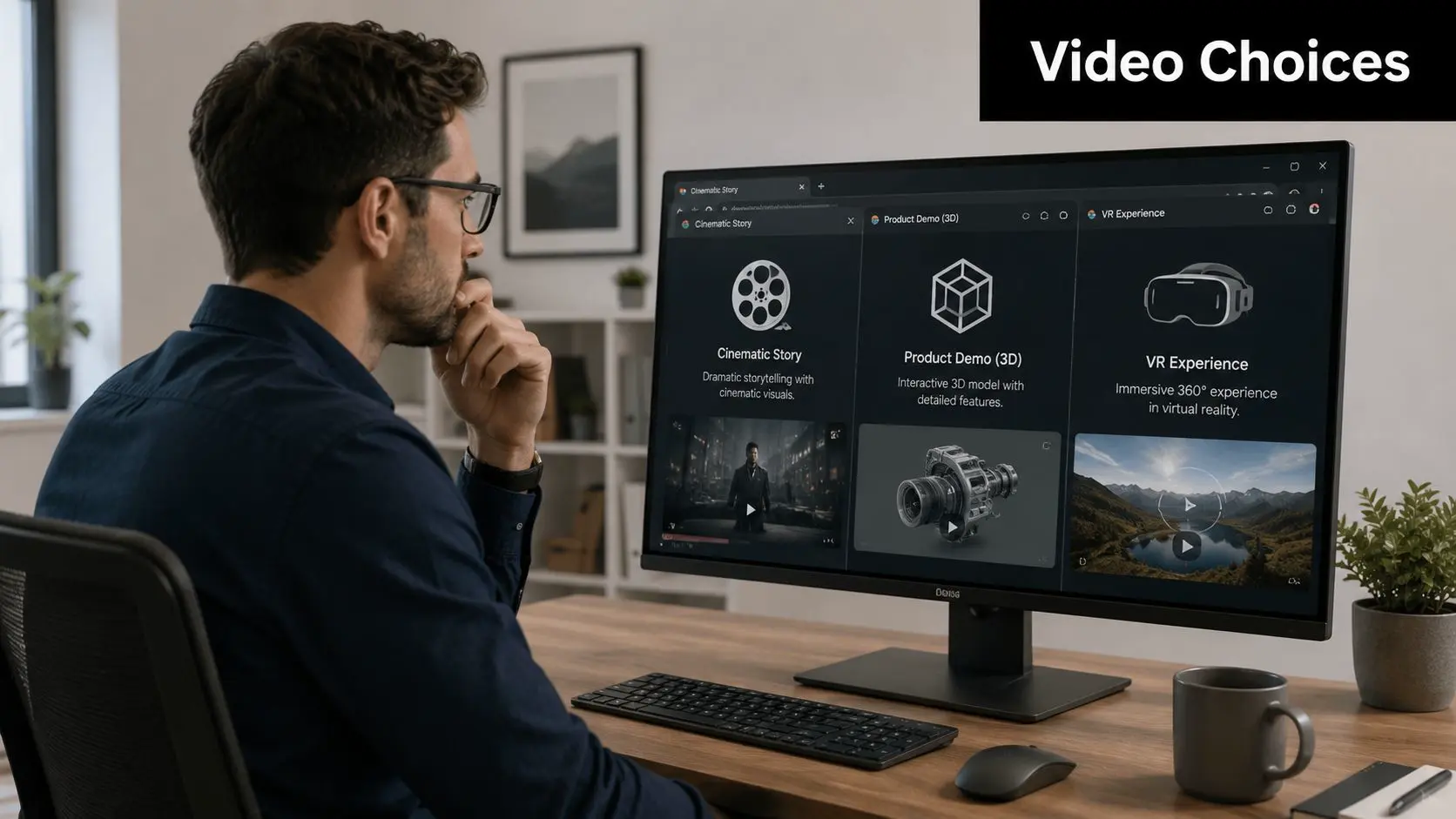
The real business problem
Most organisations don't struggle because they lack ideas. They struggle because they commission video backwards. They start with format before objective. They ask for “a two-minute video” before deciding whether the job is awareness, conversion, recruitment, investor confidence, onboarding, or training. That usually leads to bloated edits, unclear scripts, too many stakeholders, and a final asset that has to do five jobs badly instead of one job well.
Practical rule: commission outcomes first, then choose the format that serves them.
A product demo for a sales team needs a different structure from a brand film for paid media. An internal compliance video needs clarity and retention, not cinematic indulgence. A trade-show piece often needs to be effective without sound, with strong graphics and rapid comprehension. If the strategic brief is weak, the creative brief won't save it.
Why strategy matters more than volume
The pressure to produce more assets is real, particularly with social, paid media, CRM, web, and event teams all asking for variants. That doesn't mean every business needs a content factory. It means each project needs a system. That system usually includes:
- •A channel plan: where the film lives, from LinkedIn to event screens to connected TV
- •A versioning plan: what gets cut down, reformatted, subtitled, localised, or repurposed
- •A production plan: what must be shot, animated, generated, recorded, or built in real time
- •A review plan: who signs off script, visuals, legal, brand, and final masters
If your team is also weighing automation, this broader shift towards structured creation is why many marketers are also looking at strategies for AI video content. The useful question isn't whether more video is coming. It already has. The useful question is how to commission it without waste.
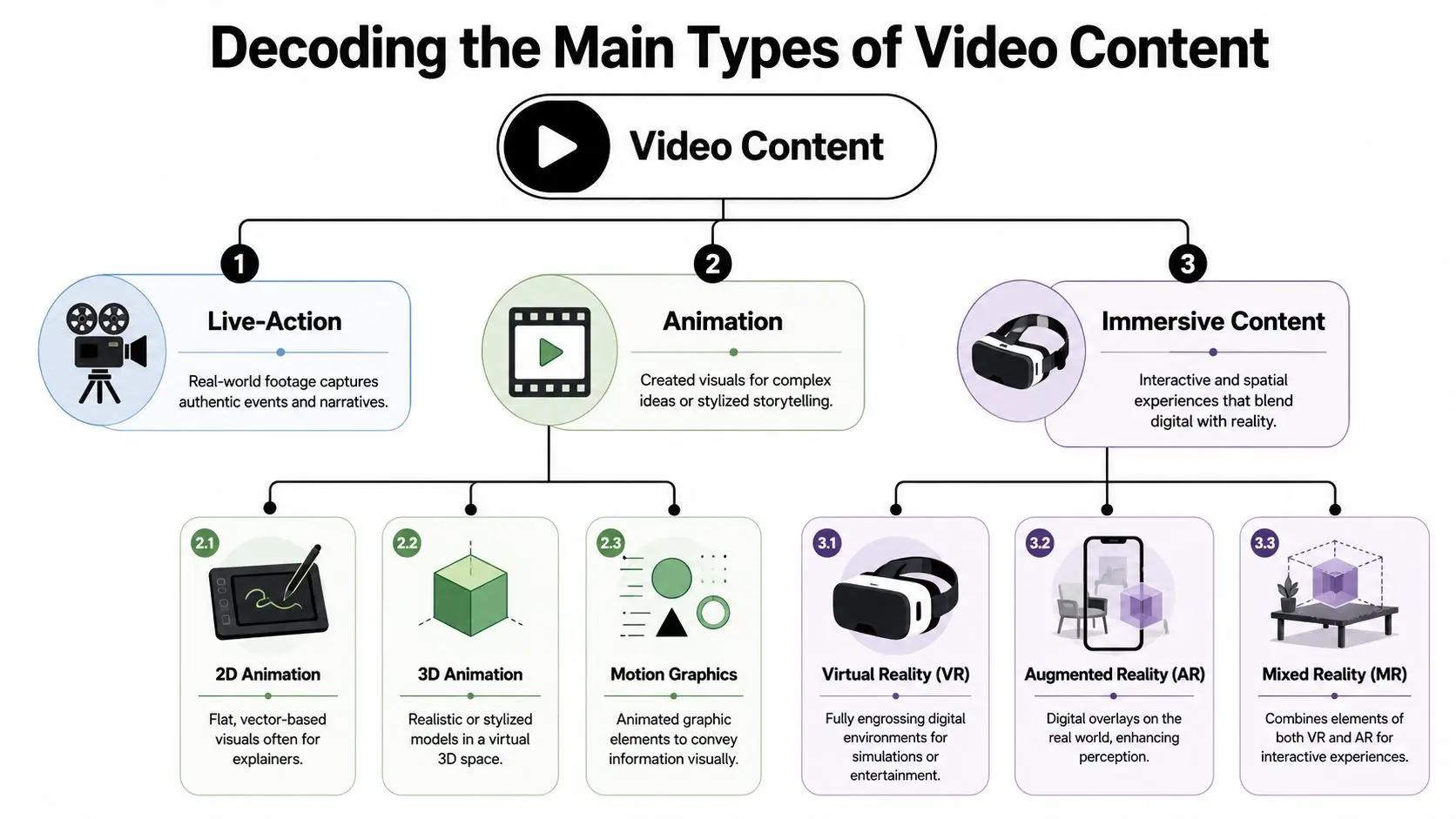
Decoding the Main Types of Video Content
Before a brief gets approved, the format needs to match the job. That sounds obvious, but it's where many budgets drift. Teams pick a style because they've seen it work elsewhere, not because it fits their message, audience, or distribution. This is the practical split most buyers need to understand.
Live-action
Live-action works best when trust, people, or place are central to the message. If you need customers to see real staff, real products, real facilities, or real leadership, filmed footage usually carries the most immediate credibility. Typical uses include:
- •Testimonials and case-led films: useful when buyer reassurance matters
- •Recruitment and culture content: better when atmosphere and people are part of the proposition
- •Brand campaigns and launch films: strong when performance, emotion, or physical product detail matter
Where live-action often fails is complex explanation. If your service is invisible, technical, or abstract, filmed interviews alone can become hard work for the audience. That's where graphics or animation usually need to carry the heavier load.
2D animation and motion graphics
2D animation is often the clearest option for explanation. It strips away unnecessary detail and lets the viewer focus on process, hierarchy, and message. It's a practical fit for:
- •Explainer videos for software, services, and technical products
- •Educational content where clarity matters more than realism
- •Campaign assets that need quick versioning across languages or audiences
Motion graphics sit close to 2D, but the purpose is slightly different. They're often less about narrative worlds and more about information design, typography, brand systems, title sequences, UI visualisation, and visual rhythm. A common mistake is assuming 2D is always the cheaper or faster route. Simple 2D can be efficient. Highly art-directed 2D with custom illustration, strong scripting, and multiple output versions can still be a serious production.
3D animation
3D becomes valuable when form, scale, environment, or performance need to be shown in a way live-action can't easily achieve. It's particularly useful for products that don't yet exist physically, machinery that can't be filmed easily, stylised characters, and premium brand storytelling. 3D is often the right choice when you need:
- •Product visualisation: showing internals, assembly, or future-state design
- •Character and creature work: for branded worlds, series, trailers, and entertainment
- •High-end brand assets: where lighting, texture, and camera movement carry meaning
3D also creates longer-term asset value. Once models, rigs, environments, and lookdev are built well, they can support future edits, stills, social variants, event loops, and interactive experiences.
If the audience needs to understand how something works, 2D often wins. If they need to believe in an object, space, or character, 3D usually earns its keep.
Immersive content
VR, AR, and mixed reality aren't “video” in the narrow sense, but they sit in the same commissioning conversation because they solve related business problems differently. VR is strong for simulation, guided learning, and location-based experiences. AR works when you want digital information layered onto a real environment, such as exhibitions or retail. Mixed reality tends to matter when physical and digital interaction are part of the experience design. For a business buyer, the key question isn't whether immersive content feels novel. It's whether interaction improves the outcome. If passive viewing is enough, video is simpler. If users need to explore, rehearse, manipulate, or respond, immersive formats may be the better production choice.
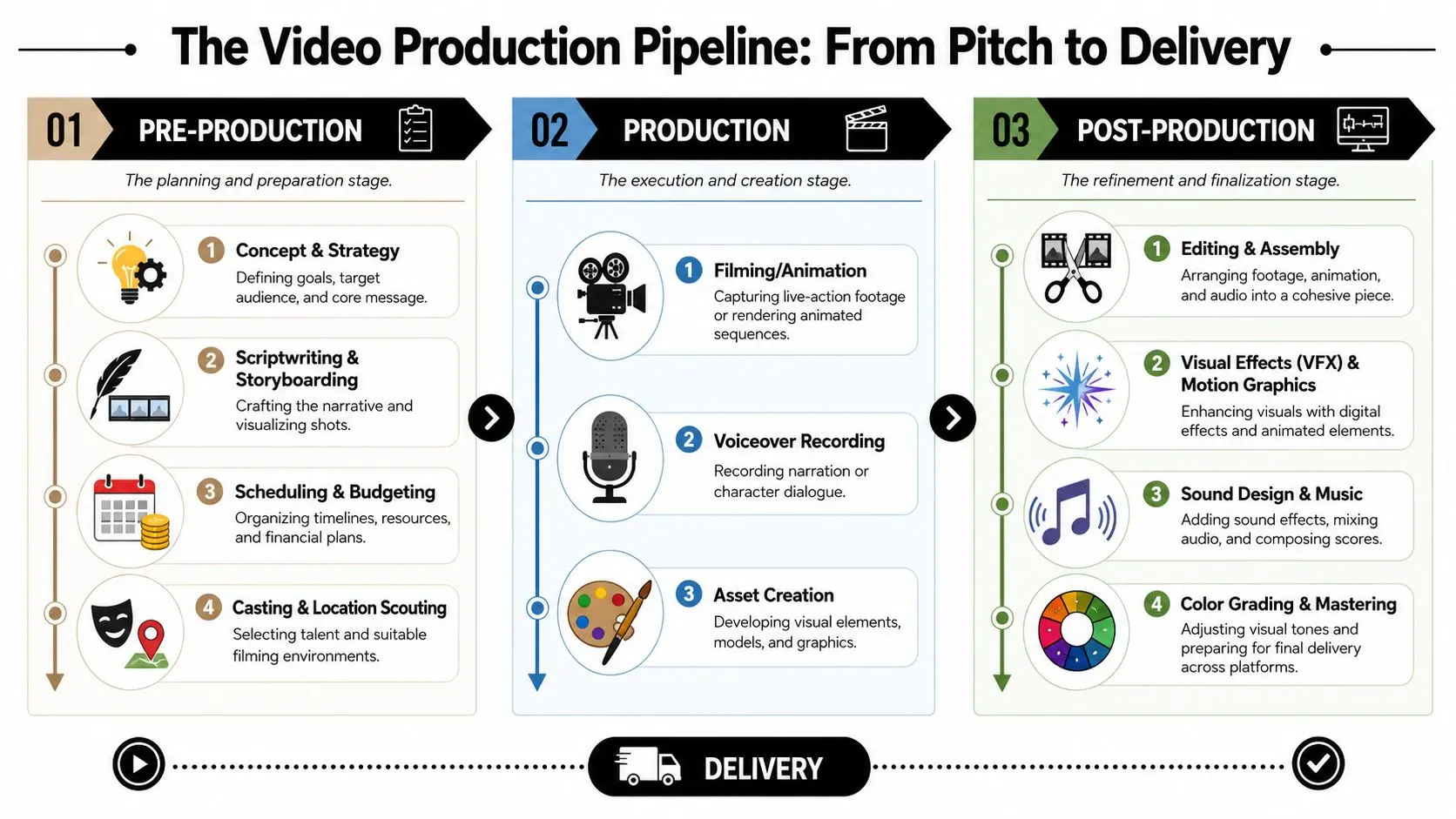
The Production Pipeline From Pitch to Delivery
A good production pipeline behaves like a build process. You don't pour concrete before you've approved the drawings. The same logic applies here. Most avoidable cost overruns in video content production start when teams rush into making before they've decided what they're making.
Pre-production is the blueprint
Whether a project gains discipline or accumulates risk is determined here. In live-action, pre-production covers concept, script, shot planning, casting, location decisions, scheduling, and technical planning. In animation, it includes treatment, script, visual development, storyboards, animatics, styleframes, and pipeline setup. The deliverables may look different, but the purpose is identical. They reduce ambiguity before expensive labour begins. A strong pre-production stage usually answers:
- •What is the single job of this asset
- •Who must it persuade, inform, or train
- •What must be shown on screen to make the message land
- •Which versions are required at final delivery
- •Who signs off each stage
Weak teams often try to “find it in the edit” or “work it out in animation”. That's where timelines slip. If the script is still being debated while scenes are being built, the budget is already under pressure.
Production is the build
Production means very different things depending on the format. For live-action, this is the shoot. Crew, camera, lighting, sound, talent, direction, art department, data management, and location logistics all converge in a compressed window where every delay costs money. The best shoots feel smooth not because they are easy, but because the difficult decisions were made earlier. For animation, production is asset creation and shot execution. That may include design, modelling, rigging, layout, animation, FX, lighting, rendering, and scene management. In real-time pipelines, some of that work shifts into engines such as Unreal or Unity for faster review and iteration. For both routes, quality control starts here, not at the end. A badly recorded interview can't be fully rescued by polish. A weak rig creates downstream problems in animation. Production quality compounds.
Post-production is where the project becomes usable
Editing is only one part of post. Sound design, music, voiceover, graphics integration, compositing, colour grading, versioning, accessibility assets, mastering, and platform-specific exports all sit here. This is also where amateur and professional workflows separate fast. A social upload and a premium master are not the same thing. Even baseline delivery standards matter. A practical production spec for many use cases is 1920×1080 at 24 fps with H.264 MP4 output and 48 kHz/24-bit audio capture, as outlined in these video requirements and guidelines. The same guidance warns that webcams, shaky footage, and built-in mic audio are likely to fail quality expectations.
Clean audio is not a finishing touch. It is a production decision.
At the top end, delivery gets stricter. Netflix requires branded assets to comply with SMPTE ST 2067-21 IMF applications, which means a studio needs an IMF-capable post pipeline rather than a simple editorial export, as detailed in Netflix's branded delivery specifications.
Delivery is not a file handover
Clients often think delivery means “send the MP4”. In practice, delivery may include multiple aspect ratios, clean and texted versions, caption files, alternate language versions, event playback files, archive masters, social cut-downs, and approval-safe naming conventions. If those outputs weren't agreed earlier, the final week becomes chaos. A production partner earns trust by making that complexity visible early. Not to make the process feel heavier, but to stop the project breaking under its own success when more teams ask for more versions.
Understanding Cost Drivers and Typical Timelines
Most clients ask for a price first. Most producers ask for the brief first. Both positions make sense. The reason estimates vary so widely is simple. Video content production isn't priced by duration alone. A short film with complex approvals, custom design, and multiple delivery versions can be more demanding than a longer piece with a straightforward structure.
What actually drives the budget
The main cost drivers usually sit in six areas:
- •Creative complexity: custom worlds, advanced VFX, stylised design systems, or technical simulations take more time than straightforward coverage or simple graphic treatment
- •Format choice: live-action, 2D, 3D, motion graphics, and XR all create different crew, software, hardware, and post requirements
- •Asset build: characters, environments, product models, title systems, and localisation packs all increase scope
- •Approvals: the more stakeholders, versions, and compliance checks involved, the more producer time and iteration the project needs
- •Talent and rights: presenters, actors, voice artists, music licensing, usage terms, and location permissions all affect the shape of the quote
- •Deliverables: one hero master is one thing. A campaign package with cut-downs, formats, subtitles, and platform variants is another
Why timelines slip
Timeline pressure rarely comes from one dramatic failure. It usually comes from soft edges in the brief. Common causes include script approvals arriving late, visual references changing after design starts, too many senior reviewers entering at final edit, or platform requirements being discussed after the master is locked. Even a well-run production can stall if the client side hasn't named a decision-maker. Here's a practical planning view.
| Video Production Budget and Timeline Estimates (2026) | Typical Timeline | Illustrative Budget Band (UK) |
|---|---|---|
| Live-action interview or testimonial edit | Short to moderate | Lower to mid band |
| 2D animated explainer | Moderate | Mid band |
| 3D product film or character-led brand asset | Moderate to extended | Mid to upper band |
| Multi-asset campaign with platform versions | Extended | Mid to upper band |
| XR or immersive training experience with video components | Extended | Upper band |
How to get a better quote
The fastest route to a reliable estimate is a disciplined brief. Include the audience, objective, required outputs, brand constraints, examples you like, examples you dislike, internal sign-off structure, and any immovable launch date. If you already know a stakeholder will ask for multiple rounds, say so early. Producers can plan around complexity. They can't price around hidden complexity.
The cheapest-looking quote is often the least complete one.
A good estimate doesn't only tell you cost. It tells you what the project is, what it excludes, where the risks are, and how change will be handled.
The Modern Toolkit Technology and AI Efficiencies
A marketing team signs off a concept on Monday, needs stakeholder review by Thursday, and still expects the finished asset to meet brand standards, legal checks, and platform specs. That pressure is why the toolkit matters. The commercial decision is not whether a tool looks advanced. It is whether it helps a business reach approval faster, reduce avoidable rework, and produce assets that can be reused across channels. AI and real-time production both change the buying decision. They affect where time is spent, which stages need senior oversight, and what kind of partner makes sense. Businesses that understand that tend to commission more effectively, because they ask better questions before production starts.
Where AI helps, and where it creates risk
AI is most useful in parts of the process that are exploratory, repetitive, or version-heavy. Early visual development, script support, transcript-led editing prep, localisation workflows, and rough internal prototypes can all move faster with AI assistance. That can be commercially useful if the project needs multiple stakeholder routes, language variants, or several campaign cutdowns from one core asset. The trade-off is control. If the brief involves regulated sectors, strict brand systems, premium design standards, or licensed IP, AI needs close producer oversight. Rights checks, consistency, and approval discipline still sit with people. Faster asset generation does not reduce the need for clear authorship or proper sign-off. It increases the need to define those things early. For a client, the practical question is simple. Is AI being used to cut waste, or to replace decisions that still need experienced judgement?
Real-time engines and virtual production
Real-time tools such as Unreal and Unity have changed how teams review work. Instead of waiting for a traditional offline build to test a scene, producers can show camera moves, lighting approaches, and environment options much earlier. That helps clients make strategic decisions sooner, especially on projects where spatial design, product staging, or virtual environments affect the final message. For businesses comparing live-action, CG, and hybrid approaches, this practical guide to virtual production for modern creatives gives a clear view of how real-time methods affect planning, approvals, and delivery. This matters most when a business is choosing between options, not just admiring the technology. A product film might use real-time previs to test whether a 3D route earns its cost before full production begins. An internal training piece might use virtual production to create repeatable environments without the cost and scheduling pressure of multiple UK location days. The right choice depends on the brief, the shelf life of the asset, and how often the business expects to update or repurpose it. A few areas where the modern toolkit improves production economics:
- •Previsualisation: clients can approve structure, pacing, and visual logic before expensive build or shoot stages
- •Versioning: language changes, format changes, and market adaptations can be handled with more consistency
- •Review cycles: earlier visual feedback reduces guesswork and lowers the chance of major changes late in production
- •Asset reuse: one production pipeline can support website film, social edits, event content, training outputs, or interactive formats
What does not change
Better tools raise the value of good producing. A weak idea still struggles. An unclear message still stays unclear when turned into more versions. A generated or real-time asset that has not been checked for rights, continuity, accessibility, or brand compliance still creates downstream cost. That is why businesses should assess a production partner by workflow discipline, not by software list alone. Studio Liddell works across animation, XR, and AI-assisted production, which is useful for clients who need to weigh several production routes rather than force every brief into one method. The useful question is not which tool a studio owns. It is whether the team knows when a tool saves money, when it improves quality, and when it adds complexity with no commercial return.
Measuring Success KPIs and Distribution Strategy
A polished film that reaches the wrong audience, in the wrong format, at the wrong moment isn't doing its job. Success starts before the first frame is made, because distribution changes the brief.
Match the KPI to the job
The right KPI depends on why the asset exists. For marketing-led content, teams usually care about attention, click behaviour, lead quality, or conversion contribution. For internal communications, they care more about completion, comprehension, and recall. For trade shows or installations, they may care about dwell, repeat play, or whether the piece supports a live conversation. Useful KPI groups often include:
- •Attention metrics: watch behaviour, hold through the opening, or completion trends
- •Action metrics: clicks, enquiries, demo requests, sign-ups, or downstream sales conversations
- •Learning metrics: completion, assessment performance, or follow-up comprehension
- •Operational metrics: how efficiently the team can version, update, localise, or redeploy the asset
If the team can't name the success metric before production starts, they're usually commissioning on instinct.
Distribution should shape the creative
A video built for a website header isn't structured like a case-study film. A vertical paid-social asset needs a faster visual grammar than a conference opener. A kiosk loop may need to work with no sound at all. Distribution decisions affect framing, pacing, on-screen text, subtitles, run time, and the call to action. That's why smart commissioning starts with a channel map, not a final export spec. Teams that plan distribution early usually produce cleaner master assets and avoid expensive retrofitting later. For businesses building a wider content system, this guide to digital content creation services for engaging audiences is a useful reference point for thinking beyond a single hero video.
Plan for reuse, not just launch
The best-performing productions often aren't the biggest. They're the most adaptable. One well-planned project can yield a hero film, short cut-downs, captioned versions, event loops, stills, product sequences, and internal edits. That only works when reuse is part of the brief from day one. If repurposing is treated as an afterthought, the source material usually won't support it cleanly. The business question isn't “How do we make one good video?” It's “How do we commission an asset system that keeps working after launch?”
How to Choose Your Studio Partner
The studio you choose will shape more than the look of the work. It will shape the clarity of the brief, the discipline of the schedule, the quality of the approvals process, and how many problems get solved before they become expensive.
What to check first
Start with evidence of relevant delivery, not just attractive showreels. A studio may produce beautiful visuals but still be the wrong fit if your project involves technical explanation, compliance-heavy reviews, accessibility requirements, or multi-version rollout.
Ask practical questions such as:
- •How do you structure pre-production: who writes, who boards, who owns approvals
- •How do you handle change: what happens if script, scope, or delivery needs move mid-project
- •How do you manage technical delivery: especially if the project needs multiple outputs or premium mastering
- •How do you approach accessibility: captions, signing, audio description, graphics legibility, and review workflow
- •Who is doing the work: internal team, regular collaborators, or ad hoc freelancers
That accessibility point matters more than many buyers realise. A key question for any UK production partner is how they handle accessibility from day one, not as an afterthought, because UK public-sector requirements and Ofcom guidance on subtitling, signing, and audio description affect budgeting, workflow, and turnaround, as outlined in this accessibility-focused discussion.
Red flags worth noticing
Some warning signs show up early. A vague proposal with no assumptions is one. So is a studio that avoids talking about approvals, revision limits, delivery formats, or rights. Another is a team that jumps to visuals before interrogating the brief. That can feel exciting in the pitch stage, but it often means they're selling style ahead of strategy. Watch for these:
- •Portfolio mismatch: strong entertainment work doesn't automatically mean strong corporate or technical communication
- •Process fog: if they can't explain how the job moves from brief to final master, expect surprises later
- •No questioning: good producers challenge assumptions and tighten scope
- •Accessibility treated as a bolt-on: that usually means extra cost and avoidable rework later
Look for strategic fit, not just creative fit
The strongest partners don't only execute. They help you commission properly. That means they can discuss why a message should be 2D rather than live-action, why a launch film needs modular cut-downs, why a technical product may benefit from 3D visualisation, or why an immersive route is justified only if interaction improves the outcome. If they can't have that conversation, they're a supplier. Not a production partner. For a more detailed checklist, this buyer's guide to choosing an animation studio is worth reviewing. In practical terms, a portfolio should also show range tied to purpose. Work like BooSnoo points to children's animation capability and series thinking. Aurora signals XR and spatial storytelling. GeoEnergy NI suggests the ability to make complex technical subjects intelligible. Those are useful indicators because they show how a studio thinks, not just how it renders.
If you're planning a campaign, explainer, series package, branded film, or immersive project and need help shaping the brief before production starts, Studio Liddell is a practical place to start. A good first conversation should clarify format, workflow, delivery needs, and the trade-offs that matter before budget is committed.