Unreal Engine Animation: A Producer's Production Guide
A producer usually meets Unreal Engine animation at the worst possible moment. The client wants a character beat changed late in the schedule. Editorial needs an alternate version for a different platform. Someone asks whether the same assets can feed an XR activation after the broadcast deliverable is signed off. In a traditional offline pipeline, those requests can trigger a chain of re-lighting, re-rendering, re-comping, and re-approval. That's where real-time changes the conversation. Unreal Engine animation isn't just a faster way to preview shots. It changes where animation decisions happen, who can review them, and how many versions a team can reasonably support without breaking delivery. Since Epic Games launched Unreal Engine 5 in April 2022, film-style animation tools such as Sequencer keyframing and Auto Key have become part of a real-time workflow that lets teams lay out, animate, and iterate directly in the editor, rather than waiting for an offline render stage to validate every choice, as outlined in Epic's guide to creating animation keyframes in Unreal Engine. For producers, that matters less as a software story and more as a pipeline story. Review cycles tighten. Departments see the same scene state earlier. Clients react to something closer to final, not a rough approximation. The result is a workflow that's better aligned with how commercial production runs in the UK across television, advertising, games, and immersive work. A useful companion to that shift is this guide to real-time VFX for producers, which looks at the wider production implications beyond character work alone.
Beyond the Render Farm Your Introduction to Real-Time
The old separation between “animation now” and “final image later” is becoming less useful. In Unreal, animation, camera, lighting, timing, and review can happen in the same environment. That doesn't remove craft. It removes waiting.
What real-time changes for production
In practice, Unreal Engine animation gives producers three operational advantages.
- •Faster approvals: Supervisors and clients can review motion in context, with lighting, camera, and scene timing already visible.
- •Cleaner change management: A note on timing or staging doesn't always trigger a long downstream render queue.
- •Better asset reuse: The same character and environment setup can support linear content, interactive content, or pitch materials with less duplication.
That last point is often underestimated. A lot of productions don't fail because the animation team can't animate. They fail because the pipeline makes every new output format feel like starting again.
Real-time doesn't remove decision-making pressure. It brings that pressure forward, when a team can still do something useful with it.
Why producers are paying attention
UK-facing production work often lives under short schedules and shifting delivery needs. A campaign can need master outputs, social cut-downs, event adaptations, and interactive extensions. Unreal suits that environment because it supports a more live mode of production. The scene isn't just a source for final pixels. It becomes a working production space. That's why Unreal Engine animation is worth treating as a production capability, not a niche toolset for technical artists. When it's deployed properly, it supports faster iteration without forcing every project into a game-style workflow.
The Core Components of Unreal Engine Animation
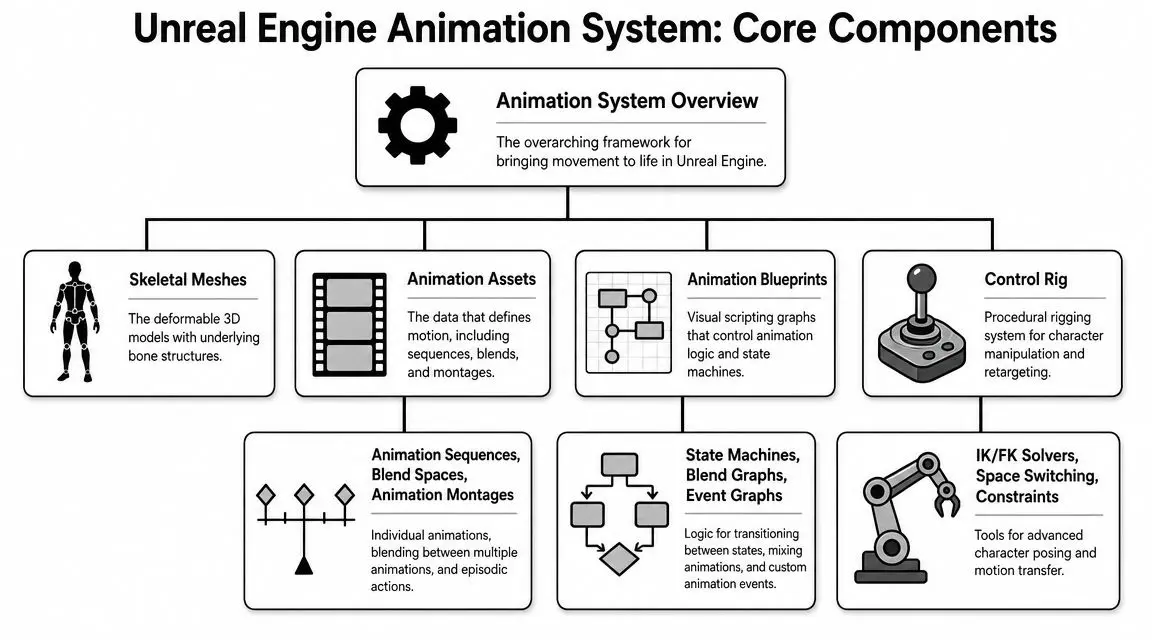
If you're evaluating Unreal as a producer, it helps to think in layers. A character doesn't “live” in one file. It's assembled from systems that each do a different job.
The body, the motion, and the logic
A Skeletal Mesh is the character's body. It's the visible model plus the underlying bone structure that lets that model deform. Without that, there's nothing to animate in a meaningful way. An Animation Sequence is one of the core motion assets. Epic's documentation describes Animation Sequences as foundational skeletal-mesh animation assets, which is why they sit at the centre of most Unreal character setups. A walk, a blink, a turn, a reach. These are the reusable pieces of movement that production teams build on. An Animation Blueprint is the decision layer. It determines how those motions are selected, blended, and updated during playback. If the Skeletal Mesh is the body and the Animation Sequence is the recorded motion, the Animation Blueprint is the logic that decides what the character should do next.
Where animators actually work
Control Rig is where Unreal becomes much more than a playback engine. It gives animators an in-engine rigging and posing workflow, so they can adjust performance directly in the scene rather than treating Unreal as a passive destination for work done elsewhere. Sequencer is the cinematic timeline. It handles shot assembly, keyframing, camera animation, timing changes, and review. That's especially relevant because Unreal Engine 5's rollout made film-style animation tools available inside the live environment, including Sequencer-based keyframing and Auto Key, which has helped teams move away from offline-only workflows. A simple producer-friendly model looks like this:
| Component | What it does | Why it matters in production |
|---|---|---|
| Skeletal Mesh | Holds the deformable character and bones | Gives the team a reusable animation-ready asset |
| Animation Sequences | Stores specific motions | Supports libraries, retakes, and reuse across scenes |
| Animation Blueprint | Controls behaviour and blending | Connects performance logic to shot or gameplay needs |
| Control Rig | Enables direct rig manipulation in-engine | Reduces back-and-forth for performance tweaks |
| Sequencer | Builds shots and timelines | Makes review and revision faster in context |
Practical rule: If a producer can't tell where motion lives, where logic lives, and where shot timing lives, approvals get messy very quickly.
Why this stack matters
The value of Unreal Engine animation comes from how these systems overlap. Animators aren't limited to one method. A team can blend authored animation, procedural rig controls, and cinematic timing in one environment. That gives production more flexibility when creative notes arrive late, which they usually do.
Building the Bridge Your Studio's Animation Pipeline
The hard question isn't whether Unreal can animate. It can. The hard question is whether it can fit into a production-safe pipeline without creating chaos between departments. That's the part many tutorials skip, and it's the part producers care about most. In the UK, where the creative industries contributed £124.6 billion in 2022, the key business question is how to build a scalable, reviewable real-time workflow for film, TV, and XR work, not just how to move a control in the interface, as discussed in this UK-focused production pipeline conversation.
Unreal works best as connective tissue
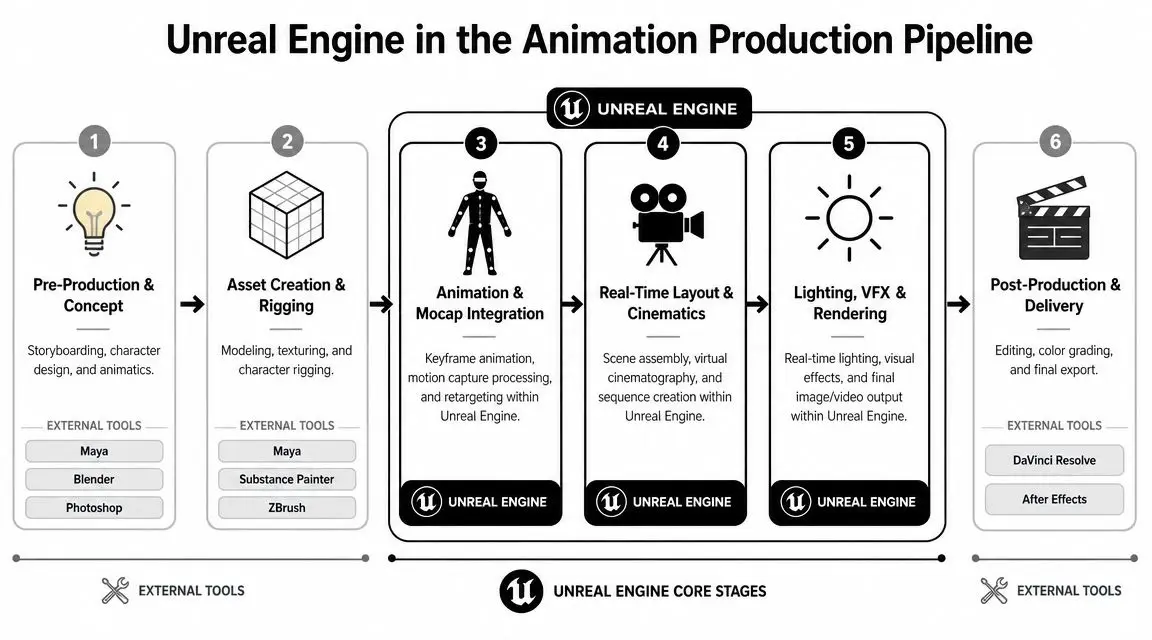
Most studios won't replace every DCC tool with Unreal, and they shouldn't. Maya, Blender, ZBrush, Substance Painter, and editorial tools still have clear roles. Unreal earns its place when it becomes the shared production space where animation, layout, cameras, lighting, and review come together earlier. A practical pipeline often looks like this:
- •Asset build in DCC tools: Modelling, surfacing, and rig foundations are prepared in the software the team already trusts.
- •Transfer into Unreal: Characters, environments, and animation data are imported in a structured way, often through standard exchange workflows.
- •Shot assembly in-engine: Layout, sequencing, and timing happen where animation can be seen in context.
- •Review against final conditions: Producers review closer to the final image, not a disconnected preview stage.
Where data flow usually breaks
Pipeline trouble usually isn't caused by the engine. It comes from ownership gaps. A rigging team may assume animation will fix naming inconsistencies later. Animation may assume layout will handle retiming. Layout may assume editorial will manage all versioning. In a real-time pipeline, those assumptions surface much faster. That's a good thing, provided the studio has clear rules for:
- Asset version control
- Shot ownership
- Approval states
- Naming and publish standards
Pipeline stability comes from agreed handoffs, not from buying more software.
The role of motion capture and live updates
Motion capture fits naturally into Unreal workflows when the team knows whether mocap is reference, a base layer, or near-final performance. That distinction matters because each use case has different cleanup and approval implications. For studios building this capability, providers such as Studio Liddell work across animation, games, and XR workflows that can include Unreal-based real-time production. The important point isn't the vendor name. It's whether the pipeline supports reliable ingest, review, and revision without forcing teams into repeated exports for every creative note.Key Workflows for Character Performance
Once the pipeline is stable, the key question becomes performance quality. Not performance in the frame-time sense. Performance in the acting sense. How does a character come alive inside Unreal?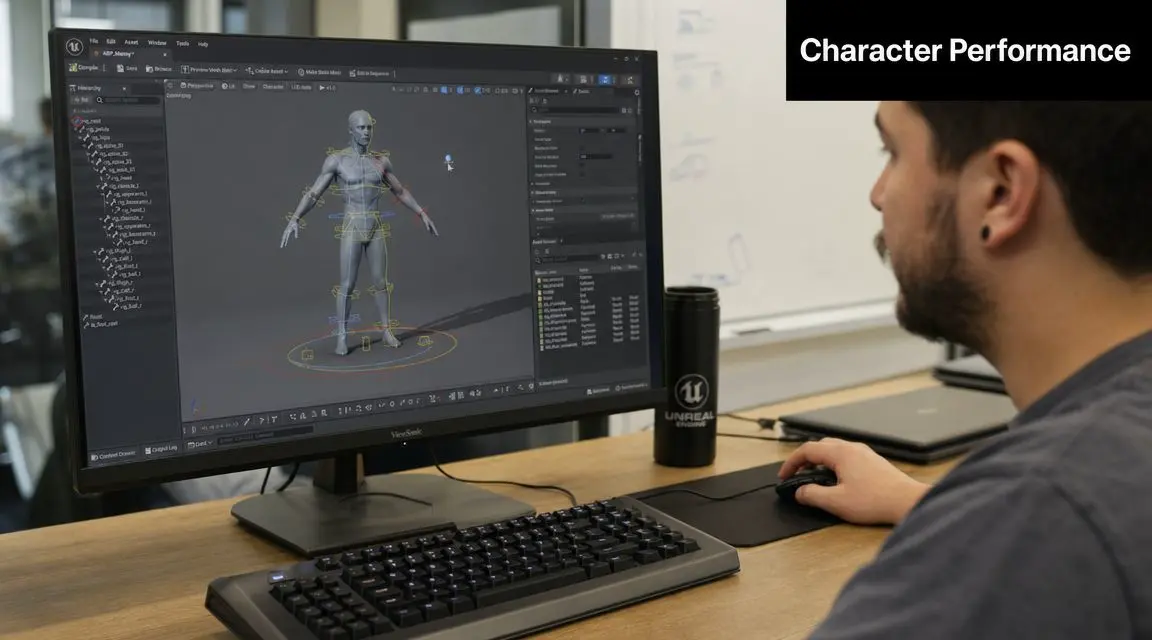
Control Rig for direct character work
Control Rig is useful when animators need to pose, adjust, or refine a character in-engine without treating Unreal as a locked playback box. That matters on productions where the camera, environment, and timing are still evolving while animation notes are coming in. It's particularly strong for:- •Shot-specific fixes: Hand placement, eye lines, contact points, or weight shifts.
- •Interactive adjustments: Performance changes that depend on scene context.
- •Director-led iteration: Reviews where the note needs to be tested immediately, not passed back through a long DCC round trip.
Retargeting when one performance must serve many assets
Retargeting solves a common production problem. You have good motion data, but it was created for the wrong character. Rather than rebuilding the animation from scratch, Unreal can adapt that movement to a different rig. This is valuable for library animation, prototype work, and motion-capture-heavy schedules. It's also where teams can waste a lot of time if the target skeletons aren't planned properly from the start. For mocap-heavy projects, this guide to markerless motion capture in production is useful context because capture quality and retargeting quality are tightly linked.
Sequencer when animation becomes a shot
Sequencer is where performance stops being an isolated asset and becomes part of a scene. You can keyframe character motion, camera moves, timing changes, and event-driven beats in one timeline. That matters because producers don't approve animation in the abstract. They approve what the audience will see.
| Method | Best For | Pros | Cons |
|---|---|---|---|
| Control Rig | Shot refinement and direct posing | Immediate in-context changes, fewer round trips | Can become messy if rig standards aren't defined |
| Retargeting | Reusing mocap or existing animation across characters | Saves time, supports asset reuse | Needs consistent skeleton planning |
| Sequencer keyframing | Cinematics, timing, camera-linked performance | Strong for review and shot assembly | Less ideal if teams treat it as a substitute for pipeline discipline |
Don't choose a workflow because it's fashionable. Choose it because it matches the level of control, reuse, and review the production actually needs.
Applications From Real-Time Cinematics to Immersive XR
The same Unreal Engine animation capability can produce very different outputs depending on the brief. That's one reason producers like it. It isn't tied to a single format.
Real-time cinematics for screen content
For television, branded content, and short-form narrative work, Unreal is well suited to cinematic animation where cameras, lighting, and performance need to evolve together. Teams can review a shot with much more of its final visual intent already present. That tends to improve the quality of feedback, because stakeholders are responding to the actual scene rather than to a disconnected previs stage.
Interactive character work for games
In games, animation isn't just watched. It has to respond. Characters blend between states, react to player input, and maintain clarity under unpredictable timing. Unreal supports that kind of responsive performance because the animation system is built around state logic, blending, and runtime evaluation, not just linear shot playback.
XR where comfort and performance shape the craft
XR is where discipline matters most. Character animation in VR and AR has to do more than look good. It has to run comfortably on the target hardware, stay legible in immersive space, and support interaction without introducing instability. That's why the right answer isn't always “put everything in Unreal”. For some client work, a hybrid approach is smarter. Unreal might handle previs, interaction, virtual production, or final-line rendering only where it clearly improves turnaround or user experience. That trade-off is often more valuable than a pure-tool ideology. A related strategic thread is how real-time pipelines intersect with AI-powered game and TV production. Not because AI replaces animation teams, but because producers increasingly need workflows that support faster content variation, prototyping, and cross-medium development.
The strongest Unreal projects aren't the ones that force every task into the engine. They're the ones that use the engine where it creates real production leverage.
Optimisation and Performance Best Practices
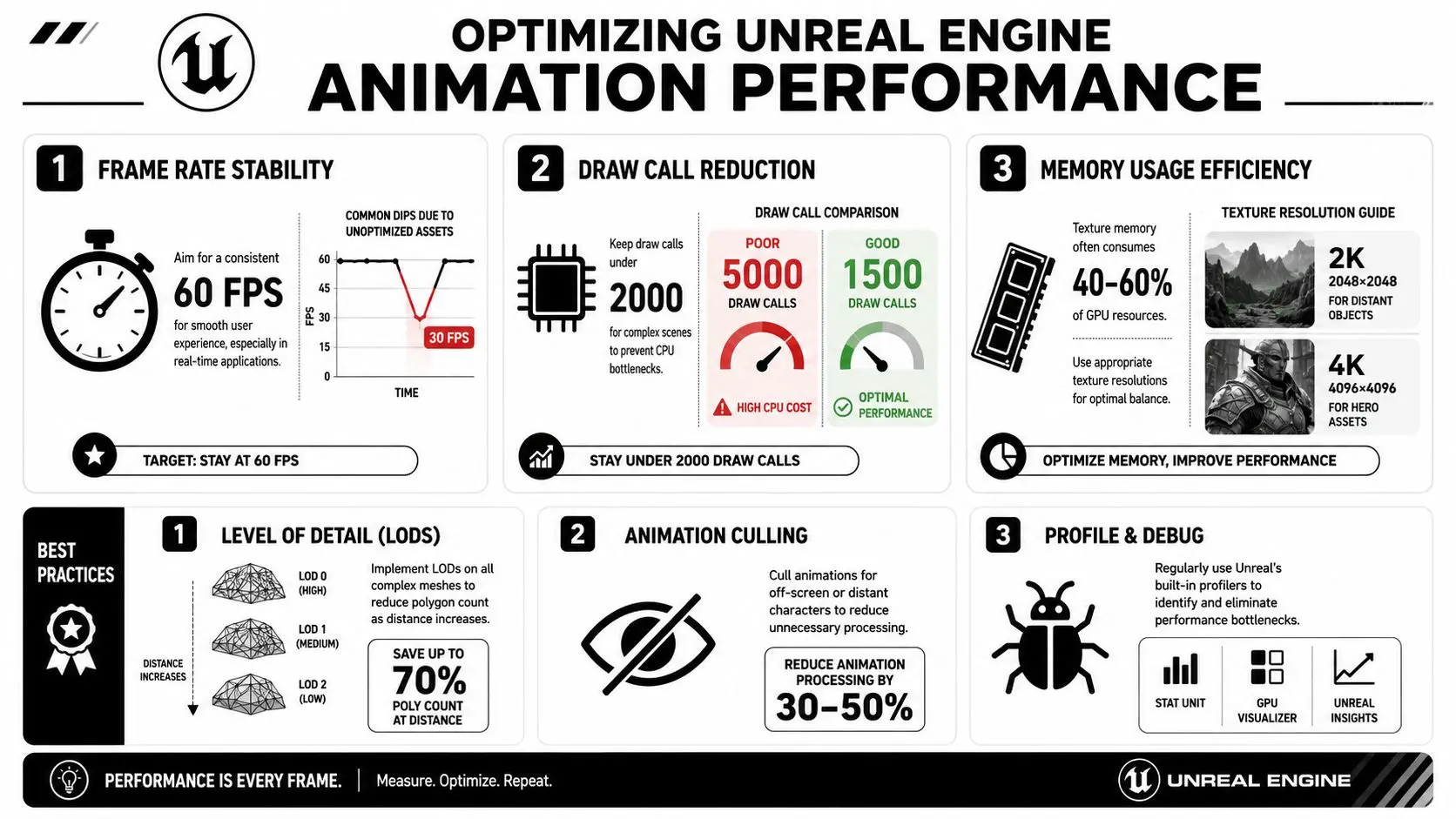
A convincing character that misses frame budget is still a failed deliverable. Producers sometimes inherit performance as a late-stage technical problem. In Unreal Engine animation, that approach is expensive. Performance has to be treated as part of animation direction. Pose complexity, graph logic, update frequency, thread usage, and character count all affect whether the scene remains viable on the target platform.
Measure first, then simplify
Unreal gives teams direct visibility into animation cost. Profiling tools such as Stat Anim, Stat Unit Graph, ShowDebug Animation, and Unreal Insights expose live performance behaviour, while the Animation Budget Allocator can enforce a fixed frame budget. In Epic's optimisation talk, the presenter describes budget management in the region of 4 to 5 milliseconds and also discusses setting a game-wide animation budget as low as 1 millisecond for all characters in blueprints, as shown in this Unreal Engine optimisation session. That kind of millisecond-level control is what makes Unreal practical for UK delivery conditions across broadcast, mobile, and XR. You're not guessing which character setup is too heavy. You can see it.
Use update strategy, not brute force
One of the most useful levers is update frequency. The same optimisation talk explains tick interval control in simple terms. 0 means every frame, 1 means once per frame, and 0.5 means twice per frame. That allows teams to reduce unnecessary animation work based on budget or screen relevance instead of updating everything at full cost all the time. A sensible production approach usually includes:
- •Prioritising hero characters: Keep the highest fidelity where viewers will notice it.
- •Reducing evaluation on peripheral actors: Lower update rates where motion importance is lower.
- •Testing on target hardware early: Don't wait for final content to discover budget failure.
Move work off the game thread where possible
Animation performance is also shaped by threading. Practitioner guidance indicates that enabling multi-threaded animation update allows animation work to run on worker threads, and thread-safe update paths in Animation Blueprints are needed for logic that executes safely outside the game thread, as explained in this guide to optimising Unreal Engine animation. That matters because animation otherwise competes with gameplay, simulation, and scene orchestration on the main thread. Moving appropriate animation evaluation off that path can improve responsiveness without changing what the viewer sees.
Production note: If a scene only performs well in a stripped-down review build, it doesn't perform well enough.
The Business Case for Unreal Engine Animation
The case for Unreal Engine animation isn't that it replaces every existing tool. It's that it changes the economics of iteration. When animation, shot layout, camera, and review happen closer together, teams waste less time validating decisions that could have been tested earlier. That improves schedule resilience. It also improves creative confidence, because clients and producers are reacting to work in context rather than to placeholders. The second advantage is flexibility. The same production assets can support more than one output path when the pipeline is designed for reuse. That's useful for studios handling broadcast content, branded experiences, interactive work, or XR extensions from the same core property. The third advantage is operational control. Unreal gives teams practical levers for performance management, review structure, and in-engine adjustment. That's the difference between a flashy demo workflow and a production workflow. If you're weighing engine choices more broadly, this comparison of Unreal vs Unity for real-time animation is a useful next step. For producers, the core question isn't “should we use Unreal because it's popular?” It's simpler than that. Will a real-time pipeline reduce approval friction, support the target platforms, and make delivery more adaptable for the client? If the answer is yes, Unreal becomes a commercial decision as much as a technical one.
If you're planning a character-led project, a real-time cinematic pipeline, or an XR production that needs dependable animation workflows, Studio Liddell can help scope the right approach from pipeline through delivery. Book a production scoping call and map out what should stay in DCC, what should move into Unreal, and where real-time animation will create value for your brief.