Swift App Development: Costs, Choices, & ROI
If you're deciding whether to fund a serious iOS product, you're probably hearing three competing arguments at once. One team says native is the only way to protect experience quality. Another says cross-platform will save time and budget. Finance wants a number, product wants flexibility, and marketing wants something polished enough to represent the brand on day one. That tension is normal. Swift app development isn't just a technical preference. It's a business choice that affects how the app feels in a customer's hand, how safely it handles data, how easily it can evolve, and how expensive it becomes to maintain once the launch excitement fades. For UK businesses, this decision sits inside a market that is already large and still expanding. The UK mobile app development market reached £28.3 billion in 2025 and is projected to grow at a CAGR of 15.1% to £32.3 billion by 2026, driven by 90% smartphone adoption, according to UK mobile app development market figures. In practical terms, that means the app itself is often no longer a side project. It's a frontline product, a service channel, a training platform, or a branded experience.
Your Next App A Strategic Business Decision
Boards rarely approve an app because they want an app. They approve it because they want a better route to revenue, stronger customer retention, lower service friction, or a more defensible digital product. Swift app development matters in that context because it shapes whether the app can meet those objectives without dragging the business into technical debt too early. A premium iOS experience changes perception quickly. Customers don't describe it in engineering terms. They say the app feels smooth, reliable, responsive, or frustrating. That judgement lands directly on the brand. For media, training, retail, and XR-led experiences, the difference between acceptable and excellent is often the difference between repeat use and abandonment.
What executives are actually choosing
The choice isn't "Swift versus another language". It's a set of strategic trade-offs:
- •Speed to market versus long-term control. Faster initial delivery can look attractive, but shortcuts often create slower iteration later.
- •Shared code versus platform excellence. One codebase sounds efficient until the product depends on device-specific performance.
- •Lower upfront spend versus stronger lifecycle value. A cheaper build can become more expensive once bug fixing, redesigns, and performance remediation start piling up.
- •Feature parity versus Apple-first differentiation. If the iOS app is central to your customer proposition, blending into the market isn't enough.
For non-technical leaders, the key is to treat the app as an operating asset. It needs a clear investment case, a production plan, governance around scope, and a realistic view of support after launch.
Native iOS investment usually pays back when user experience, performance, and trust are part of the business model, not decorative extras.
That is especially true for products involving real-time graphics, high-end media playback, secure workflows, or spatial interaction. In those cases, choosing Swift is less about engineering taste and more about protecting the commercial outcome.
Where Swift fits in the portfolio
Not every app should be native. If you're validating a simple internal workflow or launching a lightweight utility, there are cases where broader frameworks can make sense. But when the app is expected to carry premium content, advanced interaction, or a future XR roadmap, Swift gives leadership teams a stronger base for scaling quality rather than constantly negotiating around limitations.
Why Choose Native Swift for Your Application
Native development is the equivalent of building a car with the manufacturer's own parts, tools, and tolerances. Everything is designed to work together. Swift is Apple's language for that job across iOS, iPadOS, macOS, watchOS, and visionOS, which means the app doesn't have to fight the platform to perform well.

That alignment matters most when the app isn't just displaying static content. It matters when you're handling complex interaction, fluid motion, advanced graphics, camera-driven features, secure local processing, or immersive interfaces. In those situations, native access isn't a nice-to-have. It's what keeps the product feeling finished.
Performance that users actually notice
The strongest argument for Swift is usually performance. Swift 5.9+ offers up to 3.2x faster native rendering throughput compared to cross-platform frameworks in complex iOS apps, maintaining latency under 12ms, based on Swift benchmarking and performance discussion. That advantage comes from direct integration with Apple's Metal rendering pipeline. For leadership teams, the business implication is straightforward. Better rendering and lower latency support experiences that feel premium, particularly in animation-heavy products, training simulations, and XR-adjacent interfaces. Users don't reward the technical shortcut if the interaction feels laggy. A useful way to frame the wider decision is this comparison of PWA versus native app trade-offs. Progressive web apps can be a smart route for reach and convenience, but they serve a different strategic purpose from a full native product.
Security and ecosystem fit
Swift also benefits from Apple's platform rules rather than working around them. That affects:
- •Data handling. Native APIs provide more predictable behaviour for permissions, device storage, and secure workflows.
- •Hardware access. Teams can use Apple sensors, cameras, graphics frameworks, and system services without waiting for third-party framework support.
- •OS updates. Native apps usually adopt new platform capabilities with less friction.
- •Brand confidence. Fewer workarounds means fewer edge-case failures reaching customers.
When native is worth the investment
Choose Swift when the app needs to do one or more of the following well:
- •Deliver a flagship consumer experience where polish directly affects retention or conversion.
- •Run graphics-rich content such as immersive training, animation-led interfaces, or interactive media.
- •Handle sensitive user data in a tightly governed Apple environment.
- •Support future spatial computing plans on Apple devices.
Executive rule: If iOS quality is part of the product promise, don't optimise for development convenience at the expense of native fit.
The cheapest technical choice rarely remains the cheapest business choice once customers start using the product.
SwiftUI vs UIKit The Modern Framework Decision
Inside native iOS development, one of the first meaningful decisions is the interface framework. In simple terms, this is the toolkit used to build what users see and tap. The two main options are SwiftUI and UIKit. Both are valid. They solve different production problems. SwiftUI is the newer, more modern approach. UIKit is the mature, established framework that underpins a large share of existing iOS products. The right decision depends less on ideology and more on what your app is trying to achieve.
SwiftUI vs UIKit for business leaders
| Factor | SwiftUI | UIKit | Business Implication |
|---|---|---|---|
| Development approach | Declarative and modern | Imperative and established | SwiftUI can reduce friction on new builds, while UIKit offers predictability for highly custom legacy-heavy products |
| Speed for new interfaces | Strong for fresh product builds | Slower for some modern interface patterns | SwiftUI often suits greenfield work where visual iteration matters |
| Maturity | Improving fast | Battle-tested | UIKit lowers risk in edge cases and complex interface control |
| Legacy integration | Less ideal for older codebases | Strong | UIKit is often the safer route when extending an existing iOS estate |
| Talent profile | Favours teams current with Apple's latest tooling | Favours teams with broad historical iOS experience | Hiring and team composition can influence delivery pace |
| Future alignment | Closely aligned with Apple's current direction | Still essential, but older | SwiftUI is often the better long-term bet for products starting from scratch |
When SwiftUI is the better commercial choice
If the app is net new and the user interface is central to the proposition, SwiftUI is often the strongest option. It supports rapid iteration, cleaner component thinking, and an efficient route to building visually coherent interfaces across Apple devices. That makes it attractive for:
- •Media products with rich presentation layers
- •Brand-led apps where design refinement matters
- •Interactive training tools that need frequent interface iteration
- •Early-stage product builds where requirements may evolve during delivery
From a budget perspective, SwiftUI can help teams move faster in the early stages of a greenfield project. That doesn't mean it is automatically cheaper overall. It means the path from concept to usable interface can be more direct when the product architecture is modern from the start.
When UIKit still earns its place
UIKit remains the practical choice in many high-value projects. If you're modernising an existing app, integrating with older components, or relying on highly customised interface behaviours, UIKit often provides more control and fewer surprises. This matters in board-level terms because replatforming purely to follow fashion is expensive. If the existing estate already depends on UIKit patterns, forcing a full shift to SwiftUI can create avoidable delivery risk.
A modern stack isn't the one with the newest label. It's the one that lets the team ship confidently without rebuilding stable parts just to satisfy a trend.
The decision matrix that works
For most organisations, the sensible answer isn't either-or. It's selective use. A common pattern looks like this:
- Use SwiftUI for new screens, fast iteration, and design-led workflows.
- Retain UIKit where legacy stability or specialist control matters.
- Bridge the two in phases rather than committing to a disruptive rewrite.
- Review team capability before locking the framework decision, because the same tools perform very differently in experienced and inexperienced hands.
Core Architecture and Advanced Tech Stack
An app's interface gets attention. Its architecture determines whether the product remains affordable to improve, marking the point where many projects either become scalable assets or fragile liabilities. Well-structured Swift app development separates responsibilities clearly. Presentation logic sits apart from business rules, and both sit apart from data access. Teams often use patterns such as MVVM to keep that separation workable. The business benefit is maintainability. New features are easier to add, bugs are easier to isolate, and changes in one area are less likely to break another.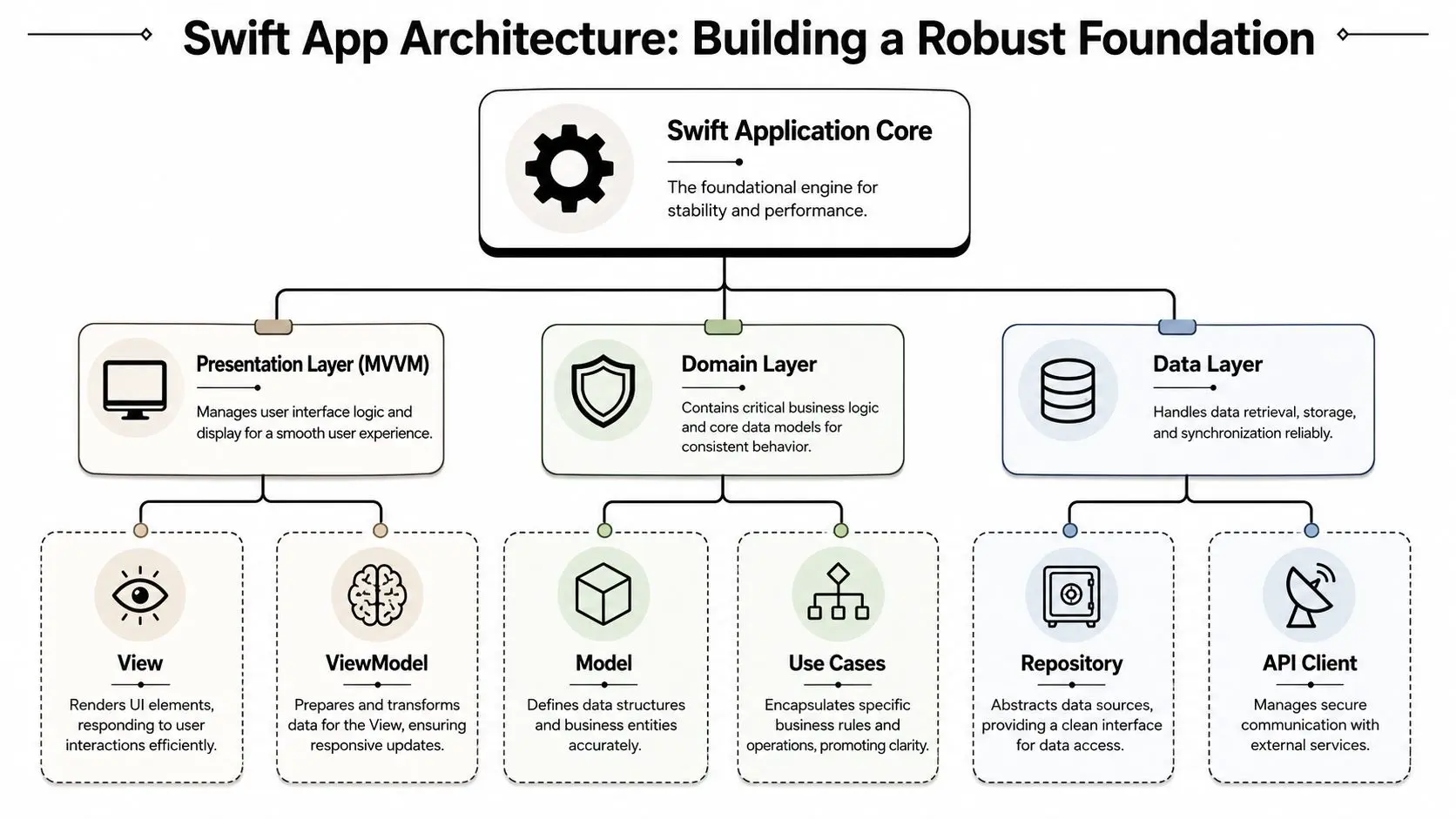
Why architecture is a financial decision
Poor architecture usually doesn't announce itself during the pitch phase. It shows up later when a simple change request turns into a multi-sprint rewrite. That's why experienced product teams treat technical architecture as part of cost control, not technical decoration. A sound Swift stack usually accounts for:- •Presentation layer design so interface changes don't cascade into backend logic
- •Domain logic separation so product rules remain explicit and testable
- •Repository and API structure so backend services can evolve without destabilising the whole app
- •Dependency management so third-party tools don't gain too much control over the roadmap
AI features raise the stakes
This becomes more important when the app includes AI-assisted functions such as speech recognition, recommendation flows, image analysis, or on-device model execution through Core ML. These features create production value, but they also create concurrency and compliance risk. According to the UK's 2025 AI Adoption Report, 74% of UK mobile developers encounter race conditions when running AI models concurrently with other tasks, yet only 9% of Swift training platforms offer GDPR-aligned AI integration templates, as noted in discussion of Swift learning gaps and AI integration challenges. For an executive audience, that statistic matters because it points to a real implementation gap. The hard part isn't adding an AI feature to a slide deck. It's adding it securely, reliably, and in a way that won't expose users or derail release schedules.
What strong implementation looks like
A production-grade approach usually includes:
- •Async and Await discipline so model execution doesn't collide with UI work or other tasks
- •Data minimisation decisions to reduce privacy exposure
- •Clear service boundaries between on-device intelligence and cloud services
- •Testing for edge conditions where concurrent tasks can produce inconsistent behaviour
The value of AI in a Swift product depends less on the model itself and more on the architecture around it.
When stakeholders ask whether advanced features are possible, the better question is whether they can be integrated cleanly enough to remain supportable. That's the standard that protects ROI.
Integrating AR and XR Experiences with Swift
For brands investing in spatial experiences, Swift is often the front door to Apple's AR and XR ecosystem. ARKit and RealityKit make it possible to build native experiences that feel grounded in the device rather than attached as an afterthought. That matters when the product depends on believable interaction, camera alignment, real-time feedback, or responsive spatial content. The strongest use cases tend to be commercially specific, not experimental for the sake of it. Retail teams use AR to let customers explore products in context. Enterprise teams use immersive interfaces for guided training and procedural learning. Event and activation teams use spatial content to create more memorable audience participation.
Where native AR makes sense
Native Swift is usually the best fit when the experience needs tight integration with Apple hardware and software behaviour. That includes:
- •Product visualisation on iPhone or iPad where smooth placement and interaction matter
- •Training workflows that benefit from on-device responsiveness and controlled interface patterns
- •Branded companion apps that add spatial layers to a broader campaign or venue experience
- •VisionOS-forward planning where Apple ecosystem alignment matters from the start
Teams evaluating concepts often benefit from a practical view of AR app development for immersive experiences, especially when the business case depends on how immersion supports a clear user goal rather than novelty.
When Swift should work with Unity or Unreal
Not every XR experience should be built entirely in native Swift. If the project includes game-like interaction systems, complex multi-scene logic, or a broader cross-platform requirement, Unity or Unreal may be the better runtime layer. In those cases, Swift still matters. It often becomes the bridge into the Apple ecosystem, handling device integration, native wrappers, account flows, or app-level services around a real-time engine. That hybrid model is common in advanced production environments. It lets teams use the right tool for each layer instead of forcing one stack to do everything.
The producer's lens on XR investment
From a commercial standpoint, the key question is not whether XR is exciting. It's whether the interaction improves understanding, engagement, or decision quality enough to justify production effort. A good decision framework looks like this:
| Scenario | Native Swift first | Hybrid with game engine |
|---|---|---|
| Retail AR configurator | Often yes | Sometimes |
| Event activation with deeper gameplay | Sometimes | Often yes |
| Training simulation with structured flows | Often yes | Depends on complexity |
| High-fidelity immersive world-building | Less often | Often yes |
The important point for leadership is that Swift app development can support both direct native experiences and a blended XR stack. The commercial win comes from matching the platform choice to the interaction ambition, not from forcing technical purity.
Project Phases Timelines and Cost Drivers
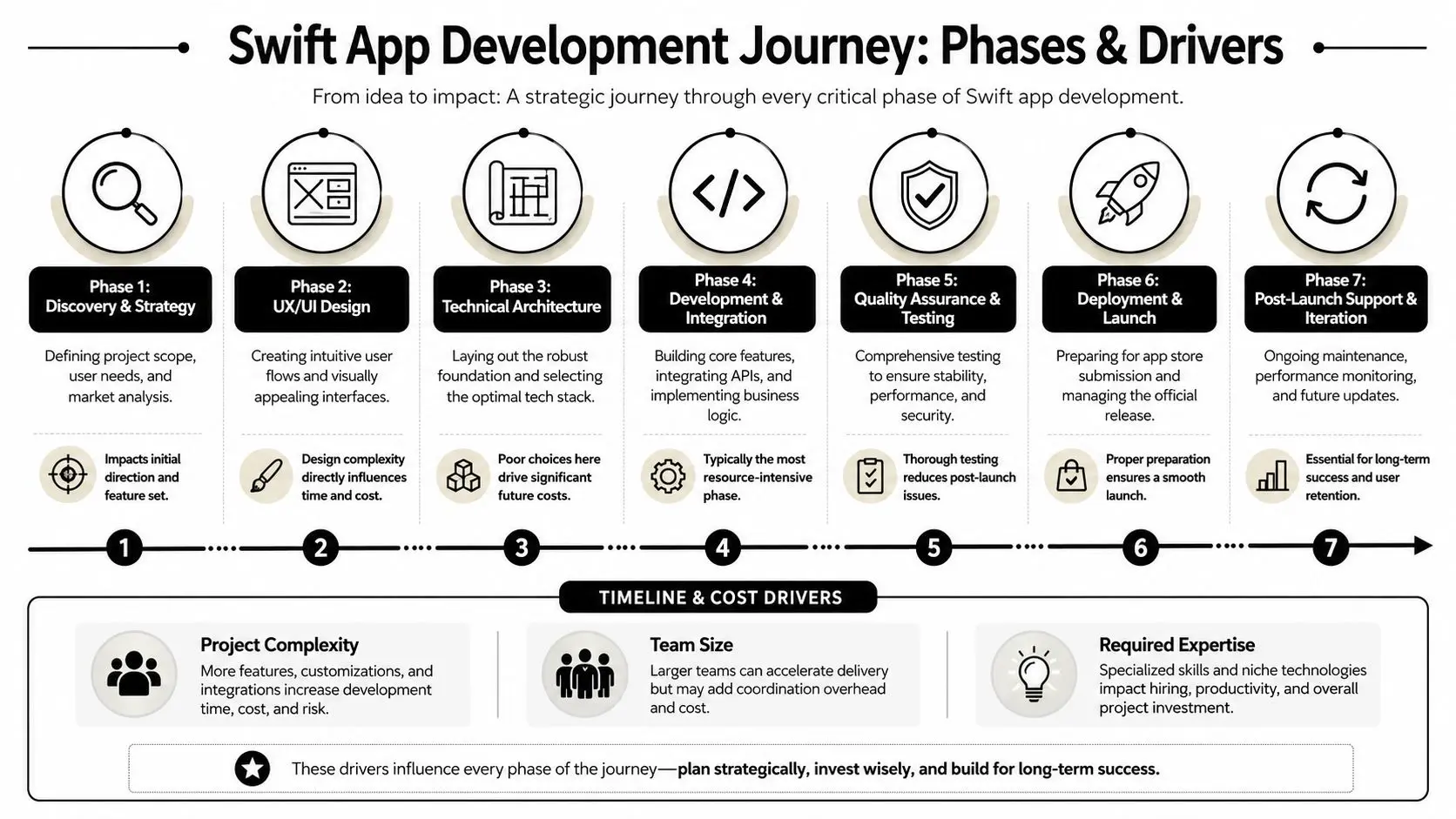
Most app budgets drift for one simple reason. The business approves a feature list without a production model. Swift app development works better when leaders understand the phases before they approve the spend, because each phase changes either risk, quality, or the final cost.
The phases that shape delivery
A strong project usually moves through seven practical stages.
- Discovery and strategy. Teams define user needs, business goals, success criteria, and technical constraints. Skipping it tends to produce expensive ambiguity later.
- UX and UI design. User flows, wireframes, interaction states, and visual systems get resolved here. Design debt created at this stage often resurfaces in development as rework.
- Technical architecture. Core frameworks, backend assumptions, data models, and integration patterns are agreed.
- Development and integration. Features are built, services are connected, and app logic becomes testable.
- Quality assurance and testing. Teams validate functional behaviour, edge cases, performance, and device consistency.
- Deployment and launch. Release preparation, App Store submission, and launch governance happen here.
- Post-launch support and iteration. Early feedback, defect handling, and roadmap updates begin immediately after release.
The cost range leaders should expect
In the UK market, high-complexity Swift app development projects, such as those with AR/VR or AI-enhanced pipelines, typically range from £80,000 to £150,000+, according to UK Swift app development cost guidance. That range reflects the specialist expertise required in Swift, Xcode, and Apple's compliance environment. That number should be read as a marker for serious products, not a universal tariff. A lighter utility may sit outside that bracket. A highly immersive, integration-heavy platform can move beyond it. For a broader planning perspective, Nerdify's iOS app development insights are useful because they help leadership teams ask the right commercial questions before locking scope too early.What moves the budget up or down
The biggest cost drivers are usually these:- •Feature complexity. Authentication is one thing. Real-time collaboration, AR interaction, subscriptions, or AI-assisted workflows are another.
- •Integration load. Payment systems, CRMs, analytics stacks, learning platforms, and proprietary APIs all add delivery overhead.
- •Design ambition. Bespoke motion, custom components, and polished transitions require more craft than template-led interfaces.
- •Compliance pressure. Privacy, App Store review requirements, and data governance affect both implementation and QA.
- •Content production. XR and media-rich apps often need asset pipelines alongside software development.
A useful analogue comes from animation production. A premium 60-second 3D animation in the UK typically requires 8 to 10 weeks, with defined stages from brief through post-production, according to UK 3D animation production timeline guidance. High-value apps behave similarly. Quality comes from staged production discipline, not from compressing every decision into the coding phase. For budgeting conversations grounded in the local market, this UK app pricing guide is a sensible companion read.
Commercial warning: If a supplier prices a complex native iOS build before discovery, you're not getting certainty. You're getting a placeholder.
Ensuring Success After Launch
Launch is the point where commercial exposure starts, not where delivery responsibility ends. Once the app is live, every defect is customer-facing, every compatibility issue is public, and every weak onboarding decision starts affecting adoption. That's why post-launch discipline is part of the investment case.
QA protects more than code quality
A strong QA process does two jobs. First, it catches defects before users do. Second, it protects the brand from avoidable friction. That includes functional testing, device testing, performance checks, regression passes, and manual review of the moments that matter most, such as sign-up, purchase flow, playback, or submission steps. Automated tests help with coverage and consistency. Manual testing remains essential for real-world judgement. Teams still need humans to assess whether an interaction is intuitive, whether copy makes sense, and whether the app feels stable under normal use.
Maintenance is not optional
Apple's ecosystem changes continuously. New iOS releases, device updates, SDK changes, privacy requirements, and dependency updates all have downstream effects. If the app is left untouched after launch, small issues turn into material risk. A sensible maintenance posture usually includes:
- •Compatibility reviews ahead of major iOS updates
- •Security patching for libraries, services, and app logic
- •Crash monitoring and triage so the team can respond quickly to production issues
- •Planned iteration based on observed user behaviour and internal priorities
This isn't about keeping developers busy. It's about protecting the business from a deteriorating customer experience.
App Store performance needs active management
Many leaders assume a good app will naturally find its audience. It won't. App Store visibility has its own operational demands, including store listing quality, screenshots, positioning, review management, release notes, and metadata discipline. Post-launch teams should keep asking:
| Post-launch area | Why it matters |
|---|---|
| Product analytics | Shows where users stall, return, or abandon |
| App Store assets | Shapes first impression before download |
| Ratings and reviews | Influence credibility and discoverability |
| Release cadence | Signals whether the product is active and supported |
Treat launch as the start of evidence gathering. The first release tells you how the market responds. The next releases show whether the team is learning.
The businesses that get real return from Swift app development are usually the ones that plan support, optimisation, and iteration from the outset rather than treating them as optional extras.
Partnering with a Specialist Swift Development Studio
By the time a business reaches procurement or partner selection, the primary challenge is no longer understanding Swift in theory. It's finding a team that can connect product strategy, technical delivery, design quality, and operational realism in one production model. That matters most in projects that sit between software and content. A straightforward utility app is one thing. A high-value iOS product with immersive interaction, premium visuals, AI-assisted workflows, or XR ambitions requires broader production literacy. The partner needs to understand not only Swift and Xcode, but also narrative flow, asset pipelines, compliance pressure, release management, and stakeholder communication.
What specialist capability looks like
A strong specialist studio typically brings three things together:
- •Native iOS technical depth so architectural choices hold up under scale and future change
- •Creative production discipline so visual quality and UX don't collapse under technical constraints
- •Cross-medium thinking so apps, animation, games, and XR can support one another instead of competing for budget
That combination is especially useful for businesses with product estates that extend beyond a single screen. Media owners, education providers, training teams, and brand-led organisations often need one partner who can understand both software delivery and content production logic.
Why this matters for executive risk
The biggest hidden risk in Swift app development isn't usually code. It's fragmentation. One supplier handles UX, another handles app engineering, another handles content, and nobody owns the total production outcome. That's when roadmaps slip and accountability blurs. For leadership teams evaluating partners, DesignStack app development insights offer a useful external perspective on how delivery choices affect startup and growth-stage app outcomes. The core lesson applies more broadly. Capability fit matters more than a polished proposal deck. A credible specialist should be able to speak clearly about projects such as scaling children's IP into digital experiences, visualising complex technical subjects for stakeholder understanding, or designing high-throughput immersive interactions for live environments. Those are different commercial challenges, but they all test the same thing. Can the team turn technical possibility into a controlled production outcome? The right partner doesn't just promise an app. They help de-risk the investment, challenge vague scope, sequence delivery properly, and build the product in a way that the business can still support a year later.
If you're weighing a major iOS investment and need a partner who understands premium content, XR, and native product delivery, Studio Liddell is well placed to help shape the scope, pressure-test the roadmap, and turn the brief into a production-ready plan.