Reels in Motion: A Production Guide for Brands and Studios
A marketing team gets the broadcast master back, the grade looks clean, the animation holds up, and then someone asks for a cut that works in Reels, Shorts, and TikTok. That's where the problem often emerges. The content is strong, but the frame is wrong, the pacing is too slow, and the lower third that looked fine in a 16:9 suite vanishes under app UI on a phone. That adaptation work is what reels in motion really means in practice. It's not just “making a video shorter”. It's the discipline of designing motion for vertical, mobile-first, short-form delivery without flattening the craft that made the original piece worth keeping. UK audiences are already used to that language of motion, with Ofcom reporting that 79% of UK adults used social media daily or almost daily in 2024, 92% of 16, 24-year-olds did the same, and 88% of UK adults watched online video in the previous month, which makes fast visual storytelling a mainstream expectation rather than a niche test case (Ofcom data summarised here).
What Reels in Motion Actually Means for Modern Production
A lot of teams use “reels” to mean two very different things. One is the demo showreel, the internal-facing or client-facing portfolio cut that proves a studio can animate characters, build environments, and finish shots to a high standard. The other is the social reel, the public-facing, platform-native asset designed to hold attention on a phone and survive algorithmic competition. Those two jobs look similar on a timeline, but they're not the same creative problem. A demo showreel can open with a slow reveal, a title card, and a sequence of polished shots because the audience already wants to assess craft. A social reel has to earn its place instantly, so the motion language, text hierarchy, and edit rhythm need to work without context.
Practical rule: if the reel has to persuade a stranger in the first few seconds, it's a social asset. If it has to persuade a buyer or producer about capability, it's a showreel.
That distinction matters for budgets too. A showreel can justify broader polish across a range of shots, while a social reel often needs modular planning, reusable motion, and cut points that can be re-versioned for different feeds. For teams trying to understand motion graphics as a discipline in the UK market, a useful companion read is Studio Liddell's own guide to motion graphics for UK brands, because the same thinking about hierarchy, timing, and readability carries straight into vertical delivery. The clearest way to think about reels in motion is this. You're not shrinking a broadcast piece. You're translating it for a new viewing context where thumb-stop, clarity, and composition have to do more work than scale.
Demo Showreels Versus Social Reels
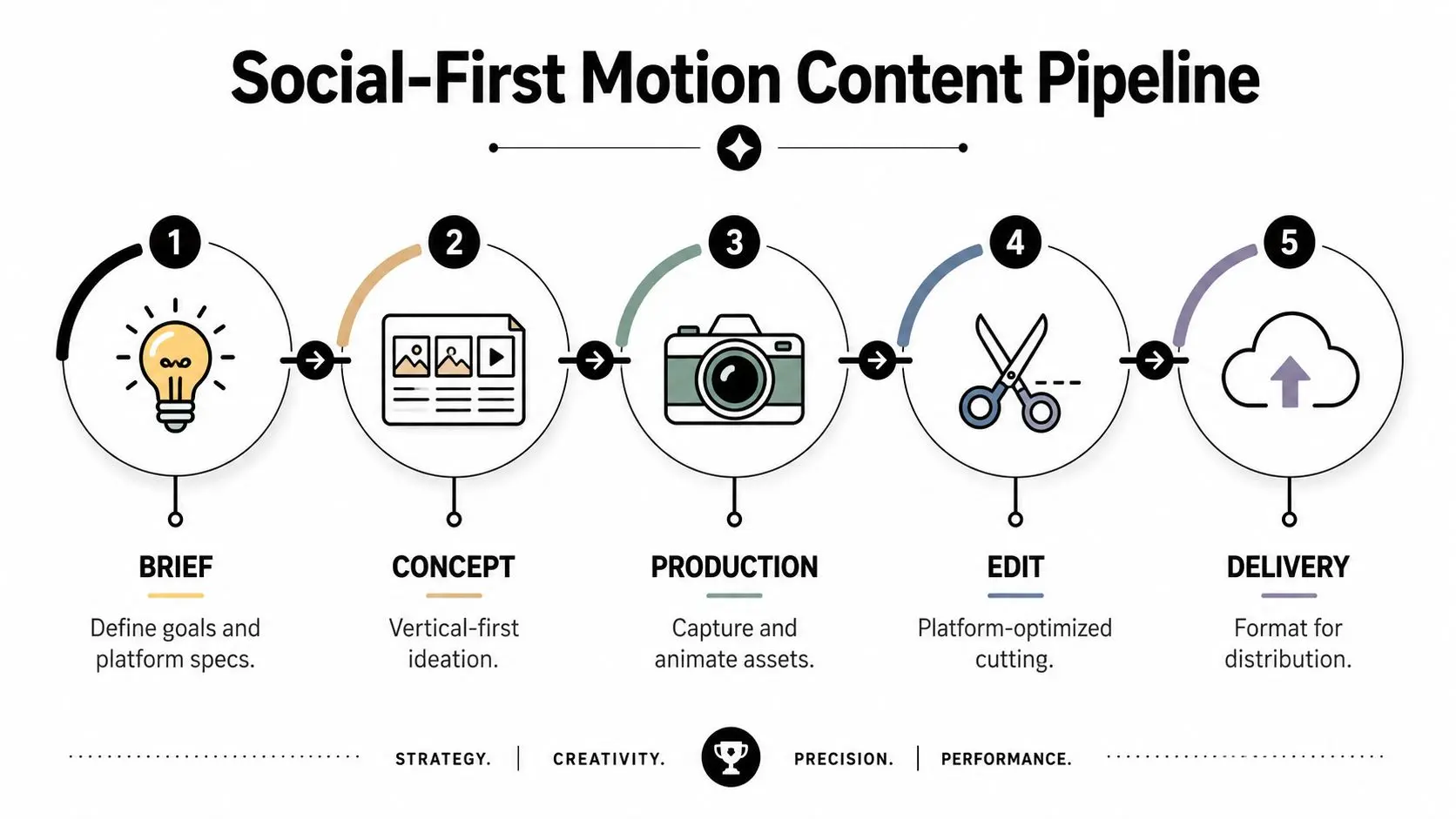
The easiest way to avoid bad briefings is to separate showreels from social reels before anyone opens After Effects or Maya. They share source material, but they don't share the same success criteria.
| Dimension | Demo Showreel | Social Reel |
|---|---|---|
| Purpose | Prove capability, range, and finish | Hold attention, drive engagement, support a campaign |
| Audience | Prospects, commissioners, producers, partners | Platform users, customers, wider public |
| Format | Flexible, often landscape or mixed | 9:16 vertical is the safest default |
| Production approach | Curated best-of sequence | Platform-led composition and pacing |
| Success metric | Sales conversations and trust | Views, retention, saves, shares, and clicks |
A showreel can tolerate more variety in pacing and shot scale because the viewer is already in evaluation mode. A social reel has to carry its own context, so the edit needs a sharper opening, fewer dead frames, and stronger text placement. If a piece is meant to serve both jobs, the production team has to plan for modular shot extraction from day one, not rescue it in the edit. Trendy's Instagram Reel examples and how-tos are useful here because they show how the same raw idea can be framed either as a polished portfolio asset or as a platform-friendly cut. That split is exactly where many teams go wrong. They approve one beautiful master, then ask for platform versions after the animation language, aspect ratio, and pacing are already locked.
What gets reused, and what doesn't
A shot that sells craft in a showreel doesn't automatically sell a product in social. The trim point, text entry, and motion emphasis usually need to change.
The safest shared material is often the underlying asset build, not the final edit. A single character pass, product rotation, or logo motion can become multiple outputs if the studio has planned framing, negative space, and headline hooks properly. Without that planning, the social cut becomes a compromise, and the showreel loses the chance to feel premium.
The Production Pipeline for Social-First Motion Content
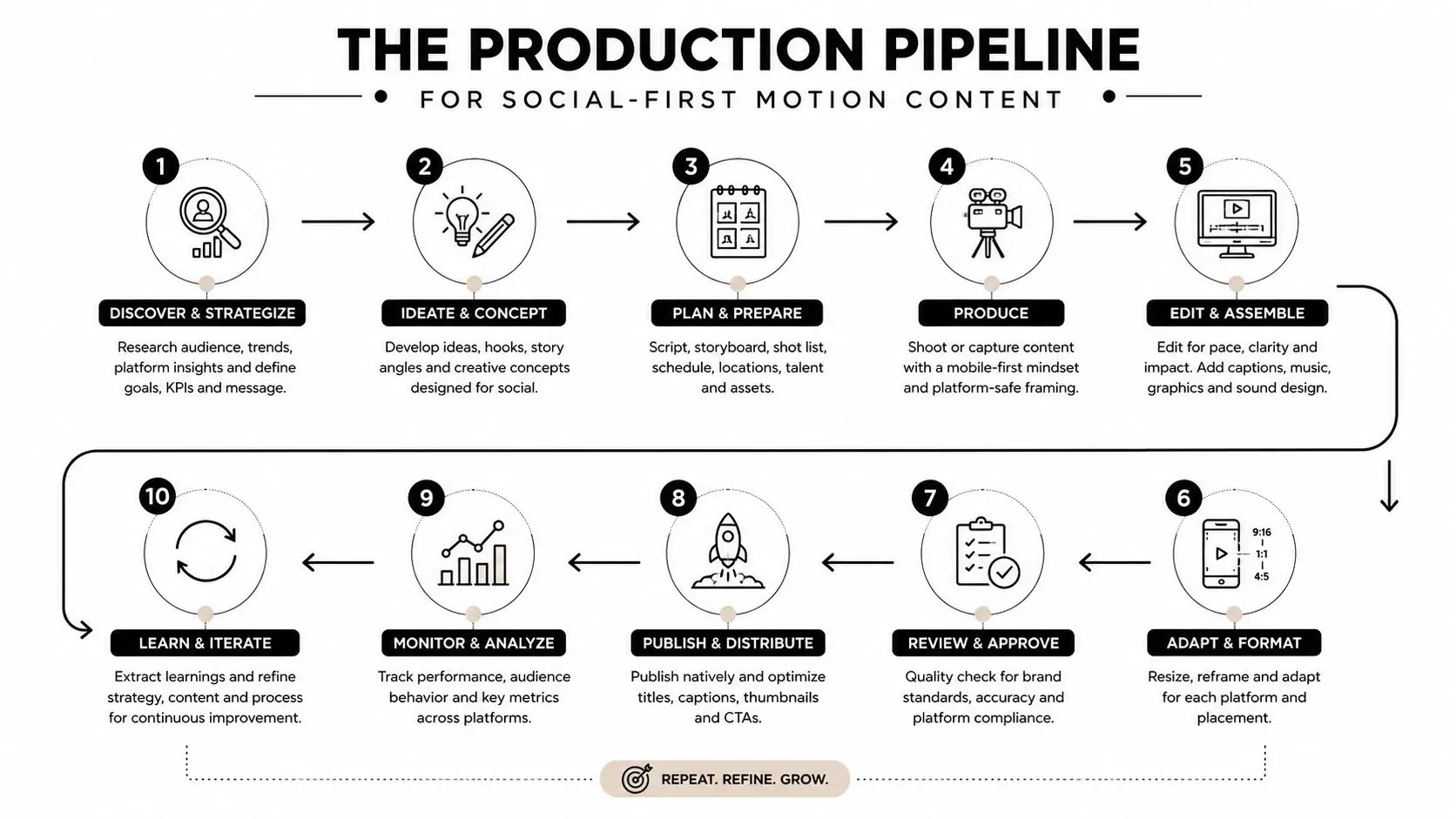
The production workflow for reels in motion should start with the platform, not with the software. Briefing needs to define the audience, the hook, the call to action, and the viewing environment before anyone locks a script or storyboard. That sounds obvious, but many teams still build a beautiful scene first and only later discover it doesn't survive vertical cropping or caption overlays. A proper pipeline starts by naming the output early. If the reel is for Instagram Reels, Facebook Reels, or Shorts, the composition has to be designed for 9:16 from the first layout pass. That's where the process diverges from a traditional broadcast workflow, because the centre of gravity shifts. Important information has to sit higher in frame, motion needs to read in a narrower slice, and cuts need to happen before attention drifts.
From brief to previz
The brief should answer three practical questions. What action do you want after viewing, what emotion should the motion carry, and what can't be obscured by app UI? Once that's clear, previz becomes less about pretty boards and more about sequencing. You're mapping where text appears, where movement accelerates, and where a viewer can still read the point on a small screen. That's where tools can help, including iterative AI-assisted passes for boards, masking, and rough cut exploration, but they don't replace timing judgement. Adobe's recent work on Premiere and After Effects is a good reminder that faster masking, board-to-edit flow, and vector-aware motion work are increasingly part of modern production, yet the creative call still sits with the producer and animator, not the software update. Studio teams that already run a disciplined pipeline can adapt those tools without changing their standards. For example, Studio Liddell's animation production pipeline guide is a sensible reference point for the broader end-to-end flow, because social delivery only works when asset naming, shot tracking, and revision control are already tight.
Build for motion, then cut for platform
Production should create motion with enough variety that the edit has options. In practice that means shooting or animating a few clean alternates, keeping camera moves readable, and planning for short lines rather than long explanatory passages. If the line is too long to read in one breath on a phone, it probably belongs in a caption or a sequence of intertitles instead. Post-production is where platform differences become essential. Safe zones, subtitle placement, and motion pacing all need a pass specifically for mobile. If you're working with a mixed pipeline that includes 2D, 3D, Unity, or Unreal, the final export has to feel unified, because the viewer won't care which package rendered which element.
Technical Specifications and Safe Zone Requirements
The standard delivery target for vertical social motion is 1080 × 1920 px, 9:16, and an export that holds up cleanly in MP4/H.264. For practical frame rate planning, 30 fps is the default that works well for most social motion, while 60 fps makes sense when the scene has fast movement or fine detail that would otherwise stutter. Independent guidance on vertical video dimensions is a useful sanity check during delivery prep, and PostPulse's exact 9:16 video resolution for apps aligns with the export logic most production teams already use. Meta's ad specs add the hard rules that catch teams out late in the process. Instagram Reels ads require 9:16, MP4 or MOV, H.264, square pixels, fixed frame rate, and a resolution of at least 500 × 888 pixels. Meta also recommends leaving roughly 14% at the top, 35% at the bottom, and 6% on each side free of critical creative elements so interface overlays don't cover the message (Meta Reels ad specs). For Facebook Reels, Meta recommends 1080p, .mp4, and 24, 60 FPS. Reels content also has to comply with Meta's Privacy Policy, Community Standards, and Terms of Use, so approval isn't just a technical render issue, it's a policy issue too (Meta Facebook Reels requirements).
Platform Delivery Specifications
| Platform | Resolution | Aspect Ratio | Frame Rate | Duration |
|---|---|---|---|---|
| Instagram Reels | At least 500 × 888 px for ads, 1080 × 1920 px is the practical social standard | 9:16 | 30 fps is practical, 60 fps for high motion | 5 to 90 seconds for Reels tab eligibility |
| Facebook Reels | 1080p recommended | Vertical format, commonly 9:16 | 24 to 60 FPS | Use short-form reel timing |
| Social vertical delivery | 1080 × 1920 px | 9:16 | 30 fps default, 60 fps for motion-heavy scenes | Keep within short-form constraints |
The timing limit matters because it changes how you edit long-form material. A reel may technically accept longer uploads through some APIs, but the Reels tab only accepts content in the short-form window, which means long masters still need disciplined cut-down planning (Reels publishing guidance). If you're turning a broadcast sequence into a social cut, treat length as a creative constraint, not an afterthought.
Delivery rule: if a logo, subtitle, or CTA sits near the top or bottom edge in a desktop comp, assume it'll get clipped, covered, or crowded on a phone.
That's why central safe-zone thinking should be baked into the storyboard, not patched in the final grade. Once text, key action, and logo placement are planned around mobile overlays, re-exports stop becoming firefighting.
Distribution Strategy and Performance Measurement
A reel can be beautifully animated and still underperform if the delivery plan was an afterthought. In practice, the distribution decision belongs in pre-production, because the way people encounter motion on social feeds shapes the edit, the captioning, and the call to action. The first question is where the reel will live. An organic Reels edit, a paid placement, and a cross-posted Shorts version do not need the same pacing, framing, or caption treatment. If the piece is meant to educate, the opening has to establish relevance quickly. If it is meant to drive response, the call to action needs to be readable before the viewer swipes away.
Measure what the motion does
Motion pacing affects how long people stay with a clip, but you only see that if you read the right metrics. Watch-through and retention show whether the opening is doing its job. Saves and shares show whether the idea felt useful or worth passing on. Clicks matter when the reel supports a landing page or paid campaign, but a strong click-through number means little if the opening has already lost comprehension. Typography has a direct effect on performance too. If the text is too dense, too low, or too decorative, the reel may still look polished in a review suite and fall apart on a phone. Accessibility belongs in the performance discussion, not in a separate compliance bucket. Cross-platform repurposing should be planned as versioning, not recycling. A social cut for one audience may need a different first frame, a different end card, or a different subtitle rhythm for another platform. For a deeper look at connecting content decisions to acquisition goals, see Studio Liddell's guide to a strategic content plan. Teams that handle this well keep the core motion asset flexible enough to support those variations without rebuilding from scratch.
Test with intent
A/B testing for motion content works best when one variable changes at a time. Keep the core animation the same, then test the hook, the headline treatment, or the CTA. If everything changes at once, the results will not show whether the issue was the shot choice, the pacing, or the message.
The reel isn't finished when the export is done. It's finished when the platform version has enough room to prove which creative choice worked.
For brands that publish regularly, the analytics process should stay simple. Pick one objective, define one primary metric, and let the versioning support that objective. Without that discipline, the team ends up optimising for the wrong signal.
When Motion Helps and When It Hurts Brand Messaging
More movement doesn't automatically mean stronger communication. In fact, too much motion can make a brand feel less trustworthy, especially when the audience needs clarity, reassurance, or technical understanding. That's why camera language matters as much in reels in motion as it does in film. High-angle framing can make a subject feel more vulnerable, low-angle framing can add authority, and Dutch angles can create instability or unease. Those are useful tools when the brief asks for drama or tension, but they can work against a heritage brand, a public-sector message, or a B2B explainer that needs calm credibility. Camera-language guidance on these choices is often discussed in visual culture terms, but it becomes more valuable when it's translated into business communication (camera angle principles for reels).
Match motion to the trust level of the message
A product teaser can handle faster cuts, more camera energy, and punchier transitions because the goal is appetite, not full explanation. An explainer for a complex service needs steadier movement, cleaner typography, and fewer visual jokes so the viewer can process the idea. Heritage and institutional brands usually benefit from motion that feels intentional rather than restless. That doesn't mean the work has to look flat. A measured push-in, a subtle parallax move, or a controlled reveal can create momentum without undermining trust. The point is to make movement serve comprehension, not distract from it. Many “viral” templates fail. They force every brief into the same tempo, regardless of subject matter or audience expectation. UK brands, especially those speaking to mixed-age audiences, usually do better when they treat motion as a tone decision, not a trend chase.
Choose the visual language before the edit locks
If the reel is supposed to reassure, start with clean framing and restrained motion. If it's supposed to energise, allow the edit and camera to accelerate together. If it's supposed to explain, keep the movement legible enough that the audience can follow the idea without rewatching. The producer's job is to make that choice early, then protect it through revision. Once the motion language is set, every cut, title, and overlay should reinforce the same message instead of competing with it.
Actionable Best Practices for Your Next Reel Production
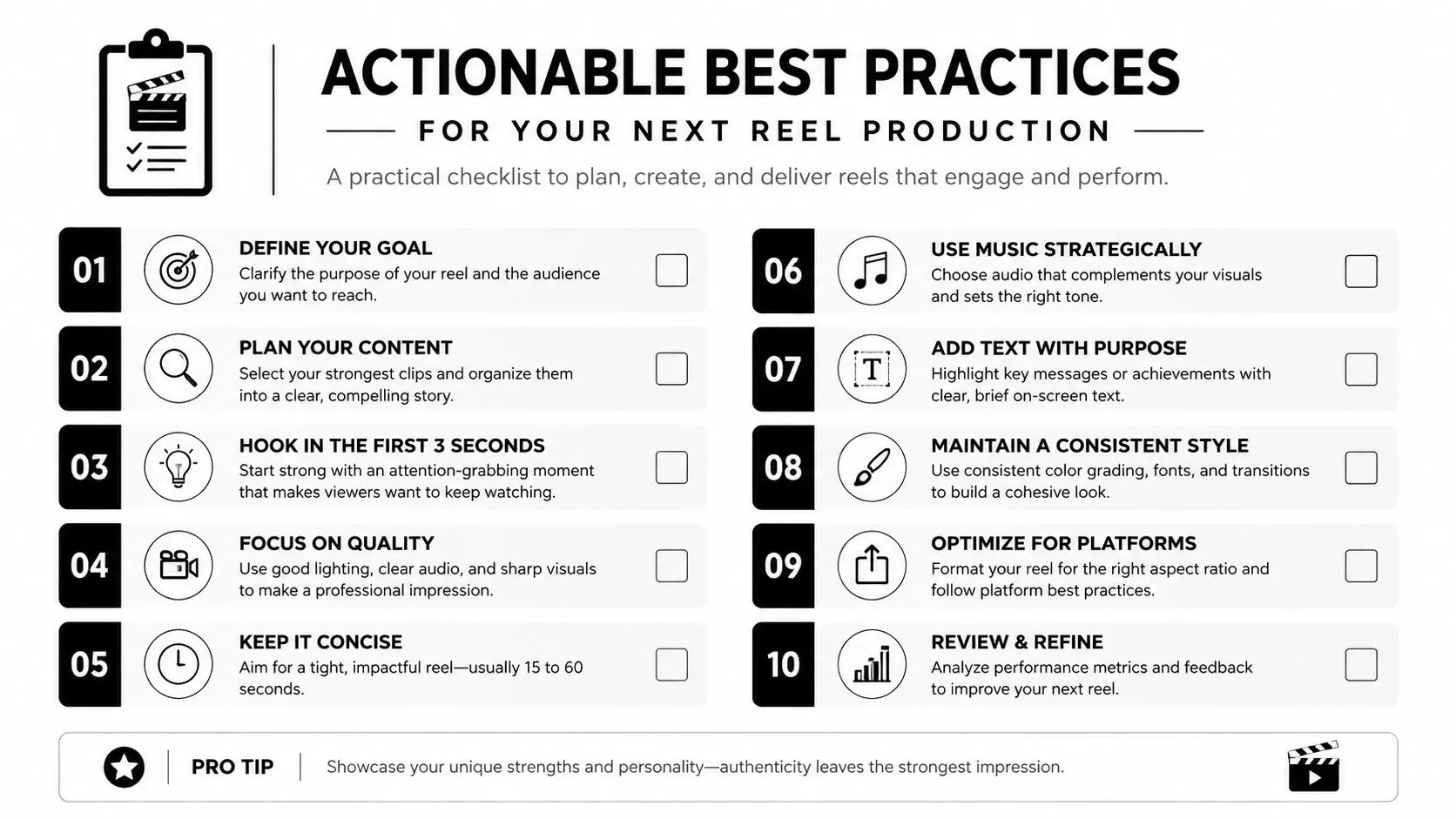
Start with a brief that names the platform, audience, and action. If those three things aren't clear, the rest of the pipeline will drift. Then lock the format early so the storyboard is built for vertical safe zones, not rescued after approval. Use a small set of repeatable composition rules. Keep critical text in the central frame, leave breathing room above and below for UI, and avoid filling every inch of the screen with motion. Strong reels in motion usually feel confident because they're not trying to say everything at once.
A practical checklist for the next cut
- •Define the one job of the reel: Awareness, education, lead capture, or product support, because a reel can't optimise for everything at once.
- •Write for short delivery: If a line needs too much reading time, split it or replace it with on-screen hierarchy.
- •Design in 9:16 from the start: Don't crop compositions after the fact and hope the framing survives.
- •Reserve safe space: Keep logos, subtitles, and calls to action away from the UI-heavy edges.
- •Build motion variety into the source: That gives the edit enough material to trim without deadening the pace.
- •Review exports on a phone: A render that looks fine on a grading monitor can still fail in a feed.
- •Check file format and frame rate: Match the platform spec before upload to avoid unnecessary re-encoding.
- •Keep transitions purposeful: Every cut should either move the story forward or sharpen the message.
- •Plan the thumbnail and opening frame together: The first impression starts before playback.
- •Brief for versioning: Ask for alternate hooks, end cards, and subtitle layouts if the reel needs to travel across platforms.
When budgets are tight, the smartest spend is usually on the parts that preserve clarity. That might mean one strong hero animation with disciplined cut-downs, rather than three loosely related assets that each need separate approval. A studio with motion graphics, 2D, 3D, and delivery expertise, such as Studio Liddell, can handle that kind of packaging when the brief is specific enough to support it. The best time to bring in outside production is when the reel has to carry brand trust, technical accuracy, or repeated platform use. In-house creation can work for simpler announcements and fast social responses, but once the motion needs to survive multiple formats, the pipeline needs more control. --- If you need reels in motion that hold up as both craft and campaign material, Studio Liddell can help shape the brief, build the animation, and deliver versions that fit social platforms without losing production value. Visit Studio Liddell to discuss a reel workflow that matches your brand, your platform mix, and your delivery constraints.