A Producer's Guide to Animations in Games
Animation in games is the magic behind the movement. It's the invisible art that brings characters, creatures, and entire worlds to life. It’s what makes a character’s jump feel satisfyingly weighty or an explosion feel genuinely powerful. But it's so much more than just pretty visuals. Great animation is a core part of the gameplay loop, feeding players crucial information and making the experience feel intuitive.
The Role of Animation in Modern Gaming
Think of animation as the silent storyteller and the choreographer of every action you take. It's the critical difference between a character that feels like a seamless extension of your will and one that feels like a clunky, unresponsive puppet. When your character smoothly vaults over a wall or an enemy staggers back from a well-timed hit, that's animation doing its job. It’s communicating success and impact faster and more effectively than any text or sound effect ever could. This process is all about crafting belief. A slowly creaking door in a horror game? That's animation building suspense. A stylised, bouncy run in a vibrant platformer? That's animation conveying a sense of pure joy. The subtle twitch of an eyebrow during a cinematic dialogue? That’s animation selling a character's emotional turmoil. Every single movement is a deliberate choice, designed to pull the player deeper into the digital world. For any producer or developer, getting this right is non-negotiable.
Animation isn't just the final coat of paint; it's one of the fundamental pillars of game design. It dictates combat pacing, guides player strategy, and shapes the emotional tone of the whole experience.
Establishing the Foundations of Movement
To really grasp its impact, you need to understand the main techniques artists use to bring games to life. Each one offers a unique creative toolkit, and the most memorable games often blend them to forge a distinct visual identity. The core disciplines we’ll be looking at are:
- •2D Animation: The classic approach, evolving from hand-drawn frames to modern digital sprites. It’s perfect for expressive, highly stylised motion.
- •3D Animation: The industry standard for most modern titles. This involves using digital skeletons (known as rigs) to manipulate models in 3D space for incredibly realistic and complex movement.
- •Motion Capture (Mocap): A technique where the movements of real actors are recorded and applied to digital characters, delivering a level of realism and nuance that’s hard to beat.
- •Procedural Animation: A fascinating system where animations are generated in real-time by algorithms. This allows for dynamic, unpredictable movements that react organically to the game world.
Making the right animation choices early on can make or break a project. A game can have a stunning art style, but if the movement feels clunky and unresponsive, players will quickly lose interest. On the other hand, a project that invests in fluid, communicative animations in games elevates the entire experience, transforming it from a simple product into a memorable world players will be eager to return to.
A Look at the Core Animation Techniques
To really get a feel for how animations in games bring a world to life, you need to understand the different tools and methods animators have up their sleeves. Each technique is a different paintbrush, suited for everything from a pixel-art indie passion project to a sprawling AAA blockbuster. At its core, game animation is all about creating the illusion of movement, one frame at a time. The methods for achieving this have evolved dramatically, from classic 2D approaches to the complex 3D workflows that power most of today's biggest titles.
The Enduring Charm of 2D Animation
2D animation is where it all started, and its artistic power hasn't faded one bit. It's not just for retro games; its principles are the bedrock of creating expressive, fluid motion that can be incredibly compelling. There are two main flavours here:
- •Sprite-Based Animation: This is the classic method you've seen in countless iconic games. Animators draw a series of images, or "sprites," for each frame of a character's action. These are then stitched together into a sprite sheet, which the game engine flips through like a digital flipbook to create movement.
- •Cutout Animation: Think of this as working with digital paper puppets. A character is built from separate, layered pieces (head, arms, legs, etc.). Animators then pivot and move these individual parts, which is a far more efficient way to create smooth, reusable movements without having to redraw every single frame from scratch.
Building Worlds in 3D
3D animation blew the doors wide open, ushering in a new era of realism and immersion. Instead of flat drawings, artists now work with digital models that have real depth, weight, and volume. This allows for far more complex and believable interactions within the game world. The king of 3D techniques is skeletal animation. Picture a highly advanced digital marionette. First, an artist creates the 3D model, which we call the "skin." Then, an animator builds a digital skeleton, or "rig," inside it, complete with joints and bones that mimic how a real creature would move. The process of attaching this skeleton to the model is called skinning. Once a character is fully rigged, animators can grab onto the skeleton's controls to pose and perform, and the skin deforms and moves right along with it. It's an incredibly powerful system. If you want to dive deeper, you might find our guide on 10 hidden secrets to bring your 3D characters to life really useful.
Think of a 3D rigger as a master digital toymaker. They don’t just sculpt the action figure; they design and install every single joint, defining its full range of motion before an animator even starts to make it move.
Advanced and Dynamic Methods
Beyond the foundational techniques, several advanced methods are pushing the boundaries of what’s possible in games. These are often used alongside traditional 3D workflows to add that extra layer of polish and realism. Motion Capture (Mocap) is a game-changer for lifelike human movement. It's a process where actors, wearing special suits covered in sensors, have their movements recorded. This performance data is then mapped directly onto a 3D character's rig, resulting in incredibly subtle and authentic animations that are almost impossible to create by hand. Procedural Animation, on the other hand, is all about letting the game engine do the work. Instead of playing back a pre-made animation, it uses algorithms to generate movement in real-time based on rules and physics. It's perfect for creating dynamic, unpredictable motion, think of how trees sway naturally in the wind, how a character's cloak flows behind them as they run, or the way water ripples when disturbed. This constant push for believable worlds has made computer-generated animation the dominant force in the industry. The global market for animation, VFX, and games, currently valued at USD 406.35 billion, is expected to swell to USD 509.19 billion by 2032. This incredible growth is powered by CGI, which makes up a staggering 85% of the market. It's also being accelerated by technologies like motion capture, which saw its usage jump by 30% last year alone. You can find more on these market trends from Intel Market Research. It’s clear that studios and publishers see immense value in investing in high-fidelity, visually stunning storytelling.
Choosing the Right Game Animation Technique
Selecting the right animation method is a critical decision that influences everything from the art style and player experience to the project's timeline and budget. Each technique has its own strengths and is better suited for certain types of games and goals. The table below breaks down the primary methods, offering a quick-glance guide to help you understand where each one shines.
| Animation Technique | Best For | Pros | Cons |
|---|---|---|---|
| Sprite-Based | 2D retro-style games, pixel art, and projects requiring a hand-drawn feel. | Strong artistic control over every frame; nostalgic and distinct visual style. | Labour-intensive; difficult to modify; can result in large file sizes. |
| Skeletal (3D/2D) | Most 3D games and complex 2D characters needing fluid movement. | Highly reusable animations; smooth and efficient motion; allows for blending. | Requires specialised rigging skills; can look 'puppet-like' if not done well. |
| Motion Capture | Achieving hyper-realistic human or creature performances in AAA titles. | Unmatched realism and subtlety; captures nuanced performances. | Very expensive; requires specialised equipment and actors; can be difficult to edit. |
| Procedural | Dynamic environmental effects (e.g., foliage, water) and physics-based movement. | Creates dynamic, non-repetitive motion; highly efficient for complex systems. | Lacks direct artistic control; can be computationally expensive. |
Ultimately, many modern games don't just stick to one technique. They often use a hybrid approach, combining the efficiency of skeletal animation for characters with procedural animation for environments and perhaps a touch of motion capture for key cinematic moments. Understanding the trade-offs is the first step toward making smart production choices.
The Game Animation Production Pipeline
Creating the fluid, believable animations in games isn’t a single, magic moment of creativity. It’s a highly structured, multi-stage journey. Think of it less like a sprint and more like a relay race, where every step builds on the last to turn a simple idea into a living, breathing part of the game. For producers and developers, getting a handle on this pipeline is key, it shines a light on milestones, dependencies, and where to give crucial feedback. The whole process kicks off long before an animator even thinks about movement. It all starts with a vision, usually sketched out in concept art and storyboards that act as the project's visual blueprint.
From Concept to Creation
This first phase is all about nailing down the "what" and "why" of an animation. It’s where we establish the visual style, personality, and purpose of a character or object before any heavy lifting begins.
- Concept Art and Storyboarding: Artists get to work creating detailed sketches and illustrations to lock in a character's look, personality, and key poses. Storyboards follow, mapping out how this character will move through critical gameplay moments or cutscenes. This gives the entire animation team a clear direction to follow.
- 3D Modelling: Once the design gets the green light, a 3D artist steps in. Using specialist software, they digitally sculpt the model (often called the "mesh" or "skin"), meticulously shaping its geometry to perfectly match the concept art. This is the digital clay from which the final character is formed.
Building the Digital Skeleton
A static 3D model is just a digital statue. To bring it to life, it needs a skeleton and a set of controls that an animator can actually use. This is where the technical artistry of rigging comes into play. A rigger builds a digital skeleton (the "rig") right inside the 3D model, carefully placing bones and joints at pivot points like elbows, knees, and fingers. This skeleton is then bound to the model’s mesh in a process known as skinning. When a bone in the rig moves, the part of the mesh it's connected to deforms and moves with it, creating a responsive digital puppet.A great rig is the unsung hero of character animation. It gives animators intuitive controls that empower them to create nuanced performances, turning a complex technical setup into an expressive artistic tool.This infographic shows a simplified flow, from those foundational 2D ideas all the way through to complex, advanced animation techniques.
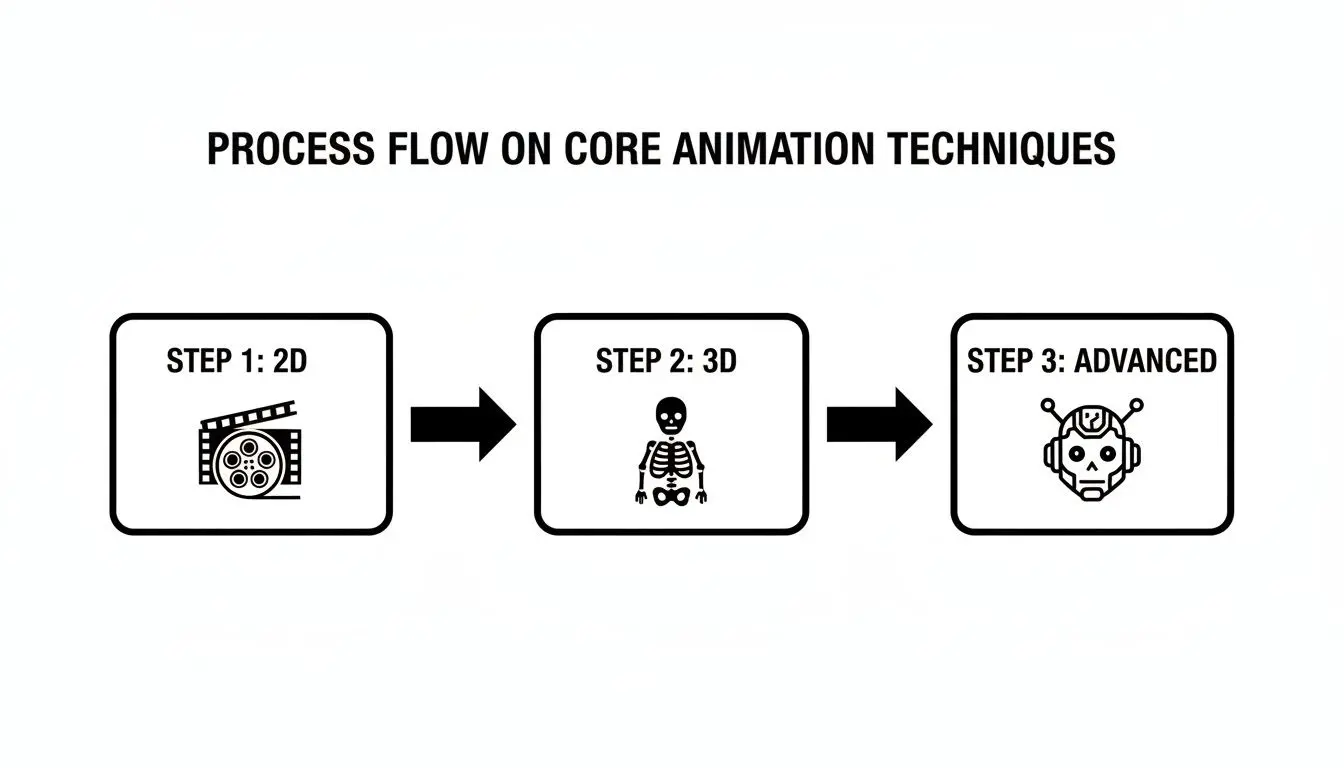 You can see how each stage layers on more complexity, starting with simple 2D frames and building towards sophisticated, fully rigged 3D models ready for an animator to work their magic.
 Animating and Final Integration
With a fully rigged model at their fingertips, the animators can finally get down to business. They might pose the character frame by frame (keyframe animation) or apply movement data captured from real-life actors (motion capture), breathing personality and life into the digital asset. Every single jump, run, or idle animation is crafted as its own separate piece. The final, absolutely critical step is engine integration. The finished animations are exported and brought into a game engine like Unity or Unreal Engine. This is where developers and technical artists write the logic that tells the game when to play each animation, triggering a run cycle when the player pushes the joystick, or a jump animation when they hit a button. It’s where art meets code, turning a library of movements into a responsive, interactive part of the game world. To discover more about turning your vision into reality, learn about professional game animation services that offer expert studio craft.Integrating Animations in Unity and Unreal
Creating a beautiful animation is only half the battle. The real magic happens when that animation comes to life inside a game engine, and that’s where the artistry of animation meets the hard logic of programming. An animation file, by itself, is just a silent movie , a collection of movement data with no instructions. It needs a ‘brain’ inside the engine to tell it when to play, how to blend into the next movement, and how to react to what the player is doing. Without that, your perfectly animated character would just stand there, frozen in place. Game engines like Unity and Unreal Engine are the command centres where this integration takes place. They provide the powerful tools needed to build the logic that connects a player's button press to the character's action on screen.The Brains Behind the Movement
Both of the big engines have their own specialised systems for managing and controlling animations. They go by different names and have different interfaces, but their core purpose is the same: to act as a state machine that decides which animation should be playing at any given moment.- •In Unity, this system is called the Animator Controller. Think of it as a visual flowchart where developers create states (like "Idle," "Run," or "Jump") and then draw the lines that define the rules for moving between them. A rule might be as simple as, "If the player's speed is greater than zero and they are on the ground, switch from the Idle animation to the Run animation."
- •In Unreal Engine, this logic is handled by Animation Blueprints. This is a seriously powerful node-based system that mixes state machine logic with real-time calculations and physics. It allows for much more complex setups, like a character that automatically aims their weapon up or down based on where the player is looking, all handled dynamically.
These systems are absolutely fundamental to creating characters that feel responsive, alive, and properly connected to the player's controls. For a deeper dive into how these engines stack up, check out our detailed comparison of Unreal vs Unity for real-time animation.
Creating Seamless Transitions with Blend Trees
Players don’t just expect a character to instantly snap from a walk to a sprint; they want to see a fluid, natural transition. Those abrupt changes can completely shatter the illusion and make a game feel clunky and cheap. This is precisely the problem that blend trees are designed to solve. Blend trees are a phenomenal tool found in both Unity and Unreal. They let animators intelligently mix multiple animations together based on one or more parameters, like speed or direction.
Imagine controlling a character with a joystick. A blend tree can seamlessly merge a "walk forward" animation with a "strafe right" animation. As you push the stick diagonally, the engine calculates the perfect mix of the two motions, resulting in a smooth, believable diagonal walk.
This is a game-changer. It means you don't have to create dozens of individual animations for every conceivable angle of movement. It saves a colossal amount of production time while delivering a far more polished and professional result.
Performance Optimisation and Best Practices
Finally, getting animations into the engine isn't just about making them look good, it's also about making them run efficiently. Poorly optimised animations can be a huge drain on processing power, leading to stuttering, dropped frames, and a sluggish experience for the player. It all starts with choosing the right file format. The industry standard is .FBX, as it neatly packages the 3D model (mesh), the skeleton, and all the animation data into one file. Beyond that, studios have to work within strict technical budgets. This means adopting practices like:
- •Limiting the number of bones in a character's skeleton to what's absolutely necessary.
- •"Baking" complex animations to reduce the need for heavy real-time calculations.
- •Using Level of Detail (LOD) systems, which automatically switch to simpler, less demanding animations for characters that are far away from the camera.
This kind of technical discipline is vital. The UK animation sector, which pumps a massive £1.6 billion into the economy, is built on this fusion of creative vision and technical excellence. While big-budget games have enormous costs, the most successful franchises can generate returns nearly ten times their initial production cost, proving just how valuable high-quality, fully optimised animation really is. You can learn more about the UK creative industry's economic impact here.
How AI Is Shaping the Future of Game Animation
The world of game animation is in the middle of a massive shift, and it’s all thanks to artificial intelligence and machine learning. These aren’t just buzzwords anymore; they're becoming practical, everyday tools inside modern production pipelines. The goal isn't to replace the artist’s unique touch. Instead, think of AI as a powerful assistant, one that can automate the most laborious tasks and unlock entirely new creative avenues. This change is a game-changer for studios of all sizes. For smaller indie teams, AI can take on the time-sucking processes that used to be possible only for huge, well-funded operations. For the major studios, it puts workflows into hyperdrive, letting artists spend more time on performance and polish instead of repetitive manual labour. The result? More dynamic, responsive, and complex animations in games, all delivered more efficiently than ever before.
Automating the Grunt Work
One of the most immediate ways AI is making a difference is by tackling the tedious side of animation. Tasks that traditionally ate up hours of meticulous, painstaking effort can now be handled in a fraction of the time. This frees up animators to focus on what they do best: bringing characters to life. Here are a few ways it’s already happening:
- •Intelligent In-betweening: In 2D animation, AI models can generate all the transitional frames between two key poses. This creates fluid motion automatically, saving animators from the soul-crushing task of drawing hundreds of individual frames by hand.
- •Mocap Data Cleanup: Raw motion capture data is often messy, full of jitter and odd imperfections. AI-powered tools can intelligently filter out this noise, cleaning up the data far faster than any manual process.
- •Automated Lip Syncing: By analysing an audio file of dialogue, AI can generate surprisingly accurate mouth movements and facial expressions. This gives animators a fantastic starting point that they can then refine and add nuance to.
Generating Dynamic, Real-Time Motion
Perhaps the most exciting frontier for AI in game animation is its ability to generate procedural, real-time movements. Instead of just playing back a pre-canned animation, characters can now react intelligently and organically to the game world and the player's actions.
We’re moving from scripted performances to emergent behaviour. AI-driven systems can generate unique walk cycles on the fly for uneven terrain, create realistic staggering animations when a character takes a hit, or even seamlessly blend different movements together based on context.
AI is making its mark on almost every part of game development, from procedural content generation to creating hyper-realistic character movements. Just imagine the time saved by using AI tools that create 3D worlds from text input, which can dramatically speed up environment design. It all contributes to building richer, more believable worlds where characters feel less like digital puppets and more like living, breathing inhabitants.
A New Toolkit for Artists
When you get right down to it, AI isn't a threat to the craft of animation; it's an evolution of the animator's toolkit. It’s a powerful new set of instruments designed to handle the technical heavy lifting, which in turn allows artists to push their creative boundaries further than they ever could before. By automating processes and enabling more dynamic, responsive systems, AI helps teams create far more immersive and engaging experiences for players. The future isn't about machine versus artist, but about collaboration, where brilliant technology is used to amplify human creativity.
Choosing the Right Studio for Your Game
Picking your creative partner is easily one of the most important calls you'll make during game development. You’re not just looking for a supplier; you need a collaborator. The right studio gets your vision, has the technical chops to bring it to life, and runs a tight production ship that respects your timeline and budget. A flashy showreel is just the start. You’ve got to dig into their portfolio. Does their work have the same vibe and art style you're chasing? Even more critical is their technical expertise. Have they got real, demonstrable experience in your chosen engine, be it Unity or Unreal? A studio that already speaks your engine’s language can spot technical roadblocks a mile off and will be optimising assets for peak performance from day one.
Preparing an Effective Brief
A solid, detailed brief is the bedrock of any great partnership. It cuts through the noise, gets rid of ambiguity, and gives a studio everything they need to give you an accurate quote and a realistic timeline. A vague brief? That’s a one-way ticket to endless revisions and a budget that just keeps growing. Before you even think about reaching out, make sure your brief nails these points:
- •A Project Overview: A quick, clear summary of your game, its genre, and who you’re making it for.
- •Animation Style References: Don't just describe it. Show it. Include video clips or other games that have the look and feel you want.
- •A Detailed Asset List: Be specific. List out every single animation you need (e.g., walk cycle, jump, primary attack, idle).
- •Technical Specifications: Lay out the target platform, the game engine, and any performance targets or constraints you’re working with.
A well-crafted brief is more than a shopping list; it’s a statement of intent. It shows a studio you’ve done your homework and are serious about quality, attracting the best partners to your project.
Evaluating Studio Capabilities
Once you get past the portfolio, it's time to investigate how they actually work. Ask them about their production pipeline. What's their process for feedback and iteration? Who does what on their team? This isn't just small talk; it's about making sure your two ways of working will click, not clash. The team's strength is everything. For producers building out an in-house animation team, exploring different talent acquisition software platforms can be a massive help in streamlining recruitment. Here in the UK, we're spoiled for choice. The games industry is booming, supporting over 73,000 jobs across more than 2,148 companies. The really interesting part? With 55% of development roles located outside of London and the South East, there's an incredible pool of specialised talent spread all over the country. You can learn more about the UK video games industry landscape to get a feel for the sheer depth of expertise out there. Choosing a partner with a proven pipeline and a seasoned team isn’t just playing it safe, it's a direct investment in your game’s success.
Frequently Asked Questions About Game Animation
To wrap things up, let's tackle some of the most common questions we hear when people start planning animations for their games. Getting these concepts straight will give you a solid foundation for your next project discussion.
What Is the Difference Between In-Game and Pre-Rendered Animation?
Think of in-game animation as a live theatre performance. It’s all happening in real-time, rendered on the fly by the game engine. This is what allows the animation to be interactive and react instantly to whatever the player does. When your character runs, jumps, or swings a sword, that’s in-game animation at work. Pre-rendered cinematics, on the other hand, are more like short films. They're created and rendered into a high-quality video file long before you play the game. Because they aren’t limited by the real-time processing power of a console or PC, they can be incredibly detailed and visually stunning. These are the beautiful cutscenes that play at key story moments, but you can’t interact with them , you just watch.
How Long Does It Take to Animate a Game Character?
That’s the ultimate "how long is a piece of string?" question. The timeline is completely dictated by complexity. A simple character for a mobile game might just need a handful of basic animations , an idle pose, a walk cycle, and one action. That could take a single animator a week or two. But for the main character in a major AAA title? You're talking about a vast library of movements for combat, traversal, stealth, and expressive dialogue. That can easily keep a whole team of animators busy for months, if not years.
Why Is Animation Optimisation So Important?
Animation optimisation is absolutely crucial for a game's performance. Every single animation eats up processing power and memory. If you have a collection of unoptimised assets, they can quickly drag a game's frame rate down, resulting in stuttering gameplay and a frustrating experience for the player.
Optimisation isn't just a technical box to tick; it's a core part of the design process. It’s what ensures the artistic vision can be delivered smoothly to the player without compromising the game's stability or responsiveness.
Some of the most effective optimisation techniques include:
- •Reducing Bone Count: Using only the necessary number of 'bones' in a character's skeleton to cut down on the calculation load.
- •Level of Detail (LOD) Systems: Swapping in simpler, less detailed animations for characters that are far away from the player's camera.
- •Baking Animations: Pre-calculating complex animation data so the engine has less work to do in real-time.
Can You Mix 2D and 3D Animation in One Game?
Absolutely! It’s actually a popular artistic choice for creating a unique visual identity. Many games go for a "2.5D" style, placing 2D sprite characters within fully realised 3D environments. This approach blends a classic, retro aesthetic with the depth and dynamic camera work of modern gameplay. Alternatively, a game might use 3D models for all its interactive gameplay but feature beautifully hand-drawn 2D animations for its cinematic cutscenes or special attack effects. This hybrid approach lets developers play to the strengths of both mediums to create something truly memorable.
At Studio Liddell, we've spent years mastering the art and science of game animation, from beloved children's TV series to immersive XR experiences. We combine creative excellence with technical precision to deliver animations that captivate players and achieve your project's goals. Ready to bring your world to life? Book a production scoping call with our team today.