Product Animation Video Guide for UK Brands
Your product team understands every feature, but customers still ask what the product does. You've got photographs, a sales deck and perhaps some CAD files, yet none of them shows the mechanism, the workflow or the reason to choose it. Someone suggests animation. Your next decision shouldn't be which studio makes the glossiest pictures. It should be what customers need to understand before they can take the next step. A product animation video can make that explanation visible. Getting it right means treating the message, accessibility, delivery and measurement as connected production decisions, not separate tasks to sort out after the film is finished.
What a Product Animation Video Actually Is
A photograph can show a product's appearance. It can't easily show air moving through a sealed filter, software passing information between teams or a component fitting inside an assembly. Product animation solves that problem by creating moving images that demonstrate something a camera can't conveniently capture. A product animation video uses animated graphics, digital models or illustrated sequences to explain, demonstrate or promote a product. It might look deliberately graphic, closely resemble a physical object or combine animation with filmed footage. The defining feature isn't realism. It's the use of controlled movement to communicate something about the product.
Separate the format from its purpose
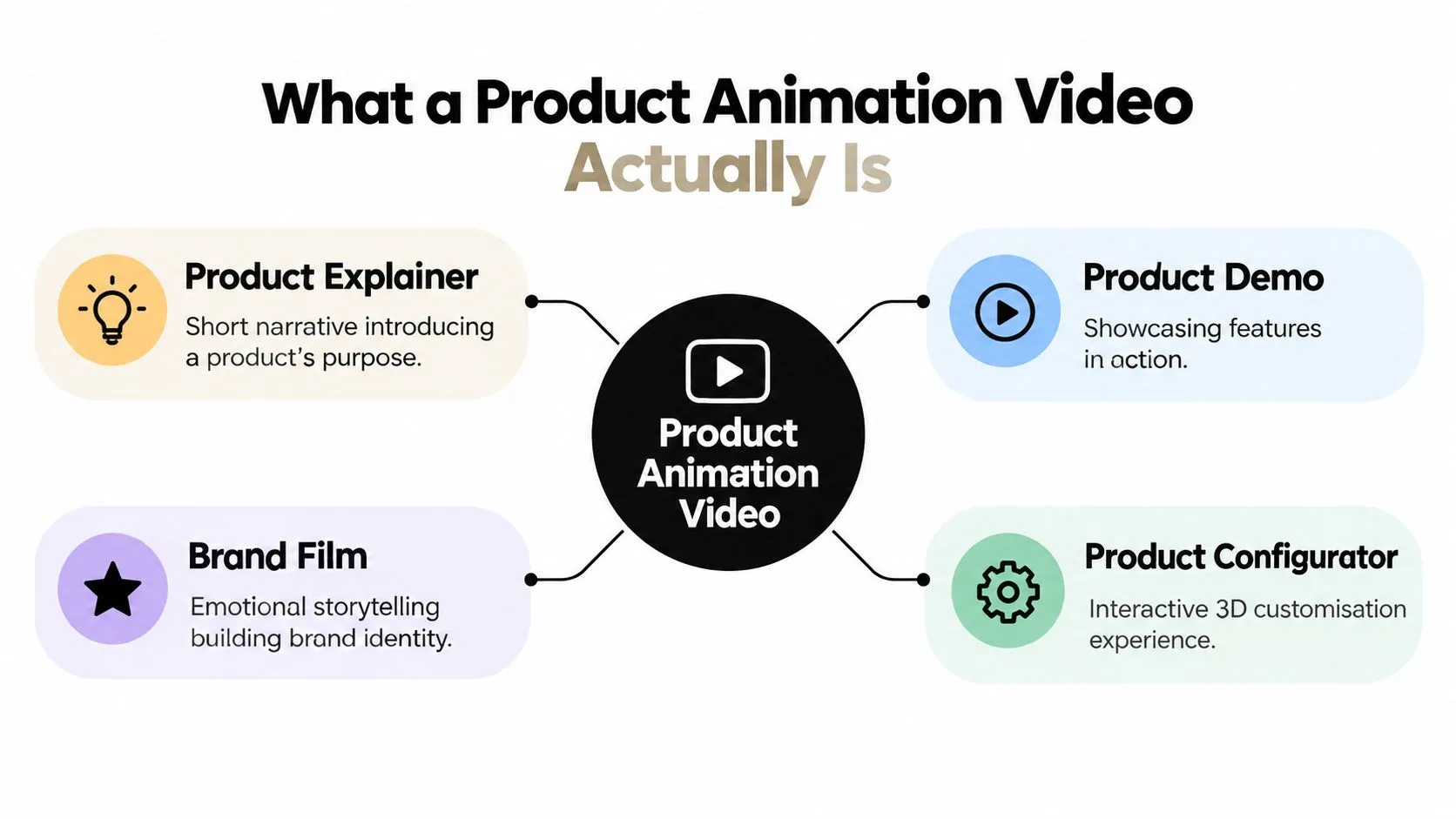
Buyers often use explainer, demo and brand film interchangeably, but they answer different questions.
- •Product explainer: What problem does this solve, and why should I care?
- •Product demo: How does it work, and what happens when I use it?
- •Brand film: What should I feel or remember about this product and its maker?
- •Product configurator: What would the product look like with my chosen options?
A configurator is the exception in that list. It's an interactive experience rather than a video, although it can share models, materials and animation with a linear film.
Decide what needs to be shown
For a manufacturer, an animated cutaway could explain how a locking mechanism engages. For an education provider, moving diagrams could demonstrate the relationship between controls and outcomes. These are illustrative production choices, not evidence that animation automatically improves understanding or sales. Live action remains useful when customers need to see a real person handling a real object. Photography is appropriate when appearance, finish and physical proof matter more than movement. A combined approach can let footage establish authenticity while animation explains hidden processes.
Practical rule: Use animation to make the explanation clearer, not to make an unproven capability look finished.
The finished material might appear on a product page, inside a sales presentation, across social advertising, on an exhibition screen or within onboarding. Each placement asks something different of the content. A sales presenter can pause and explain; an unattended screen can't, so its sequence needs to make sense independently.
Matching Animation Style to the Job You Need Done
Choose the style around the customer's question, rather than assuming a realistic digital product is always the right answer. The useful comparison is between what each approach lets you explain, what it requires you to build and how viewers will encounter it.
When graphic clarity matters most
2D motion graphics suit relationships, sequences and abstract ideas. Moving labels, diagrams and interface elements can explain how information travels through a service without constructing a realistic environment around it. Consider an illustrative software brief: customers don't understand which team approves a request. A clear diagram showing responsibility and handovers may serve them better than a cinematic journey through a digital office. A confident 2D treatment can feel premium through composition, typography, timing and sound. Adding depth won't rescue a script that hasn't decided what matters.
When shape and space matter
3D CGI product visualisation becomes useful when the product's geometry carries the explanation. You can rotate an object, separate its components, reveal an internal mechanism or demonstrate assembly from a controlled viewpoint. A cutaway of a pump, for example, could show the fluid path and the movement of internal parts. The engineering team should approve that representation, particularly where simplification might imply performance the product doesn't deliver. For a closer comparison of the creative choices, use this guide to 2D vs 3D animation when discussing treatments. Style vs Best-Fit Job
| Style | Best-fit job | Typical length | Interactivity |
|---|---|---|---|
| 2D motion graphics | Explain a process, service or interface | Brief message or longer explanation | Usually linear |
| 3D CGI | Show form, mechanisms, materials or assembly | Focused demonstration or extended walkthrough | Linear, with potential asset reuse |
| AR | Help viewers judge placement or scale | User-paced session | Placement and inspection |
| VR or mixed reality | Rehearse a task or explore spatial relationships | Task-led experience | Navigation and manipulation |
When interaction earns its cost
AR, VR and mixed reality deserve consideration when the viewer's action changes what they learn. Placing a product in a room, inspecting clearance around machinery or practising a procedure can justify an interactive build. A product reveal that everyone watches in the same order may not. Unity and Unreal are possible production tools, not creative objectives. Ask the team to explain why the proposed technology suits the target hardware, interaction and maintenance requirements. Budget should follow the necessary work. Existing approved artwork can make a graphic treatment economical, while usable CAD can help a product-focused CGI approach. Neither removes the need for design, preparation and checking. The shortest useful treatment is the one that answers the question without rushing the explanation. Don't stretch a simple demonstration to make the commission feel substantial.
How a Product Animation Video Is Actually Made
The studio needs more than a product brochure. Bring the questions your sales team keeps answering, the mistakes customers make and the technical details that must remain accurate. Those materials help the producer distinguish essential explanation from interesting but unnecessary detail.
Establish the explanation before building it
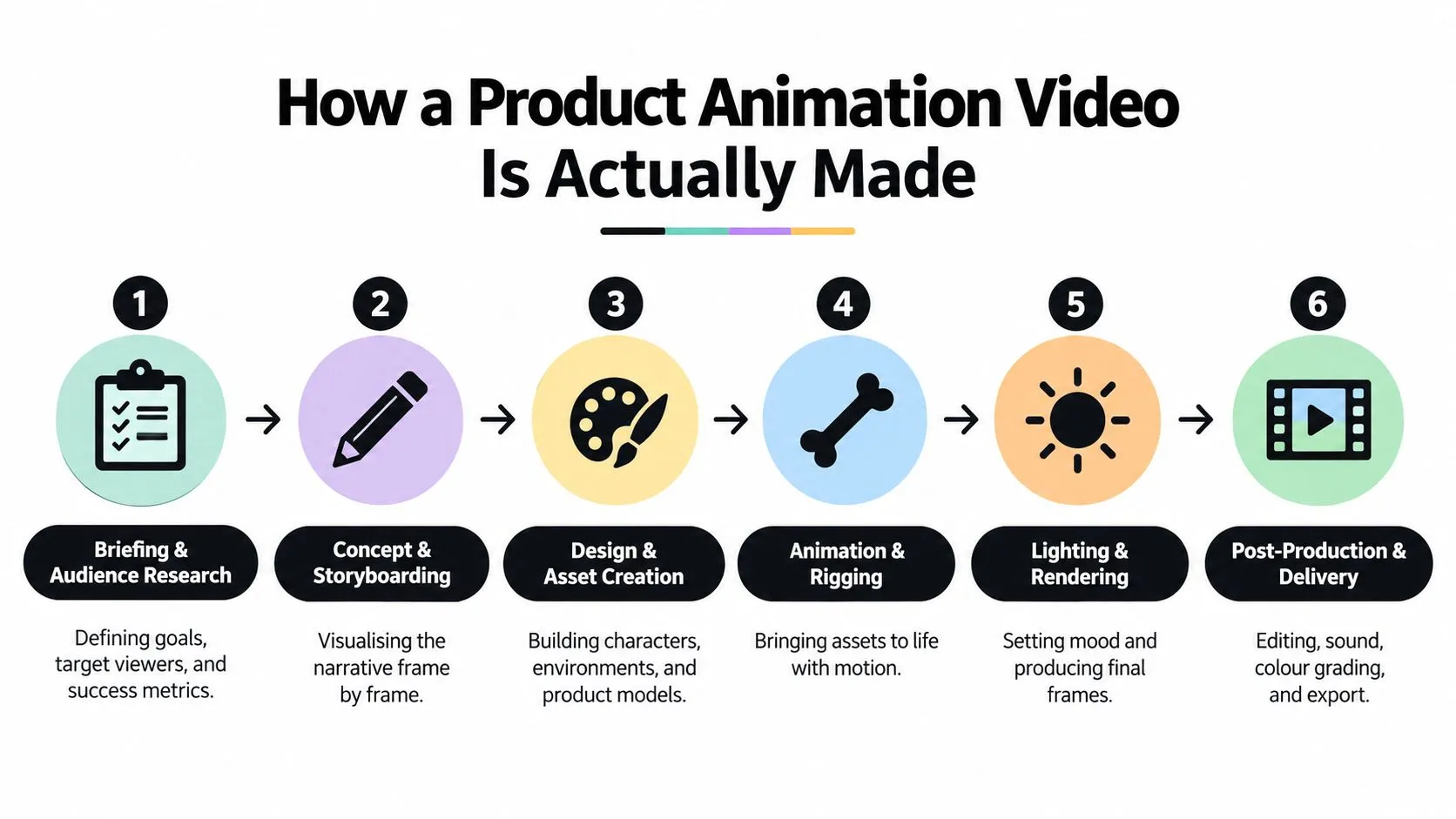
Briefing and audience research establish who needs the video, what they already know and what should happen afterwards. The producer, client lead and relevant product specialist should agree the central message, evidence requirements and approval responsibilities. Storyboarding turns that message into a sequence of views. A previz, or rough animated preview, adds timing and camera movement before anyone commits to polished imagery. Review whether the sequence answers the customer's question, not whether the unfinished pictures look impressive.
Approve the logic while it's still represented by rough shapes. Polished lighting can make a confusing sequence harder to question.
Design and asset creation follow. Artists prepare illustrations, interfaces, product models, materials and any environments needed for the shots. CAD files may need cleaning or rebuilding for production, and a technical reviewer should confirm proportions, labels and visible mechanisms.
Turn approved assets into a finished film
During animation, artists control product movement, cameras, graphic transitions and any character performance. A rig is the control system that makes repeatable movement possible, whether it operates a creature's face or a mechanical hinge. Review the motion for accuracy and readability before approving final image production. Lighting and rendering establish how the surfaces appear and generate the finished frames. Compositing brings rendered elements together with graphics, effects and other layers. The team should check that attractive reflections, depth effects or motion blur haven't obscured the very feature the film needs to explain. Delivery and quality assurance come after creative approval. Someone must inspect the actual exported files, check text and sound, confirm version names and test playback in the intended environment.
- •Client checkpoint: Confirm product claims, terminology and any legal qualifications.
- •Creative checkpoint: Approve picture, pacing, voice and sound against the agreed treatment.
- •Delivery checkpoint: Verify every requested version rather than assuming the approved master guarantees correct exports.
Broadcast work adds its own formal requirements. The BBC's television delivery requirements require network programmes to arrive as AS-11 DPP files, fully checked editorially and technically before transmission, including an “eyeball” quality-control check. That's a useful distinction for any commission: approval of the imagery and approval of the deliverable are separate responsibilities. Name who owns each before production starts.
Realistic Timelines and Budgets for UK Projects
A running time isn't a production specification. A brief animation of an existing model and a film requiring intricate mechanisms, new environments and character performance can have similar durations but very different workloads. There isn't a defensible universal UK price or schedule for a product animation video in the available evidence. Programme-production statistics can describe the wider sector, but they can't tell you what your commercial should cost. Ask for a scoped estimate, not an apparently precise price attached only to duration.
Compare production tiers by what you receive
| Scope level | Likely production work | Main trade-off |
|---|---|---|
| Focused graphic treatment | Existing brand assets, restrained movement and a narrowly defined message | Less scope for detailed physical demonstration |
| Bespoke product demonstration | Custom design or model preparation, planned camera work and technical review | More preparation before final animation |
| Campaign production | Multiple treatments, complex assets, performance, environments or interactive extensions | More dependencies, approvals and deliverables |
These are planning categories, not published pricing bands. For each, request an itemised description of development, asset creation, animation, finishing, sound, revisions and delivery. The UK animated video production cost guide provides a useful starting point for the budget conversation. Your written quotation should still identify assumptions, exclusions, usage rights and what happens when the scope changes.
Understand what moves the estimate
Late product changes can require modelling, animation and finishing to be revisited. New language versions may affect voice recording, text layouts and timing. Additional screen formats can require new compositions rather than a simple export. Schedule the project backwards from its real delivery obligations, leaving room for the product specialist, marketing team and legal reviewer to respond. Ask which tasks can overlap and which depend on signed-off work.
- •Asset readiness: Are the CAD, artwork and interface designs approved and usable?
- •Review availability: Can the people authorised to approve work attend the scheduled reviews?
- •Delivery breadth: Does the quote include only a main film, or also cut-downs, stills and localised versions?
For context, BFI's animation-programme figures for 2021 recorded £73 million across 30 productions, with 67% domestic, 25% inward-investment and 8% co-production spend. Those figures illustrate different financing structures, not a commercial-video rate card. Don't assume a regional studio will cost less than a London supplier, or that a higher quote guarantees better work. Compare the assigned team, relevant examples, asset ownership and revision terms. Where procurement asks for speculative creative work, agree what's paid for and who owns it before asking a team to develop a treatment.
Technical Choices That Decide Where the Video Works
Tell the producer where the film will play before approving the storyboard. A website player, exhibition display, broadcaster and headset application don't necessarily accept the same files or present information in the same way. The commercial context is substantial: Ofcom's Communications Market Report reported UK video-on-demand advertising revenue of £1.33 billion in 2024, up 26% year on year. That isn't an animation-specific figure, but it reinforces the need to plan for more than a presentation-room screen.
Specify delivery rather than guessing
A codec determines how moving images are encoded. The container is the file that carries them, while bitrate controls how much data is allocated to playback. Ask the receiving platform or delivery partner for its approved specification.
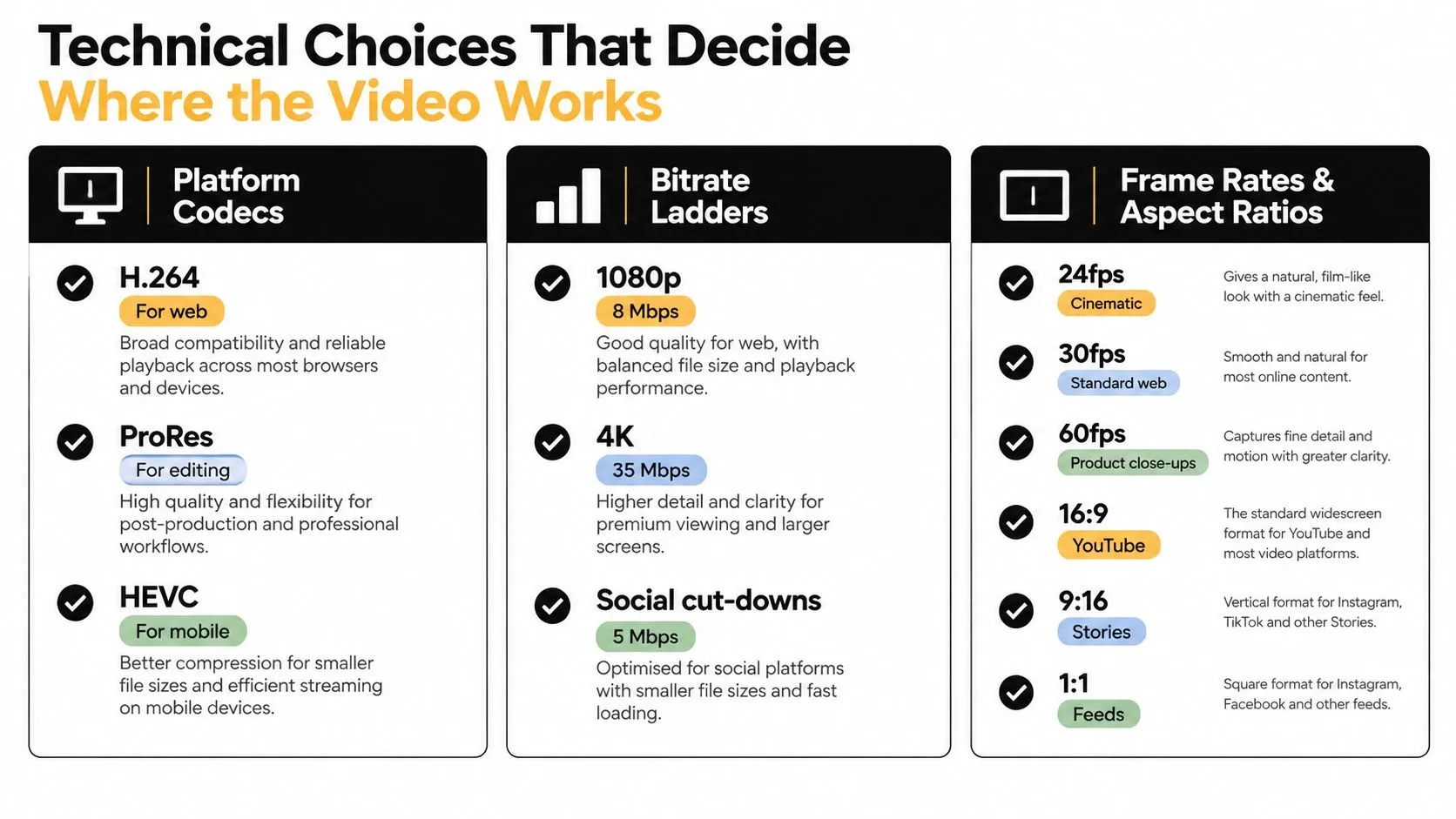
Treat the infographic's settings as illustrative starting points, not universal acceptance criteria. The correct choices depend on the destination, footage characteristics and playback testing. An adaptive player may need a bitrate ladder, meaning several encoded versions suited to different connection conditions. Editing teams may need a high-quality intermediate master, while publishing teams need a compressed distribution file. That's why the same project can legitimately require different masters.
Design for readable and accessible playback
Don't solve every viewing problem at export. Compose shots so the product remains visible in the required crops, leave room for captions and test fine labels after compression.
- •Captions: Supply checked timed-text files where the player supports them, alongside any specifically requested open-caption versions.
- •Essential information: Present operating steps, warnings and specifications visually rather than leaving them only in narration.
- •Description: Prepare a transcript and assess whether an audio-described version is needed to communicate visual information.
- •Motion and contrast: Review flashing, rapid movement, text pacing and separation between labels and backgrounds.
WCAG's Captions (Prerecorded) requirement is a relevant accessibility checkpoint identified in UK government guidance. Caption availability alone doesn't establish that the complete experience is accessible; test the actual player and content with users, including disabled participants.
Delivery check: Review the compressed version on its destination screen, not just the pristine master on an artist's monitor.
Treat interactive versions as separate deliverables
For Quest or another headset target, test the application on the intended device. Check model complexity, textures, interaction comfort, loading and alternative ways to complete tasks. Unity or Unreal project settings don't replace device testing. App and connected-TV submissions may also need naming, language, caption, thumbnail and other metadata specified by the receiving service. For separate campaign-variant exploration, the ShortGenius AI video ad maker is another tool to assess against your requirements, without assuming it replaces technical product validation or final quality assurance.
Measuring Whether the Animation Earned Its Place
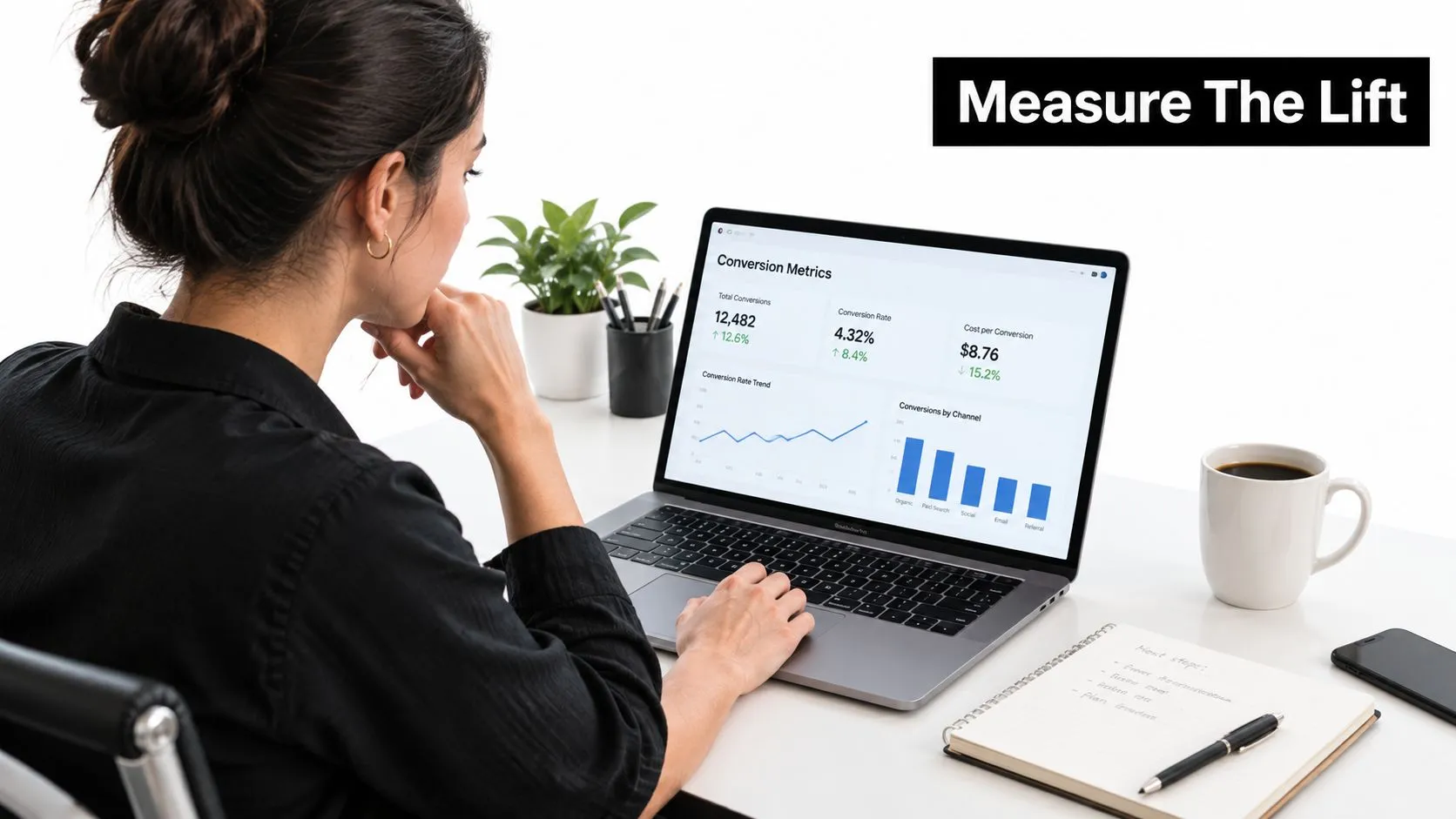
A view tells you that playback occurred. It doesn't establish that someone understood the product, became more confident or purchased because of the explanation. Choose a primary business question before storyboarding. A product-page film might aim to resolve a purchase objection; an onboarding demonstration might aim to prevent an operating mistake. Those objectives need different measurements.
Match the measure to the intended change
| Objective | Useful measure | Interpretation to check |
|---|---|---|
| Improve product evaluation | Product-page conversion | Whether comparable visitors purchase more often |
| Explain a specific feature | Demo completion and related interactions | Whether viewers reach and use the relevant explanation |
| Support a longer buying journey | Assisted revenue or qualified enquiries | Whether exposure appears in journeys that progress |
| Prevent avoidable mistakes | Relevant support tickets and return reasons | Whether the problem demonstrated becomes less common |
| Encourage deeper exploration | Scroll depth and next-step clicks | Whether engagement leads somewhere meaningful |
Define events carefully. A video automatically starting isn't the same as a viewer choosing to watch, and reaching the final frame doesn't prove comprehension. Use the discussion of animated adverts and meaningful engagement to help frame the conversation, then agree operational definitions with your analyst. Record what counts as exposure, completion, conversion and a relevant support issue before launch.
Build a comparison you can interpret
Where practical, randomly assign comparable visitors to a page with the animation or a control version without it. Keep the offer, pricing, traffic sources and surrounding page content consistent. Decide in advance how long to run the comparison and what level of evidence your analyst needs. Segment the results by device and audience where the available data supports it. A helpful desktop demonstration may be difficult to follow on a phone; a film aimed at new buyers may offer little value to returning customers.
A commercially useful result can be a better-informed enquiry, not simply a larger audience.
Attribution becomes less tidy when the film appears in email, sales decks and paid advertising. Use campaign tags where appropriate and connect recorded interactions to customer records only within your privacy arrangements. Ask sales staff to record which objections remain after the demonstration. Review return reasons and support categories rather than assuming every change came from the video. Report the evidence alongside its limitations, especially where viewers chose to watch and may already have been more interested than non-viewers.
Working With Studio Liddell on Your Product Animation
Bring your product references, current sales materials, customer questions, intended channels and launch dependencies to the scoping call. Include CAD files or interface designs where available, but explain their approval status and any restrictions on sharing them. The studio is one option for commissions combining 2D and 3D animation, product commercials, apps and XR development. Its published capabilities include Unity and Unreal workflows and AI-enhanced production. Ask which capabilities are relevant to your particular film, rather than assuming every project benefits from the same technology.
Make the proposal useful to your team
A productive engagement should turn the initial conversation into an agreed treatment, asset plan, review schedule and deliverables list. Request relevant portfolio evidence for the work you're commissioning, whether that's a technical demonstration, broadcaster-facing production or interactive experience.
- •Name the reviewers: Identify who approves product accuracy, brand presentation and final delivery.
- •Set the boundaries: Agree what's included, what can change and how additional work is authorised.
- •Keep the outcome visible: Put the customer question and measurement plan alongside the creative treatment.
--- For a product animation video that needs CGI, graphic explanation or an interactive extension, visit Studio Liddell to book a production scoping call. Bring your product deck, available assets and intended publishing channels so the team can discuss a practical treatment, production scope and delivery plan.