App Development Steps: A Studio's Guide to Production
A client arrives with a clear conviction: the product needs an iOS app and an Android app, both ready for a campaign date already printed in the marketing plan. The screens are being sketched, a feature list is growing, and nobody has yet asked whether an app is the most inclusive or commercially sensible format. That question belongs at the beginning of the app development steps, before wireframes and certainly before code. A dependable product process connects business need, user reality, architecture, accessibility, testing and ongoing maintenance. The teams that ship well don't move quickly for its own sake. They remove expensive uncertainty before it reaches production.
The Decision Most App Guides Skip
The first decision isn't what the home screen looks like. It's whether a native app should exist at all. A responsive web app, progressive web experience, messaging journey or XR product may solve the same problem with less friction, depending on the audience and context. A native build makes sense when device capabilities, offline behaviour, notifications or sensor interaction are central to the experience. It makes less sense when the audience needs a fast, low-commitment route or may not have compatible hardware. That distinction matters in the UK. Written evidence submitted to Parliament estimated that approximately 1.5 million UK households lacked internet access, around 6% of the population, while a further 5% relied solely on mobile internet access (Parliamentary written evidence). Ofcom's research on digital disadvantage also identifies people with low or no internet use, limited digital skills, insecure housing and people who rely only on smartphones as groups at greater risk of exclusion. “Mobile-first” doesn't automatically mean inclusive. An app-only journey can introduce device costs, storage pressure, data charges, poor-connectivity failures, inaccessible authentication and a requirement to visit an app store. For some services, a responsive web route, assisted process or offline alternative is part of the product, not a concession.
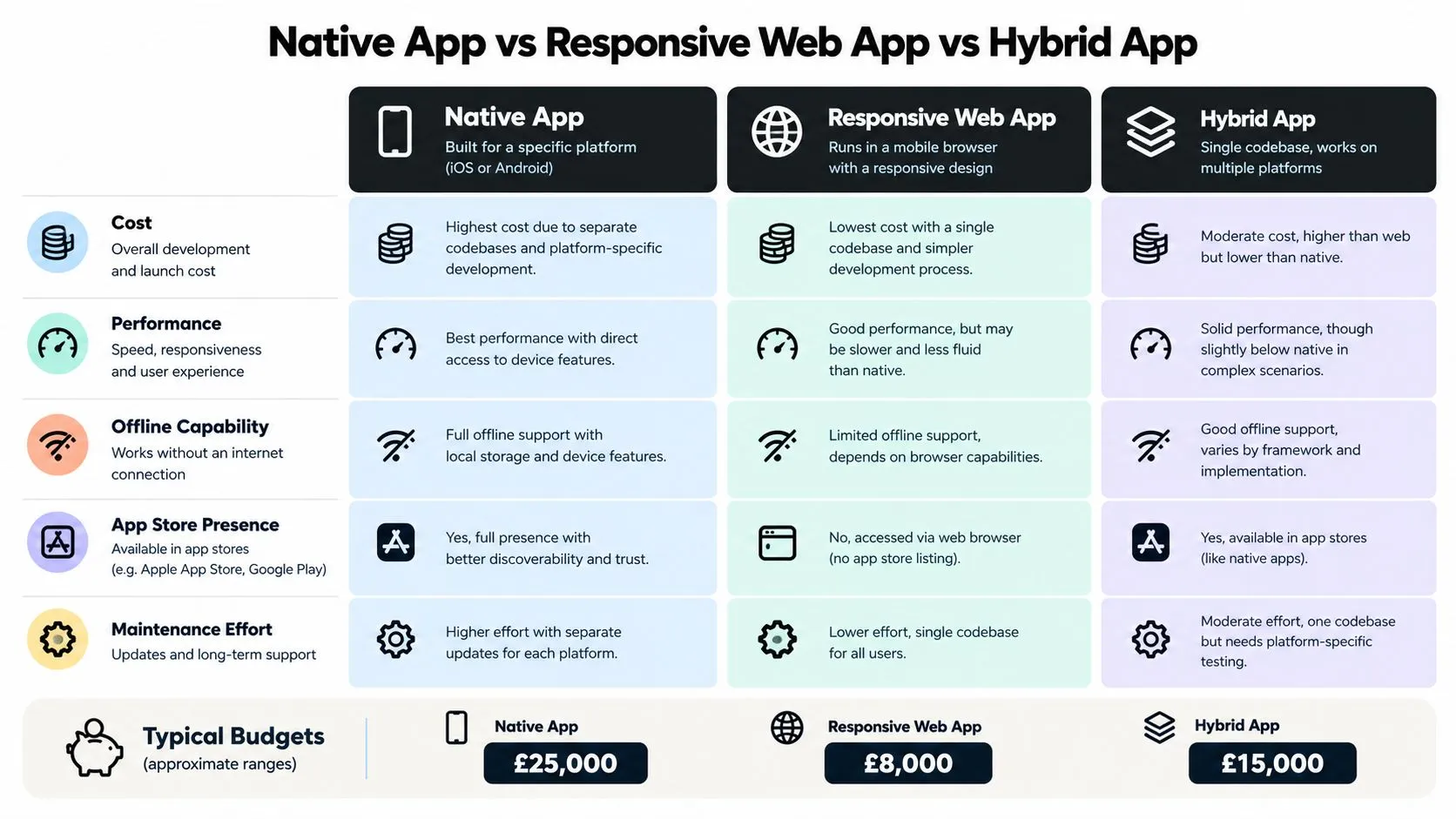
Make the format decision explicit
Before producing polished screens, create a one-page decision matrix. Score each route against:
- •Audience access: Can the intended users reach it with their devices, connectivity and digital confidence?
- •Core interaction: Does the product need camera access, spatial input, sensors, offline storage or high-performance graphics?
- •Distribution: Will app-store presence help discovery, or add an unnecessary barrier?
- •Operations: Who will support accounts, content, updates, analytics and accessibility fixes?
- •Fallbacks: What happens when a user can't install the app, loses connectivity or uses assistive technology?
For an interactive exhibition, location-based VR game or real-time 3D configurator, XR may be the right product format. For a simple account journey, a web experience may deliver the outcome more directly. The strongest app development steps begin with the service decision, not a presumption about the technology.
Discovery, Feasibility and a Clear Brief
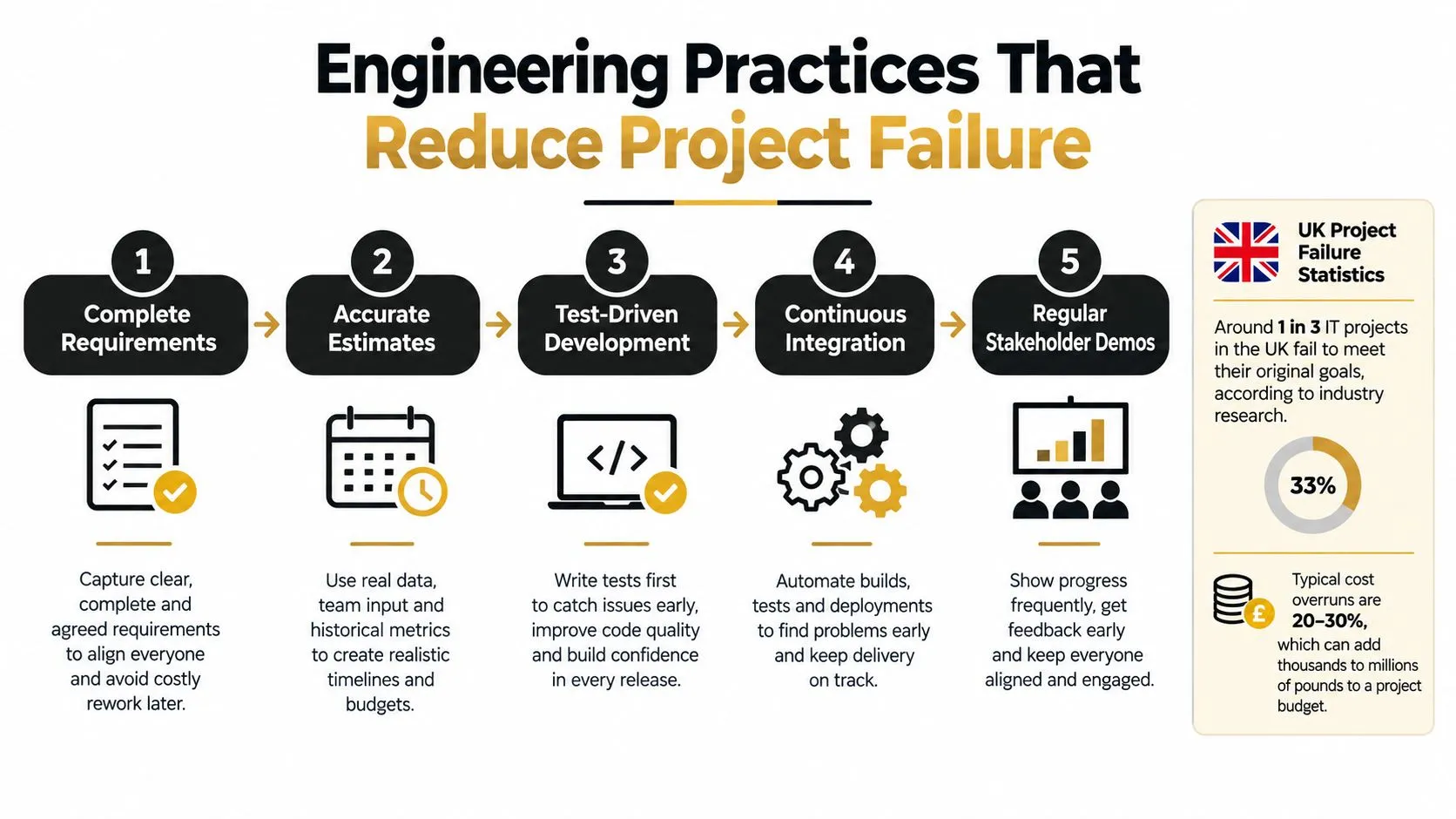
Discovery earns its keep by turning assumptions into decisions. The output shouldn't be a long document that nobody uses. It should be a prioritised MVP backlog, a release-one specification and a set of acceptance criteria that product, design and engineering can all interpret consistently. UK project evidence gives this phase uncomfortable importance. One BCS analysis of project failure found that almost one in four projects were abandoned after feasibility, approximately one in three experienced schedule and budget overruns, and only one in eight met its strict definition of success across time, cost and quality. The same analysis reported a 65% failure rate where development started before clear requirements, specifications were incomplete and substantial late changes occurred. Start with the user problem, not the feature list. Interview representative users, observe the existing journey, identify operational constraints and write a problem statement that describes who struggles, what they need to do and why current options fail.
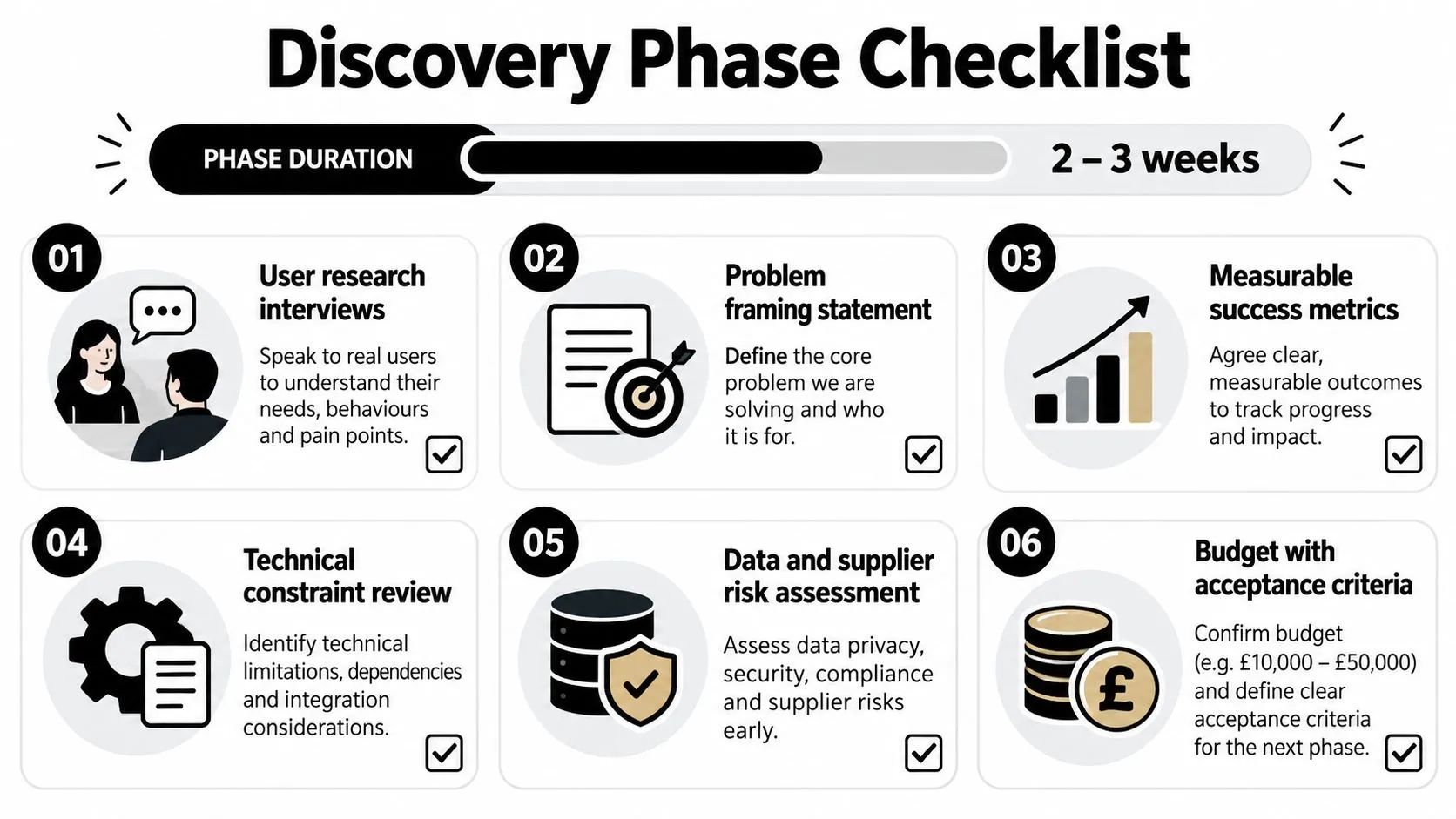
Turn findings into a buildable brief
A useful brief answers six practical questions:
- •User need: Which audience and situation are you serving?
- •Product outcome: What must change for the user or organisation?
- •Technical boundary: Which devices, integrations, data sources and suppliers are involved?
- •Risk position: What could compromise security, privacy, accessibility or delivery?
- •MVP scope: Which capabilities are necessary for the first useful release?
- •Acceptance: What observable result proves that each requirement works?
An acceptance criterion should be testable. “The login feels simple” is a design intention. “A new user can recover access using the approved authentication route and receives a clear error when the details are invalid” gives the team something to implement and verify. For founders shaping a first release, this guide for SaaS founders building MVPs is a useful companion because it keeps validation and scope connected. A practical MVP proof of concept for digital products can then test the riskiest assumption before a full build begins. Discovery is finished when the team can explain what it will build, what it won't build, how success will be judged and which risks still need evidence. That clarity becomes the handoff into architecture and design.
Picking a Stack With Unity, Unreal and XR in Mind
Stack selection should follow the experience, not a preference for a particular framework. Ask where the product will run, what content it must render, how much device access it needs, which skills the team already has and how the team will maintain it after launch. A conventional native iOS or Android route gives deep platform control and can suit demanding device features. A web stack reduces installation friction and simplifies distribution. Unity and Unreal become credible choices when the product depends on real-time 3D, spatial interaction, Quest deployment, mixed-reality events or an animation pipeline that needs to move between interactive and linear outputs.
| Approach | Best for | Trade-off |
|---|---|---|
| Native iOS or Android | Platform-specific features, demanding device interaction and tightly optimised experiences | Separate implementation and maintenance decisions for each platform |
| Responsive or progressive web | Broad reach, low-friction access and content-led services | Less direct access to device capabilities and more dependence on browser conditions |
| Unity | Quest VR, interactive 3D, games, configurators and event experiences | Engine overhead and specialist real-time development requirements |
| Unreal | High-fidelity real-time visuals, virtual production and visually demanding XR | Larger production demands and a need for suitable real-time skills |
| Hybrid or cross-platform | Shared product logic across mobile platforms and efficient business applications | Platform-specific behaviour still needs testing and occasional native work |
The right engine also depends on the content pipeline. A studio producing animation, interactive characters and XR may benefit from shared assets, materials and real-time lighting workflows. A service with forms, search and account management may gain nothing from introducing a game engine. For a 3D-heavy project, the BFI National Lottery Short Form Animation Fund provides a useful UK planning benchmark, with production funding of £30,000 to £120,000 and an expectation that funded projects are completed no later than 18 months after the production-finance agreement is executed. That isn't an app quote, but it illustrates how content ambition, pipeline and delivery window must be planned together. A practical comparison of Unity development for business and XR experiences helps frame the choice around use case rather than engine loyalty. The decision is sound when the team can explain the target hardware, content requirements, technical risks and maintenance route in one conversation.
Design, Prototyping and the Vertical Slice
A design file isn't proof that the product works. It becomes useful when it exposes decisions early enough for users, engineers and stakeholders to challenge them. Start with information architecture and user flows. Follow with wireframes that show hierarchy rather than decoration, then create a clickable prototype for the critical journey. A small design system should establish accessible defaults for type, colour, focus states, controls, error messaging and responsive behaviour before the team produces a large screen set. Consider a location-based VR game. A polished menu system won't answer the operational questions. The useful prototype is a thin slice of the experience running on a Quest headset, taking a player through onboarding, one gameplay loop, the reset path and the handoff to the next player. That slice can reveal whether instructions are clear, tracking is reliable and the venue can move people through the experience before the team builds every environment.
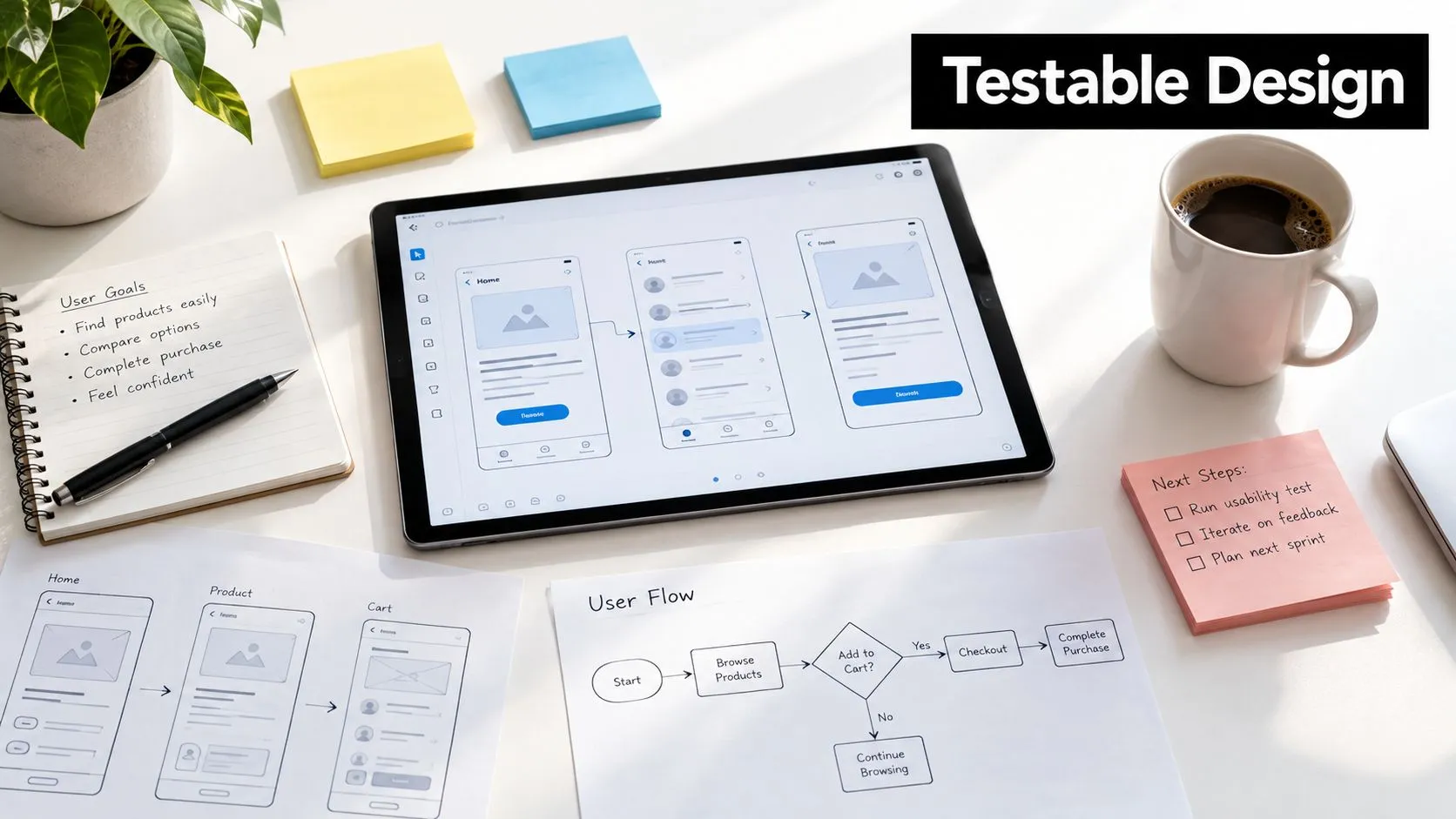
Accessibility belongs in the interaction model
The GOV.UK accessibility guidance recommends testing with assistive technology throughout development. That means accessibility decisions begin in research and prototypes, not during a final visual review. For mobile and XR work, test more than screen-reader labels. Check contrast, scalable text, focus order, target sizes, captions, motion intensity, sound alternatives, controller haptics, cognitive load and performance on lower-capability devices. In an immersive experience, a user may need clear spatial instructions and a safe way to pause. In a conventional app, the equivalent may be meaningful form errors and a login flow that works with alternative input. The handoff should include component states, content rules, interaction notes and known constraints. SpecStory's 2026 guide to the design-to-development handoff is a useful reference for making that exchange explicit rather than leaving engineers to infer behaviour from static screens.
Practical rule: If the vertical slice can't demonstrate the core user outcome on the target device, the project isn't ready for full production.
Engineering Practices That Actually Move the Needle
Once the vertical slice is approved, development should become predictable. The team should know what it is building, why it matters, how it will be tested and what evidence is required before release. The BCS project-failure analysis associates lower failure with five practices, including complete requirements, accurate problem definition and early technical discussion. In practical delivery, those practices become visible artefacts rather than slogans:
- •Service map: Shows the app, APIs, data stores, suppliers and operational boundaries.
- •Data model: Defines what the product stores, where it comes from and who may access it.
- •Threat model: Identifies abuse cases, sensitive data risks, authentication concerns and dependency exposure.
- •Test plan: Connects requirements to functional, regression, security, usability and accessibility checks.
- •Delivery pipeline: Automates builds, tests, review environments and repeatable releases.
The UK Government's 2024 response on software resilience and security reported that 86% of surveyed organisations would be unable to continue normal operations for more than seven days if essential software became unavailable, while 41% would be unable to function for less than 24 hours. It also found that 75% would be unable to function for more than seven days if a critical software supplier failed. Those findings change how a responsible team treats dependencies. Third-party code needs review, updates need ownership and failure modes need a plan. The same government response highlighted testing third-party code and conducting regular vulnerability testing and reporting as elements of rigorous risk management.
Build in vertical slices
Avoid completing every screen before connecting the backend, then discovering that the data model can't support the experience. Build a narrow end-to-end capability, connect it to real service boundaries in a controlled environment, test it automatically and demonstrate it to stakeholders. Continuous integration catches broken changes while context is fresh. Dependency management prevents the project from accumulating unsupported packages. Regular demonstrations expose misunderstandings earlier than a final review, when correcting them is expensive.
Testing, Beta Gates and Accessibility as a Release Gate
“QA the app” isn't a test strategy. A release needs several kinds of evidence, gathered in stages, with defects routed back into design or engineering rather than parked for later. Functional testing verifies that journeys work against the agreed requirements. Regression testing checks that a new change hasn't damaged an existing capability. Security testing covers the application, its configuration, dependencies and third-party code. Usability testing with real users reveals hesitation and workarounds that scripted test cases miss. For a UK public-sector app, accessibility also has a formal compliance dimension. The requirements for equality and accessibility regulations require public-sector websites and mobile apps to be perceivable, operable, understandable and resilient, with WCAG 2.2 AA as the required standard and an accessibility statement published for each service or app.
Use private beta as a remediation gate
Government guidance recommends accessibility research from the start and audits during both private and public beta. Problems found in private beta should be corrected before public beta, not documented as an acceptable surprise. A technically mature test programme checks:
- •Functional release gate: Critical journeys complete successfully, including interruption, error and recovery paths.
- •Security release gate: Known vulnerabilities have owners and a disposition, third-party code has been assessed and sensitive data is handled as designed.
- •Accessibility release gate: Keyboard or alternative-input paths, focus order, labels, contrast, text scaling, error handling and screen-reader flows work on representative platforms.
- •Usability release gate: Target users can complete the primary task without unexplained friction.
- •Operational release gate: Monitoring, support routes, rollback procedures and incident ownership are ready.
The GOV.UK app offers a useful caution. Its iOS and Android releases were tested against WCAG 2.2 AA, yet the Android version initially remained partially compliant, including issues involving unexpected VoiceOver or TalkBack navigation behaviour and incompatible assistive features, as documented in its accessibility statement. Testing provides evidence, not a permanent certificate. If the team lacks internal capacity for device and assistive-technology coverage, mobile QA specialist hiring provides a route to finding dedicated testing capability. The important decision is to assign ownership before beta, not after a release candidate fails.
Launch, Maintenance and the Day-After Mindset
Launch is a controlled transition into a less predictable environment. Prepare store metadata and review submissions, validate production configuration, stage the rollout where appropriate, and make sure someone is watching errors, performance and support requests from the first live users. The day-after checklist should include:
- •Monitoring: Track crashes, failed requests, latency, accessibility reports and key user journeys.
- •Security: Review alerts, patch dependencies and reassess supplier exposure.
- •Support: Give users a clear route to report problems and give the team an agreed incident process.
- •Research: Combine analytics with interviews and observed sessions, especially where users abandon a critical task.
- •Planning: Turn evidence into the next prioritised backlog rather than accepting every feature request.
The supplier risk remains material. The government resilience response found that 75% of respondents would be unable to function for more than seven days if a critical software supplier failed, so supplier continuity, data export and fallback planning belong in maintenance, not just procurement. Teams often call the first public release version one, but operationally it behaves more like the beginning of version one-point-one. The marketing playbook for an app is most useful when promotion, feedback and product evidence are connected. Launch data should feed the next discovery cycle, where the team decides what to fix, simplify or develop. --- Studio Liddell works across product scoping, user research, UX, app development, testing, deployment and ongoing support, with Unity and Unreal experience for interactive 3D and XR projects. Visit Studio Liddell to discuss the format decision, vertical slice and delivery plan for your next product.