Mastering the Blender Addon Ecosystem for UK Studios
A lot of teams start looking for a blender addon at the exact wrong moment. A delivery is under pressure, artists are repeating the same task for the fifth time, exports keep breaking, and someone says, “There must be an addon for this.” They're usually right. But in a studio pipeline, the real question isn't whether an addon exists. It's whether that addon deserves to sit inside production. That distinction matters. In a personal workflow, an addon can be a convenience. In a commercial pipeline, it becomes part of your operating system. It affects scene integrity, handoff quality, training, version control, and, in some cases, compliance. The studios that get value from addons aren't the ones with the longest list installed. They're the ones that treat addons as controlled infrastructure.
Beyond the Basics What a Blender Addon Means for a Studio
A blender addon is often described as a plugin that extends Blender. That definition is fine for beginners, but it's incomplete for production. In a studio environment, an addon is better understood as a pipeline modifier. It changes how artists build scenes, how data moves between departments, and how reliably work reaches final delivery.

The most useful addons don't just add features. They remove friction. That might mean batch renaming assets, enforcing naming rules, accelerating rig controls, automating export presets, or introducing measurement tools that Blender doesn't handle elegantly out of the box. In each case, the point is the same. Fewer manual steps, fewer avoidable errors, and more predictable output. For teams working across animation, CGI, and immersive media, the pressure points are rarely glamorous. They sit in repetitive setup, scene cleanup, export checking, technical annotation, and review prep. A well-chosen addon can turn those tasks from artist time into system time.
Hobby convenience versus production infrastructure
A freelancer can install ten addons in an afternoon and disable the ones that misbehave. A studio can't work that way. Once multiple artists touch the same scenes, every addon decision has consequences. A production-ready addon needs to answer questions like these:
- •Is it stable under load: Can it handle real project scenes, not just demo files?
- •Is it predictable: Does it produce the same result across machines and Blender versions?
- •Is it supportable: If it breaks mid-project, can the team fix or replace it quickly?
- •Is it compatible: Will it survive export to render, compositing, game engines, or client review formats?
Practical rule: If an addon saves one artist time but creates ambiguity for the rest of the team, it's not a pipeline improvement. It's local optimisation.
That's why addon strategy sits close to pipeline design. Studios that already think carefully about naming, review loops, asset structures, and approval stages are usually the ones that get the best return from Blender's addon ecosystem. The addon fits the system, rather than forcing the system to fit the addon. For a broader view of how these production systems connect, this guide to 3D computer graphics workflows is a useful companion.
The Professional's Toolkit Key Addon Categories Explained
The addon ecosystem gets easier to manage once you stop thinking in terms of popularity and start thinking in terms of production roles. Most studio-useful tools fall into a handful of categories. Each one solves a different class of problem.
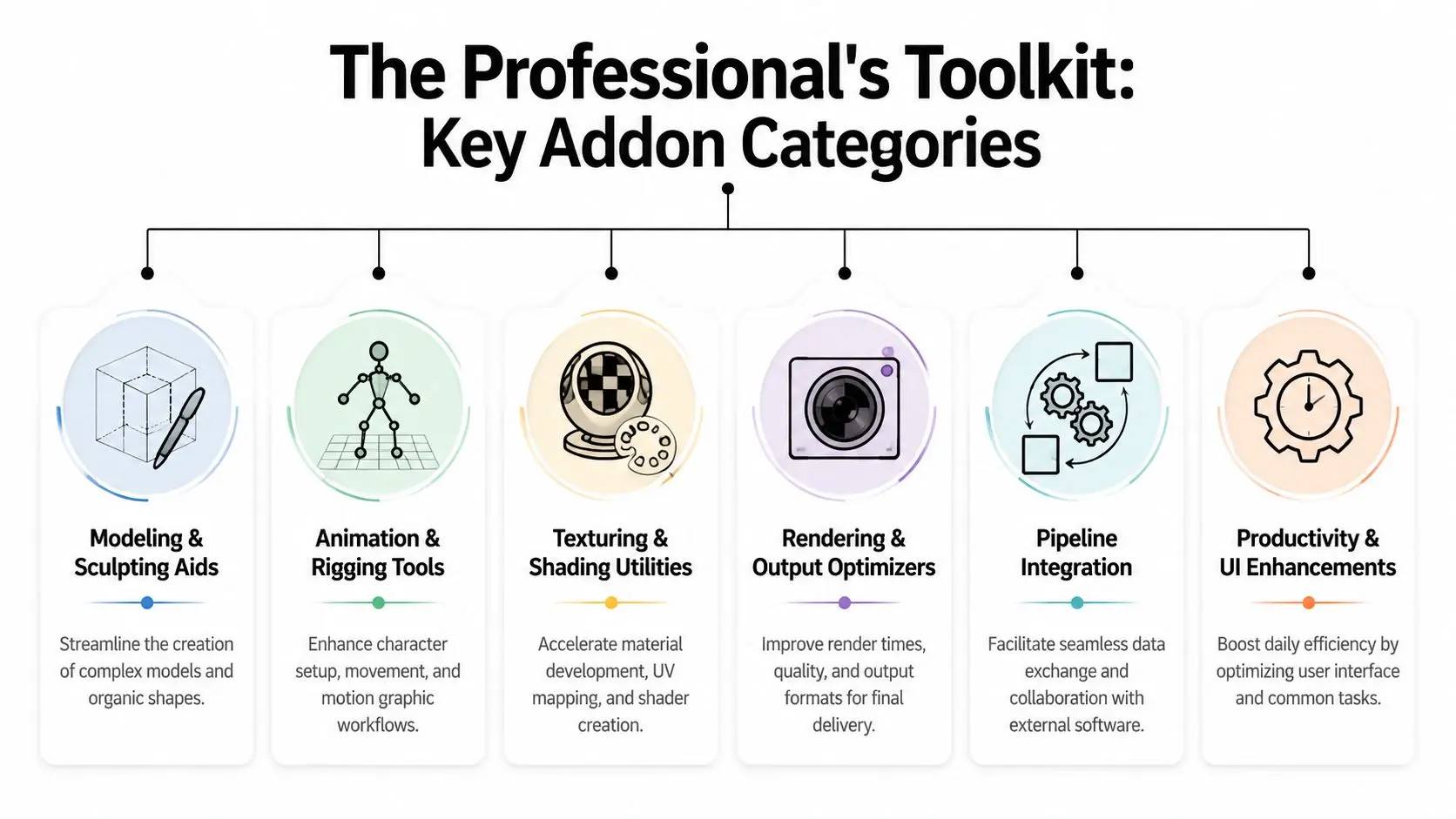
Modelling and sculpting aids
These addons help artists create geometry faster or with more control. Some reduce repetitive actions. Others improve retopology, boolean cleanup, snapping behaviour, or object distribution. They're valuable when modelling is a throughput issue. They're less valuable when they create non-standard geometry that causes pain later in rigging, UVs, or export. A flashy modeller's helper can become a pipeline liability if it produces meshes nobody wants to inherit.
Animation and rigging tools
This category covers rig helpers, pose libraries, keyframe utilities, motion cleanup, and UI enhancements for animators. In production, the best rigging addons don't just offer more controls. They reduce ambiguity for the people using those controls every day. Good animation tools have a clear signature. Artists adopt them quickly because they shorten common operations without changing the logic of the rig. Bad ones hide too much, generate opaque dependencies, or create controller setups that are hard to debug when a shot goes wrong.
The right rigging addon feels invisible after a week. The wrong one becomes part of every handover problem.
Texturing and shading utilities
Material management, UV support, library browsing, and shader setup addons sit here. These tools are often productive because they reduce interface travel. Artists spend less time clicking through menus and more time making decisions. The risk is standardisation. If one artist uses a custom shader workflow that nobody else understands, the studio loses consistency. In shared pipelines, texturing addons are only useful when they support repeatable material logic and clean handoff into lookdev, lighting, or engine export.
Rendering and output optimisers
These tools focus on render setup, batch processing, camera management, and output control. They tend to matter late in production, when deadlines compress and every avoidable manual step starts to hurt. A reliable rendering addon is usually conservative rather than clever. It sets passes correctly, enforces output structures, and avoids introducing hidden settings that break on a render node or another workstation.
Pipeline integration and productivity tools
Much of the professional studio value resides here. These addons connect Blender to trackers, asset libraries, review systems, external formats, or internal conventions. Others improve the UI and remove day-to-day friction. A useful way to judge them is simple:
| Category | Main production benefit | Common failure mode |
|---|---|---|
| Modelling aids | Faster asset creation | Dirty or inconsistent geometry |
| Rigging tools | Quicker posing and cleaner control | Hard-to-debug dependencies |
| Shading utilities | Faster material setup | Inconsistent handoff |
| Output tools | Safer delivery preparation | Hidden render settings |
| Pipeline tools | Better interoperability | Version and support issues |
The strongest addon stack usually isn't the most exciting. It's the one that supports modelling, animation, rendering, and review without creating extra decisions for artists.
Sourcing and Integrating Addons a Studio Best Practice Guide
A compositor opens yesterday's scene on a render node and half the publish tools fail because one artist updated a local addon before leaving for the night. That is a familiar studio problem, and it rarely starts with bad software. It starts with unmanaged adoption. For a professional team, addon selection is a pipeline decision, not a personal preference. The question is not whether a tool looks useful in a demo file. The question is whether it installs predictably, survives version freezes, passes security review, and behaves the same way on an artist workstation, a render blade, and a recovery machine. For UK studios delivering to broadcasters or working under client IT scrutiny, that standard is higher again. BBC- and Sky-adjacent workflows often bring tighter expectations around naming, file handling, review traceability, and software governance. A casual addon install can create real delivery risk. Studios also need to judge addons in the context of the wider production stack. If Blender is feeding motion design, VFX, virtual production, or review systems, the addon has to fit the operating model, not just the artist's preference. Our own approach is close to the production logic outlined in this guide to modern motion graphics and 3D workflows. Every tool has to justify its place in the handoff chain.
Where studios usually source addons
The source matters because it affects support, transparency, and maintenance cost. A commercial storefront may give clearer licensing and a support contact. A GitHub repository may give better visibility into the code but leave your team carrying the maintenance burden if the maintainer disappears.
| Source | Typical Vetting | Support Level | Best For |
|---|---|---|---|
| Blender Market or similar storefronts | Packaged for end users, usually with clearer release notes | Often better defined commercial support | Teams that need predictable onboarding and licensing |
| Gumroad | Highly variable by creator | Inconsistent | Niche tools that solve a specific production problem after internal review |
| GitHub | Code is often inspectable and revision history is visible | Depends on maintainer activity and your internal technical capacity | Studios that can audit, test, and support addons themselves |
Platform reputation helps, but it does not replace internal review. I have seen expensive commercial addons fail basic pipeline tests, and I have seen free internal-facing tools from GitHub perform well for years because the studio treated them like managed software.
A practical approval process
A studio should keep an approved addon register. Include the addon version, supported Blender build, licence terms, installation method, team owner, security status, and any known scene-level side effects. If ownership is unclear, support work gets dumped on production at the worst possible time. A practical approval flow usually looks like this:
- Problem definition. State the production issue in plain terms. Save time in layout, reduce export errors, automate naming, or improve review prep.
- Code and security review. Check what the addon installs, what it writes to disk, whether it calls external services, and whether the code can be inspected.
- Pipeline test. Use real studio files, not a polished demo scene. Test on the versions artists use.
- Failure test. Disable the addon and confirm the scene still opens, publishes, and renders in a recoverable state.
- Deployment plan. Push it through managed installation, not artist-by-artist setup.
What to check before rollout
Security and compatibility need the same weight as features. That is where many teams misjudge ROI. A tool that saves ten minutes a day but adds update failures, unreadable scene data, or uncertain licensing can cost more than it returns. Check these points before team-wide deployment:- •Version discipline: Lock Blender and addon versions together for each active production.
- •Permission control: Restrict who can install, update, or disable addons on production systems.
- •Scene safety: Confirm what data the addon writes into .blend files and whether that data degrades safely if the addon is missing.
- •Licensing: Verify commercial use terms, seat limits, and whether freelancers or remote vendors are covered.
- •Security review: Audit Python scripts, external calls, bundled binaries, and update mechanisms.
- •Broadcast fit: Test naming, metadata, colour management, export settings, and review outputs against delivery requirements your clients enforce.
- •Support plan: Assign an internal owner and define who handles breakages during a show.
The strongest addon policy is conservative by design. It gives artists approved tools that save real time, but it keeps the studio in control of compatibility, security, and recovery. That balance matters more than feature count. In production, a blender addon earns its place by reducing labour without increasing operational risk.
Essential Addons for Technical and Creative Pipelines
A supervisor gets a client note at 6 p.m. The model looks right, but the dimensions in the approval pack do not match the brief, and the team is now choosing between a late manual fix or a slipped review. In a studio pipeline, that is the point where an addon stops being a convenience and starts being an operational decision.
The addons that keep paying for themselves usually support control, traceability, and cleaner handoff between departments. That matters in architecture, product visualisation, heritage work, and broadcast-adjacent projects where approvals depend on more than visual quality. UK studios working to client governance standards, including broadcaster review expectations around naming, documentation, and consistency, need tools that reduce ambiguity rather than add another layer of scene complexity.
Precision Drawing Tools for dimensional control
Precision Drawing Tools (PDT) fills a real production gap. It brings coordinate-driven, dimension-based modelling into Blender, which makes it far more usable for assets that need to match drawings, survey data, or engineering reference instead of being shaped by eye alone (Precision Drawing Tools overview). The gain is simple. Artists can enter values directly, place elements predictably, and review changes against a measurable standard. That reduces corrective passes later in layout, lookdev, and client review. I have seen this pay off most clearly on jobs where creative and technical criteria collide. A set extension, museum reconstruction, or product cutaway still has to look polished, but the underlying geometry also needs to stand up to scrutiny. Without numerical control, supervisors end up reviewing taste and accuracy in the same pass, which slows both.
Measurable for production documentation
Some teams also need technical communication to come out of the same Blender scene used for production. Measurable supports that requirement by adding measurement readouts, angle checks, circular dimensions, and text callouts that can be used to prepare client-facing reference material without rebuilding the information elsewhere. That changes the cost profile of the work. If measurements live inside the source scene, the team avoids duplicate annotation in external software and lowers the chance that documentation drifts away from the approved model. For studios under delivery pressure, that is a practical ROI argument, not a feature-list argument. This category of addon is often underestimated because the output looks administrative. In practice, it protects margin. The expensive failure is not the addon licence. It is a senior artist or producer spending hours reconciling screenshots, dimensions, and notes across disconnected files.
Technical addons earn their place by keeping the approved asset and the approved information tied together.
Where these tools return value
The strongest use cases tend to be predictable:
- •Architectural visualisation: Assets need to stay aligned with plans, site references, and stakeholder review comments.
- •Product and engineering-led CGI: Form, proportion, and spacing have to hold up under close inspection.
- •Heritage and reconstruction work: Teams need a clearer chain between reference material, modelling decisions, and review output.
- •Documentation-heavy delivery: Measurement callouts, spec sheets, and annotated visuals need to be produced quickly from approved assets.
Studios building mixed technical and creative workflows can see the wider production context in this guide to motion graphics and 3D production workflows. There is also a useful case study on scaling media production with VFX tools, which reflects the same broader point. Pipeline tools create value when they reduce rework and standardise output, not when they merely add more buttons. Not every show needs CAD-style precision inside Blender. But when dimensional accuracy, client review packs, or audit-friendly documentation are part of delivery, addons like PDT and Measurable stop being optional extras. They become part of how the studio protects time, quality, and approval confidence.
Optimising Addons for Real-Time and XR Pipelines
A scene that feels efficient in Blender can still fail on a headset build. I have seen teams save hours during look development with a modelling or scattering addon, then lose those gains in Unity or Unreal because the exported asset count, material structure, or draw-call profile is wrong for the target device. In XR, addon selection is a pipeline decision, not a personal preference. The main risk is translation. Blender addons are usually built to speed up authoring. Real-time delivery cares about something else: clean exports, predictable data, and assets that hold up under frame-time budgets on actual hardware. Broadcast-adjacent XR work in the UK raises the bar further because review, versioning, and technical sign-off often need to stand up to the same scrutiny applied to BBC or Sky deliverables.
Where XR pipelines lose time
The failure points are rarely dramatic at first. An asset imports, the scene opens, and early reviews pass. Problems appear later, during integration and optimisation, when technical artists find mesh density that cannot be reduced cleanly, materials that need rebuilding by hand, or naming that breaks batch processing. The common pressure points are specific:
- •Geometry output: Some addons generate attractive source meshes with edge flow or polygon counts that are expensive in-engine.
- •Material conversion: Node setups that work well in Blender often need manual rebuilding for Unreal or Unity shader graphs.
- •Rig behaviour: Helper systems, constraints, and custom controls may not survive FBX or USD export in a usable form.
- •Scene organisation: Procedural tools can leave behind collections, empties, modifiers, and duplicate materials that clutter automated import paths.
- •LOD and variant planning: Addons may create a hero asset quickly but offer no controlled route to lower-detail versions for mobile XR or broadcast-linked interactive installs.
Studios that already manage mixed VFX and production systems will recognise the pattern from scaling media production with VFX tools. Tools return value when they fit the wider production chain, not just the artist's viewport.
Judge the addon in the target runtime
The useful test is simple. Export the result, import it through the actual pipeline, and profile it on the target device. Do that before the addon gets approved for show use. A Blender viewport preview does not tell you enough. You need to know how many materials the addon creates, whether pivots remain stable, whether naming survives export, whether metadata can be passed forward, and whether technical artists can simplify the output without rebuilding it. For UK studios handling branded, regulated, or broadcaster-reviewed content, those checks reduce delivery risk as much as they reduce frame time. For teams balancing fidelity with engine performance, this producer's guide to real-time VFX is a useful companion to addon testing.
A practical approval filter for XR addons
I would not approve an addon for XR production until it clears four checks.
- •Export transparency: The team can explain exactly what the addon generates and what leaves Blender in FBX, USD, Alembic, or glTF.
- •Engine validation: Test assets have been imported into the target Unity or Unreal project and checked against device budgets.
- •Cleanup cost: Technical art can optimise or troubleshoot the output without reverse-engineering the addon's internal logic.
- •Version control and support: The addon has a clear update history, a known maintainer, and no dependency that creates avoidable security or compatibility risk.
That last point matters more than many teams expect. Addons that touch file I/O, external libraries, or cloud services need the same scrutiny as any other pipeline component. If a tool cannot be vetted, pinned to a tested version, and rolled back safely, it should stay out of production. In real-time and XR work, the wrong addon usually does not fail at the start. It passes the first review and adds cost later, in optimisation, QA, and integration. The studios that handle this well treat addons as pipeline assets with measurable ROI, maintenance overhead, and delivery risk attached.
The Ultimate Advantage Creating Custom Studio Addons
A studio usually reaches the custom-tool stage after the same production problem has wasted enough hours to show up in schedules, bids, and QC. Artists are still finishing the work, but they are doing it through repeated manual fixes, naming corrections, export checks, and delivery prep that should have been handled once in code. Off-the-shelf addons help with broad Blender tasks. They rarely match the exact way a UK studio has to structure assets, prepare review media, enforce naming rules, or package files for a broadcaster, agency, or platform with fixed delivery requirements. For teams working against BBC or Sky technical expectations, that gap matters. Small inconsistencies in metadata, folder structure, colour management, or output settings create avoidable risk. Custom development earns its place when a workflow is both repetitive and specific to your operation. If the task happens every day and reflects your studio process rather than a generic Blender feature, building an internal addon is often cheaper than absorbing the same labour cost on every project.
Why custom beats generic in mature pipelines
The strongest internal addons do three things. They remove repeated manual effort, reduce variation between artists, and make pipeline rules easier to follow under deadline pressure. That matters more than feature count. A good custom addon might validate scene structure before publish, enforce naming conventions tied to your asset tracker, generate delivery-ready exports for a specific client, or build review packages with the correct codec, slate data, and folder layout. None of that is glamorous. All of it improves margin and lowers production risk. Custom tools are also one of the clearest ways to protect specialist time. If one technical artist is repeatedly fixing exports, relinking caches, or correcting avoidable user errors, the studio has already identified a candidate for automation. The goal is not to replace expertise. The goal is to reserve that expertise for exceptions, pipeline design, and higher-value problem solving.
Where custom addons return real ROI
Studios usually get the best return from internal addons in a few predictable areas:
- •Publish and export control: Validate naming, frame ranges, render settings, colour space, and output paths before files leave Blender.
- •Pipeline integration: Push status data into tracking systems, generate review packages, or pull approved assets from internal libraries.
- •Broadcast and client compliance: Standardise output steps for delivery specifications, reducing QC failures and last-minute fixes.
- •Error prevention: Block common mistakes at source instead of finding them during comp, edit, or engine integration.
- •Knowledge transfer: Turn tribal knowledge into a repeatable tool that junior and freelance artists can use safely.
For many studios, the gain is consistency first and speed second. A process that runs correctly every time is easier to schedule, easier to quote, and easier to support.
What a good custom addon looks like
The best internal tools are tightly scoped. They solve one expensive problem well, with a clear interface, sensible defaults, and strict limits on what the user can change. Broad ambition usually creates maintenance debt. I would rather approve a simple publish validator that saves ten minutes on every shot than a flashy multi-tool nobody fully trusts. Reliable narrow tools survive production. Overbuilt addons often become internal legacy problems within a year. Ownership matters just as much as code quality. A production-safe addon needs a maintainer, version control, release notes, and a rollback plan. It also needs basic security review if it touches file I/O, network services, render farm submission, or third-party APIs. In a professional pipeline, internal code is still production infrastructure. Some studios also build small companion tools around distribution or commercial packaging, especially if they plan to productise internal utilities or release public-facing software. In those cases, teams may also submit products to Lanzabooster as part of their go-to-market process.
A custom addon becomes commercially useful when it captures your studio's operating method and removes a repeated source of cost or failure.
Python makes Blender accessible for internal development, but access to scripting is not the hard part. The harder decision is choosing what deserves to become software. Build only where the savings are repeatable, the rules are stable, and the maintenance burden is justified by fewer errors, faster delivery, or better compliance.
Building a Smarter Pipeline with Blender Addons
The smart use of a blender addon has very little to do with collecting tools. It has everything to do with curation, control, and fit. Studios get the best results when addons are selected for a clear pipeline reason, tested against real production conditions, and maintained like any other operational asset. That applies whether you're tightening a technical modelling workflow, protecting a broadcast delivery path, or making Blender behave properly inside a real-time XR pipeline. And if your team eventually develops internal tools, the goal stays the same. Remove friction without introducing uncertainty. If you're also thinking about how tools, workflows, and visibility intersect when launching new products, directories can play a role too. For example, some teams use curated platforms to submit products to Lanzabooster when they want broader discovery for software or digital releases.
If your team needs help designing a production-safe Blender workflow, planning a real-time content pipeline, or scoping animation and XR delivery from concept to final output, talk to Studio Liddell. Their team delivers high-end animation, CGI, games, and immersive experiences with a production mindset built around reliability, technical quality, and efficient execution.