How to Build Downloadable Puzzle Games in the UK
You've got a puzzle that already works on paper, a small team, and a shared folder full of half-agreed decisions. Nobody has named the oldest phone the build must run on. Nobody has watched a first-time player finish level one without help. The store page is still a list of features. Downloadable puzzle games look small from the outside. A grid, a timer, a hint button. The production risk is not the art. It is shipping a loop that only the people who designed it can finish, on a device you never tested, for an audience you assumed was young. I would lock one platform and one tested audience before the catalogue grows. A first playable is a release gate, not a demo.
Production Stages and the Core Loop Players Finish
Map the work before anyone opens an engine. Six stages carry the risk, and they overlap in practice. The game designer owns the loop and the levels. The engineer owns the build. The QA lead owns the test report. The producer owns packaging, the store listing and the patch plan. A vertical slice on the lowest target device has to exist before level production scales. Otherwise frame-rate problems appear after the content is already built. Phones are the right first bet for most first-time studios. Ofcom's Adults' Media Use and Attitudes Report 2025 reports that 53% of UK adults played games in 2024, with mobile phones the most-used gaming device, and that nearly six in ten adult gamers played puzzle or quiz games. Adoption is stronger among older players: 80% of gamers aged 65+ played puzzles or quizzes, compared with 40% of 16, 24-year-olds. The same report's UK app figures for May 2025 put Candy Crush Saga at approximately 2.0 million UK visitors, averaging 8 hours 23 minutes per visitor that month, and Crossword Puzzle at approximately 1.4 million visitors, averaging 2 hours 17 minutes. Those are category benchmarks, not a forecast for a new title.
| Stage | Output to hand over | Done when |
|---|---|---|
| Concept and core loop | One-line pitch and a paper or grey-box prototype | A first-time tester understands the goal before the first move |
| Level design | Test levels across at least three difficulty bands | Each level has a solver-checked solution and a target solve rate |
| Build and engine setup | Vertical slice on the lowest target device | Runs at a stable frame rate with no blocking bugs in the first level |
| Accessibility and playtesting | Test report split by player group | Task success and error counts recorded for each group |
| Packaging and store listing | Builds, icons, screenshots and age rating | Each platform's submission review has passed |
| Launch and live updates | Analytics dashboard and patch plan | Day 1 and Day 7 retention are tracked against the test baseline |
A fuller view of how these handovers sit inside a wider schedule is in our game development pipeline guide.
Run the loop in the first week
- Prototype the opening as a one-minute session. Paper or a grey-box scene is enough. If the goal needs a paragraph, it will not survive a bus ride. The usual slip is painting the board before the rule is obvious.
- Test comprehension with no tutorial. Sit beside the player and note every pause. Developers who already know the rule will not pause, so they hide the gap.
- Split the numbers by age group. Record completion, abandonment, hint use and time to first success. A healthy average can conceal one cohort giving up.
- Retune touch targets, text size and contrast for older players. That group already plays puzzles heavily. Tiny buttons and grey-on-grey type fail them first.
- Make difficulty segmented and adjustable. A single ramp treats every player as the same person. Harder is not the same thing as more engaging.
- Soft-launch with analytics before you add levels. Downloads without cohort retention or solved-puzzle rates do not tell you the loop works.
Practical rule: most first-time players should solve the opening puzzle unaided, and hint use should fall across the first five levels. If that signal is missing, stop building content.Designing only for young players, and treating difficulty as engagement, are the two slips that waste a month.
Choosing Platforms and Engines for Puzzle Games
Pick the platform where the core loop is strongest, not the one that lets you tick the most storefronts. A second platform is a port plan. It is not week-one work.| Platform | Usual engine route | Main constraint | Best fit |
|---|---|---|---|
| Phones and tablets (iOS, Android) | Unity or Unreal, or native code for simple titles | Store review, touch controls and device range | Short-session, mobile-first puzzles |
| PC and Mac (Steam, itch.io) | Unity or Unreal | Storefront discovery and keyboard or controller support | Longer puzzles and deeper campaigns |
| Console digital stores | Unity or Unreal with the platform SDK | Certification and developer kit access | Premium, controller-first puzzles |
| Meta Quest (XR) | Unity or Unreal with an XR toolkit | Comfort, hand tracking and the performance budget | Spatial puzzles and training scenarios |
What the engine choice actually costs
Unity usually suits 2D and mobile puzzles when the team is small. The 2D toolset, UI, and mobile build steps are familiar, and a grey-box can be on a phone in days. Unreal earns its weight when the puzzle is a high-fidelity 3D space and someone on the team already knows the editor, lighting and packaging. Starting in Unreal because the screenshots look richer, then discovering nobody can ship a mobile build, is a common late surprise. Native code is reasonable for a very simple title, a single-screen sorter or a word grid, where an engine's build size is the main cost. It becomes a poor trade the moment you need save transfer, controllers and a second platform. A spatial sorting puzzle built for a training course belongs on Quest first, with a PC port once comfort and hand tracking are proven. A word puzzle belongs on phones. Putting the word puzzle in a headset so the project “covers XR” adds a comfort budget the loop never needed. Write down the lowest-spec device on day one and treat it as the performance ceiling for every level. If a new mechanic drops frames on that device, the mechanic is out, not the device.Before week four, name one primary platform and one port plan, and do not start the second build until the first loop holds.Engine choice is easier to revisit with a side-by-side of current tools. Our comparison of free game development software is a useful filter before you commit the pipeline.
Using AI in Level Design Without Losing Quality
AI is useful in three narrow jobs. It should not set the difficulty curve, and it should not approve a level. Candidate layouts. A model can draft variants from rules you have already written, such as grid size, piece counts and forbidden shapes. Every generated level still has to pass an automated solver check for solvability and for a single intended solution. A designer plays it at least once before it enters the build. The slip is shipping the first batch that “looks like a puzzle”. Hint and tutorial copy. A draft can give you plain-language lines to edit. A designer rewrites anything a playtester misread. Generated copy that explains the designer's intent, rather than the player's mistake, teaches the wrong lesson. Placeholder art. Quick stand-in tiles and icons keep a prototype moving. They never ship. A consistency pass covers silhouette, palette and readable state changes. Placeholder art left in a store screenshot is how a build looks unfinished on the product page. Difficulty comes from playtest data split by age group, not from how many moves the generator happened to produce. Longer solutions are not automatically better puzzles.
A filter, not a generator
- Write the rules and constraints in a level spec.
- Generate a batch of candidates from that spec only.
- Filter by solver result and solution length. Drop anything unsolvable, anything with two valid routes when you wanted one, and anything far outside the target length.
- A designer reviews the survivors by hand.
- A small group plays the shortlist.
- Lock the approved level in version control.
Accessibility Tests to Run Before Launch
A puzzle can look usable and still block someone on move two. A UK-focused accessibility guide reports that 66% of gamers with disabilities or health conditions encounter barriers while gaming, which is why this is a release criterion rather than a post-launch patch (UpGameIn accessibility guide). Colour-blind palettes alone do not fix clipped text, tiny controls, unclear feedback or audio-only instructions.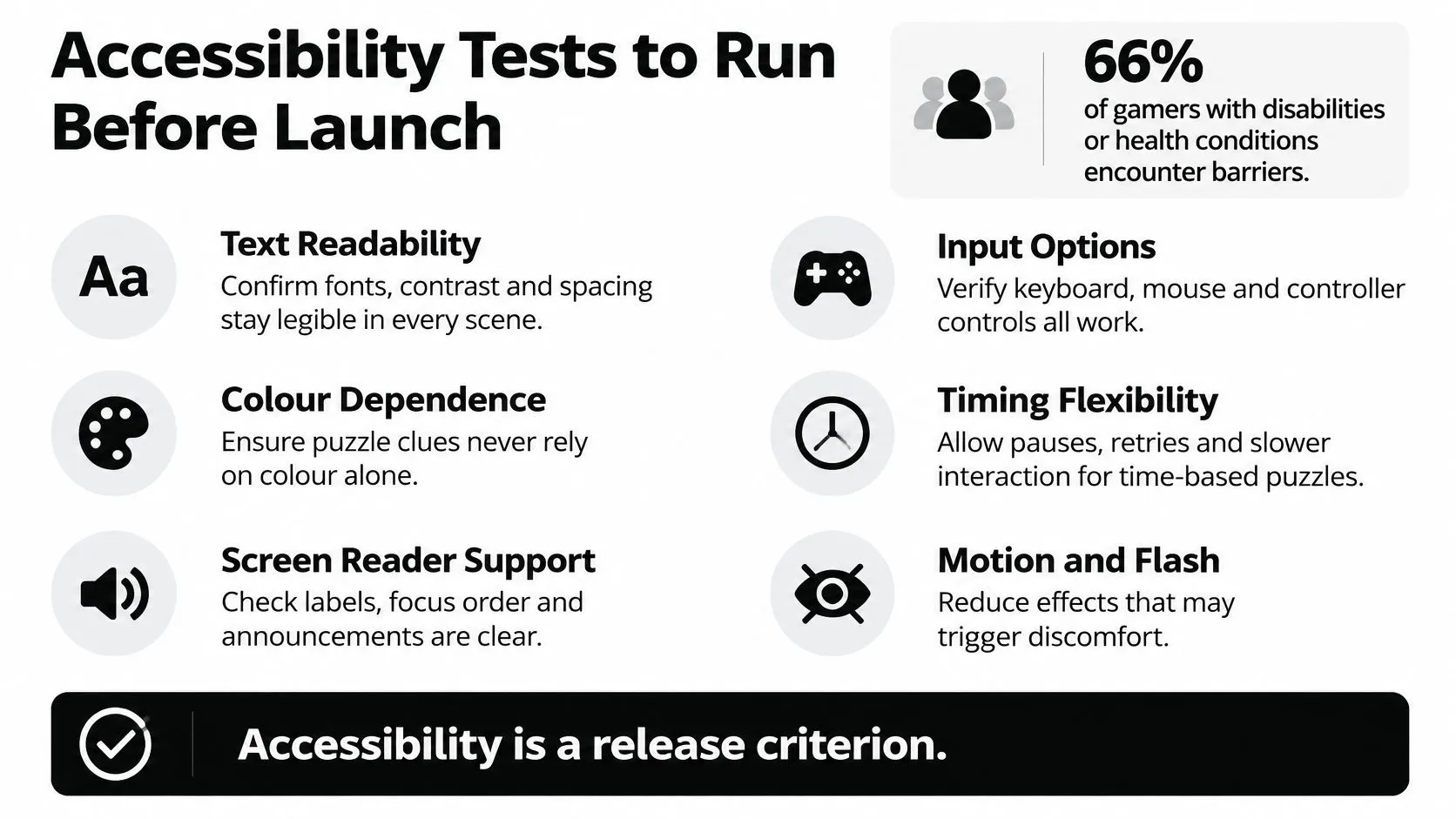
Six checks before you call it shippable
Recruit players with relevant lived experience before the vertical slice, not the week of submission. Test keyboard, touch and controller navigation as separate paths. Run automated checks for colour contrast and text readability. Run screen-reader and audio-cue tests. Ship scalable text, a high-contrast mode, adjustable audio, remappable controls and at least a basic difficulty choice. Repeat the set after every major UI or level-system change. For the puzzle itself, a player has to identify the board state, select a piece, understand feedback and recover from an error using non-visual cues. Large, well-spaced controls matter on a small touch screen. RNIB guidance, as reflected in that same accessibility guide, recommends early and repeated testing with blind and partially sighted players rather than blindfold simulations, and combining visual, audio and tactile signals. A blindfold on a sighted colleague is not that test.| Check | How to run it | Pass criterion |
|---|---|---|
| Input paths | Complete every puzzle using keyboard only, touch only and controller only | Every puzzle can be solved on each input method |
| Colour contrast | Automated contrast check on all interface text | Body text meets the WCAG AA ratio of 4.5:1 |
| Text scaling | Set the system text size to the largest option | No labels are clipped or overlap the board |
| Non-visual feedback | Play with sound off, then with a screen reader on | Board state, selection and errors are understood without guessing |
| First-puzzle task success | Fresh players install, start and solve the first puzzle alone | Percentage completing independently is recorded and tracked per build |
| Older-player sessions | Run sessions with players aged 55 and over | Time on task and error count are within the target band set in the brief |
The number to report is the percentage of participants who can install, start, understand and complete the first puzzle independently, alongside error count and time on task.If that percentage is missing from the build notes, the build is not ready. Tie the platform and the monetisation model to the people who sat those sessions. A hint shop that pressures an older player who already struggles with small type is a product choice, not a neutral default.
Educational Alignment and Proof from Production
A training manager opens the build ten minutes before a shift briefing and asks which rule the first puzzle teaches. Write that outcome into the level spec before the layout exists. Pattern recognition, sequencing and spatial reasoning are specific enough to test. "Problem solving" is not, because nobody can fail it. Set age bands before design starts. A Key Stage 2 pupil and an adult trainee do not share text load, hint rules or session length. A six-minute classroom slot and a 20-minute shift briefing are different products even when the mechanic matches. The late surprise is usually a solvable puzzle that will not fit the slot the buyer has. Teacher-facing reporting should come from the same analytics the player already generates. Time on task, solve rate and hint use, each tied to a learning objective, is enough for a first release. A separate education dashboard that nobody maintains will drift from the live build. I would keep the first release to those three measures.Who has to play it
Run the gate with teachers and learners, including older trainees and disabled players, not only with the developers who wrote the rules. That session decides whether the build ships, and it shows which audience the product can sell to. Record which objectives each build supports, and drop any level whose outcome you cannot point to in the spec. If a teacher cannot tell what the pupil was meant to practise, the store page should not claim it. A warehouse safety course can use a spatial sorting puzzle. Each tier maps to one rule the trainee must apply, such as separating incompatible items before they share a bay. The phone build and a Quest build keep the same release bar. If those players struggle with timed prompts or small type, sell a fixed session against the objective they completed, matched to the platform they could use. For scoping proof rather than promised results, Dance! Dance! Dance! is a Quest VR game Studio Liddell has shipped. Treat it as a reference for team shape and technical risk on a headset build. It is not a guarantee of classroom outcomes.Pricing, Packaging and Store Discovery
A puzzle can attract a burst of downloads and then lose momentum within weeks. Plan the launch around a range of demand, rather than assuming an early spike will hold. Sensor Tower's Q3 2024 UK puzzle units note records Block Blast! rising from approximately 105,000 weekly downloads in early July to nearly 340,000 by the end of September. The same report puts Zen Word at about 104,000 weekly downloads at its mid-August peak, Fruit Merge at about 77,000 in early July, and Screw Puzzle: Wood Nut & Bolt falling from around 67,000 in mid-July to about 26,000 by the end of September. Sensor Tower's Q3 2024 jigsaw units note says Jigsawscapes exceeded 25,000 UK downloads in the final week of September 2024.| Title | UK weekly downloads | Period |
|---|---|---|
| Block Blast! | Rose from about 105,000 to nearly 340,000 | Early July to end of September 2024 |
| Zen Word | Peak of about 104,000 | Mid-August 2024 |
| Fruit Merge | Peak of about 77,000 | Early July 2024 |
| Screw Puzzle: Wood Nut & Bolt | Fell from about 67,000 to about 26,000 | Mid-July to end of September 2024 |
| Jigsawscapes | Exceeded 25,000 | Final week of September 2024 |
Pick a model by its main risk
- •Premium, one-time purchase. The value is clear, with no hint pressure. The risk is a weak trial: players may not buy if they cannot sample the loop.
- •Free with ads. This removes the purchase barrier, but frequent interruptions can frustrate players seeking a quiet session. Test ad placement with the audience you intend to reach.
- •Optional purchases for hints or extra packs. Keep them optional and make the value clear before purchase. A hint system should help players continue, not make the standard puzzle feel unfair.
- •Licensed or education editions for schools. Sales take longer and contracts may span terms. Include only reporting that the team can maintain once the product is in use.
What the store page has to show first
Make the game's difficulty curve, typical session length, offline play and controller support easy to find. The first screenshots and opening lines should explain the kind of puzzle and who it suits. A demo or free opening levels can let players judge the loop before paying. Use one clear genre promise in the description. “A ten-minute word puzzle you can finish offline” gives a more useful expectation than a feature list. The screenshots should match the build, including text size and the actual hint flow. Reply to reviews within a week and schedule at least one content update in the first month. If the listing needs new key art, using AI to design product packaging can help draft icon and screenshot variants. Check every asset against the installed game before publishing. Choose pricing and packaging from observed play, including sessions with older and disabled players. If players complete puzzles without hints, a hint meter may add friction rather than value. If accessibility testing shows that text, timing or input options affect whether they can finish, treat those findings as release criteria and make the store page describe the support accurately.
Scope Your First Playable Build
The next decision is whether to commit to a first playable for one platform and one audience. You can answer this in one sitting.
- The core loop in one sentence. What the player does, and how they know they have finished.
- The primary platform and the lowest-spec device. That device is the performance limit.
- The target age range, and the accessibility features that must ship. Not a later patch.
- The monetisation model and the date of the first update. Both written down.
- The test group and the metric that proves the loop. Independent completion of puzzle one, with errors and time on task.