How Is an App Developed for Businesses
A business can burn half a year arguing over app screens, stack choices, and launch dates, then still end up with something that feels unfinished. The usual pattern is familiar, the brief changed three times, the agency waited on sign-off, and no one agreed what success looked like before build started. How is an app developed in a way that avoids that mess? It starts with a lifecycle, not with a sprint ticket. That matters in the UK because app development sits inside a serious digital economy. The UK was the third-largest software market in Europe in 2021, and the digital sector contributed £151.4 billion in GVA with 1.8 million digital sector employees in the same year, according to government digital sector statistics, which helps explain why app work usually pulls in product, design, engineering, QA, and compliance together UK digital sector statistics. With 97% of UK adults owning a smartphone in 2024, apps are built for a near-universal mobile audience, not a narrow niche Ofcom smartphone ownership figure cited in the same dataset. In practice, that means the process has to be disciplined from day one. For teams that want a useful external reference point, the lifecycle framing in RapidNative's mobile app development lifecycle insights lines up with the same basic truth, app delivery is a sequence of decisions, not a single build task. The rest of the roadmap below follows the phases that keep projects shippable, maintainable, and less likely to absorb hidden costs.
Introduction to the App Development Lifecycle
An app project usually goes off the rails before a single line of code is merged. Stakeholders approve a vague concept, the product team starts sketching screens, and engineering gets asked to “just build the first version” without clear boundaries or measurable outcomes. That's where budget waste begins, because every missing decision turns into rework later. A structured lifecycle gives each role a job at the right time. Planning clarifies the problem, discovery defines the scope, design makes the experience tangible, architecture sets the technical shape, development turns it into software, QA proves it works, and maintenance keeps it useful after launch. That sequence sounds simple, but skipping any stage usually creates hidden costs somewhere else.
What the lifecycle protects
The biggest protection is against false certainty. Teams often think they're saving time by coding early, but they're really pushing ambiguity into later sprints where changes are more expensive and harder to untangle. In a market as active as the UK's, with a large digital labour pool and smartphone-heavy usage, the pressure is to release quickly, but quick doesn't mean careless UK digital sector statistics. A better lifecycle also gives executives something concrete to manage. Instead of asking whether the app is “nearly done”, they can ask whether user flows are validated, whether the prototype tested the right assumptions, and whether the release candidate has passed QA and beta checks. That's the difference between a project plan and a guessing game.
Practical rule: if a decision affects scope, user behaviour, or support burden, capture it before development starts, not after the first prototype feels promising.
The phases that follow are the ones I'd expect on any serious business app, whether it's an internal tool, a customer-facing product, or an XR-enabled experience with extra technical constraints. The details change by platform, but the discipline doesn't.
Discovery and Requirements Gathering
The cheapest mistake in app development is to validate the wrong thing quickly. Teams often ask for a build before they've agreed on the business problem, the primary user, or the one outcome the MVP needs to prove. That's how projects become bloated, because every stakeholder treats their own request as essential. Start with a problem statement, not a feature list. Run a stakeholder workshop that forces agreement on the user, the pain point, the business goal, and the non-goals. Then interview 5, 10 real users, map 1 core user flow, and define 2, 3 measurable KPIs for version 1, because that gives the team a way to judge whether the app is doing its job independent mobile guidance.
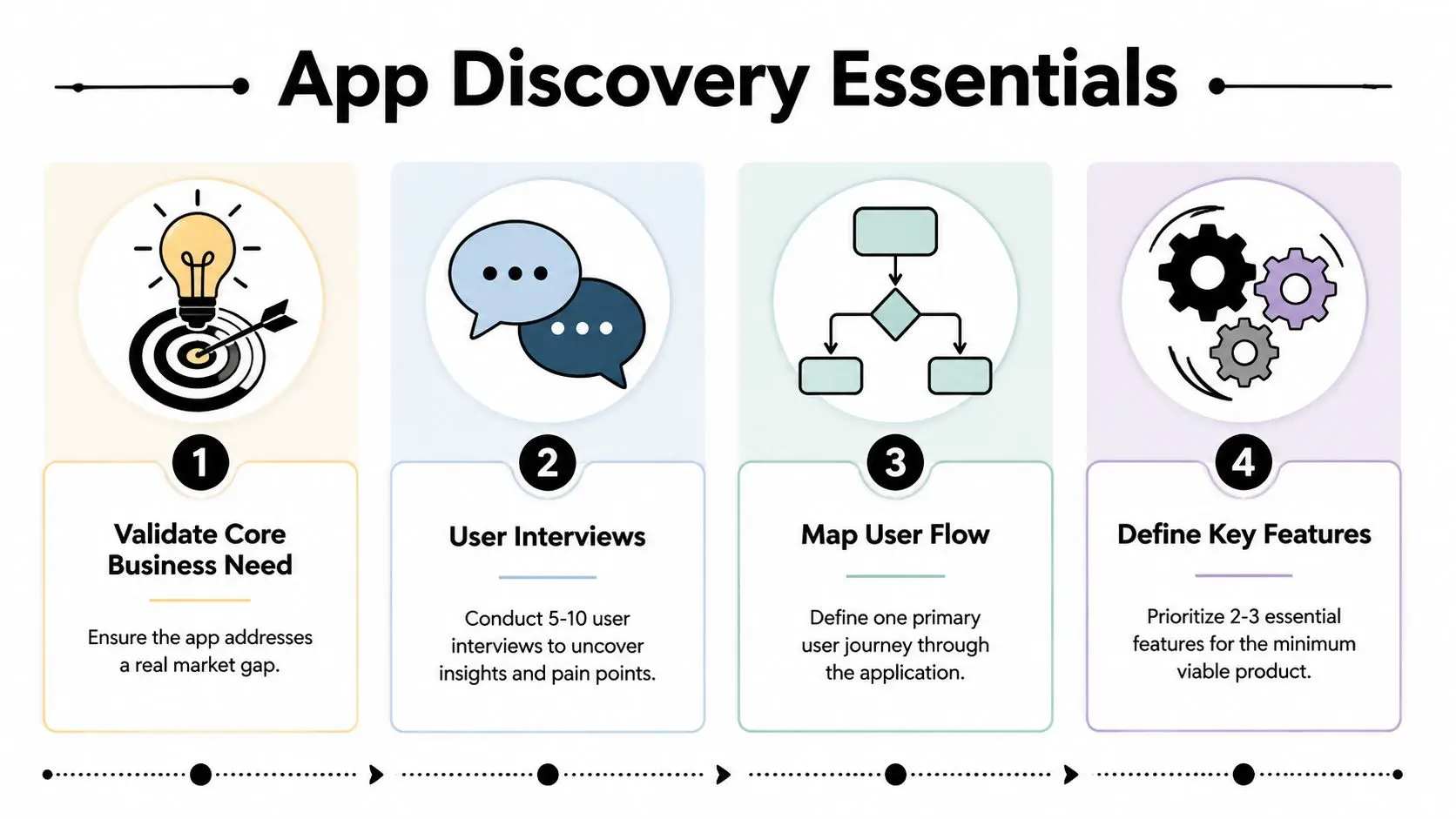
What good discovery produces
Good discovery ends with a short, usable document. It should name the target audience, describe the primary journey, list the core features, and explain what gets cut from the MVP. That document is what protects the design team from random additions and gives engineers something they can estimate without guesswork. A lot of teams rush this part because they think discovery is just meetings. It isn't. Discovery is where you decide what not to build. If that decision isn't made early, you'll pay for it during sprint planning, QA, and launch, because scope creep rarely arrives as a single dramatic request. It arrives as “small” changes that each seem harmless.
The best scoping documents are short enough to read in one sitting and specific enough that a developer can estimate from them without follow-up questions.
This is also the point where app teams should think about analytics. If the KPIs aren't defined before build-out, the app often ships without the instrumentation needed to prove whether users are completing the journey you designed. That makes launch feedback less useful than it should be, because the team can see activity but not intent. For business apps, I'd treat discovery as a gate, not a formality. If the stakeholder group can't agree on one core user flow, the product isn't ready for wireframes yet. If the user interviews contradict the proposed feature set, the feature set needs another pass. That discipline saves more time than any shortcut in the coding phase.
UX UI Design and Prototyping
Once the requirements are stable enough to trust, the work moves into interface design. In this stage, teams translate abstract goals into screens, navigation, and interaction patterns that users can understand. Wireframes come first, then a design system or style guide, then a clickable prototype that tests the journey before code is written. A strong prototype should answer practical questions, not just look polished. Can the user move from entry point to task completion without hesitation? Does the screen hierarchy make the primary action obvious? Can the app explain itself when there's no onboarding hand-holding? That's the level of detail that saves expensive redesigns later.

For teams working with AI-assisted design or content generation, the hard part isn't making more screens. It's keeping human judgement in the loop so the interface still reflects actual user behaviour. A useful discussion of that tension is bridging the AI-UX gap, especially where automation can speed up drafts but can't replace product sense.
Prototyping for standard apps and XR
For a regular mobile product, Figma, Sketch, or Adobe XD are enough to validate layouts, motion, and interaction states. For XR pilots, the prototype often needs to move into Unity or Unreal sooner, because spatial UI depends on head movement, depth, and real-world scale. A button that looks fine on a flat screen can become awkward once it lives in a 3D space. That's why the interface team shouldn't treat XR design as “regular UI in a headset”. Spatial menus, gaze interactions, and controller input all need different test conditions. In some projects, I've seen teams save weeks by prototyping only the hardest interactions in engine while keeping the rest in standard wireframes. That keeps the scope under control and surfaces the core usability risks early. There's a practical internal resource worth using here too, the thinking behind design for mobile apps is directly relevant when you're shaping touch-first flows, navigation depth, and visual hierarchy. The point is simple, prototypes should make decisions visible.
Useful test: if a stakeholder can't explain the primary action in five seconds, the prototype isn't ready for build.
Design is where taste meets evidence. If a screen choice can't be justified by the user flow, the platform constraints, or accessibility needs, it's probably decoration.
Architecture and Technology Selection
The architecture choice decides how painful the next year will feel. Native iOS and Android apps, cross-platform frameworks, and custom XR engines all solve different problems, and the right answer depends on performance, team skill, and maintenance load rather than brand loyalty. A stack that looks elegant in a pitch can become expensive if the team can't support it.
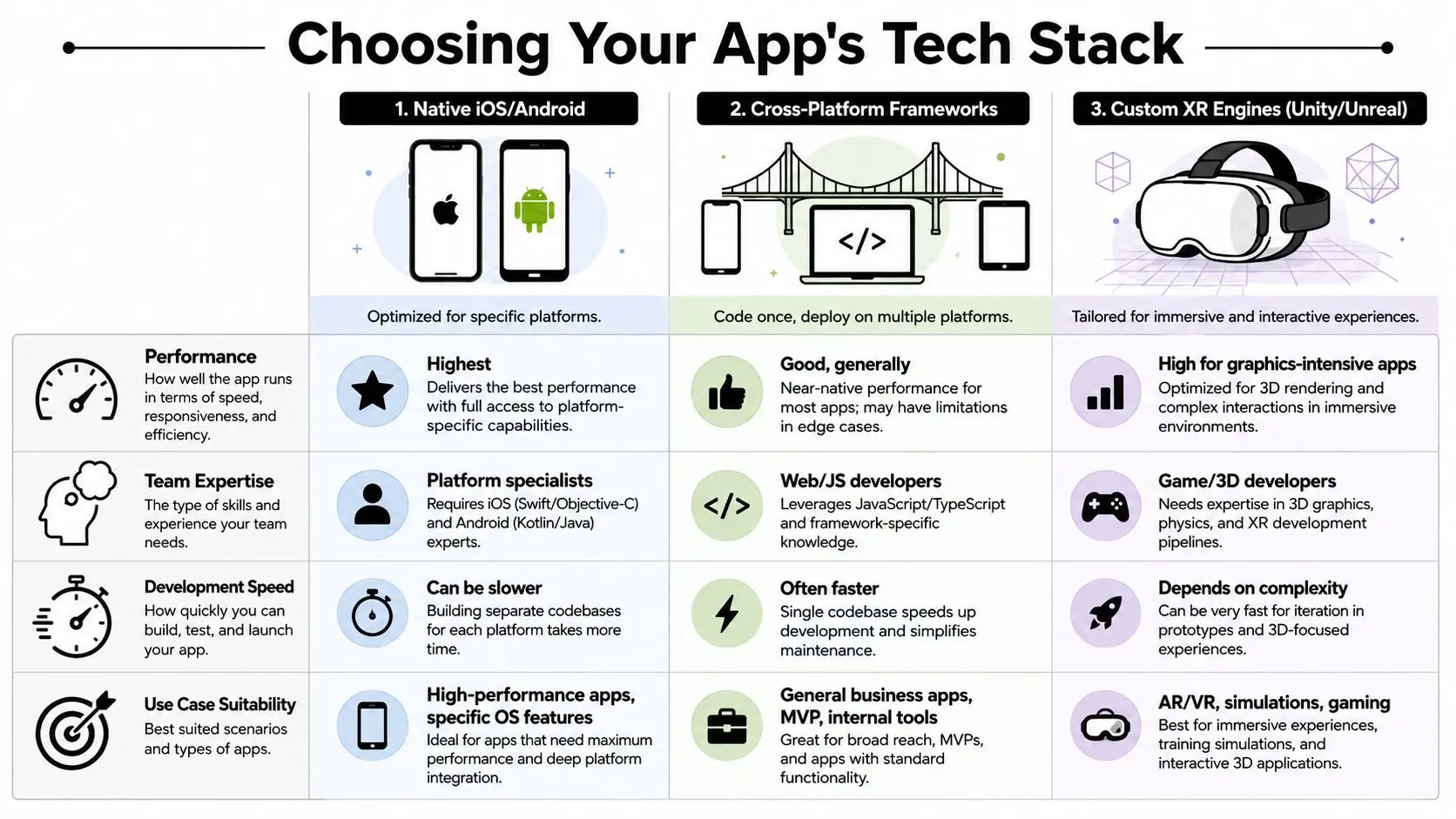
Choosing by business fit
Native development still makes sense when the app needs tight hardware integration, platform-specific polish, or the highest possible performance on a single operating system. Cross-platform frameworks suit many business apps, especially when one codebase needs to reach multiple devices quickly. XR engines like Unity and Unreal belong in a different category altogether, because they're built for immersive interaction, 3D assets, and real-time rendering. The trade-off isn't merely speed versus quality. It's also team composition and future support. Native work often needs platform specialists, cross-platform teams often lean on web and JavaScript skills, and XR teams need developers who are comfortable with game-style pipelines, shaders, and asset optimisation. If the wrong people are hired for the wrong stack, maintenance becomes awkward long before launch. Offline-first design also matters in the UK, where rural 4G and 5G gaps mean users can't always rely on a strong connection. Well-engineered sync models, careful error handling, and local storage strategies are more reliable than assuming constant online access offline-first guidance. That concern shows up in consumer apps, field tools, and public-facing services alike. For AI-enabled products, hidden build costs often sit in the architecture, not the model call. You need logging, guardrails, fallbacks, and review points for generated content or recommendations. Those aren't nice extras, they're part of the delivery pipeline, and they affect long-term maintenance as much as the app code itself.
How to decide without overengineering
Use the simplest stack that can support the product's core behaviour. If the app needs only standard business workflows, a cross-platform build can reduce duplication. If the app's value depends on rich 3D interaction or deterministic rendering, a dedicated engine is usually the safer route.
Decision rule: don't choose a stack because the team likes it, choose it because it matches the app's interaction model, support burden, and update path.
This is also where hidden cost creeps in for XR and AI projects. Asset creation, engine optimisation, model evaluation, and device testing can add ongoing work that isn't obvious in a first estimate. A good architecture conversation names those costs early, so leadership isn't surprised after the build begins.
Development Pipelines and AI Efficiencies
A disciplined development pipeline is what keeps the app from turning into a pile of inconsistent code. Agile sprints of 1 to 2 weeks work well because they force small, reviewable increments, and that rhythm supports continuous integration instead of huge merge events. Reusable modules, code reviews, and a build pipeline that runs automatically are more important than any single framework choice. The best teams treat AI as a helper, not a replacement for engineering judgement. Code assistants can draft boilerplate, propose test cases, and speed up repetitive tasks, but they can also introduce drift if nobody owns the architecture. That's especially true when the codebase grows, because the team still has to keep the design coherent and the documentation current.
What a working sprint pipeline looks like
A practical sprint usually starts with one tightly defined work item, then moves through implementation, review, and test automation before anything merges. Continuous integration should run every change through build checks and unit tests, while infrastructure-as-code keeps environments reproducible. When the team uses AI tools, the smart move is to let them handle repetitive scaffolding and surface area work, while humans handle architecture, acceptance criteria, and final review. Useful external context on AI-supported product workflows is available through Context.dev's Web Scraping API for RAG, especially if your team is building retrieval or content-heavy features that need structured, current inputs. The important part is not the tool itself, it's the discipline around what gets automated and what still needs human sign-off.
Guardrails that prevent AI drift
AI output gets risky when it's allowed to shape the product without constraints. The team should keep a living style guide, architecture notes, and test expectations inside the repository so reviewers can compare generated code against standards. Manual code review still matters because AI can produce something that passes a quick glance but breaks a pattern the rest of the app relies on.
Practical rule: if AI helps write the code, a human still owns the decision.
That mindset keeps velocity realistic. The point is to reduce repetitive work, not to remove accountability. Teams that understand that distinction move faster because they spend less time repairing generated mistakes later.
QA Testing Deployment and Ongoing Maintenance
A release candidate isn't ready just because it compiles. It needs to pass unit tests, integration tests, UI checks, and beta testing against realistic devices and user journeys. If any of those stages is missing, launch risk goes up fast, because bugs tend to show up where the app meets real behaviour rather than tidy internal assumptions. Testing should begin with the core flow identified in discovery. Unit tests protect business logic, integration tests verify that services talk to each other correctly, UI tests catch interaction regressions, and beta testers expose problems that only appear on actual phones and networks. For apps with public-sector or accessibility obligations, the build also needs early attention on assistive technology compatibility and accessible structure, not as a late polish pass. The release checklist needs sign-off on privacy, device security, content, and analytics before app-store submission. That is where many projects stumble, because they treat launch as the end of the job instead of the start of support. In reality, shipping without crash monitoring or feature tracking makes post-release decisions guessy rather than evidence-based. There's a useful internal reference on measurement and event tracking in Studio Liddell's mobile app tracking guide. The point there aligns with good product practice, if you can't see crash-free sessions, retention, or feature usage after release, you're managing the app blind.
What maintenance really includes
Maintenance isn't just bug fixes. It covers OS updates, device compatibility, dependency updates, accessibility adjustments, content changes, and feature refinement based on real use. In a mobile market as broad as the UK's, where smartphone ownership is near universal Ofcom figure cited earlier, the device mix and user expectations keep changing, so the app needs a support plan, not a one-off handover. Beta channels are worth using before public release because they surface rough edges in a controlled environment. You want feedback on onboarding, navigation, crash points, and confusing copy before the app-store review and public rollout make those problems more visible. A rushed release often looks cheaper until the support queue fills up.
Keep the analytics simple enough that product owners can actually act on them. If no one reviews the data, instrumentation becomes overhead.
A solid QA and maintenance plan doesn't just protect quality. It protects the roadmap, because teams can prioritise improvements based on evidence instead of whoever shouted loudest after launch.
Cost Timelines and Team Roles by Project Size
A project's size changes the shape of the team more than it changes the phases. Small apps can move with a lean group, medium builds usually need clearer ownership, and larger projects need more coordination across design, engineering, QA, and product management. The timeline is still bounded by scope and complexity, and most builds run 3 to 7 months from concept to launch, depending on those variables timeline guidance. Studio Liddell's application development cost explainer is a useful companion if you're trying to map budget to scope, but the real planning question is staffing. Too few people and the app drags. Too many and the coordination overhead eats the gain.
| Project Size | Estimated Cost | Timeline | Team Composition |
|---|---|---|---|
| Small | Lower, tightly scoped budget | Shorter end of the range | Product lead, designer, 1 to 2 developers, QA support |
| Medium | Moderate budget with more iteration | Mid-range delivery window | Product manager, UX/UI designer, developers, QA engineer, part-time analyst |
| Large | Higher budget with multiple workstreams | Longer end of the range | Product owner, design team, multiple developers, QA, DevOps, analyst, support lead |
The right takeaway is not that bigger is always slower. It's that bigger needs more explicit coordination. If XR features, AI workflows, or offline-first behaviour are involved, the hidden maintenance load rises, so the budget has to cover more than the initial build. Planning for that up front is what keeps the app viable after launch. --- If you need an app scoping partner who can move from discovery to design, development, QA, and launch with the same team conversation intact, talk to Studio Liddell. We build business apps with the same discipline we use for complex digital production, so the brief, the prototype, the stack, and the release plan all line up. Send us your current idea or half-finished spec, and we'll help you turn it into a build plan that's realistic to deliver.