Application Development Cost Explained
A lot of teams hit the same moment at roughly the same point. The concept is exciting, the stakeholders are interested, and somebody asks for a number before the brief is mature enough to support one. That's where application development cost gets misunderstood, especially in creative production. A finance team may expect app pricing to behave like a standard software build. Then the project turns out to involve real-time rendering, animation pipelines, headset optimisation, content authoring, user testing, and the kind of polish that makes a game, XR experience, or animated app feel finished rather than merely functional. For immersive and visual products, cost isn't just about features. It's shaped by production craft. A VR training module, a mobile game, and an animated brand tool can all share similar technical foundations while having completely different budget profiles because the expensive parts sit in different places. If you're building in this space, a rough estimate won't do much good. You need a budget model that reflects how creative applications are made, where the risk sits, and which decisions keep scope under control without flattening the idea.
Budgeting Your Big Idea
If you're costing an XR training app, a branded game, or an animated product experience, you're probably juggling two pressures at once. One group wants a credible budget. Another wants to protect the creative ambition that makes the project worth doing in the first place. That tension is normal. It's also where many budgets go wrong. Teams try to answer the price question too early, before they've separated the must-have mechanics from the expensive nice-to-haves, or before they've worked out whether they're funding software, content production, or both.

A better approach starts with budgeting as a production exercise, not just a procurement exercise. The useful questions aren't only “How much will it cost?” They're also “What are we building first?”, “What level of visual finish is required?”, and “How much uncertainty is still in the concept?” If you need a general software framing alongside the creative perspective in this article, TekRecruiter's cost estimation guide is a practical companion read.
What usually changes the number
Some projects look simple in a pitch deck and become expensive in production because the hidden work appears later:
- •Real-time performance demands. A scene that looks fine in a static mock-up may need extensive optimisation to run smoothly on mobile or standalone VR hardware.
- •Content volume. One polished environment, one hero character, and a short interaction loop is a different budget from a library of levels, variants, languages, or lessons.
- •Approval complexity. Brand, legal, education, and technical stakeholders rarely review work at the same speed or with the same priorities.
- •Delivery obligations. App store submission, headset deployment, exhibition setup, analytics tagging, and handover documentation all add effort.
Practical rule: If a project needs to feel cinematic, interactive, and robust across devices, budget for all three disciplines. Cutting one usually pushes cost and risk into the others.
The useful outcome isn't a single magic figure. It's a budget range tied to scope confidence. That gives you room to make decisions early, before the expensive assumptions harden into production reality.
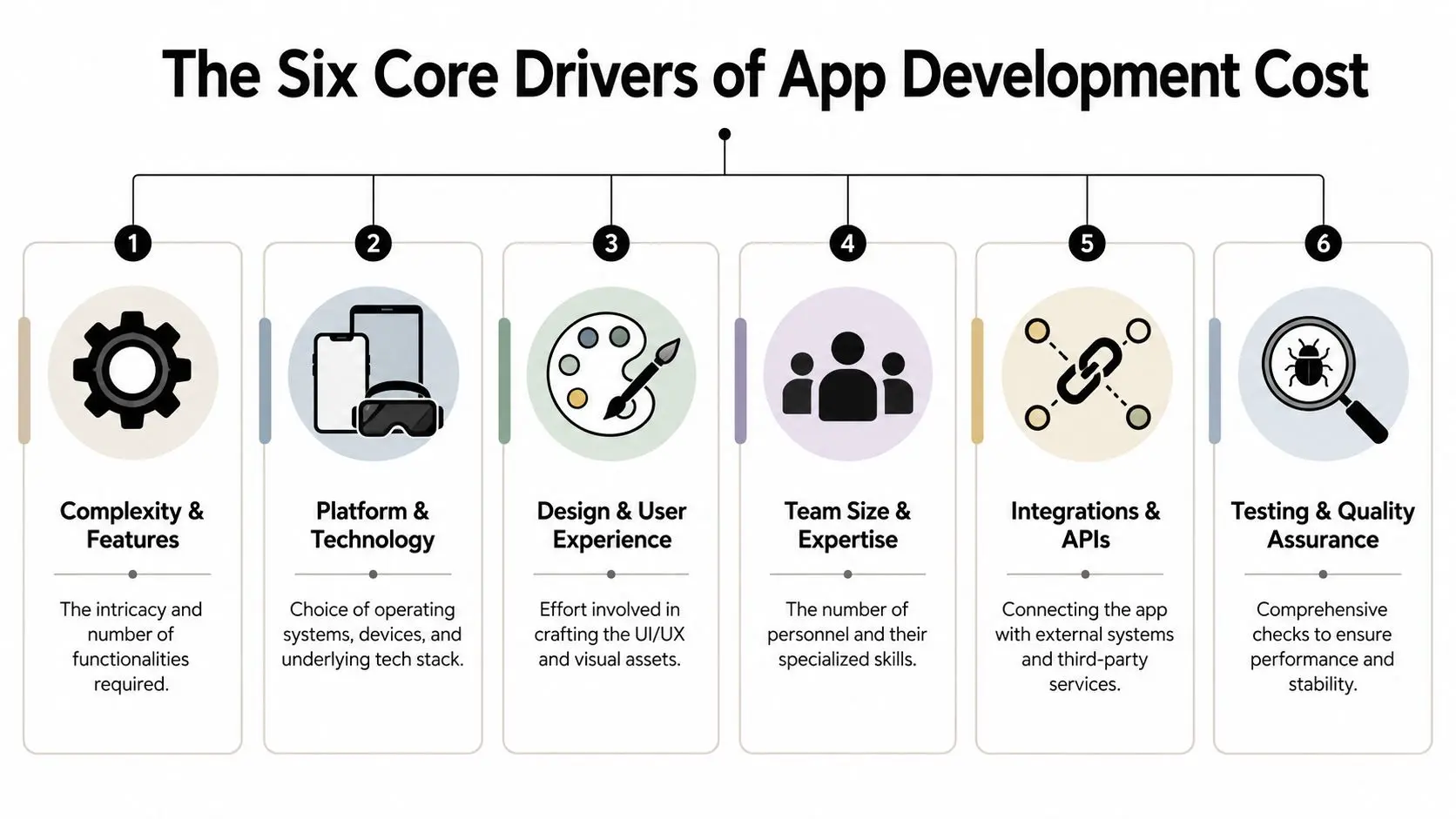
The Six Core Drivers of App Development Cost
Creative app budgets work like a build schedule on a complex set. Every department touches the final result, and each one affects cost in a different way. If you only look at coding hours, you'll miss the parts that make the app usable, stable, and publishable.
Design and user experience
Design is more than screen layouts. In a creative app, design often includes interaction logic, visual language, motion behaviour, onboarding, accessibility, and how users understand the world you've built. For XR and games, design can also include spatial flow, comfort, camera behaviour, control feedback, and environmental readability. Those choices affect engineering and testing later, so underinvesting here rarely saves money. It usually just delays the same spend until rework begins.
Engineering and real-time implementation
Engineering turns concept into working software. That includes app logic, backend services where needed, integrations, platform-specific behaviour, optimisation, and build pipelines. In a typical creative application build, engineering and design account for 60 to 70% of the initial budget, while quality assurance and project management represent an essential 20 to 25% needed to ensure a successful launch, according to Studio Liddell's breakdown of app development cost drivers. For teams also planning hosting, environments, and deployment architecture, this cloud computing guide for app development helps frame the infrastructure side of the budget.
Quality assurance and technical review
QA is where many first-time buyers are tempted to economise. That's a mistake, especially in immersive work. A creative app often has more edge cases than a standard form-based product. You're checking animation states, controller input, loading behaviour, performance drops, device-specific issues, visual glitches, audio sync, and whether the app still feels coherent after changes. Broadcast-style expectations can apply even when the product is interactive.
The build isn't ready because the feature list is complete. It's ready when users stop finding the cracks.
Project management and production control
Project management protects the budget by controlling decision-making. That includes sprint planning, approvals, dependencies, file handoffs, risk tracking, and making sure design, art, and engineering don't move out of sync. For animation-heavy apps, producers often spend significant time on version control of assets, review cycles, and keeping stakeholders aligned. Without that structure, teams burn time in avoidable revisions.
Infrastructure and deployment
Some applications are light on backend requirements. Others need content delivery, user management, telemetry, or cloud-hosted services. A standalone kiosk build has different needs from a consumer mobile app or an online training platform. Infrastructure cost isn't only about servers. It includes build environments, deployment workflows, storage, analytics setup, and the technical overhead of keeping versions organised across platforms.
Licensing and third-party tools
This category is easy to ignore in an early estimate. Then contracts arrive. Licences can include engine plugins, content tools, SDKs, analytics services, audio middleware, testing platforms, device management software, and specialist asset libraries. None of that is unusual. It just needs to be visible before procurement starts, not after.
Typical Budgets for Creative and XR Applications
There isn't one standard price for a creative app, because complexity sits in different places. A compact AR activation might be visually rich but short-lived. A training simulator may look restrained yet carry heavy scenario logic, review requirements, and deployment obligations. A narrative VR piece can seem small on paper and still demand substantial art, sound, optimisation, and polish. That's why budget conversations work better when framed by complexity tier, not by generic labels like “small app” or “large app”.
What simple, mid-complexity, and complex usually mean
A simple project tends to have a narrow user journey, limited content, and few moving parts. Think of a lightweight branded interaction, a single-purpose companion app, or a compact explainer with interactive elements. A mid-complexity build usually introduces either content breadth or system depth. This might be a puzzle game with multiple states, a technical animation app with layered interactions, or an educational module with assessment logic and media handling. A complex build often combines several demanding disciplines at once. That's where you see location-based VR, multi-user event experiences, animation-rich game apps, or training products that need strong content control, hardware optimisation, and detailed QA.
Sample application budget ranges
The table below is a planning tool, not a promise. It's most useful for early stakeholder conversations, when you need to align ambition with production reality and decide whether to stage the work.
| Complexity Tier | Example Project | Typical Budget (GBP) | Estimated Timeline |
|---|---|---|---|
| Simple | Branded AR face filter or single-purpose interactive promo | Lower budget range | Short timeline |
| Mid-complexity | Multi-level puzzle game or technical explainer application | Mid budget range | Medium timeline |
| Complex | Location-based VR experience or broadcast-quality animated interactive app | Higher budget range | Longer timeline |
What pushes a project up a tier
Budget usually climbs when one of these happens:
- •The content library expands. More characters, levels, scenes, lessons, or language versions create a multiplication effect across art, implementation, and QA.
- •The platform mix grows. Shipping to mobile, web, headset, and kiosk is not the same as targeting a single environment well.
- •The polish requirement rises. Cinematic lighting, advanced shaders, nuanced character animation, and premium audio finish all add specialist production time.
- •Stakeholder review becomes layered. Brand teams, educators, internal product owners, venue partners, and legal reviewers can all stretch the approval cycle.
Budgeting works best when you define what “finished” means in production terms. “Interactive and visually impressive” is not a scope. “One headset experience with one environment, one guided loop, and final sound mix” is.
A useful budgeting habit is to separate the core build from the extension roadmap. If the first release proves the concept, additional chapters, devices, or content packs can follow with much less estimation fog.
Fixed Price vs Time and Materials vs Retainer
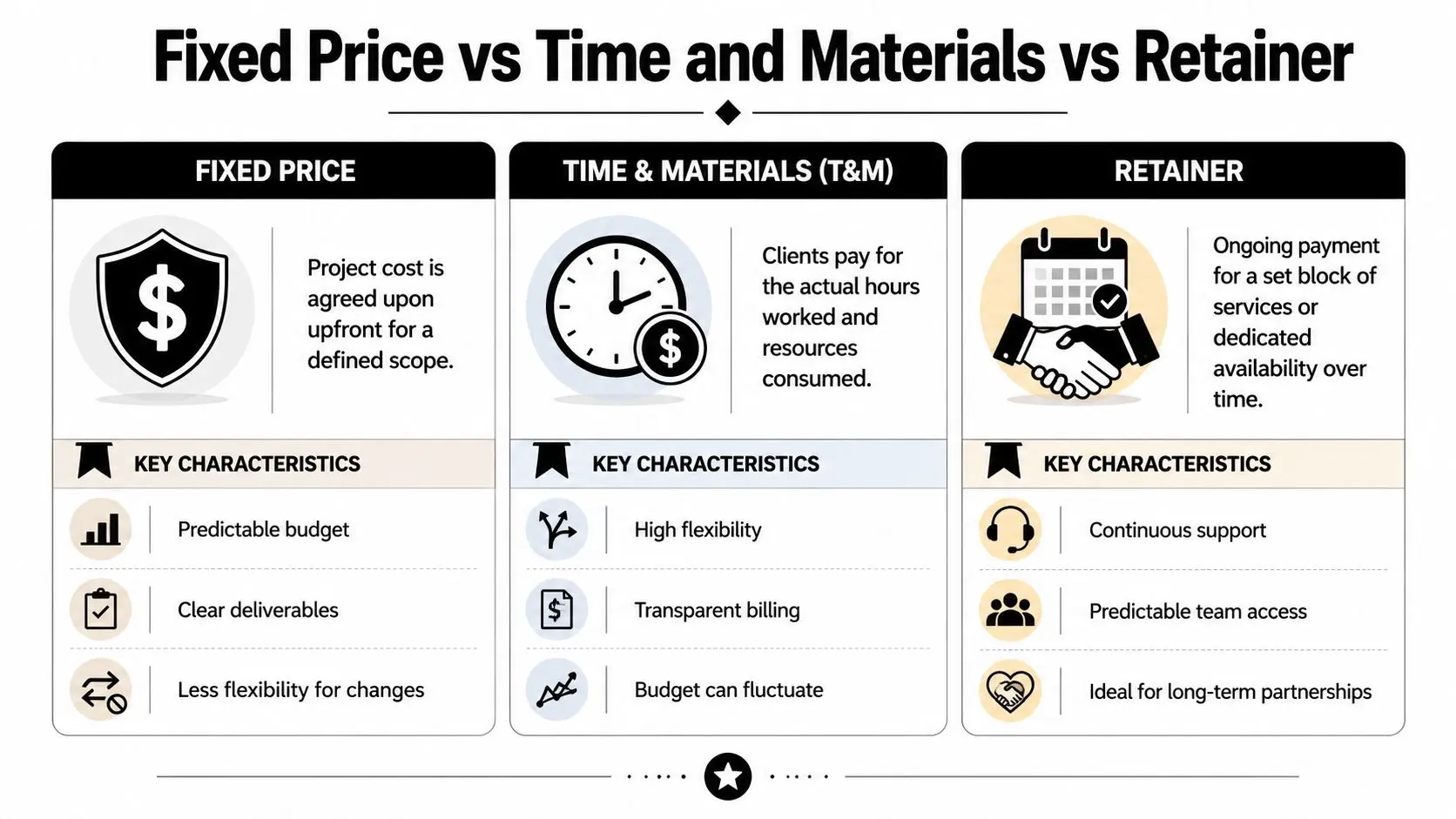
The pricing model changes how risk gets distributed. That matters just as much as the headline quote. In creative app production, the wrong commercial model can create friction even when the team is good. If the scope is evolving and the contract assumes certainty, every useful discovery becomes a change request. If the scope is stable and the contract is too open-ended, budget confidence disappears.
Fixed price
Fixed price works best when the scope is clear, approvals are straightforward, and the deliverables can be defined tightly before production starts. This model suits contained assignments such as a known feature set, a specific kiosk build, or a tightly storyboarded interactive experience with limited technical unknowns. Clients like it because the budget is predictable. Studios like it when the brief is disciplined. Where it fails is R&D-heavy work. If you're still testing control schemes, interaction ideas, visual approaches, or hardware assumptions, a fixed price contract can become rigid very quickly.
Time and materials
Time and materials fits projects where discovery is part of the work. That's common in XR, games, and anything that depends on iteration to find the right mechanic or visual balance. Under this model, the team can prototype, test, adjust, and keep moving without forcing every change through a contract reset. It's often the more honest route when the final shape of the app won't be known until some production has happened. A lot depends on reporting discipline. Clients need visibility into burn, priorities, and decisions. If you want a simple outside reference for how providers present adaptable commercial structures, PinDrop's overview of flexible pricing is a useful comparison point.
Retainer
Retainer is less about a single build and more about continuity. It works when an app needs ongoing content drops, support, optimisation, platform updates, or a standing creative-technical team. This can be the right model for long-running educational products, brand experiences that evolve through campaigns, or internal tools that need regular enhancement rather than one large release. It also reduces the stop-start cost of repeatedly briefing and onboarding new suppliers.
Which model suits which situation
| Model | Best fit | Main advantage | Main risk |
|---|---|---|---|
| Fixed price | Clear scope, known deliverables | Budget certainty | Limited flexibility |
| Time and materials | R&D, prototype-led, evolving briefs | Adaptability | Spend needs close monitoring |
| Retainer | Ongoing roadmap, support, iterative releases | Team continuity | Less suitable for one-off work |
Producer's view: If the concept still needs to be discovered, don't force it into a fixed number too early. You won't remove uncertainty. You'll just hide it in the contract.
How Timelines and Geography Impact Your Budget
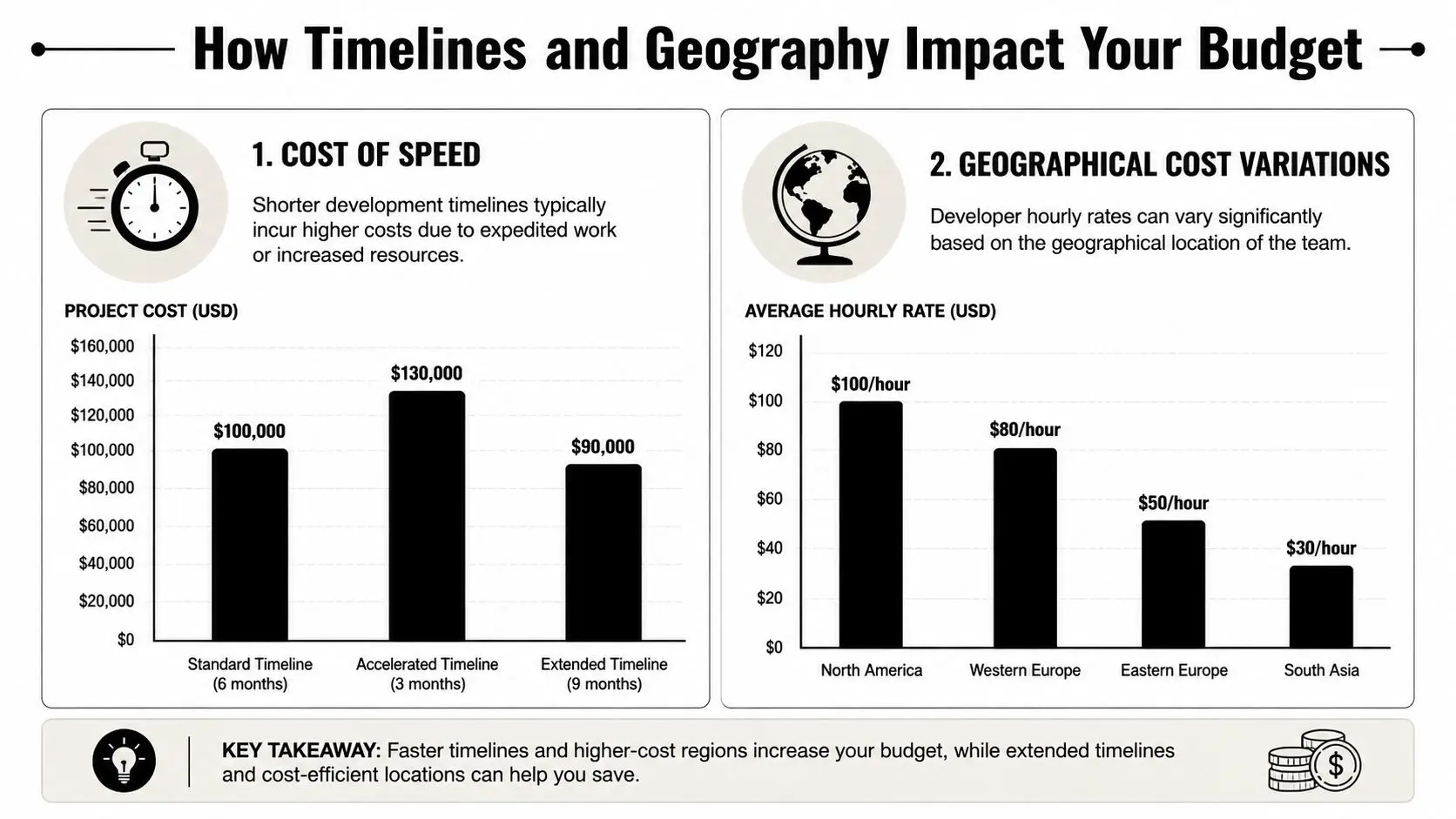
Two projects with the same feature list can carry very different costs because of when they need to launch and where the team sits. Those factors don't just shift the day rate. They affect process, communication, approvals, and how much slack the production can tolerate.
The cost of speed
Creative app production rarely compresses neatly. If a launch date is fixed, the team may need parallel workstreams, faster review turnarounds, tighter build management, and less room for exploratory iteration. That doesn't automatically mean the work gets better managed. Often it means the production has fewer chances to catch avoidable problems early. Rush schedules can be necessary for events, campaign launches, or funding deadlines, but they need realism. For a practical look at how schedule shape affects production planning, this app development timeline article is worth reviewing.
Geography changes more than rate cards
Buyers often compare quotes by region and assume cheaper geography equals lower total application development cost. Sometimes it does. Sometimes it doesn't. A lower-cost region can still become expensive if the project depends on constant collaborative design, nuanced creative interpretation, or rapid stakeholder workshops. Time zone gaps, fragmented communication, and longer feedback loops create hidden cost in revision cycles. On the other hand, for clearly specified technical components, a distributed model can work perfectly well.
What to evaluate beyond hourly cost
When reviewing geography as a budget variable, check these points:
- •Relevant production experience. Has the team built XR, game, or animation-led products before, or are they pricing it like a standard app?
- •Communication overlap. Can producers, artists, engineers, and your stakeholders review work in a useful daily rhythm?
- •Hardware access. If the product targets specific devices, who is testing on real hardware and how often?
- •Delivery context. Event installs, venue coordination, and broadcast-quality review often benefit from tighter proximity and faster response.
The cheapest quote can be the most expensive if the team needs multiple rounds to understand a brief that an experienced studio would decode immediately.
Smart Ways to Reduce Application Development Costs
A creative app usually gets expensive in two places. Teams either overbuild before the concept is proven, or they leave too many decisions open and pay for that uncertainty during production. The cheaper route is sharper production design.
Start with the core experience
For XR, games, and animation-led products, the first version has to prove the part that carries the experience. If that part is weak, a broader feature set only hides the problem and increases cost. In practice, that means defining the smallest release that can answer a real production question. Is the gameplay loop strong enough to repeat? Does the training scenario teach the right behaviour? Does the animated interaction hold attention long enough to complete the journey? A sensible first release often focuses on:
- •One audience
- •One platform
- •One core interaction pattern
- •One approval route
That last point matters more than clients expect. Extra reviewers do not just add comments. They create conflicting direction, slower approvals, and rounds of rework across design, animation, engineering, and QA.
Reuse pipelines, not just assets
Studios often talk about reuse as if it means recycling models or screens. The larger saving usually comes from reusing the production system around them. Shared Unity or Unreal workflows, modular UI components, repeatable animation setups, common analytics events, and standardised testing routines reduce handoff friction between disciplines. That matters in immersive projects, where cost is often driven by coordination between artists, technical teams, and content stakeholders rather than pure coding time. A team that already has a joined-up pipeline for real-time content can usually estimate more accurately and revise work with less waste. Buyers evaluating that capability can use this guide to choosing mobile app creators as a practical checklist.
Use AI where it removes labour
AI helps when it cuts a specific task. It can speed up reference gathering, asset tagging, content prep, test case support, and some forms of variation work. It does not make a complex XR build, game mechanic, or animation pipeline cheap by default. The test is simple. If a tool reduces revision rounds, shortens handoffs, or lowers manual production effort, it can save money. If it creates extra cleanup, approval risk, or inconsistent outputs, it adds cost back in.
Cut uncertainty before full production
Discovery is often the cheapest part of the project and the part clients are most tempted to skip. For creative applications, a short paid discovery phase can prevent expensive rebuilds later because it forces the team to resolve the questions that usually derail budgets. Lock down the user journey, release content, target hardware, sign-off path, and any technical unknowns that need a prototype. In XR, that might be headset constraints or spatial interaction comfort. In a game, it might be progression balance or input feel. In animation-led apps, it might be content volume and approval timing. Cost control comes from fewer surprises, not thinner ambition.
Choosing the Right Development Studio Partner
The wrong partner can make a reasonable budget feel endless. The right partner usually doesn't make the app cheap, but they do make the spend legible, controlled, and tied to outcomes you can review. That's why studio selection is a cost decision, not just a creative one.
What to look for in a proposal
A credible proposal should show that the team understands the product type, not just app development in general. If you're building XR, game mechanics, or animation-led interactions, you want evidence that they've handled real-time constraints, content production, testing complexity, and deployment specifics before. Look for these signs:
- •Relevant portfolio match. Not just polished visuals, but work that resembles your delivery context.
- •Clear production stages. Discovery, prototyping, build, QA, deployment, and support should all be visible.
- •Named assumptions. Good teams say what the quote depends on.
- •Practical risk notes. Device issues, content approvals, and integration dependencies should be acknowledged early.
For buyers who need a sharper checklist, this guide to choosing mobile app creators is a useful reference.
Red flags that usually cost more later
Some warning signs show up before the work begins:
- •The estimate arrives too fast for the level of complexity involved.
- •Everything is included, but nothing is defined.
- •QA and project management barely appear in the budget logic.
- •The team says yes to every feature without discussing priorities or trade-offs.
- •Nobody asks about hardware, deployment, review cycles, or success criteria.
The brief that gets better pricing
Clients often think a detailed brief locks them into too much too early. In practice, it usually gets them a more accurate and more useful quote. A strong brief should identify the user, the core journey, target platform, content expectations, approval stakeholders, delivery deadline, and what success looks like at launch. That doesn't remove every unknown. It gives the studio a realistic basis for pricing the work and flagging what still needs discovery. --- If you're planning a game, XR experience, or animation-led application and need a grounded view of scope, production risk, and budget shape, Studio Liddell is a practical place to start the conversation. A focused scoping discussion usually surfaces the cost drivers quickly and helps separate the first release from the longer roadmap.