Game Design and Development: A Business Guide
Most clients arrive with the same brief in different language. They need people to pay attention longer, understand something faster, remember a brand better, or practise a task safely before doing it for real. They don't usually ask for “game design and development” on day one. They ask for engagement, training impact, audience retention, or a stronger way to extend an IP beyond passive viewing. That's the useful starting point. A game project for business isn't just entertainment repackaged. It's an interactive system built to move a commercial objective. Sometimes that means a branded experience for an event. Sometimes it's an XR training simulation. Sometimes it's a companion app that turns a children's property into something playable. The creative layer matters, but the business logic matters first. If the interaction doesn't support the outcome, it's decoration.
Beyond Entertainment What Is Game Development for Business
Game design and game development are related, but they're not the same job. Design is the blueprint. It defines the audience, the interaction model, the rules, the reward loops, the tone, the user journey, and the reason the experience should exist at all. Development is the build. It turns that plan into a working product through art, code, audio, interface, testing, and deployment. For a corporate client, the easiest analogy is architecture. Design decides what the building is for and how people move through it. Development makes sure it stands up, opens on time, and works in practice.
What businesses are actually buying
When a company commissions an interactive project, it's usually buying one or more of these outcomes:
- •Deeper audience engagement: More active participation than a video or static site can deliver.
- •Better learning transfer: Practice, repetition, and feedback inside a controlled environment.
- •Stronger IP extension: A way to move a story world, mascot, or brand into a playable format.
- •Clearer product communication: Systems, processes, or technical ideas become easier to explore through interaction.
The key point is that the process is structured, not improvised. The UK is home to more than 2,000 games businesses and had 12,100 employees in the industry in 2022, which is a strong sign that this is an established creative-tech sector with mature production pipelines, not a fringe discipline (UK games sector overview).
Practical rule: If you can't state the business outcome in one sentence, the game concept isn't ready for production.
That's why early conversations should sound less like “what genre do we want?” and more like “what user behaviour are we trying to create?” For organisations exploring interactive projects for the first time, this guide to Unity game development for businesses is a useful companion because it frames engine-led production in commercial terms rather than hobbyist language.
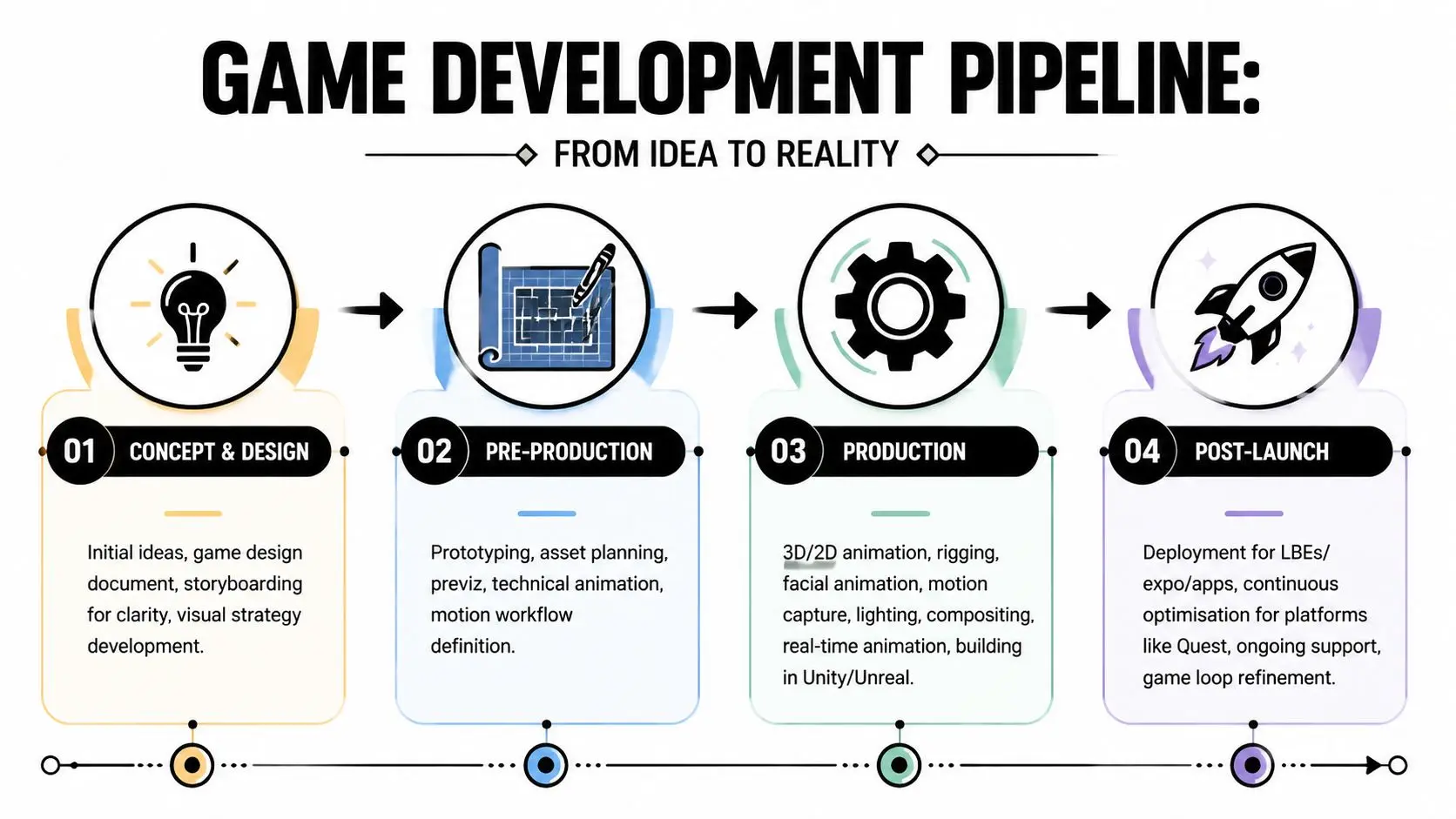
The Production Pipeline From Pitch to Post-Launch
Clients often imagine game production as a black box. They approve a concept, disappear for months, then hope something polished emerges at the end. That's not how well-run projects work. Good pipelines create review points, decisions, and visible deliverables all the way through.
Concept and design
The commercial brief gets translated into an interaction brief. The team defines the audience, core use case, platform, visual direction, and the simplest version of the game loop that can prove the idea. Typical outputs at this point include:
- •Creative treatment: A short document that explains the concept in client language.
- •Game design document: The first structured version of mechanics, progression, interface, and success criteria.
- •Moodboards and references: Visual alignment before expensive asset creation starts.
- •User journey maps: Particularly useful for training, education, museum, retail, or exhibition work.
If this phase is skipped or rushed, the rest of the project spends its time correcting basic misunderstandings.
Pre-production
Pre-production is where optimism meets reality. Teams prototype the riskiest ideas first. Not the easiest ones. If a mechanic, input method, or technical integration is uncertain, it needs a prototype before the content plan expands around it. This is also where pipeline choices get locked in. Asset naming, engine setup, source control, build process, performance targets, and approval workflow all belong here. A good pre-production phase answers practical questions such as:
| Decision area | What the client should want answered |
|---|---|
| Core interaction | Is the main loop actually compelling or useful? |
| Platform fit | Does it work on the intended device or headset? |
| Content scope | How much art, animation, audio, and UI is really needed? |
| Technical risk | Which features are likely to cause rework later? |
The cheapest time to remove a bad idea is before the full art and code teams depend on it.
Production and integration
Production is where most of the visible work happens. Artists create environments, characters, props, effects, and interface assets. Animators rig and animate. Developers implement mechanics, systems, menus, save states, analytics, and platform-specific behaviours. Audio teams add music, effects, and voice workflows if needed. What matters for clients is that production isn't just making things. It's making things in the right order. A common sequence looks like this:
- Build the core loop first: If the experience isn't coherent in greybox form, visuals won't rescue it.
- Add content in layers: Environment, UI, feedback, progression, and polish follow stable systems.
- Integrate continuously: Teams shouldn't stockpile work for one giant merge at the end.
- Review against the brief: Not just for aesthetics, but for the business objective.
QA, release, and post-launch
The final stretch is not “just bug fixing”. It's compatibility checking, edge-case testing, usability review, optimisation, packaging, store or deployment preparation, and release management. For business-focused projects, post-launch often matters more than launch day. A museum installation needs support procedures. A branded game needs analytics review. A training simulation may need content updates after subject matter experts observe usage. An event build may need fast iteration between venues. Post-launch is where a game stops being a file and becomes an operational product.Your Project Team Roles and Deliverables
Clients don't need a lesson in studio hierarchy. They need to know who is accountable for what, who makes decisions, and what each specialist hands over that can be reviewed.The people who protect scope and clarity
The producer is usually the commercial anchor. This is the person tracking schedule, budget movement, dependencies, approvals, and risk. If a client asks, “What happens if we add two more environments?” the producer translates that request into consequences for time, cost, and sequencing. The producer's core deliverables are usually the things that keep the job governable:- •Project plan: Milestones, dependencies, and approvals.
- •Risk log: Known technical or production issues.
- •Review cadence: When builds, artwork, and documents will be signed off.
- •Change control record: What changed, why, and what it affects.
The game designer owns the logic of the experience. This role isn't there to write vague creative ideas on a whiteboard. It defines rules, interaction loops, reward structures, progression, and usability decisions that support the brief. Typical design deliverables include a concise design document, wireframes, flow diagrams, balancing notes, and prototype specs.
The people who make the experience tangible
Artists, animators, technical artists, and audio specialists turn the design from abstract logic into something users can see, hear, and understand. Their work influences more than aesthetics. It affects readability, perceived quality, onboarding, accessibility, and emotional tone. A client will usually encounter outputs such as:
- •Concept art and style frames
- •3D models, textures, and rigs
- •Animation previews and final shots
- •UI layouts and interaction feedback assets
- •Audio drafts, sound design passes, and voice plans
A technical artist becomes especially important when the visual ambition is high but the runtime environment is constrained. That person helps the art pipeline survive contact with real hardware.
The people who make it work and keep it honest
Programmers implement the systems that users never see directly but always feel. Input, save logic, interactions, AI behaviours, UI functionality, analytics, optimisation, deployment, and platform support all land here. A project with elegant visuals and weak engineering will still fail in the hands of users. QA testers are the counterweight to assumption. They don't just ask whether the build crashes. They ask whether the user can misunderstand a prompt, get stuck in a flow, trigger a platform-specific issue, or complete the wrong task for the right reward.
A polished build is rarely the result of one brilliant final push. It's usually the result of disciplined review all the way through production.
For clients, that means deliverables shouldn't arrive as a mystery package. They should arrive as a chain of reviewable decisions, owned by named people.
The Modern Tech Stack Unity Unreal XR and AI
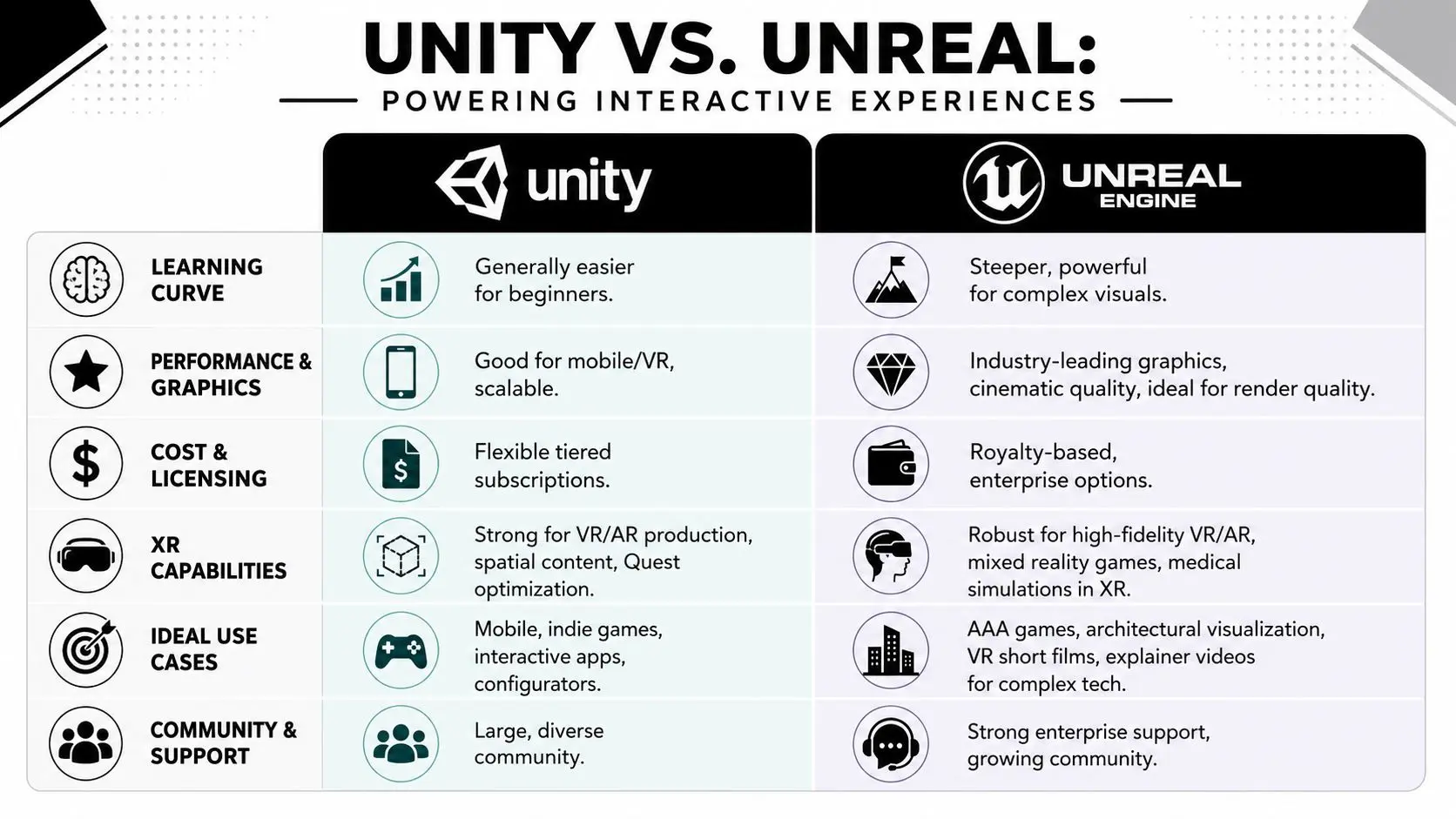
The engine question matters because it affects production speed, visual ambition, platform support, and the kind of team you need to maintain the work after delivery. It shouldn't be treated as a brand preference.
Unity and Unreal through a business lens
Unity is often a practical fit for interactive apps, mobile-led work, many XR builds, and projects where flexibility and broad device support matter. Unreal is often a strong fit for visually intensive work, cinematic rendering, high-fidelity immersive experiences, and projects where presentation quality is a major stakeholder concern. That doesn't make one “better”. It makes them different production environments with different strengths.
| Question | Unity tends to suit | Unreal tends to suit |
|---|---|---|
| Multi-platform deployment | Broad, especially for app-style interactive products | Strong, but usually chosen when visual fidelity is a priority |
| Visual target | Stylised to polished real-time output | High-end real-time visuals and cinematic presentation |
| XR use | Frequent choice for lightweight and iterative XR pipelines | Frequent choice for premium immersive builds |
| Team fit | Useful where rapid iteration and broad tooling matter | Useful where advanced rendering and visual control matter |
For clients commissioning XR, the primary question isn't “which engine is more popular?” It's “which engine reduces compromise for this specific brief?” That's particularly important in VR, AR, and mixed reality work, where hardware constraints, headset optimisation, interaction comfort, and deployment model all affect design choices long before final art.
AI as a production lever, not a substitute for judgment
The current discussion around AI in game production is more useful when framed around task allocation. The practical shift is not replacement of creative roles, but automation of repetitive production work so teams can spend more time on prototyping, iteration, and content variation (AI and entry-level game design work). That distinction matters to clients. AI can help accelerate rough ideation, support placeholder content generation, assist with variation passes, and shorten some early production loops. It doesn't remove the need for design judgment, art direction, technical validation, QA, or editorial control. Useful applications tend to be narrow and supervised:
- •Prototype support: Fast placeholder assets or system experiments.
- •Variation generation: Alternate copy, environmental detail, or concept permutations.
- •Workflow assistance: Tagging, cleanup, search, and production support tasks.
- •Audio experimentation: Early explorations for synthetic voice, temp narration, or tonal testing using tools such as an AI vocal generator when a team needs to audition approaches before final casting or recording.
One option for teams evaluating engine-led production workflows is this producer's guide to game development with Unreal Engine, which looks at the practical implications of real-time production from a delivery standpoint. Another is Studio Liddell, which works across animation, apps, games, and XR with Unity and Unreal-based pipelines.
What actually works in practice
A modern stack works when the tools serve the brief instead of dictating it. That usually means choosing the engine after answering four questions:
- What device will the user be on?
- What level of visual realism is commercially necessary?
- How often will the experience need updating?
- Who will maintain it after delivery?
Planning Your Budget and Project Timeline
The fastest way to lose control of a game project is to ask for a fixed answer too early. “How much will it cost?” sounds simple, but the honest answer depends on scope, content volume, platform requirements, approval complexity, and how much uncertainty still exists in the concept. What a client can get early is a reliable pricing framework. A typical game project can take 2 to 5 years to complete, which is why pipeline throughput matters so much. Toolchain decisions, documentation quality, and early prototyping all affect schedule risk and budget pressure over that span (technical game design documentation guidance).The main drivers behind cost
The first driver is scope. A single polished core interaction is manageable. Multiple modes, branching progression, bespoke character systems, live content, and platform variants multiply effort quickly. The second is content density. A short but highly crafted experience can cost more than a longer one with simpler assets if every frame, animation, environment, and audio cue is custom. The third is platform complexity. A touchscreen app, a desktop kiosk, a Quest deployment, and a mixed reality event build all create different testing, optimisation, and support demands. Here's the practical version clients should use during scoping:- •Ask what must be bespoke: Custom code and unique assets are where costs concentrate.
- •Separate must-have from nice-to-have: Teams can phase features, but only if priorities are explicit.
- •Identify hard constraints early: Venue hardware, app store rules, accessibility needs, or internal IT policies can alter production assumptions.
- •Protect prototype time: Cutting discovery work to save money usually creates rework later.
What usually causes overruns
Most overruns don't come from a team moving slowly. They come from one of three things. First, the core mechanic wasn't proven early enough, so production expanded around assumptions. Second, stakeholders approved visuals before agreeing the interaction model. Third, change requests kept arriving without any matching change in timeline or resource.
The cheapest schedule is rarely the one that starts building fastest. It's the one that removes uncertainty early.
A bespoke quote is still necessary, but good scoping narrows the range quickly. If a client arrives with a clear objective, a target platform, example references, known technical constraints, and a rough definition of audience, the budgeting conversation becomes much sharper. Not because the project is simpler, but because the unknowns are fewer.
Defining and Measuring Project Success KPIs
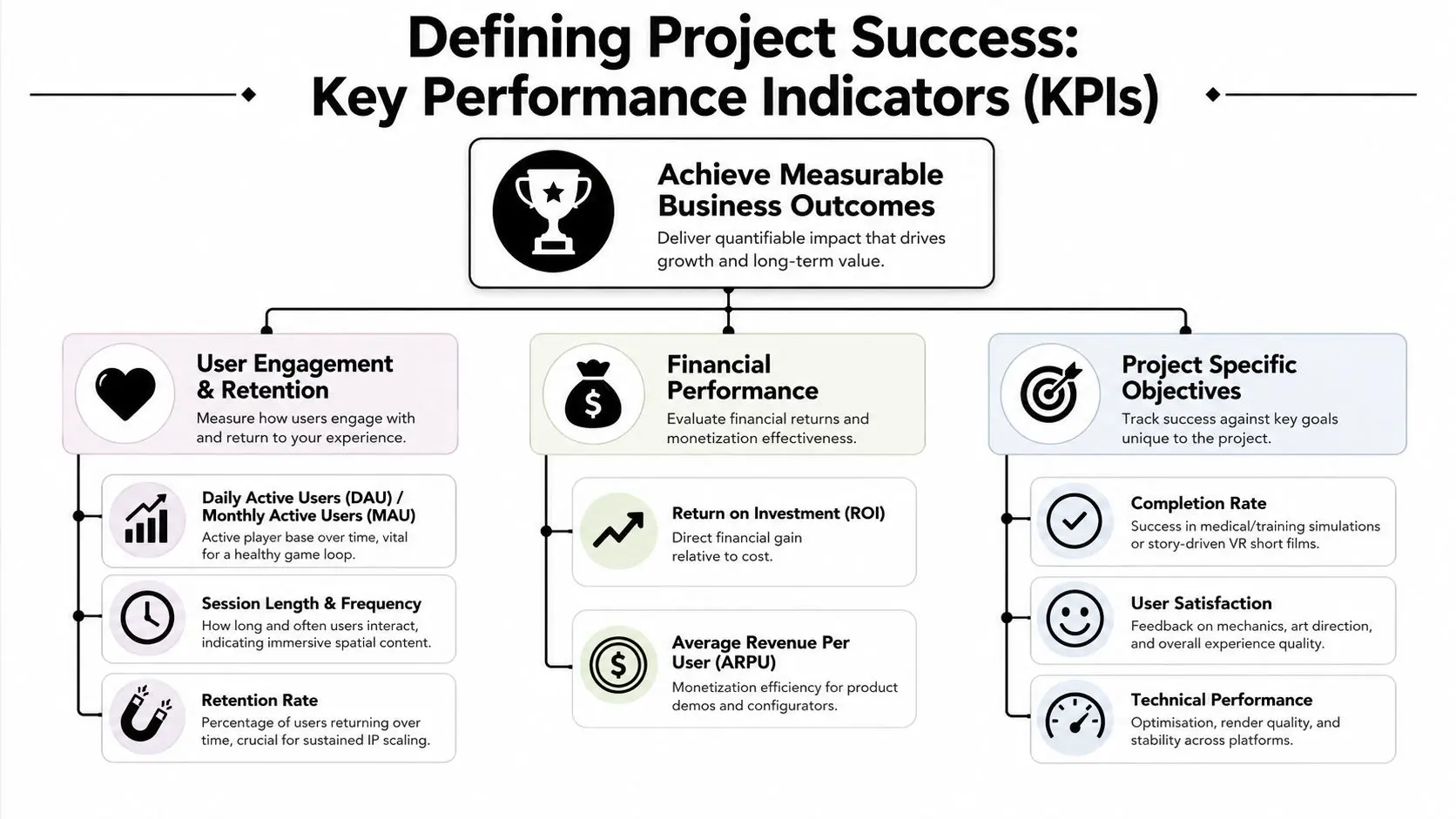
A business game fails when everyone says it looks good but nobody can prove it worked. That sounds blunt, but it's the right standard. Visual quality, polish, and originality matter. They just aren't enough on their own when the project was commissioned to influence behaviour, improve understanding, support a launch, or extend an IP.
Success depends on the brief
A branded game, a museum interactive, a training simulation, and a children's IP extension shouldn't all be measured the same way. They may share technology and process, but they exist for different outcomes. A practical KPI framework often looks like this:
| Project type | Useful success signals |
|---|---|
| Marketing or branded activation | Repeat engagement, completion behaviour, quality of interaction, campaign-linked response |
| Training or simulation | Task completion, decision accuracy, confidence in repeated use, assessor feedback |
| Educational interactive | Progress through learning flow, comprehension checks, replay for reinforcement |
| IP extension | Return visits, content completion, engagement with characters or world systems |
The important part is choosing the measure before production, not after launch.
Data-driven design changes the conversation
Data-driven design connects gameplay tuning to measurable signals like retention and churn. In practice, telemetry around tutorial completion and day-1 or day-7 return rates can be mapped back to specific mechanics so design changes become causally testable rather than subjective (technical game designer view on telemetry and retention). That principle applies beyond consumer games. If users abandon a training simulation before the first assessment, the onboarding may be too dense. If players drop during a branded experience's first interaction, the core loop may be unclear. If a children's companion app sees weak repeat use, the reward structure may not justify return sessions. Useful telemetry tends to answer concrete questions:
- •Onboarding: Did users complete the first critical action?
- •Flow: Where did they stop, hesitate, or exit?
- •Return behaviour: Did the experience create a reason to come back?
- •Mechanic clarity: Which features were ignored, misunderstood, or repeated?
For teams that want to connect interactive design to broader commercial measurement, this article on utilizing analytics to understand customer behavior is a relevant read.
If a KPI can't influence a design decision, it's probably the wrong KPI.
ROI is usually indirect before it becomes direct
Clients sometimes expect a single tidy number that proves value. In interactive projects, ROI often appears in stages. First in engagement quality, training uptake, stakeholder understanding, or repeat use. Then later in sales support, reduced friction, improved communication, or stronger brand recall. That doesn't make measurement weak. It means the project should be assessed against the job it was hired to do.
How We Build Success Stories at Studio Liddell
The strongest interactive work usually happens when three things line up. The commercial objective is clear. The production process is disciplined. The team knows when to stay ambitious and when to simplify. That matters whether the output looks like a game, an immersive short, an XR installation, or a technical interactive. The labels change. The production logic doesn't.
IP extension works when the interaction fits the brand
A property such as BooSnoo for Sky Kids points to one of the most common commercial uses for game thinking. Extending a world beyond passive viewing. In that kind of project, the wrong move is to bolt on mechanics because “games need gameplay”. The right move is to identify what the audience already likes about the property, then build interactions that reinforce that relationship. For children's brands, that often means clarity, warmth, repeatable play patterns, and feedback systems that feel immediate without becoming noisy or overcomplicated. The design challenge is less about feature depth and more about fit. If the interaction doesn't feel native to the IP, users notice. That same principle applies to entertainment, education, and brand work. Mechanics should express the proposition, not distract from it.
Complex subjects need interaction that clarifies
On technical communication projects such as GeoEnergy NI, the challenge is different. The audience doesn't need “more fun”. It needs a faster route to understanding. That shifts design priorities toward clarity, pacing, and visual explanation. In these jobs, the team usually has to translate specialist information into a sequence users can explore without expert supervision. That means:
- •Reducing cognitive load: Too much jargon or too many simultaneous inputs will lose people.
- •Showing systems in motion: Interaction is valuable when it explains process, sequence, or cause and effect.
- •Testing comprehension early: If the prototype confuses internal stakeholders, the public version won't recover later.
- •Designing for decision-makers: Many technical projects succeed because they help non-specialists grasp the issue quickly.
A lot of organisations preparing pitches, prototypes, or funding conversations for interactive products also need support material around evaluation and readiness. In that context, resources for prep for game assessments can be useful because they help teams structure thinking before they commit to production decisions.
What experienced teams do differently
Experienced teams don't treat game design and development as a single creative burst. They treat it as a managed sequence of validated decisions. That sounds less romantic, but it's how commercially useful work gets made. In practice, that means they:
- Stress-test the core interaction early
- Build around user behaviour, not internal assumptions
- Keep documentation short, current, and actionable
- Tie review points to business outcomes, not just visuals
- Plan for support after delivery, not just launch day
If you're exploring an interactive project and need a partner who can translate a commercial brief into a workable production plan, book a conversation with Studio Liddell.