Creative Project Tracking That Actually Works
You can have a beautiful tracker, a tidy board, and a colour-coded dashboard, and still miss the moment that matters. The week goes sideways when one late asset sits in review, the client is waiting on a tiny change, and the whole delivery chain gradually backs up behind it. That's the true job of creative project tracking, to catch the delay before it becomes a rescue mission. In practice, the studios that stay calm don't track everything equally. They track the stages that make decisions, the assets that move, the revisions that eat margin, and the approvals that release work. That's why the best systems feel less like admin and more like a control room, especially once automation starts reducing the time spent chasing status updates, as explored in prove ROI with automation.
Why Creative Projects Slip When Tracking Stays Generic
I've seen the failure mode more than once. A producer opens the board on a Wednesday morning and sees “in progress” on a dozen tasks, which sounds fine until a single character turnaround is still on an old file, the voice pickup hasn't been logged, and lighting is waiting on a review note that lives in someone's inbox. The board says work is moving, but the delivery team knows the truth, one unresolved asset can stall an entire sequence. Generic project tools often hide that problem because they treat creative work like a line of independent tasks. Animation, XR and multi-episode production don't behave like that. A clean Gantt chart from construction-style PM software can make the timeline look disciplined while missing actual blockers, version drift, revision churn and approval ambiguity.
Practical rule: if a tracker doesn't show which file, which version and which reviewer owns the next decision, it's reporting theatre, not control.
The UK evidence base backs that up. Government-backed reviews commissioned by the Cabinet Office and HM Treasury found a £2.2 billion cost increase across the Major Projects Authority's central government portfolio between 2012 and 2015, and 69% of that increase sat in just 14 projects. The same review notes a collection of 149 projects (creative operations statistics). In creative production, the pattern is similar; a small number of late or over-scope jobs can dominate the budget and swallow the schedule. The fix isn't to track more for the sake of it. It's to track the right control points, then use those signals to steer the job while there's still time to recover. That means stages with real gates, asset states with version history, revision loops with limits, and reporting that forecasts risk instead of describing what already went wrong.
Defining Stages, Milestones and Approval Gates
A reliable tracker starts with a map everyone can read the same way. In a studio pipeline, that map needs five canonical stages, brief and concept, previsualisation and prototyping, production, post and polish, and delivery plus sign-off. Each stage should have one named owner, one primary output and one gate that says whether the work moves forward.
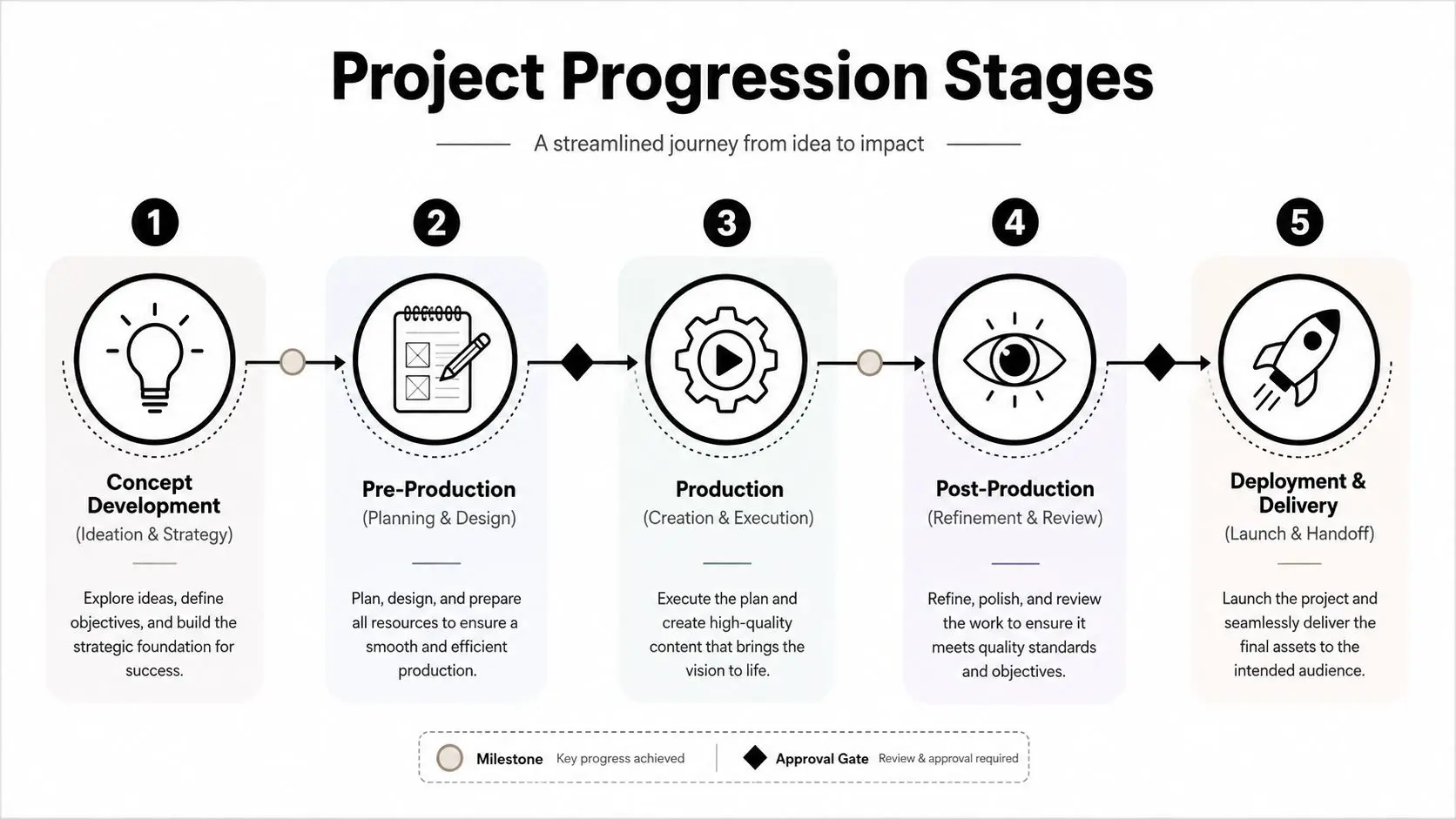
The five-stage structure that holds up under pressure
Brief and concept needs a signed creative brief, a clear objective and a decision on what success looks like. The gate here is simple, does the team agree the work is worth doing, and does the scope fit the budget. The owner is usually the producer or account lead, as weak scope gets corrected before it becomes expensive. Previsualisation and prototyping needs a storyboard, rough animatic, interaction mock-up or technical proof. In VR work, this stage often bleeds into production, so sub-gates help, for example an internal look test before anything is built at full fidelity. The owner is often the director or lead artist, with technical review from whoever owns feasibility. Production is where the approved assets are created at final quality. The gate is an asset lock or sequence lock, meaning the team stops treating ideas as open-ended and starts tracking exceptions only. This is the phase where version discipline matters most. Post and polish covers lighting, comp, sound, fix-ups and final QA. The gate is a client-ready review package with a clear comment deadline and a defined revision budget. This is also where the workflow described in the animation production pipeline guide becomes useful, because the hand-offs stop being abstract once the pipeline is mapped stage by stage. Delivery and sign-off should end with a final approval record, the delivery format list and the archive location. The owner here is often production plus delivery ops, because sign-off without archiving creates future confusion. If the studio can't prove what was accepted, it hasn't really finished.
Choosing the Right Cadence and Template for the Work
The cadence should match the kind of creative pressure you're under. A short motion graphics job with a fixed launch date behaves differently from a multi-episode series with rolling asset dependencies, and both behave differently again from an XR build where technical issues can slow art output without warning. The template needs to respect that reality, not fight it.
Sprint, Gantt or Kanban
Sprints suit work that benefits from short, bounded cycles, such as gameplay tuning, UI motion revisions or iterative previz. They force scope discipline, which helps when a team is tempted to keep polishing instead of closing a loop. They're strongest when feedback is fast and the output can be assessed in clear increments. Gantt timelines still matter when dates are fixed and dependencies are real, especially for broadcaster delivery or multi-team hand-offs. They show overlap, sequencing and critical dependencies well. They fail when the brief is loose, because a pretty timeline can't compensate for an unclear scope. Kanban is the cleanest fit for shared review queues, incoming asset requests and revision triage. It makes bottlenecks visible fast, which is why it works well across multiple episodes or high-volume deliverable streams. If a board keeps accumulating cards in review, the issue is usually not speed, it's decision fatigue. The strongest teams blend templates instead of marrying one forever. A fixed launch XR project might run inside a Gantt frame, while the art team uses sprint-like review cycles inside that larger schedule. The app-development comparison in understanding the app development timeline is a useful analogue, because the dependency logic is similar even when the creative medium changes.
Review the container, not just the task list. If the same work keeps slipping, the cadence is probably wrong for the way approvals actually happen.
A good starting rule is simple. Use sprints for iteration, Gantt for dependencies, Kanban for flow. Then watch what the team is doing; if the board fills up with blocked work, or the timeline depends on heroic hand-offs, change the system before the system changes the project.
Asset and Version Management Without the Chaos
Most delays don't start in the schedule, they start in the asset library. Someone uploads the wrong render, a naming convention slips, or two reviewers comment on different versions and nobody realises it until the next round. At that point, the tracker is no longer a source of truth, it's just another place where confusion gets recorded.
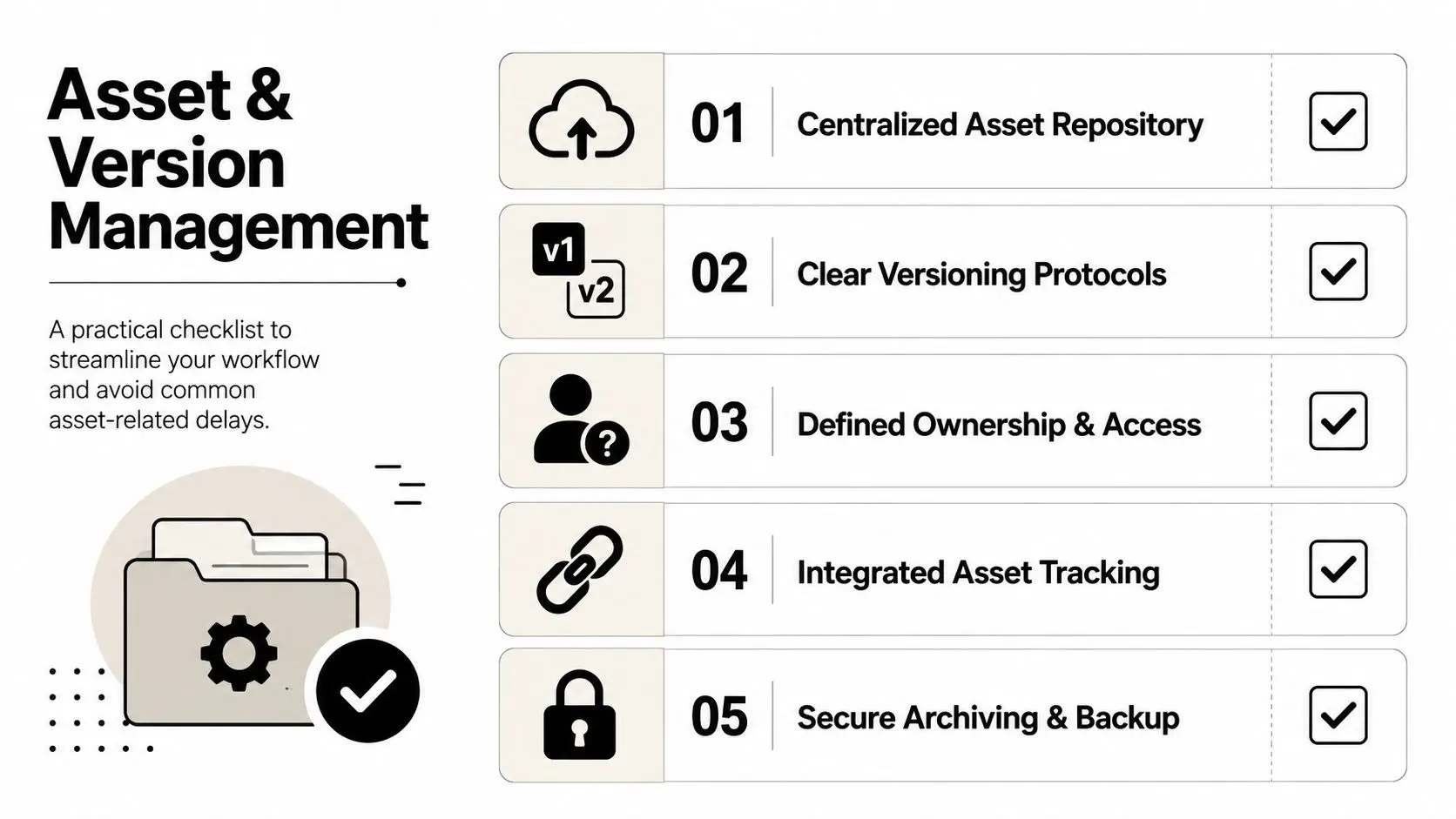
Build the naming convention before the first file lands
Use a filename pattern that encodes project, sequence, asset type, variant and version. The exact syntax can vary by studio, but the rule can't. If a producer can't tell what a file is from the name alone, the file name isn't doing its job. The tracker also needs a minimum metadata set on every asset, owner, status, dependencies, due date and last reviewer. That turns a status board into something actionable, because anyone can see what's blocked, what's waiting, and who needs to move. For heavier pipelines, a shared library or Perforce-style repository keeps the tracker aligned with real file locations instead of hand-written assumptions. A practical asset-management resource like NanoPIM's take on asset management is worth reading because it reinforces the same principle, ownership and traceability only work when the asset record stays connected to the thing itself. Here's how one character can move through a multi-episode series without chaos:
- Rigging starts as blocked until the approved model is in the repository and the rig owner is assigned.
- Animation moves to in review once the first pass is published to the correct folder and version.
- Lighting stays pending until the approved animation version is frozen.
- Final delivery becomes approved only after comp, sound and export checks are done against the same file reference.
- Archive goes locked so the team can't accidentally re-open a delivered version as if it were active work.
Building Feedback and Approval Loops That Don't Spiral
Feedback is where good creative projects either become organised or unravel. If you let comments arrive from multiple directions without naming the checkpoint, the revision count balloons and no one can tell whether the work is improving or just circling. The fix is to make every review legible, timed and owned.Name each checkpoint and cap the loop
The clean sequence is internal review, creative lead sign-off, client round, client sign-off and final delivery. Each checkpoint should have one owner, one deliverable, one deadline and one revision budget. The studio I trust most on tough jobs never treats “feedback” as a single phase, it treats it as a series of gates with different rules. The operational benchmark of a 3-round revision cap matters here, because the problem isn't revision itself, it's revision creep. When the count starts drifting above the cap, the tracker should flag it as overage and not just as “more notes”. That's the point where a producer can reset expectations, narrow the comment list, or escalate scope before the margin disappears.Record the review duration, number of comments and number of resolved items. Without those three signals, future scoping becomes guesswork.A tracker that logs only “approved” or “changes requested” misses the complete story. If one client takes hours to review but leaves clean notes, that's a different risk from a fast reviewer who creates twenty scattered comments and keeps reopening the same shot. The former is a schedule issue, the latter is a briefing issue. This is also where the human side matters. At kickoff, tell the client how many review rounds are included, who can comment, and what counts as sign-off. When a dispute does happen, the studio needs a dated record of the approved version, the comment round and the final acceptance note, not a memory of a phone call.
KPIs and Reporting That Forecast Risk Early
A dashboard only becomes useful when it shows a producer where the job is drifting before the date slips, the budget cracks, or the team starts burning time on avoidable rework. That means tracking has to move beyond record-keeping and into early warning. The KPI set should stay small, readable, and tied to a clear response.The numbers that actually help you intervene
The leading indicators that matter most are estimated vs. actual project time, estimated vs. actual project cost, utilisation rate, review duration, revision rounds per project, and blocked work counts. Agency KPI formulas usually frame estimated-vs-actual project time as forecasted hours divided by actual hours times 100, estimated-vs-actual project cost as estimated cost divided by actual cost times 100, and utilisation rate as invoiceable hours divided by total working hours in a standard week (creative agency KPI formulas). Those measures are useful because they show whether the work is still inside the assumptions made at kickoff. The reporting cadence should match the signal. Time and cost variance belong in monthly reviews, because they shape scoping and profitability discussions. Review duration and blocked work counts need weekly visibility, because those signals usually surface process problems before delivery slips. A producer who waits for a month-end summary is already dealing with the fallout. Creative operations teams tend to focus on the same pressure points. In-house teams most often track time from brief to acceptance at 70%, then overall review duration at 64% and volume of deliverables shared at 63% (creative operations metrics). On the lagging side, the most common metric is total number of assets generated, tracked by 68% of teams, while 65% track on-time completion and 63% track requests completed (creative operations metrics). That pattern matters because it shows teams are paying closer attention to turnaround and throughput than to final output alone.| KPI | Formula | Frequency | Owner |
|---|---|---|---|
| Estimated vs. actual project time | Forecasted hours divided by actual hours times 100 | Monthly | Producer |
| Estimated vs. actual project cost | Estimated cost divided by actual cost times 100 | Monthly | Producer and finance |
| Utilisation rate | Invoiceable hours divided by total working hours in a standard week | Weekly | Department lead |
| Review duration | Time from review sent to review closed | Weekly | Producer |
| Revision rounds per project | Count of completed review cycles | Weekly | Producer |
| Blocked work count | Number of tasks waiting on input or approval | Daily or weekly | Line producer |
Tooling, Integrations and the AI-Enhanced Pipeline
The tool stack should follow the workflow, not the other way around. A small team doesn't need enterprise-heavy governance for every job, and a larger studio doesn't need to pretend a spreadsheet can hold a multi-asset pipeline together. The right mix usually includes a project board, a proofing layer, an asset library and a way to record AI-assisted work cleanly.
Pick tools by the decisions they improve
PM platforms such as Jira, Asana and ClickUp work well when the team needs task ownership, due dates and review states. Monday-style setups are useful when the board needs to mirror a creative process rather than force one, and the practical monday.com use cases are a decent reference point for how visual workflows, approvals and reporting can sit in one place. The tool matters less than whether the board reflects the actual sequence of work. Asset libraries like Frame.io, Iconik and Perforce earn their place when the studio needs proofing, clip-level comment trails or strict version control. A team can get away with a lighter setup on small jobs, but once multiple departments touch the same asset set, the cost of loose file handling rises fast. That's when version history stops being optional.If the team can't answer “what changed, who changed it and what was approved” in under a minute, the pipeline isn't auditable enough.AI changes the record-keeping problem as much as the production problem. The tracker now needs to show what was AI-generated, what was human-reviewed and which rights or compliance checks were applied, especially for UK broadcasters and public-sector clients. The article on AI animation software and production is a useful reminder that AI belongs inside a governed pipeline, not outside it. Use AI where it removes grunt work, such as categorising requests, summarising comments or drafting variants, but keep the decision record explicit. If a prompt iteration led to a usable asset, that lineage should be visible. If a human artist corrected it, that correction should be visible too. A good audit this week is simple. Check whether every active project has named stages, whether every asset has versioned ownership, whether review rounds are capped, whether the dashboard shows time and cost variance, and whether AI-assisted outputs are traceable. If any one of those is missing, the tracker is still helping you remember work, but not yet helping you run it. --- Studio Liddell helps teams turn complicated production into something a client can approve and a producer can steer. If you need creative project tracking that holds up across animation, XR and AI-assisted pipelines, visit Studio Liddell and start a conversation about how your next job should be scoped, tracked and delivered.