Blender 3D Addon Guide for Studios
A lot of teams hit the same wall with Blender. The core app is strong, the artists are capable, the brief is clear, and then production slows down on something painfully small. It might be repetitive rig setup, technical annotation, export prep for Unreal, or scene checks that someone still does by hand because “that's how we've always done it”. That's usually the moment a blender 3d addon stops being a nice extra and starts becoming a production decision. In a studio environment, addons aren't just convenience scripts. They shape how fast a team can iterate, how reliably assets move between departments, and how much artist time gets wasted on preventable admin. Used well, they turn Blender from a general-purpose DCC into a pipeline platform tuned to the work in front of you. Used badly, they create fragility, hidden dependencies, and version chaos.
Beyond the Defaults How Addons Transform Blender
Blender ships with a lot. For many freelancers and smaller projects, that's enough. In production, “enough” often breaks the moment jobs become repeatable, multi-stage, or client-sensitive. A native workflow might be technically possible and still be the wrong workflow. That distinction matters. If an animator can complete a task in twenty clicks, but has to repeat it across dozens of shots, the problem isn't capability. The problem is throughput.
Where native workflows usually start to fail
The friction tends to show up in familiar places:
- •Repetitive scene prep: renaming, collection cleanup, export tagging, visibility toggles
- •Technical visualisation: dimensions, callouts, blueprint views, measurement accuracy
- •Pipeline handoff: getting assets from Blender into Unity, Unreal, render, or review stages consistently
- •Quality control: checking topology, transforms, naming rules, scale, and scene state before publishing
None of these tasks are glamorous. All of them eat schedule. That's why I treat addons as force multipliers, not feature candy. The right tool removes repeated decision-making from artists and puts it into a reliable system.
Practical rule: If a task is done the same way more than a few times, it probably shouldn't stay manual.
Addons change the shape of production
A good addon does one of three things. It speeds up a known process, reduces error in a fragile process, or enables a process Blender doesn't handle elegantly on its own. That changes the studio conversation. You stop asking, “Can Blender do this?” and start asking, “How should Blender do this in our pipeline?” For broader context on how 3D workflows fit into modern production, Studio Liddell's complete guide to 3D computer graphics is a useful companion read.
Think in systems, not downloads
The mistake I see most often is treating addons as isolated purchases. In practice, every addon affects onboarding, versioning, support, and output consistency. One artist's favourite panel can become the whole team's dependency. A blender 3d addon is valuable when it survives contact with real production. That means it works across file versions, behaves predictably under deadline pressure, and solves a bottleneck that matters. If it only looks clever in a demo file, it's not pipeline-ready.
A Studio's Toolkit Key Types of Blender Addons
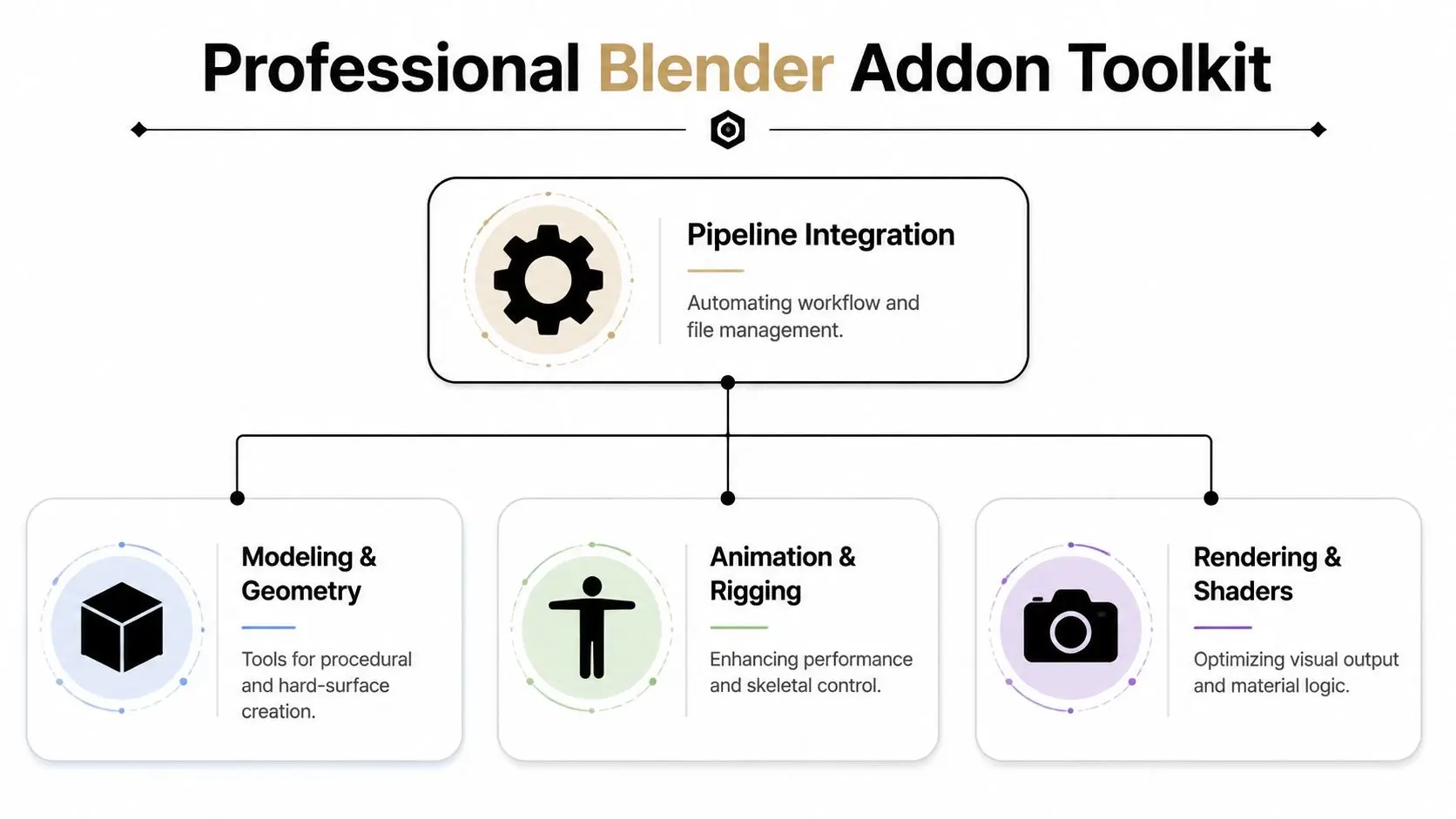
The addon ecosystem is too broad to evaluate as one big category. The useful way to think about it is by pipeline function. Once you group tools by what they do for production, it gets much easier to decide what deserves a place in the stack.
Workflow and productivity
These are the least flashy and often the most valuable. They handle batch actions, naming, validation, cleanup, scene publishing, and repetitive UI operations. In production, a productivity addon earns its keep when artists stop thinking about process glue and stay focused on the actual shot or asset. If a task exists purely to satisfy downstream departments, automate it. Typical wins include:
- •Scene validation: catching bad names, unapplied transforms, missing collections
- •Batch operations: applying the same publish or export logic to many assets
- •UI shortcuts: exposing common actions in one clear panel instead of scattered menus
Modelling and technical geometry
This category covers hard-surface helpers, procedural modelling tools, retopo aids, CAD-style dimensioning, and geometry utilities. For technical visualisation, that can be a direct production gain. Dimensions and Lines can achieve 2x faster blueprint creation compared to native tools by enabling CAD-style dimensioning directly in the viewport, which is especially useful in animation and XR pipelines, as shown on the Dimensions and Lines product page. That kind of speed-up matters because technical drawings aren't judged on artistic improvisation. They're judged on legibility, consistency, and revision speed.
Rigging and animation
Rigging addons are often where teams feel the biggest difference day to day. They can simplify control creation, speed up repetitive deformation tasks, or standardise how rigs are assembled. Animation utilities also help with posing workflows, key management, and shot prep. In a busy pipeline, even small helpers matter because animators touch these tools constantly. A poor rigging addon creates friction in every scene. A good one disappears into the work.
The best animation tools don't add complexity. They remove decision fatigue from repeat tasks.
Rendering and shading
These addons focus on lookdev support, material handling, render helpers, light rig utilities, and shader logic management. I'm cautious here. Rendering addons can be useful, but they can also smuggle in brittle dependencies. If a material tool saves setup time but complicates farm rendering or handoff, it may cost more than it saves.
Integration and import-export
This is the category that determines whether Blender behaves like part of a studio stack or a standalone island. Connectors for game engines, asset libraries, review systems, and external data formats belong here. A strong integration addon reduces handoff mistakes. A weak one creates “works on my machine” failures that only appear after publish. When evaluating any blender 3d addon, always ask which category it serves first. That keeps the decision tied to pipeline outcomes instead of impulse buying.
Finding Installing and Managing Your Addons
Most addon problems aren't caused by installation. They're caused by weak management after installation. Teams usually start well. Someone finds a tool, tests it, gets a quick win, and rolls it into active work. Months later, nobody remembers which version was approved, who owns support, or why half the team has different preferences enabled.
Where to look first
Reliable sources usually fall into three groups:
- •Official channels: Blender Extensions is the obvious starting point for broadly supported tools.
- •Established marketplaces: places like Superhive are useful when you need specialist production tools.
- •Developer repositories: GitHub can be excellent, but only if you review maintenance activity, issue handling, and documentation quality.
I don't install a tool in a live environment just because the demo looks good. I check whether the developer explains version compatibility, update history, installation method, and known limitations. If those basics are missing, that's a warning sign.
A safer way to evaluate
Use a small gate before any addon gets adopted:
- Test it in a non-critical file.
- Check whether it touches scene data, UI only, or export logic.
- See what happens when the addon is disabled.
- Open the same file on another machine.
- Document the approved version.
Keep the library lean
Addon bloat is a real production problem. Blender starts slower, interfaces get cluttered, troubleshooting takes longer, and junior artists don't know which tools are standard. Use three statuses:- •Approved: installed across the team
- •Experimental: tested by a limited group
- •Retired: removed from active use, but documented for old projects
A blender 3d addon should earn its place. If nobody can explain why it exists in the stack, disable it.
The Strategic Choice Off-The-Shelf vs Custom-Built
A production supervisor flags the same problem for the third delivery in a row. Artists are finishing the work, but exports still need manual cleanup, naming still breaks downstream, and one addon update has changed behavior halfway through the schedule. At that point, the question is no longer whether a blender 3d addon can help. The question is whether the studio should keep adapting to someone else's tool or invest in one built around its own pipeline. Studios make this call based on repetition, risk, and strategic value. Off-the-shelf addons are cheaper to test and faster to put in artists' hands. Custom addons take longer and cost more upfront, but they can remove whole classes of recurring mistakes if the workflow is central to delivery.
When off-the-shelf is enough
Buy first when the task is common and the workflow does not define your studio's edge. Batch renaming, measurement tools, viewport helpers, review overlays, and asset browsing improvements usually fit that category. That route gives teams a working solution quickly. It also answers an important business question early. Is this problem painful enough to justify any tool investment at all? I have seen studios commission custom development for issues that were annoying, not expensive. A solid commercial addon often exposes that difference within a week. Off-the-shelf tools also make sense when requirements are stable. If ten artists need the same utility and the output is easy to verify, buying a proven addon is often the disciplined choice.
When custom becomes the better decision
Custom work starts to make financial sense when artists keep building workarounds around a third-party tool. That usually shows up as helper scripts, extra training, exception handling in reviews, or repeated fixes by leads before publish. Once that pattern appears every episode or every asset drop, the studio is already paying for custom behavior. It is just paying for it inefficiently. The operational trade-off is control versus responsibility. A custom addon lets the studio define the UI, the rules, the naming standards, the export logic, and the failure messages. It also creates an ownership problem that has to be handled properly. Someone needs to maintain it, test it against Blender updates, and decide what happens when production requirements shift. For studios weighing that decision at a software strategy level, this article on modernizing legacy ecosystems with AI is useful because it treats custom development as an operational investment, not just a coding task. Teams exploring that path often start with a focused custom pipeline tool development brief instead of a broad feature wishlist.
Comparison of Off-the-Shelf vs Custom Addons
| Factor | Off-the-Shelf Addon | Custom-Built Addon |
|---|---|---|
| Speed to deploy | Fast if the tool already fits the need | Slower because discovery, build, and testing take time |
| Upfront cost | Usually easier to justify early | Higher because development time is real spend |
| Workflow fit | Partial to strong, depending on the tool | Exact fit if the brief is good |
| Maintenance control | Depends on the developer's roadmap | Owned internally or by your development partner |
| Training burden | Lower if the UI is familiar and documented | Depends on how well the tool is designed for artists |
| Competitive advantage | Limited because others can buy the same tool | Stronger if the workflow is unique to your studio |
| Risk profile | Vendor abandonment or update mismatch | Internal maintenance debt if ownership is unclear |
The operational trade-off
Custom is not automatically better. Poorly scoped custom addons can become private technical debt with a nice button on top. Build custom when the workflow is repeated often, tightly tied to delivery quality, and expensive to get wrong. Buy off the shelf when the task is standard, the market already serves it well, and your team gains more by deploying fast than by controlling every detail. That distinction matters because pipeline tools are not just conveniences. In a busy studio, they shape how reliably work moves from artist intent to final output.
The Studio Liddell Approach to Custom Development
Custom addon development works best when it starts with artists, not code. The wrong way to build a tool is to begin with features. The right way is to find the exact point where production slows down, watch how people work around it, and then decide what should be automated, standardised, or hidden.
Start with the friction, not the wish list
A useful custom tool brief is rarely “we want an addon”. It's usually something closer to:
- •Exports break when artists organise scenes differently
- •Rig variants take too long to prepare for episodic work
- •Technical assets need consistent annotation and review output
- •XR handoff needs cleaner data from Blender into runtime engines
Once that's clear, the addon can be scoped around a measurable job. That might mean one export panel, one validation step, one rig helper, or one publish action. Small, reliable tools usually outperform giant all-in-one panels.
Build for artists under deadline
A production addon doesn't live in a sandbox. It lives in a shot file at the end of a long day when someone's trying to deliver notes before review. That means the UI has to be obvious, the failure states have to be clear, and the tool has to degrade gracefully. The best internal tools I've seen follow a few rules:
- •One clear purpose: users understand what it's for immediately
- •Minimal setup: no one should need a manual for common actions
- •Predictable output: the result should be consistent across artists and machines
- •Safe defaults: if the user misses a setting, the tool still behaves sensibly
Development capacity matters
Studios don't always need a large internal engineering bench to do this well. What they do need is access to developers who can work closely with artists and production. Depending on the model, distributed specialist teams can help with capacity and speed. If you're exploring that route, this overview of working with LATAM developers is worth considering for production support planning.
Connect the addon to the wider product
A Blender tool only becomes valuable when it fits the delivery chain around it. If the work ends in an app, XR build, or interactive deployment, the addon should be designed around that reality from the start. Studio Liddell's work in app development points to the kind of broader ecosystem where Blender tooling has to support downstream use, not just artist convenience.
A custom addon is successful when artists stop talking about the tool and start moving faster through the work.
That's the benchmark I'd use. Not feature count. Not interface cleverness. Just whether the addon removes friction from real production without creating new dependencies somewhere else.
Integrating Addons into a Scalable Production Pipeline
Monday morning is where weak addon integration shows up first. One artist opens a scene and gets a missing dependency warning. Another exports the same asset with different naming. A supervisor reviews a playblast that does not match what lighting sees downstream. At that point, the problem is no longer the addon. It is pipeline control. A blender 3d addon belongs in production only if it behaves predictably across machines, users, and show phases. Studios that scale well treat addons like any other production dependency. They assign ownership, lock versions, test changes before rollout, and define what happens when a tool fails.
Standardise deployment
The fastest way to create support debt is to let every artist install and update tools independently. Personal setups feel efficient for a week. Then a Blender point release lands, preferences drift, and scenes start carrying assumptions that the rest of the team cannot reproduce. A workable deployment model usually includes:
- •Version pinning: one approved addon build for a project or milestone
- •Controlled distribution: installs from a shared package, not ad hoc downloads
- •Named ownership: a person or team responsible for support, updates, and approval
- •Rollback capability: a tested way to revert if a release breaks production
- •Environment checks: confirmation that key machines match before reviews or publishes
Small teams can get away with lighter process for a while. Larger teams cannot. Once multiple departments touch the same assets, inconsistency turns into rework.
Make addons pipeline-aware
Useful addons do more than speed up clicks in the Blender UI. They enforce naming, place files in the right locations, validate export settings, and catch bad data before it reaches rendering, comp, real-time, or delivery. That is where an addon starts paying for itself. This matters even more in mixed pipelines. Motion design, animation, and real-time content all impose different constraints on geometry, timing, hierarchy, and output. Teams planning those handoffs in advance can use tools with far fewer surprises. Studio Liddell's guide to 3D motion graphics end-to-end studio production is a useful reference for how those production stages connect. The trade-off is straightforward. The more pipeline-aware an addon becomes, the more carefully it has to be maintained. That is acceptable if the tool removes repeated manual checks or prevents expensive downstream fixes. It is a poor deal if the addon creates a fragile dependency that only one technical artist understands.
Treat tooling as production infrastructure
Studios often underestimate how much tooling shapes delivery. Addons affect scene health, onboarding speed, review consistency, and publish reliability. Those are production concerns, not side effects of software choice. I use a simple test. If an addon cannot be deployed cleanly, documented clearly, and supported by someone other than its original champion, it is still in prototype territory. It may be a good experiment. It is not pipeline infrastructure yet. That distinction matters because scalable pipelines are built on repeatability. The best addon strategy is not the one with the most features. It is the one that lets artists work faster without making the rest of the production chain harder to manage.
Your Next Step from Tool to Strategic Asset
A blender 3d addon can be a minor convenience or a serious operational advantage. The difference comes down to selection, ownership, and fit. Studios get the most value when they stop collecting tools and start designing a tool strategy. That means identifying the workflows that slow production, choosing off-the-shelf addons where they make sense, and building custom solutions when the pipeline demands something tighter. The practical test is simple. If artists are repeating preventable work, if handoffs keep breaking, or if your team is adapting itself to weak tooling, the stack needs review. Addons should support the pipeline you want, not trap you in the one you've inherited.
Frequently Asked Questions About Blender Addons

Are Blender addons safe to install
Only if you treat them like pipeline code. Check the developer, update history, release notes, and Blender version support. Review what the addon accesses, test it in a sandbox file, and keep it off active shows until it passes a basic validation step. In production, the risk is rarely dramatic malware. It is broken compatibility, unstable operators, undocumented dependencies, and artists losing time on tools nobody vetted.
Do too many addons slow Blender down
Yes. The bigger cost is often operational, not just technical. Some addons add startup overhead or heavy UI panels, but the actual drag usually shows up in support tickets, conflicting keymaps, duplicate functions, and inconsistent scenes between artists. A smaller approved stack is easier to deploy, document, and troubleshoot. Studios move faster when the toolset is deliberate.
Should a studio pay for addons or build everything internally
Use a simple filter. Buy tools for common, solved problems. Build tools for workflows that are specific to your pipeline, repeated across projects, or tied directly to margin, quality, or delivery speed. That line matters. Off-the-shelf addons are usually faster to adopt and cheaper at the start. Custom tools give better control over data standards, handoffs, and studio-specific automation. The right answer is rarely ideological. It is a production decision.
Do addon purchases create admin or finance issues
They do, especially when supervisors, freelancers, and artists all buy tools independently. The problem is less about the price of a single addon and more about fragmented purchasing, unclear license ownership, duplicate subscriptions, and poor records at renewal time. Centralising procurement helps studios keep license terms clear, control who supports what, and avoid paying twice for tools that solve the same problem.
What's the best first step if our pipeline feels messy
Start with evidence, not a shopping list. Pull a lead artist, a coordinator, and whoever owns pipeline support into the same review. Look for repeated manual fixes, files that fail handoff, and steps people work around instead of following. Then sort each problem into three buckets: process issue, existing addon fit, or custom tool candidate. That gives you a tool plan based on production reality rather than wishlist buying.
If your team is hitting the limits of off-the-shelf workflows, Studio Liddell can help assess where Blender addons should fit into your production pipeline, whether that means smarter tool selection, cleaner integration, or a custom-built solution that removes friction from animation, XR, and technical visualisation work.