Best Video Generator AI of 2026: A Business Guide
Teams looking for the best video generator AI often find themselves in the same position. They need more video than their calendar, headcount, or budget can comfortably support. One week it's paid social cut-downs. The next it's product visuals, internal training, a trade-show loop, and a board deck that suddenly needs motion. AI video tools look like the obvious answer. In some cases, they are. They can help teams prototype ideas faster, test visual directions before spending on full production, and generate useful content for channels where speed matters more than polish. But that's only half the story. The real divide in 2026 isn't just which model looks best in a prompt demo. It's the gap between prosumer convenience and professional production requirements. A marketing team can get value from fast AI output. A broadcaster, rights holder, museum brand, agency, or corporate comms team often needs something else entirely. They need consistency, approvals, licensing clarity, and output that won't unravel when stakeholders ask for round three of revisions.
The Unending Demand for Video and AI's Promise
A familiar scenario plays out in marketing departments every day. The campaign lead wants launch assets by Friday. Social needs short edits for multiple formats. Sales wants a product walkthrough. HR needs a training module. The content team already has a backlog, and traditional production can't always turn around every request at the speed the business wants. That's why AI video has landed so quickly in commercial workflows. It promises motion without a shoot, storyboards without a full art department, and explainers without booking a complete post-production pipeline. For lean teams, that's attractive for good reason. There's also a wider market shift behind it. The global AI video generator market is projected to grow from $847 million in 2026 to $3,350 million by 2034, at a CAGR of 18.80%, with UK-based companies including Synthesia Limited and Veed Limited playing a notable role in that growth, according to Fortune Business Insights on the AI video generator market.
Practical rule: If your brief is vague, AI will amplify the vagueness. If your brief is sharp, AI becomes much more useful.
The mistake I see most often is treating all video demands as if they belong in one bucket. They don't. A quick concept visual for internal alignment is one thing. A public-facing campaign asset with brand scrutiny, legal review, and audience expectations is another. That's why ranking tools alone isn't enough. The better question is simpler. What kind of video problem are you trying to solve? Once that's clear, the right tool set becomes much easier to choose.
Understanding AI Video Generation Technology
AI video generators are easiest to understand if you think of them as a robotic film crew. You give the crew instructions, references, and constraints. The system then tries to turn those signals into moving images, sound, or a presentable sequence. Some tools generate scenes from scratch. Others transform an existing image into motion. Others are built around presenters, templates, or editing workflows rather than open-ended scene generation.
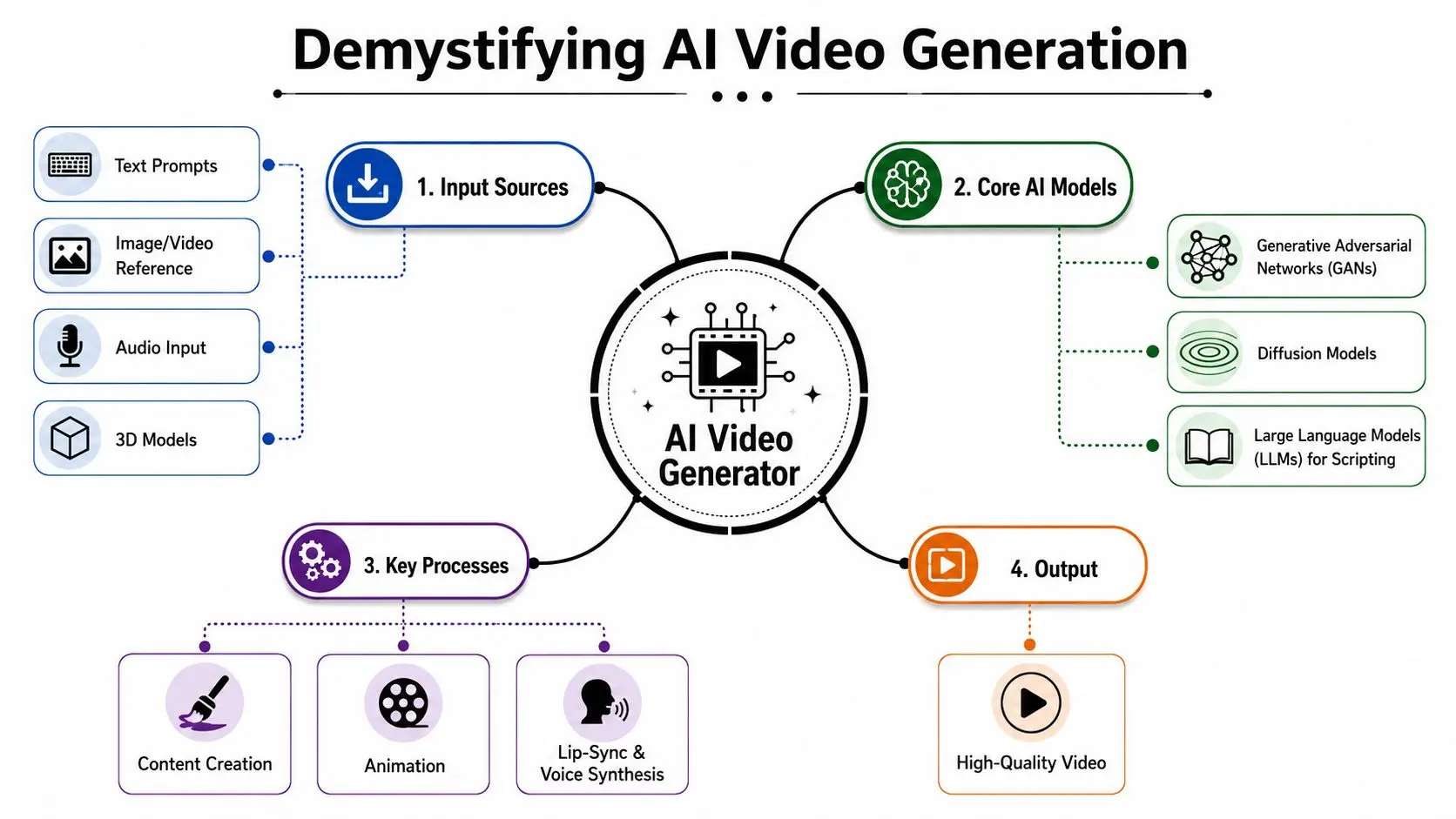
The main categories that matter
There are three broad categories businesses should separate before comparing products.
- •Generative text-to-video tools create scenes from prompts. Models such as Kling and Veo exemplify this type. They're useful for concept visuals, cinematic experiments, mood pieces, and increasingly for ad development.
- •Avatar-led platforms focus on presenters, dialogue, and structured business communication. Synthesia is the obvious example. These are often better suited to training, onboarding, internal comms, and multilingual presentation content.
- •AI-assisted editors and production suites help teams repurpose, cut, caption, and package existing footage. They don't replace filmmaking, but they can remove a lot of repetitive post work.
What actually affects output quality
Most buyers focus on realism first. That matters, but it isn't the only thing that determines whether a tool is usable in production. Look at these factors instead:
- Prompt adherence. Does the model follow the brief, or does it improvise in unhelpful ways?
- Temporal coherence. Does the subject stay stable from one moment to the next?
- Motion quality. Human movement, cloth, camera logic, and physical interaction expose weak models quickly.
- Control surfaces. Can the team steer style, framing, timing, and revisions without starting over?
The strongest demos often come from short clips with forgiving creative briefs. Real production stress starts when continuity, brand detail, and approvals enter the room.Many teams also confuse video generation with video production. They aren't the same thing. Generation gives you raw visual possibility. Production turns that possibility into something organised, reviewable, and commercially usable. For teams exploring workflows beyond one-off prompting, Studio Liddell's overview of AI services for creative production is a useful reference point for how AI fits into broader pipelines rather than replacing them outright.
The 2026 AI Video Generator Landscape
The best video generator AI in 2026 depends on what you value most. If you care about raw realism in short generated sequences, one model is clearly leading. If you care about balanced performance across multiple production criteria, another is stronger. If you care about commercial safety, the answer changes again.Kling v3 and the realism race
As of June 2026, Kling v3 leads the global text-to-video AI leaderboard with an arena score of 2031, ahead of LTX-2 Fast at 1920 and Seedance 2.0 Fast at 1851 in blind human voting comparisons focused on realistic motion, scene composition, and prompt adherence, according to the LLM Stats video generation leaderboard. The same benchmark identifies Kling v3 as producing the “most realistic motion” in blind tests. That matters because motion is where a lot of AI video still gives itself away. A still frame can impress almost any stakeholder. A moving shot exposes flaws immediately.Veo 3.1 and balanced reliability
Kling isn't automatically the right choice for every business workflow. Some teams need steadier all-round performance rather than the strongest motion score on a leaderboard. According to Pixflow's analysis of the best AI video generators, Google Veo 3.1 achieves the highest overall benchmark score in 2026 because of balanced performance across prompt adherence, temporal coherence, and photorealism. That balance is what many professional studios care about, especially when clips need to sit inside longer-form storytelling, ad sequences, or recurring campaign worlds.The gap between good clips and usable production
In practice, the leading tools separate into distinct roles.| Tool | Best For | Key Strength | Limitation | Commercial Safety |
|---|---|---|---|---|
| Kling v3 | Short cinematic generation where realism is the priority | Strongest recognised motion realism in blind testing | Not always the safest default for brand-sensitive commercial use | Needs careful review of usage terms and rights position |
| Google Veo 3.1 | Balanced professional output | Reliable mix of coherence, prompt adherence, and realism | Access and workflow fit may vary by team setup | Depends on deployment context and licence terms |
| Synthesia | Training, onboarding, presenter-led business comms | Structured avatar workflow for corporate content | Not designed for cinematic narrative generation | Better suited to enterprise communication than open-ended creative |
| Veed | Fast repurposing and social content workflows | Efficient editing and packaging for digital teams | Not a replacement for bespoke production craft | Depends on asset provenance and workflow use |
| Adobe Firefly | Commercially cautious enterprise use | Explicit market positioning around commercially safe outputs | Visual fidelity may not match top realism-first models | Stronger fit where licensing clarity matters most |
What works and what doesn't
What works:- •Short-form concept generation where you need visual options fast
- •Mood films and previs-style exploration before a full production commit
- •Internal and low-risk communications where utility matters more than perfect craft
- •Volume content workflows when variation is more valuable than bespoke artistry
What doesn't work as reliably:
- •Longer narrative continuity with precise character consistency
- •Detailed branded environments that must remain locked across revisions
- •Nuanced performance direction where emotion needs to feel intentional
- •Approval-heavy stakeholder processes where every visual decision must stay controllable
AI models are brilliant at producing possibility. They're still uneven at delivering certainty.
That distinction matters more than any leaderboard.
A Decision Framework for Choosing Your AI Tool
Most teams don't need the objectively best model. They need the right one for the job, the stakeholders, and the risk profile.
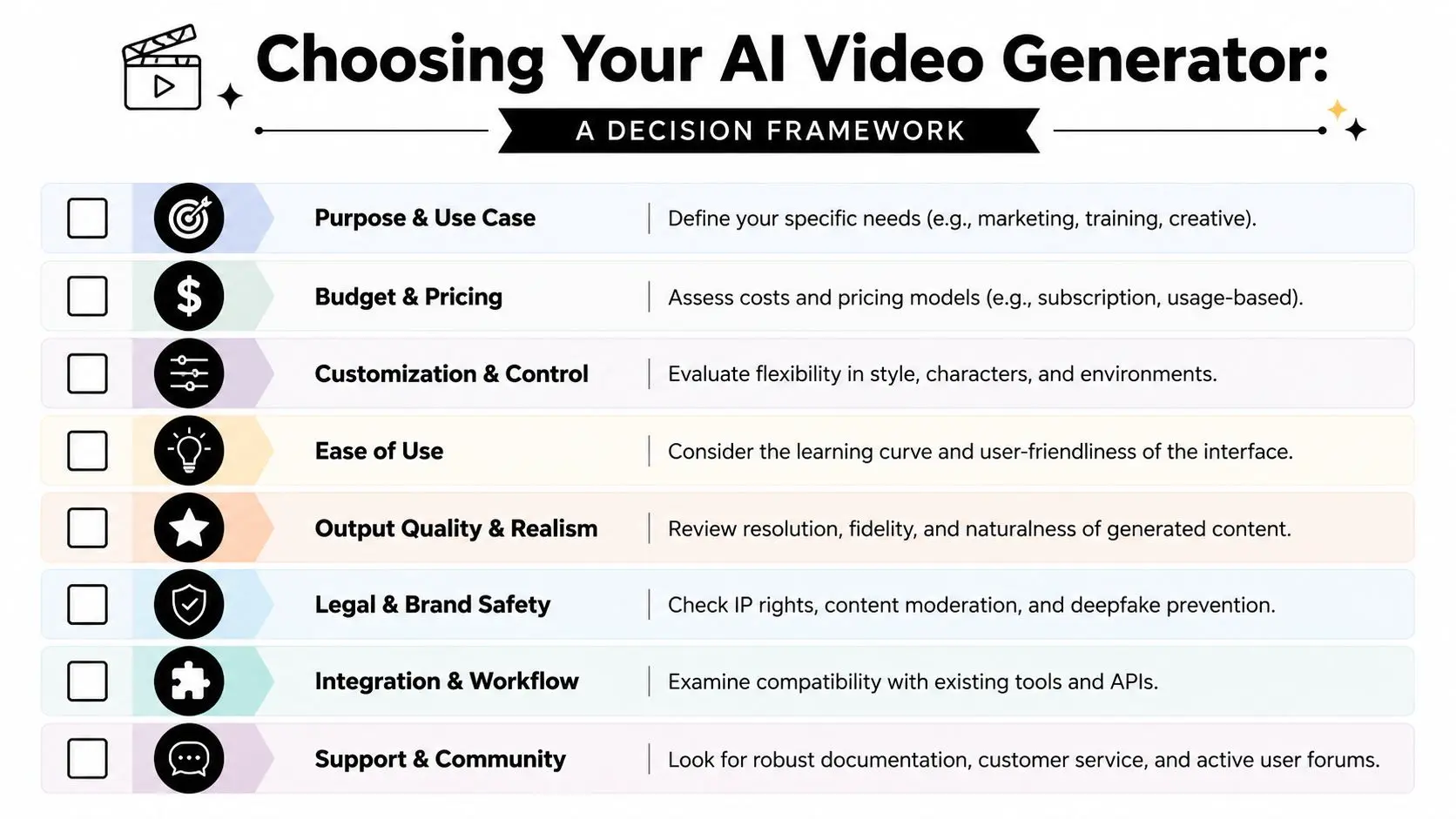
Start with the business use case
Ask this before you compare interfaces or sample clips.
- •Need internal training content. Use an avatar-led or presentation-first platform. Don't force a cinematic generator into a structured communication task.
- •Need social concepts at pace. A fast generative tool or AI-assisted editor often makes sense.
- •Need polished product visuals. Output quality matters more because 3D visualisations and product videos can boost conversion rates by up to 80% compared to static images, as noted by Hatch Studios on 3D animation production.
- •Need campaign work with stakeholder scrutiny. Choose for control, reviewability, and rights clarity before novelty.
Use the quality, speed, cost triangle honestly
Every buyer says they want all three. In reality, one usually leads. #### If speed is the top priority Use AI when the brief is exploratory and the content is disposable enough to iterate. Concept boards, ad variations, and rough visual directions fit well here. You'll move quickly, but you may accept imperfect continuity and occasional artefacts. #### If quality is the top priority You'll need to judge more than surface realism. Look for prompt consistency, camera behaviour, subject stability, and whether the model holds up under revision pressure. High-quality output isn't just prettier. It performs better when the asset has to persuade, explain, or convert. #### If cost is the top priority Choose tightly bounded tasks. AI gives the best return when the creative ask is narrow and the team can work around limitations. It gives the worst return when people spend days trying to force a cheap tool into a premium brief.
A practical checklist before you commit
Use this as a fast decision screen.
| Question | If the answer is yes | What that suggests |
|---|---|---|
| Does this video need public brand approval? | Yes | Prioritise control and rights safety |
| Is the content mostly presenter-led or instructional? | Yes | Consider Synthesia-style workflows |
| Do you need cinematic realism more than editability? | Yes | Test Kling v3 or Veo 3.1 first |
| Will multiple stakeholders request revisions? | Yes | Favour controllable pipelines over one-shot generation |
| Is this for experimentation rather than final delivery? | Yes | AI-only workflow is often enough |
Prompting for business results
A weak prompt produces generic output. A strong prompt acts more like a production brief. Weak prompt
Make a modern product video for our new device. Make it look premium.
That leaves too much open. The model fills the gaps with clichés. Stronger prompt
Create a clean studio-style product film showing a black handheld device on a neutral background. Use restrained camera motion, soft directional lighting, shallow reflections, and close-up detail shots of the interface. Keep the tone premium, minimal, and suitable for a UK technology brand. Avoid exaggerated lens effects, crowded backgrounds, and futuristic UI overlays.
The second prompt does three things well. It defines the subject, the visual language, and the exclusions. That's how you increase the odds of getting something usable. A final check worth making is workflow fit. Can the generated asset move cleanly into your edit, approval, or post pipeline? If the answer is no, the best video generator AI on paper may still be the wrong buying decision in practice.
The Hidden Risks of AI Video Legal and Brand Safety
The most visually impressive model in a demo isn't always the safest model for a business to use commercially.

This is the part many comparison lists barely touch. They rank realism, speed, and interface polish, then move on. For UK brands, agencies, education providers, broadcasters, and rights holders, that isn't enough. The hard question is whether the resulting asset is safe to put into market with confidence.
Why UK buyers are hesitating
In the UK, 78% of marketing agencies report delaying AI video adoption due to unclear intellectual property rights, with many reviews focusing on visual fidelity rather than ownership certainty, according to Aixploria's overview of AI video generators. That hesitation is sensible. The Copyright, Designs and Patents Act 1988 wasn't written for the current wave of generative video systems. Businesses therefore face a practical problem. Even if a tool can generate something that looks production-ready, legal teams may still ask uncomfortable questions about training data, ownership, indemnity, likeness, and whether a generated scene could expose the brand to disputes later.
The professional versus prosumer divide shows up here most clearly
For an individual creator posting experimental social content, the risk may be acceptable. For a national brand, public institution, sports property, or broadcaster, it often isn't. A useful distinction is this:
- •Prosumer-first tools often win attention through striking output and fast generation.
- •Enterprise-oriented tools tend to win trust through licensing terms, safer workflows, and clearer commercial positioning.
That's why Adobe Firefly remains relevant even when other models can look more exciting visually. It's one of the few names regularly discussed in connection with commercially safe outputs for business use.
If your legal team can't get comfortable with the rights position, the quality of the clip stops mattering.
Brand safety goes beyond copyright
There's also a creative risk. AI systems can introduce unwanted visual associations, unstable character details, or odd compositing choices that slip through a fast internal review. For a low-stakes post, that may be fine. For regulated sectors, children's content, heritage brands, or global campaigns, it can create avoidable problems. Watch for these failure points:
- •Character drift that changes age, styling, wardrobe, or expression between shots
- •Inconsistent environments that weaken trust in product or place-based storytelling
- •Unclear provenance for source materials and generated outputs
- •Approval friction when teams can't explain how an asset was made or licensed
The safest approach isn't to avoid AI. It's to use AI in the parts of the workflow where the risk is proportionate and the controls are understood.
When to Use AI Tools vs When to Hire a Studio
The decision is straightforward: Use AI where speed, exploration, and content volume matter most. Bring in a studio where the work has to stand up to scrutiny, revision, and long-term brand value.
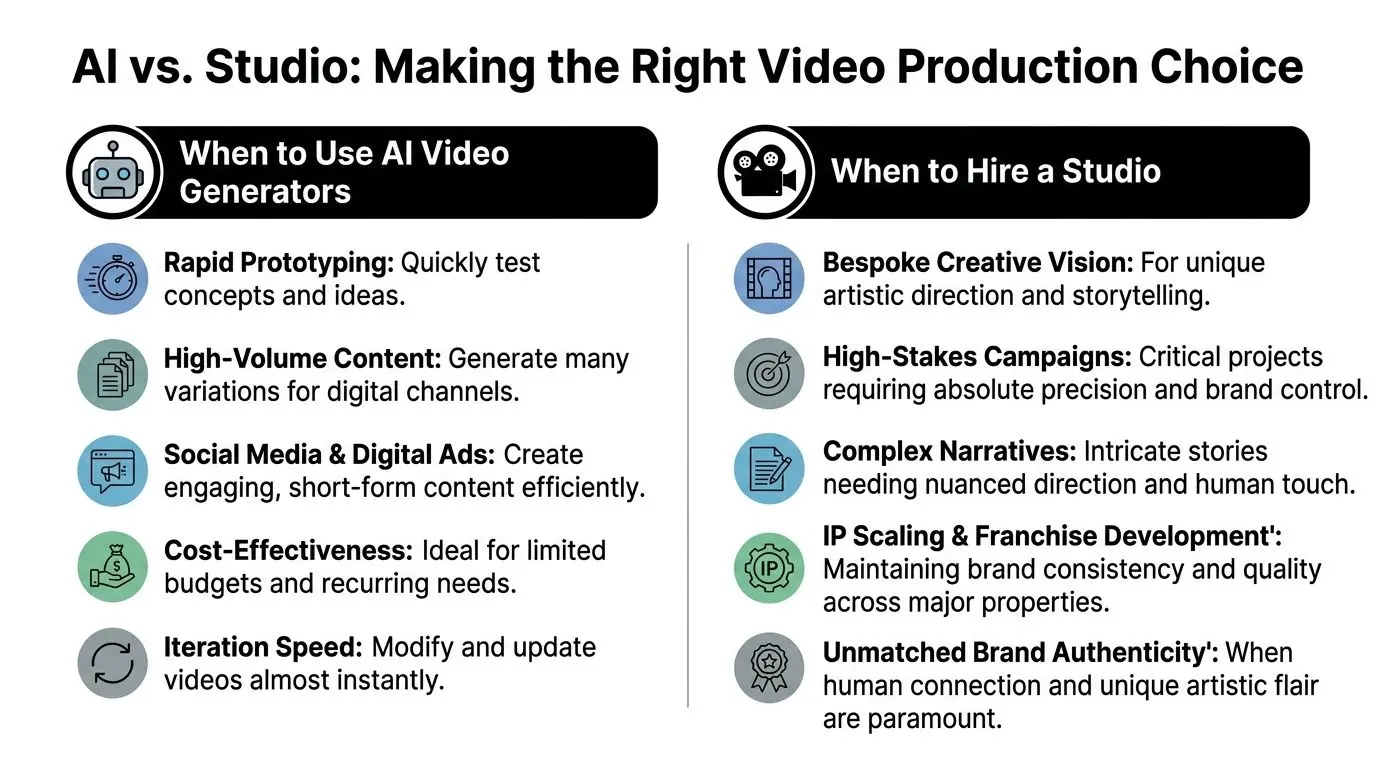
Good uses for AI-only production
AI tools are a smart fit when the brief is bounded and the downside of imperfection is low.
- •Rapid concept testing for pitches, moodboards, and early visual development
- •High-volume digital content where teams need many variants quickly
- •Internal communications that don't require bespoke cinematic craft
- •Background visuals and placeholders inside a wider production process
When a professional studio becomes non-negotiable
A studio earns its place when creative control, technical discipline, and accountability matter more than raw generation speed. In the UK, a standard 60 to 90 second 3D animated video takes approximately 6 to 8 weeks to produce, reflecting the work involved in modelling, lighting, and rendering for studio-quality output, according to Moovie Makers on UK animation timelines. That timeline isn't inefficiency. It reflects craft, review structure, and the layers required to make a piece hold together under professional conditions. Hire a studio when you need:
| Scenario | Why AI alone often falls short |
|---|---|
| Broadcast or campaign delivery | Quality has to survive public scrutiny |
| Bespoke character animation | Performance and consistency need directed craft |
| Technical explainers | Complex information needs clarity, not just motion |
| IP-led content | Brand worlds require continuity and governance |
| Rights-sensitive work | Legal and brand safety need stronger guarantees |
For teams weighing broader production options, this guide to video content production for UK businesses gives useful context on where different approaches fit. One final test is simple. Ask whether the video needs to be merely generated, or whether it needs to be directed, refined, approved, and owned with confidence. That's the defining line between a useful AI tool and professional production.
If you need broadcast-grade animation, XR, or AI-enhanced production with proper creative control, talk to Studio Liddell. For brands, agencies, education teams, and rights holders who can't afford shaky output or licensing uncertainty, a production scoping call is the fastest way to define what should be automated, what should be crafted, and where the safest path to delivery sits.