AR on the Web: UK Guide to WebAR & Business Use Cases
A lot of marketing teams arrive at the same brief from different directions. Retail wants a product visualiser without forcing an app install. Events wants something people can launch from a stand graphic. Brand wants an AR activation that's easy to share from print, packaging, email, or social. Then the same question lands on the table. Can we do AR on the web, and will it actually work for real users? The short answer is yes, but only when the concept matches the delivery method. WebAR is excellent at reducing friction. It is not a magic replacement for native AR apps. If you treat it like one, you'll run into browser quirks, performance ceilings, and support issues that should have been caught during planning. That's the decision most explainers skip. They define WebAR, show a floating trainer or shoe, and stop there. A better way to think about it is this. WebAR wins on reach. App AR wins on control. If you're choosing between them for a UK audience, that trade-off matters more than the novelty factor.
What Is WebAR and Why Does It Matter Now
A customer scans a code on a box, taps a campaign link, or clicks from an ad. They want to see a sofa in their lounge, a trainer on a table, or a product animation over printed packaging. If the first thing you ask them to do is visit an app store, many of them won't continue. WebAR is augmented reality delivered through the web browser instead of a dedicated native app. In practice, that usually means the user opens a URL, scans a QR code, or taps an NFC trigger, grants camera access, and launches the experience in the browser.
Why the web changes the commercial case
For marketing teams, the biggest advantage isn't the AR itself. It's the lower friction at the start of the journey. A browser-based route is easier to place inside existing campaigns because the same mechanics already exist across email, OOH, packaging, print, paid social, and event signage. Mobile access is the wider backdrop. Industry figures cited by Statista reported about 1.07 billion mobile AR users in 2025 worldwide, with the mobile AR market estimated at $11.9 billion in 2024 and projected at $13.8 billion in 2025. That matters because it shows AR isn't sitting in a niche hardware category. It's increasingly tied to the phone people already use every day, as noted in Statista's overview of augmented reality market and user trends.
Practical rule: If your campaign success depends on instant access, WebAR deserves consideration before you commission a native app.
Where WebAR sits against app-based AR
The simplest distinction is this:
- •WebAR is distribution-first. It's built for ease of access, shareability, and lighter-touch interactions.
- •App AR is platform-first. It's built for deeper device integration, richer persistence, and more controlled performance.
- •Both can be valid. The right choice depends on the user journey, not the buzz around the format.
For a useful grounding in the broader context, Studio Liddell's guide to augmented reality experiences is a sensible companion read before you define scope. WebAR matters now because it fits how audiences already discover content. It meets people where they are, on the phone in their hand, at the point of interest, without making them commit to an install first.
How Browser-Based AR Actually Works
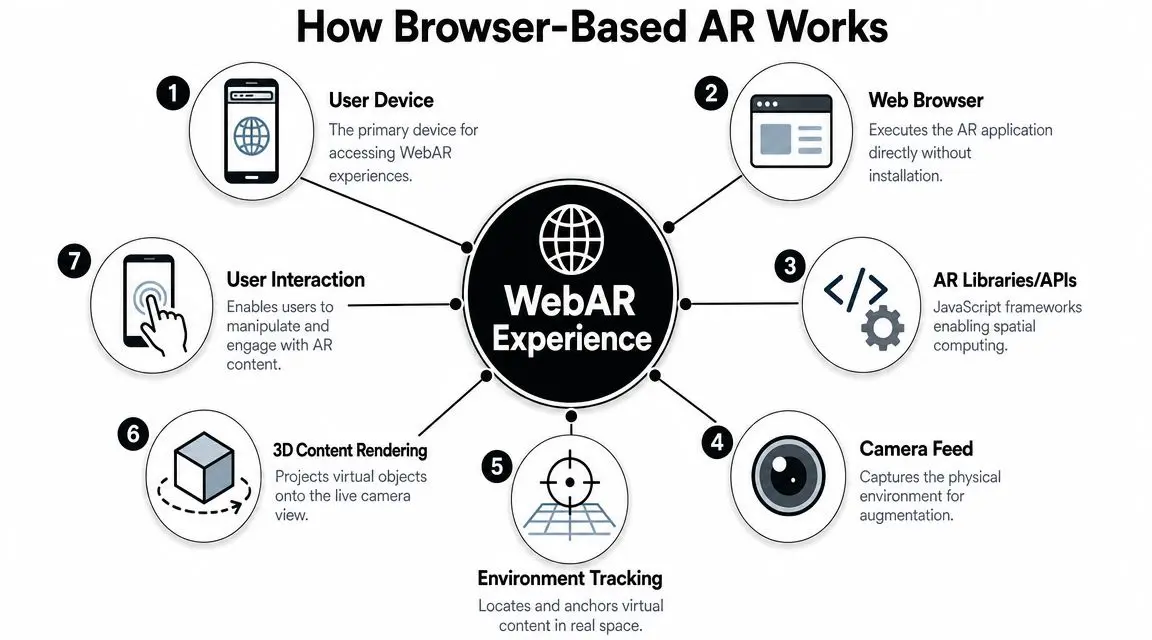
Most non-technical buyers don't need the deep stack. They need to know what has to happen on the device for browser AR to feel smooth enough to use. At a basic level, a WebAR experience is a web page that can see through the phone camera, draw digital content over that live view, and respond to what the user does on screen. The browser acts like a translator between the experience and the phone's hardware.
The core pieces doing the work
WebAR implementations commonly rely on WebGL, WebRTC, camera permission APIs, and modern mobile browsers such as Chrome and Safari. AR.js documentation also notes that it is a pure web solution that works on any phone with WebGL and WebRTC, while browser-based AR flows often start from a QR code, URL, or NFC tap, as explained in this full guide to Web AR. In plain terms:
- •WebGL handles the graphics. It renders the 3D object, animation, or overlay in the browser.
- •WebRTC and camera permissions handle live video access. Without camera access, there's no real-world view to augment.
- •The browser manages the session. It opens the experience, asks for permissions, and runs the code without an install.
- •AR libraries do the heavy lifting. They help with tracking, image recognition, placement, and interaction logic.
Marker-based and markerless are not the same job
Many briefs become muddled because there are two common interaction models, and they suit different business contexts. #### Marker-based AR Marker-based WebAR looks for a known image, pattern, or code. Packaging, posters, brochures, museum labels, and event graphics are good fits because the trigger is controlled and easy to explain. That approach is useful when you want certainty. The user points at a fixed visual target, and the experience responds to it. #### Markerless AR Markerless WebAR tries to place content into the environment without a printed marker. This is the route used for many “view in room” or “place on surface” experiences. It can feel more natural, but it also asks more of the browser, camera feed, lighting conditions, and device support. That means it usually needs tighter optimisation and more testing than clients first expect.
Browser AR rarely fails because the concept is wrong. It fails because permissions, lighting, device support, and asset weight weren't treated as production issues.
What makes this viable in the UK
The browser matters because mobile matters. In the UK, a large share of internet use happens on phones, which makes browser delivery commercially attractive when the objective is campaign reach rather than deep technical complexity. That's why QR-led and link-led AR journeys have become practical for retail, visitor attractions, and branded activations. The key takeaway is simple. WebAR isn't a mysterious new channel. It's a browser-based production problem with XR behaviour layered on top. Treat it like that, and the planning becomes much more realistic.
Inspiring Business Use Cases for WebAR
The strongest WebAR projects usually solve a very ordinary business problem. The audience needs more confidence before buying, more context before enquiring, or a more memorable interaction at a physical touchpoint.

Deloitte and Snap reported that 9 in 10 medium-sized brands and 88% of mid-sized companies were already using AR capabilities for product development, training, and marketing. The same research reported that AR experiences in retail product interactions can drive a 94% conversion rate boost, which helps explain why more teams now treat AR as a practical commercial tool rather than a novelty, according to these AR adoption and commerce figures collected by Banuba.
Retail and ecommerce
A furniture brand wants to reduce hesitation. A shopper likes the product page, but can't judge scale, colour fit, or how the piece sits against what's already in the room. WebAR lets that shopper launch a browser experience directly from the product page and place a simplified model in context. That's where WebAR makes sense commercially. It supports the decision point without adding the friction of an app install. If your team is evaluating this for commerce, Studio Liddell's practical guide to augmented reality in ecommerce covers the retail side in more depth.
Exhibitions and live events
At exhibitions, time is short and attention is fragmented. Most visitors won't install an event app for one stand interaction, but they will scan a code if the value is obvious. A good WebAR event use case might be:
- •Product reveal: A large machine, property scheme, or technical object appears at full or scaled size.
- •Configurator: Visitors toggle finishes, features, or modes on their own phone.
- •Explainer overlay: A complex service becomes easier to grasp because the animation sits over a brochure, board, or physical model.
The point isn't spectacle on its own. It's getting a prospect from glance to understanding faster.
Packaging and campaign media
Packaging is one of the cleanest fits for ar on the web because the object already exists in the customer's hand. A printed pack, can, label, or leaflet becomes the launch point for animation, storytelling, instructions, or gamified interaction. This works best when the digital layer adds something the print asset can't do on its own, such as:
| Use case | What WebAR adds |
|---|---|
| Product packaging | Animation, reveal, ingredients, assembly, or story |
| Print advertising | Motion, interaction, and direct response |
| Direct mail | A richer handoff from physical piece to digital journey |
Training and public engagement
WebAR also works well when you need accessible guidance on a standard mobile device. Training prompts, visitor interpretation, and step-led overlays can all live in the browser, which makes deployment simpler than issuing dedicated hardware. That doesn't mean browser AR is always the right training format. It means it's often the easiest way to get useful spatial content in front of a broad audience quickly.
WebAR vs App AR Which Is Right for You
This is the part that decides whether the project succeeds. Not “is AR interesting?” but “which delivery route matches the audience, the environment, and the business goal?”
A practical UK question often gets missed. Will WebAR work at scale on the devices and browsers your audience uses? Browser-based AR still depends heavily on camera access, WebXR support, and device and browser compatibility. Support remains uneven across iOS and Android browser environments, as discussed in this practitioner-focused video on WebAR platform realities.
The fast way to frame the trade-off
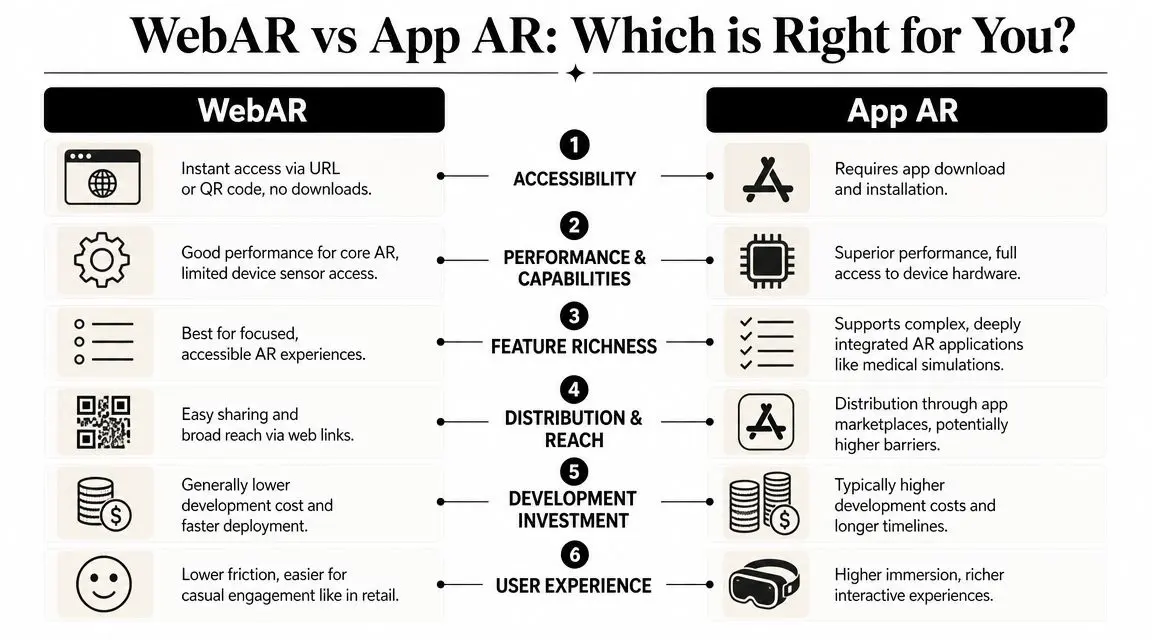
If you need broad access from a campaign link, print asset, or stand graphic, WebAR is usually the first route to test. If you need advanced tracking, heavier interactivity, longer session reliability, or a more controlled feature set, native app AR is often the stronger choice.
If the first KPI is reach, start with WebAR. If the first KPI is capability, start with native.
WebAR vs. App-Based AR at a Glance
| Criterion | WebAR (Browser-Based) | App-Based AR (Native App) |
|---|---|---|
| Accessibility | Opens from a link, QR code, or similar trigger with no install step | Requires download and installation before use |
| Performance | Good for focused AR interactions when optimised carefully | Usually more stable for demanding experiences |
| Feature depth | Better for lighter, campaign-led use cases | Better for richer, longer-form, feature-heavy experiences |
| Distribution | Easy to place in existing marketing channels | Stronger when users already have a reason to keep the app |
| Production risk | Lower entry friction, but more variability across browsers and devices | Higher adoption friction, but more controlled runtime behaviour |
| Best fit | Retail previews, activations, packaging, events, simple explainers | Training tools, persistent utilities, complex configurators, deeper products |
What works well in WebAR
WebAR performs well when the experience is tightly scoped. Good candidates include:
- •Single-object placement: One hero product, one clear action, one clean outcome.
- •Short interactions: Launch, explore, share, or click through.
- •Campaign activations: Experiences connected to media, events, packaging, or POS.
- •Low-friction entry points: Journeys where an app download would kill participation.
What usually pushes you toward an app
Native AR is often the better investment when the experience has to do more than attract attention. That includes projects where you need:
- •Longer sessions and repeat use
- •Richer interaction logic
- •Higher confidence in device-level behaviour
- •Deeper platform integration
A lot of budget waste comes from choosing WebAR because it sounds easier, then trying to force app-scale functionality into the browser. That's the wrong way round. Pick the delivery model for the job the user needs to complete.
The Path from Concept to a Live WebAR Experience
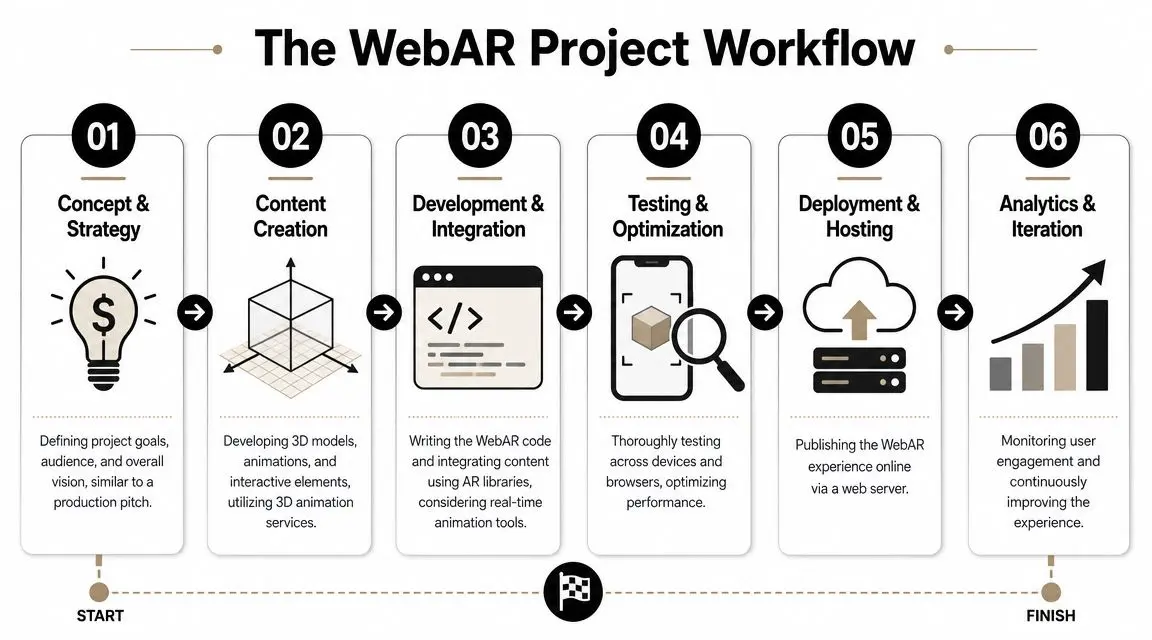
Teams often assume WebAR is quick because it's “just a website”. In production terms, it isn't. It's a compact XR project with all the usual demands around concepting, UX, asset prep, development, testing, and deployment.
In the UK, 63% of adults used a mobile phone to access the internet in 2023, which is why browser delivery is commercially attractive for this format, as noted in PlugXR's discussion of WebAR and mobile-first access. But ease of access for the user doesn't remove the need for disciplined production.
1. Define the job before the format
A good WebAR project starts with a business question, not a software question. Are you trying to help someone buy, understand, remember, or share? That choice affects everything that follows. A retail placement tool, an exhibition demo, and a packaging activation may all use browser AR, but they don't need the same design language or technical build.
2. Design the user journey ruthlessly
The browser gives you reach, but it gives you very little patience from the user. That means the flow has to be spare. A solid WebAR journey usually answers these points fast:
- How does the user launch it
- Why should they allow camera access
- What are they meant to do first
- What happens after the AR moment
3. Build assets for the web, not for a demo reel
In practice, many concepts fall apart. The model that looks beautiful in a pitch deck may be far too heavy for a browser session on a mixed range of phones. The right production discipline includes:- •Lean geometry: Keep models efficient and purposeful.
- •Compressed textures: Use the visual fidelity the use case needs, not more.
- •Focused animation: Give motion where it supports understanding or appeal.
- •Clean interaction design: Touch targets and prompts must be obvious on mobile.
A WebAR experience lives or dies on optimisation. Beautiful assets that don't load well are production mistakes, not creative wins.
4. Develop, test, and trim
This phase is less glamorous and more important. Browser AR needs repeat testing across devices, browsers, camera permission flows, and real-world lighting conditions. It also needs hard decisions. Sometimes the right move is to cut a feature so the core interaction remains smooth.
5. Launch with a distribution plan
A WebAR build without a launch mechanic is unfinished. The access point matters as much as the experience itself. That might be a QR code on packaging, a retail product page, an event stand graphic, or a paid media landing route. One option in this space is Studio Liddell's Engine Shed AR project, which shows the kind of browser-led public-facing AR execution organisations often explore for engagement and interpretation. After launch, teams should review how people enter, grant permissions, engage, and exit. The first version rarely answers every usability question. Iteration is part of the format.
Start Your WebAR Project with Studio Liddell
If you're weighing up ar on the web, the important question isn't whether WebAR is possible. It is. The better question is whether it's the right delivery model for the result you want. For broad-reach campaigns, product visualisation, event activations, and mobile-first public engagement, WebAR can be a strong fit. It reduces the install barrier and gives marketing teams a format they can distribute through channels they already own. But it only works well when the concept is scoped around browser reality. Asset weight, camera permissions, device compatibility, and launch context all need attention from day one. That's where an experienced XR production process matters. You need the creative side to be clear enough for a customer or visitor to use instantly, and the technical side to be disciplined enough to survive outside a demo environment. In practice, that means making decisions early about interaction depth, visual ambition, fallback behaviour, and where browser AR should stop and native AR should begin. Studio Liddell works across XR, real-time production, animation, and interactive development, which is the mix this kind of project usually needs. For teams comparing a lightweight browser activation with a deeper app-based route, that production perspective is often more useful than a generic “WebAR platform” sales pitch. It helps you scope the right thing before budget and timeline drift. If you already have a campaign concept, exhibition brief, retail use case, or internal idea that needs validating, the sensible next step is to review the audience, access point, and technical fit before moving into build.
Talk to Studio Liddell if you want to scope a WebAR concept, compare it against app-based AR, or map out the production path from idea to launch.