3D Animation Production: A Practical Guide for UK Buyers
You have a brief, a delivery date, and a budget that looks reasonable until someone asks how many characters need building, how many versions the campaign needs, and whether the final film must meet broadcast specifications. That's the point at which 3D animation stops being a creative idea and becomes a production decision. The safest way to buy 3D animation production is to treat every stage as a lever affecting schedule, cost, quality, and revision risk. Approve the wrong visual direction early and you may pay for it through every later department. Lock the right decisions at the right time, and the studio can protect the budget while keeping the work flexible where flexibility still has value. This guide gives you a practical framework for briefing, comparing, commissioning, reviewing, and delivering a 3D animation project in the UK. It also explains where technology helps, where it creates risk, and which questions deserve clear answers before production begins.
What 3D Animation Production Actually Involves for a Buyer
A 3D animation project is a chain of approvals. You're not buying a single render or a piece of software. You're buying a managed sequence of decisions that turns an idea into approved frames, a finished master, and usable campaign versions. The first decision is strategic. Is the animation for sales, training, broadcast, product marketing, entertainment, or an event? A product visualisation may need accurate materials and controlled camera movement. A character film needs performance, rigging, and facial direction. A broadcast asset needs technical compliance as well as creative approval.
Every approval has a different cost of reversal
Some decisions are cheap to change. A colour adjustment in compositing may be relatively flexible. Others become expensive once production advances. Rebuilding a character after rigging, changing the aspect ratio after animation, or replacing a product model after lighting has started can disrupt several departments at once. Your first meeting with a studio should therefore focus on decision timing:
- •Creative direction: Approve the visual language before detailed assets are built.
- •Scope: Confirm duration, number of shots, characters, environments, versions, and deliverables.
- •Technical requirements: Identify platforms, frame rates, resolutions, codecs, captions, audio, and aspect ratios.
- •Review authority: Name the people who can approve work and define how feedback is consolidated.
- •Rights: Clarify ownership or licensing for music, characters, source files, brand assets, and any third-party material.
The UK market is sizeable but fragmented. The relevant UK post-production SIC code counted 3,412 enterprises, with total turnover of £1.572 billion and approximate GVA of £970 million in 2023, according to Animation UK's industry data. That means buyers will encounter many capable specialist suppliers, not one standard production model.
Practical rule: Ask what becomes harder to change after each approval. A good producer will answer in terms of departments, time, and downstream impact.
A studio may also support adjacent visual work. If your project is architectural or spatial, a resource such as create immersive 360° tours can help you think through interactive viewing alongside linear animation. Keep that distinction clear in the brief. A film, a real-time experience, and a 360° tour may share assets, but they don't share the same delivery logic.
The Eight Stages of a 3D Animation Pipeline
A production pipeline gives every contributor a defined handover. For a buyer, it also creates a sequence of approval gates. You should know what you're approving at each stage, what remains adjustable, and what will become costly to revisit.
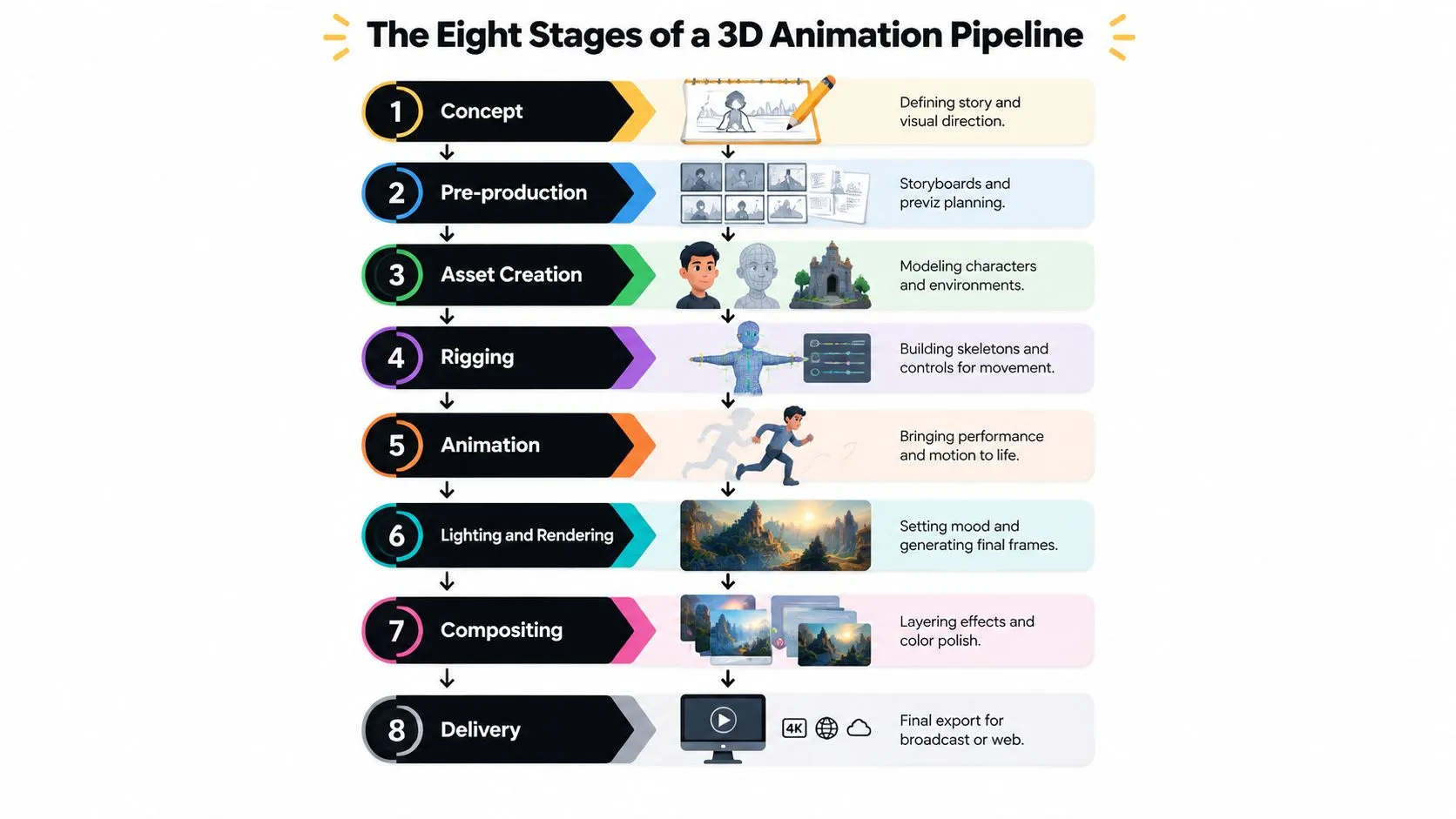
The first four stages establish what can be made
1. Concept defines the story, tone, audience promise, and visual direction. Your approval should cover the central idea, not surface polish. If the concept doesn't communicate the business objective, better rendering won't rescue it. 2. Pre-production turns the concept into a workable plan through script, storyboard, style frames, shot list, previz, schedule, and resource planning. Challenge pacing and sequence logic. A storyboard or animatic is cheaper to alter than finished animation. 3. Asset creation builds the characters, products, environments, materials, textures, and props. The buyer's job is to check accuracy and visual alignment against the approved frame. For technical or industrial work, supplied CAD and engineering data must be reviewed carefully rather than accepted blindly. 4. Rigging creates the skeletons, controls, deformation systems, and facial setup needed for movement. Approving a rig means accepting a range of movement. If the brief later demands actions the rig can't support, the schedule can move quickly in the wrong direction. For a fuller production overview, use Studio Liddell's animation production pipeline guide. If your project also includes filmed material, voice, or location recording, the Isolate Audio production guide offers useful context on planning production inputs before post-production begins.
The final four stages turn assets into deliverables
5. Animation is where performance, camera movement, timing, and acting are reviewed. Don't approve it by looking only at image quality. Watch the cut for clarity, rhythm, weight, and whether the intended action reads without explanation. 6. Lighting and rendering make visual fidelity a real production cost. Lighting choices affect mood, materials, reflections, shadows, render time, and consistency from shot to shot. 7. Compositing combines render passes, effects, colour work, titles, and corrections. It can refine many elements without sending the entire shot back through rendering, provided the studio prepared the scene properly. 8. Delivery covers the final master, exports, version control, captions, audio, aspect ratios, and platform requirements. Treat delivery as a production stage, not a file-transfer task.
Technology and Pipeline Choices That Shape Your Project
The right technology depends on the output, not on whichever tool is currently attracting attention. A real-time engine can be the correct choice for an interactive installation or a project requiring constant iteration. It isn't automatically the cheapest route for a cinematic film with demanding final-frame quality.
Match the tool to the production problem
Unity and Unreal Engine are strong options when interactivity, live review, rapid camera changes, or engine-native deployment matter. Their value increases when the project needs to become an application, game, virtual production environment, or immersive experience. Traditional offline renderers such as Arnold and RenderMan remain appropriate when the work depends on controlled lighting, complex materials, simulations, and a high visual ceiling. They can demand longer render cycles and specialist pipeline management, but they give artists extensive control over final frames. AI-assisted tools can help with denoising, inpainting, rotoscoping, reference exploration, and repetitive asset tasks. They should not be treated as a substitute for art direction, continuity supervision, or rights review. The BFI and CoSTAR identify direct IP and copyright concerns around generative AI, including unlicensed training data, in their screen-sector AI perspectives. That makes provenance, licensing, consistency, and client approval part of procurement. Cloud render farms shift infrastructure spending into a service cost. They make sense when a studio has a well-prepared, parallelised pipeline and predictable data handling. They're less useful when scenes are poorly structured, assets are still changing, or upload and transfer controls haven't been agreed.
| Technology | Best Fit For | Cost Profile | Main Risk |
|---|---|---|---|
| Unity | Interactive content, applications, rapid iteration | Engine, development, and deployment costs | Weak fit for some high-end cinematic requirements |
| Unreal Engine | XR, virtual production, real-time visualisation | Team setup and project integration costs | Requires engine-specific skills and optimisation |
| Arnold or RenderMan | Controlled cinematic rendering and complex shading | Artist time, rendering, and infrastructure | Longer iteration if approvals arrive late |
| AI-assisted tools | Repetitive tasks, exploration, denoising, and cleanup | Tool licences plus supervision and review | Rights, provenance, and visual inconsistency |
| Cloud render farms | Parallel rendering with suitable scene preparation | Variable operational spend | Data transfer, security, and poorly parallelised scenes |
Before selecting a stack, compare team skills, licensing, integration, delivery format, and revision behaviour. Studio Liddell's 3D animation software guide is a useful starting point for that conversation.
Realistic Timelines and Budgets for UK Buyers
A budget becomes useful only when it's tied to a defined output. A minute of simple graphic animation and a minute of photoreal 3D product work may share a duration, but they don't share the same modelling, lighting, simulation, rendering, or review burden. Published UK guidance places 2D vector and character animation at £3,000 to £8,000 per minute, with lead times of about 4 to 6 weeks, while 3D animation starts around £8,000 per minute and can exceed £20,000 per minute for complex product visualisations, with typical lead times of 8 to 16 weeks. These figures come from Studio Liddell's animation guide. The following planning bands are useful for an initial conversation, but they aren't quotations. They're editorial planning ranges, and the final cost depends on the scope you approve.
| Project Type | Typical Budget (GBP) | Typical Duration | Main Cost Drivers |
|---|---|---|---|
| Short-form social cutdowns | Under £15,000 | 3 to 6 weeks | Existing assets, limited shots, simple motion, rapid approvals |
| Mid-weight brand film or product explainer | £20,000 to £60,000 | 6 to 12 weeks | Modelling, look development, animation, voice, music, versions |
| Broadcast or hero campaign piece | £80,000 to £250,000+ | 4 to 9 months | Character work, simulations, complex environments, multiple approvals |
What pushes a project up a band
Photoreal characters require more than a detailed model. They need convincing skin, hair, cloth, facial performance, lighting, and motion. Fluid simulation, smoke, fire, crowds, complex reflections, and destruction effects introduce technical testing and longer render management. Licensed music and voice-over add rights and recording considerations. Multi-language versions may require new audio, typography, timing adjustments, and sometimes mouth animation. More aspect ratios mean more than cropping if the composition relies on directional action or carefully framed product shots. Include VAT, currency exposure, usage rights, source-file ownership, music licensing, and revision limits in the commercial conversation. Those items often create surprises when they're left outside the initial cost shape.
Writing a Brief and Running QA That Actually Reduces Risk
A brief is a production control document. It tells the studio what success means, who can approve it, and which constraints must be respected before artists start building. Your buyer-led brief should contain eight sections:
- Business objective: State the action or understanding the animation should create.
- Audience: Define who will watch and what they already know.
- Distribution channels: List broadcast, web, social, events, training platforms, or internal use.
- Reference reel: Include visual examples and explain what you want from each.
- Deliverable matrix: Specify duration, aspect ratio, resolution, captions, audio, cutdowns, and masters.
- Success metrics: Identify the measurable business or communication outcome.
- Budget ceiling: Give the studio a commercial boundary, not an abstract request for “best value”.
- Decision-makers: Name the people with sign-off rights and define how feedback will be consolidated.
Build review gates before production begins
Late creative changes are the most obvious pipeline failure, but wrong aspect ratios and unrendered final frames create similar damage. The solution is to approve the decision that belongs to each stage before the next department depends on it. Use a tiered QA schedule:- •Offline review: Check script, storyboard, animatic, pacing, and shot order before final assets.
- •Online review: Review animation, performance, camera movement, and continuity with current renders.
- •Colour review: Check exposure, colour consistency, brand treatment, and display assumptions.
- •Audio review: Check voice, music, sound effects, sync, captions, and mix.
- •Master QC: Check frame integrity, titles, logos, technical settings, playback, and file naming.
For UK broadcast delivery, ask the studio to confirm the specification rather than assuming a web export will pass. The DPP references MXF OP1A with AVC Intra Class 100 for HD programme files and IMX at 50 Mb/s for SD delivery in its programme delivery guidance. Another UK delivery standard specifies 1920 x 1080, 16:9, and 25 frames per second with 50 interlaced fields, known as 1080i/25 in the technical standards document. ITV's specification requires the YCrCb colour system and references ITU-R BT.2100 in its AS-11 delivery specification.
What Real Projects Look Like Behind the Finished Frame
The finished frame hides the decisions that made it possible. A product shot that looks effortless may depend on accurate source data, disciplined look development, controlled lighting, and a decision to prioritise one hero composition over a dozen weaker views.
The simple product shot is rarely simple
Take a photoreal product film. The buyer may see a clean camera move around a finished object, but the production usually starts with concept boards that define the intended sales message and framing. Supplied CAD often needs a detailed cleanup pass before it can support animation, materials, bevels, and close-up lighting. The lighting may then go through several revisions to match the brand book. That work isn't cosmetic. It determines whether the product feels premium, technical, durable, precise, or approachable. If the buyer decides early that one still-frame hero plate will also support out-of-home use, the team can compose and light that frame deliberately instead of treating it as an accidental by-product of the film.

Character work rewards early technical decisions
A stylised brand character creates a different set of buying choices. The key question isn't only whether the character looks appealing. It's how far the character must move, whether facial performance matters, what actions appear on screen, and which delivery frame rate the project needs. A shallow rig may be efficient for a limited performance. It becomes a liability if the script later demands climbing, twisting, object interaction, or expressive facial acting. The buyer's early call on rigging depth and broadcast frame rate can protect the schedule because the team builds the movement system around the approved performance rather than retrofitting it during animation.
Accuracy can outrank visual polish
Packaging and industrial visualisation bring another priority. A beautiful render with the wrong connector, label, dimension, material, or assembly relationship can undermine stakeholder confidence. For technical clients, the review process should therefore include a subject-matter expert who can verify the object, process, or system. Artistic approval and factual approval are different gates. Combining them into one vague “looks good” review is how errors survive until delivery.
Choosing a Studio and Running an RFP Without the Spin
A polished reel can hide a poor production fit. Choose a studio against the delivery format, approval structure, schedule, and risk your project carries.
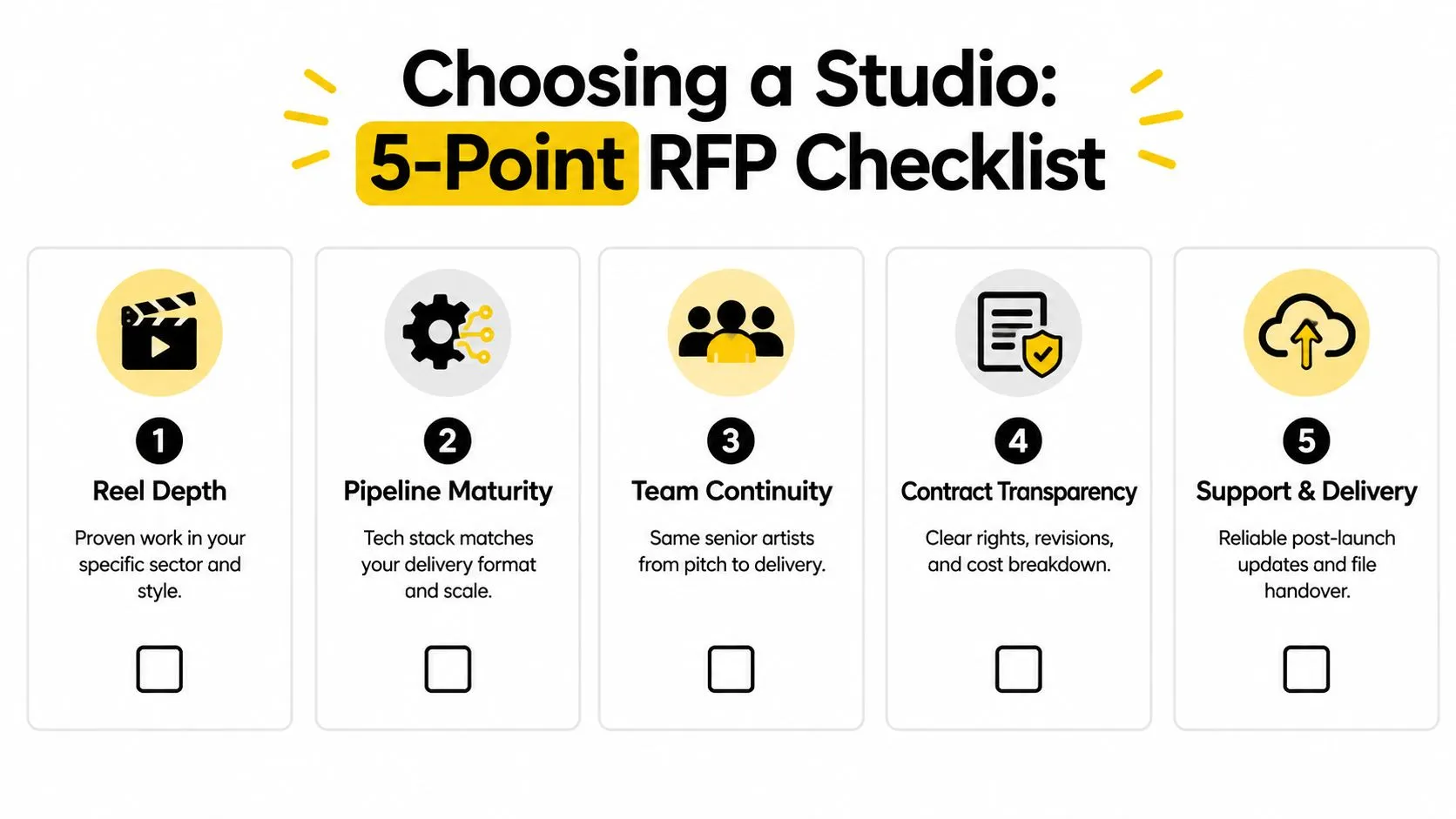
Score each supplier against five criteria:
- •Reel depth: Check for relevant sectors, visual styles, audiences, and technical complexity. A visually strong reel is weak evidence if it does not resemble your production problem.
- •Pipeline maturity: Confirm that the toolchain supports your delivery format, version control, review process, and expected scale.
- •Team continuity: Ask whether the senior artists presenting the pitch will stay involved through delivery. A handover can add review time and create avoidable rework.
- •Contract transparency: Require clear rights, revision terms, exclusions, milestones, and cost breakdowns before approval.
- •Support and handover: Confirm responsibility for post-delivery fixes, version updates, master files, and source files.
Red flags appear before the quote
A studio that quotes before reviewing the script, deliverables, assets, approvals, and technical requirements is guessing. Treat an unexplained timeline or vague QA process the same way. You need to know who checks the work, when checks happen, and what happens when a review identifies a problem. Keep the RFP short and comparable:
- One page covering the brief and business objective.
- One page listing deliverables, formats, platforms, and rights.
- One page stating the timeline and budget envelope.
- One fixed question set for every bidder.
- One scoring sheet completed by the same internal group.
- •Who leads the project day to day?
- •What does the render cost include?
- •How are change requests priced?
- •What happens if delivery slips?
- •Who owns the source files?
Use Studio Liddell's buyer's guide to choosing an animation studio to structure the comparison around budgets, timelines, and red flags. Score documented answers, not adjectives such as “premium.” The winning supplier is the one that makes scope, ownership, review points, and delivery exposure clear.
Your First Actions Before You Talk to Any Studio
A productive first studio call starts before the call. Set the business decision, limits, and evidence suppliers need to price the same problem. That keeps schedule, budget, and delivery risk visible from the start.
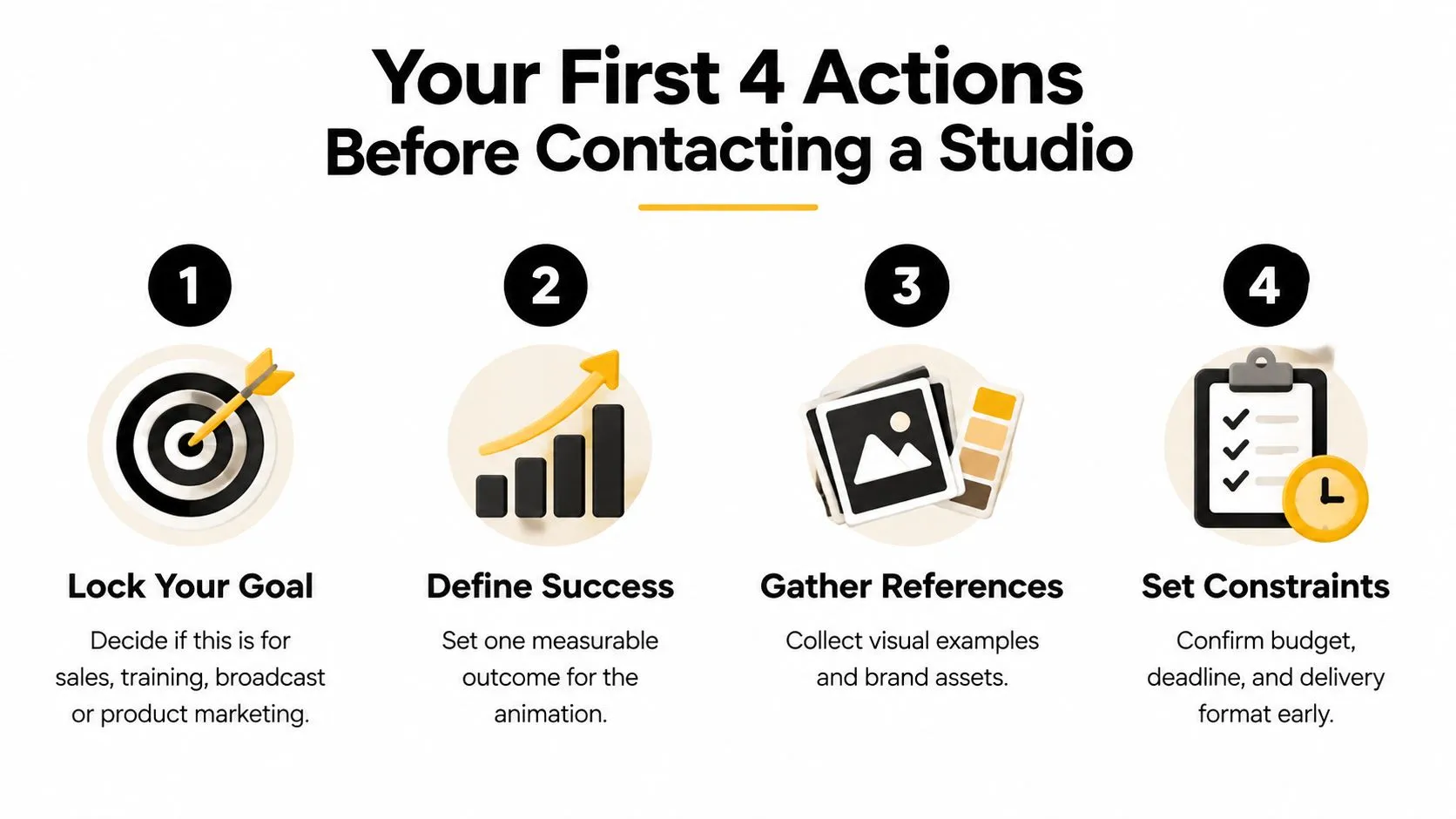
Make these four moves first:
- Lock the job: State whether the animation supports sales, training, broadcast, product marketing, entertainment, or an event. The purpose affects tone, format, approvals, and budget.
- Define success: Write one measurable outcome. A long list of ambitions makes approval and evaluation slower.
- Gather references: Select three relevant examples and explain what works in each. Add brand assets, product information, existing footage, scripts, and technical documentation.
- Set constraints: Confirm the budget envelope, hard delivery date, formats, rights, and internal time available for reviews.
Put internal review windows on the schedule
Client-side delays often begin with unavailable reviewers, late senior stakeholders, or conflicting feedback from separate teams. Add review dates to the project plan before production starts. Name one feedback owner and state who can approve the work. Use this sequence:- •Before the call: Prepare the objective, references, assets, budget, and date.
- •During the call: Test assumptions and identify dependencies.
- •After the call: Compare written scopes, exclusions, milestones, and named team members.
- •Before appointment: Confirm rights, QA, formats, review rounds, and handover.
Studio Liddell's free brief template can organise the information your team needs before contacting suppliers. --- Studio Liddell works across 3D and 2D animation, CGI film and television, TV advertising, trailers, multi-episode series, games cut-scenes, and XR experiences, with production roles spanning senior 3D generalists, modellers, and animators. Visit Studio Liddell to book a production scoping conversation and define the route from concept to delivery.