Your Strategic Guide to Building an App for Retail
You're probably in one of two positions right now. Either the business keeps saying it needs an app because competitors have one, or you already launched something lightweight and realised downloads alone don't solve much. Both situations are common, and both lead to the same question: what is an app for retail supposed to do for the business? The wrong answer is “be on mobile”. The right answer is much narrower and much more useful. A retail app should solve a specific commercial problem better than your website, email programme, in-store signage, or marketplace presence can solve it on their own. That might mean improving repeat purchase through loyalty, making promotions more relevant, supporting click and collect, helping store teams execute better, or creating an interactive product experience that lifts confidence before purchase. For some brands, advanced visuals matter too. AR, 3D product views, and immersive content can move an app from functional to differentiated, but only when they serve a clear retail job.
Why Every Retailer Is Talking About Apps
Most retail teams don't start with a blank sheet. They start with pressure. Marketing wants a direct channel. Ecommerce wants better conversion from mobile users. Operations wants cleaner stock visibility. Loyalty wants more first-party data. Leadership wants something that feels future-facing without turning into an expensive side project. That tension is why the phrase app for retail gets used so loosely. People use it to mean everything from a shopping app to an in-store staff tool. In practice, the useful question isn't whether you need an app. It's whether your business has a repeatable use case that an app handles better than the mobile web. In the UK, mobile is already foundational. Ofcom's 2024 Communications Market Report found that 97% of adults had access to a smartphone, which is why app strategy now sits inside core retail planning rather than experimental digital work. The wider shopping-app category is also substantial. The market was valued at USD 48.9 billion in 2023 and is projected to reach USD 189.4 billion by 2033 at a 14.5% CAGR, according to shopping app market data.
The pressure is real, but strategy comes first
The retailers that get value from apps usually avoid one mistake. They don't begin with a feature wishlist. They begin with a commercial priority. A few examples:
- •Retention problem: A loyalty-led app can make repeat purchase easier and promotions more relevant.
- •Store experience problem: An app can support stock lookup, scan-and-go, or assisted shopping journeys.
- •Brand differentiation problem: Rich 3D, AR, and interactive content can make considered purchases feel less abstract.
- •Operational problem: Staff-facing workflows can reduce friction in stores and improve execution.
Practical rule: If you can't define the business problem in one sentence, you're not ready to scope the app.
It also helps to look at broader shifts in customer behaviour before committing budget. For a useful market-level view of what's shaping shopping now, it's worth reviewing current retail behaviour through that lens, then mapping only the patterns that matter to your own channel mix.
What a Modern Retail App Can Be
A modern retail app isn't one product type. It's a set of possible models, each built around a different commercial job. Treating them as the same thing is where many roadmaps go wrong.
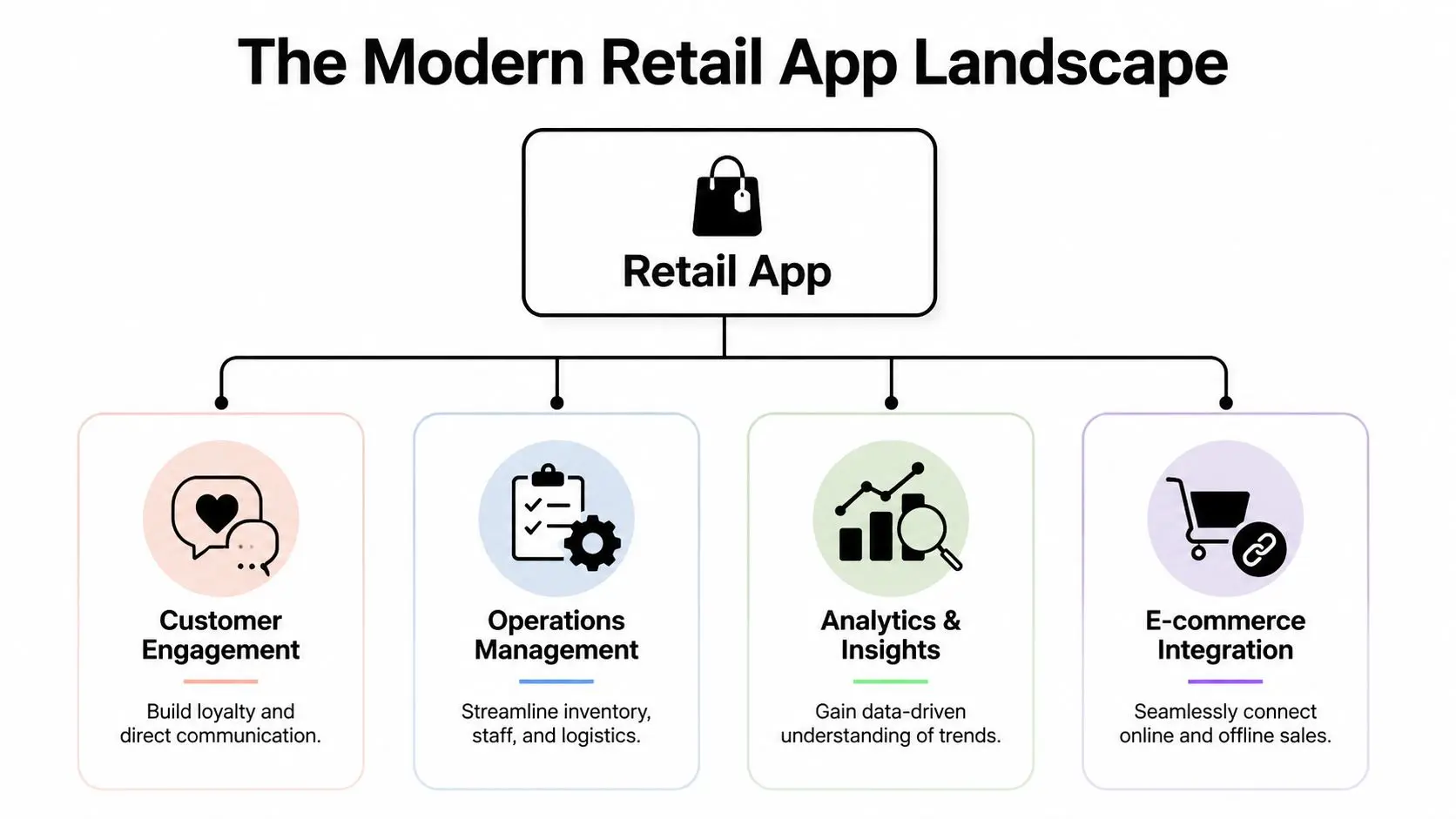
The market context matters here. The Office for National Statistics reported that online sales accounted for 27.4% of all retail sales in Great Britain in January 2021, and later ONS releases show online retail remained a material part of the sector. On the app side, the App Store ecosystem generated more than USD 1 trillion in commerce, with retail applications accounting for nearly 50% of that value, as outlined in these app commerce figures. That isn't fringe behaviour. It's infrastructure.
The four common app models
#### The commerce engine This is the most obvious version. Its job is to support browsing, filtering, checkout, saved baskets, account access, order tracking, and payment. It works best when mobile web friction is already visible. If customers buy repeatedly, revisit often, or need fast reordering, a native or cross-platform app can reduce enough friction to justify itself. If purchases are infrequent and product consideration starts in search, the app may struggle unless there's a strong retention hook. #### The loyalty hub This model is about repeat behaviour, not just transactions. The app becomes the place where customers view rewards, activate offers, manage preferences, and receive personalised prompts. Loyalty apps work well when the retailer already has enough product breadth, promotion cadence, or shopping frequency to make regular return visits realistic. They fail when loyalty is treated as a digital stamp card with no meaningful reason to open the app between purchases. #### The in-store companion Retail apps often become more interesting. They do so by supporting physical shopping rather than replacing it. Think stock checking, scan-and-go, digital receipts, wayfinding, store maps, appointment booking, or assisted service. For larger estates or more complex categories, the in-store app can become a practical bridge between ecommerce and store operations. #### The immersive brand experience This model is less about utility and more about confidence and memorability. It may include 3D product viewing, AR visualisation, guided storytelling, or interactive product configuration. An AI shopping agent can also become relevant as part of the wider retail experience stack, especially for guided discovery and product assistance. But it should still connect back to a retail job, such as reducing hesitation, simplifying product choice, or improving service at scale.
Pick the model before you pick the features
A lot of weak retail apps are really hybrids with no clear centre. They have a bit of shopping, a bit of loyalty, a bit of content, and no reason for customers to come back.
The strongest apps usually do one thing exceptionally well first, then expand once the usage pattern is proven.
Core Features That Drive Business Growth
The feature list should come from the business model, not the other way round. Retail teams often ask for everything in the first release. That usually creates a heavier build, slower QA, and a blurrier value proposition.
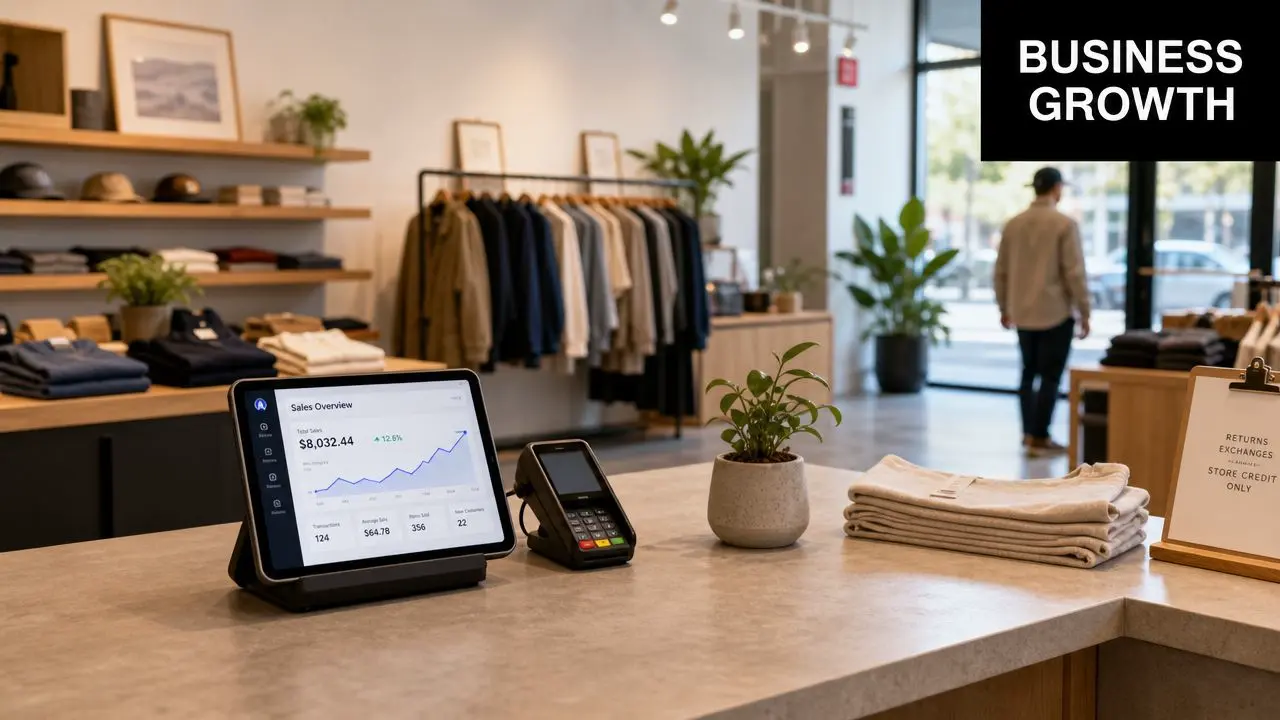
A better approach is to group features by outcome. That keeps scope tied to return, not internal enthusiasm.
Features that support sales
Checkout still matters, but not as an isolated screen. The full purchase path matters. Product discovery, filtering, saved preferences, account recognition, payment convenience, and order visibility all shape whether people complete on mobile. Useful sales features often include:
- •Fast basket recovery: Saved carts, recently viewed items, and simple sign-in remove repeat friction.
- •Clear product media: Strong photography, video, and where relevant, 3D views reduce uncertainty.
- •Practical fulfilment choices: Click and collect, local delivery windows, or store-level availability can be more persuasive than another promotional banner.
- •Timed messaging: Notifications work when they are relevant to intent, stock, or an activated offer. They become noise when they're just scheduled blasts.
Features that improve retention
Many UK retail apps either create measurable value or become wallpaper, a result often dictated by their design and data capabilities. UK grocery and convenience shoppers are highly promotion-sensitive, so the app needs to capture useful behavioural signals, not just hand out generic rewards. The most effective retail apps capture consented purchase data tied to basket contents, visit frequency, and offer redemption so teams can trigger more relevant promotions and improve repeat visits and basket size, as described in this retail loyalty and data guidance. That changes feature priorities.
| Business goal | Feature that supports it | What often goes wrong |
|---|---|---|
| Repeat visits | Personalised offers and reminders | Same offer sent to everyone |
| Bigger baskets | Complementary recommendations | Rules are too broad to feel relevant |
| Better loyalty use | Digital wallet, redemption tracking, points visibility | Rewards are hard to understand |
| Preference capture | Favourites, replenishment prompts, saved lists | Data is collected but not activated |
What works is the data loop. A customer buys, redeems, skips, revisits, or lapses. The app records that. The CRM or loyalty engine turns it into a segment. The next message is more relevant than the last one.
If your app can't connect customer behaviour to action, it's a brochure with push notifications.
Features that help operations
Retail apps don't have to face only the customer to drive value. Some of the strongest returns come from features that reduce operational drag. That may include:
- •Click and collect workflows: Better pickup handling and handoff status.
- •Appointment booking: Useful for retail categories with consultation or fitting needs.
- •Digital receipts and returns support: Lower friction after purchase, fewer service bottlenecks.
- •Store-specific content: Local stock, local promotions, local services.
There's a practical rule here. If a feature saves the customer time and saves the store team time, it usually has a stronger business case than a feature that only looks good in a pitch deck.
Building the Business Case for Your Retail App
A retail leadership team usually asks the same question in different ways. Why build an app when the website already exists, stores are already trading, and every new platform adds cost? The answer has to be commercial. An app earns its place when it solves a business problem better than other channels can. That might mean increasing repeat purchase, improving loyalty participation, reducing service friction, or getting better first-party data that the business can use. If none of those outcomes matter, the case is weak. I usually advise clients to frame the app as a channel decision with three jobs. It should create profitable customer behaviour, improve the quality of customer insight, and remove friction from parts of the retail journey that currently cost time or margin.
Where the return usually comes from
Leadership does not need a tour of every possible feature. They need a clear path from investment to result. The business case is usually strongest across four areas:
- Revenue contribution
- Customer retention
- First-party data quality
- Operational efficiency
The KPIs that actually matter
Install numbers are often the least useful success metric. Retailers can buy downloads with promotion. They cannot buy habit. A better measurement set focuses on behaviour and margin:- •Active users: Regular usage shows whether the app has ongoing value, not just launch interest.
- •Repeat purchase rate: This is often one of the clearest signs that the app is changing customer behaviour.
- •Average order value: Useful when recommendations, bundles, or saved lists are part of the proposition.
- •Retention by cohort: This shows whether the app keeps earning attention after week one.
- •Loyalty participation and redemption: Strong indicators that the app is becoming part of the customer routine.
- •Service or fulfilment efficiency: For store-linked apps, track reduced handling time, fewer support contacts, or faster collection.
A retail app needs one commercial KPI that matters to finance and one behaviour KPI that matters to product. Everything else should support those two.
Build the case around a use case, not a wishlist
The fastest way to lose internal support is to pitch an app as a container for every idea in the business. A better approach is to start with one problem that has a visible cost today. For one retailer, that may be weak repeat purchase after first order. For another, it may be low loyalty usage because rewards are hard to access in store. For a premium category, it may be hesitation before purchase because customers cannot judge the product well enough on a standard product page. That last point matters more than many teams expect. Advanced visual tools can strengthen the business case when they remove uncertainty that blocks conversion. Used well, AR and 3D are not decoration. They help customers make decisions with more confidence, especially in categories where fit, scale, finish, or placement affect buying behaviour. Studio Liddell often works in this area because the return is easier to defend when the experience improves a measurable step in the journey. For a broader view, our guide to augmented reality in retail explains where immersive features support real commerce goals. The same principle applies to in-store utility such as augmented reality wayfinding, where the app helps customers complete a task faster instead of merely presenting content. A phased rollout usually gets approved more easily because it lowers risk. Start with the use case that has a clear owner, a measurable outcome, and enough customer demand to justify release one. Then expand once the app proves it can change behaviour in a way the business can see on a dashboard and in the P&L.
Engaging Customers with AR and Interactive Experiences
AR and interactive 3D can create real retail value, but only when they reduce uncertainty or increase confidence. If they exist only to look advanced, customers try them once and move on.
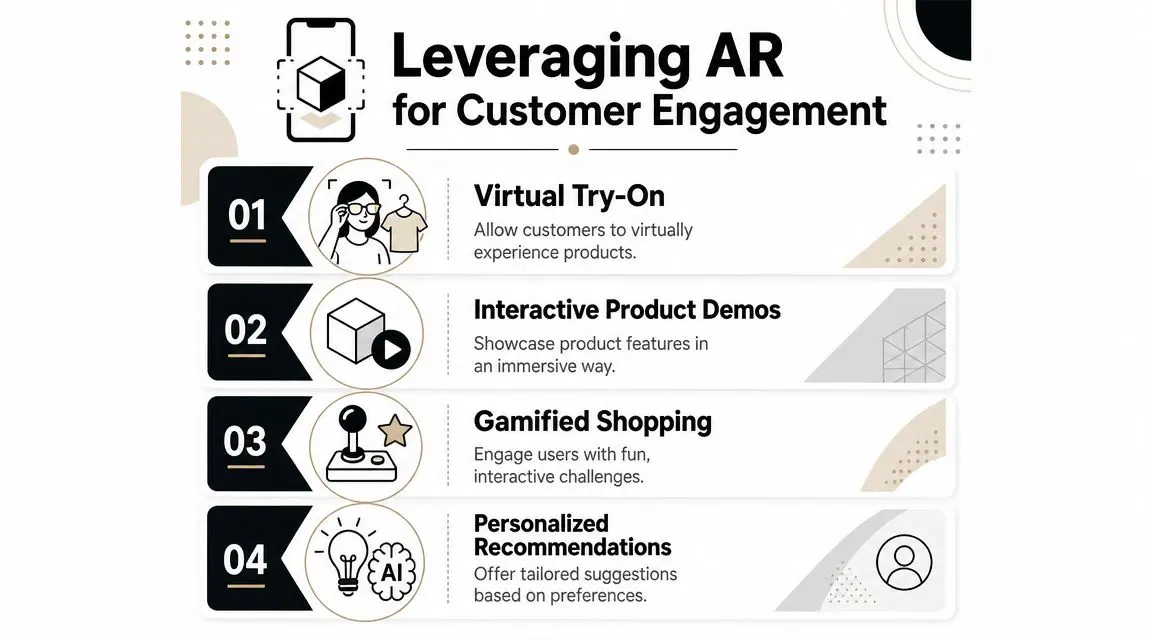
The strongest use cases tend to be simple. A customer wants to know if a product fits, suits, matches, or works in context. AR gives a better answer than a static thumbnail.
Where immersive features actually help
A few examples illustrate the difference between gimmick and value. A furniture retailer can let a customer place a sofa in their living room at approximate scale. That doesn't just entertain. It helps the customer assess size, colour, and spatial fit before purchase. A fashion or accessories brand can use virtual try-on for selected items where shape, finish, or appearance strongly affects choice. Again, the point isn't novelty. It's reducing hesitation. A more premium or configurable product can benefit from interactive 3D. Let the customer rotate, inspect, and customise a product in real time, then save or share the chosen variant. That's especially useful when product detail is part of the value story. For a broader look at how these experiences fit into commerce, Studio Liddell's perspective on augmented reality in retail is one practical reference point among the wider set of retail experience approaches.
Immersion still has to be usable
Many AR concepts fail in production. The visual idea is strong, but the user journey is weak. Launch time is slow, asset quality is inconsistent, or the experience interrupts the buying flow instead of supporting it. A few practical checks help:
- •Keep entry friction low: Don't make users hunt through the app to find the feature.
- •Use selective rollout: Apply AR where visual confidence changes buying behaviour, not across every SKU.
- •Optimise the assets: Heavy 3D files, poor lighting assumptions, or unstable tracking will kill usage fast.
- •Connect it to commerce: Add save, share, wishlist, or buy pathways so the experience leads somewhere.
AR should answer a shopping question. If it doesn't, it probably belongs in a campaign, not the core app.
Some in-store journeys are also worth considering. For larger stores or more complex environments, augmented reality wayfinding shows how orientation-led experiences can support navigation rather than just product visualisation.
Accessibility is part of the ROI
There's another commercial layer that often gets ignored when teams discuss advanced app experiences. Accessibility. The Office for National Statistics estimated that 16.1 million people in the UK were disabled in 2022/23, and prioritising support such as screen readers and voice navigation can tap into retained demand from a large audience, as noted in this accessibility and underserved market view. That matters because flashy app features can accidentally narrow the audience if basic usability is weak. Accessible navigation, readable contrast, sensible motion behaviour, and alternative pathways through AR-heavy journeys are not secondary polish items. They are product decisions.
Your Development Roadmap and Cost Considerations
Retail app projects become expensive in avoidable ways when teams rush from idea to build. The better route is a phased roadmap with decisions made in the right order.
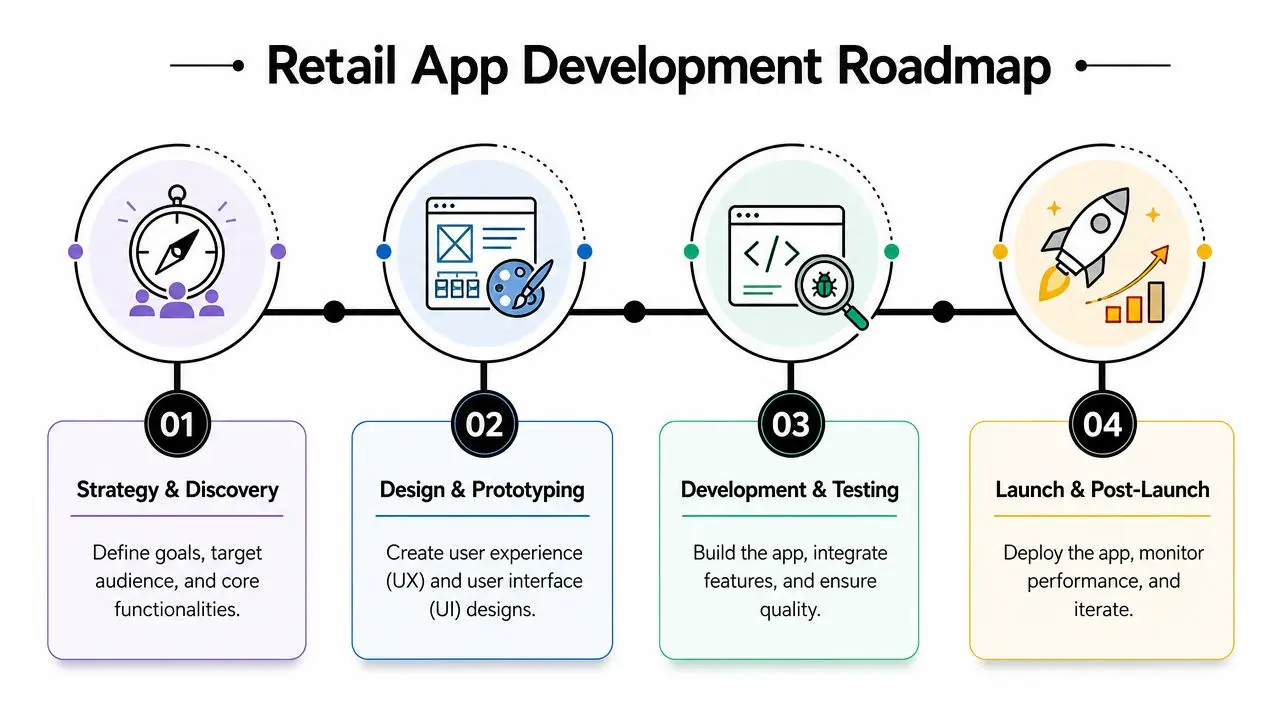
Strategy and discovery
The brief is sharpened. You define the business problem, target users, priority use cases, channel overlaps, content needs, and technical dependencies. The most useful outputs at this stage are usually:
- •A ranked feature set: Must-have, should-have, later-phase.
- •A systems map: Ecommerce platform, CRM, loyalty platform, payments, inventory, analytics.
- •A content plan: Product media, copy, animations, 3D models, service content.
- •A measurement model: What success looks like after launch.
If the app has in-store execution requirements, complexity rises quickly. Computer vision tools that turn aisle photos into SKU-level compliance data can identify out-of-stock gaps or planogram drift and create tasks for staff, which improves operational speed and shelf correction, according to this retail execution overview. That kind of capability changes the integration and testing workload substantially.
Design and prototyping
This phase shouldn't be reduced to screen styling. The key question is whether the user can complete the core job quickly and clearly. For retail, that means designing around moments such as:
- •Find and decide
- •Save and return
- •Buy and fulfil
- •Redeem and repeat
- •Get help in-store or after purchase
Prototype the hard parts first. Navigation, product detail, account flows, loyalty interactions, and checkout deserve early testing. If AR or 3D is part of the roadmap, prototype the entry point and loading behaviour, not just the visual effect.
Development and QA
At this point, budget is largely driven by choices already made. The main cost drivers tend to be platform scope, backend complexity, integration depth, and the amount of bespoke content. A few of the biggest variables are:
| Cost driver | Why it affects budget |
|---|---|
| Platform choice | Native iOS and Android can raise build and maintenance effort compared with a shared approach |
| Integrations | Payments, CRM, inventory, loyalty, and fulfilment systems all add complexity |
| Feature depth | Loyalty logic, store tooling, and rich media add more edge cases to build and test |
| Content production | Custom animation, 3D models, and AR assets require specialist production time |
| Post-launch support | Monitoring, updates, analytics tuning, and OS changes all continue after release |
For teams planning budgets, this guide on how much an app costs to make in the UK is a useful starting point for framing the variables rather than chasing a generic flat estimate.
Launch and iteration
Launch isn't the finish line. It's the start of evidence. The first release should tell you where users hesitate, what they ignore, what they repeat, and which features deserve more investment. A healthy post-launch plan includes analytics review, bug fixing, usability improvements, message testing, and backlog reprioritisation. Most successful retail apps get better because teams are willing to simplify after release, not because they guessed everything correctly upfront.
Choosing the Right Partner for Your Retail App
The partner decision matters because retail apps sit at the intersection of product thinking, systems integration, content production, and customer experience. A team that only knows app code may miss the merchandising logic. A team that only thinks in campaigns may underplay the technical debt. You need both. That's especially true when the roadmap includes richer visual experiences. Interactive 3D, AR, animation, and retail UX all have to work together inside one practical product. One option in that mix is Studio Liddell, which works across app development, animation, and XR production. That combination can be relevant when a retail app needs both functional engineering and custom immersive content.
Finding your ideal development partner
| Capability | What to look for |
|---|---|
| Strategy | They challenge the brief, not just price the feature list |
| UX for retail | They understand browse, buy, fulfil, loyalty, and in-store journeys |
| Technical delivery | They can explain integrations, QA scope, analytics, and maintenance clearly |
| Creative production | They can produce the visual assets the app actually depends on |
| Accessibility | They treat usability as part of the product, not a compliance afterthought |
| Commercial realism | They can phase delivery and discuss trade-offs without hiding complexity |
A good partner should also be able to tell you what not to build yet. That's often more valuable than enthusiastic agreement. For due diligence, this guide on how to find and choose the right mobile app development agency is worth reviewing before you shortlist vendors. The right app for retail doesn't start with technology. It starts with a specific business problem, a clear user behaviour to improve, and a roadmap that balances ambition with operational reality.
If you're assessing an app for retail and need help shaping the product, content, or immersive experience layer, Studio Liddell can support discovery, visual development, and app production planning. A practical next step is a scoping conversation focused on your commercial goal, required integrations, and the level of interactive content the app needs.