What Is AR Technology and How It Works for Business
Augmented reality, or AR, overlays digital content onto the world through a phone, tablet, smart glasses, or headset. In the UK, 65 permanent jobs cited augmented reality in the six months to 29 August 2026, with a median annual salary of £60,000, showing that AR is already part of measurable business capability rather than only a gaming trend. The more useful question isn't, “What is AR technology?” It's, “Where can digital information improve a physical task, customer interaction, training session, or production workflow?” AR can help a retailer show a product in a customer's room, guide an engineer through a repair, turn packaging into an interactive demonstration, or give an exhibition visitor a layer of context that printed signage can't provide. UK adoption already offers a practical signal. PwC identified 1,550 unique examples of XR business usage in the UK, with engineering and manufacturing representing 24.13% of leading adoption sectors, followed by retail and consumer at 10.90% and professional services at 10.65%. Consumer engagement accounted for 37.9% of applications, while learning and development represented 21.7%, according to PwC UK's analysis of business benefits from XR. That mix matters. It suggests UK organisations are paying for AR where it supports communication, training, visualisation, and operational work. The technology still has limitations, especially around tracking, device access, content production, and measurement, so a sound AR project starts with a business decision rather than a novelty.
AR Technology in Plain Terms
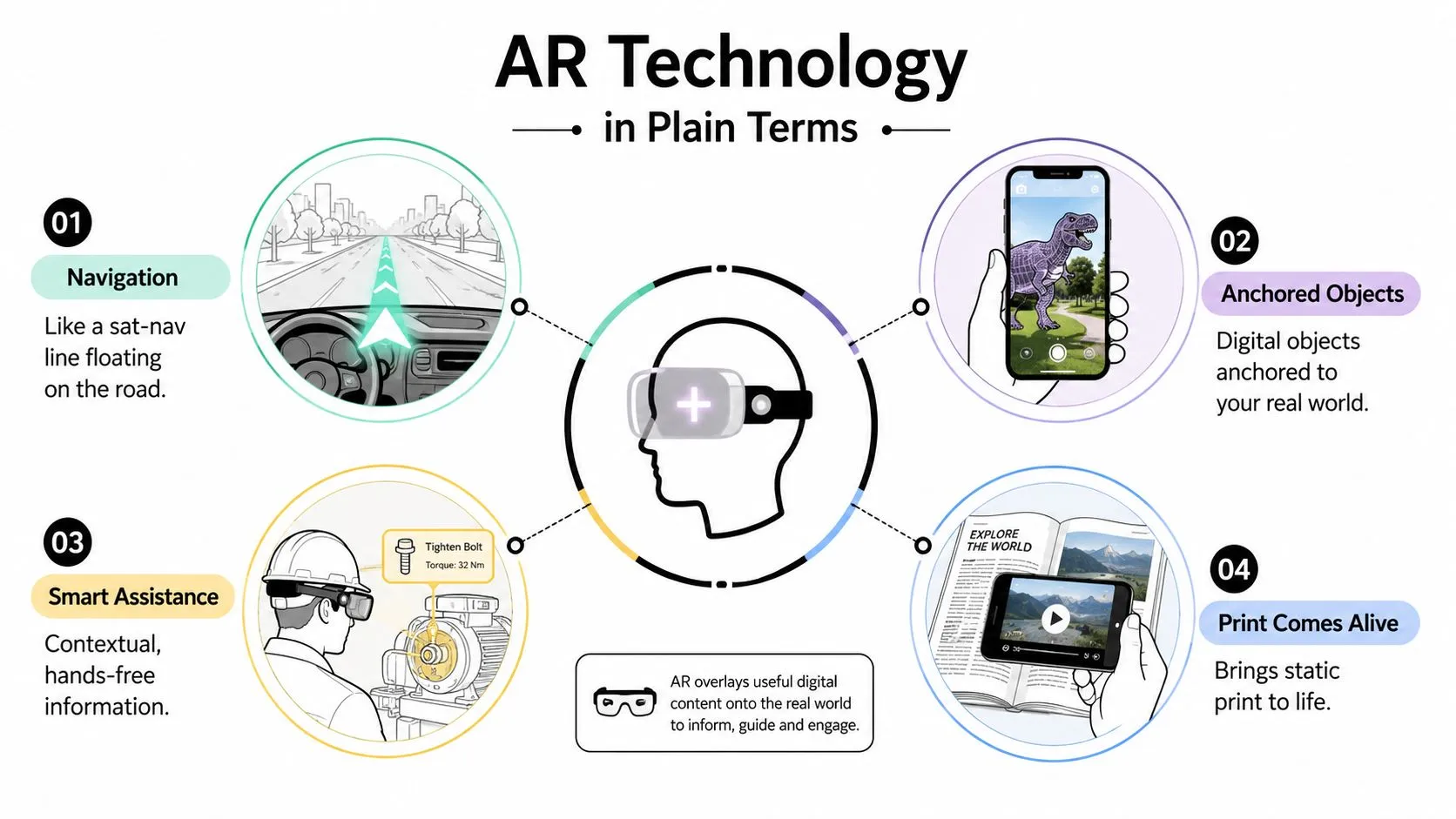
AR is like a heads-up display layered onto ordinary life. A sat-nav line appears to float above the road on a windscreen, while the road remains visible underneath. AR follows the same principle, placing digital information into your view without removing the physical environment. A working definition is simple: augmented reality renders digital content in real time and aligns it with the physical world. That content might be a 3D product, text instructions, animation, video, sound, or an interactive control. The device uses cameras and sensors to understand the user's viewpoint, then updates the content as the user moves.
AR, VR, MR and XR
The terms overlap, but they lead to different production and buying decisions.
- •AR adds a digital layer to a real environment. A mobile product visualiser is a straightforward example.
- •VR replaces the user's view with a fully synthetic environment. That suits controlled simulations, virtual tours, and immersive games.
- •MR, or mixed reality, lets digital objects appear to occupy a real world and respond to it. A virtual machine sitting on a real table is closer to MR when the user can walk around it and interact with it.
- •XR is the family term covering AR, VR, MR, and related immersive formats.
AR needs a reliable real-world anchor. VR doesn't, because the experience controls the entire visual environment. That distinction affects the brief, the hardware, the testing plan, and the risk of failure in a busy venue or poorly lit room. For a marketing lead, AR is a way to add useful context at the point of attention. For a training lead, it's a layer of digital intelligence over a physical operation, not a game. A practical guide to augmented reality experiences can help teams turn that idea into a more concrete experience brief. If sound forms part of the interaction, producers also need suitable rights and cultural fit. Teams building multilingual or regionally targeted experiences can find royalty-free Arabic tracks when they need music that supports an audience without creating unnecessary licensing complications.
The Four Core Types of AR Tracking
Tracking determines how the system knows where to place digital content. Treat it as a selection decision, not a technical glossary. The right method depends on whether the experience needs a printed trigger, spatial freedom, projection onto a surface, or a geographic location.
Marker-based AR
Marker-based AR recognises a printed image, QR code, product label, or visual target. The user points a camera at it, and the system launches or anchors the experience. It's often the simplest route for packaging, brochures, posters, and exhibition graphics because the business controls where the trigger appears. The trade-off is obvious: the user must find and scan the marker, and the target must remain visible enough for reliable recognition.
Markerless AR
Markerless systems use computer vision, inertial sensors, and SLAM, or simultaneous localisation and mapping, to understand surfaces and place content on floors, walls, and tables. That makes them useful for furniture visualisation, virtual try-on, equipment demonstrations, and retail configuration. The experience feels more natural, but it requires stronger device compatibility, careful environmental testing, and better asset optimisation. A reflective floor, poor light, or visually empty room can make placement less stable.
Projection and location-based AR
Projection AR casts light or imagery onto physical surfaces. It can support interactive installations, industrial prototypes, and events where the audience shares a large visual surface rather than looking through individual phones. Location-based AR uses GPS and other positioning signals to attach content to places. Tourism trails, outdoor wayfinding, heritage interpretation, and location-triggered activations fit this model. GPS provides reach, but urban canyons, indoor spaces, and dense venues can weaken positional accuracy.
| Tracking Type | Best-Fit Use Case | Hardware | Accuracy | Typical UK Cost Band |
|---|---|---|---|---|
| Marker-based | Packaging, print, exhibition triggers | Phone or tablet camera | High when the target is visible | Lower |
| Markerless | Product visualisation, try-on, spatial demos | Phone, tablet, or headset with camera and sensors | Variable by device and environment | Mid |
| Projection | Events, installations, industrial prototypes | Projector, camera, interactive surface | High with controlled setup | Mid to premium |
| Location-based | Tourism, wayfinding, outdoor activations | Smartphone GPS and motion sensors | Variable outdoors and indoors | Mid |
The deciding question is practical: which constraint dominates your use case, budget, accuracy, or scale? A useful sensor fusion glossary can clarify the technical language before a supplier conversation.
The AR Stack From Hardware to Engine
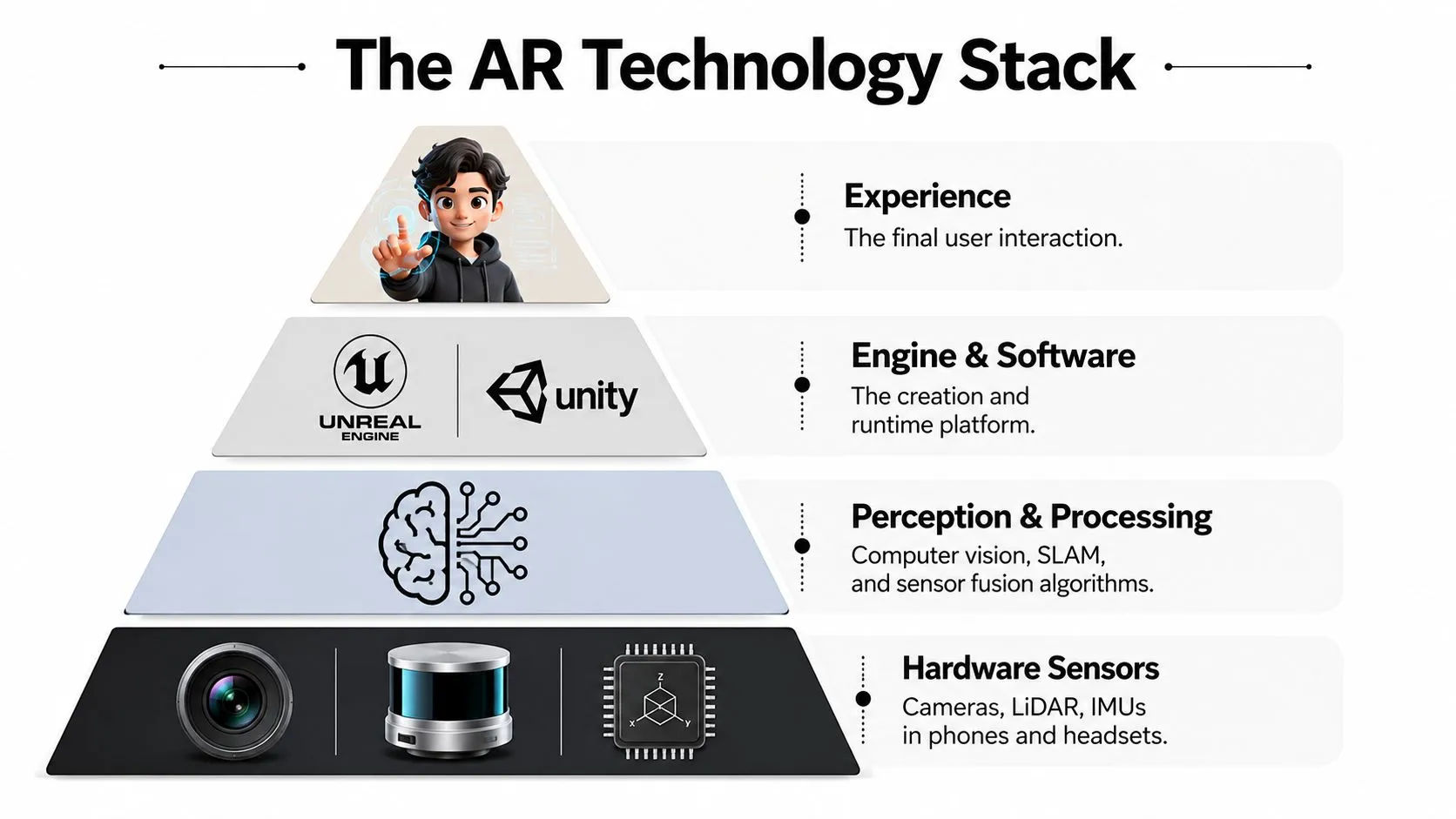
An AR experience is a stack of connected layers. Understanding those layers helps a buyer identify what a proposal includes, rather than treating “AR development” as one indivisible service. At the bottom sits hardware. Phones and tablets combine cameras, inertial measurement units, and, on some devices, LiDAR or depth sensors. Platforms and devices named in AR production conversations include iPhone and iPad Pro, Android handsets, Magic Leap, HoloLens, and Quest 3. Each device affects tracking quality, field of view, processing power, comfort, and audience access.
From perception to experience
The perception layer combines camera images with inertial data and depth information to estimate the device's pose. In plain language, it helps the system understand where the user is and how the surrounding space is changing. That information supports stable placement, occlusion, surface detection, and interaction. The SDK layer gives developers access to those capabilities. ARKit supports Apple devices, while ARCore supports Android. Apple's LiDAR-enabled devices can support detailed meshing in compatible workflows, while Android projects can use geospatial anchors where the experience needs location-aware placement. The engine layer is where teams assemble interaction, animation, lighting, and runtime logic. Unity is widely used for cross-device AR, especially where one project needs to reach multiple platforms. Unreal Engine is often selected when cinematic image quality matters, including automotive, architecture, and high-end visualisation. A guide for modern game engines gives useful background for anyone comparing Unity and Unreal beyond brand familiarity.
Distribution changes the brief
A native app offers deeper functionality and stronger performance, but users must install it. WebAR, delivered through a browser using tools such as 8th Wall or model-viewer, reduces access friction. Headset applications can support hands-free work and spatial precision, but the device cost and deployment logistics narrow the audience.
Practical rule: Most UK teams should consider WebAR for reach, native development for performance, and headsets only when hands-free operation or spatial precision justifies the device cost.
How AR Experiences Are Built
What must an AR project prove before launch? Treat production as a sequence of business and technical decisions. A campaign-grade experience commonly takes 8 to 14 weeks, while an ongoing platform can require a longer roadmap. The schedule depends on device coverage, 3D content complexity, tracking method, and approval process.
Six production stages
- Discovery brief: Define the audience, business objective, environment, devices, accessibility needs, and success measures. A product demonstration at a retail stand has different constraints from a maintenance overlay in a factory.
- Experience design: Map the user journey, trigger, interactions, content hierarchy, fallback states, and completion action. Storyboards and clickable prototypes expose weak ideas before full development.
- Asset modelling: Create or adapt 3D models, textures, animation, audio, and interface elements. Production teams optimise polygon counts, texture sizes, lighting, and loading behaviour for the target hardware.
- Tracking integration: Connect content to image targets, surfaces, locations, or spatial anchors. A polished concept can still fail when the physical environment is not represented accurately in testing.
- Development and testing: Developers build the interaction while QA teams test real devices, network conditions, lighting, camera angles, and user behaviour, including the mobile and headset conditions that a desktop preview cannot reproduce.
- Deployment and analytics: Launch through the selected distribution channel, monitor usage, and connect interactions to business measures. Analytics should be designed before release, not added after the campaign ends.
Where AR Delivers Value Across Industries
Where can AR justify investment beyond a consumer novelty? It earns its place when it improves a decision or task that already matters. The strongest applications connect a physical object, location, or procedure with digital guidance, giving the business a measurable outcome to test. UK adoption points to enterprise use. As noted earlier, PwC identified engineering and manufacturing as the leading sector at 24.13%, followed by retail and consumer at 10.90% and professional services at 10.65%. These sectors suit AR because it can place annotations, visualisations, remote guidance, and contextual information directly beside the work.| Sector | AR Use Case | Targeted Outcome |
|---|---|---|
| Retail and ecommerce | Mobile product visualiser, virtual try-on, or room placement | More confident purchase decisions and fewer avoidable returns |
| Manufacturing and field service | Guided repair overlay highlighting machine parts and work steps | Fewer process errors, faster access to instructions, and more consistent work |
| Training and education | Step-by-step onboarding or simulated procedure layered over equipment | Better procedural understanding and more repeatable assessment |
| Tourism, events, and heritage | GPS-triggered city trail, exhibition interpretation, or interactive stand content | Longer engagement with places, exhibits, and event experiences |
Planning Budget Platform and ROI
An AR commission starts with four choices: how much complexity the budget can support, which platform fits the audience, how users will access it, and what evidence will define success. Precise project prices vary by content volume, device coverage, integration, security, and review requirements, so treat the following figures as planning bands rather than promises. A simple WebAR marketing experience may sit around £15,000 to £45,000, while a custom mobile app may require £60,000 to £150,000. An enterprise training platform can begin at £120,000 upwards when it includes multiple scenarios, user management, assessment, content administration, and data requirements. These figures are decision aids, not verified market statistics, and a supplier should validate them against a written scope.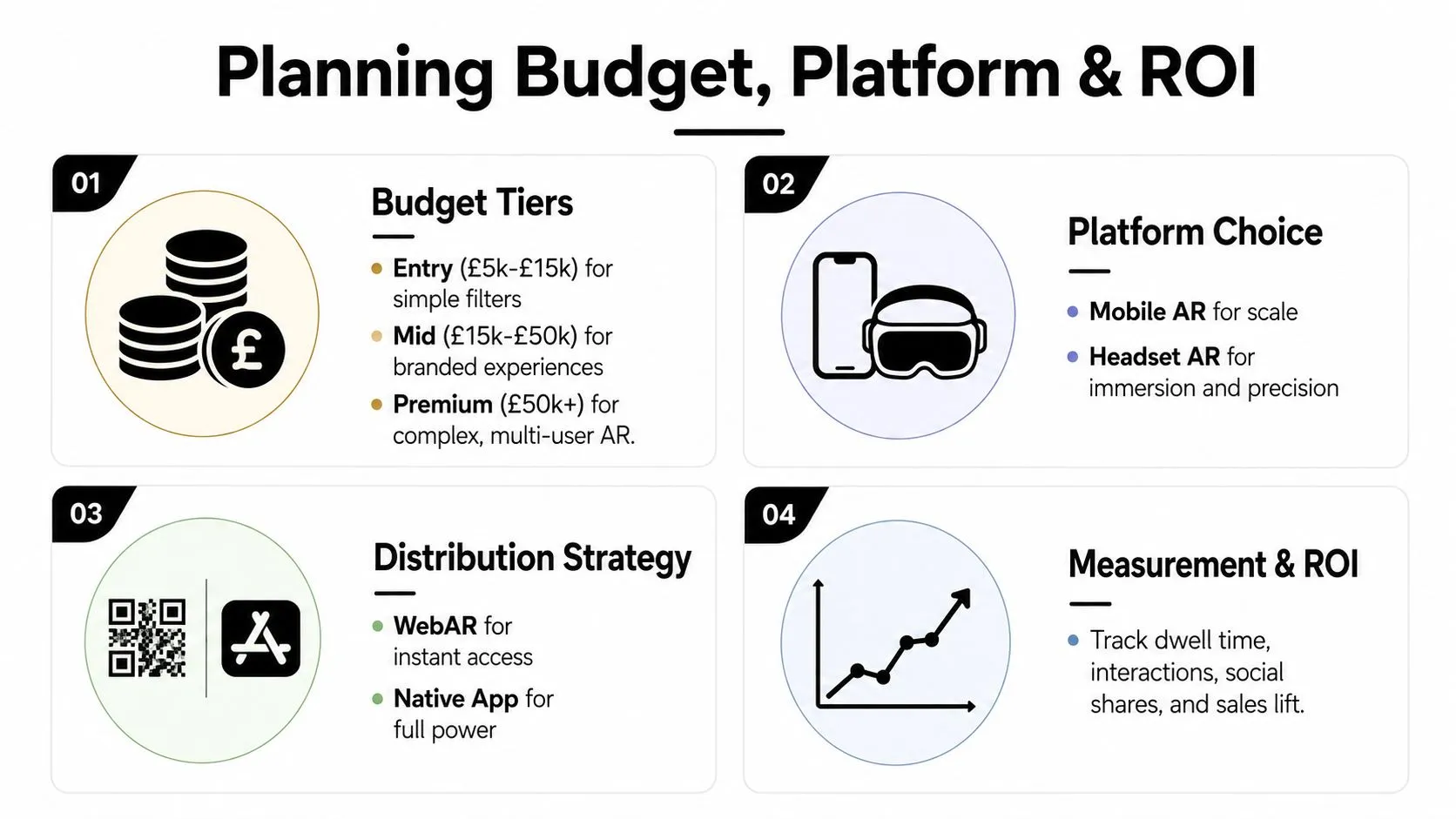
Match the platform to the job
- •WebAR: Choose it when reach and low-friction access matter most. Users can open an experience from a QR code or link, but browser capabilities and device variation limit advanced interactions.
- •Native mobile: Choose it when the experience needs stronger performance, deeper device access, saved user states, or integration with an existing app. Installation adds friction, so the audience must have a reason to return.
- •Headset AR: Choose it for hands-free training, spatial guidance, or controlled enterprise environments. Budget for device procurement, storage, support, hygiene, onboarding, and replacement planning.
Budget also concentrates in less visible areas. Asset preparation, tracking tests, accessibility, content management, analytics, and stakeholder review can determine the schedule as much as coding does. A beautiful model that loads slowly or fails in the intended venue won't create value.
Define ROI before production
AR rarely pays back through direct sales alone. Useful measures may include conversion lift, dwell time, interaction completion, training error reduction, support-cost savings, repeat usage, or qualified leads. Select the metric that matches the original business problem, then capture a baseline before launch so the team can distinguish interest from impact. UK market forecasts support the view that AR is becoming a broader commercial technology. MarketsandMarkets projected 26.4% CAGR for the UK augmented and virtual reality industry from 2022 to 2027, while separate market tracking estimated the UK AR market at US$9,061.1 million in 2025, rising to US$76,024.0 million by 2033, implying a 29.1% CAGR from 2026 to 2033. These projections are summarised in the UK AR market outlook, and they should inform strategic planning rather than replace project-level validation.
Common Pitfalls and Best Practices
First-time AR buyers often blame the technology when the project failed earlier, during scoping. The recurring problems are predictable, and each has a direct remedy.
- Launching everywhere: Start with one priority device and environment, then expand after evidence.
- Ignoring light and occlusion: Test in the actual venue, including reflective, dark, bright, and cluttered conditions.
- Treating AR as an afterthought: Put AR into the campaign or training journey from the first creative brief.
- Skipping real-device testing: Test on the phones, tablets, and headsets users will hold.
- Underestimating asset preparation: Budget for modelling, optimisation, texture work, animation, and fallback content.
- Chasing novelty: Tie every interaction to a customer, operational, or learning objective.
- Skipping analytics: Define events, consent, dashboards, and reporting before deployment.
A day-one checklist
- •Choose one audience: Name the user and the moment when AR will help.
- •Write the physical context: Record surfaces, lighting, movement, noise, connectivity, and staff involvement.
- •Select the trigger: Decide between an image target, surface detection, projection, or location.
- •Limit the first release: Build a focused experience instead of a catalogue of features.
- •Approve the asset plan: Confirm what can be reused and what must be created.
- •Set accessibility requirements: Provide readable text, clear audio options, and a non-AR alternative.
- •Test the fallback: Decide what users see when tracking or loading fails.
- •Instrument the journey: Track meaningful interactions rather than vanity activity.
- •Train the operators: Give staff a short explanation and a recovery process.
- •Schedule a review: Reserve time after launch to fix friction and interpret results.
Producer's warning: If the team can't explain what users should do after the AR moment, the experience isn't ready for production.
Where AR Is Heading Next
Where will AR create measurable value next, and which hardware should a UK business fund? The answer will depend less on a single headset than on better production tools, capable devices, persistent spatial understanding, and clear measurement. AI-assisted 3D creation and automated texture work can reduce repetitive production effort. Human artists and technical directors still set the visual style, information hierarchy, performance targets, and brand accuracy. Faster prototyping lets teams test several concepts before committing to a full build, reducing the cost of early decisions. Mobile screens will remain important because customers already carry them. Lightweight smart glasses may suit field service, logistics, training, and maintenance where hands-free access justifies new hardware. Persistent spatial anchors could keep content attached to a place across sessions and compatible devices. That benefit brings practical questions about data governance, permissions, and ownership. WebAR should remain useful for campaigns because it avoids the app-download barrier. PwC's UK audience research reported that nearly 45% of the population and nearly all social and communication app users were expected to become frequent AR users, making AR a wider audience capability rather than a niche novelty. Treat that figure as an earlier forecast, not a current performance guarantee. A sensible next step is to audit one campaign for a useful AR moment, run a focused WebAR pilot, and establish a baseline for comparing results. Studio Liddell combines AR strategy, 3D content creation, and software development for mobile, exhibition, retail, and immersive experiences. Visit Studio Liddell to discuss your use case, platform requirements, and route from concept to deployment.